2017 MITSUBISHI OUTLANDER PHEV tow
[x] Cancel search: towPage 20 of 548

2.Adjust the steering wheel to the desired
position.
3. Securely lock the steering wheel by pull-
ing the lever fully upward.A-LockedB-Release
Refer to “Steering wheel height and reach adjustment” on page 7-07.
3-Power switch
If you are carrying the keyless operation key,
you can start the Plug-in Hybrid EV System.
If you press the power switch without de-
pressing the brake pedal, you can change the
operation mode in the order of OFF, ACC,
ON, OFF.OFF-The indication lamp (A) on the
power switch turns off.ACC-The indication lamp on the en-
gine switch illuminates orange.ON-The indication lamp on the pow-
er switch illuminates blue.
Refer to “Power switch” on page 7-12.
4-Wiper and washer switchMIST-Misting function
The wipers will operate
once.OFF-OffAUTO-Auto-wiper control
The wipers will automati- cally operate depending on
the degree of wetness on the windscreen.LO-SlowHI-Fast
The washer fluid will be sprayed onto the
windscreen by pulling the lever towards you.
Refer to “Wiper and washer switch” on page 6-64.
Quick guide
1-17OGGE17E1Overview1
Page 32 of 548

WARNINGlIf the vehicle receives a strong impact to
the floor while driving, stop the vehicle in
a safe place and check the floor.
l Never start the plug-in hybrid EV system
if you found a leak of a liquid (except wa-
ter of the air conditioner) while checking the outside of the vehicle because there is
possibility the fuel system has been dam-
aged and causing of fire or exploding.
In such case, immediately contact your MITSUBISHI MOTORS Authorized
Service Point.
l Leaks or damage to the drive battery may
result in a fire. If you discover them, con-
tact emergency services immediately.
Since the fluid leak may be lithium man- ganite from the Lithium-ion battery, nev- er touch any fluid leaking from the inside
or outside of the vehicle. If the fluid con- tacts your skin or eyes, wash it off imme-
diately with a large amount of water and receive immediate medical attention to
help avoid serious injury.
l If you are unable to safely assess the vehi-
cle due to vehicle damage, do not touch the vehicle. Leave the vehicle and contact
emergency services. Advise emergency responders that this is a Plug-in Hybrid
vehicle.WARNINGl If a fire occurs in this vehicle, leave the
vehicle as soon as possible and contact
emergency services. Do not attempt to ex- tinguish a fire by yourself. If the fire in-
volves a lithium-ion battery, it will re- quire large, sustained volumes of water for extinguishment. Using a small amount
of water or the incorrect fire extinguisher
can result in serious injury or death from electrical shock.
l When you leave the vehicle, if possible,
open the windows, doors and tailgate to
prevent accumulation of poisonous/ combustible gasses. This will also assist in
the rescue and fire fighting process.
l As with any vehicle fire, the byproducts of
combustion can be toxic. Do not inhale
smoke, vapors, or gas from the vehicle. Move to a safe distance upwind and uphill
from the vehicle fire and out of the way of any oncoming traffic while awaiting the
arrival of emergency responders.
l If you detect leaking fluids, sparks,
smoke, flames, gurgling, popping or hiss-
ing noises originating from the high volt- age battery compartment, contact emer-
gency services immediately. This may re- sult in a fire.
l Physical damage to the vehicle or high
voltage battery may result in immediate or delayed release of toxic and/or flamma- ble gases and fire.WARNINGl If your vehicle needs to be towed, trans-
port the vehicle on a flatbed truck or tow
the vehicle with all wheels off the ground.
If the any wheels are on the ground when towing, this may cause damage to the elec-
tric motors. This may also cause a fire, if
wiring in the electric motor unit room be- comes damaged. Refer to “Towing” on
page 9-22.
l Do not attempt to repair a damaged Plu-
gin Hybrid vehicle by yourself. Please contact a MITSUBISHI MOTORS Au-
thorized Service Point for service.
l In the event of an accident that requires
body repair and painting, the vehicle should be delivered to a MITSUBISHI
MOTORS Authorized Service Point to
have the drive battery and high voltage parts such as the inverter, including the
attached wiring harness, removed prior to
painting. If exposed to heat in the paint booth, the drive battery will experiencebattery capacity loss.
A damaged drive battery can also pose
safety risks to untrained mechanics and
repair personnel.NOTEl The emergency shut-off system will be acti-
vated and the high-voltage system will auto- matically turn off under the following condi-
tions:
In case of a collision
2-07OGGE17E1General information2
Page 69 of 548

For the operation method of theMITSUBISHI Remote Control, please visit
the MITSUBISHI MOTORS Web site:
http://www.mitsubishi-motors.com/en/prod-
ucts/ outlander_phev2/app/remote/
l If you need further information, please
contact a MITSUBISHI MOTORS Au-
thorized Service Point.WARNINGl Do not use the
MITSUBISHI Remote
Control if children, persons in need of care, pets, etc. are in the vehicle. Even if the remote climate control is used, thecabin may become hot or cold due to somereasons such as automatic stop of the sys-
tem. The cabin temperature may quickly
rise in sunshine, which poses a risk of heat
stroke and dehydration. In cold weather, on the other hand, the cabin temperature
may quickly drop. Either of which could lead to death in the worst case.
In addition, children can activate switches and controls, resulting in injury or a fatal
accident.
l The cooling fan in the engine compart-
ment may operate automatically when
charging or when operating air condition- er. Do not bring your hand close to the
cooling fan during charging.CAUTIONl Do not use a car cover except for the
MITSUBISHI MOTORS GENUINE car
cover, when using the charging timer or the remote climate control.NOTEl Keep the following points in mind when us-
ing a wireless LAN device:
• Communication speed and range vary de-
pending on the wireless LAN devices and the surrounding conditions (radio environ-
ment, obstacles, parking area environ- ment, etc.).
• Due to the characteristics of radio waves,
communication speed tends to decrease as the communication distance increases.
Use your wireless LAN device at a short
distance from the vehicle for better re- sponse.
• When a microwave oven or ISM (indus-
trial, scientific and medical) equipment is being used, the communication speed andrange of wireless LAN devices may de-crease. Use your wireless LAN device
away from these appliances and equip-
ment.NOTE• If a wireless LAN device and Bluetooth
(registered trademark of Bluetooth SIG, Inc.) are used simultaneously, the com-
munication speed and range of each de- vice may decrease. Use your wireless
LAN device away from Bluetooth devi- ces.
l Wireless LAN devices may not communi-
cate with the vehicle, or may not operate
normally or stably in the following environ- ment or situations. Check that the device cancommunicate with your vehicle before use.
• There is an obstruction such as a concrete
or metal wall between the vehicle and
wireless LAN device.
• The vehicle is surrounded by tall vehicles
in a parking lot.
• There are facilities nearby that emit strong
radio waves, such as a TV tower, trans-
former substation, broadcasting station or airport.
• There is a communication device such as
a mobile phone or radio, or an electric de- vice such as a personal computer near thewireless LAN device.
• The wireless LAN device is in contact
with or covered by a metal object.
• The battery of the wireless LAN device
has run down.
l The
MITSUBISHI Remote Control cannot
be used under the following conditions:
• The wireless LAN device is turned off.
MITSUBISHI Remote Control*
3-26OGGE17E1Charging3
Page 86 of 548

CAUTIONlBe careful not to lock the doors while the
key is inside the vehicle.NOTEl To prevent the key from being locked inside
the vehicle, neither the lock knob on the
driver’s door nor the key can be used to lock the driver’s door when it is open.
To lock or unlock with the key
1- Lock
2- Unlock
NOTEl When locking or unlocking with the key, on-
ly the driver’s door will be locked or un-
locked.
To lock or unlock all doors, the charging lid and the tailgate, use the central door lock
switch, the keyless entry system or the key-
less operation function.
Refer to “Central door locks” on page 4-16,
“Keyless entry system” on page 4-03, and
“To operate using the keyless operation function” on page 4-09.
l The charging lid can be locked or unlocked
at the same time when the driver’s door islocked or unlocked using the key.
However, the charging lid cannot be un-
locked while the operation mode of the pow- er switch is in ON.
To lock or unlock from inside
the vehicle
1- Lock
2- Unlock
Pull the inside door handle towards you to open the door.NOTEl The driver’s door can be opened without us-
ing the lock knob by pulling on the inside
door handle.
l The charging lid can be locked or unlocked
at the same time when the driver’s door is locked or unlocked using the lock knob.
However, the charging lid cannot be un- locked while the operation mode of the pow-
er switch is in ON.
To lock without using the key
Front passenger’s door, Rear
door
Doors
4-15OGGE17E1Locking and unlocking4
Page 101 of 548

Changing the security alarmsettings
E00301601365
It is possible to set the security alarm to the
“active” mode or “inactive” mode.
Follow the procedure below. 1. Put the operation mode in OFF.
2. Place the lamp switch in the “OFF” posi- tion, and leave the driver’s door open.
3.Pull the windscreen wiper and washer
switch towards you and hold it there. (Since the operation mode in OFF,
washer fluid will not be sprayed.)
4. After approximately 10 seconds, the
buzzer will make a sound. Keep the windscreen wiper and washer switch
pulled towards you. (If the windscreen
wiper and washer switch was released,
the setting change mode would be can-
celled. To start over, perform the proce- dure again from step 3.)
5. When the buzzer stops, with the wind-
screen wiper and washer switch still
pulled towards you, press the UNLOCK switch (A) on the remote control switch to select the security alarm settings
mode.
The settings mode can be toggled by
pressing the UNLOCK switch. The mode can be confirmed from the numberof times the buzzer sounds.
Number of
times the buzzer
sounds
Security alarm settings mode
1Alarm inactive2Alarm active
6.Any of the following operations can be
used to terminate the system settings change mode.
• Releasing the windscreen wiper and
washer switch.
• Closing the driver’s door.
Security alarm system*
4-30OGGE17E1Locking and unlocking4
Page 120 of 548
To unfasten
Hold the latch plate and push the button on
the buckle.
NOTEl As the belt retracts automatically, keep hold-
ing the latch plate while retracting so that the
belt stows slowly. Failure to do this could damage the vehicle.NOTEl If the seat belt (A) or ring (B) becomes dirty,
the belt may not retract smoothly. If the seatbelt and ring are dirty, clean them with a
mild soap or detergent solution.Seat belt reminder
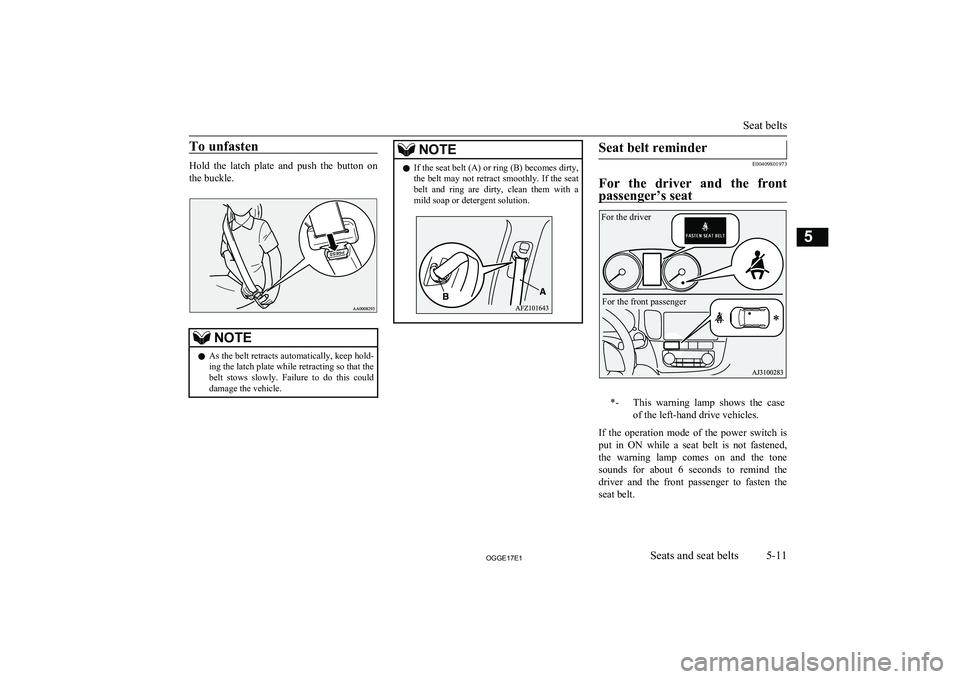
E00409801973
For the driver and the front
passenger’s seat
*-This warning lamp shows the case
of the left-hand drive vehicles.
If the operation mode of the power switch is put in ON while a seat belt is not fastened,
the warning lamp comes on and the tone sounds for about 6 seconds to remind the
driver and the front passenger to fasten the
seat belt.
Seat belts
5-11OGGE17E1Seats and seat belts5 For the driverFor the front passenger
Page 123 of 548

4.Insert the latch plate (B) into the buckle
(D).
5. Pull the belt slightly to adjust slackness
as desired.
To unfasten
1. Hold the latch plate and push the button
on the buckle.
NOTEl As the belt retracts automatically, keep hold-
ing the latch plate while retracting so that the
belt stows slowly. Failure to do this could damage the vehicle.
l To release the buckle (C), press the button
(E) with a narrow-tipped object (latch plate
or mechanical key etc.).
2. After the seat belt is retracted complete-
ly, insert the latch plate (B) into the up-
per slit (F), and then insert the small
latch plate (A) into the lower slit (G).
3. Store the seat belt buckle in the storage
pocket.
(Refer to next column.)
Rear seat belt storage
E00405301521
When the seat belt is not in use, store it as
shown in the illustration.
Seat belt plate storage
Outboard seating position
After passing the belt through the rear notch
(A), insert the plate into the front notch (B).
Seat belts
5-14OGGE17E1Seats and seat belts5 AA0111487 AA0064860
Page 198 of 548

CAUTIONlWhen the warning lamp remains on or does
not come on, there is a possibility that the
parking brake cannot be operated or re-
leased. Immediately contact the nearest MITSUBISHI MOTORS Authorized Serv-
ice Point. When the warning lamp comes on during driving, immediately stop the vehiclein a safe place, and contact your
MITSUBISHI MOTORS Authorized Serv-
ice Point. If you inevitably have to park, park the vehicle on level and stable ground,
press the electrical parking switch and place
chocks or blocks.Check engine warning lamp
E00502602938
This lamp is a part of an on-
board diagnostic system
which monitors the emis-
sions, engine control system. If a problem is detected in one of these systems, this
lamp illuminates or flashes.
Although your vehicle will usually be driva-
ble and not need towing, we recommend you
to have the system checked as soon as possi- ble.
This lamp will also illuminate when the oper-
ation mode of the power switch is put in ON,
and goes off after the Plug-in Hybrid EV System has started. If it does not go off after
the Plug-in Hybrid EV System has started, we recommend you to have the vehicle
checked.CAUTIONl Prolonged driving with this lamp on may
cause further damage to the emission control system. It could also affect fuel economyand drivability.
l If the lamp does not illuminate when the op-
eration mode is put in ON, we recommend
you to have the system checked.
l If the lamp illuminates while the Plug-in Hy-
brid EV System is operating, avoid driving
at high speeds and have the system inspected by a MITSUBISHI MOTORS Authorized
Service Point as soon as possible.NOTEl The engine electronic control module ac-
commodating the onboard diagnostic system has various fault data (especially about the
exhaust emission) stored.This data will be erased if a auxiliary battery
cable is disconnected which will make a rap- id diagnosis difficult. Do not disconnect a
auxiliary battery cable when the check engine
warning lamp is ON.Auxiliary battery charge warn-
ing lamp
E00502702287
This warning lamp will illu- minate when there is a fault with the charging system of
the auxiliary battery.
Normally, when the opera-
tion mode of the power
switch is put in ON, this warning lamp will illuminate. Then, when the Plug-in Hybrid
EV System is started and the ready indicator
illuminates, the warning lamp will go out.
CAUTIONl If the warning lamp stays on after the ready
indicator illuminates, there may be a prob- lem with the charging system for the auxili-
ary battery.
• Immediately park your vehicle in a safe
place and we recommend you to have it
checked.
• Do not charge the auxiliary battery.
Warning lamps
6-51OGGE17E1Instruments and controls6