2017 MITSUBISHI OUTLANDER air condition
[x] Cancel search: air conditionPage 201 of 521

Forward Collision Mitigation System (FCM) (if so equipped) 5-120 Features and controls
5
• When a vehicle ahead is not completely in your path.• When your vehicle ch
anged lanes, and
your vehicle approac
hed immediately
behind the vehicle ahead.• When a vehicle ahead
is towing a trailer.
• When a vehicle ahead is a truck loaded with freight that protrudes rearward from the cargo bed.• When the height of a vehicle ahead isextremely low or its road clearance isextremely high.• When a vehicle ahead is extremely dirty.• When a vehicle ahea
d is covered with
snow.• When a vehicle ahea
d has a large glass
surface.• When a vehicle ahead does not havereflectors (light reflector) or the positionof the reflector is low.• When a vehicle ahead is a car carrier ora similar shaped vehicle.• When accelerating and deceleratingquickly.• When driving on a sl
ippery road covered
by rain water, snow, ice, etc.• When driving on a r
oad with alternating
up and down steep slopes.• When driving on a curve.• When driving on a bumpy or rough road.• When driving in dark areas, such as in a tunnel or at night.WA R N I N G
• When the system recognizes driver’s steering, accelerati
ng, braking or gear
shifting actions as
evasive actions to
avoid collision.• When the rear of your vehicle is weigheddown with the weight of passengers and luggage.• Up to several seconds after starting driv-ing.• In adverse weather conditions, such asrain, snow, fog or sand-storm.• When the windshield of the sensor por-tion is covered with
dirt, water droplets,
snow and ice, etc.• When a vehicle ahea
d or an oncoming
vehicle is splashing water, snow or dirt. • When using a windshield washer.• If windshield wipers are not Mitsubishi Motors Genuine parts or equivalent. • When the sensor becomes extremely hotor cold.• If the battery becomes weak or runsdown.• When the sensor is affected by stronglight, such as direct sunlight or the head- lights of an oncoming vehicle.
The FCM may not detect a pedestrian in certain situations. Some of these include:• If the pedestrian is
shorter than approxi-
mately 3.2 feet (1 m) or taller thanapproximately 6.5 feet (2 m).WA R N I N G
• If the pedestrian is
wearing loose-fitting
clothes.• If part of a pedestrian’s body is hidden, such as when holding an umbrella, large bag, etc.• If a pedestrian bends forward, sits or lieson the road.• When a pedestrian is pushing/pullingsomething, such as a stroller, bicycle orwheelchair.• When pedestrians gather in a group.• When a pedestrian
clothing appears to
be nearly the same color or brightness asits surroundings.• When a pedestrian is very close to anobject, such as a vehicle.• When a pedestrian is in a dark area, suchas at night or in a tunnel.• When a pedestrian is walking fast orrunning.• When a pedestrian suddenly rushes infront of the vehicle.• When the position of
a pedestrian is close
to the edge of the vehicle.
When the system recognizes driver’s steering or accelerati
ng actions as evasive
actions to avoid a collision, FCM control and alarm functions
may be canceled.
In certain situations,
though there is little
or no risk of a collision, the FCM mayactivate. Examples include: • When overtaking a vehicle.WA R N I N G
BK0239700US.book 120 ページ 2016年6月16日 木曜日 午前10時58分
Page 212 of 521

Blind Spot Warning (BSW) (with Lane Change Assist) (if so equipped)
Features and controls 5-131
5
N00586800038
Every time the operation mode is turned to “ON”, the Ultrasonic misacceleration Mitiga-tion System will automatically be turned on. In addition, on vehicles equipped with the Forward Collision Mitigation System (FCM),the Ultrasonic misacceleration Mitigation System and the FCM are simultaneously turned off and on by operating the FCM andUltrasonic misaccelerat
ion Mitigation System
ON/OFF switch. Refer to “FCM and Ultrasonic misaccelera-tion Mitigation System ON/OFF switch” on page 5-122.
N00586900026 N00587000037
Example: When the front and/or rear sensors are temporarily not available This display will appear if more than one sen- sor is temporarily not available for some rea- son such as an environmental condition. This can typically occur when
the sensor is heated.
When the radar sensor performance returns, the message will disappear and the system will resume operation.If the message is continuously displayed, contact an authorized Mitsubishi Motors dealer or a repair facility of your choice.
N00587100038
Example: When there is a malfunction inboth sensors If the Ultrasonic misacceleration Mitigation System detects a malfun
ction in the system,
the Ultrasonic misacceleration Mitigation System will not operate normally and thismassage is displayed. Have the vehicle inspected at an authorized Mitsubishi Motors dealer or a repair facilityof your choice.
N00592200024
The Blind Spot Warning (BSW) is a driving aid system that alerts the driver when another vehicle which may not be visible through theoutside rearview mirror is traveling in the next lane behind your vehicle.
NOTE
The ultrasonic sensors
do not detect objects
in areas directly below or very close to thebumpers. If the height of
an object is lower
than the sensors, the sensors may not con- tinue detecting it wh
ile the vehicle is
approaching the object,
even if the sensors
can initially detect it.
To turn on/off the Ultrasonic misacceleration Mitigation Sys- tem
Warning display
When the sensor is temporarily not available
When there is a malfunction in the sensor or the system
Blind Spot Warning (BSW) (with Lane Change Assist)
(if
so equipped)
BK0239700US.book 131 ページ 2016年6月16日 木曜日 午前10時58分
Page 261 of 521
Multi Information display - Type 1 5-180 Features and controls
5
N00557201154
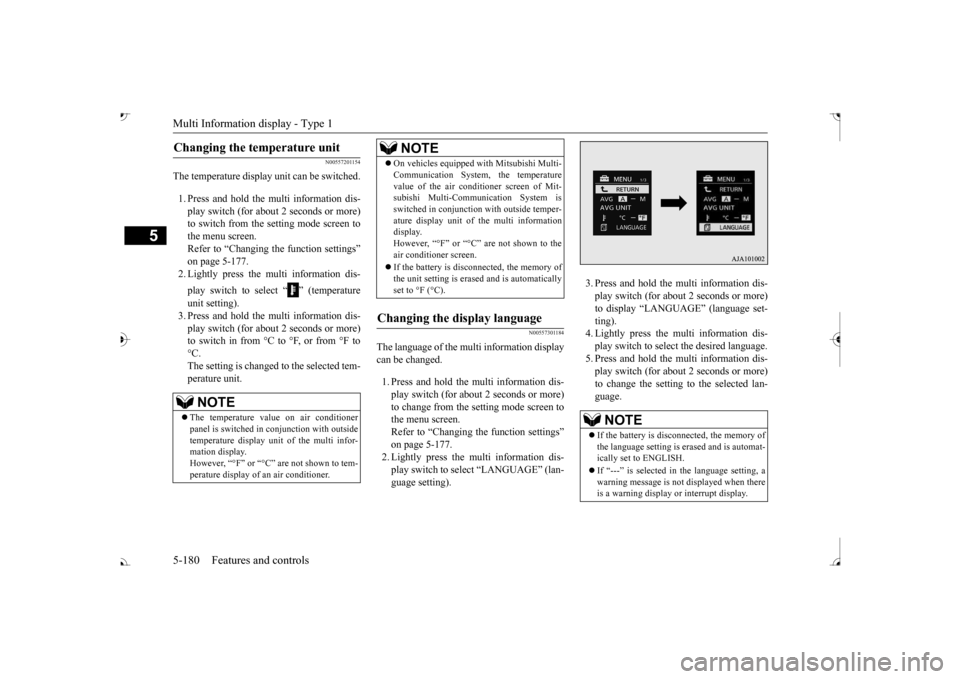
The temperature display unit can be switched. 1. Press and hold the multi information dis- play switch (for about 2 seconds or more) to switch from the setting mode screen tothe menu screen. Refer to “Changing the function settings” on page 5-177.2. Lightly press the multi information dis- play switch to select “ ” (temperature unit setting). 3. Press and hold the multi information dis- play switch (for about 2 seconds or more)to switch in from °C to °F, or from °F to °C. The setting is changed to the selected tem-perature unit.
N00557301184
The language of the multi information displaycan be changed. 1. Press and hold the mu
lti information dis-
play switch (for about 2 seconds or more) to change from the setting mode screen to the menu screen.Refer to “Changing th
e function settings”
on page 5-177. 2. Lightly press the multi information dis-play switch to se
lect “LANGUAGE” (lan-
guage setting).
3. Press and hold the multi information dis- play switch (for about 2 seconds or more)to display “LANGUAGE” (language set- ting). 4. Lightly press the multi information dis-play switch to select
the desired language.
5. Press and hold the multi information dis- play switch (for about 2 seconds or more)to change the setting to the selected lan- guage.
Changing the temperature unit
NOTE
The temperature value on air conditioner panel is switched in
conjunction with outside
temperature display unit of the multi infor-mation display. However, “°F” or “°C” are not shown to tem- perature display of
an air conditioner.
On vehicles equipped
with Mitsubishi Multi-
Communication System, the temperaturevalue of the air conditioner screen of Mit-subishi Multi-Communication System is switched in conjunction
with outside temper-
ature display unit of the multi informationdisplay. However, “°F” or “°C” air conditioner screen. If the battery is disconnected, the memory of the unit setting is erased and is automaticallyset to °F (°C).
Changing the display language
NOTE
NOTE
If the battery is disconnected, the memory of the language setting is erased and is automat- ically set to ENGLISH. If “---” is selected in the language setting, a warning message is not displayed when there is a warning display or interrupt display.
BK0239700US.book 180 ページ 2016年6月16日 木曜日 午前10時58分
Page 267 of 521
Multi Information display - Type 2 5-186 Features and controls
5
N00575301030
This displays the average fuel consumption from the last reset to the present. The reset mode conditions for the average fuel consumption disp
lay can be switched
between “Auto reset”
and “Manual reset”.
For information on how to change the aver- age fuel consumption display setting, refer to“Changing the function settings” on page 5-189.
N00556501121
Shows the temperature
outside the vehicle.
N00579000054
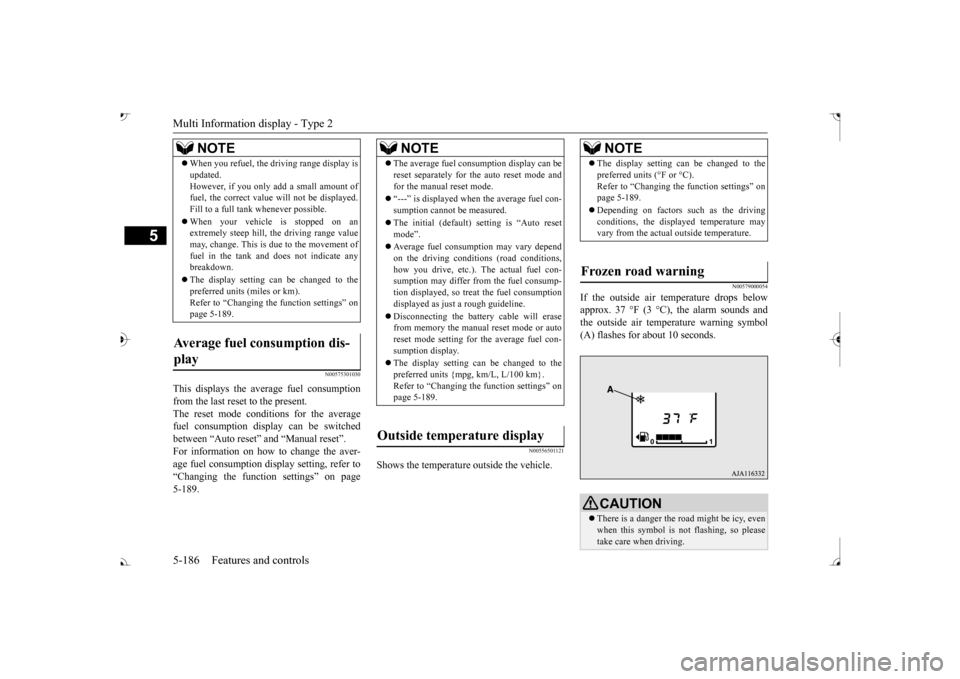
If the outside air temperature drops below approx. 37 °F (3 °C), the alarm sounds andthe outside air temperature warning symbol (A) flashes for about 10 seconds.
When you refuel, the driving range display is updated.However, if you only add a small amount offuel, the correct value
will not be displayed.
Fill to a full tank whenever possible. When your vehicle is stopped on an extremely steep hill, th
e driving range value
may, change. This is due to the movement offuel in the tank and does not indicate any breakdown. The display setting can be changed to the preferred units (miles or km). Refer to “Changing th
e function settings” on
page 5-189.
Average fuel consumption dis- play
NOTE
NOTE
The average fuel cons
umption display can be
reset separately for the auto reset mode andfor the manual reset mode. “---” is displayed when the average fuel con- sumption cannot be measured. The initial (default) setting is “Auto reset mode”. Average fuel consumption may vary depend on the driving conditi
ons (road conditions,
how you drive, etc.). The actual fuel con- sumption may differ from the fuel consump- tion displayed, so treat the fuel consumptiondisplayed as just
a rough guideline.
Disconnecting th
e battery cable will erase
from memory the manual reset mode or auto reset mode setting for the average fuel con- sumption display. The display setting can be changed to the preferred units {mpg, km/L, L/100 km}.Refer to “Changing the
function settings” on
page 5-189.
Outside temperature display
NOTE
The display setting ca
n be changed to the
preferred units (°F or °C).
e function settings” on
page 5-189. Depending on factors such as the driving conditions, the displa
yed temperature may
vary from the actual outside temperature.
Frozen road warning
CAUTION There is a danger the ro
ad might be icy, even
when this symbol is not flashing, so pleasetake care when driving.
BK0239700US.book 186 ページ 2016年6月16日 木曜日 午前10時58分
Page 271 of 521
Multi Information display - Type 2 5-190 Features and controls
5
N00557101179
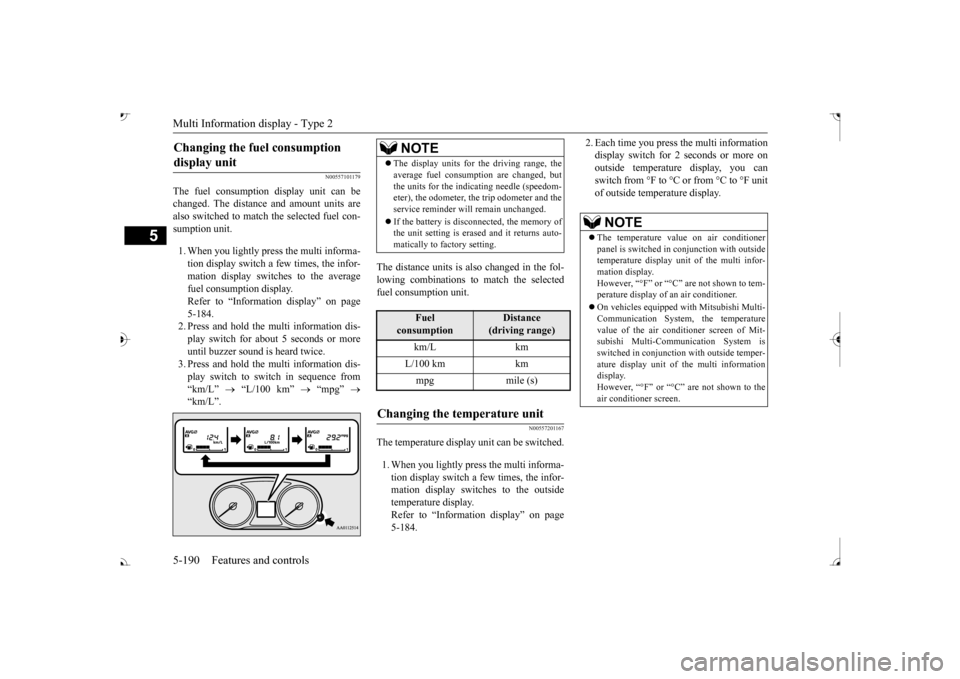
The fuel consumption display unit can be changed. The distance and amount units are also switched to match the selected fuel con- sumption unit. 1. When you lightly press the multi informa- tion display switch a few times, the infor- mation display switches to the average fuel consumption display. Refer to “Information display” on page 5-184.2. Press and hold the multi information dis- play switch for about 5 seconds or more until buzzer sound is
heard twice.
3. Press and hold the multi information dis- play switch to swit
ch in sequence from
“km/L”
“L/100 km”
“mpg”
The distance units is also changed in the fol- lowing combinations to match the selected fuel consumption unit.
N00557201167
The temperature display unit can be switched. 1. When you lightly press the multi informa- tion display switch a few times, the infor- mation display switches to the outsidetemperature display. Refer to “Information display” on page 5-184.
2. Each time you press the multi information display switch for 2 seconds or more onoutside temperatur
e display, you can
switch from °F to °C or from °C to °F unit of outside temperature display.
Changing the fuel consumption display unit
NOTE
The display units for the driving range, the average fuel consumption are changed, butthe units for the indica
ting needle (speedom-
eter), the odometer, the trip odometer and the service reminder will
remain unchanged.
If the battery is disconnected, the memory of the unit setting is erased and it returns auto- matically to factory setting.
Fuel
consumption
Distance
(driving range)
L/100 km km mpg mile (s)
Changing the temperature unit
NOTE
The temperature value on air conditioner panel is switched in
conjunction with outside
temperature display unit of the multi infor- mation display.However, “°F” or “°C” are not shown to tem- perature display of
an air conditioner.
On vehicles e
quipped with Mitsubishi Multi-
Communication System, the temperature value of the air condi
tioner screen of Mit-
subishi Multi-Communication System is switched in conjunction
with outside temper-
ature display unit of
the multi information
display. However, “°F” or “°C” air conditioner screen.
BK0239700US.book 190 ページ 2016年6月16日 木曜日 午前10時58分
Page 285 of 521

Indicator light, warning light, and information screen display list (multi information display - Type 1)
5
The Adaptive Cruise Control System (ACC) control is automatically canceled and the system is placed in the ‘standby’ state.
Refer to “How to use ACC” on page 5-108.
Conditions for the start of control are not met, the Adaptive Cruise Control
System (ACC) cannot start
the control. The Adaptive Cruise Control System (ACC) cannot start the control because th
e speed is out of speed
range. The Adaptive Cruise Control System (ACC) cannot start the control because not
detected the approach of
the vehicles in front. The Adaptive Cruise Control System (ACC) is tem- porarily unavailable due to conditions such as the adhesion of contaminants to the sensor. This is not a malfunction. There is a fault in the Adaptive Cruise Control Sys- tem (ACC).
Contact an authorized Mits
ubishi Motors dealer or a
repair facility of your c
hoice to have the system
checked. Refer to “When ACC dete
cts a vehicle in front
within the set distance” on page 5-110.
Screen
Cause
Do this (Reference)
BK0239700US.book 204 ページ 2016年6月16日 木曜日 午前10時58分
Page 297 of 521
Warning lights 5-216 Features and controls
5
N00520300147 N00520401552
This light comes on when the ignition switch is turned to the “ON” position (engine off) orthe operation mode is put in ON. When the engine is started, the light should go off a few seconds later. A warning is alsodisplayed in the multi information display. The warning light also illuminates after start- ing the engine under the following condi-tions. When the parking brake is still applied. When the brake fluid level is low. When the brake system circuit is not working properly.
When the vehicle is moving at more than 5 mph (8 km/h) and parking brake applied, abuzzer will sound to inform the driver that the parking brake is not properly release. Before driving, be sure
that the parking brake
is fully released and
brake warning light is
off.
N00591200030
This warning light will illuminate when there is a fault in the Electric parking brake system. Normally, this warning light illuminateswhen the operation mode is put in ON, and goes off in a few seconds.
NOTE
The ECO drive assist is displayed only when vehicle is driven with
the selector lever in
the “D” (DRIVE) positi
on or when vehicle is
driven in the sport mode (for vehicles equipped with sportroni
c steering wheel pad-
dle shifter).
Warning lights Brake warning light (red) and buzzer
CAUTION If the brake warning light and the Anti-lock braking system warning
light are illuminated
at the same time, the braking force distribu- tion function will not ope
rate, so the vehicle
may be destabilized
during sudden braking
under the following conditions.• When the brake warn
ing light does not go
out even when the parking brake is released.• When the brake warning light stays onwhile driving.• If the above occurs,
avoid sudden braking
and high-speed driving. Park the vehicle in a safe place, and contact an authorized Mit-subishi Motors dealer or a repair facility of your choice as soon as possible.
The vehicle should be bro
ught to a halt in the
following manner when
brake performance
is deteriorated.• Confirm that the vehicle slows down whenyou press down on the brake pedal harderthan usual. In some cases, the brake pedal may go all the way to the floor.
• Should the brakes fail, use engine braking to reduce your speed and observe the fol-lowings.[Vehicles with the parking brake of the lever type] Carefully pull the parking brake lever.[Vehicles with the Electric parking brake] Keep pulling the Electric parking brake switch. (Refer to “Electric parking brake” Depress the brake peda
l to illuminate the
stop lights to alert
the vehicles behind you.
Electric parking brake warning light (yellow)
(if so equipped)
BK0239700US.book 216 ページ 2016年6月16日 木曜日 午前10時58分
Page 302 of 521

Combination headlights and dimmer switch
Features and controls 5-221
5
Rotate the switch to operate the lights. The combinations of switch operations and illuminated lights differ in accordance with the following conditions. [When the engine is started, and the parking brake is released]
[When the engine is not running, or when the engine is running but the parking brake is notreleased] The engine starts when the lights are off.
Rotate the switch to operate the lights. The combinations of switch operations and illuminated lights differ in accordance withthe following conditions. [When the engine is started, and the parking brake is released]
When it rains, or wh
en the vehicle has been
washed, the inside of the lens sometimesbecomes foggy. This is the same as whenwindow glass mists up
on a humid day, and
does not indicate a problem. When the light is switched on, the heat
will dry out the fog.
However, if water collects inside the light, have it checked by an
authorized Mitsubishi
Motors dealer or a repair facility of yourchoice.
Ty p e 1
NOTE
OFF
The daytime running lights illumi- nated The daytime running lights illumi- nated Tail, front and rear side-marker lights, license plate, instrument panel lights and downlight on Headlights and other lights onNOTE
Once the daytime running light come on, they do not go out until the ignition switch is turned to the “OFF” or “ACC” position or the operation mode is changed to OFF orACC.
OFF All lights off
Parking, tail, front and rear side- marker lights, license plate, instru- ment panel lights and downlight on Headlights and other lights on
Ty p e 2 OFF
The daytime running lights illumi- nated
AUTO
The daytime running lights illumi- nated (when it is light outside the vehicle) Headlights and other lights turn on and off automatically in accor-dance with outside light level.
BK0239700US.book 221 ページ 2016年6月16日 木曜日 午前10時58分