2017 MITSUBISHI OUTLANDER reset
[x] Cancel search: resetPage 263 of 521
Multi Information display - Type 1 5-182 Features and controls
5
N00557501160
The time until the di
splay appears can be
changed. 1. Press and hold the multi information dis- play switch (for about 2 seconds or more) to switch from the setting mode screen to the menu screen.Refer to “Changing the function settings” on page 5-177. 2. Lightly press the multi information dis-play switch to select “ALARM” (rest time setting). 3. Press and hold the multi information dis-play switch (for about 2 seconds or more) to display “ALARM” (rest time setting).
4. Lightly press the multi information dis- play switch to select the time until the dis-play appears. 5. Press and hold the mu
lti information dis-
play switch (for about 2 seconds or more)to change the setting to the selected time.
N00563501080
It is possible to cha
nge the turn signal sound.
1. Press and hold the mu
lti information dis-
play switch (for about 2 seconds or more) to switch from the setting mode screen tothe menu screen. Refer to “Changing th
e function settings”
on page 5-177.2. Lightly press the multi information dis- play switch to select . (changing the turn signal sound)
3. Press and hold the multi information dis- play switch (for about 2 seconds or more)to switch from 1 (turn-signal sound 1) to 2 (turn-signal sound 2), or from 2 to 1. The setting changes to the selected turnsignal sound.
N00563601049
It is possible to change the bar graph settingof the momentary fuel consumption display. 1. Press and hold the multi information dis- play switch (for about 2 seconds or more) to switch from the setting mode screen tothe menu screen. Refer to “Changing the function settings” on page 5-177.2. Lightly press the multi information dis- play switch to
select . (changing
the momentary fuel consumption display) 3. Press and hold the multi information dis- play switch (for about 2 seconds or more) to switch from ON (with the green bargraph) to OFF (without the green bar graph), or from OFF to ON. The setting changes to the selected bargraph setting.
NOTE
If the battery is disconnected, the memory of the operation sound setting is erased and isautomatically set to
“ON” (operation sound
on). The operation sound sett
ing only deactivates
the operation sound of the multi information display switch and rheostat illumination but- ton. The warning di
splay and other sounds
cannot be deactivated.
Changing the time until “REST REMINDER” is displayed
NOTE
If the battery is disconnected, the memory of the unit setting is erased and is automatically set to the “OFF”. The drive time is reset when the ignition switch is in the “LOCK” or “OFF” position or the operation mode is in OFF.
Changing the turn signal sound
Changing the momentary fuel con- sumption display
BK0239700US.book 182 ページ 2016年6月16日 木曜日 午前10時58分
Page 264 of 521
Multi Information display - Type 2
Features and controls 5-183
5
N00557601217
Many of the function set
tings can be returned
to their factory settings. 1. Press and hold the mu
lti information dis-
play switch (for about 2 seconds or more)to switch from the setting mode screen to the menu screen. Refer to “Changing th
e function settings”
on page 5-177. 2. Lightly press the multi information dis- play switch to select “RESET” (return to the factory settings). 3. Press and hold the mu
lti information dis-
play switch (for about 5 seconds or more), the buzzer sounds and all of the function settings are returned to the factory set-tings.
N00555001291
The multi information display displays theodometer, trip odometer, service reminder, fuel remaining, outside
temperature, selector
lever position, averag
e fuel consumption,
driving range, etc. It is also possible to change elements such as the units used on the multi information dis- play.
Returning to the
factory settings
NOTE
The factory settings are as follows. • Average fuel consumption and average speed reset mode: A (Auto reset) • Fuel consumption di
splay unit: mpg (US)
or (L/100 km) • Temperature unit: °F (Fahrenheit) or {°C (Celsius)} • Display language: ENGLISH • Cooperative language
setting: A (language
cooperation: enabled)
• Operation sounds: ON (Operation sound on) • “REST REMINDER” display: OFF • Turn signal sound: Turn signal sound 1• Momentary fuel consumption with the green bar graph: ON
The tire ID set cannot be returned to the fac- tory settings.
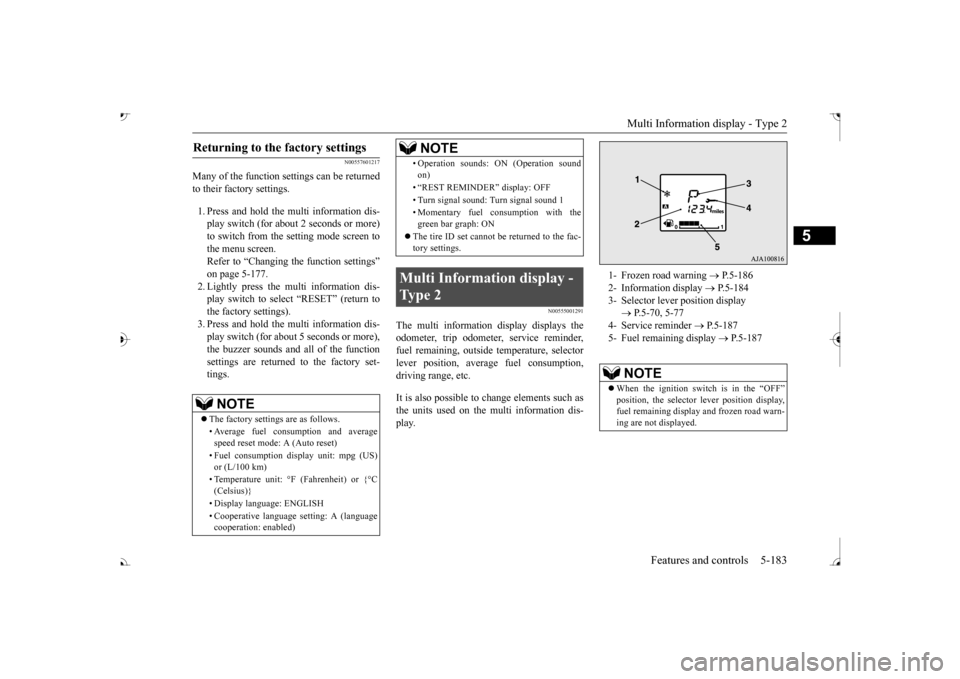
Multi Information display - Type 2
NOTE
1- Frozen road warning
P.5-186
2- Information display
P.5-184
3- Selector lever position display
P.5-70, 5-77
4- Service reminder
P.5-187
5- Fuel remaining display
P.5-187
NOTE
When the ignition switch is in the “OFF”
lever position display,
fuel remaining display and frozen road warn-ing are not displayed.
BK0239700US.book 183 ページ 2016年6月16日 木曜日 午前10時58分
Page 266 of 521
Multi Information display - Type 2
Features and controls 5-185
5
N00574901039
The odometer indicates the total distance the vehicle has traveled.
N00575001037
The trip odometer indicates the distance trav-eled between two points. To return the display to 0, hold down the multi information display switch for about 2 seconds or more. Only the currently dis- played value wi
ll be reset.
Example If trip odometer is displayed, only tripodometer will be reset.
Both trip odometers and can count up to 9999.9 m
iles/kilometers.
When a trip odometer goes past 9999.9miles/kilometers, it returns to 0.0 miles/ kilometers. When disconnecting th
e battery terminal,
the memories of trip odometer displays
and are cleared, and their displays
return to “0.0 miles/kilometers”.
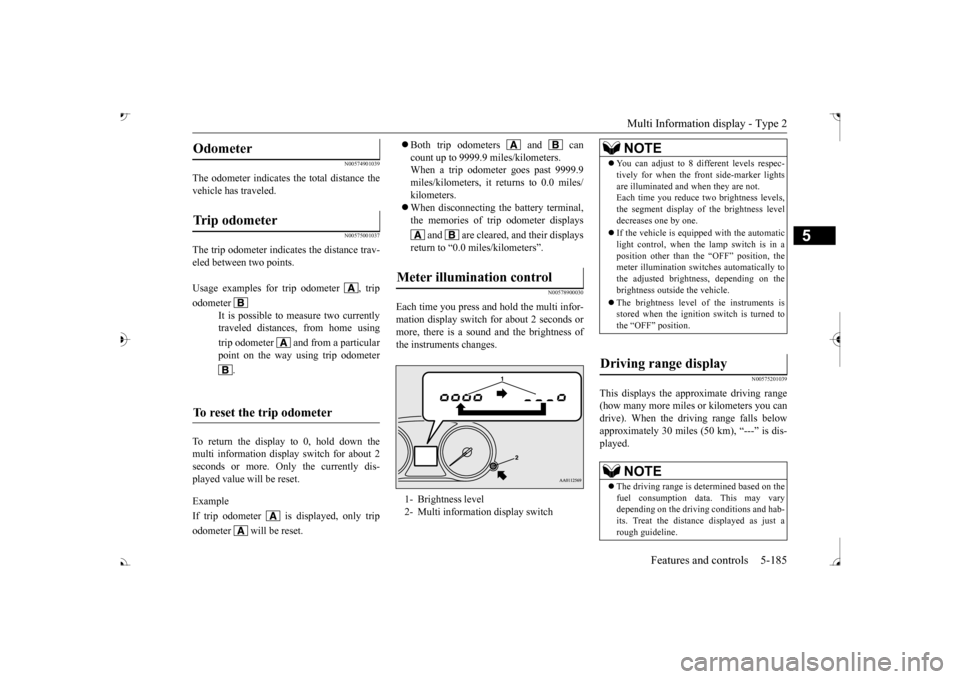
N00578900030
Each time you press a
nd hold the multi infor-
mation display switch for about 2 seconds ormore, there is a sound and the brightness of the instruments changes.
N00575201039
This displays the approximate driving range (how many more miles or
kilometers you can
drive). When the driving range falls below approximately 30 miles (
50 km), “---” is dis-
played.
Odometer Trip odometer Usage examples for trip odometer , trip odometer
It is possible to
measure two currently
traveled distances, from home using trip odometer and from a particular point on the way using trip odometer
.
To reset the trip odometer
Meter illumination control 1- Brightness level 2- Multi information display switch
NOTE
You can adjust to 8 di
fferent levels respec-
tively for when the front side-marker lightsare illuminated and when they are not.Each time you reduce tw
o brightness levels,
the segment display of
the brightness level
decreases one by one. If the vehicle is equi
pped with the automatic
light control, when the lamp switch is in aposition other than the
“OFF” position, the
meter illumination switches automatically to the adjusted bright
ness, depending on the
brightness outsi
de the vehicle.
The brightness level of the instruments is stored when the ignition switch is turned to the “OFF” position.
Driving range display
NOTE
The driving range is determined based on the fuel consumption data. This may vary depending on the drivi
ng conditions and hab-
its. Treat the distance displayed as just arough guideline.
BK0239700US.book 185 ページ 2016年6月16日 木曜日 午前10時58分
Page 267 of 521
Multi Information display - Type 2 5-186 Features and controls
5
N00575301030
This displays the average fuel consumption from the last reset to the present. The reset mode conditions for the average fuel consumption disp
lay can be switched
between “Auto reset”
and “Manual reset”.
For information on how to change the aver- age fuel consumption display setting, refer to“Changing the function settings” on page 5-189.
N00556501121
Shows the temperature
outside the vehicle.
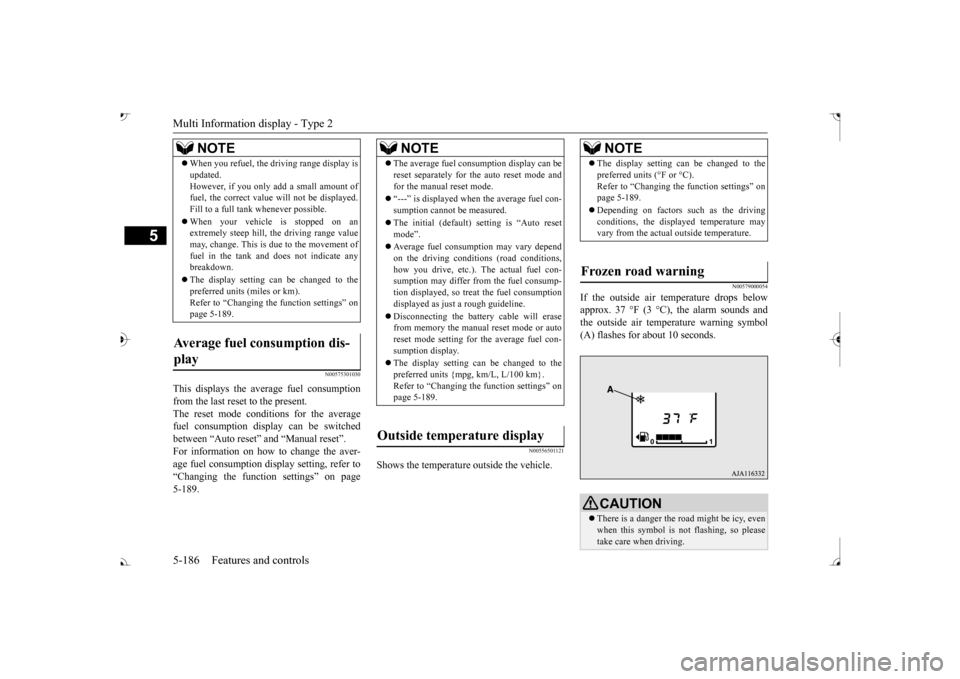
N00579000054
If the outside air temperature drops below approx. 37 °F (3 °C), the alarm sounds andthe outside air temperature warning symbol (A) flashes for about 10 seconds.
When you refuel, the driving range display is updated.However, if you only add a small amount offuel, the correct value
will not be displayed.
Fill to a full tank whenever possible. When your vehicle is stopped on an extremely steep hill, th
e driving range value
may, change. This is due to the movement offuel in the tank and does not indicate any breakdown. The display setting can be changed to the preferred units (miles or km). Refer to “Changing th
e function settings” on
page 5-189.
Average fuel consumption dis- play
NOTE
NOTE
The average fuel cons
umption display can be
reset separately for the auto reset mode andfor the manual reset mode. “---” is displayed when the average fuel con- sumption cannot be measured. The initial (default) setting is “Auto reset mode”. Average fuel consumption may vary depend on the driving conditi
ons (road conditions,
how you drive, etc.). The actual fuel con- sumption may differ from the fuel consump- tion displayed, so treat the fuel consumptiondisplayed as just
a rough guideline.
Disconnecting th
e battery cable will erase
from memory the manual reset mode or auto reset mode setting for the average fuel con- sumption display. The display setting can be changed to the preferred units {mpg, km/L, L/100 km}.Refer to “Changing the
function settings” on
page 5-189.
Outside temperature display
NOTE
The display setting ca
n be changed to the
preferred units (°F or °C).
e function settings” on
page 5-189. Depending on factors such as the driving conditions, the displa
yed temperature may
vary from the actual outside temperature.
Frozen road warning
CAUTION There is a danger the ro
ad might be icy, even
when this symbol is not flashing, so pleasetake care when driving.
BK0239700US.book 186 ページ 2016年6月16日 木曜日 午前10時58分
Page 269 of 521
Multi Information display - Type 2 5-188 Features and controls
5
1. Shows the time until the next periodic inspection. 2. This informs you that a periodic inspec- tion is due. Contact
an authorized Mit-
subishi Motors dealer or a repair facilityof your choice to have the system checked. 3. After your vehicle is inspected at anauthorized Mitsubishi Motors dealer, it displays the time until the next periodic inspection.
The “---” display can be reset while the igni- tion switch is in the “OFF” position.
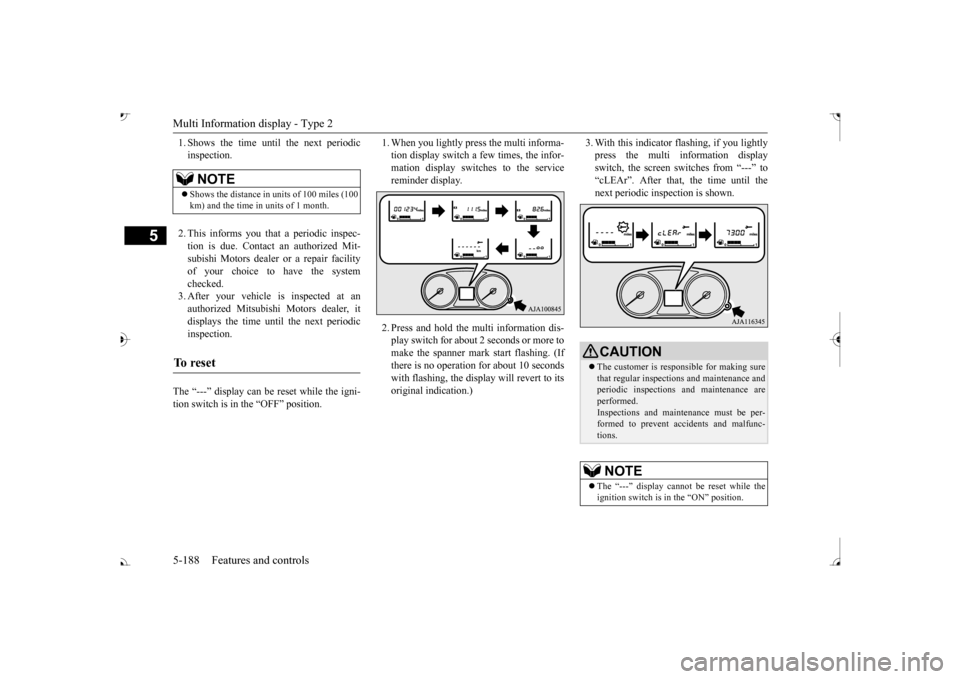
1. When you lightly press the multi informa- tion display switch a few times, the infor-mation display switches to the service reminder display. 2. Press and hold the mu
lti information dis-
play switch for about 2 seconds or more tomake the spanner mark start flashing. (If there is no operation for about 10 seconds with flashing, the display will revert to itsoriginal indication.)
3. With this indicator flashing, if you lightly press the multi information displayswitch, the screen sw
itches from “---” to
“cLEAr”. After that, the time until the next periodic inspection is shown.
NOTE
Shows the distance in units of 100 miles (100 km) and the time in units of 1 month.
To r e s e t
CAUTION The customer is responsible for making sure that regular inspections
and maintenance and
periodic inspections
and maintenance are
performed.Inspections and mainte
nance must be per-
formed to prevent accidents and malfunc- tions.NOTE
The “---” display cannot
be reset while the
ignition switch is in the “ON” position.
BK0239700US.book 188 ページ 2016年6月16日 木曜日 午前10時58分
Page 270 of 521
Multi Information display - Type 2
Features and controls 5-189
5
N00556801209
The “Average fuel consumption reset mode”,
it” and “Temperature
unit” setting can be
modified as desired,
when the ignition switch is in the “ON” posi- tion.
N00575501029
You can change the mode condition for theaverage fuel consumption display to “Auto reset” or “Manual reset”.
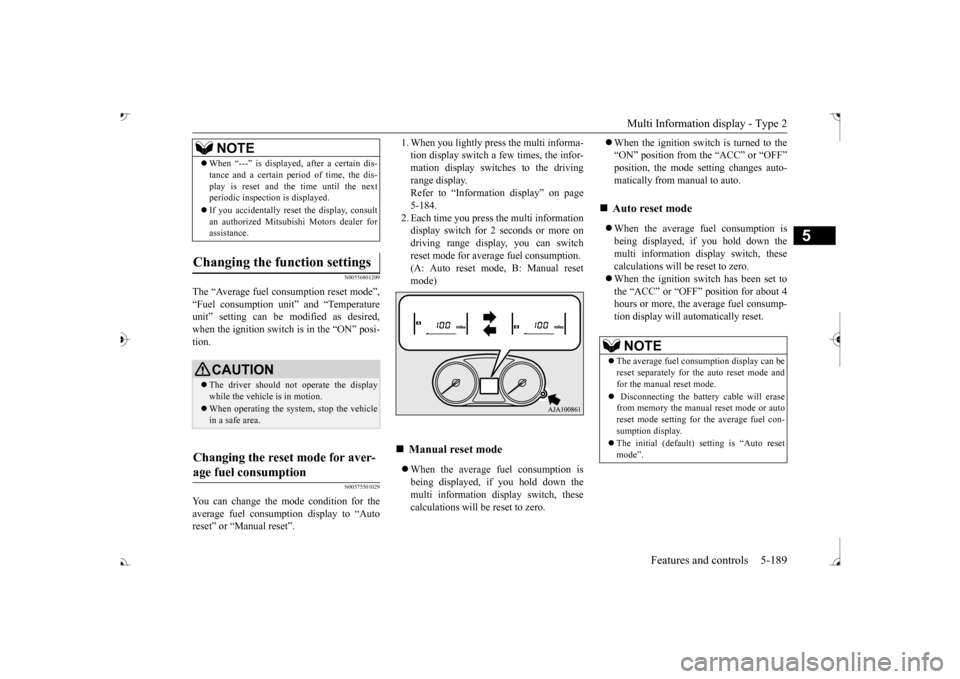
tion display switch a few times, the infor-mation display switches to the driving range display. Refer to “Information display” on page5-184. 2. Each time you press the multi information display switch for 2 seconds or more ondriving range display, you can switch reset mode for average fuel consumption. (A: Auto reset mode, B: Manual reset mode) When the average fuel consumption is being displayed, if you hold down the multi information display switch, thesecalculations will
be reset to zero.
When the ignition switch is turned to the “ON” position from the “ACC” or “OFF”position, the mode se
tting changes auto-
matically from manual to auto. When the average fuel consumption is being displayed, if you hold down themulti information display switch, these calculations will be reset to zero. When the ignition switch has been set to the “ACC” or “OFF” position for about 4 hours or more, the average fuel consump-tion display will automatically reset.
When “---” is displaye
d, after a certain dis-
tance and a certain pe
riod of time, the dis-
play is reset and the time until the nextperiodic inspecti
on is displayed.
If you accidentally rese
t the display, consult
an authorized Mitsubishi Motors dealer for assistance.
Changing the function settings
CAUTION The driver should not operate the display while the vehicle is in motion. When operating the system, stop the vehicle in a safe area.
Changing the reset mode for aver- age fuel consumption
NOTE
Manual reset mode
Auto reset mode NOTE
The average fuel cons
umption display can be
reset separately for the auto reset mode and for the manual reset mode. Disconnecting the batt
ery cable will erase
from memory the manual reset mode or auto reset mode setting for the average fuel con-sumption display. The initial (default) setting is “Auto reset mode”.
BK0239700US.book 189 ページ 2016年6月16日 木曜日 午前10時58分
Page 408 of 521
Operation Keys
Comfort controls 7-25
7
N00716700113
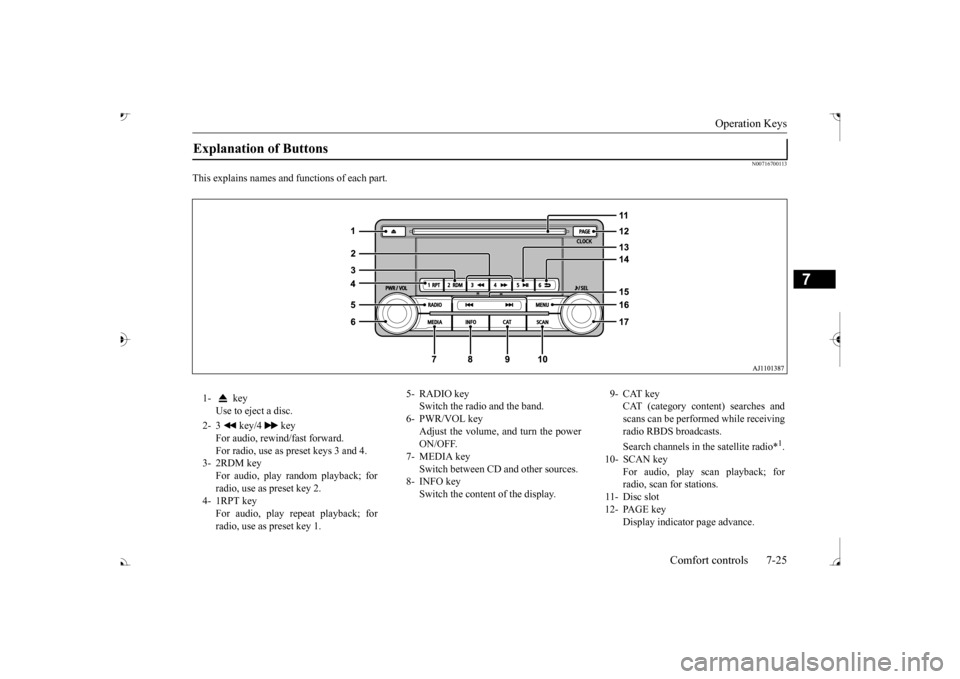
This explains names and
functions of each part.
Explanation of Buttons 1- key
Use to eject a disc.
2- 3 key/4 key
For audio, rewind/fast forward. For radio, use as preset keys 3 and 4.
3- 2RDM key
For audio, play random playback; for radio, use as preset key 2.
4- 1RPT key
For audio, play repeat playback; for radio, use as preset key 1.
5- RADIO key
Switch the radio and the band.
6- PWR/VOL key
Adjust the volume, and turn the powerON/OFF.
7- MEDIA key
Switch between CD and other sources.
8- INFO key
Switch the content of the display.
9- CAT key
CAT (category content) searches and scans can be performed while receiving radio RBDS broadcasts. Search channels in the satellite radio*
1.
10- SCAN key
For audio, play scan playback; forradio, scan for stations.
11- Disc slot 12- PAGE key
Display indicato
r page advance.
BK0239700US.book 25 ページ 2016年6月16日 木曜日 午前10時58分
Page 409 of 521
Listen to Radio 7-26 Comfort controls
7
N00716800114
N00716900069
This explains how to listen to AM and FM radio broadcasts.
13-
5 key Play/Pause Bluetooth Audio
*2, and use
as preset key 5 for radio.
14-
6 key Return during audio track search, and stop Bluetooth Audio
*2.
For radio, use as preset key 6.
15-
key/ key
For audio, select a
udio track/file; for
radio, perform auto
matic station selec-
tion. Select channels in the satellite radio*
1.
16- MENU key
Switch to Menu mode.
17- /SEL key
Adjust audio quality
and select items.
For radio, manually
select stations.
Select channels in the satellite radio*
1.
*1: Requires a satellit
e tuner connection.
*2: Requires a separately-purchased Blue- tooth-capable audio
device in equip-
ment by type.
Steering wheel audio remote control switch 1-
button, button Adjust audio functions and the mobile phone function volume.
2-
button, button Select CD and other
audio source tracks
and radio stations.Hold down to skip up and down through tracks. Hold down to switch the satellite radioband during satellite
radio reception.
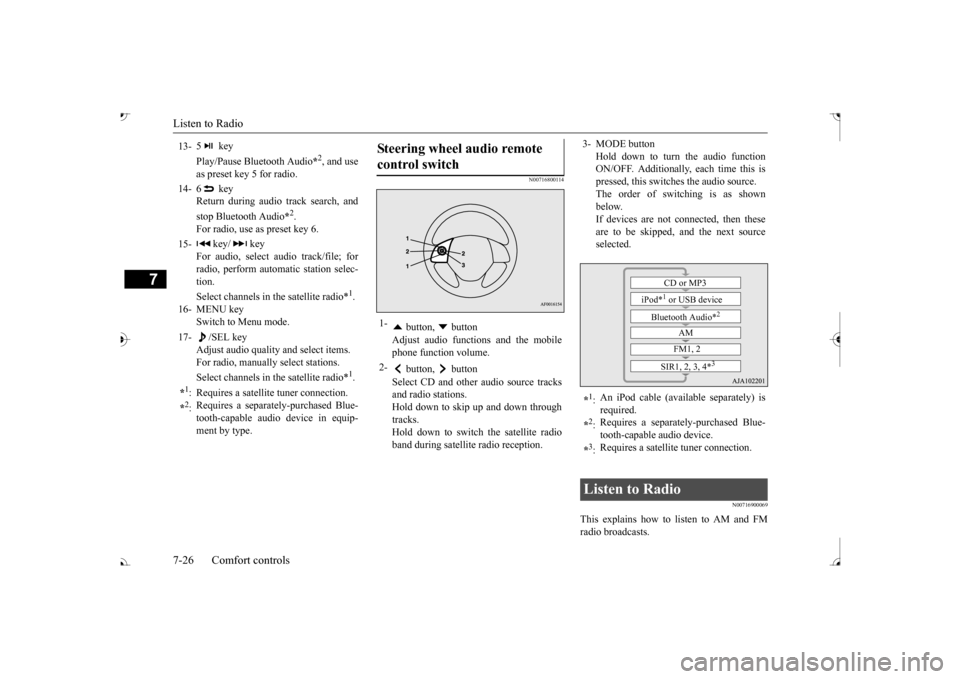
3- MODE button
Hold down to turn the audio function ON/OFF. Additionally, each time this ispressed, this switch
es the audio source.
The order of switching is as shown below.If devices are not c
onnected, then these
are to be skipped, and the next source selected.
*1: An iPod cable (available separately) is required.
*2: Requires a separately
-purchased Blue-
tooth-capable
audio device.
*3: Requires a satellite
tuner connection.
Listen to Radio
CD or MP3
iPod*
1 or USB device
Bluetooth Audio*
2
AM FM1, 2
SIR1, 2, 3, 4*
3
BK0239700US.book 26 ページ 2016年6月16日 木曜日 午前10時58分