2017 MITSUBISHI iMiEV battery
[x] Cancel search: batteryPage 53 of 296
MiEV Remote System
General information/Charging 3-39
3
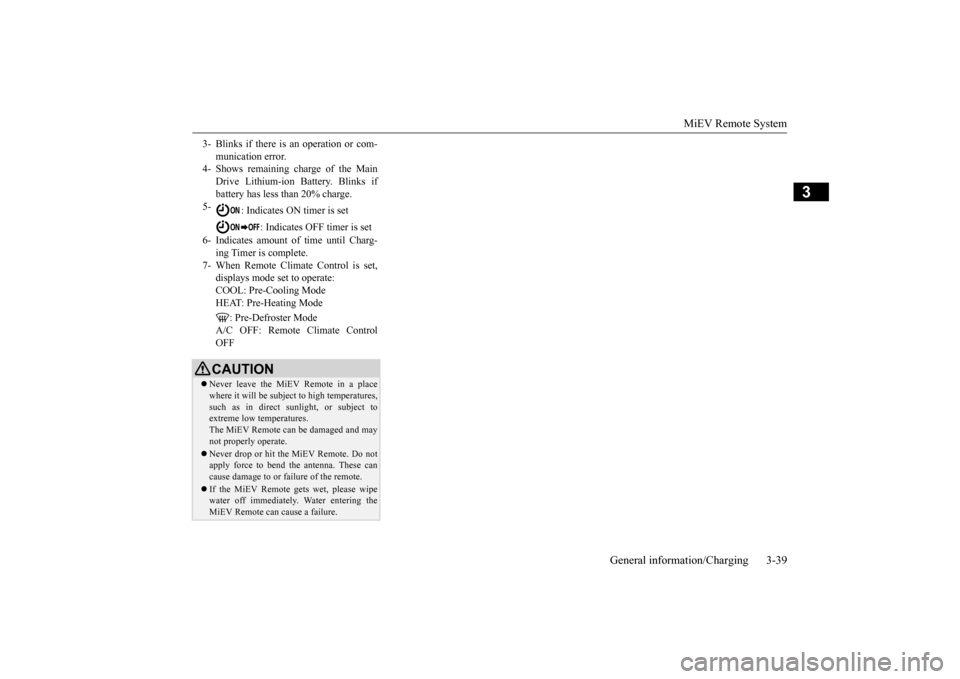
3- Blinks if there is an operation or com-
munication error.
4- Shows remaining charge of the Main
Drive Lithium-ion Battery. Blinks if battery has less than 20% charge.
5-
: Indicates ON timer is set
: Indicates OFF timer is set
6- Indicates amount of time until Charg-
ing Timer is complete.
7- When Remote Climate Control is set,
displays mode set to operate:COOL: Pre-Cooling Mode HEAT: Pre-Heating Mode
: Pre-Defroster Mode
A/C OFF: Remote Climate ControlOFFCAUTION Never leave the MiEV Remote in a place where it will be subject to high temperatures,such as in direct s
unlight, or subject to
extreme low temperatures. The MiEV Remote can
be damaged and may
not properly operate. Never drop or hit the MiEV Remote. Do not apply force to bend the antenna. These can cause damage to or failure of the remote. If the MiEV Remote gets wet, please wipe water off immediately.
Water entering the
MiEV Remote can cause a failure.
BK0220401US.book 39 ページ 2015年6月3日 水曜日 午前7時42分
Page 54 of 296
MiEV Remote System 3-40 General information/Charging
3
N01206100015
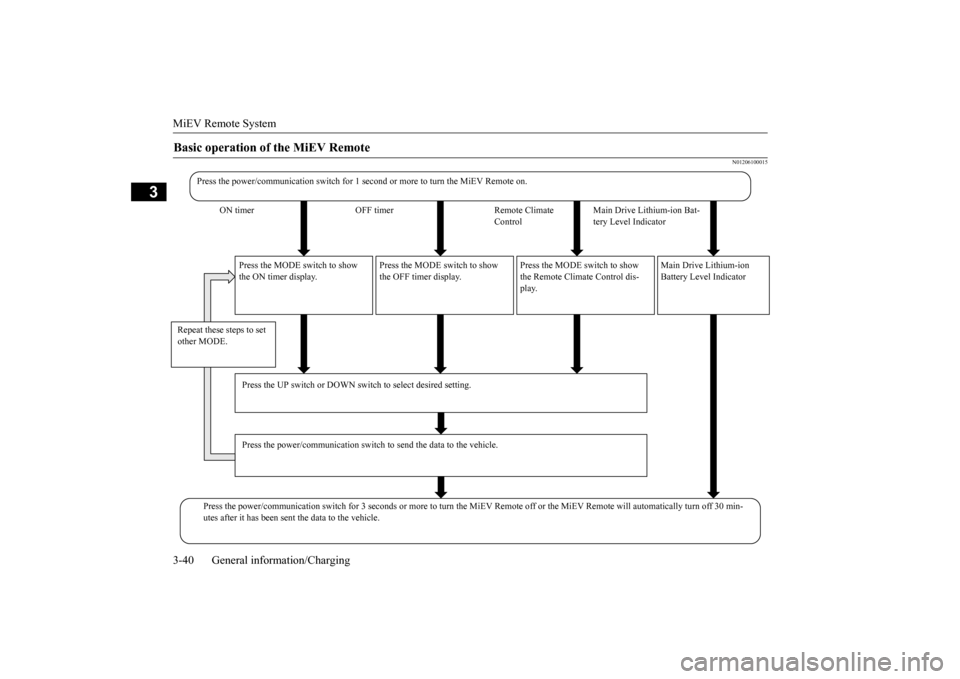
Basic operation of the MiEV Remote
Press the power/communication switch for 1 seco
nd or more to turn
the MiEV Remote on.
ON timer OFF timer Remote Climate
Control
Main Drive Lithium-ion Bat- tery Level Indicator
Press the MODE switch to show the ON timer display.
Press the MODE switch to show the OFF timer display.
Press the MODE switch to show the Remote Climate Control dis- play.
Main Drive Lithium-ion Battery Level Indicator
Repeat these steps to set other MODE.
Press the UP switch or DOWN switch to select desired setting. Press the power/communication switch
to send the data to the vehicle.
Press the power/communication switch for 3 seco
nds or more to turn the Mi
EV Remote off or the MiEV Remote will automatically tu
rn off 30 min-
utes after it has been sent the data to the vehicle.
BK0220401US.book 40 ページ 2015年6月3日 水曜日 午前7時42分
Page 55 of 296

MiEV Remote System
General information/Charging 3-41
3
N01203701020
The Charging Timer can be set as follows. ON timer: Time from the present to when charging will begin. OFF timer: Time from the start of charg- ing to the end of charging
To set the timer, th
e following conditions
must be met. Selector lever: “P Electric motor switch: “LOCK”position EV charging cable (regular charger): Con- nected
Charging Timer
WA R N I N G Improper charging can result in a fire, property damage, and serious injury or death.Before Charging Timer, carefully read and follow the instructions in “Precaution on Charging the Main Drive Lithium-ionBattery” on page 3-15 and “Regular charging (charging method with rated AC 120 V outlet)” on page 3-16.NOTE
Charging Timer cannot be
used with a quick
charging system.
BK0220401US.book 41 ページ 2015年6月3日 水曜日 午前7時42分
Page 59 of 296

MiEV Remote System
General information/Charging 3-45
3
4. Press the power/c
ommunication switch
(B) for less than 1 second to send the set-ting data to the vehicle. The MiEV Remote will sound melodies on transmis- sion and reception. The charging willstart. Refer to “Regular charging (charging method with rated AC 120 V outlet)” onpage 3-16. 5. Turn off the MiEV Remote. Refer to “To turn the MiEV Remote ON/OFF” on page 3-43.
N01205301033
The OFF timer can be
set during the regular
charging or after setting the ON timer. 1. When the power of MiEV Remote is off, turn the power on. Refer to “To turn theMiEV Remote ON/OFF” on page 3-43. 2. Press the MODE switc
h (G) to change the
display to the OFF timer (2).
3. Press the UP switch (C) or the DOWN switch (D) once. The time set last time for the OFF timer will be
displayed and blink.
4. If you need to change the time for the OFF timer, press the UP switch (C) or the DOWN switch (D) to change the time.
• The time can be changed within the range from 0.5h to 19.5h by half hourand can be changed to “-h”. • When “-h” is displayed, the charging will end when Main Drive Lithium-ionBattery is fully charged.
5. Press the power/c
ommunication switch
(B) for less than 1 second to send the set- ting data to the vehicle.The MiEV Remote
will sound melodies
on transmission and reception.
To set OFF Timer
1_ Shown the ON timer 2_ Shown the OFF timer 3_ Shown the Remote Climate Control
NOTE
To display “-h”, press the UP switch (C) when 19.5h is displayed or press DOWN switch (D) when 0.5h is displayed.NOTE
The melodies can be turned off. Refer to “To turn on/off melody and buzzer” on page 3-49. If a communication error occurs or the MiEV Remote System is not
functioning properly,
the buzzer will sound. Refer to “Display ofMiEV Remote during
communicating with
vehicle” on page 3-46. If the ON timer is unset when setting the OFF timer, the ON timer will be automati- cally set with “0h”.
BK0220401US.book 45 ページ 2015年6月3日 水曜日 午前7時42分
Page 60 of 296

MiEV Remote System 3-46 General information/Charging
3
6. Turn off the MiEV Remote. Refer to “To turn the MiEV Remote ON/OFF” on page3-43.
N01203801021
It communicates with the vehicle when thepower of the MiEV Remote is turned on with pressing the power
supply/communication
switch (B) for 1 second or more and if thepower supply/communication switch (B) is pressed for less than 1 second while the power of the MiEV Remote is on.If the normal reception
melody sounds after
the transmitting melody, it is set completion. Communication symbol (H) blinks whilecommunicating with the vehicle. If the buzzer sounds with ERROR symbol (I) blinks, a problem is detected. Refer to“Actions to be taken when the MiEV Remote system does not operate correctly” on page 3-52.
N01203901022
There are two methods to cancel ChargingTimer. By using the MiEV Remote By operating the electric motor switch on the vehicle
NOTE
The energy level gauge (E) in the instrument panel will illuminate
and the charging indi-
cator (F) will blink
approximately 30 sec-
onds after the vehicl
e has received the
setting for the OFF timer.After approximately 30 seconds, the energy level gauge and the ch
arging indicator will
then go off, and the vehicle will be preparedfor Charging Timer in accordance with the ON/OFF setting. The symbol on the MiEV Remote illuminates while the Main Drive Lithium- ion Battery is charging.
E
F
The Charging Timer will be cancelled if the electric motor switch is turned to the “ON” Once the Main Drive Lithium-ion Battery is fully charged, the charging will end even ifbefore the time set by the OFF timer. If the charge connector is disconnected dur- ing charging, the OFF charging timer will be canceled.
Display of MiEV Remote during communicating with vehicle
NOTE
To cancel Charging Timer
NOTE
If the Charging Timer is canceled during charging, the charging will continue until the Main Drive Lithium-ion Battery is fullycharged. If the Charging Timer is canceled before charging starts, charging
will start immedi-
ately and continue until the Main Drive Lith- ium-ion Battery is fully charged.
BK0220401US.book 46 ページ 2015年6月3日 水曜日 午前7時42分
Page 62 of 296

MiEV Remote System 3-48 General information/Charging
3
N01204301036
The following conditi
ons must be met to
operate the Remote Climate Control. Selector lever:
P (PARK) position.
Electric motor switch: LOCK position. EV charging cable (regular charger): Con- nected. Quick charging: Not used. Main Drive Lithium-ion Battery Level Indicator: Shows one bar or more. Refer to “Main Drive Lithium-ion Battery LevelIndicator” on page 3-50. All doors and the liftgate: Closed. 1. Start charging. Refer to “Regular charging (charging method with rated AC 120 V outlet)” on page 3-16.
2. Turn on the MiEV Remote. Refer to “To turn the MiEV Remote ON/OFF” on page3-43. 3. Press the MODE switch (G) to change the mode to Remote Climate Control (3). 4. Select a desired
mode by pressing UP
switch (C) or DOWN switch (D).
The Remote Climate Control will automati- cally stop 30 minutes after the Remote Cli-mate Control has been set. The Remote Climate Control is operated by electric power s
upplied through the EV
charging cable (regular charger). Under the following conditions, the effect of the Remote Climate Control can be decreased. • When the outside temp
erature is very high.
• When the sunlight is strong.• When the outside temperature is very low. When Remote Climate Control is activated while charging the Main Drive Lithium-ion Battery, the time required to fully charge theMain Drive Lithium-ion Battery will become longer or the amount of charge may decrease if the OFF timer has been set. If the Main Drive Lithium-ion Battery Warming System is operated while theRemote Climate Control is activated, the Remote Climate Control
will stop. When the
Main Drive Lithium-ion Battery WarmingSystem stops, the Remote Climate Control will resume. Refer to “Main Drive Lithium- ion Battery Warming System” on page 3-21. While the Remote Climate Control is acti- vated, if a heated seat switch is ON, theheated seat
will operate.
NOTE
To operate the Remote Climate Control
WA R N I N G Improper charging ca
n result in a fire,
property damage, and serious injury ordeath. Carefully read and follow instructions in “Precaution during Charging the MainDrive Lithium-ion Battery” on page 3-15 and “Regular chargi
ng (charging method
with rated AC 120 V outlet)” on page 3-16.
1_ Shown the ON timer 2_ Shown the OFF timer3_ Shown the Remote Climate Control
BK0220401US.book 48 ページ 2015年6月3日 水曜日 午前7時42分
Page 64 of 296
MiEV Remote System 3-50 General information/Charging
3
2. Turn off the MiEV Remote. Refer to “To turn the MiEV Remote ON/OFF” on page3-43.
N01204500015
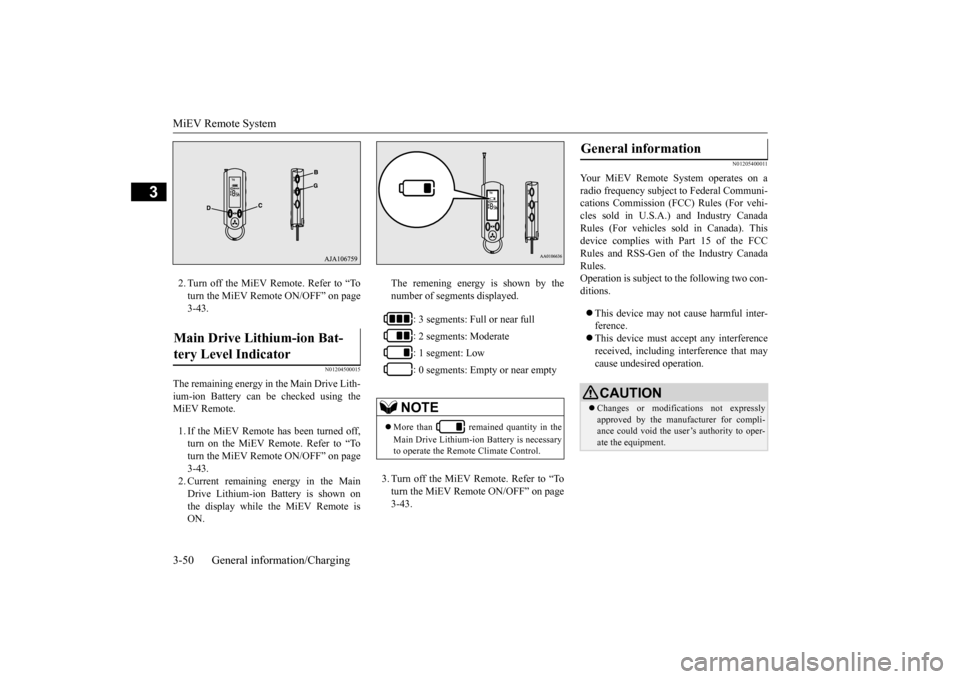
The remaining energy in the Main Drive Lith- ium-ion Battery can be checked using the MiEV Remote. 1. If the MiEV Remote has been turned off, turn on the MiEV Remote. Refer to “To turn the MiEV Remote ON/OFF” on page 3-43.2. Current remaining energy in the Main Drive Lithium-ion Battery is shown on the display while the MiEV Remote isON.
The remening energy is shown by the number of segments displayed. 3. Turn off the MiEV Remote. Refer to “To turn the MiEV Remote ON/OFF” on page 3-43.
N01205400011
Your MiEV Remote
System operates on a
radio frequency subject
to Federal Communi-
cations Commission (FCC) Rules (For vehi-cles sold in U.S.A.) and Industry Canada Rules (For vehicles so
ld in Canada). This
device complies with
Part 15 of the FCC
Rules and RSS-Gen of the Industry Canada Rules. Operation is subject to
the following two con-
ditions. This device may not
cause harmful inter-
ference. This device must ac
cept any interference
received, including interference that may cause undesired operation.
Main Drive Lithium-ion Bat- tery Level Indicator
: 3 segments: Full or near full : 2 segments: Moderate : 1 segment: Low : 0 segments: Empty or near empty
NOTE
More than remained quantity in the Main Drive Lithium-ion Battery is necessary to operate the Remote Climate Control.
General information
CAUTION Changes or modifica
tions not expressly
approved by the manufacturer for compli- ance could void the user’s authority to oper-ate the equipment.
BK0220401US.book 50 ページ 2015年6月3日 水曜日 午前7時42分
Page 65 of 296
MiEV Remote System
General information/Charging 3-51
3
N01204600016 N01204700017
Two coin type batteries are used. Replace as necessary to assure proper operation.
N01204800021
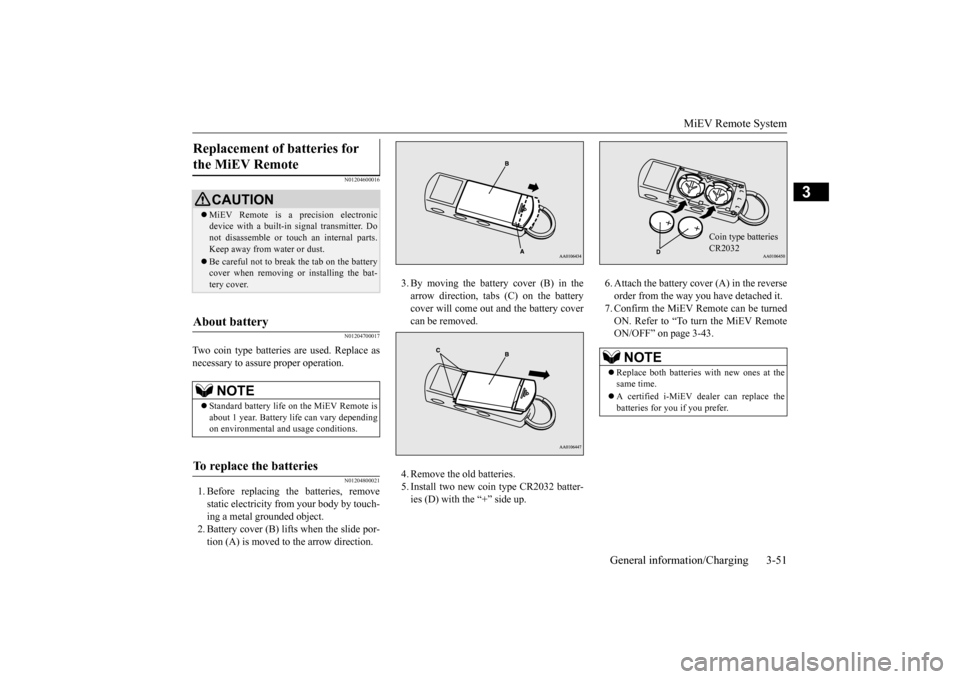
1. Before replacing the batteries, removestatic electr
icity from your body by touch-
ing a metal grounded object. 2. Battery cover (B) lifts when the slide por- tion (A) is moved to the arrow direction.
3. By moving the battery cover (B) in the arrow direction, tabs (C) on the batterycover will come out
and the battery cover
can be removed. 4. Remove the old batteries. 5. Install two new coin type CR2032 batter- ies (D) with the “+” side up.
6. Attach the battery c
over (A) in the reverse
order from the way you have detached it.7. Confirm the MiEV Remote can be turned ON. Refer to “To turn the MiEV Remote ON/OFF” on page 3-43.
Replacement of batteries for the MiEV Remote
CAUTION MiEV Remote is a precision electronic device with a built-in
signal transmitter. Do
not disassemble or touc
h an internal parts.
Keep away from water or dust. Be careful not to break the tab on the battery cover when removing or installing the bat- tery cover.
About battery
NOTE
Standard battery life on the MiEV Remote is about 1 year. Battery li
fe can vary depending
on environmental and usage conditions.
To replace the batteries
NOTE
Replace both batt
eries with new ones at the
same time. A certified i-MiEV de
aler can replace the
batteries for you if you prefer.
Coin type batteriesCR2032
BK0220401US.book 51 ページ 2015年6月3日 水曜日 午前7時42分