2017 MERCEDES-BENZ S CLASS ECO
[x] Cancel search: ECOPage 67 of 382
Child-proof locks for the rear doors
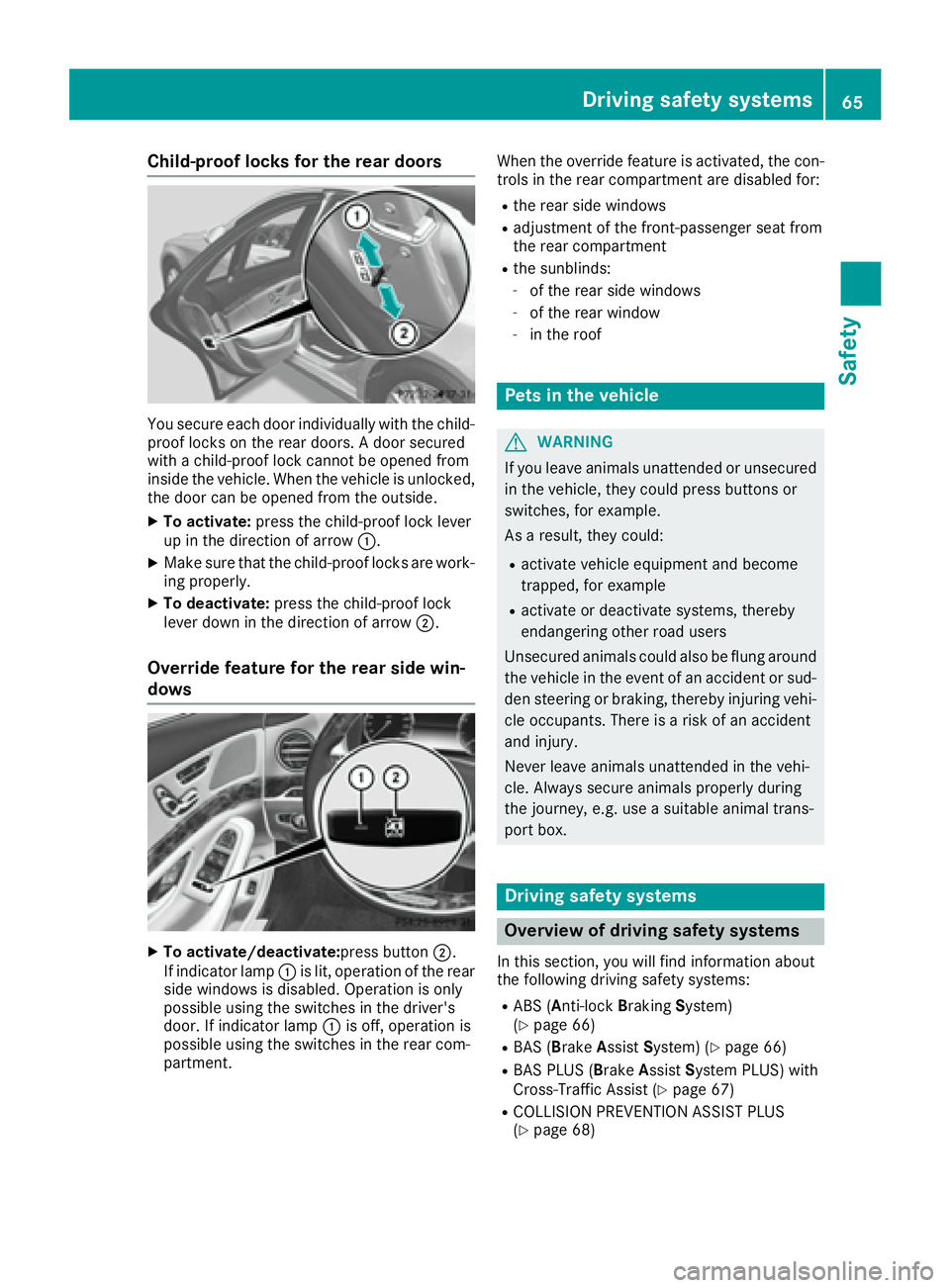
You secure each door individually with the child-
proof locks on the rear doors. A door secured
with a child-proof lock cannot be opened from
inside the vehicle. When the vehicle is unlocked,
the door can be opened from the outside. X
To activate: press the child-proof lock lever
up in the direction of arrow C .X
Make sure that the child-proof locks are work-
ing properly. X
To deactivate: press the child-proof lock
lever down in the direction of arrow D .
Override feature for the rear side win-
dows
X
To activate/deactivate: press button D .
If indicator lamp C is lit, operation of the rear
side windows is disabled. Operation is only
possible using the switches in the driver's
door. If indicator lamp C is off, operation is
possible using the switches in the rear com-
partment. When the override feature is activated, the con-
trols in the rear compartment are disabled for: R
the rear side windows R
adjustment of the front-passenger seat from
the rear compartment R
the sunblinds: -
of the rear side windows -
of the rear window -
in the roof
Pets in the vehicle
G WARNING
If you leave animals unattended or unsecured
in the vehicle, they could press buttons or
switches, for example.
As a result, they could: R
activate vehicle equipment and become
trapped, for example R
activate or deactivate systems, thereby
endangering other road users
Unsecured animals could also be flung around
the vehicle in the event of an accident or sud-
den steering or braking, thereby injuring vehi-
cle occupants. There is a risk of an accident
and injury.
Never leave animals unattended in the vehi-
cle. Always secure animals properly during
the journey, e.g. use a suitable animal trans-
port box.
Driving safety systems
Overview of driving safety systems In this section, you will find information about
the following driving safety systems: R
ABS ( A nti-lock B raking S ystem)
( Y
page 66) R
BAS ( B rake A ssist S ystem) ( Y
page 66)R
BAS PLUS ( B rake A ssist S ystem PLUS) with
Cross-Traffic Assist ( Y
page 67)R
COLLISION PREVENTION ASSIST PLUS
( Y
page 68)Driving safety systems 65
Safety Z
Page 68 of 382

R
ESP ®
( E lectronic S tability P rogram)
( Y
page 71)R
EBD ( E lectronic B rake force D istribution)
( Y
page 73)R
ADAPTIVE BRAKE ( Y
page 73)R
PRE-SAFE ®
Brake ( Y
page 73)R
STEER CONTROL ( Y
page 75)
Important safety notes If you fail to adapt your driving style or if you are
inattentive, the driving safety systems can nei-
ther reduce the risk of an accident nor override
the laws of physics. Driving safety systems are
merely aids designed to assist driving. You are
responsible for maintaining the distance to the
vehicle in front, for vehicle speed, for braking in
good time, and for staying in lane. Always adapt
your driving style to suit the prevailing road and
weather conditions and maintain a safe distance
from the vehicle in front. Drive carefully.
The driving safety systems described only work
as effectively as possible when there is ade-
quate contact between the tires and the road
surface. Pay particular attention to the informa-
tion regarding tires, recommended minimum
tire tread depths etc. in the "Wheels and tires"
section ( Y
page 343).
In wintry driving conditions, always use winter
tires (M+S tires) and if necessary, snow chains.
Only in this way will the driving safety systems
described in this section work as effectively as
possible.
ABS (Anti-lock Braking System)
General information ABS regulates brake pressure in such a way that
the wheels do not lock when you brake. This
allows you to continue steering the vehicle when
braking.
The % ABS warning lamp in the instrument
cluster lights up when the ignition is switched
on. It goes out when the engine is running.
ABS works from a speed of about 5 mph
(8 km/h), regardless of road-surface conditions.
ABS works on slippery surfaces, even when you
only brake gently. Important safety notes
i Observe the "Important safety notes" sec-
tion ( Y
page 66).
G WARNING
If ABS is faulty, the wheels could lock when
braking. The steerability and braking charac-
teristics may be severely impaired. Addition-
ally, further driving safety systems are deac-
tivated. There is an increased danger of skid-
ding and accidents.
Drive on carefully. Have ABS checked imme-
diately at a qualified specialist workshop.
When ABS is malfunctioning, other systems,
including driving safety systems, will also
become inoperative. Observe the information
on the ABS warning lamp ( Y
page 261) and dis-
play messages which may be shown in the
instrument cluster ( Y
page 228).
Braking X
If ABS intervenes: continue to depress the
brake pedal vigorously until the braking sit-
uation is over. X
To make a full brake application: depress
the brake pedal with full force.
If ABS intervenes when braking, you will feel a
pulsing in the brake pedal.
The pulsating brake pedal can be an indication
of hazardous road conditions, and functions as a
reminder to take extra care while driving.
BAS (Brake Assist System)
General information BAS operates in emergency braking situations.
If you depress the brake pedal quickly, BAS
automatically boosts the braking force, thus
shortening the stopping distance.
Important safety notes
i Observe the "Important safety notes" sec-
tion ( Y
page 66).66
Driving safet y system s
Sa fety
Page 69 of 382

G WARNING
If BAS is malfunctioning, the braking distance
in an emergency braking situation is
increased. There is a risk of an accident.
In an emergency braking situation, depress
the brake pedal with full force. ABS prevents
the wheels from locking.
Brakes X
Keep the brake pedal firmly depressed until
the emergency braking situation is over.
ABS prevents the wheels from locking.
The brakes will function as usual once you
release the brake pedal. BAS is deactivated.
BAS PLUS (Brake Assist System
PLUS) with Cross-Traffic Assist
General information BAS PLUS can help you to minimize the risk of a
collision with a vehicle or a pedestrian and
reduce the effects of such a collision. If BAS
PLUS detects a danger of collision, you are
assisted when braking.
i Pay attention to the important safety notes
in the "Driving safety systems" section
( Y
page 66).
BAS PLUS is only available in vehicles with the
Driving Assistance Plus package.
For BAS PLUS to assist you when driving, the
radar sensor system and the camera system
must be operational.
With the help of a sensor system and a camera
system, BAS PLUS can detect obstacles: R
that are in the path of your vehicle for an
extended period of time R
that cross the path of your vehicle
In addition, pedestrians in the path of your vehi-
cle can be detected.
BAS PLUS detects pedestrians by using typical
characteristics such as the body contours and
posture of a person standing upright.
If the radar sensor system or the camera system
is malfunctioning, BAS PLUS functions are
restricted or no longer available. The brake sys-
tem is still available with complete brake boost-
ing effect and BAS. i Observe the restrictions described in the
"Important safety notes" section
( Y
page 67).
Important safety notes
G WARNING
BAS PLUS cannot always clearly identify
objects and complex traffic situations.
In such cases, BAS PLUS may: R
intervene unnecessarily R
not intervene
There is a risk of an accident.
Always pay careful attention to the traffic sit-
uation and be ready to brake. Terminate the
intervention in a non-critical driving situation.
G WARNING
BAS PLUS cannot always clearly identify peo-
ple, this is especially the case if they are mov-
ing. BAS PLUS cannot intervene in these
cases. There is a risk of an accident.
Always pay careful attention to the traffic sit-
uation and be ready to brake.
G WARNING
BAS PLUS does not react: R
to small people, e.g. children R
to animals R
to oncoming vehicles R
when cornering
As a result, BAS PLUS may not intervene in all
critical situations. There is a risk of an acci-
dent.
Always pay careful attention to the traffic sit-
uation and be ready to brake.
In the event of snowfall or heavy rain, the rec-
ognition can be impaired.
Recognition by the radar sensor system is also
impaired if: R
there is dirt on the sensors or anything else
covering the sensors R
there is interference by other radar sources R
there are strong radar reflections, for exam-
ple in parking garagesDriving safety systems 67
Safety Z
Page 70 of 382

R
a narrow vehicle is traveling in front, e.g. a
motorbike R
a vehicle is traveling in front on a different line R
vehicles quickly move into the radar sensor
system detection range
Recognition by the camera system is also
impaired in the event of: R
dirt on the camera or if the camera is covered R
glare on the camera system, e.g. from the sun
being low in the sky R
darkness R
or if: -
pedestrians move quickly, e.g. into the path
of the vehicle -
the camera system no longer recognizes a
pedestrian as a person due to special cloth-
ing or other objects -
a pedestrian is concealed by other objects -
the typical outline of a person is not distin-
guishable from the background
Following damage to the front end of the vehicle,
have the configuration and operation of the
radar sensors checked at a qualified specialist
workshop. This also applies to collisions at slow
speeds where there is no visible damage to the
front of the vehicle.
Following damage to the windshield, have the
configuration and operation of the camera sys-
tem checked at a qualified specialist workshop.
Function To avoid a collision, BAS PLUS calculates the
brake force necessary if: R
you approach an obstacle, and R
BAS PLUS has detected a risk of collision
When driving at a speed
under20 mph(30 km/h) : if you depress the
brake pedal, BAS PLUS is activated. The
increase in brake pressure will be carried out at
the last possible moment.
When driving at a speed
above20 mph(30 km/h) : if you depress the
brake pedal sharply, BAS PLUS automatically
raises the brake pressure to a value adapted to
the traffic situation.
BAS PLUS provides braking assistance in haz-
ardous situations with vehicles in front within a
speed range between 4 mph (7 km/h) and
155 mph (25 0 km/ h) . At speeds of up to approximately 44 mph
(70 km/h), BAS PLUS can react to: R
stationary objects in the path of your vehicle,
e.g. stopped or parked vehicles R
pedestrians in the path of your vehicle R
obstacles crossing your path, which move in
the detection range of the sensors and are
recognized by them
i If BAS PLUS demands particularly high brak-
ing force, preventative passenger protection
measures (PRE-SAFE ®
) are activated simulta-
neously ( Y
page 57). X
Keep the brake pedal depressed until the
emergency braking situation is over.
ABS prevents the wheels from locking.
BAS P LUS is deactivated and the brakes func-
ti
on as usual, if: R
you release the brake pedal. R
there is no longer a risk of collision. R
no obstacle is detected in front of your vehi-
cle. R
you depress the accelerator pedal. R
you activate kickdown.
COLLISION PREVENTION ASSIST
PLUS
General information COLLISION PREVENTION ASSIST PLUS consists
of a distance warning function with an autono-
mous braking function and Adaptive Brake
Assist.
COLLISION PREVENTION ASSIST PLUS can help
you to minimize the risk of a front-end collision
with a vehicle ahead or reduce the effects of
such a collision.
If COLLISION PREVENTION ASSIST PLUS
detects that there is a risk of a collision, you will
be warned visually and acoustically. If you do not
react to the visual and audible collision warning,
autonomous braking can be initiated in critical
situations. If you apply the brake yourself in a
critical situation, the COLLISION PREVENTION
ASSIST PLUS adaptive Brake Assist assists you.68
Driving safety systems
Safety
Page 76 of 382

Important safety notes
G WARNIN G
PRE-SAF E ®
Brake will initially brak e your vehi-
cle by a partial application of th e brakes if a
danger of collision is detected. Ther e may be
a collision unless you brak e yourself . Even
after subsequen t full application of th e brakes
a collision canno t always be avoided, partic-
ularly when approachin g at to o high a speed.
Ther e is a ris k of an accident.
Always apply th e brakes yourself and tr y to
tak e evasive action , provide d it is saf e to do
so.
In th e event of a partial application of th e brakes,
th e vehicl e is braked wit h up to 50 % of th e full
braking pressure.
G WARNIN G
PRE-SAF E ®
Brake canno t always clearly iden -
tify objects and comple x traffic conditions.
In these cases, PRE-SAF E ®
Brake may:R
giv e an unnecessary warning and then
brak e th e vehicl eR
no t giv e a warning or interven e
Ther e is a ris k of an accident.
Always pay particular attention to th e traffic
situation and be read y to brake, especially if
PRE-SAF E ®
Brake warn s you. Terminate th e
intervention in a non-critical driving situation .
G WARNIN G
PRE-SAF E ®
Brake canno t always clearly iden -
tify people, especially if they are moving . In
these cases, PRE-SAF E ®
Brake canno t inter-
vene. Ther e is a ris k of an accident.
Always pay particular attention to th e traffic
situation and be read y to brake, especially if
PRE-SAF E ®
Brake warn s you.
In order to maintai n th e appropriat e distanc e to
th e vehicl e in fron t and thus preven t a collision ,
you must apply th e brakes yourself . G WARNIN G
PRE-SAF E ®
Brake does no t react:R
to small people, e.g. children R
to animals R
to oncomin g vehicles R
to crossing traffic R
when cornering
As a result , PRE-SAF E ®
Brake may neither
giv e warning s no r interven e in all critical sit -
uations. Ther e is a ris k of an accident.
Always pay careful attention to th e traffic sit -
uation and be read y to brake.
In th e event of snowfall or heav y rain , th e rec -
ognition can be impaired.
Recognition by th e radar sensor system is also
impaire d if: R
there is dirt on th e sensor s or anythin g else
covering th e sensor sR
there is interferenc e by other radar source sR
there are stron g radar reflections, for exam-
ple in parking garages R
a narrow vehicl e is traveling in front, e.g. a
motorbike R
a vehicl e is traveling in fron t on a differen t lin e
relative to th e center of your vehicl e
Recognition by th e camera system is also
impaire d in th e event of: R
dirt on th e camera or if th e camera is coveredR
glar e on th e camera system, e.g. from th e sun
bein g low in th e sk yR
darkness R
or if: -
pedestrian s mov e quickly, e.g. int o th e pat h
of th e vehicl e -
th e camera system no longer recognizes a
pedestri an as a p erson due to special cloth -
ing or other objects -
a pedestrian is concealed by other objects -
th e typical outlin e of a person is no t distin-
guishable from th e backgroun d
Followin g damag e to th e fron t en d of th e vehicle,
hav e th e configuration and operation of th e
radar sensor s checke d at a qualified specialist
workshop. This also applie s to collision s at slow
speeds wher e there is no visible damag e to th e
fron t of th e vehicle.74
Driving safety systems
Safety
Page 78 of 382

i The immobilizer is always deactivated when
you start the engine.
In the event that the engine cannot be started
(yet the vehicle's battery is charged), the sys-
tem is not operational. Contact an authorized
Mercedes-Benz Center or call
1-800-FOR-MERCedes (in the USA) or
1-800-387-0100 (in Canada).
ATA (anti-theft alarm system) X
To arm: lock the vehicle with the SmartKey or
KEYLESS-GO.
Indicator lamp C flashes. The alarm system
is armed after approximately ten seconds. X
To disarm: unlock the vehicle with the Smart-
Key or KEYLESS-GO.
or X
Insert the SmartKey into the ignition lock.
or X
Press the Start/Stop button.
The SmartKey must be in the vehicle.
A visual and audible alarm is triggered if the
alarm system is armed and you open: R
a door R
the vehicle with the mechanical key R
the trunk lid R
the hood X
To stop the alarm with the SmartKey:
press the 6 or 7 button on the Smart-
Key.
The alarm is stopped.
or X
Remove the Start/Stop button from the igni-
tion lock. X
Insert the SmartKey into the ignition lock.
The alarm is stopped. X
To stop the alarm using KEYLESS-GO:
grasp the outside door handle. The SmartKey
must be outside the vehicle.
The alarm is stopped.
or X
Press the Start/Stop button on the dash-
board. The SmartKey must be inside the vehi-
cle.
The alarm is stopped.
The alarm is not switched off, even if you close
the open door that triggered it, for example.
i If the alarm continues for more than
30 seconds, the mbrace emergency call sys-
tem automatically notifies the Customer
Assistance Center. This is done either by text
message or data connection.
The emergency call system sends a message
or establishes a data connection provided
that: R
you have subscribed to the mbrace service. R
the mbrace service has been activated
properly. R
the necessary mobile phone network is
available.76
Protection against theft
Safety
Page 81 of 382

KEYLESS- GO start function
Gene ra l notesBear in min d that th e engin e can be started by
any of th e vehicl e occupant s if there is a Smart -
Key in th e vehicl e ( Y
page 147).
Changing the settings of the locking
system You can chang e th e setting s of th e locking sys-
tem. This mean s that only th e driver's door and
th e fuel filler flap are unlocke d when th e vehicl e
is unlocked. This is useful if you frequentl y travel
on your own .X
To change th e setting: press and hold down
th e 6 and 7 buttons simultaneousl y
for approximately six seconds until th e bat -
tery chec k lamp ( Y
page 80 ) flashes twice .
If th e setting of th e locking system is changed
within th e signal range of th e vehicle, pressing
th e 7 or 6 button:R
locks or R
unlocks th e vehicl e
The SmartKey no w function s as follows :X
To unlock: press th e 6 butto n once .X
To unlock centrally: press th e 6 butto n
twice .X
To lock: press th e 7 button.
The KEYLESS-GO function s can be changed as
follows :X
To unlock th e driver's door : touch th e inner
surfac e of th e door handle on th e driver's
door .X
To unlock centrally: touch th e inner surfac e
of th e door handle on th e front-passenger
door or th e rear door .X
To lock centrally: touch th e outer sensor
surfac e on on e of th e door handles .X
To restor e th e factory settings: press and
hold th e 6 and 7 buttons simu ltane -
o
usl y for approximately six seconds until th e
battery chec k lamp ( Y
page 80) flashes
twice . Mechanical key
Gene ra l notesIf th e vehicl e can no longer be locke d or
unlocke d wit h th e SmartKey or KEYLESS-GO ,
use th e mechanical key.
If you use th e mechanical ke y to unloc k and
open th e driver's door , th e anti-thef t alarm sys-
te m will be triggered . Switc h off th e alarm
( Y
page 76) .
If you unloc k th e vehicl e usin g th e mechanical
key, th e fuel filler flap will no t be unlocke d auto -
matically. X
To unlock th e fuel filler flap: insert th e
SmartKey int o th e ignition lock.
Removing the me chanical key
X
Push release catch C in th e direction of th e
arrow and at th e sam e time remove mechan -
ical ke y D from th e SmartKey.
Fo r further information about :R
Locking/unlocking th e driver's door
( Y
page 84 ) R
Unlocking th e trunk ( Y
page 90 )
Inserting the me chanical key X
Push mechanical ke y D completely int o th e
SmartKey until it engage s and release
catch C is bac k in it s basic position .SmartKey 79
Opening and closing Z
Page 82 of 382
SmartKey battery
Important safety notes
G WARNING
Batteries contain toxic and corrosive substan-
ces. If batteries are swallowed, it can result in
severe health problems. There is a risk of fatal
injury.
Keep batteries out of the reach of children. If
a battery is swallowed, seek medical attention
immediately.
H Environmental note
Batteries contain dangerous
substances. It is against the
law to dispose of them with
the household rubbish. They
must be collected separately
and recycled to protect the
environment.
Dispose of batteries in an
environmentally friendly
manner. Take discharged
batteries to a qualified spe-
cialist workshop or a special
collection point for used bat-
teries.
The SmartKey batteries contain perchlorate
material, which may require special handling
and regard for the environment. National guide-
lines must be observed during disposal. In Cal-
ifornia, see www.dtsc.ca.gov/
HazardousWaste/Perchlorate/index.cfm .
Mercedes-Benz recommends that you have the
batteries replaced at a qualified specialist work-
shop. Checking the battery X
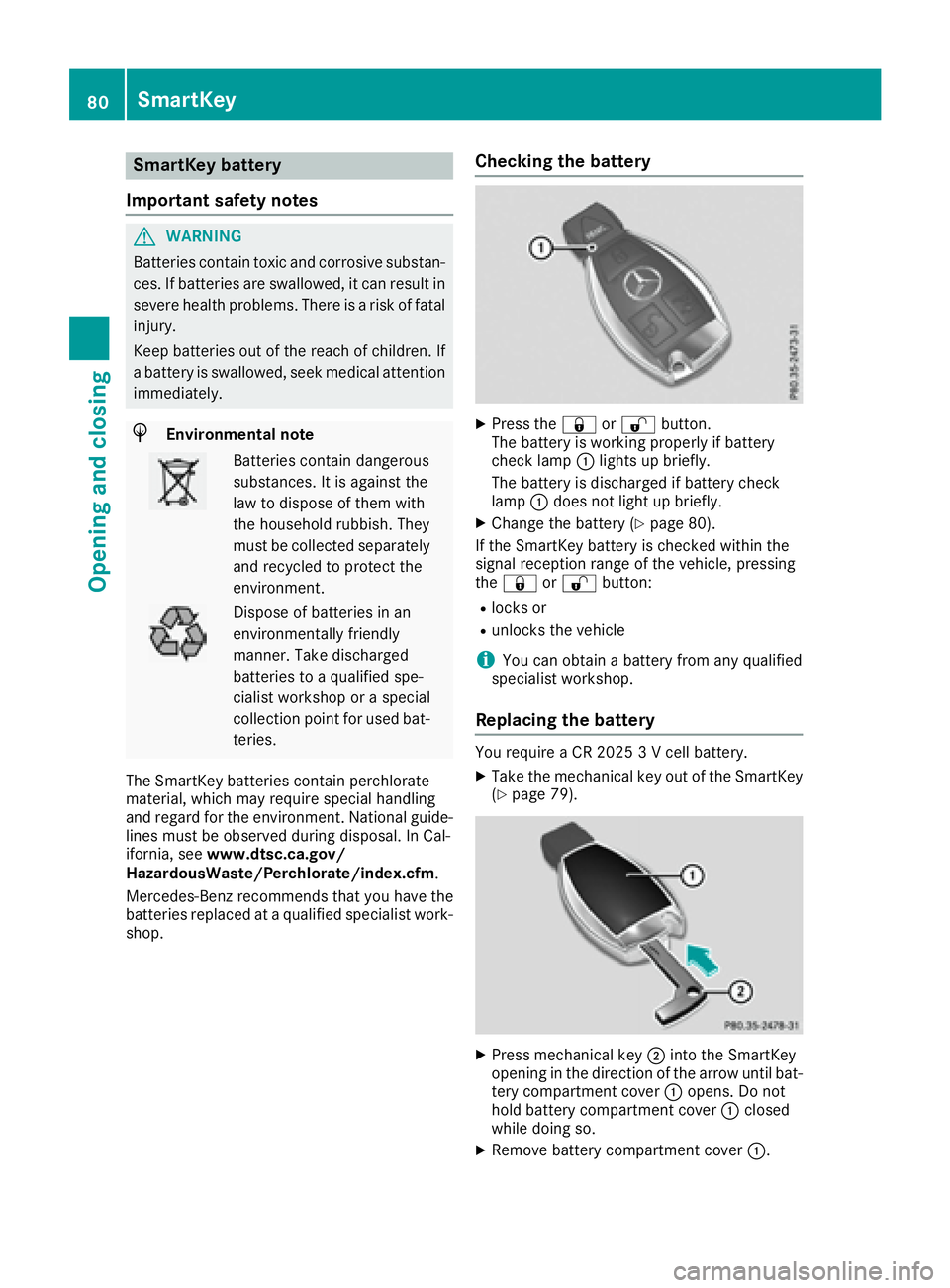
Press the 7 or 6 button.
The battery is working properly if battery
check lamp C lights up briefly.
The battery is discharged if battery check
lamp C does not light up briefly. X
Change the battery ( Y
page 80).
If the SmartKey battery is checked within the
signal reception range of the vehicle, pressing
the 7 or 6 button: R
locks or R
unlocks the vehicle
i You can obtain a battery from any qualified
specialist workshop.
Replacing the battery You require a CR 2025 3 V cell battery. X
Take the mechanical key out of the SmartKey
( Y
page 79).
X
Press mechanical key D into the SmartKey
opening in the direction of the arrow until bat-
tery compartment cover C opens. Do not
hold battery compartment cover C closed
while doing so. X
Remove battery compartment cover C .80
SmartKey
Opening and closing