2017 MERCEDES-BENZ S-Class MAYBACH instrument cluster
[x] Cancel search: instrument clusterPage 192 of 382
Surroundingsmessage appears in the mul-
tifunction display.
iYou will achieve the best results by waiting
for the steering procedure to complete before
pulling away.
If you back up after activation, the steering
wheel is moved to the straight-ahead posi-
tion.
XDrive forwards and back up as prompted by
the PARKTRONIC warning displays, several
times if necessary.
Once you have exited the parking space com-
pletely, the steering wheel is moved to the
straight-ahead position. You hear a tone and the
Park
AssistSwitchedOffmessage appears
in the multifunction display. You will then have
to steer and merge into traffic on your own.
PARKTRONIC is still available. You can take over
the steering before the vehicle has exited the
parking space completely. This is useful if you
recognize that it is already possible to pull out of
the parking space.
Canceling Active Parking Assist
XStop the movement of the multifunction
steering wheel or steer yourself.
Active Parking Assist will be canceled at once.
The Park Assist Canceled
message
appears in the multifunction display.
or
XPress the PARKTRONIC button (Ypage 185).
PARKTRONIC is switched off and Active Park-
ing Assist is immediately canceled. The Park
Assist Canceledmessage appears in the
multifunction display.
Active Parking Assist is canceled automatically
if:
Rthe electric parking brake is engaged
Rtransmission position Pis selected
Rparking using Active Parking Assist is no lon-
ger possible
Ryou are driving faster than 6 mph (10 km/h)
Ra wheel spins, ESP®intervenes or fails. The
÷ warning lamp lights up in the instrument
cluster
A warning tone sounds. The parking symbol dis-
appears and the multifunction display shows the
Park Assist Canceled
message.
When Active Parking Assist is canceled, you
must steer and brake again yourself. If a system malfunction occurs, the vehicle is
braked to a standstill. To drive on, depress the
accelerator again.
Rear view camera
General notes
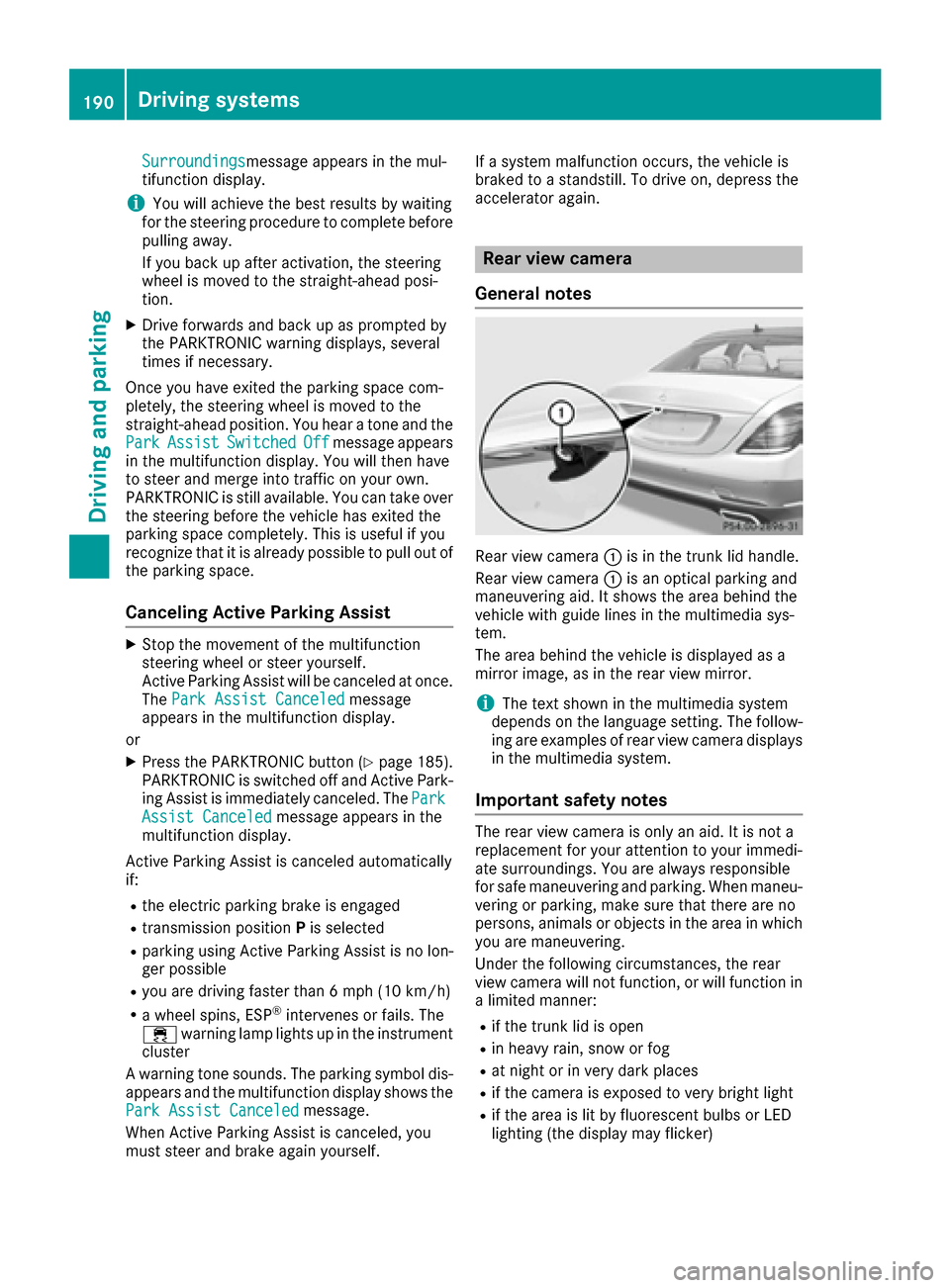
Rear view camera :is in the trunk lid handle.
Rear view camera :is an optical parking and
maneuvering aid. It shows the area behind the
vehicle with guide lines in the multimedia sys-
tem.
The area behind the vehicle is displayed as a
mirror image, as in the rear view mirror.
iThe text shown in the multimedia system
depends on the language setting. The follow- ing are examples of rear view camera displays
in the multimedia system.
Important safety notes
The rear view camera is only an aid. It is not a
replacement for your attention to your immedi-
ate surroundings. You are always responsible
for safe maneuvering and parking. When maneu-
vering or parking, make sure that there are no
persons, animals or objects in the area in whichyou are maneuvering.
Under the following circumstances, the rear
view camera will not function, or will function in
a limited manner:
Rif the trunk lid is open
Rin heavy rain, snow or fog
Rat night or in very dark places
Rif the camera is exposed to very bright light
Rif the area is lit by fluorescent bulbs or LED
lighting (the display may flicker)
190Driving systems
Driving and parking
Page 201 of 382
XCallup the assistance graphic and select
ATTENTION AS SIST(Ypage 221).
The foll owing information appears:
RLength of the journey since the last break.
RThe attention level determined byATTENTION
AS SIST (Attention Level),displ ayed ina
bar displ ayinfive leve lsfrom high to low
RIfATTENTION AS SIST isunableto calculate
the attention level and cannot issue a warn-
ing, the System Suspended
message
appears. The bar display then changes the
displ ay, e.g. ifyou are driving at a speed below
37 mph (60 km/h) or above 124 mph
(200 km/h).
Activating ATTENTION ASSIST
XActivate ATTENTION AS SISTusing the on-
board computer (Ypage 223).
The system determines the attention level of
the driver dependin g on the setting selected:
If Standard
is selected: the sensitivit ywit h
whic h the system determines the attention level
is set to normal.
If Sensitive
is selected: the sensitivit yis set
higher. The attention level detected byAttention
Assist isadapted according lyand the driveris
warned earlier.
When ATTENTION AS SIST isdeactivate d,the
é symbol appears inthe multifunction dis-
play in the assistance graphic display.
When ATTENTION AS SISThas been deactivate d,
it is automatically reactivated after the engine
has been stopped. The sensitivity selected cor-
responds to the last selection activated ( Stand‐
ard/Sensitive).
Warning in the multifunction display
If fatigue or increasing lapses inconcentration
are detected, a warning appears inthe mult i-
function display:ATTENTION
ASSIST:TakeaBreak!.
In addit ion to the message shown in the multi-
function display, you willthen hear a warning
tone.
XIf necessary, take a break.
XConfirm the message bypressing the a
button on the steering wheel.
On long journeys, take regular breaks ingood
time to allow yourself to rest properly. Ifyou do
not take a break and ATTENTION AS SISTcon- tinues to detect increasing lapses
inconcentra-
tion, you will bewarned again after 15 minutes
at the earliest. This will only happen ifATTEN-
TION ASSI STstill detects typical indicators of
fatigue or increasing lapses inconcentration.
If a warning is given in the multifunction display,
the multimedia system offers a service station
search. You can select a service station and
navigation to th isservice station will then begin.
This function can beactivated and deactivated
in the multimedia system.
Traffic Sign Assist
General notes
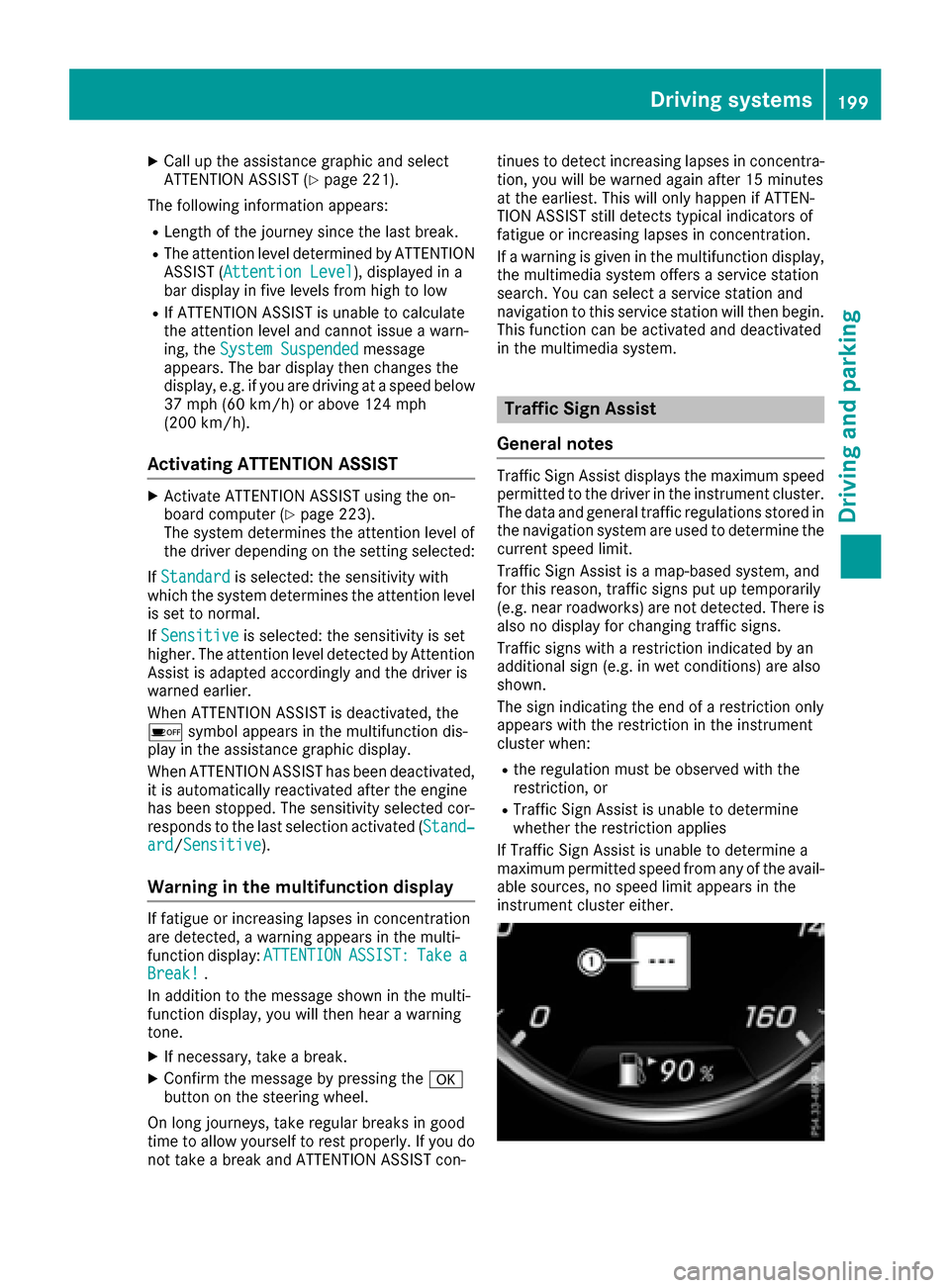
Traffic Sign Assist displays the maximum speed
permitted to the driver in the instrument cluster.
The data and general traffic regulations stored in
the navigation system are used to determine the
current speed limit.
Traffic Sign Assist isa map-based system, and
for th isreason, traffic signs put up temporarily
(e.g. near roadworks) are not detected. There is also no display for changing traffic signs.
Traffic signs with a restriction indicated by an
additional sign (e.g. in wet conditions) are also
shown.
The sign indicating the end of a restriction only
appears with the restriction inthe instrument
cluster when:
Rthe regulation must be observed with the
restriction, or
RTraffic Sign Assist isunable to determine
whether the restriction applies
If Traffic Sign Assist is unable to determine a
maximum permitted speed from any of the avail-
able sources, no speed limit appears in the
instrument cluster either.
Driving systems199
Driving and parking
Z
Page 202 of 382
Traffic Sign Assist is not available in all coun-
tries. In this case, display:appears in the
assistance graphic (
Ypage 221).
Important safety notes
Traffic Sign Assist is only an aid and is not always
able to correctly display speed limits. Traffic
signs always have priority over the Traffic Sign
Assist display.
The system may be either functionally impaired
or temporarily unavailable if the information in
the digital street map of the navigation system is
incorrect or out of date.
Activating Traffic Sign Assist
XActivate the Traffic Sign Assist display using
the on-board computer (Ypage 222).
If you have activated the Traffic Sign Assist dis-
play in the on-board computer, the traffic regu-
lations (speed limits and overtaking restrictions)
appear in the instrument cluster for five seconds in each case. The wrong-way warning and the
traffic sign display for speed limits and overtak-
ing restrictions remain active even when the
display has been deactivated.
Instrument cluster display
Displaying the assistance graphic
XCall up the assistance graphics display func-
tion using the on-board computer
(
Ypage 221).
Detected traffic signs appear in the instru-
ment cluster.
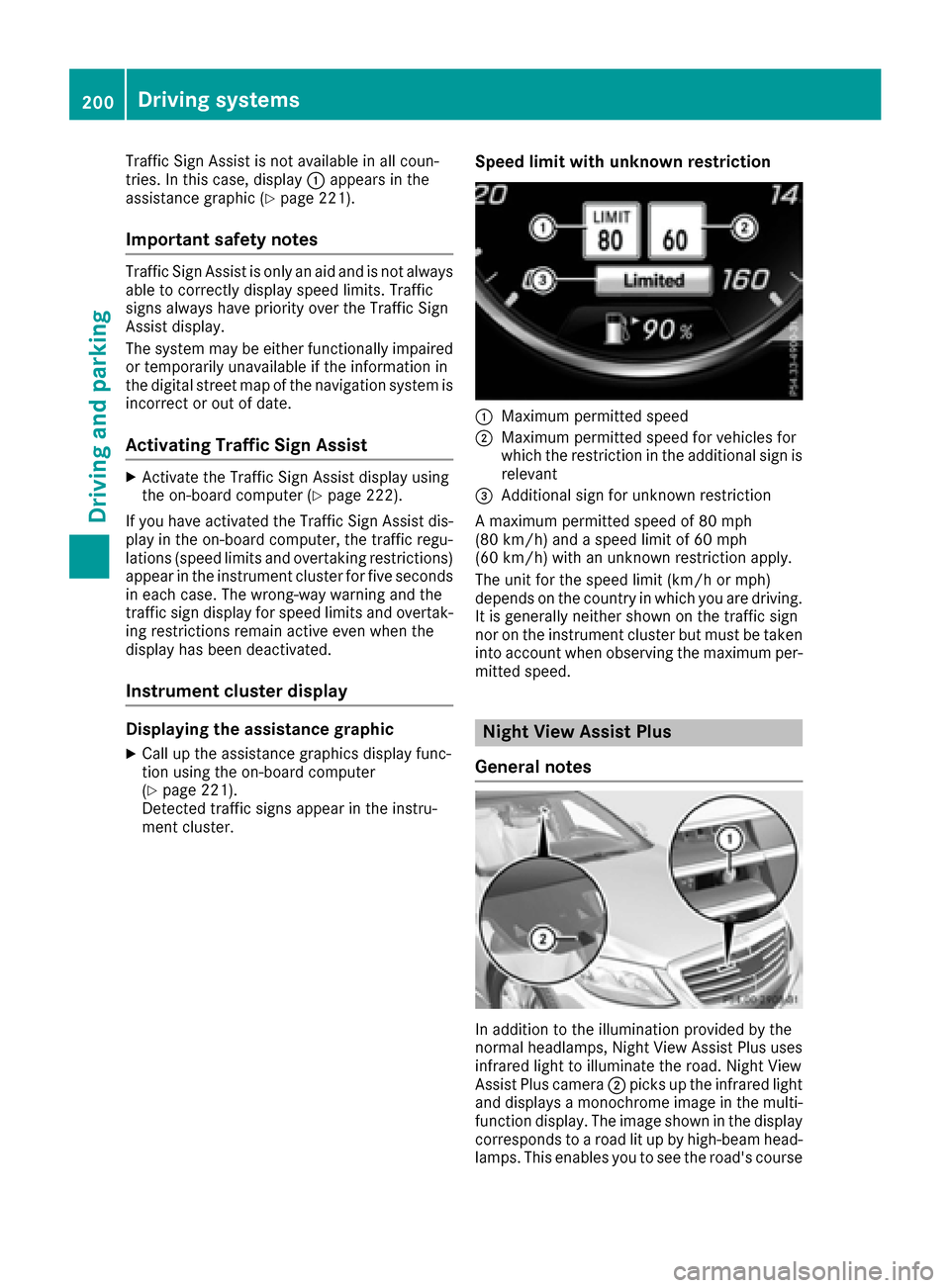
Speed limit with unknown restriction
:Maximum permitted speed
;Maximum permitted speed for vehicles for
which the restriction in the additional sign is relevant
=Additional sign for unknown restriction
A maximum permitted speed of 80 mph
(80 km/h) and a speed limit of 60 mph
(60 km/h) with an unknown restriction apply.
The unit for the speed limit (km/h or mph)
depends on the country in which you are driving. It is generally neither shown on the traffic sign
nor on the instrument cluster but must be taken
into account when observing the maximum per-
mitted speed.
Night View Assist Plus
General notes
In addition to the illumination provided by the
normal headlamps, Night View Assist Plus uses
infrared light to illuminate the road. Night View
Assist Plus camera ;picks up the infrared light
and displays a monochrome image in the multi- function display. The image shown in the display
corresponds to a road lit up by high-beam head-
lamps. This enables you to see the road's course
200Driving systems
Driving and parking
Page 212 of 382

Important safety notes
GWARNING
If you operate information systems and com-
munication equipmen tintegrate din th evehi-
cle while driving ,you will be distracte dfrom
traffic conditions. You could also lose control
of th evehicle. Ther eis aris kof an accident.
Only operate th eequipmen twhen th etraffic
situation permits. If you are no tsur ethat this
is possible ,park th evehicl epayin gattention
to traffic condition sand operate th eequip-
men twhen th evehicl eis stationary.
You must observ eth elegal requirements for th e
country in whic hyou are currentl ydriving when
operating th eon-board computer.
GWARNIN G
If th einstrumen tcluste rhas faile dor mal-
functioned, you may no trecognize function
restriction sin systems relevan tto safety. The
operating safet yof your vehicl emay be
impaired .Ther eis aris kof an accident.
Drive on carefully. Hav eth evehicl echecke d
at aqualified specialist workshop immedi-
ately.
If th eoperating safet yof your vehicl eis
impaired ,pull ove ras soo nas it is saf eto do so.
Contac t aqualified specialist workshop.
The on-board computer only shows message sor
warning sfrom certain systems in th emultifunc-
tion display. You should therefor emak esur e
your vehicl eis operating safely at all times .
Fo ran overview, see th einstrumen tpanel illus-
tration (
Ypage 35).
Hybrid vehicles: makesur ethat you read th e
separat eOperator's Manual. Otherwise, you
may no trecognize dangers.
Displays and operation
Instrument cluster lighting
The ligh tsensor in th einstrumen tcluste rauto -
matically control sth ebrightness of th emulti-
function display. In daylight, th edisplays in th einstrumen
tcluste rare illuminated. Adimming
function is no tpossible in daylight.
The lighting in th einstrumen tcluster, in th edis-
plays and th econtrol sin th evehicl einterior can
be adjusted usin gth ebrightness control knob.
The brightness control is locate dbetween th e
instrumen tcluste rand th emultimedia system
display (
Ypage 36).
XTurn thebrightness control knob clockwise or
counter-clockwise.
If you tur nth eligh tswitch (
Ypage 124) to th e
T, ÃorL position ,th ebrightness
will depend upon th ebrightness of th eambi -
en tlight.
Speedometer segments
The segments in th espeedometer indicat e
whic hspee drange is available.
RCruis econtrol activated (Ypage 169):
The segments ligh tup from th estore dspee d
to th een dof th escale.
RDISTRONI CPLU Sactivated (Ypage 171):
On eor two segments in th eset spee drange
ligh tup.
RDISTRONI CPLU Sdetects avehicl ein fron t
moving mor eslowly than th estore dspeed:
The segments between th espee dof th evehi-
cle in fron tand th estore dspee dligh tup.
Tachometer
!
Do no tdriv ein th eoverrevving range, as this
could damag eth eengine.
The red ban din th etachometer indicates th e
engine's overrevving range.
The fuel suppl yis interrupted to protect th e
engin ewhen th ered ban dis reached.
Outside temperature display
You should pay special attention to road condi-
tion swhen temperatures are aroun dfreezing
point.
Bea rin min dthat th eoutside temperature dis-
play indicates th etemperature measured and
does no trecord th eroad temperature.
The outside temperature display is in th emulti-
function display (
Ypage 212).
210Displays and operation
On-board computer and displays
Page 213 of 382
There is a short delay before a change in outside
temperature is shown in the multifunction dis-
play.
Coolant temperature gauge
GWARNING
Opening the hood when the engine is over-
heated or when there is a fire in the engine
compartment could expose you to hot gases
or other service products. There is a risk of
injury.
Let an overheated engine cool down before
opening the hood. If there is a fire in the
engine compartment, keep the hood closed
and contact the fire department.
!A display message is shown if the coolant
temperature is too high.
If the coolant temperature is above 257 ‡
(125 †) do not drive any further. The engine
will otherwise be damaged.
The coolant temperature gauge is in the lower
section of the tachometer (
Ypage 35).
Under normal operating conditions and with the
specified coolant level, the coolant temperature
may rise to 255 ‡ (124 †).
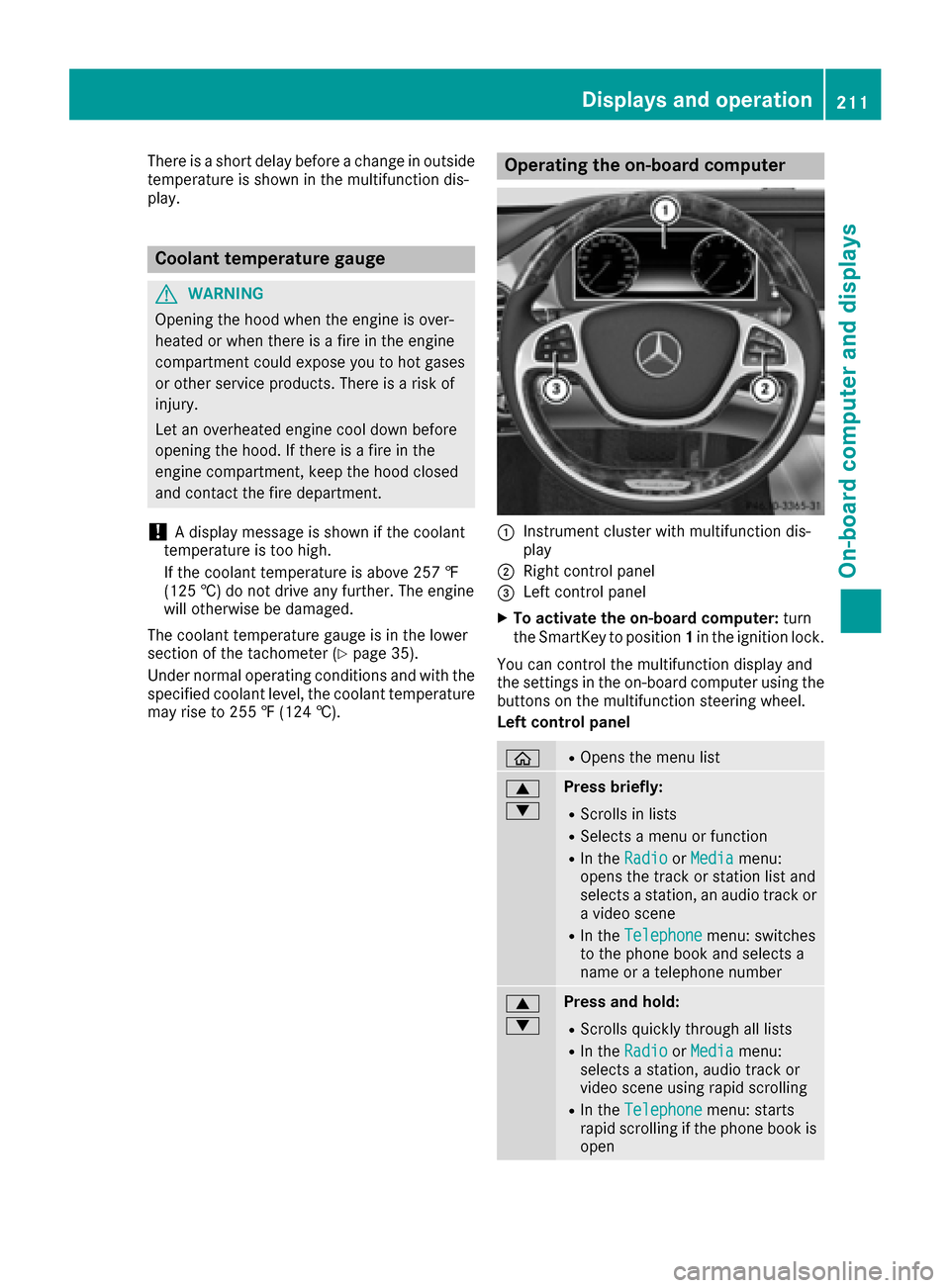
Operating the on-board computer
:Instrument cluster with multifunction dis-
play
;Right control panel
=Left control panel
XTo activate the on-board computer: turn
the SmartKey to position 1in the ignition lock.
You can control the multifunction display and
the settings in the on-board computer using the
buttons on the multifunction steering wheel.
Left control panel
òROpens the menu list
9
:Press briefly:
RScrolls in lists
RSelects a menu or function
RIn the RadioorMediamenu:
opens the track or station list and
selects a station, an audio track or
a video scene
RIn the Telephonemenu: switches
to the phone book and selects a
name or a telephone number
9
:Press and hold:
RScrolls quickly through all lists
RIn the RadioorMediamenu:
selects a station, audio track or
video scene using rapid scrolling
RIn the Telephonemenu: starts
rapid scrolling if the phone book is
open
Displays and operation211
On-board computer and displays
Z
Page 224 of 382

XUse: or9 to select the DriveAssistsubmenu.
XPressato confirm your selection.
XPress the :or9 button to select ESP.
XPressato confirm.
The current selection appears.
XTo activate/deactivate: press theabut-
ton again.
ESP
®is deactivated if the åwarning lamp in
the instrument cluster lights up continuously
when the engine is running.
If the ÷ warning lamp lights up continuously,
ESP
®is not available due to a malfunction.
Observe the information on warning lamps
(
Ypage 261).
Observe the information on display messages
(
Ypage 228).
Automatic activation of Night View Assist
Plus
XPress òon the steering wheel to open the
menu list.
XPress :or9 on the steering wheel to
select the Settingsmenu.
XConfirm by pressing aon the steering
wheel.
XUse : or9 to select the DriveAssistsubmenu.
XPressato confirm your selection.
XPress the :or9 button to select
Night View Assist.
XPress ato confirm.
The current selection appears.
XTo activate/deactivate: press theabut-
ton again.
If Night View Assist Plus automatic activation is switched on, the night vision image is automat-
ically shown in the multifunction display if an
object is detected (
Ypage 202).
For further information about Night View Assist
Plus (
Ypage 200).
Activating/deactivating Traffic Sign
Assist
Under certain conditions, the Traffic SignAssistfunction allows you to choose if traffic
signs and messages should be displayed in the
lower part of the speedometer.
XPress the òbutton on the steering wheel
to open the menu list.
XPress :or9 on the steering wheel to
select the Settingsmenu.
XConfirm by pressing aon the steering
wheel.
XUse : or9 to select the DriveAssistsubmenu.
XPressato confirm your selection.
XPress the :or9 button to select
Traffic Sign Assist.
XPress ato confirm.
The current selection appears.
XTo activate/deactivate: press theabut-
ton again.
Traffic signs and messages appear in the
lower part of the speedometer if the function
is activated.
For further information about Traffic Sign Assist,
see (
Ypage 199).
Activating/deactivating COLLISION PRE-
VENTION ASSIST PLUS
XPress the òbutton on the steering wheel
to open the menu list.
XPress :or9 on the steering wheel to
select the Settingsmenu.
XConfirm by pressing aon the steering
wheel.
XUse : or9 to select the DriveAssistsubmenu.
XPressato confirm your selection.
XPress the 9or: button to select Col‐lision Prevention.
XPressato confirm.
The current selection appears.
XTo activate/deactivate: pressaagain.
When COLLISION PREVENTION ASSIST PLUS is
deactivated, the æsymbol appears in the
multifunction display in the Assistance
Graphicmenu.
For further information about COLLISION PRE-
VENTION ASSIST PLUS, see (
Ypage 68).
222Menus and submenus
On-board computer and displays
Page 227 of 382
Light submenu
Switching the spotlight function on/off
XPressòon the steering wheel to open the
menu list.
XPress :or9 on the steering wheel to
select the Settingsmenu.
XConfirm by pressing aon the steering
wheel.
XPress :or9 to select the Lightssubmenu.
XPressato confirm.
XPress the :or9 button to select the
Spotlightfunction.
XPress the abutton to save the setting.
When the spotlight function is activated, the
assistance graphic shows the pedestrian
symbol.
Further information on the spotlight function
(
Ypage 202).
Switching the daytime running lamps on/ off
This function is not available in Canada.
XPress the òbutton on the steering wheel
to open the menu list.
XPress :or9 on the steering wheel to
select the Settingsmenu.
XConfirm by pressing aon the steering
wheel.
XUse : or9 to select the Lightssub-
menu.
XPress ato confirm.
XUsing :or9, select the DaytimeRunning Lightsfunction.
If the DaytimeRunningLightsfunction has
been switched on, the cone of light in the
multifunction display is shown in white and
blue.
XPress the abutton to save the setting.
Further information on daytime running lamps
Daytime Running Lights
(Ypage 124).
Instrument cluster submenu
Selecting the distance unit
The DisplayUnitSpeed-/Odometerfunction
allows you to choose whether certain displays
appear in kilometers or miles in the multifunc-
tion display.
XPress the òbutton on the steering wheel
to open the menu list.
XPress the :or9 button on the steering
wheel to select the Settingsmenu.
XConfirm by pressing aon the steering
wheel.
XPress :or9 to select the Instru‐ment Clustersubmenu.
XPressato confirm.
XPress the :or9 button to select the
Display Unit Speed-/Odometerfunction.
The current setting kmorMilesappears.
XPress the abutton to save the setting.
The selected unit of measurement for distance
applies to:
Rspeedometer
Rdigital speedometer in the Tripmenu
Radditional speedometer in the status area on
the multifunction display
The unit in the additional speedometer is dis-
played inversely to the selected distance unit.
Rthe odometer and trip odometer
Rthe trip computer
Rthe current consumption and the range
Rnavigation instructions in the Navimenu
Rcruise control
RSPEEDTRONIC
RDISTRONIC PLUS
RDISTRONIC PLUS with Steering Assist and
Stop&Go Pilot
RASSYST PLUS service interval display
Switching the additional speedometer
on/off
TheAdditional Speedometer [km/h]func-
tion allows you to choose whether the status
area in the multifunction display shows the
speed digitally. The unit in the additional speed-
ometer is always inverse to the speedometer
unit.
XPress òon the steering wheel to open the
menu list.
XPress :or9 on the steering wheel to
select the Settingsmenu.
XConfirm by pressing aon the steering
wheel.
XPress :or9 to select the Instru‐ment Clustersubmenu.
XPressato confirm your selection.
Menus and submenus225
On-board computer and displays
Z
Page 230 of 382

Safety systems
Display messagesPossible causes/consequences andMSolutions
!÷
Currently Unavaila‐ble See Operator'sManual
ABS (Anti-lock Braking System) and ESP®(Electronic Stability Pro-
gram) are temporarily not available.
Other driving systems and driving safety systems may also malfunc-
tion.
In addition, the ÷and! warning lamps light up in the instru-
ment cluster.
ATTENTION ASSIST is deactivated.
For example, the on-board voltage may be insufficient.
GWARNING
The brake system continues to function normally, but without the
functions listed above. The wheels could therefore lock if you brake
hard, for example.
The steerability and braking characteristics may be severely affected.
The braking distance in an emergency braking situation can increase.
If ESP
®is not operational, ESP®is unable to stabilize the vehicle.
There is an increased risk of skidding and an accident.
XDrive on carefully.
Carefully drive a suitable distance, making slight steering move-
ments at a speed above 12 mph (20 km/h).
If the display message disappears, the functions mentioned above are available again.
If the multifunction display still shows the display message:
XDrive on carefully.
XVisit a qualified specialist workshop immediately.
!÷
Inoperative SeeOperator's Manual
ABS and ESP®are malfunctioning.
Other driving systems and driving safety systems may also malfunc-
tion.
The $ (USA only) or J(Canada only), ÷and! warning
lamps in the instrument cluster may also light up.
GWARNING
The brake system continues to function normally, but without the
functions listed above. The wheels could therefore lock if you brake
hard, for example.
The steerability and braking characteristics may be severely affected.
The braking distance in an emergency braking situation can increase.
If ESP
®is not operational, ESP®is unable to stabilize the vehicle.
There is an increased risk of skidding and an accident.
XDrive on carefully.
XVisit a qualified specialist workshop immediately.
228Display messages
On-board computer and displays