2017 MERCEDES-BENZ S-Class COUPE Direct select
[x] Cancel search: Direct selectPage 132 of 338
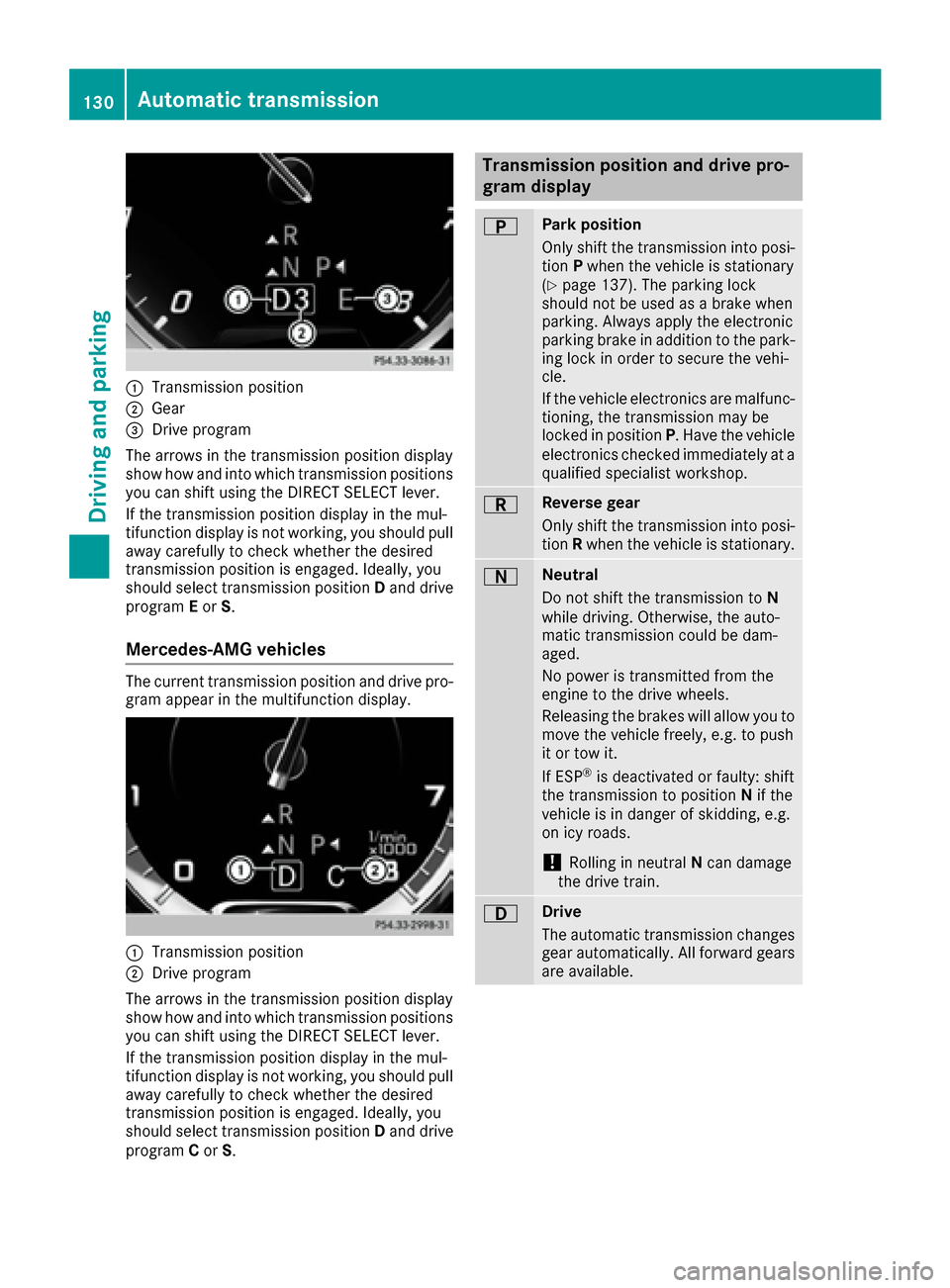
0043Transmission position
0044Gear
0087Drive program
The arrows in the transmission position display
show how and into which transmission positions
you can shift using the DIRECT SELECT lever.
If the transmission position display in the mul-
tifunction display is not working, you should pull
away carefully to check whether the desired
transmission position is engaged. Ideally, you
should select transmission position Dand drive
program Eor S.
Mercedes-AMG vehicles
The current transmission position and drive pro-
gram appear in the multifunction display.
0043Transmission position
0044Drive program
The arrows in the transmission position display
show how and into which transmission positions
you can shift using the DIRECT SELECT lever.
If the transmission position display in the mul-
tifunction display is not working, you should pull
away carefully to check whether the desired
transmission position is engaged. Ideally, you
should select transmission position Dand drive
program Cor S.
Transmission position and drive pro-
gram display
0045Park position
Only shift the transmission into posi-
tion Pwhen the vehicle is stationary
(
Ypage 137). The parking lock
should not be used as a brake when
parking. Always apply the electronic
parking brake in addition to the park-
ing lock in order to secure the vehi-
cle.
If the vehicle electronics are malfunc- tioning, the transmission may be
locked in position P. Have the vehicle
electronics checked immediately at a
qualified specialist workshop.
0046Reverse gear
Only shift the transmission into posi-
tion Rwhen the vehicle is stationary.
0044Neutral
Do not shift the transmission to N
while driving. Otherwise, the auto-
matic transmission could be dam-
aged.
No power is transmitted from the
engine to the drive wheels.
Releasing the brakes will allow you to
move the vehicle freely, e.g. to push
it or tow it.
If ESP
®is deactivated or faulty: shift
the transmission to position Nif the
vehicle is in danger of skidding, e.g.
on icy roads.
!Rolling in neutral Ncan damage
the drive train.
003ADrive
The automatic transmission changes
gear automatically. All forward gears
are available.
130Automatic transmission
Driving and parking
Page 135 of 338
All vehicles (except Mercedes-AMG vehi-
cles:)Mand the selected gear appear in the
multifunction display.
Shifting gears
If you pull on the left or right steering wheel
paddle shifter, the automatic transmission
switches to manual drive programMfor a limi-
ted amount of time. Depending on which steer- ing wheel paddle shifter is pulled, the automatic
transmission immediately shifts into the next
gear down or up, if permitted.
XTo shift up: pull the right-hand steering wheel
paddle shifter (Ypage 132).
The automatic transmission shifts up to the
next gear.
If the maximum engine speed on the currently
engaged gear is reached and you continue to accelerate, the automatic transmission auto-
matically shifts up in order to prevent engine
damage.
Mercedes-AMG vehicles: the automatic
transmission will not shift up to the next gear
when the engine speed is very low.
XTo shift down: pull on the left-hand steering
wheel paddle shifter (Ypage 132).
The automatic transmission shifts down to
the next gear.
If the engine exceeds the maximum engine
speed when shifting down, the automatic
transmission protects against engine damage
by not shifting down.
Automatic down shifting occurs when coast-
ing.
Shift recommendation
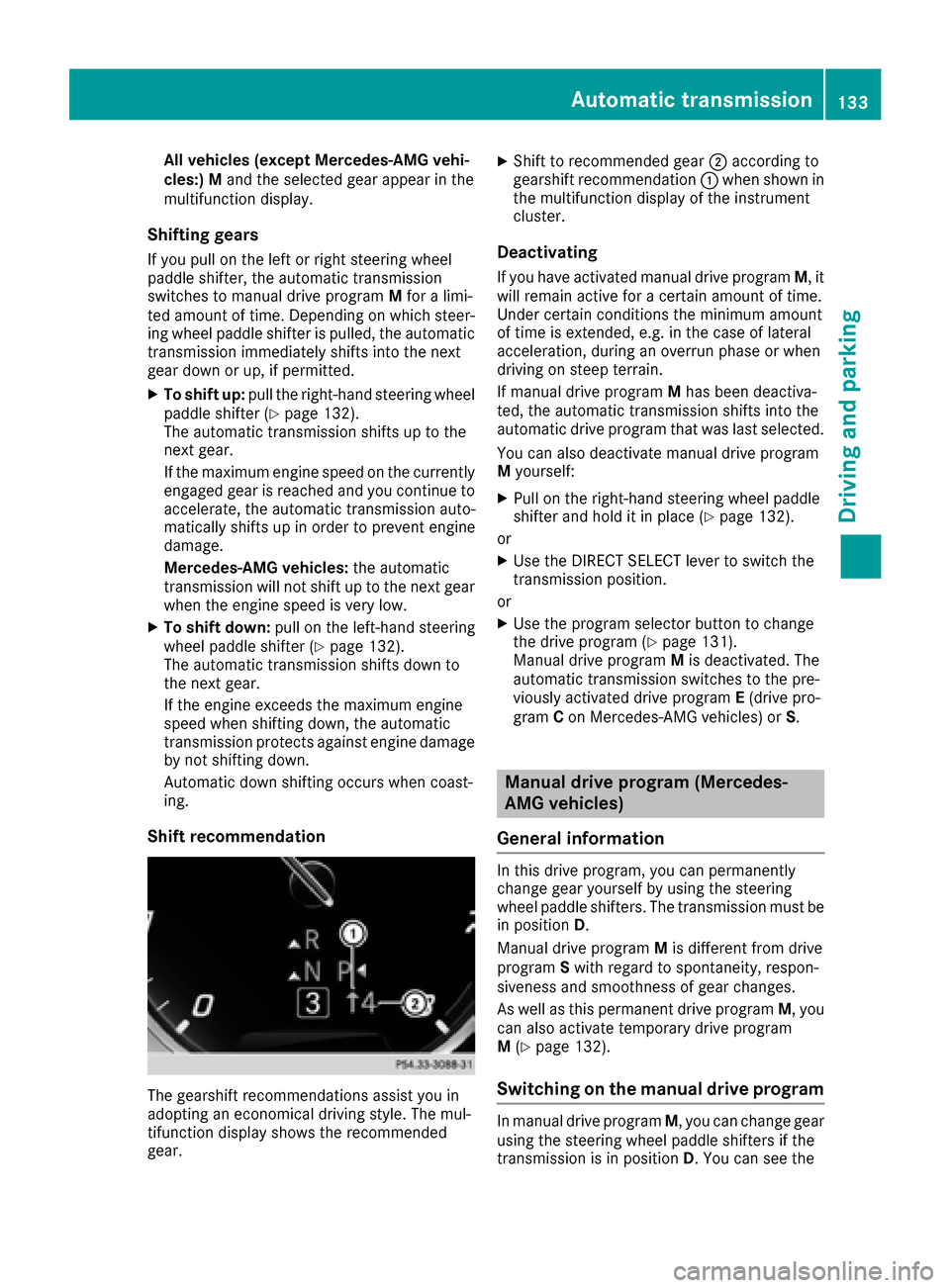
The gearshift recommendations assist you in
adopting an economical driving style. The mul-
tifunction display shows the recommended
gear.
XShift to recommended gear 0044according to
gearshift recommendation 0043when shown in
the multifunction display of the instrument
cluster.
Deactivating
If you have activated manual drive program M, it
will remain active for a certain amount of time.
Under certain conditions the minimum amount
of time is extended, e.g. in the case of lateral
acceleration, during an overrun phase or when
driving on steep terrain.
If manual drive program Mhas been deactiva-
ted, the automatic transmission shifts into the
automatic drive program that was last selected.
You can also deactivate manual drive program
M yourself:
XPull on the right-hand steering wheel paddle
shifter and hold it in place (Ypage 132).
or
XUse the DIRECT SELECT lever to switch the
transmission position.
or
XUse the program selector button to change
the drive program (Ypage 131).
Manual drive program Mis deactivated. The
automatic transmission switches to the pre-
viously activated drive program E(drive pro-
gram Con Mercedes-AMG vehicles) or S.
Manual drive program (Mercedes-
AMG vehicles)
General information
In this drive program, you can permanently
change gear yourself by using the steering
wheel paddle shifters. The transmission must be
in position D.
Manual drive program Mis different from drive
program Swith regard to spontaneity, respon-
siveness and smoothness of gear changes.
As well as this permanent drive program M, you
can also activate temporary drive program
M (
Ypage 132).
Switching on the manual drive program
In manual drive program M, you can change gear
using the steering wheel paddle shifters if the
transmission is in position D. You can see the
Automatic transmission133
Driving and parking
Z
Page 164 of 338

Warning displays
0043Segments on the left-hand side of the vehi-
cle
0044Segments on the right-hand side of the vehi-cle
0087Segments showing operational readiness
The warning displays show the distance
between the sensors and the obstacle. The
warning display for the front area is in the instru-
ment cluster. The warning display for the rear
area is located on the headliner in the rear com-
partment.
The warning display for each side of the vehicle
is divided into five yellow and two red segments.
PARKTRONIC is operational if operational read-
iness indicator 0087lights up.
The selected transmission position and the
direction in which the vehicle is rolling deter-
mine which warning display is active when the
engine is running.
Transmission posi-
tionWarning display
DFront area activated
R, Nor the vehicle is
rolling backwardsRear and front areas
activated
PNo areas activated
One or more segments light up as the vehicle
approaches an obstacle, depending on the vehi-
cle's distance from the obstacle.
From the:
Rsixth segment onwards, you will hear an inter-
mittent warning tone for approximately two
seconds.
Rseventh segment onwards, you will hear a
warning tone for approximately two seconds.
This indicates that you have now reached the minimum distance.
Deactivating/activating PARKTRONIC
0043Indicator lamp
0044Deactivates/activates PARKTRONIC
If indicator lamp 0043is on then PARKTRONIC is
deactivated. Active Parking Assist is then also
deactivated.
iPARKTRONIC is activated automatically
when you switch on the ignition.
162Driving systems
Driving and parking
Page 167 of 338
Rthat are parallel to the direction of travel andat least 39.5 in (1.0 m)longer than your vehi-
cle
Rthat are at right angles to the direction of
travel and at least 39.5 in (1.0 m) wider than
your vehicle
iNote that Active Parking Assist cannot
measure the size of a parking space if it is at
right angles to the direction of travel. You will
need to judge whether your vehicle will fit into the parking space.
When driving at speeds below 19 mph
(30 km/h), you will see the parking symbol as a
status indicator in the instrument cluster. When
a parking space has been detected, an arrow
towards the right or the left also appears. By
default, Active Parking Assist only displays park-
ing spaces on the front-passenger side. Parking
spaces on the driver's side are displayed as
soon as the turn signal on the driver's side is
activated. When parking on the driver's side,
this must remain switched on until you acknowl-
edge the use of Active Parking Assist by press-
ing the 0076button on the multifunction steer-
ing wheel. The system automatically determines
whether the parking space is parallel or at right
angles to the direction of travel.
A parking space is displayed while you are driv-
ing past it, and until you are approximately 50 ft (15 m) away from it.
Parking
GWARNING
If you leave the vehicle when it is only being
braked by Active Parking Assist it could roll
away if:
Rthere is a malfunction in the system or in
the voltage supply.
Rthe electrical system in the engine com-
partment, the battery or the fuses have
been tampered with.
Rthe battery is disconnected.
Rthe accelerator pedal has been depressed,
e.g. by a vehicle occupant.
There is a risk of an accident.
Before leaving the vehicle, always secure it
against rolling away.
iWhen PARKTRONIC detects obstacles,
Active Parking Assist brakes automatically
during the parking process. You are respon-
sible for braking in good time.
XStop the vehicle when the parking space sym- bol shows the desired parking space in the
instrument cluster.
XShift the transmission to position R.
The Start
ParkAssist?Yes:OKNo:0038
message appears in the multifunction display.
XTo cancel the procedure: press the0038
button on the multifunction steering wheel or
pull away.
or
XTo park using Active Parking Assist: press
the 0076 button on the multifunction steering
wheel.
The Park Assist Active Accelerate
and BrakeObserve Surroundingsmes-
sage appears in the multifunction display.
XLet go of the multifunction steering wheel.
XBack up the vehicle, being ready to brake at all
times. When backing up, drive at a speed
below approximately 6 mph (10 km/h). Oth-
erwise Active Parking Assist will be canceled.
Active Parking Assist brakes the vehicle to a
standstill when the vehicle approaches the
rear border of the parking space.
Maneuvering may be required in tight parking
spaces.
The Park
AssistActiveSelect DObserveSurroundingsmessage appears in the multi-
function display.
XShift the transmission to position Dwhile the
vehicle is stationary.
Active Parking Assist immediately steers in
the other direction.
The Park Assist Active Accelerate
and BrakeObserve Surroundingsmes-
sage appears in the multifunction display.
iYou will achieve the best results by waiting
for the steering procedure to complete before
pulling away.
XDrive forwards and be ready to brake at all
times.
Active Parking Assist brakes the vehicle to a
standstill when the vehicle approaches the
rear border of the parking space.
The Park
AssistActiveSelect RObserveSurroundingsmessage appears in the multi-
function display.
Driving systems165
Driving and parking
Z
Page 168 of 338
As soon as the parking procedure is complete,
thePark Assist Switched Offmessage
appears and a warning tone sounds. The vehicle
is now parked. The vehicle is kept stationary
without the driver having to depress the brake
pedal. The braking effect is canceled when you
depress the accelerator pedal.
Active Parking Assist no longer supports you
with steering interventions and brake applica-
tions. When Active Parking Assist is finished,
you must steer and brake again yourself.
PARKTRONIC is still available.
Parking tips:
RThe way your vehicle is positioned in the park- ing space after parking is dependent on vari-
ous factors. These include the position and
shape of the vehicles parked in front and
behind it and the conditions of the location. It
may be the case that Active Parking Assist
guides you too far into a parking space, or not
far enough into it. In some cases, it may also
lead you across or onto the curb. If necessary,
you should cancel the parking procedure with
Active Parking Assist.
RYou can also select preselect transmission
position D. The vehicle redirects and does not
drive as far into the parking space. Should the
transmission change take place too early, the parking procedure will be canceled. A sensi-
ble parking position can no longer be ach-
ieved from this p
osition.
Exiting a parking space
In order that Active Parking Assist can support
you when exiting the parking space:
Rthe border of the parking space must be high
enough at the front and the rear. A curb is too
small, for example.
Rthe border of the parking space must not be
too wide. Your vehicle can be maneuvered
into a position at a maximum of 45° to the
starting position in the parking space.
Ra maneuvering distance of at least 3.3 ft
(1.0
m) must be available .
Active Parking Assist can only assist you with
exiting a parking space if you have parked the
vehicle parallel to the direction of travel using
Active Parking Assist.
iIf PARKTRONIC detects obstacles, Active
Parking Assist brakes automatically whilst the vehicle exits the parking space. You are
responsible for braking in good time.
XStart the engine.
XRelease the electric parking brake.
XSwitch on the turn signal in the direction you
are pulling away.
XShift the transmission to position
Dor R.
The Start
ParkAssist?Yes:OKNo:0038
message appears in the multifunction display.
XTo cancel the procedure:press the 0038
button on the multifunction steering wheel or
pull away.
or
XTo exit a parking space using Active Park-
ing Assist: press the0076button on the mul-
tifunction steering wheel.
The Park Assist Active Accelerate
and BrakeObserve Surroundingsmes-
sage appears in the multifunction display.
XLet go of the multifunction steering wheel.
XPull away, being ready to brake at all times. Do
not exceed a maximum speed of approx-
imately 6 mph (10 km/h) when exiting a park-
ing space. Otherwise Active Parking Assist
will be canceled.
XShift the transmission to position Dor Ras
required or according to the message while
the vehicle is stationary.
Active Parking Assist immediately steers in
the other direction. The Park Assist
Active Accelerate and BrakeObserveSurroundingsmessage appears in the mul-
tifunction display.
iYou will achieve the best results by waiting
for the steering procedure to complete before
pulling away.
If you back up after activation, the steering
wheel is moved to the straight-ahead posi-
tion.
XDrive forwards and back up as prompted by
the PARKTRONIC warning displays, several
times if necessary.
Once you have exited the parking space com-
pletely, the steering wheel is moved to the
straight-ahead position. You hear a tone and the
Park
AssistSwitchedOffmessage appears
in the multifunction display. You will then have
to steer and merge into traffic on your own.
PARKTRONIC is still available. You can take over
the steering before the vehicle has exited the
parking space completely. This is useful if you
166Driving systems
Driving an d parking
Page 187 of 338
No lane-correcting brake application occurs if:
Ryou clearly and actively steer, brake or accel-erate.
Ryou cut the corner on a sharp bend.
Ryou have switched on the turn signal.
Ra driving safety system intervenes, e.g. ESP®,
PRE-SAFE®Brake or Active Blind Spot Assist.
Ryou have adopted a sporty driving style with
high cornering speeds or high rates of accel-
eration.
RESP®is switched off.
Rthe transmission is not in position D.
Ra loss of tire pressure or a defective tire has
been detected and displayed.
Ran obstacle in the lane in which you are driving
has been detected.
Active Lane Keeping Assist may not detect other
road users or traffic situations. An inappropriate
brake application may be interrupted at any time
if you:
Rsteer slightly in the opposite direction.
Rswitch on the turn signal.
Rclearly brake or accelerate.
A lane-correcting brake application is interrup-
ted automatically if:
Ra driving safety system intervenes, e.g. ESP®,
PRE-SAFE®Brake or Active Blind Spot Assist.
Rlane markings can no longer be recognized.
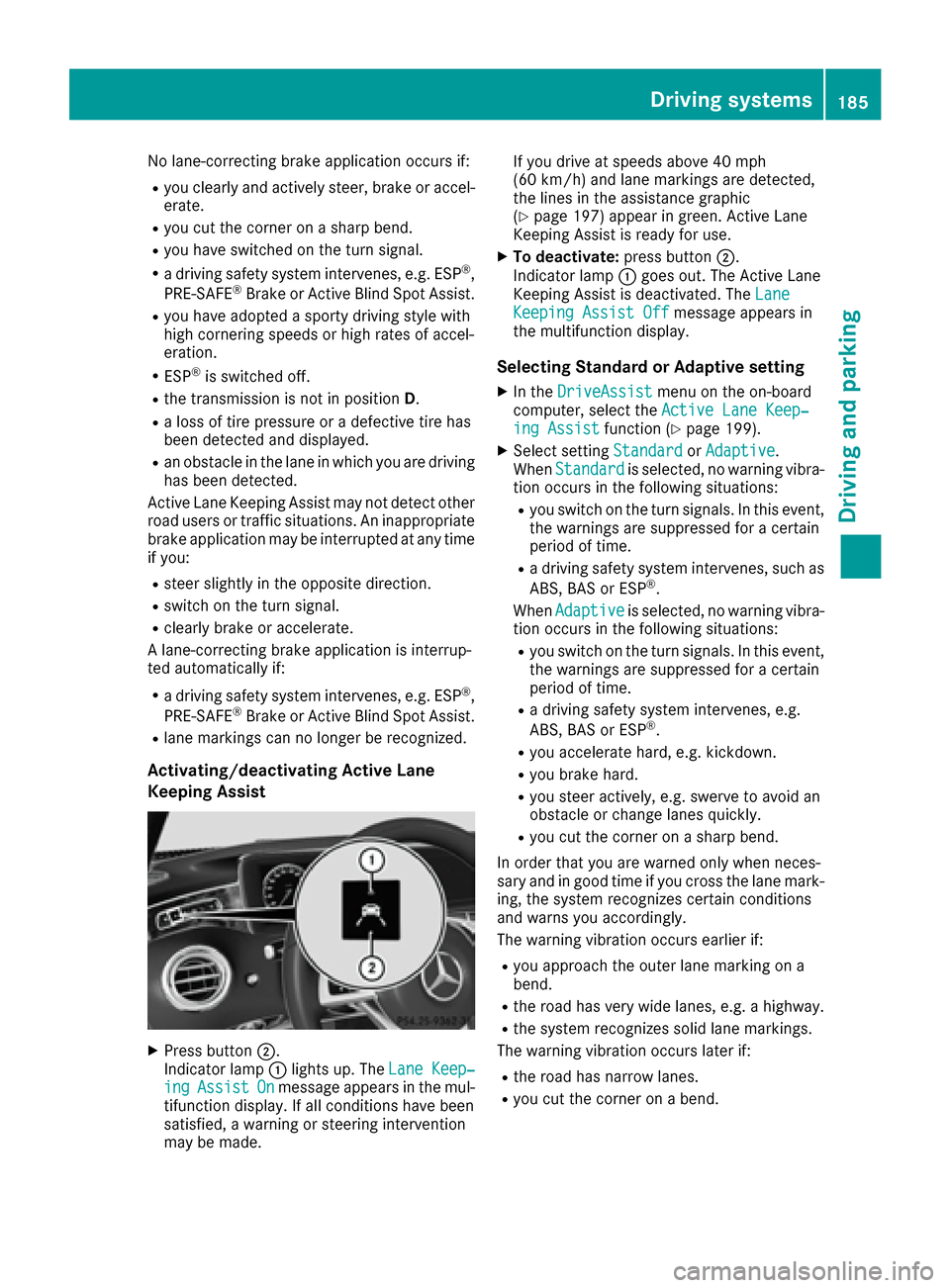
Activating/deactivating Active Lane
Keeping Assist
XPress button 0044.
Indicator lamp 0043lights up. The Lane Keep‐
ingAssistOnmessage appears in the mul-
tifunction display. If all conditions have been
satisfied, a warning or steering intervention
may be made. If you drive at speeds above 40 mph
(60 km/h) and lane markings are detected,
the lines in the assistance graphic
(
Ypage 197) appear in green. Active Lane
Keeping Assist is ready for use.
XTo deactivate: press button0044.
Indicator lamp 0043goes out. The Active Lane
Keeping Assist is deactivated. The Lane
Keeping Assist Offmessage appears in
the multifunction display.
Selecting Standard or Adaptive setting
XIn the DriveAssistmenu on the on-board
computer, select the Active Lane Keep‐
ing Assistfunction (Ypage 199).
XSelect settingStandardorAdaptive.
When Standardis selected, no warning vibra-
tion occurs in the following situations:
Ryou switch on the turn signals. In this event,
the warnings are suppressed for a certain
period of time.
Ra driving safety system intervenes, such as
ABS, BAS or ESP®.
When Adaptive
is selected, no warning vibra-
tion occurs in the following situations:
Ryou switch on the turn signals. In this event,
the warnings are suppressed for a certain
period of time.
Ra driving safety system intervenes, e.g.
ABS, BAS or ESP®.
Ryou accelerate hard, e.g. kickdown.
Ryou brake hard.
Ryou steer actively, e.g. swerve to avoid an
obstacle or change lanes quickly.
Ryou cut the corner on a sharp bend.
In order that you are warned only when neces-
sary and in good time if you cross the lane mark-
ing, the system recognizes certain conditions
and warns you accordingly.
The warning vibration occurs earlier if:
Ryou approach the outer lane marking on a
bend.
Rthe road has very wide lanes, e.g. a highway.
Rthe system recognizes solid lane markings.
The warning vibration occurs later if:
Rthe road has narrow lanes.
Ryou cut the corner on a bend.
Driving systems185
Driving and parking
Z
Page 194 of 338
XPress0064or0063 on the steering wheel to
select the Navimenu.
XConfirm by pressing 0076on the steering
wheel.
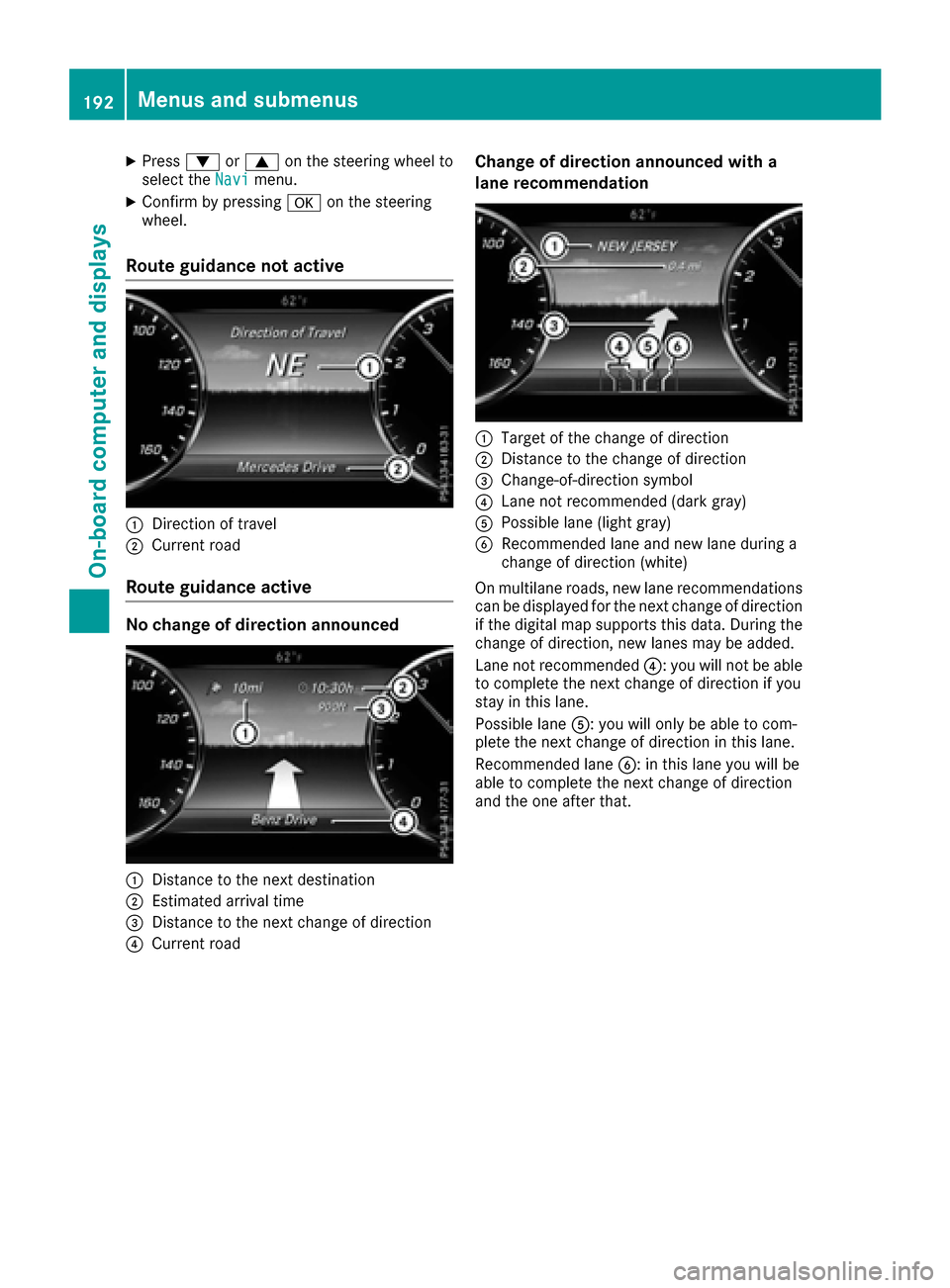
Route guidance not active
0043Direction of travel
0044Current road
Route guidance active
No change of direction announced
0043Distance to the next destination
0044Estimated arrival time
0087Distance to the next change of direction
0085Current road
Change of direction announced with a
lane recommendation
0043Target of the change of direction
0044Distance to the change of direction
0087Change-of-direction symbol
0085Lane not recommended (dark gray)
0083Possible lane (light gray)
0084Recommended lane and new lane during a
change of direction (white)
On multilane roads, new lane recommendations
can be displayed for the next change of direction
if the digital map supports this data. During the
change of direction, new lanes may be added.
Lane not recommended 0085: you will not be able
to complete the next change of direction if you
stay in this lane.
Possible lane 0083: you will only be able to com-
plete the next change of direction in this lane.
Recommended lane 0084: in this lane you will be
able to complete the next change of direction
and the one after that.
192Menus and submenus
On-board computer and displays
Page 195 of 338
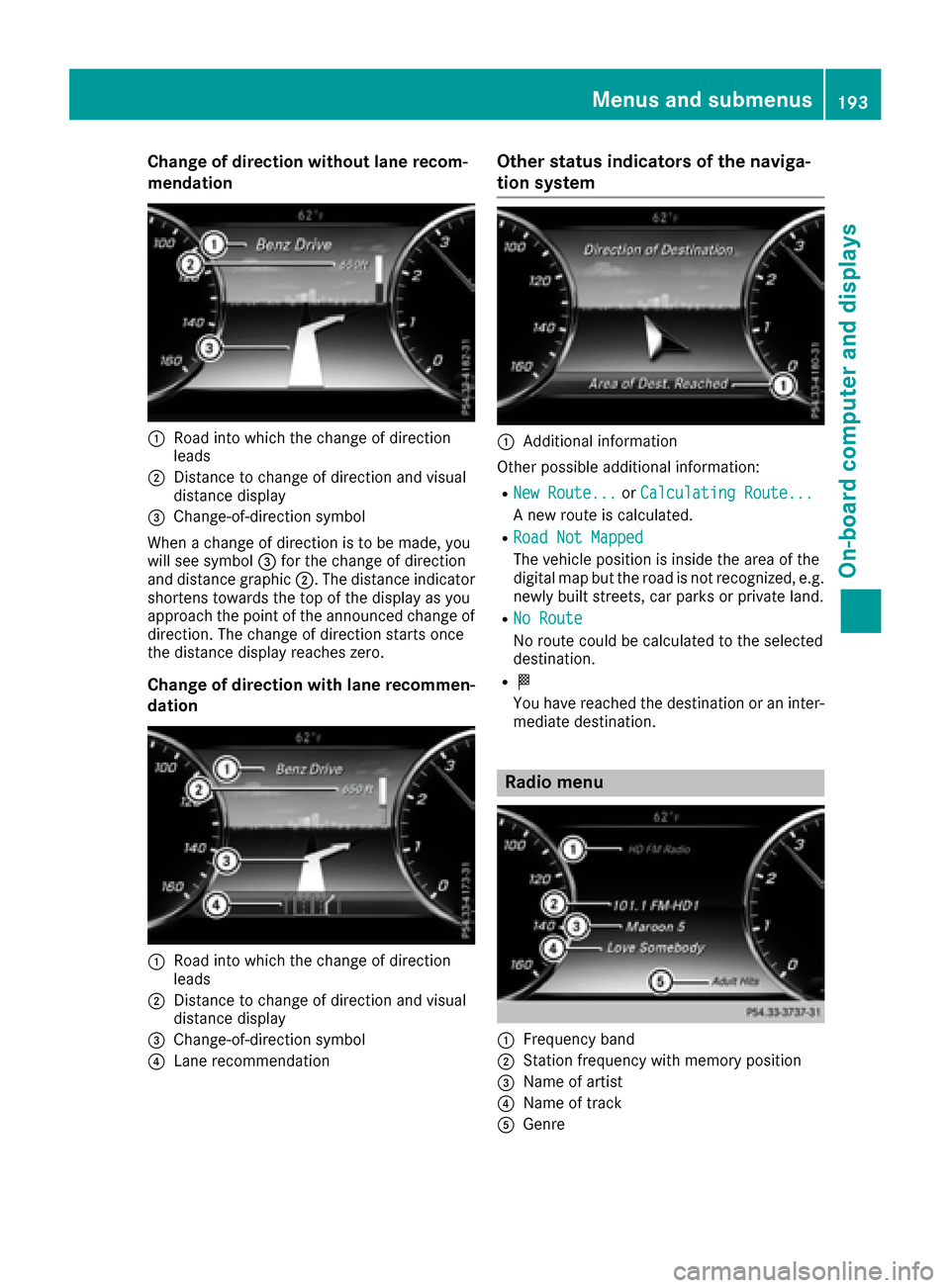
Change of direction without lane recom-
mendation
0043Road into which the change of direction
leads
0044Distance to change of direction and visual
distance display
0087Change-of-direction symbol
When a change of direction is to be made, you
will see symbol 0087for the change of direction
and distance graphic 0044. The distance indicator
shortens towards the top of the display as you
approach the point of the announced change of
direction. The change of direction starts once
the distance display reaches zero.
Change of direction with lane recommen-
dation
0043Road into which the change of direction
leads
0044Distance to change of direction and visual
distance display
0087Change-of-direction symbol
0085Lane recommendation
Other status indicators of the naviga-
tion system
0043Additional information
Other possible additional information:
RNew Route...or Calculating Route...
A new route is calculated.
RRoad Not Mapped
The vehicle position is inside the area of the
digital map but the road is not recognized, e.g.
newly built streets, car parks or private land.
RNo Route
No route could be calculated to the selected
destination.
R004B
You have reached the destination or an inter-
mediate destination.
Radio menu
0043Frequency band
0044Station frequency with memory position
0087Name of artist
0085Name of track
0083Genre
Menus and submenus193
On-board computer and displays
Z