2017 MERCEDES-BENZ S-CLASS CABRIOLET ad blue
[x] Cancel search: ad bluePage 228 of 521
%
This is ho wtochangethe channel on the
media sourc eTV.
Changing them edia source #
Press thel eft-hand Touc hC ontrol. #
Toselect amedia source: swipe upwards
or down wardsont he left-hand Touc hC on‐
trol. #
Press thel eft-hand Touc hC ontrol. Dialling
telephone number susing theo n-
boar dcompu ter Re
quirement:
R The mobile phon eisconnec tedtot he multi‐
media sy stem. On-boar
dcomputer:
, Telephone &
WARNING Risk of di stra ction from infor‐
mation sy stems and communications
equipment
If yo uo perat einformation and communica‐
tio ne quipment integrated in thev ehicle
when driving, youw ill be distracted from the
traf fics ituation. Thi scould also cause youto
lose control of thev ehicle. #
Onlyoperat ethis equipment when the
traf fics ituation permits. #
Ifyo uc anno tbes ureoft his,stop the
ve hicle whils tpaying attention toroad
and traf ficc onditions and ope rate the
equipment wit hthe vehicle stationar y. When
telephoning, youm usto bse rvet he legal
re qu irements fort he countr yinwhichyou are
cur rentl yd riving.
The mos trecen ttelephone connection s(dialled,
re cei veda nd missed calls) ar edispla yedint he
Telephone menu. #
Toselect thet elephone number: swipe
upwards or down wardsont he left-hand
To uc hC ontrol. #
Press thel eft-hand Touc hC ontrol.
If th ereiso nlyo ne telephone number
sa ve dtoane ntry:thet elephone number is
selected. #
Ifth erea remultiple telephone numbers
sa ve dtoane ntry:swipe upwards or down‐
wa rdsont he left-hand Touc hC ontrol to
select thed esired telephon enumber. #
Press thel eft-hand Touc hC ontrol.
The telephon enumber is dialled.
The following displa ysma yappear ins tead of the
te lephon enumber sdialled:
R Please wait... :the applicationiss tarting.
When aBluetooth ®
connection tothem obile
phone is no testablished, them enu for
authorisin gand connectin gamobile phon eis
displa yedint he multimedia sy stem
(→ pag e292).
R Importing contacts... :the contacts from the
mobil ephone or from astorage medium are
being impor ted. Instrument Displa
yand on-boar dcomputer 225
Page 242 of 521
Vo
ice command Function
Text message to
crea team essage. All address book names ar eavailable.
Reply To
reply toam essage
Forward text message To
forw ardam essage Overvie
wofvehicle voice commands Yo
uc an use thev ehicle voice command sto
directly call up thec orresponding menus fort he
ve hicle settings. Vo
ice command Function
Ambien tlight menu To
displa yambient light settings
Ambien tlight blue To
displa ythe blue ambient light
Display and styles menu To
sho wdispla ysettings
Assistance menu To
displa yassis tance settings
Scent menu To
displa yfragrance settings
Energy flow To
displa yenergy flow settings
Ionization menu To
displa yionisation settings LINGU
ATRO NIC 239
Page 254 of 521
#
Select Summer Time. #
Select OnorOff.
Setting the time and dat eformat
Multimedia sy stem:
, System .
& Time and date .
Set
format #
Setthe dat eand time form at#.
Setting thet imem anually
Re quirement:
R The Manual time adjustment function is
switched on.
Multimedia sy stem:
, System .
& Time and date .
Set
time #
Setthe hours. #
Navigat etot heright tosetthe minutes. #
Setthe minutes. #
Confir mchanges when exitin gthe menu.
The dat eissetautomaticall yvia GPS. Connectivity
Setting up
ahotspo tvia business telephony
Multimedia sy stem:
, System .
ö Connectivity .
Set up
hotspot #
Select Select the vehicle's mobile hotspot . #
Select Business phone.
The hotspo tisactive.
Exte rnal devices (e.g. tablets) can be connec‐
te dtot he multimedia sy stem via business
te lephon y.
% Information abouts etting up ahotspot
(→ pag e313).
Swi tchin gtransmission of the vehicl eposi‐
tion on/off
Multimedi asystem:
, System .
ö Connectivity #
Select Transmit vehicle position . #
Switc hthe function on Oor off ª. Blue
tooth ® Information abou
tBluet oo th®
Bl ue tooth ®
tech nology is astandar dfor short-
ra ng ew ireles sdatat ransfer up toappr oximately
10 m.Youc an use Blue tooth®
to connect your
mobile phon etothe multimedia sy stem and use
th ef ollowing functions, fore xamp le:
R hands-free sy stem wit haccess tothef ollow‐
ing options:
- contacts (→ page298)
- call lists (→ page300)
- text messa ges
R Interne tconnection
R listening tomusi cvia Blue tooth®
audio
(→ pag e329)
R trans ferring business cards (vCards) int othe
ve hicle
Blue tooth ®
is ar egis tere dt rademar kofBlue‐
toot hSpecial Interes tGroup (SIG) Inc.
% Interne tconnection via Blue tooth®
is not
av ailable in all countries. Multimedia sy
stem 251
Page 255 of 521

Ac
tivating/deactivatin gBluetooth ®
Requ irement:
R Apple CarPlay™ is no tactive.
Multimedia sy stem:
, System .
ö Connectivity #
Activate Oor deacti vate ª Bluetoo th®
.
If Android Autois active, apromp tappear sask‐
ing whe ther Blue tooth®
should be deactivated. #
Select Yes.
Android Autois closed and Blue tooth®
is
deactivated. Wi
-Fi Wi
-Fic on nectio noverview
Yo uc an use Wi-Fi toestablish aconnection with
aW i-Finetwo rkand toaccess theI nterne tor
ot her networ kdevices.
The following connection option sareavailable:
R Wi-Fi connection The
Wi-Fi connectio ntoaWi-Fi-capable
device ,e.g.t he cus tomer's mobil ephone or
at able tPCise stablished.
R multimedia sy stem as aWi-Fihotspot
Using this function ,atable tPCorn otebook
can be connected, fore xamp le.
To establish aconnection ,you can use thef ol‐
lowing me thods:
R WPS PIN
The connection toas ecur eWi-Finetwo rkis
mad eviaaP IN.
R WPS PBC
The connectio ntoasecureWi-Finetwo rkis
mad ebyp ressing abutton (push button).
R security key
The connection toas ecur eWi-Finetwo rkis
mad eviaas ecu rity key. Setting up
Wi-Fi
Requ irement:
R The device tobe connec teds upports one of
th et hree means of connection described
(→ pag e252).
Multimedia sy stem:
, System .
ö Connectivity
Ac tivating/deactivatin gWi-Fi #
Switch Wi-FionO or off ª.
If Wi-Fi is deacti vatedª,communicatio nvia
Wi -Fi toall devices is inter rupte d. This also
means that ac onnectio ntothe HERMES
communication module canno tbeestab‐
lished. Then function ssuchasd ynamic route
guidance wit hLiveT raffic In form ation ar enot
av ailable.
Connecting them ultimedia sy stem wit ha
device via Wi-Fi
Thi sfunction is available if aHERME Scommuni‐
cation modul eisnotins talled. 252
Multimedia sy stem
Page 275 of 521
option is enabled.
Amessag eappear sand you
will hear acorresponding message.
Selecting notifications
Multimedia sy stem:
, Naviga-
tion .
Z Options .
Announcements #
Switc hannouncements on Oor off ª.
R Announc etraffic warnings
This function is no tavailable in all coun‐
tries.
R Announc estreet names
The multimedia sy stem announces the
names of ther oads that will follo wt he
upcomin gchang eofd irection.
This function is no tavailable in all coun‐
tries and languages.
Displ aying destination information
Requ irements:
R Adestination is entered. Multimedia sy
stem:
, Navigation #
Select Intermediate destinations and info.
The following informatio nisdisplayed:
R intermediat edestinations and destination
The routec an also include up tofour
intermediat edestinations.
R name, address
R remaining driving dis tance
R time of ar rival
Selecting an alternativ eroute
Multimedia sy stem:
, Navigation .
À Route and position #
Select Alternativ eroute.
The routes ar edispl ayed in accordance with
th es etting made in ther out esettings.
The cur rentl ys elected routeiss hown wit ha
dar kblue line. #
Select thea lternativ eroute. Switching
thea utomatic filling station
sear chon/off
Multimedia sy stem:
, Navigation .
Z Options #
Switch Reserve fuel level onO or off ª.
Switched on O:whenthef uel reser velevel
is reached, apromp tappear sasking whe ther
yo uw ant tostar ts ear ching forf illing sta‐
tions.
St arting thea utomatic service station
sear ch
Re quirements:
R ATTENTION ASSIS Tand the Suggest rest
area function ar eactivated (→ page207).
Driving situation
The Attention Assist Do you want to start the
rest area search? messageisshown. #
Select Yes.
The service statio nsear ch st arts.The availa‐
ble servic estations alon gthe routeorint he
vicinity of thev ehicle's cur rent positio nare
displ ayed. 272
Multimedia sy stem
Page 292 of 521
Te
lephone Te
lephony Te
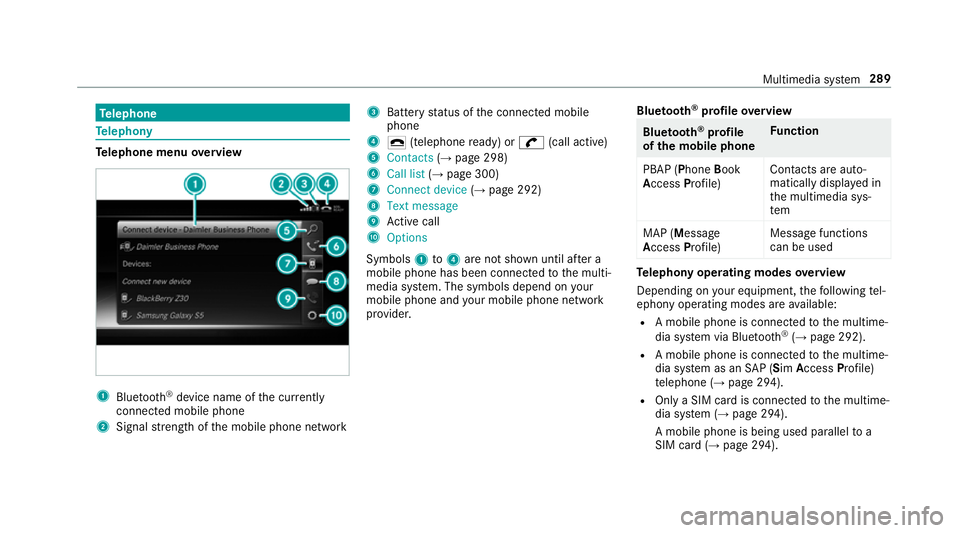
lephone menu overview 1
Blue tooth ®
device name of thec urrently
connected mobil ephone
2 Signal stre ngt hoft he mobile phone network 3
Batter ystatus of thec onnected mobile
phone
4 ¢ (telephone ready) or w(call active)
5 Contacts (→pag e298)
6 Call list (→pag e300)
7 Connec tdevice (→pag e292)
8 Textmessage
9 Activec all
A Options
Symbols 1to4 aren otshown until af tera
mobil ephone has been connected tothem ulti‐
media sy stem. The symbols depend on your
mobile phon eand your mobile phon enetwo rk
pr ov ider. Blu
etoo th®
pr ofile overview Blue
tooth ®
profile
of the mobile phone Fu
nction
PBAP (Phone Book
Access Profile) Contact
sareauto‐
matically displa yedin
th em ultimedia sys‐
tem
MAP (Message
Access Profile) Messag
efunctions
can be used Te
lephon yoperating modes overview
Depending on your equipment ,the following tel‐
ephon yoperatin gmodes ar eavailable:
R Am obile phon eisconnec tedtot he multime‐
dia sy stem via Blue tooth®
(→ pag e292).
R Am obile phone is connec tedtot he multime‐
dia sy stem as an SAP(Sim Acc ess Profile)
te lephon e(→pag e294).
R OnlyaS IM car disconnec tedtot he multime‐
dia sy stem (→ page294).
Am obile phone is being used parallel to a
SIM card (→ page 294). Multimedi
asyst em 289
Page 293 of 521
Note
sont elephony &
WARNING Risk of di stra ction from oper‐
ating integrated communication equip‐
ment while thev ehicle is in motion
If yo uo perat ecommun icationequipment
integrated in thev ehicle when driving, you
will be distracted from thet raffic situation.
This could also cause youtol ose control of
th ev ehicle. #
Onlyoperat ethis equipment when the
traf fics ituation permits. #
Ifyo uc anno tbes ureoft his,stop the
ve hicle whils tpaying attention toroad
and traf ficc onditions and ope rate the
equipment wit hthe vehicle stationar y. &
WARNING Risk of di stra ction from oper‐
ating mobil ecommunication equipment
while thev ehicle is in motion
If yo uo perat ecommun icationequipment
integrated in thev ehicle when driving, you
will be distracted from thet raffic situation. This could also cause
youtol ose control of
th ev ehicle.
Onl yoperat ethis equipment when thev ehi‐
cle is stationar y. Yo
um usto bse rvet he legal requ irements fort he
countr yinwhich youa recur rentl yd riving when
operating mobil ecommunication equipment in
th ev ehicle.
Fu rther information can be obtained from a
Mercedes-BenzS ervice Centreorat:http://
www.mercedes-benz.com/connect.
Information on telephony
The following situations can lead tothec all
being disconnected while thev ehicle is in
motion:
R ther eisi nsufficient networ kcove rage inthe
area
R youm ovef romo ne GSM or UMT Stransmit‐
te r/receiver area (cell )int oa nother and no
communication channels ar efree
R theS IM car dused is no tcompatible wit hthe
networ kavailable R
am obile phon ewith" Twincard" is logged into
th en etwo rkwit hthe second SIM car datthe
same time
HD Voice ®
R Toimpr ovevoice qualit y,them ultimedia sys‐
te ms upports telephon ecalls in HD Voice ®
.
R In order touse this function ,the mobile
phones and them obile phone networ kpro‐
vider of thep erson youa recalling mus tsup‐
por tHDV oice®
.
Depending on theq ualit yoft he connection, the
vo ice qualit ym ayfluctuate.
Connecting amobile phone (Blue tooth ®
te l‐
ephony)
Re quirements:
R Blue tooth ®
is activated on them obile phone
(see them anufacturer's operating instruc‐
tions).
R Blue tooth ®
is activated on them ultimedia
sy stem (→ page252). 290
Multimedia sy stem
Page 294 of 521
Multimedia sy
stem:
, Telephone .
á Connec tdevice
Sear ching foram obilephone #
Select Use Bluetooth telephon yonly. #
Select Connect new device .#
Select Startsearch on the system .
The available mobile phones ar edispla yed. If
an ew mobile phone is found ,itisi ndicated
by the á symbol.
Connecting amobile phone (authorisation
using Secur eSimple Pairing) #
Selec tthe mobile phone.
Ac ode is displa yedint he multimedia sy stem
and on them obile phone. #
Ifth ec odes match: confirm thec ode on
th em obile phone.
Connecting amobile phone (authorisation by
entering apassk ey) #
Select them obile phone. #
Choose aone tosixteen-digit number combi‐
nation as apassk ey. #
On them ultimedia sy stem: enter thep ass‐
ke ya nd select a. #
On them obil ephone: enter thep assk ey
again and con firm.
% Upto15 mobil ephones can be auth orised
on them ultimedia sy stem.
Auth orised mobile phones ar ereconnec ted
au tomatical ly. Using
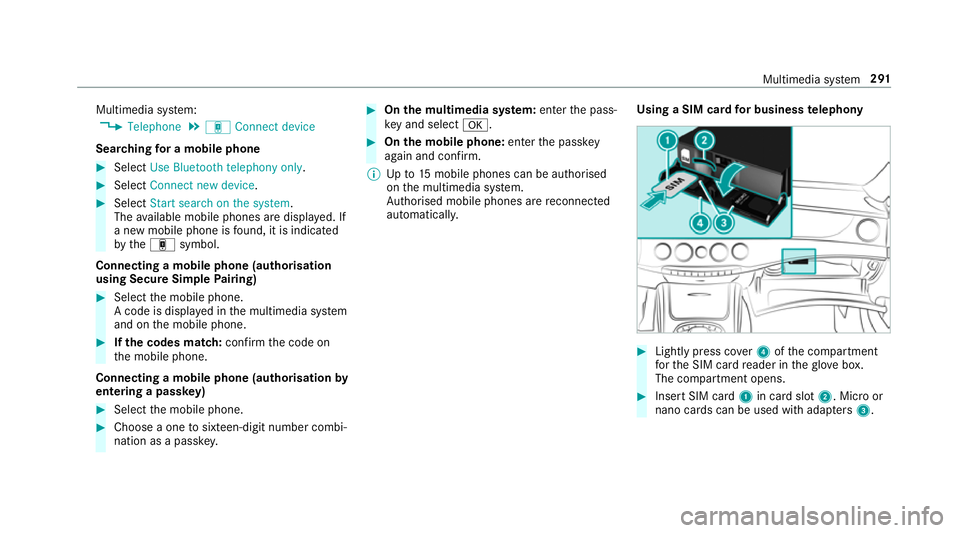
aSIM car dfor business telephony #
Light lypress co ver4ofthec ompartment
fo rt he SIM car dreader in theg love box.
The compartmen topens. #
Inser tSIM card 1in car dslot 2.M icroor
nano cards can be used wit hadap ters 3 . Multimedia sy
stem 291