2017 MERCEDES-BENZ S-CLASS CABRIOLET key
[x] Cancel search: keyPage 142 of 521

&
WARNING Risk offire caused byflam‐
mable material on thee xhau stsystem
Flammable materials brought in byeither ani‐
mals or environmen talinfluences ma yignite
if th ey come int ocontact wi thhotp arts of
th ee ngine or exhaus tsyst em. #
Therefore, checkr egularly that there
ar enof lammable materials in the
engine compartmen torontheexhaust
sy stem. Re
quirements:
R thek eyis located in thev ehicle and thek ey
batter yisnotdischar ged.
R or,ift he "Digital Vehicle Key" function is acti‐
va tedv iatheM ercedes me connect weba pp:
th em obile phone is in stowages pace
(→ pag e142). #
Toswitc hont he powersupp ly:press but‐
ton 1once.
Yo uc an activat ethe windscreen wiper ,for
ex ample.
The po wersupp lyis switched of fagain if thef ol‐
lowing condition sareme t:
R youo pen thed rive r's door.
R youp ress but ton1twice. #
Toswitc hont he ignition: press button1
twice.
The indicator lamps in thei nstrument clus ter
light up.
The ignition is switched of fagain if one of the
fo llowing condition sismet:
R youdon otstar tt he vehicle within
15 minutes.
th et ransmission is in position j.
or
th ee lectric parking brak eisapplied.
R youp ress but ton1once. St
arting thev ehicle St
arting thev ehicle wit hthe start/s topb ut‐
ton
Requ irements:
R The keyisl ocated in thev ehicle and thek ey
batter yisnotdischar ged.
R Or,ift he "Digital Vehicle Key" function is
activated via theM ercedes me connect web Driving and pa
rking 13 9
Page 143 of 521
app:
them obile phone is in thes towa ge com‐
partment (→ page142). #
Shif tthe transmission toposition jori. #
Depress theb rake pedal and push button 1
once. #
Ifth ev ehicle does no tstart:s witc hoffnon-
essential consumer sand press button 1
once. #
Ifth ev ehicle still does no tstart and the
Place the key in the marked space See Own-
er's Manual displaymessag ealso appear sin
th em ultifunction display: star tt he vehicle in
emer gency operation mode.
Yo uc an swit chofft he engine while driving by
pressing button 1fora bout thre es econds. Be
sur etoo bservethes afet yn otes under "Driving
instructions".
St arting avehicle using amobilep hone
Re quirements:
R thev ehicle is equipped wit hthe "Digital Vehi‐
cle Key" function. R
the" Digital Vehicle Key" function is activated
via theM ercedes me connect weba pp:
http://www.mercedes.me.
R suitable mobile phone wit hNFC aerial (Near
Field Communication) and Secur eElement.
R Suf ficient charge status of them obile
phone. On some mobile phones, thef unction
is also available when theb atter yisd is‐
ch arge d.
% Youc an checkt he suitability of your mobile
phon ebye ntering thep hone number at
http://www.mercedes.me.
Information about suitable mobile phones
can be obtained from your Mercedes-Benz
servic ecentr eorath ttp://www.mercedes-
benz.com/connect.
% Mercedes-Ben zrecommends that youc arry
th ee mer gency keye lemen tincaseoff unc‐
tion restrictions.
% The function is only available in combination
wit hM ercedes me connec tand on lyin cer‐
ta in countries. %
Protectiv ecases around them obile phone
can impair thef unctionality. #
Mak esuret hat thec har gestatus of the
mobil ephone is suf ficient. If necessar y,
ch arge them obile phone befor estartin gt he
journe y.
St arting thev ehicle fort he firs tt ime af ter
activating the function #
Mak esuret hat ther eisav alidvehicle keyin
th ev ehicle. #
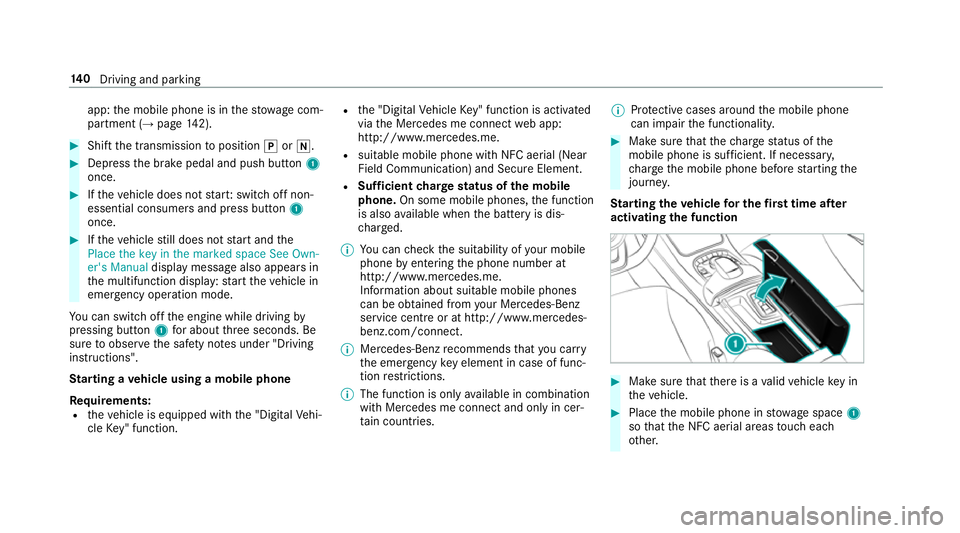
Place them obile phone in stowages pace 1
so that theN FC aerial areas touc he ach
ot her. 14 0
Driving and pa rking
Page 144 of 521

#
Dep ress theb rake pedal and star tt he vehicle
using thes tart/s topb utton.
% The keyisn otneeded fora ny further starts.
An yfurther starts #
Place them obile phone in stowages pace 1
so that theN FC aerial areas touc he ach
ot her ,and lea veitth er ew hile driving. #
Depress theb rake pedal and star tt he vehicle
using thes tart/s topb utton.
The "Digital Vehicle Key" servic ecan be deacti‐
va tedinM ercedes me connec tath ttp://
www.mercedes.me. The function is then deacti‐
va tedint he smartphone via an online connec‐
tion. If connection totheI nterne tisnotpossible,
e.g. af tert he mobile phone has been stolen, the
ke yf unction can be deacti vatedataM ercedes-
Ben zService Centre.
St arting thev ehicle in eme rgency operation
mode
If th ev ehicle does no tstart and thePlace the
key in the marked space See Owner's Manual
displa ymessag eappear sinthe multifunction displa
y,yo uc an star tt he vehicle in emer gency
operation mode. #
Makesur ethat mar keds pace 2is em pty. #
Remo vekey 1from thek eyring. #
Place key1in mar keds pace 2.
The vehicle will star ta fter as hor twhile.
If yo ur emo vekey 1from mar keds pace 2
th ee ngine continues running .For fur ther
ve hicle starts ho wever,key 1mus tbel oca‐
te dinm arke ds pace 2during thee ntire
journe y. #
Have key 1checkedataq ualified specialist
wo rkshop. If
th ev ehicle doe snotstar t: #
Lea vekey 1in mar keds pace 2. #
Depress theb rake pedal and star tt he vehicle
using thes tart/s topb utton.
% Youc an also swit chon thep ower suppl yor
th ei gnition wit hthe start/ stop button. St
arting thev ehicle via Remo teOnline serv‐
ices Cooling or heating
thev ehicle interior before
st arting thej ou rney
% This function is no tavailable in all countries.
If yo us tart thev ehicle via your smartphone, the
pr ev iousl yselec teda ir conditioning setting is
active.
Ensur ethe following befor estartin gt he engine:
R thel egal stipulation sinthe area wher eyour
ve hicle is par keda llowe ngin estartin gv ia
smartphone.
R it is saf etostart and runt he engine where
yo ur vehicle is par ked.
R thef uel tank is su fficientl yfilled. Drivin
gand parking 141
Page 151 of 521
Configuring driv
eprogram I Multimedia sy
stem:
, Vehicle .
e DYNAMIC
SELECT .
Individual #
Select thei ndividual setting. Displaying
vehicl edata Multimedi
asystem:
, Vehicle .
e DYNAMIC SELECT #
Select Vehicle data. Displaying engine data
Multimedia sy
stem:
, Vehicle .
e DYNAMIC SELECT #
Select Engine data.
% The values fore ngine outpu tand engine tor‐
qu em aydeviat efromt he nominal values.
Items that can influence this are, fore xam‐
ple:
R engine speed R
sea le vel
R fuel grade
R outside temp erature Au
tomatic transmission DIREC
TSELECT lever Fu
nction of theD IRECT SELECT le ver &
WARNING Risk of accident and inju ry
due tochildren lef tunat tende dint he
ve hicle
If ch ildren ar eleftu nat tende dint hevehicle,
th ey could:
R Ope ndoors,t hereb yendangering other
persons or road users.
R Getout of thev ehicle and be hit by
oncoming traf fic.
R Ope rate ve hicle equipment. Moreo
ver,ch ildren could also se tthe vehicle
in motion by,for example:
R Releasing thep arking brake.
R Shifting thet ransmission out of park
position j.
R Startin gthe engine. #
Neverlea ve children and animals unat‐
te nde dint hevehicle. #
When leaving thev ehicle, alw ayst ake
th ek eywit hyou and loc kthe vehicle.
This also applies tomobil ephones if the
"Digital Car Keyint he smartphone"
function is activated via theM ercedes
me connect weba pp. #
Keep thek eyso ut of ther eac hofc hil‐
dren. This also applies tomobile
phones if the" Digital Car Keyint he
smartphone" function is activated via
th eM ercedes me connect weba pp. 14 8
Driving and pa rking
Page 157 of 521
Re
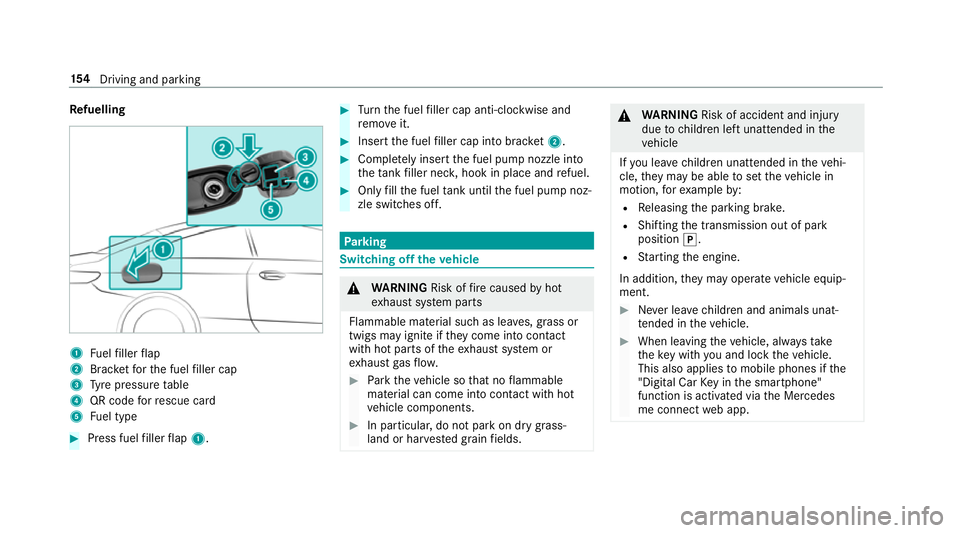
fuelling 1
Fuelfiller flap
2 Brac ketfor thef uel filler cap
3 Tyre pressur etable
4 QR code forr escue card
5 Fuel type #
Press fuel filler flap 1. #
Turn thef uel filler cap anti-clockwise and
re mo veit. #
Inser tthe fuel filler cap int obrack et 2 . #
Comp lete ly inse rtthef uel pum pnozzle into
th et ank filler nec k,hook in place and refuel. #
Onlyfillthef uel tank unti lthe fuel pum pnoz‐
zle switches off. Pa
rking Switching of
fthe vehicle &
WARNING Risk offire caused byhot
ex haus tsystemp arts
Flammable material suc hasleaves, grass or
twigs ma yignit eift heyc ome int ocontact
wi th hotp arts of thee xhau stsystem or
ex haus tgas flow. #
Park thev ehicle so that no flammable
material can com eintoc ontact wi thhot
ve hicle components. #
In particular ,donotpar kond rygrass‐
land or har vested grain fields. &
WARNING Risk of accident and inju ry
due tochildren lef tunat tende dint he
ve hicle
If yo ul eave children unat tende dint hevehi‐
cle, they ma ybea bletos etthev ehicle in
motion, fore xamp leby:
R Releasing thep arking brake.
R Shifting thet ransmission out of park
position j.
R Startin gthe engine.
In addition, they ma yoperat evehicle equip‐
ment. #
Neverlea ve children and animals unat‐
te nde dint hevehicle. #
When leaving thev ehicle, alw ayst ake
th ek eywit hyou and loc kthe vehicle.
This also applies tomobil ephones if the
"Digital Car Keyint he smartphone"
function is activated via theM ercedes
me connect weba pp. 15 4
Driving and pa rking
Page 162 of 521
Count
ryRadio equipment appr oval
number
South
Africa TA
-20 15/1386
Tu rkey notrequired
Uni ted
Arab Emi‐
ra tes ER4
1849/15
Dealer No: DA35176/14
United
St ates FCC ID
:NZLM UAHL5 Brazil
Es
te equipament ooper aemc aráter secundário,
is to é, não temd ireit oàp roteção contr ainter fer‐
ência prejudicial ,mesmo de es tações do mesmo
tipo ,en ão pod ecausar inter ferê ncia asiste mas
operando em caráter primário.
Pa ra maio resi nformações acessar
www.anatel.go v.br
Fu rther information on thed eclaration of con‐
fo rm ity forw ireles svehicle components
(→ pag e26). Electric parking brake
Fu
nction of thee lectric pa rking brak e(app ly‐
ing automatically) &
WARNING Risk of accident and inju ry
due tochildren lef tunat tende dint he
ve hicle
If yo ul eave children unat tende dint hevehi‐
cle, they ma ybea bletos etthev ehicle in
motion, fore xamp leby:
R Releasing thep arking brake.
R Shifting thet ransmission out of park
position j.
R Startin gthe engine.
In addition, they ma yoperat evehicle equip‐
ment. #
Neverlea ve children and animals unat‐
te nde dint hevehicle. #
When leaving thev ehicle, alw ayst ake
th ek eywit hyou and loc kthe vehicle.
This also applies tomobil ephones if the
"Digital Car Keyint he smartphone" Driving and parking
15 9
Page 255 of 521

Ac
tivating/deactivatin gBluetooth ®
Requ irement:
R Apple CarPlay™ is no tactive.
Multimedia sy stem:
, System .
ö Connectivity #
Activate Oor deacti vate ª Bluetoo th®
.
If Android Autois active, apromp tappear sask‐
ing whe ther Blue tooth®
should be deactivated. #
Select Yes.
Android Autois closed and Blue tooth®
is
deactivated. Wi
-Fi Wi
-Fic on nectio noverview
Yo uc an use Wi-Fi toestablish aconnection with
aW i-Finetwo rkand toaccess theI nterne tor
ot her networ kdevices.
The following connection option sareavailable:
R Wi-Fi connection The
Wi-Fi connectio ntoaWi-Fi-capable
device ,e.g.t he cus tomer's mobil ephone or
at able tPCise stablished.
R multimedia sy stem as aWi-Fihotspot
Using this function ,atable tPCorn otebook
can be connected, fore xamp le.
To establish aconnection ,you can use thef ol‐
lowing me thods:
R WPS PIN
The connection toas ecur eWi-Finetwo rkis
mad eviaaP IN.
R WPS PBC
The connectio ntoasecureWi-Finetwo rkis
mad ebyp ressing abutton (push button).
R security key
The connection toas ecur eWi-Finetwo rkis
mad eviaas ecu rity key. Setting up
Wi-Fi
Requ irement:
R The device tobe connec teds upports one of
th et hree means of connection described
(→ pag e252).
Multimedia sy stem:
, System .
ö Connectivity
Ac tivating/deactivatin gWi-Fi #
Switch Wi-FionO or off ª.
If Wi-Fi is deacti vatedª,communicatio nvia
Wi -Fi toall devices is inter rupte d. This also
means that ac onnectio ntothe HERMES
communication module canno tbeestab‐
lished. Then function ssuchasd ynamic route
guidance wit hLiveT raffic In form ation ar enot
av ailable.
Connecting them ultimedia sy stem wit ha
device via Wi-Fi
Thi sfunction is available if aHERME Scommuni‐
cation modul eisnotins talled. 252
Multimedia sy stem
Page 256 of 521
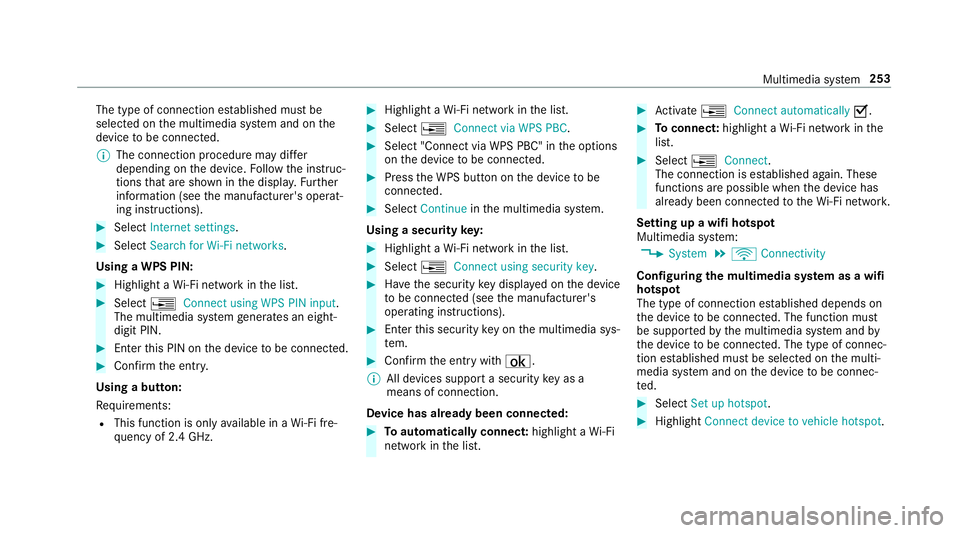
The type of connection es
tablished mus tbe
selected on them ultimedia sy stem and on the
device tobe connec ted.
% The connection procedur emaydiffer
dependin gonthe device. Followt he instruc‐
tions that ar eshown in thed ispla y.Fu rther
information (see them anufacturer's operat‐
ing instructions). #
Select Internet settings . #
Select Search for Wi-Fi networks.
Using aWPS PIN: #
Highlight aWi-Finetwo rkinthel ist. #
Select ¥Connec tusing WPS PIN input.
The multimedia sy stem generates an eight-
digi tPIN. #
Enter this PIN on thed evice tobe connec ted. #
Confir mthe entr y.
Using abutton:
Re quirements:
R This function is onl yavailable in aWi-Fifre‐
qu ency of 2.4 GHz. #
Highlight aWi-Finetwo rkinthel ist. #
Select ¥Connec tvia WPS PBC. #
Select "Connec tvia WPS PBC" in theo ptions
on thed evice tobe connec ted. #
Press theW PS button on thed evice tobe
connec ted. #
Select Continue inthem ultimedia sy stem.
Using asecurity key: #
Highlight aWi-Finetwo rkinthel ist. #
Select ¥Connec tusing securit ykey. #
Have thes ecurity keyd ispla yedont he device
to be connec ted( see them anufacturer's
operating instructions). #
Ente rthis security keyo nthe multimedia sys‐
te m. #
Confir mthe entr ywith¡.
% All devices suppor tasecurity keyasa
mean sofconnection.
Device ha salread ybeen connec ted: #
Toautomaticall yconnect: highlight aWi-Fi
networ kinthe list. #
Activate ¥ Connect automatically O. #
Toconnect: highlightaWi-Finetwo rkinthe
list. #
Select ¥Connect.
The connection is es tablished again. These
function sarepossible when thed evice has
already been connected totheW i-Finetwo rk.
Setting up awifih otspot
Multimedia sy stem:
, System .
ö Connectivity
Configuring them ultimedia sy stem as awifi
hotsp ot
The type of connection es tablished depends on
th ed evice tobe connec ted. The function must
be suppor tedbyt he multimedia sy stem and by
th ed evice tobe connec ted. The type of connec‐
tion es tablished mus tbeselected on them ulti‐
media sy stem and on thed evice tobe connec‐
te d. #
Select Set up hotspot. #
Highlight Connectdevice to vehicle hotspot. Multimedia sy
stem 253