2017 MERCEDES-BENZ GLC SUV bumper
[x] Cancel search: bumperPage 186 of 374
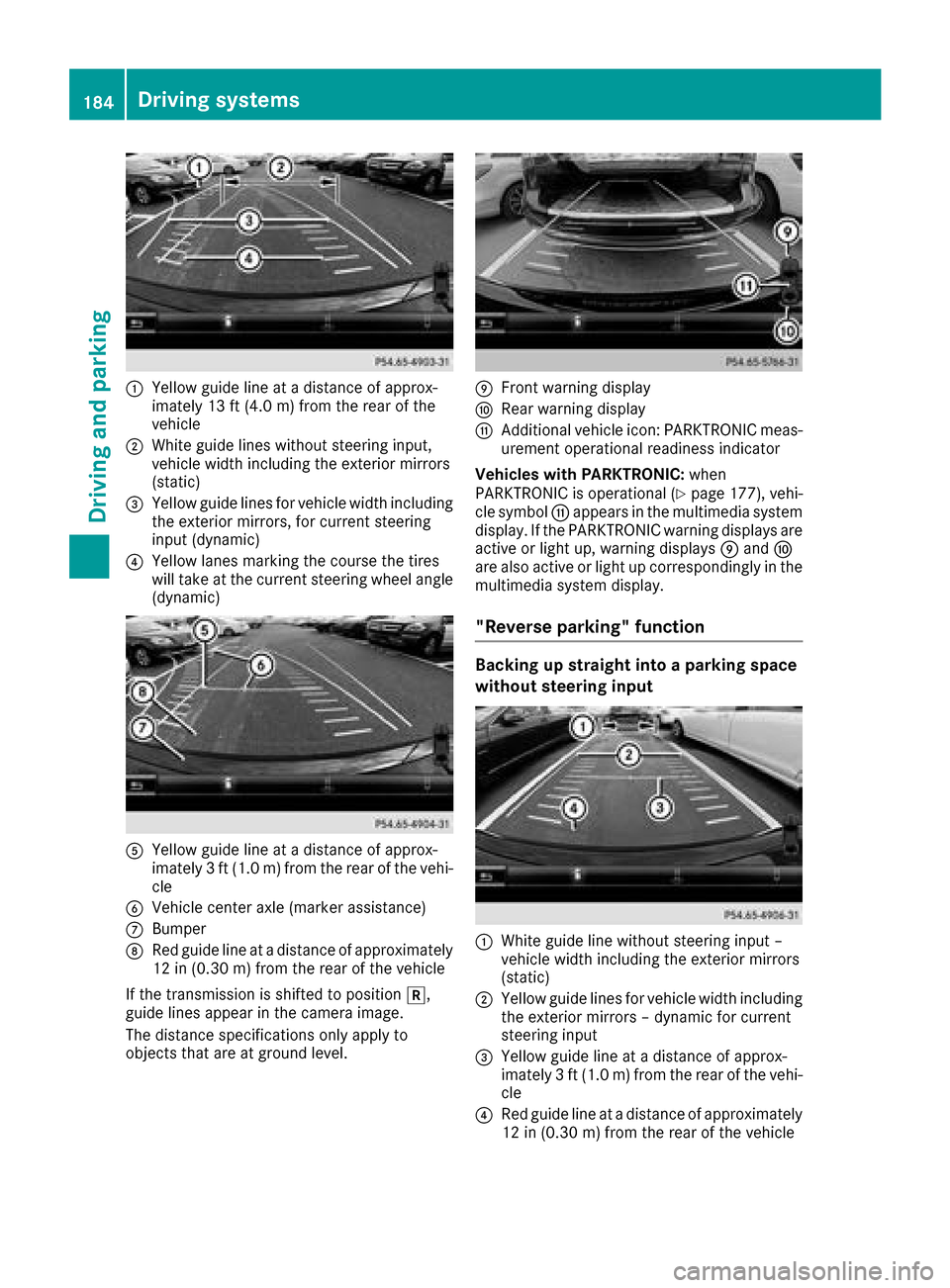
:Yellow guide line at a distance of approx-
imately 13 ft (4.0 m) from the rear of the
vehicle
;White guide lines without steering input,
vehicle width including the exterior mirrors
(static)
=Yellow guide lines for vehicle width including
the exterior mirrors, for current steering
input (dynamic)
?Yellow lanes marking the course the tires
will take at the current steering wheel angle
(dynamic)
AYellow guide line at a distance of approx-
imately 3 ft (1.0 m) from the rear of the vehi-
cle
BVehicle center axle (marker assistance)
CBumper
DRed guide line at a distance of approximately
12 in (0.30 m) from the rear of the vehicle
If the transmission is shifted to position k,
guide lines appear in the camera image.
The distance specifications only apply to
objects that are at ground level.
EFront warning display
FRear warning display
GAdditional vehicle icon: PARKTRONIC meas-
urement operational readiness indicator
Vehicles with PARKTRONIC: when
PARKTRONIC is operational (
Ypage 177), vehi-
cle symbol Gappears in the multimedia system
display. If the PARKTRONIC warning displays are
active or light up, warning displays Eand F
are also active or light up correspondingly in the
multimedia system display.
"Reverse parking" function
Backing up straight into a parking space
without steering input
:White guide line without steering input –
vehicle width including the exterior mirrors
(static)
;Yellow guide lines for vehicle width including
the exterior mirrors – dynamic for current
steering input
=Yellow guide line at a distance of approx-
imately 3 ft (1.0 m) from the rear of the vehi-
cle
?Red guide line at a distance of approximately
12 in (0.30 m)from the rear of the vehicle
184Driving systems
Driving and parking
Page 190 of 374
The camera in the rear area is protected by
means of a flap. This flap opens when the 360°
camera is activated. Observe the notes on
cleaning (
Ypage 316). For technical reasons,
the flap may remain open briefly after the 360°
camera has been deactivated.
The field of vision and other functions of the
camera system may be restricted due to addi-
tional attachments (e.g. license plate holder,
rear bicycle carrier).
On vehicles with height-adjustable chassis,
depending on technical conditions, leaving the
standard height can result in:
Rinaccuracies in the guide lines
Rinaccuracies in the display of generated
images (top view)
Activation conditions
The image from the 360° camera appears if:
Rthe multimedia system is switched on
Rthe 360° Camerafunction is switched on
If you are driving faster than at a moderate
speed and you turn on the 360° camera, a warn-
ing message appears.
The warning message disappears if:
Ryou are again driving at a moderate speed The
360° camera is then activated
Rthe message is confirmed with the %but-
ton
Switching the 360° camera on and off
using the button
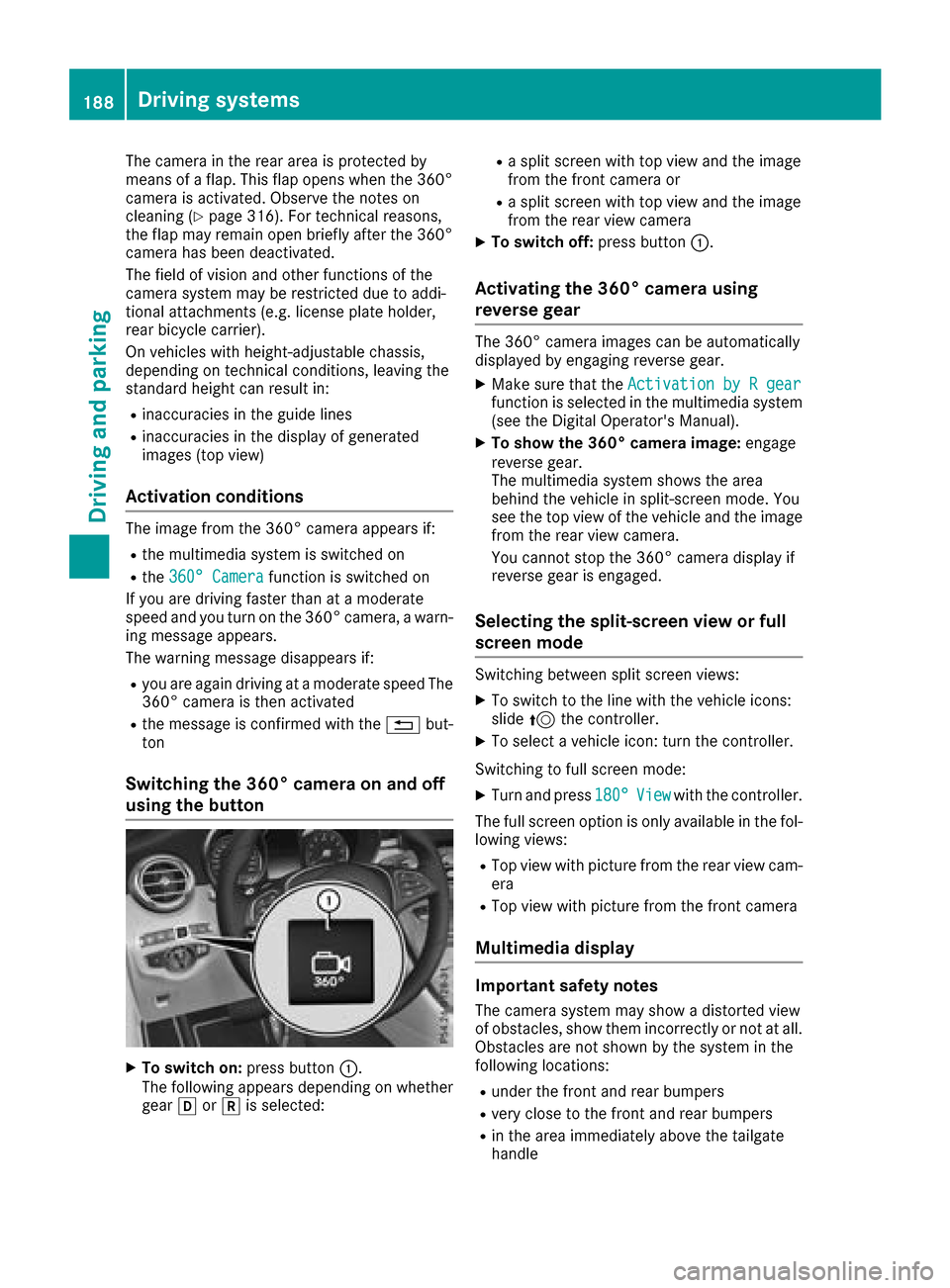
XTo switch on: press button:.
The following appears depending on whether
gear hork is selected:
Ra split screen with top view and the image
from the front camera or
Ra split screen with top view and the image
from the rear view camera
XTo switch off: press button:.
Activating the 360° camera using
reverse gear
The 360° camera images can be automatically
displayed by engaging reverse gear.
XMake sure that the Activation by R gearfunction is selected in the multimedia system
(see the Digital Operator's Manual).
XTo show the 360° camera image: engage
reverse gear.
The multimedia system shows the area
behind the vehicle in split-screen mode. You
see the top view of the vehicle and the image
from the rear view camera.
You cannot stop the 360° camera display if
reverse gear is engaged.
Selecting the split-screen view or full
screen mode
Switching between split screen views:
XTo switch to the line with the vehicle icons:
slide 5the controller.
XTo select a vehicle icon: turn the controller.
Switching to full screen mode:
XTurn and press 180°Viewwith the controller.
The full screen option is only available in the fol-
lowing views:
RTop view with picture from the rear view cam-
era
RTop view with picture from the front camera
Multimedia display
Important safety notes
The camera system may show a distorted view
of obstacles, show them incorrectly or not at all.
Obstacles are not shown by the system in the
following locations:
Runder the front and rear bumpers
Rvery close to the front and rear bumpers
Rin the area immediately above the tailgate
handle
188Driving systems
Driving and parking
Page 191 of 374
Rvery close to the exterior mirrors
Rin the transitional areas between the various
cameras in the virtual top view
!Objects not at ground level may appear to
be further away than they actually are, e.g.:
Rthe bumper of a parked vehicle
Rthe drawbar of a trailer
Rthe ball coupling of a trailer tow hitch
Rthe rear section of an HGV
Ra slanted post
Use the guidelines only for orientation.
Approach objects no further than the bottom-
most guideline.
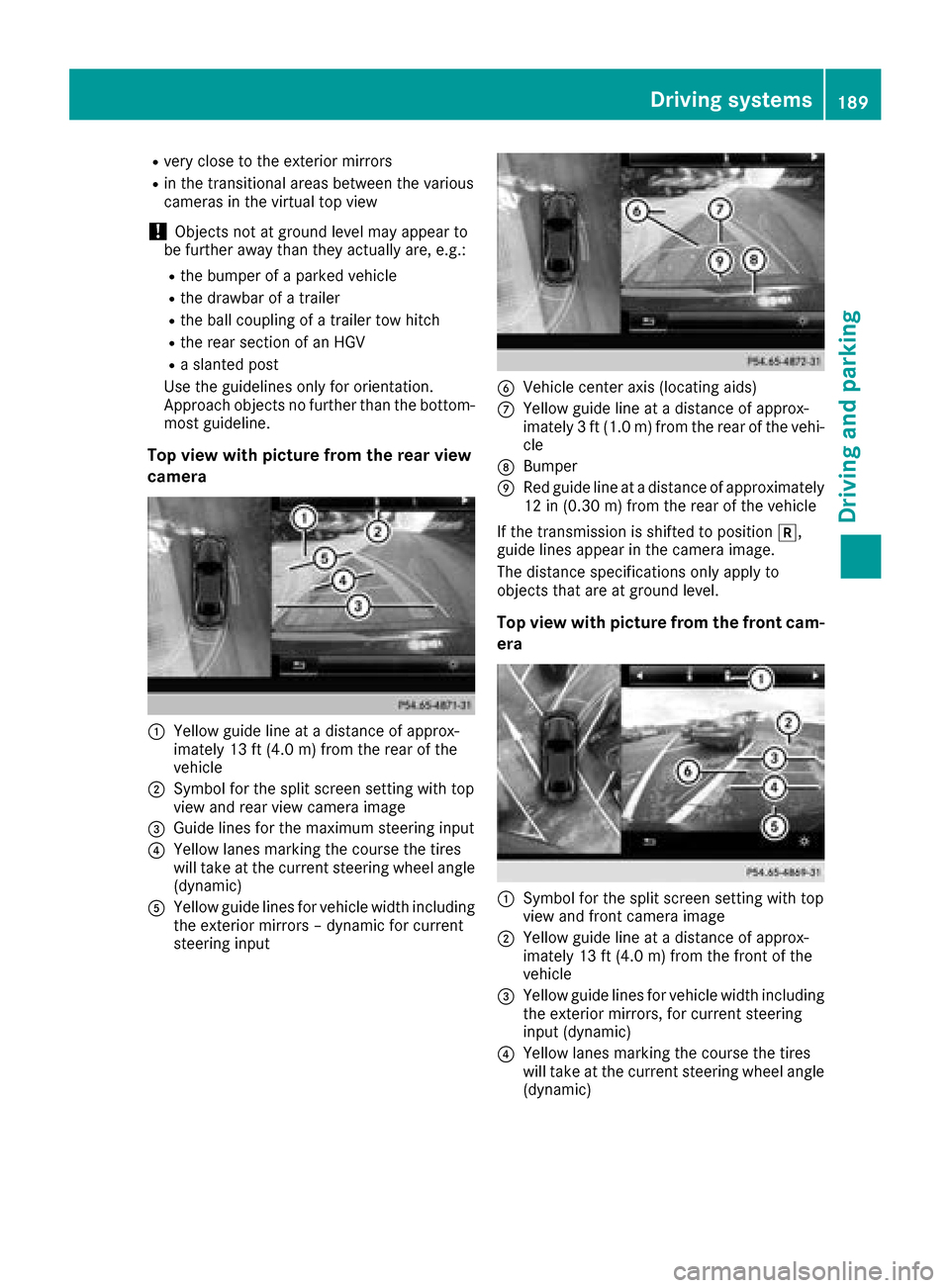
Top view with picture from the rear view
camera
:Yellow guide line at a distance of approx-
imately 13 ft (4.0 m) from the rear of the
vehicle
;Symbol for the split screen setting with top
view and rear view camera image
=Guide lines for the maximum steering input
?Yellow lanes marking the course the tires
will take at the current steering wheel angle
(dynamic)
AYellow guide lines for vehicle width including
the exterior mirrors – dynamic for current
steering input
BVehicle center axis (locating aids)
CYellow guide line at a distance of approx-
imately 3 ft (1.0 m) from the rear of the vehi-
cle
DBumper
ERed guide line at a distance of approximately
12 in (0.30 m) from the rear of the vehicle
If the transmission is shifted to position k,
guide lines appear in the camera image.
The distance specifications only apply to
objects that are at ground level.
Top view with picture from the front cam-
era
:Symbol for the split screen setting with top
view and front camera image
;Yellow guide line at a distance of approx-
imately 13 ft (4.0 m) from the front of the
vehicle
=Yellow guide lines for vehicle width including
the exterior mirrors, for current steering
input (dynamic)
?Yellow lanes marking the course the tires
will take at the current steering wheel angle
(dynamic)
Driving systems189
Driving and parking
Z
Page 196 of 374

Important safety notes
GWARNING
Blin dSpo t Assist does not react to:
Rvehicles overtaken too closely on the side,
plac ing them inthe blind spot area
Rvehicleswhic happr oach with a large speed
diff erential and overtake your veh icle
As a result, BlindSpo t Assist may not give
warnings insuch situations. There isa risk of
an acc ident.
Always observe the traff icconditions care-
fully, and maintain a safe lateral distance.
Blin dSpo t Assist isonly anaid. It may fail to
detect some vehicles and isno substitute for
attentive driving. Always ensure that there is
suff icientdist ance to the sidefor other road
users and obstacles.
iUSA only:
This device has been approved bythe FCC as
a "Vehicular Radar System". The radar sensor
is intended for use inan automotive radar
system only. Removing, tampering with, or
altering the device willvoid any warranties,
and isnot permitted bythe FCC. Do not tam-
per with, alter, or use inany non- approved
way.
Any unauthorized mod ification to th isdevice
could void the user’s authority to operate the
equipm ent.
Radar sensors
The radar sensors for BlindSpo t Assist are inte-
grated into the rear bumper. Make sure that the bumpers are free from dirt, ice or slush. The
sensors must not becovered, for example by
cyc le
r
acks or overhanging loads. Fol lowing a
severe impact or inthe event of damage to the
bumpers, have the function of the radar sensors
checked at a qualified specialist workshop.
Blin dSpo t Assist may no longer work properly.
Monitoring area
Inparticular, the detection of obstacles can be
impaired if:
Rthere is dirt on the sensors or anything else
covering the sensors
Rthere ispoor vis ibility, e.g. due to fog, heavy
rain, snow or spray
Rthere are narrow vehicles, e.g. motorcycles or
bic ycles
Rthe road has very widelanes
Rthe road has narrow lanes
Ryou are not driving inthe middle of the lane
Rthere are barriers or other road boundaries
Vehicles inthe monitoring range are then not
indicated.
At a distance of around 1.6 ft (0.5m); from the
vehicle, Blind Spot Assist monitors the area up
to 10 ft (3 m)next to =and behind :your
vehicle, as shown in the picture.
If the lanes are narrow, vehicles driving in the
lane beyond the lane next to your vehicle may be
indicated, especially if the vehicles are not driv-
ing in the middle of their lane. This may be the
case if there are vehicles driving at the inner
edge of their lanes.
Due to the nature of the system:
Rwarnings may be issued in error when driving
close to crash barriers or similar solid lane
borders
Rwarnings may be interrupted when driving
alongside long vehicles, such as trucks, for a
prolonged time
194Driving systems
Driving an d parking
Page 200 of 374

Removal, tampering,or altering of th edevice
will voi dany warranties, and is no tpermitted.
Do no ttamper with, alter, or use in any non-
approve dway.
An yunauthorized modification to this device
could voi dth euser's authority to operate th e
equipment.
Rada rsensors
The Active Blind Spot Assist radar sensor sare
integrate dint oth efron tand rear bumpers and
behind acover in th eradiato rtrim. Mak esur e
that th ebumpers and th ecover in th eradiato r
grill are free of dirt ,ice or slush. The rear sensor s
mus tno tbe covered, for exampl eby cycle racks
or overhanging cargo. Followin g asevere impact
or in th eevent of damag eto th ebumpers ,hav e
th efunction of th eradar sensor schecke dat a
qualified specialist workshop. Active Blind Spot
Assist may otherwise no longer wor kproperly.
Monitoring area
GWARNIN G
Active Blind Spot Assist does no tdetec tall
traffic situation sand road users. There is a
ris kof an accident.
Always mak esur ethat there is sufficien tdis-
tance on th eside for other traffic or obstacles.
At adistanc eof approximately 1. 6ft (0. 5m) ;
from the vehicle, Active Blind Spot Assist mon-
itors the area up to 10 ft (3 m) next to =and
behind :your vehicle, as shown in the picture. The detection of obstacles can be impaired in
the case of:
Rthere is dirt on the sensors or anything else
covering the sensors
Rpoor visibility, e.g. due to rain, snow or spray
Vehicles in the monitoring range are then not
indicated.
Active Blind Spot Assist may not detect narrow
vehicles, such as motorcycles or bicycles, or
may only detect them too late.
If the lanes are narrow, vehicles driving in the
lane beyond the lane next to your vehicle may be
indicated, especially if the vehicles are not driv-
ing in the middle of their lane. This may be the
case if there are vehicles at the inner edge of
your lane.
Due to the nature of the system:
Rwarnings may be issued in error when driving
close to crash barriers or similar solid lane
borders.
Rwarnings may be interrupted when you are
driving alongside particularly long vehicles,
such as trucks, for a prolonged time.
Warning lamp
:Warning lamp
Active Blind Spot Assist is not operational at
speeds below approximately 20 mph (30 km/h).
Vehicles in the monitoring range are then not
indicated.
If a vehicle is detected within the blind spot
monitoring range at speeds above 20 mph
(30 km/h), warning lamp :on the correspond-
ing side lights up red. This warning is always
emitted when a vehicle enters the blind spot
monitoring range from behind or from the side.
When you overtake a vehicle, the warning only
occurs if the difference in speed is less than
7 mph (12 km/h).
198Driving systems
Driving and parking
Page 202 of 374

Active Lane Keeping Assist
Generalnotes
Active Lan eKeepin gAssis tmonitors th earea in
fron tof your vehicl eby mean sof multifunction
camera :at th eto pof th ewindshield. Various
differen tareas to th efront, rear and side of your
vehicl eare also monitore dwit hth eaid of th e
radar sensor system. Active Lan eKeepin g
Assis tdetects lan emarking son th eroad and
can warn you before you leav eyour lan eunin-
tentionally. If you do no treac tto th ewarning , a
lane-correcting application of th ebrakes can
bring th evehicl ebac kint oth eoriginal lane.
This function is available in th erange between
40 mph and 12 0mph (60 km/h and 20 0km/h).
Important safety notes
If you fail to adapt your drivin gstyle, Active Lan e
Keepin gAssis tcan neither reduce th eris kof an
acciden tno roverride th elaws of physics .Active
Lan eKeepin gAssis tcanno ttak eaccoun tof
road and weather conditions. It may no trecog-
niz etraffic situations. Active Lan eKeepin g
Assis tis only an aid. You are responsibl efor th e
distanc eto th evehicl ein front, for vehicl e
speed, for braking in goo dtime and for stayin gin
your lane.
Active Lan eKeepin gAssis tcanno tcontinuously
keep your vehicl ein it slane.
GWARNIN G
Active Lan eKeepin gAssis tcanno talways
clearly detec tlan emarkings.
In suc hcases, Active Lan eKeepin gAssis t
can :
Rgivean unnecessary warning and then
mak e acourse-correcting brak eapplication
to th evehicl e
Rnotgiv e a warning or interven e
There is aris kof an accident.
Always pay particular attention to th etraffic
situation and keep within th elane, especially
if Active Lan eKeepin gAssis talerts you. Ter -
minate th eintervention in anon-critical driv-
ing situation .
The system may be impaire dor may no tfunction
if:
Rthere is poor visibility, e.g. due to insufficien t
illumination of th eroad ,or due to snow, rain ,
fog or spray
Rthere is glare, e.g. from oncomin gtraffic, th e
sun or reflection from other vehicles (e.g. if
th eroad surfac eis wet )
Rthewindshield is dirty, fogged up, damaged or
covered, for instance by asticker, in th evicin-
it y of th ecamera
Rth eradar sensor sin th efron tor rear bumpers
or th eradiato rtrim are dirty, e.g. obscured by
snow
Rthere are no ,several or unclear lan emarking s
for alane, e.g. in areas wit hroad construction
wor k
Rthelan emarking sare wor naway, dark or cov-
ere dup, e.g. by dir tor snow
Rth edistanc eto th evehicl ein fron tis to osmall
and th elan emarking sthus canno tbe detec -
te d
Rth elan emarking schang equickly, e.g. lanes
branch off ,cross on eanother or merge
Rth eroad is narrow and windin g
Rthere are highly variable shad econdition son
th eroadway
If no vehicl eis detecte din th eadjacent lan eand
broke nlan emarking sare detected, no lane-cor-
recting brak eapplication is made .
Warning vibration in th esteering wheel
A warning may be given if afron twhee lpasses
ove r alan emarking .It will warn you by mean sof
intermittent vibration in th esteering whee lfor
up to 1. 5seconds.
200Driving systems
Driving and parking
Page 205 of 374

For more information, please contact a qualified
specialist workshop.
Please observe the manufacturer's operating
instructions for the trailer coupling if a detach-
able trailer coupling is used.
Couple and uncouple the trailer carefully. If you
do not couple the trailer to the towing vehicle
correctly, the trailer could become detached.
Make sure that the following values are not
exceeded:
Rthe permissible trailer drawbar noseweight
Rthe permissible trailer load
Rthe permissible rear axle load of the towing
vehicle
Rthe maximum permissible gross vehicle
weight of both the towing vehicle and the
trailer
The applicable permissible values, which must
not be exceeded, can be found:
Rin the vehicle documents
Ron the type plate for the trailer
Ron the vehicle identification plate
If the values differ, the lowest value applies.
When towing a trailer, your vehicle's handling
characteristics will be different in comparison
with when driving without a trailer.
The vehicle/trailer combination:
Ris heavier
Ris restricted in its acceleration and gradient-
climbing capability
Rhas an increased braking distance
Ris affected more by strong crosswinds
Rdemands more sensitive steering
Rhas a larger turning circle
This could impair the handling characteristics.
When towing a trailer, always adjust your speed
to the current road and wea
ther conditions. Do
not exceed the maximum permissible speed for
your vehicle/trailer combination.
Notes on towing a trailer
General notes
RDo not exceed the maximum permissible
speed for vehicle/trailer combinations in the
relevant country. This lowers the risk of an accident.
ROnly install an approved trailer coupling on
your vehicle.
Further information on availability and on
installation is available from any authorized
Mercedes-Benz Center.
RThe bumpers of your vehicle are not suitable
for installing detachable trailer couplings.
RDo not install hired trailer couplings or other
detachable trailer couplings on the bumpers
of your vehicle.
RIf you no longer need the ball coupling,
remove it from the ball coupling recess. This
will reduce the risk of damage to the ball cou-
pling.
When towing a trailer, set the tire pressure on
the rear axle of the towing vehicle for a maxi-
mum load; see the tire pressure table in the fuel
filler flap (
Ypage 354).
Please note that when towing a trailer, the fol-
lowing driving systems have limited availability
or are not available at all:
RPARKTRONIC (Ypage 175)
RBlind Spot Assist (Ypage 193)
RActive Lane Keeping Assist (Ypage 200)
On vehicles without level control, the height of
the ball coupling will alter according to the load
placed on the vehicle. If necessary, use a trailer
with a height-adjustable drawbar.
You will find permissible trailer loads under
"Technical data" (
Ypage 371).
Driving tips
Observe the information on ESP®trailer stabili-
zation (Ypage 73) and on pulling away with a
trailer (Ypage 135).
The maximum permissible speed for vehicle/
trailer combinations depends on the type of
trailer. Before beginning the journey, check the
trailer's documents to see what the maximum
permitted speed is. Observe the maximum per-
missible speed in the relevant country.
For certain Mercedes-Benz vehicles, the maxi-
mum permissible rear axle load is increased
when towing a trailer. See the "Technical data"
section to find out whether this applies to your
vehicle (
Ypage 371). In the event of increased
rear axle load, the vehicle/trailer combination
may not exceed a maximum speed of 60 mph
(100 km/h) for reasons concerning the operat-
ing permit. This also applies in countries in
Towing a trailer203
Driving and parking
Z
Page 207 of 374
XSwitch off the engine.
XClose the doors and tailgate.
XCouple up the trailer.
XEstablish the electrical connection between
the vehicle and the trailer.
XCheck that the trailer lighting system is work-
ing.
XPush the combination switch upwards/down-wards and check whether the corresponding
turn signal on the trailer flashes.
A trailer that is connected is recognized only
when the electrical connection is established
correctly and when the lighting system is work-
ing properly. The function of other systems also
depends on this, for example:
RESP®
RPARKTRONIC
RActive Parking Assist
RActive Blind Spot Assist
RActive Lane Keeping Assist
Vehicles with AIR BODY CONTROL: if you couple
up a trailer, the vehicle always remains at high-
way level. Observe the following note when cou-
pling up a trailer:
RUnless highway level has been set manually,
the vehicle is automatically lowered to high-
way level. If a speed of 5 mph (8 km/h) has
been reached, this may be the case.
These restrictions apply to accessories that are
supplied with power via the trailer socket in your
vehicle, e.g. a rear bicycle rack.
Observe the maximum permissible trailer
dimensions (width and length).
Most U.S. states and all Canadian provinces
require by law:
RSafety chains between the towing vehicle and
the trailer. The chains should be cross-wound
under the trailer drawbar. They must be fas-
tened to the vehicle's trailer coupling, not to
the bumper or the axle.
Leave enough play in the chains to make tight
cornering possible.
RA separate brake system for certain types of
trailer.
RSafety switch for braked trailers. Check the
specific legal requirements applicable to your state.
If the trailer becomes detached from the tow-
ing vehicle, the safety feature applies the
trailer brakes.
Towing a trailer
There are several legal requirements for towing
a trailer, e.g. the maximum permissible speed.
Make sure that your car/trailer combination
complies with the local regulations:
Rin your place of residence
Rat your destination
The police and local authorities can provide reli- able information.
To accumulate driving experience and accustom
yourself to the new handling characteristics,
practice the following at a location where there
is no traffic:
RCornering
RStopping
RBacking up
Check the following before the journey:
RTrailer tow hitch
RSafety switch for braked trailers
RSafety chains
RElectrical connections
RLighting system
RWheels and tires
RLoad securing
Adjust the exterior mirrors so that you have a
clear view of the rear section of the trailer.
If the trailer is equipped with electronically con-
trolled brakes, pull away carefully in the car/
trailer combination. Brake manually using the
brake controller and check whether the brakes
function correctly.
Regularly check that the load is secure.
When towing a trailer, your vehicle's handling
characteristics will be different in comparison
with when driving without a trailer.
The vehicle/trailer combination:
Ris heavier
Ris restricted in its acceleration and gradient-
climbing capability
Rhas an increased braking distance
Ris affected more by strong crosswinds
Rdemands more sensitive steering
Rhas a larger turning circle
Avoid sudden steering movements.
Avoid braking abruptly. If possible, brake gently
at first to allow the trailer to run on. Then,
increase the braking force rapidly.
Towing a trailer205
Driving and parking
Z