2017 MERCEDES-BENZ GLC SUV engine
[x] Cancel search: enginePage 166 of 374

DISTRONICPLUS
General notes
DISTRONIC PLU Sregulates th espeed and auto-
matically helps you maintain th edistanc efrom
th evehicle detecte din front. Vehicles are detec -
te dwit hth eaid of th eradar sensor system.
DISTRONIC PLU Sbrake sautomatically so that
th eset speed is no texceeded.
Change into alowe rgear in goo dtime on lon g
and steep downhill gradients. Thi sis especially
important if th evehicle is laden. By doin gso, you
will mak euse of th ebraking effect of th eengine.
Thi srelieves th eload on th ebrake syste mand
prevents th ebrake sfrom overheatin gand wear -
in g to oquickly.
If DISTRONIC PLU Sdetects that there is aris kof
a collision ,you will be warned visually and
acoustically. DISTRONIC PLU Scanno tpreven t a
collision without your intervention .An intermit -
tent warnin gtone will then soun dand th edis -
tanc ewarnin glamp will ligh tup in th einstru-
men tcluster. Brak eimmediately in order to
increase th edistanc eto th evehicle in fron tor
take evasiv eaction provided it is saf eto do so.
DISTRONIC PLU Soperates in th espeed range
between 0mph (0 km/ h) and 120 mph
(200 km/h).
Do not use DISTRONIC PLUS whil
e driving on
roads with steep gradients.
As DISTRONIC PLUS transmits radar waves, it
can resemble the radar detectors of the respon-
sible authorities. You can refer to the relevant
chapter in the Operator's Manual if questions
are asked about this.
iUSA only: This device has been approved by
the FCC as a "Vehicular Radar System". The
radar sensor is intended for use in an auto-
motive radar system only. Removal, tamper-
ing, or altering of the device will void any war-
ranties, and is not permitted by the FCC. Do
not tamper with, alter, or use in any non-
approved way.
Any unauthorized modification to this device
could void the user's authority to operate the
equipment.
iCanada only: This device complies with
RSS-210 of Industry Canada. Operation is
subject to the following two conditions:
1. This device may not cause interference,
and 2. This device must accept any interference
received, including interference that may
cause undesired operation of the device.
Removal, tampering, or altering of the device
will void any warranties, and is not permitted.
Do not tamper with, alter, or use in any non-
approved way.
Any unauthorized modification to this device
could void the user's authority to operate the equipment.
Important safety notes
GWARNING
DISTRONIC PLUS does not react to:
Rpeople or animals
Rstationary obstacles on the road, e.g. stop- ped or parked vehicles
Roncoming and crossing traffic
As a result, DISTRONIC PLUS may neither give
warnings nor intervene in such situations.
There is a risk of an accident.
Always pay careful attention to the traffic sit- uation and be ready to brake.
GWARNING
DISTRONIC PLUS cannot always clearly iden-
tify other road users and complex traffic sit-
uations.
In such cases, DISTRONIC PLUS may:
Rgive an unnecessary warning and then
brake the vehicle
Rneither give a warning nor intervene
Raccelerate or brake unexpectedly
There is a risk of an accident.
Continue to drive carefully and be ready to
brake, in particular when warned to do so by
DISTRONIC PLUS.
GWARNING
DISTRONIC PLUS brakes your vehicle with up to 50% of the maximum possible deceleration.
If this braking force is insufficient, DISTRONIC
PLUS warns you visually and audibly. There isa risk of an accident.
164Driving systems
Driving and parking
Page 167 of 374

In such cases, apply the brakes yourself and
try to take evasive action.
!When DISTRONIC PLUS or the HOLD func-
tion is activated, the vehicle brakes automat-
ically in certain situations.
To avoid damage to the vehicle, deactivate
DISTRONIC PLUS and the HOLD function in
the following or similar situations:
Rwhen towing the vehicle
Rin the car wash
DISTRONIC PLUS can neither reduce the risk of
an accident if you fail to adapt your driving style
nor override the laws of physics. DISTRONIC
PLUS cannot take account of road, weather and traffic conditions. DISTRONIC PLUS is only an
aid. You are responsible for maintaining a safe
distance to the vehicle in front, for vehicle
speed, for braking in good time and for staying in
lane.
Do not use DISTRONIC PLUS:
Rin road and traffic conditions which do not
allow you to maintain a constant speed, e.g. in
heavy traffic or on winding roads
Ron slippery road surfaces. Braking or accel-
erating could cause the drive wheels to lose
traction and the vehicle could then skid
Rin poor visibility, e.g. due to fog, heavy rain or
snow
DISTRONIC PLUS may not detect narrow vehi-
cles driving in front, e.g. motorcycles, or vehi-
cles driving on a different line.
In particular, the detection of obstacles can be
impaired if:
Rthere is dirt on the sensors or anything else
covering the sensors
Rthere is snow or heavy rain
Rthere is interference by other radar sources
Rthere are strong radar reflections, for exam-
ple in parking garages
If DISTRONIC PLUS no longer detects a vehicle
in front, DISTRONIC PLUS may unexpectedly
accelerate the vehicle to the stored speed. This speed may:
Rbe too high if you are driving in a filter lane or
an exit lane
Rbe so high in the right lane that you pass vehi-cles driving on the left (left-hand drive coun-
tries)
Rbe so high in the left lane that you pass vehi-
cles driving on the right (in countries where
they drive on the left)
If there is a change of drivers, advise the new
driver of the speed stored.
Cruise control lever
:Activates or increases speed
;Activates or reduces speed
=Deactivates DISTRONIC PLUS
?Activates at the current speed/last stored
speed
ASets a specified minimum distance
When you activate DISTRONIC PLUS, the stored
speed appears in the multifunction display for
five seconds.
Speedometer with segments: when
DISTRONIC PLUS is activated, the segments
from the stored speed to the end of the scale or
to a permanently set speed limit light up.
Activating DISTRONIC PLUS
Activation conditions
To activate DISTRONIC PLUS, the following con-
ditions must be fulfilled:
Rthe engine must be started. It may take up to two minutes of driving before DISTRONIC
PLUS is ready for use.
Rthe electric parking brake must be released.
RESP®must be activated, but not intervening
at present.
Driving systems165
Driving and parking
Z
Page 169 of 374
between your vehicle and the vehicle in front
becomes too small.
When you change lanes, DISTRONIC PLUS mon-
itors the left lane (on left-hand-drive vehicles) or
the right lane (on right-hand-drive vehicles).
Stopping
GWARNING
When leaving the vehicle, even if it is braked
only by DISTRONIC PLUS, it could roll away if:
Rthere is a malfunction in the system or in
the voltage supply.
RDISTRONIC PLUS has been deactivated
with the cruise control lever, e.g. by a vehi-
cle occupant or from outside the vehicle.
Rthe electrical system in the engine com-
partment, the battery or the fuses have
been tampered with.
Rthe battery is disconnected.
Rthe accelerator pedal has been depressed, e.g. by a vehicle occupant.
There is a risk of an accident.
If you wish to exit the vehicle, always turn off
DISTRONIC PLUS and secure the vehicle
against rolling away.
For further information on deactivating
DISTRONIC PLUS (
Ypage 169).
If DISTRONIC PLUS detects that the vehicle in
front has stopped, it will cause your vehicle to
brake and come to a halt.
Once your vehicle is stationary, it remains sta-
tionary and you do not need to depress the
brake.
After a time, the electric parking brake secures
the vehicle and relieves the service brake.
Depending on the specified minimum distance,
your vehicle will come to a standstill at a suffi-
cient distance behind the vehicle in front. The
specified minimum distance is set using the
control on the cruise control lever. When DISTRONIC PLUS is activated, the trans-
mission is shifted automatically to position
j,
if:
Rthe driver's seat belt is not fastened and the
driver's door is open.
Rthe engine is switched off, unless it is auto-
matically switched off by the ECO start/stop
function.
The electric parking brake secures the vehicle
automatically if DISTRONIC PLUS is activated
when the vehicle is stationary and:
Ra system malfunction occurs.
Rthe power supply is insufficient.
If a malfunction occurs, the transmission may
also be shifted to position jautomatically.
Setting a speed
XPush the cruise control lever up :for a
higher speed or down ;for a lower speed.
XTo adjust the set speed in 1 mph incre-
ments (1 km/h increments): briefly push
the cruise control lever up :or down ;to
the pressure point.
Every time the cruise control lever is pressed
up : or down ;the last speed stored is
increased or reduced.
XTo adjust the set speed in 5 mph incre-
ments (10 km/h increments): briefly push
the cruise control lever up :or down ;
beyond the pressure point.
Every time the cruise control lever is pressed
up : or down ;, the last speed stored is
increased or reduced.
iIf you accelerate to overtake, DISTRONIC
PLUS adjusts the vehicle's speed back to the
last speed stored after you have finished over-
taking.
Setting a specified minimum distance
You can set the specified minimum distance for
DISTRONIC PLUS by varying the time span
between one and two seconds. With this func-
tion, you can set the minimum distance that
DISTRONIC PLUS maintains to the vehicle in
front, depending on the driving speed. You can
see this distance in the multifunction display
(
Ypage 168).
Make sure that you maintain the minimum dis-
tance to the vehicle in front as required by law.
Driving systems167
Driving and parking
Z
Page 171 of 374
Deactivating DISTRONICPLUS
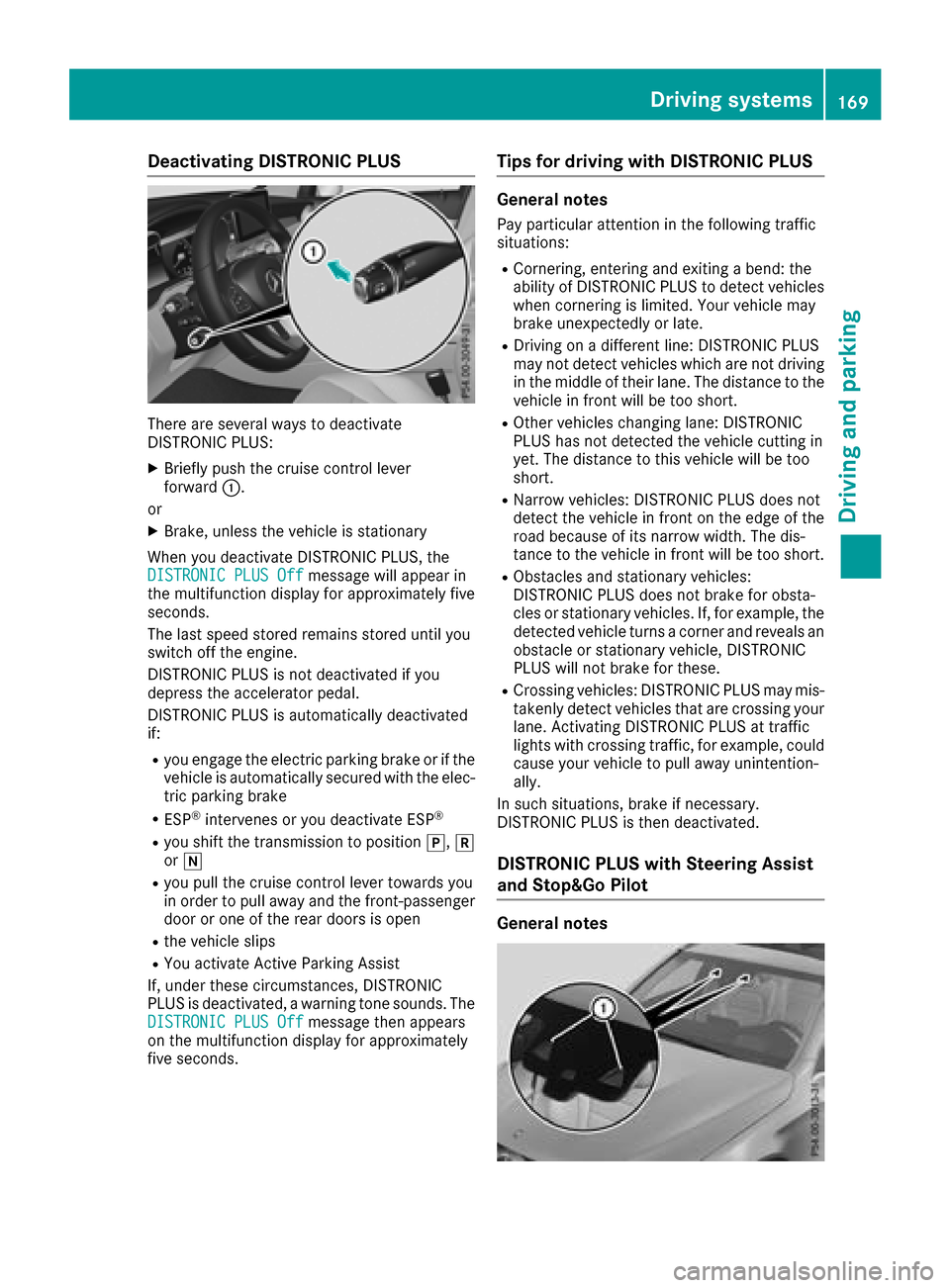
There are severa lways to deactivat e
DISTRONIC PLUS:
XBriefly push th ecruise contro llever
forwar d:.
or
XBrake, unless th evehicle is stationary
Whe nyou deactivat eDISTRONIC PLUS, th e
DISTRONIC PLU SOff
messag ewill appear in
th emultifunction display fo rapproximately fiv e
seconds.
The last speed stored remain sstored until you
switch of fth eengine.
DISTRONIC PLU Sis no tdeactivated if you
depress th eaccelerator pedal.
DISTRONIC PLU Sis automatically deactivated
if:
Ryou engage th eelectric parking brake or if th e
vehicle is automatically secure dwit hth eelec -
tric parking brake
RES P®intervenes or you deactivat eES P®
Ryou shift th etransmissio nto position j,k
or i
Ryou pull th ecruise contro llever toward syou
in order to pull away and th efront-passenger
doo ror on eof th erea rdoors is ope n
Rthevehicle slip s
RYou activat eActive Parking Assis t
If ,under these circumstances, DISTRONIC
PLU Sis deactivated, awarnin gtone sounds. The
DISTRONIC PLU SOff
messag ethen appears
on th emultifunction display fo rapproximately
fiv eseconds.
Tips for drivin gwit hDISTRONI CPLUS
General notes
Pay particular attention in th efollowin gtraffic
situations:
RCornering, enterin gand exitin g abend: th e
ability of DISTRONIC PLU Sto detec tvehicles
when cornering is limited. Your vehicle may
brake unexpectedly or late.
RDriving on adifferen tline: DISTRONIC PLU S
may no tdetec tvehicles whic hare no tdrivin g
in th emiddle of their lane. The distanc eto th e
vehicle in fron twill be to oshort .
ROther vehicles changin glane: DISTRONIC
PLU Shas no tdetecte dth evehicle cutting in
yet .The distanc eto this vehicle will be to o
short .
RNarro wvehicles :DISTRONIC PLU Sdoe sno t
detec tth evehicle in fron ton th eedg eof th e
road because of it snarro wwidth. The dis -
tanc eto th evehicle in fron twill be to oshort .
RObstacles and stationary vehicles :
DISTRONIC PLU Sdoe sno tbrake fo robsta -
cles or stationary vehicles .If ,fo rexample, th e
detecte dvehicle turn s acorner and reveals an
obstacl eor stationary vehicle, DISTRONIC
PLU Swill no tbrake fo rthese .
RCrossing vehicles :DISTRONIC PLU Smay mis -
takenl ydet ectvehicles that are crossin gyour
lane. Activatin gDISTRONIC PLU Sat traffic
lights wit hcrossin gtraffic ,fo rexample, could
cause your vehicle to pull away unintention -
ally.
In suc hsituations, brake if necessary.
DISTRONIC PLU Sis then deactivated.
DISTRONI CPLUS wit hSteering Assis t
an dStop&Go Pilo t
General notes
Driving systems169
Driving an d parking
Z
Page 173 of 374
a visual warning. A steering wheel symbol
appears in the multifunction display. If you have
still not started to steer and have not taken hold
of the steering wheel after five seconds at the
latest, a warning tone also sounds to remind you
to take control of the vehicle. Steering Assist
and Stop&Go Pilot are switched to passive.
DISTRONIC PLUS remains active.
Activating Steering Assist and Stop&Go
Pilot
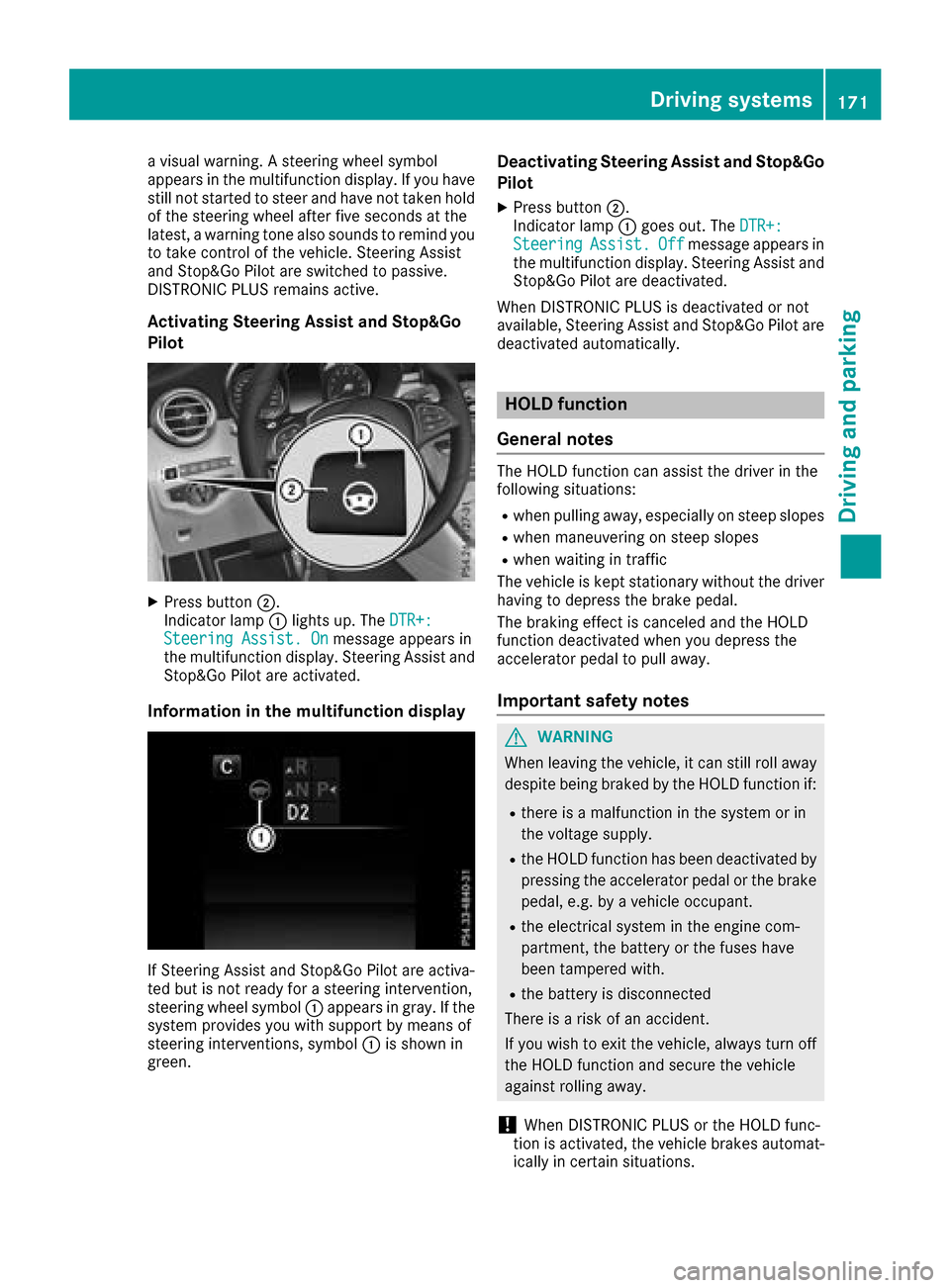
XPress button;.
Indicator lamp :lights up. The DTR+:
Steering Assist. Onmessage appears in
the multifunction display. Steering Assist and
Stop&Go Pilot are activated.
Information in the multifunction display
If Steering Assist and Stop&Go Pilot are activa-
ted but is not ready for a steering intervention,
steering wheel symbol :appears in gray. If the
system provides you with support by means of
steering interventions, symbol :is shown in
green.
Deactivating Steering Assist and Stop&Go
Pilot
XPress button ;.
Indicator lamp :goes out. The DTR+:
SteeringAssist.Offmessage appears in
the multifunction display. Steering Assist and
Stop&Go Pilot are deactivated.
When DISTRONIC PLUS is deactivated or not
available, Steering Assist and Stop&Go Pilot are deactivated automatically.
HOLD function
General notes
The HOLD function can assist the driver in the
following situations:
Rwhen pulling away, especially on steep slopes
Rwhen maneuvering on steep slopes
Rwhen waiting in traffic
The vehicle is kept stationary without the driver having to depress the brake pedal.
The braking effect is canceled and the HOLD
function deactivated when you depress the
accelerator pedal to pull away.
Important safety notes
GWARNING
When leaving the vehicle, it can still roll away despite being braked by the HOLD function if:
Rthere is a malfunction in the system or in
the voltage supply.
Rthe HOLD function has been deactivated by
pressing the accelerator pedal or the brake
pedal, e.g. by a vehicle occupant.
Rthe electrical system in the engine com-
partment, the battery or the fuses have
been tampered with.
Rthe battery is disconnected
There is a risk of an accident.
If you wish to exit the vehicle, always turn off the HOLD function and secure the vehicle
against rolling away.
!When DISTRONIC PLUS or the HOLD func-
tion is activated, the vehicle brakes automat-
ically in certain situations.
Driving systems171
Driving and parking
Z
Page 174 of 374
To avoid damage to the vehicle, deactivate
DISTRONIC PLUS and the HOLD function in
the following or similar situations:
Rwhen towing the vehicle
Rin the car wash
Deactivating the HOLD function (
Ypage 172).
Activation conditions
You can activate the HOLD function if all of the
following conditions are fulfilled:
Rthe vehicle is stationary.
Rthe engine is running or if it has been auto-
matically switched off by the ECO start/stop
function.
Rthe driver's door is closed or your seat belt is
fastened.
Rthe electric parking brake is released.
Rthe transmission is in position h,kori.
RDISTRONIC PLUS is deactivated.
Activating the HOLD function
XMake sure that the activation conditions are
met.
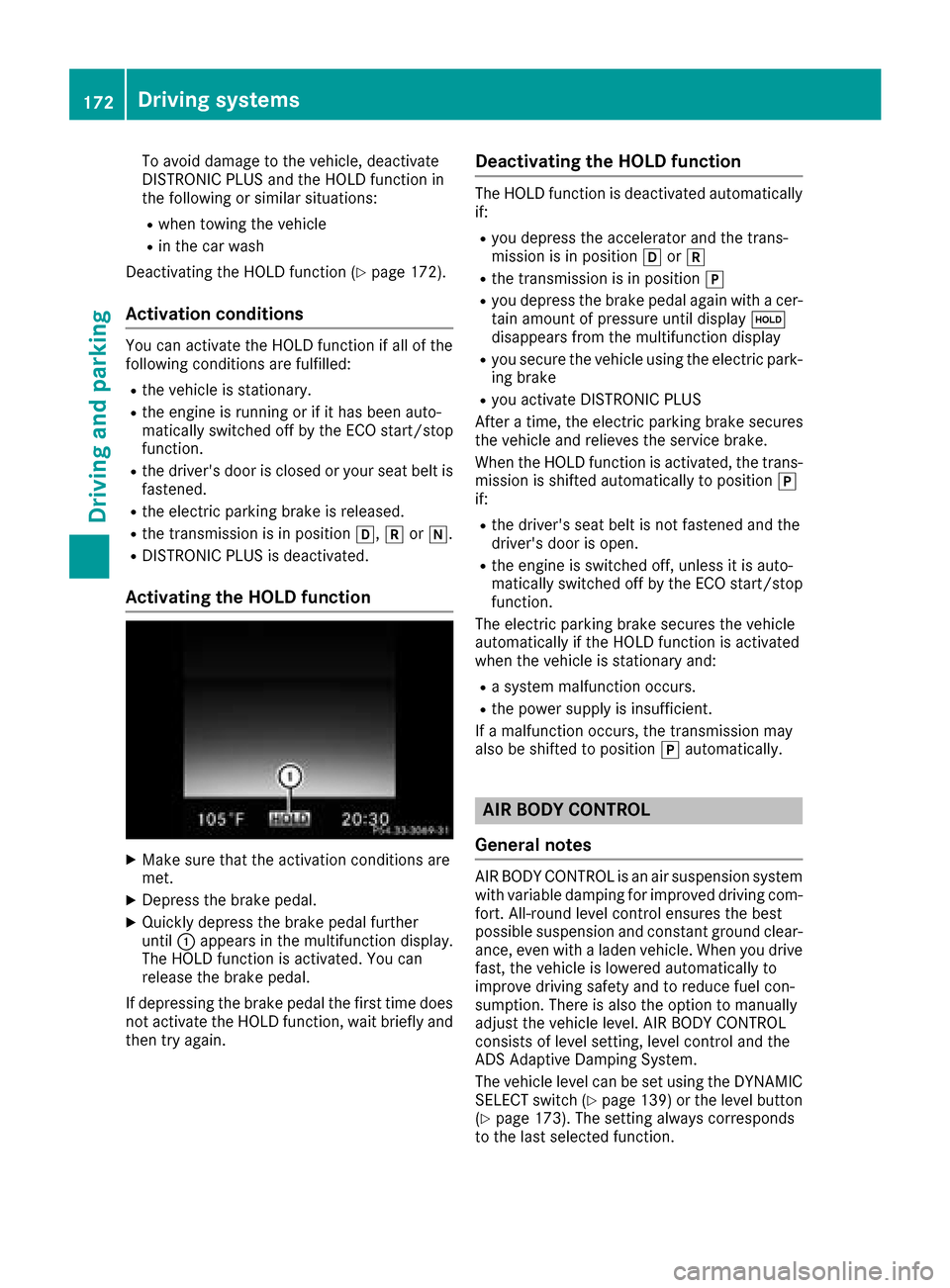
XDepress the brake pedal.
XQuickly depress the brake pedal further
until :appears in the multifunction display.
The HOLD function is activated. You can
release the brake pedal.
If depressing the brake pedal the first time does not activate the HOLD function, wait briefly and
then try again.
Deactivating the HOLD function
The HOLD function is deactivated automatically
if:
Ryou depress the accelerator and the trans-
mission is in position hork
Rthe transmission is in position j
Ryou depress the brake pedal again with a cer-
tain amount of pressure until display ë
disappears from the multifunction display
Ryou secure the vehicle using the electric park- ing brake
Ryou activate DISTRONIC PLUS
After a time, the electric parking brake secures
the vehicle and relieves the service brake.
When the HOLD function is activated, the trans-
mission is shifted automatically to position j
if:
Rthe driver's seat belt is not fastened and the
driver's door is open.
Rthe engine is switched off, unless it is auto-
matically switched off by the ECO start/stop
function.
The electric parking brake secures the vehicle
automatically if the HOLD function is activated
when the vehicle is stationary and:
Ra system malfunction occurs.
Rthe power supply is insufficient.
If a malfunction occurs, the transmission may
also be shifted to position jautomatically.
AIR BODY CONTROL
General notes
AIR BODY CONTROL is an air suspension system
with variable damping for improved driving com- fort. All-round level control ensures the best
possible suspension and constant ground clear-
ance, even with a laden vehicle. When you drive
fast, the vehicle is lowered automatically to
improve driving safety and to reduce fuel con-
sumption. There is also the option to manually
adjust the vehicle level. AIR BODY CONTROL
consists of level setting, level control and the
ADS Adaptive Damping System.
The vehicle level can be set using the DYNAMIC SELECT switch (
Ypage 139) or the level button
(Ypage 173). The setting always corresponds
to the last selected function.
172Driving systems
Driving and parking
Page 175 of 374
Important safety notes
GWARNING
When th evehicl eis bein glowered, people
could become trapped if their limb sare
between th evehicl ebody and th ewheels or
underneat hth evehicle. Ther eis aris kof
injury.
Mak esur eno on eis underneat hth evehicl eor
in th eimmediat evicinity of th ewhee larches
when th evehicl eis bein glowered.
iIf on eof th edoor sis open ,th evehicl eis no t
lowered.
Vehicle level
Setting the raised vehicle level
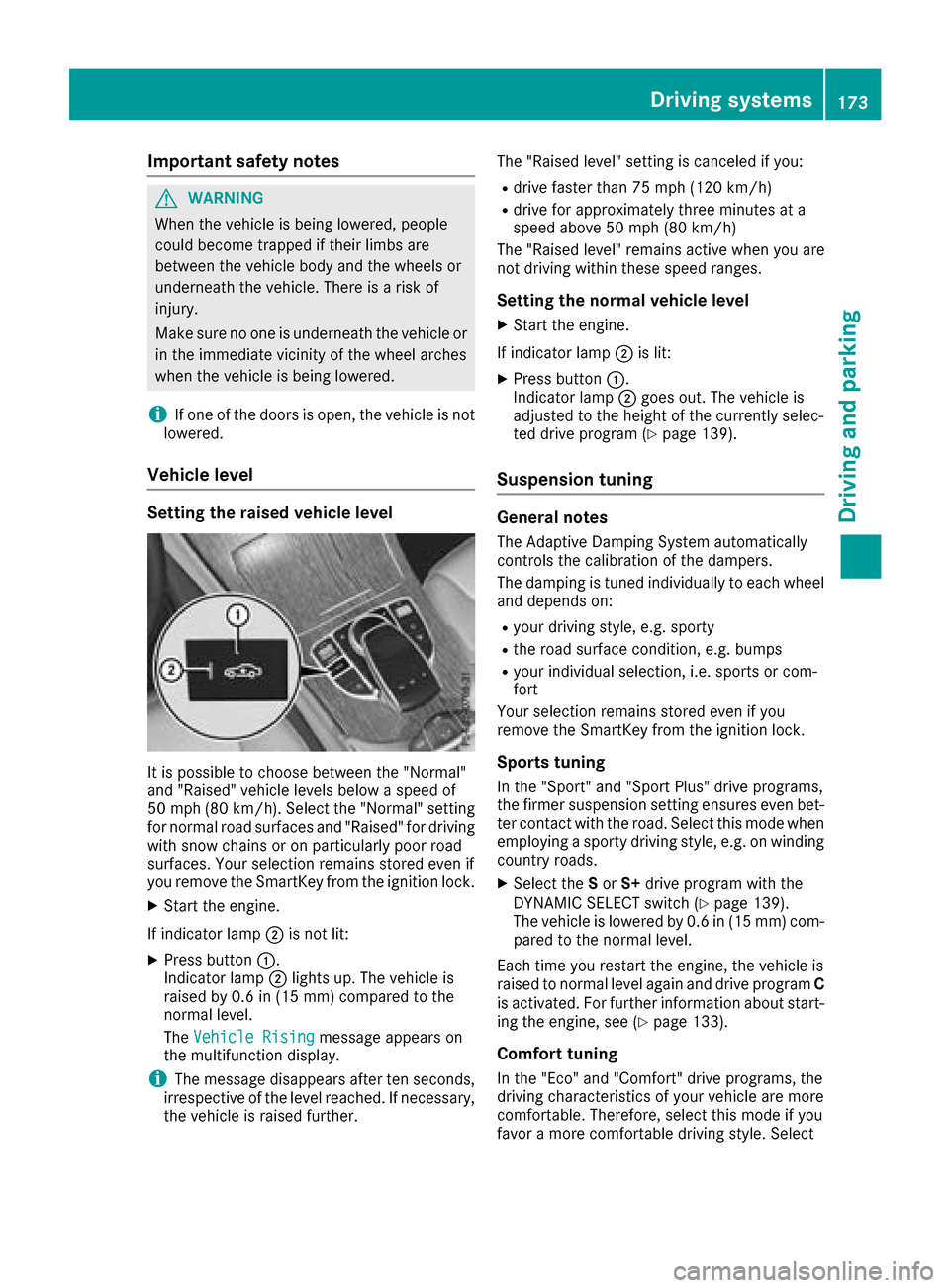
It is possible to choos ebetween th e"Normal"
and "Raised "vehicl elevels belo w aspee dof
50 mph (80 km/h). Selec tth e"Normal" setting
for normal road surfaces and "Raised "for driving
wit hsnow chain sor on particularly poor road
surfaces. Your selection remain sstore deve nif
you remove th eSmartKey from th eignition lock.
XStart th eengine.
If indicator lamp ;is no tlit :
XPress butto n:.
Indicato rlamp ;lights up. The vehicl eis
raised by 0. 6in (15 mm )comp ared to the
normal level.
The Vehicle Rising
message appears on
the multifunction display.
iThe message disappears after ten seconds,
irrespective of the level reached. If necessary,
the vehicle is raised further. The "Raised level" setting is canceled if you:
Rdrive faster than 75 mph (120 km/h)
Rdrive for approximately three minutes at a
speed above 50 mph
(80 km/h)
The "Raised level" remains active when you are
not driving within these speed ranges.
Setting the normal vehicle level
XStart the engine.
If indicator lamp ;is lit:
XPress button :.
Indicator lamp ;goes out. The vehicle is
adjusted to the height of the currently selec-
ted drive program (
Ypage 139).
Suspension tuning
General notes
The Adaptive Damping System automatically
controls the calibration of the dampers.
The damping is tuned individually to each wheel
and depends on:
Ryour driving style, e.g. sporty
Rthe road surface condition, e.g. bumps
Ryour individual selection, i.e. sports or com-
fort
Your selection remains stored even if you
remove the SmartKey from the ignition lock.
Sports tuning
In the "Sport" and "Sport Plus" drive programs,
the firmer suspension setting ensures even bet-
ter contact with the road. Select this mode when
employing a sporty driving style, e.g. on winding country roads.
XSelect the Sor S+ drive program with the
DYNAMIC SELECT switch (Ypage 139).
The vehicle is lowered by 0.6 in (15 mm) com- pared to the normal level.
Each time you restart the engine, the vehicle is
raised to normal level again and drive program C
is activated. For further information about start-
ing the engine, see (
Ypage 133).
Comfort tuning
In the "Eco" and "Comfort" drive programs, the
driving characteristics of your vehicle are more
comfortable. Therefore, select this mode if you
favor a more comfortable driving style. Select
Driving systems173
Driving and parking
Z
Page 176 of 374
comfort mode also when driving fast on straight
roads, e.g. on straight stretches of highway.
XSelect theEor Cdrive program with the
DYNAMIC SELECT switch (Ypage 139).
The vehicle is raised to the normal level.
When driving at speeds above 80 mph
(125 km/h), the vehicle is automatically low-
ered by 0.6 in (15 mm) in the Eand Cdrive pro-
grams. When driving at speeds below 50 mph
(80 km/h), the vehicle is raised again.
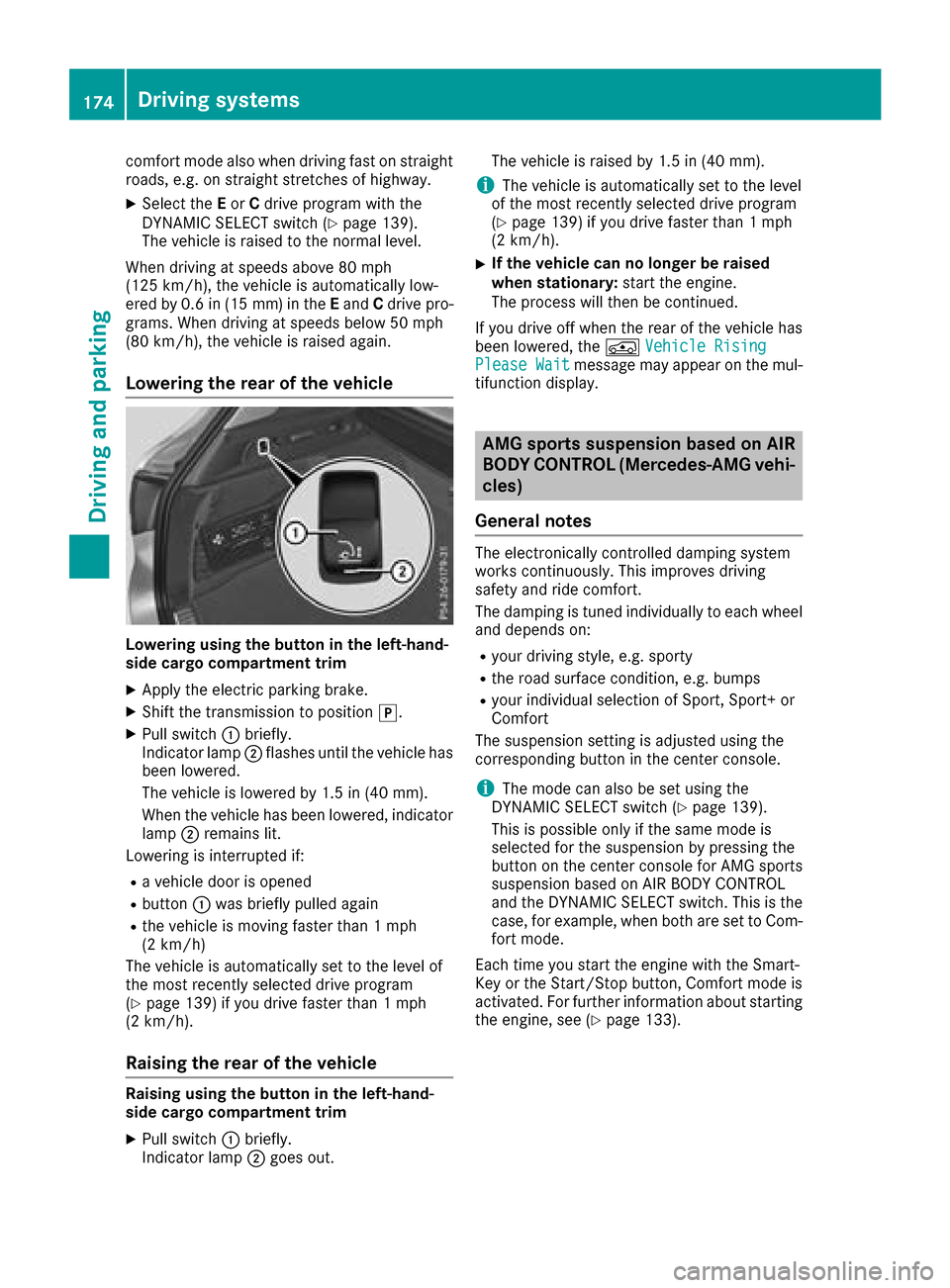
Lowering the rear of the vehicle
Lowering using the button in the left-hand-
side cargo compartment trim
XApply the electric parking brake.
XShift the transmission to position j.
XPull switch:briefly.
Indicator lamp ;flashes until the vehicle has
been lowered.
The vehicle is lowered by 1.5 in (40 mm).
When the vehicle has been lowered, indicator
lamp ;remains lit.
Lowering is interrupted if:
Ra vehicle door is opened
Rbutton :was briefly pulled again
Rthe vehicle is moving faster than 1 mph
(2 km/h)
The vehicle is automatically set to the level of
the most recently selected drive program
(
Ypage 139) if you drive faster than 1 mph
(2 km/h).
Raising the rear of the vehicle
Raising using the button in the left-hand-
side cargo compartment trim
XPull switch :briefly.
Indicator lamp ;goes out. The vehicle is raised by 1.5 in (40 mm).
iThe vehicle is automatically set to the level
of the most recently selected drive program
(
Ypage 139) if you drive faster than 1 mph
(2 km/h).
XIf the vehicle can no longer be raised
when stationary: start the engine.
The process will then be continued.
If you drive off when the rear of the vehicle has
been lowered, the ÁVehicle Rising
Please Waitmessage may appear on the mul-
tifunction display.
AMG sports suspension based on AIR
BODY CONTROL (Mercedes-AMG vehi-
cles)
General notes
The electronically controlled damping system
works continuously. This improves driving
safety and ride comfort.
The damping is tuned individually to each wheel
and depends on:
Ryour driving style, e.g. sporty
Rthe road surface condition, e.g. bumps
Ryour individual selection of Sport, Sport+ or
Comfort
The suspension setting is adjusted using the
corresponding button in the center console.
iThe mode can also be set using the
DYNAMIC SELECT switch (Ypage 139).
This is possible only if the same mode is
selected for the suspension by pressing the
button on the center console for AMG sports
suspension based on AIR BODY CONTROL
and the DYNAMIC SELECT switch. This is the
case, for example, when both are set to Com- fort mode.
Each time you start the engine with the Smart-
Key or the Start/Stop button, Comfort mode is
activated. For further information about starting
the engine, see (
Ypage 133).
174Driving systems
Driving and parking