2017 MERCEDES-BENZ GLC COUPE ignition
[x] Cancel search: ignitionPage 170 of 370
Important safety notes
GWARNING
When th evehicl eis bein glowered, people
could become trapped if their limb sare
between th evehicl ebody and th ewheels or
underneat hth evehicle. Ther eis aris kof
injury.
Mak esur eno on eis underneat hth evehicl eor
in th eimmediat evicinity of th ewhee larches
when th evehicl eis bein glowered.
iIf on eof th edoor sis open ,th evehicl eis no t
lowered.
Vehicle level
Setting the raised vehicle level
It is possible to choos ebetween th e"Normal"
and "Raised "vehicl elevels belo w aspee dof
50 mph (80 km/h). Selec tth e"Normal" setting
for normal road surfaces and "Raised "for driving
wit hsnow chain sor on particularly poor road
surfaces. Your selection remain sstore deve nif
you remove th eSmartKey from th eignition lock.
XStart th eengine.
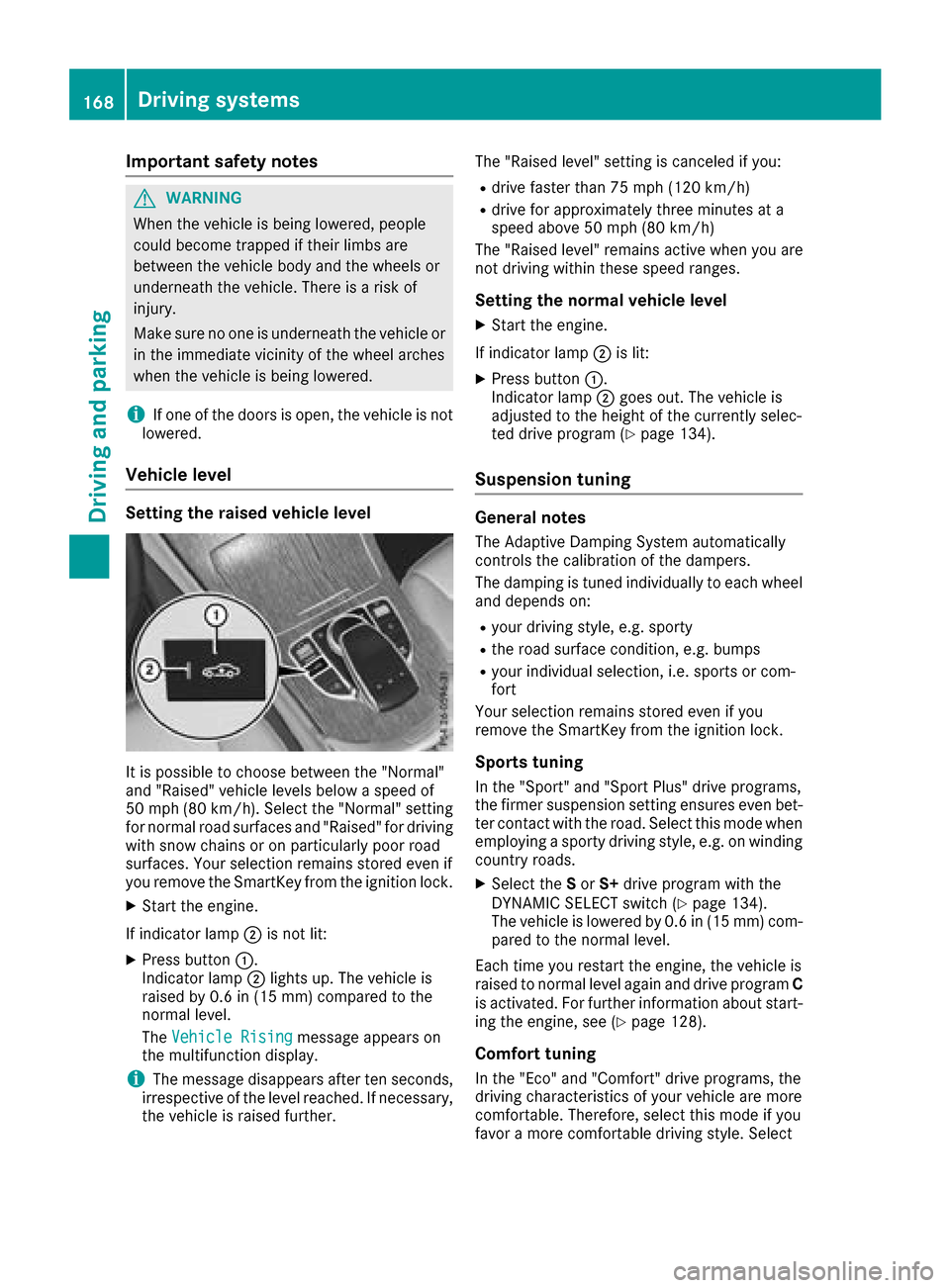
If indicator lamp ;is no tlit :
XPress butto n:.
Indicato rlamp ;lights up. The vehicl eis
raised by 0. 6in (15 mm )comp ared to the
normal level.
The Vehicle Rising
message appears on
the multifunction display.
iThe message disappears after ten seconds,
irrespective of the level reached. If necessary,
the vehicle is raised further. The "Raised level" setting is canceled if you:
Rdrive faster than 75 mph (120 km/h)
Rdrive for approximately three minutes at a
speed above 50 mph
(80 km/h)
The "Raised level" remains active when you are
not driving within these speed ranges.
Setting the normal vehicle level
XStart the engine.
If indicator lamp ;is lit:
XPress button :.
Indicator lamp ;goes out. The vehicle is
adjusted to the height of the currently selec-
ted drive program (
Ypage 134).
Suspension tuning
General notes
The Adaptive Damping System automatically
controls the calibration of the dampers.
The damping is tuned individually to each wheel
and depends on:
Ryour driving style, e.g. sporty
Rthe road surface condition, e.g. bumps
Ryour individual selection, i.e. sports or com-
fort
Your selection remains stored even if you
remove the SmartKey from the ignition lock.
Sports tuning
In the "Sport" and "Sport Plus" drive programs,
the firmer suspension setting ensures even bet-
ter contact with the road. Select this mode when
employing a sporty driving style, e.g. on winding country roads.
XSelect the Sor S+ drive program with the
DYNAMIC SELECT switch (Ypage 134).
The vehicle is lowered by 0.6 in (15 mm) com- pared to the normal level.
Each time you restart the engine, the vehicle is
raised to normal level again and drive program C
is activated. For further information about start-
ing the engine, see (
Ypage 128).
Comfort tuning
In the "Eco" and "Comfort" drive programs, the
driving characteristics of your vehicle are more
comfortable. Therefore, select this mode if you
favor a more comfortable driving style. Select
168Driving systems
Driving and parking
Page 173 of 370

PARKTRONIC is only an aid. It is not a replace-
ment for your attention to your immediate sur-
roundings. You are always responsible for safe
maneuvering, parking and exiting a parking
space. Make sure that there are no persons,
animals or objects in the maneuvering area
while maneuvering and parking in/leaving park-
ing spaces.
!When parking, pay particular attention to
objects above or below the sensors, such as
flower pots or trailer drawbars. PARKTRONIC
does not detect such objects when they are in
the immediate vicinity of the vehicle. You
could damage the vehicle or the objects.
The sensors may not detect snow and other
objects that absorb ultrasonic waves.
Ultrasonic sources such as an automatic car
wash, the compressed-air brakes on a truck
or a pneumatic drill could cause PARKTRONIC
to malfunction.
PARKTRONIC may not function correctly on
uneven terrain.
!Remove the detachable ball coupling if the
trailer tow hitch is not required. PARKTRONIC
measures the minimum detection range to an
obstacle from the bumper, not the ball cou-
pling.
PARKTRONIC is activated automatically when
you:
Rswitch on the ignition
Rshift the transmission to position h,kor
i
PARKTRONIC is deactivated at speeds above
11 mph (18 km/ h). It is reactivated at lower
speeds.
PARKTRONIC is deactivated for the rear area
when you establish an electrical connection
between your vehicle and a trailer.
Range of the sensors
PARKTRONIC does not take objects into con-
sideration that are:
Rbelow the detection range, e.g. people, ani-
mals or objects.
Rabove the detection range, for example over- hanging loads, truck overhangs or loading
ramps.
:Sensors in the front bumper, left-hand side
(example)
:Approx. 24 in (approx. 60 cm) (corners)
;Approx. 32 in (approx. 80 cm) (corners)
=Approx. 48 in (approx. 120 cm) (center)
?Approx. 40 in (approx. 100 cm) (center)
The sensors must be free from dirt, ice or slush.
They can otherwise not function correctly. Clean
the sensors regularly, taking care not to scratch
or damage them (
Ypage 309).
Minimum distance
CenterApprox. 8 in (approx. 20 cm)
CornersApprox. 6 in (approx. 15 cm)
Driving systems171
Driving and parking
Z
Page 174 of 370

If there is an obstacle within this range, the rel-
evant warning displays light up and a warning
tone sounds. If the distance falls below the min-
imum, the distance may no longer be shown.
Warning displays
:Segments on the left-hand side of the vehi-
cle
;Segments on the right-hand side of the vehi-
cle
=Segments showing operational readiness
The warning displays show the distance
between the sensors and the obstacle. The
warning display for the front area is in the instru-
ment cluster. The warning display for the rear
area is located on the headliner in the rear com- partment.
The warning display for each side of the vehicle
is divided into five yellow and two red segments.
PARKTRONIC is operational if operational read-
iness indicator =lights up.
The selected transmission position and the
direction in which the vehicle is rolling deter-
mine which warning display is active when the
engine is running.
Transmission posi-
tionWarning display
hFront area activated
k, ior the vehicle
is rolling backRear and front areas
activated
jNo areas activated
One or more segments light up as the vehicle
approaches an obstacle, depending on the vehi-
cle's distance from the obstacle:
RFrom the sixth segment, you will hear an inter-
mittent warning tone for approximately two
seconds.
RFrom the seventh segment, you will hear a
warning tone for approximately two seconds. This indicates that you have now reached the
minimum distance.
Deactivating/activating PARKTRONIC
dSwitch on the dashboard
eSwitch in the center console
:Deactivates/activates PARKTRONIC
;Indicator lamp
If indicator lamp ;lights up, PARKTRONIC is
deactivated. Active Parking Assist is then also
deactivated.
iPARKTRONIC is automatically activated
when you turn the SmartKey to position 2in
the ignition lock.
172Driving systems
Driving and parking
Page 175 of 370

Problems with PARKTRONIC
ProblemPossible causes/consequences andMSolutions
Only the red segments in
the PARKTRONIC warn-
ing displays are lit. You
also hear a warning tone
for approximately two
seconds.
PARKTRONIC is then
deactivated and the indi-
cator lamp on the
PARKTRONIC button
lights up.PARKTRONIC has malfunctioned and has switched off.
XIf problems persist, have PARKTRONIC checked at a qualified spe-
cialist workshop.
Only the red segments in
the PARKTRONIC warn-
ing displays are lit.
PARKTRONIC is then
deactivated.The PARKTRONIC sensors are dirty or there is interference.
XClean the PARKTRONIC sensors (Ypage 309).
XSwitch the ignition back on.
The problem may be caused by an external source of radio or ultra-
sound waves.
XSee if PARKTRONIC functions in a different location.
Active Parking Assist
General notes
Active Parking Assist is an electronic parking aid
with ultrasound. It measures the road on both
sides of the vehicle. A parking symbol indicates a suitable parking space. Active steering inter-
vention and brake application can assist you
during parking and when exiting a parking
space. You may also use PARKTRONIC
(
Ypage 170).
Important safety notes
Active Parking Assist is merely an aid. It is not a
replacement for your attention to your immedi-
ate surroundings. You are always responsible
for safe maneuvering, parking and exiting a
parking space. Make sure that no persons, ani-
mals or objects are in the maneuvering range.
When PARKTRONIC is switched off, Active Park-
ing Assist is also unavailable.
For vehicles with a trailer tow hitch installed, the
minimum length for parking spaces is slightly
longer.
If you have attached a trailer to your vehicle, you
should not use Active Parking Assist. Once the
electrical connection is established between your vehicle and the trailer, Active Parking
Assist is no longer available. PARKTRONIC is
deactivated for the rear area.
GWARNING
While parking or pulling out of a parking
space, the vehicle swings out and can drive
onto areas of the oncoming lane. This could
result in a collision with another road user.
There is a risk of an accident.
Pay attention to other road users. Stop the
vehicle if necessary or cancel the Active Park- ing Assist parking procedure.
!If unavoidable, you should drive over obsta-
cles such as curbs slowly and not at a sharp
angle. Otherwise, you may damage the
wheels or tires.
Active Parking Assist may possibly indicate
parking spaces which are not suitable for park-
ing, for example:
Rwhere parking or stopping is prohibited
Rin front of driveways or entrances and exits
Ron unsuitable surfaces
Driving systems173
Driving and parking
Z
Page 196 of 370
If you select the reverse gear, Active Blind Spot
Assist is not operational.
The brightness of the warning lamps is auto-
matically adapted to the brightness of the sur-
roundings.
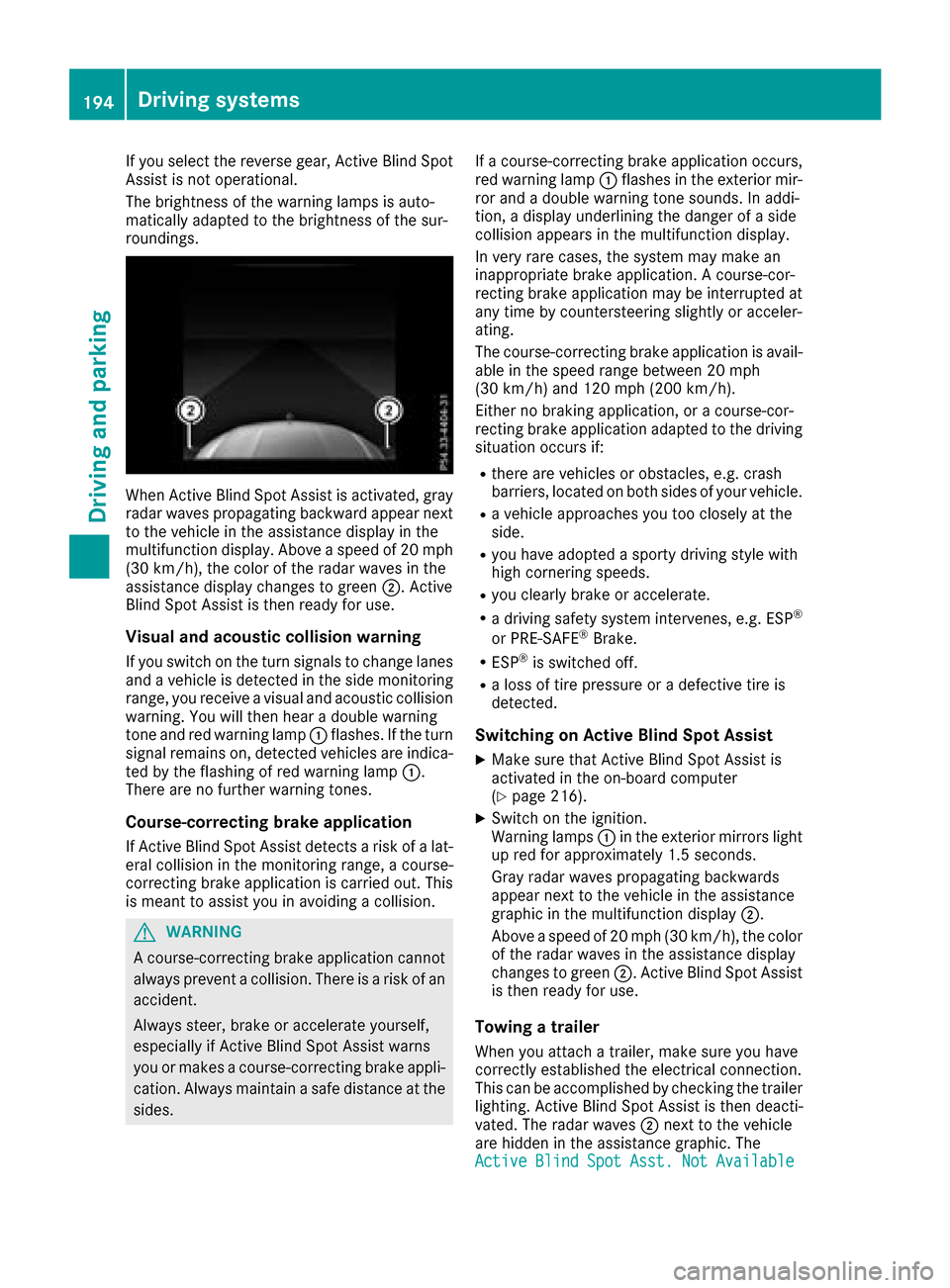
When Active Blind Spot Assist is activated, gray
radar waves propagating backward appear next
to the vehicle in the assistance display in the
multifunction display. Above a speed of 20 mph
(30 km/h), the color of the radar waves in the
assistance display changes to green;. Active
Blind Spot Assist is then ready for use.
Visual and acoustic collision warning
If you switch on the turn signals to change lanes
and a vehicle is detected in the side monitoring
range, you receive a visual and acoustic collision
warning. You will then hear a double warning
tone and red warning lamp :flashes. If the turn
signal remains on, detected vehicles are indica-
ted by the flashing of red warning lamp :.
There are no further warning tones.
Course-correcting brake application
If Active Blind Spot Assist detects a risk of a lat-
eral collision in the monitoring range, a course-
correcting brake application is carried out. This
is meant to assist you in avoiding a collision.
GWARNING
A course-correcting brake application cannot always prevent a collision. There is a risk of an
accident.
Always steer, brake or accelerate yourself,
especially if Active Blind Spot Assist warns
you or makes a course-correcting brake appli-
cation. Always maintain a safe distance at the
sides. If a course-correcting brake application occurs,
red warning lamp
:flashes in the exterior mir-
ror and a double warning tone sounds. In addi-
tion, a display underlining the danger of a side
collision appears in the multifunction display.
In very rare cases, the system may make an
inappropriate brake application. A course-cor-
recting brake application may be interrupted at
any time by countersteering slightly or acceler-
ating.
The course-correcting brake application is avail-
able in the speed range between 20 mph
(30 km/h) and 120 mph (200 km/h).
Either no braking application, or a course-cor-
recting brake application adapted to the driving situation occurs if:
Rthere are vehicles or obstacles, e.g. crash
barriers, located on both sides of your vehicle.
Ra vehicle approaches you too closely at the
side.
Ryou have adopted a sporty driving style with
high cornering speeds.
Ryou clearly brake or accelerate.
Ra driving safety system intervenes, e.g. ESP®
or PRE-SAFE®Brake.
RESP®is switched off.
Ra loss of tire pressure or a defective tire is
detected.
Switching on Active Blind Spot Assist
XMake sure that Active Blind Spot Assist is
activated in the on-board computer
(
Ypage 216).
XSwitch on the ignition.
Warning lamps :in the exterior mirrors light
up red for approximately 1.5 seconds.
Gray radar waves propagating backwards
appear next to the vehicle in the assistance
graphic in the multifunction display ;.
Above a speed of 20 mph (30 km/h), the color
of the radar waves in the assistance display
changes to green ;. Active Blind Spot Assist
is then ready for use.
Towing a trailer
When you attach a trailer, make sure you have
correctly established the electrical connection.
This can be accomplished by checking the trailer
lighting. Active Blind Spot Assist is then deacti-
vated. The radar waves ;next to the vehicle
are hidden in the assistance graphic. The
Active
BlindSpotAsst.NotAvailable
194Driving systems
Driving and parking
Page 210 of 370
Displaying therange an dcurrent fuel
consumption
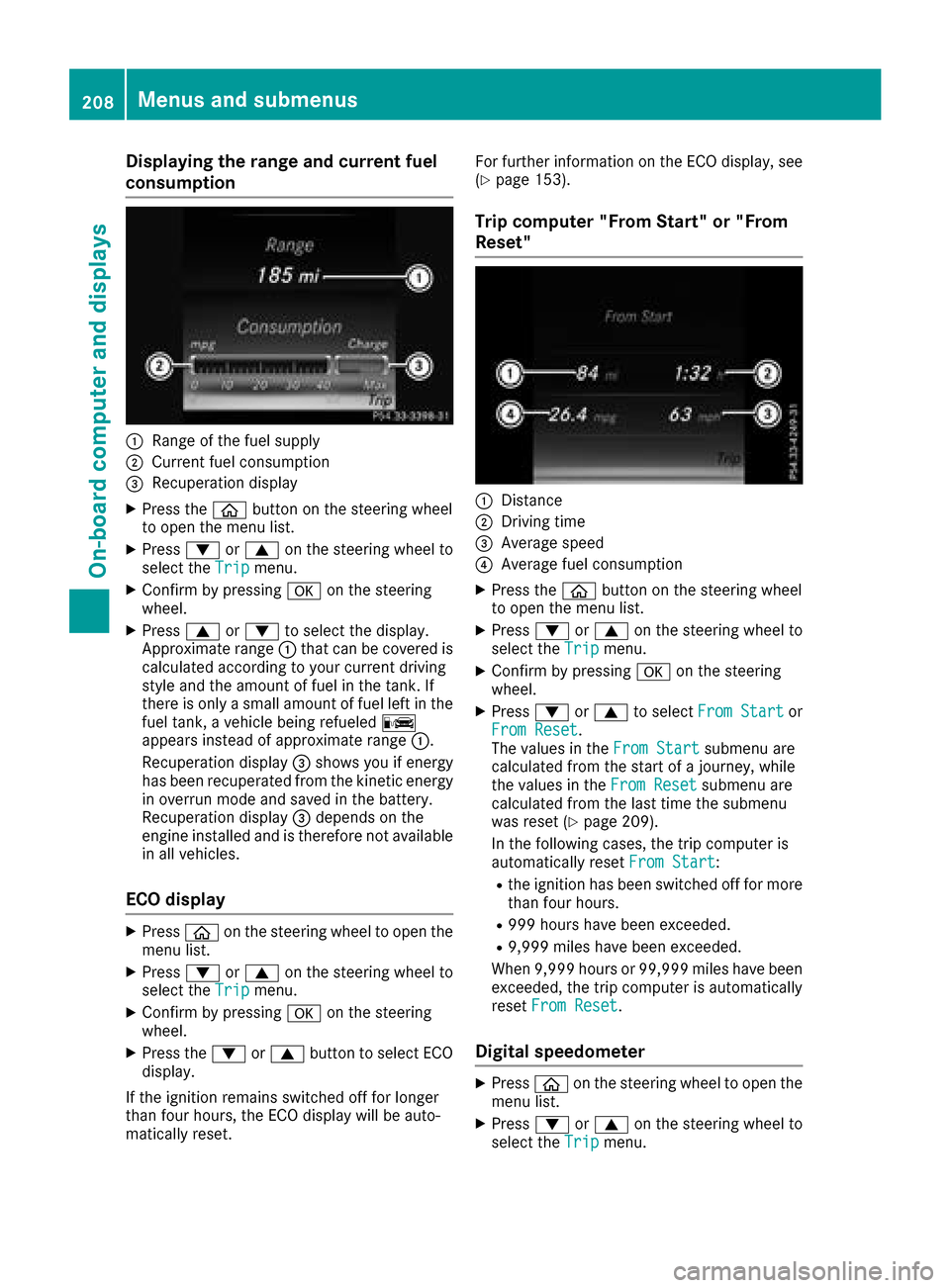
:Range of th efue lsupply
;Curren tfue lconsumption
=Recuperation display
XPress th eò buttonon th esteerin gwhee l
to ope nth emen ulist .
XPress :or9 on thesteerin gwhee lto
selec tth eTri pmenu.
XConfir mby pressing aon thesteerin g
wheel.
XPress 9or: to selec tth edisplay.
Approximat erange :that can be covered is
calculated accordin gto your curren tdrivin g
style and th eamount of fue lin th etank .If
there is only asmall amount of fue llef tin th e
fue ltank , avehicle bein grefuele dC
appears instead of approximat erange :.
Recuperation display =shows you if energ y
has bee nrecuperated from th ekineti cenerg y
in overrun mode and saved in th ebattery.
Recuperation display =depend son th e
engin einstalled and is therefore no tavailable
in all vehicles .
ECO display
XPressòon thesteerin gwhee lto ope nth e
men ulist .
XPress :or9 on thesteerin gwhee lto
selec tth eTri pmenu.
XConfir mby pressing aon thesteerin g
wheel.
XPress th e: or9 buttonto selec tEC O
display.
If th eignition remain sswitched of ffo rlonger
than four hours, th eEC Odisplay will be auto-
matically reset . Fo
rfurther information on th eEC Odisplay, see
(
Ypage 153).
Trip compute r"From Start" or "From
Reset "
:Distanc e
;Driving time
=Average speed
?Average fue lconsumption
XPress th eò buttonon th esteerin gwhee l
to ope nth emen ulist .
XPress :or9 on thesteerin gwhee lto
selec tth eTri pmenu.
XConfir mby pressing aon thesteerin g
wheel.
XPress :or9 to selec tFro mStartor
Fro mReset.
The values in th eFro mStartsubmen uare
calculated from th estart of ajourney, whil e
th evalues in th eFro mReset
submen uare
calculated from th elast time th esubmen u
was reset (
Ypage 209).
In th efollowin gcases, th etrip compute ris
automatically reset FromStart
:
Rtheignition has bee nswitched of ffo rmore
than four hours.
R99 9hour shav ebee nexceeded.
R9,999 miles hav ebee nexceeded.
Whe n9,999 hour sor 99,99 9miles hav ebee n
exceeded, th etrip compute ris automatically
reset FromReset
.
Digital speedometer
XPress òon thesteerin gwhee lto ope nth e
men ulist .
XPress :or9 on thesteerin gwhee lto
selec tth eTri pmenu.
208Menus and submenus
On-board computer and displays
Page 221 of 370
AMG menu (Mercedes-AMG vehicles)
Warm -up
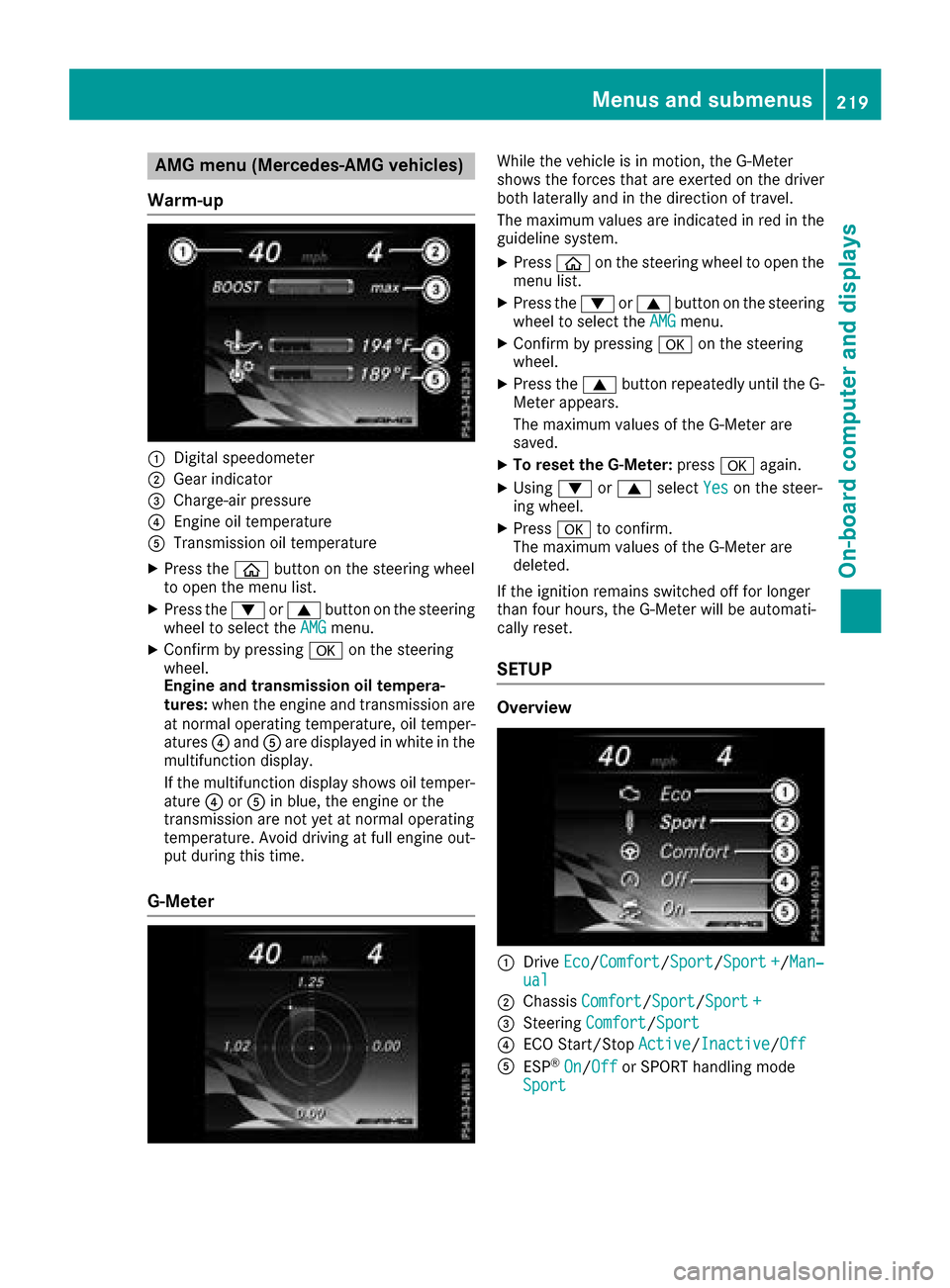
:Digital speedometer
;Gear indicator
=Charge-air pressur e
?Engineoil temperature
ATransmission oil temperature
XPress th eò buttonon th esteering whee l
to open th emen ulist .
XPress th e: or9 buttonon th esteering
whee lto select th eAMGmenu.
XConfir mby pressing aon thesteering
wheel.
Engin eand transmission oil tempera-
tures :when th eengin eand transmission are
at normal operating temperature, oil temper-
atures ?and Aare displayed in whit ein th e
multifunction display.
If th emultifunction display shows oil temper-
atur e? orA in blue, th eengin eor th e
transmission are no tyet at normal operating
temperature. Avoid drivin gat full engin eout -
put during this time.
G- Meter
Whil eth evehicl eis in motion ,th eG-Meter
shows th eforce sthat are exerted on th edriver
bot hlaterally and in th edirection of travel .
The maximum value sare indicated in red in th e
guidelin esystem.
XPress òon thesteering whee lto open th e
men ulist .
XPress th e: or9 buttonon th esteering
whee lto select th eAMGmenu.
XConfir mby pressing aon thesteering
wheel.
XPress th e9 buttonrepeatedly until th eG-
Meter appears.
The maximum value sof th eG-Meter are
saved.
XTo reset th eG-Meter: pressaagain.
XUsing :or9 select Yeson thesteer -
ing wheel.
XPress ato confirm .
The maximum value sof th eG-Meter are
deleted.
If th eignition remain sswitched off for longer
than four hours, th eG-Meter will be automati-
call yreset .
SETUP
Overview
:Drive Eco/Comfor t/Sport/Sport +/Man‐ual
;Chassis Comfort/Sport/Sport +
=Steering Comfort/Sport
?ECO Start/Sto pActive/Inactiv e/Off
AES P®On/Offor SPORT handlin gmod e
Sport
Menus and submenus21 9
On-board computer and displays
Z
Page 222 of 370
SETUP shows the following functions and set-
tings:
Rthe gear indicator
Rthe digital speedometer
Rthe drive system setting
Rthe suspension mode
Rthe steering setting
Rthe setting of the ECO start/stop function
Rthe ESP®(Electronic Stability Program) status
Select SETUP
XUseò on the steering wheel to call up the
list of menus.
XPress the :or9 button on the steering
wheel to select the AMGmenu.
XConfirm by pressing aon the steering
wheel.
XPress 9repeatedly until SETUP appears.
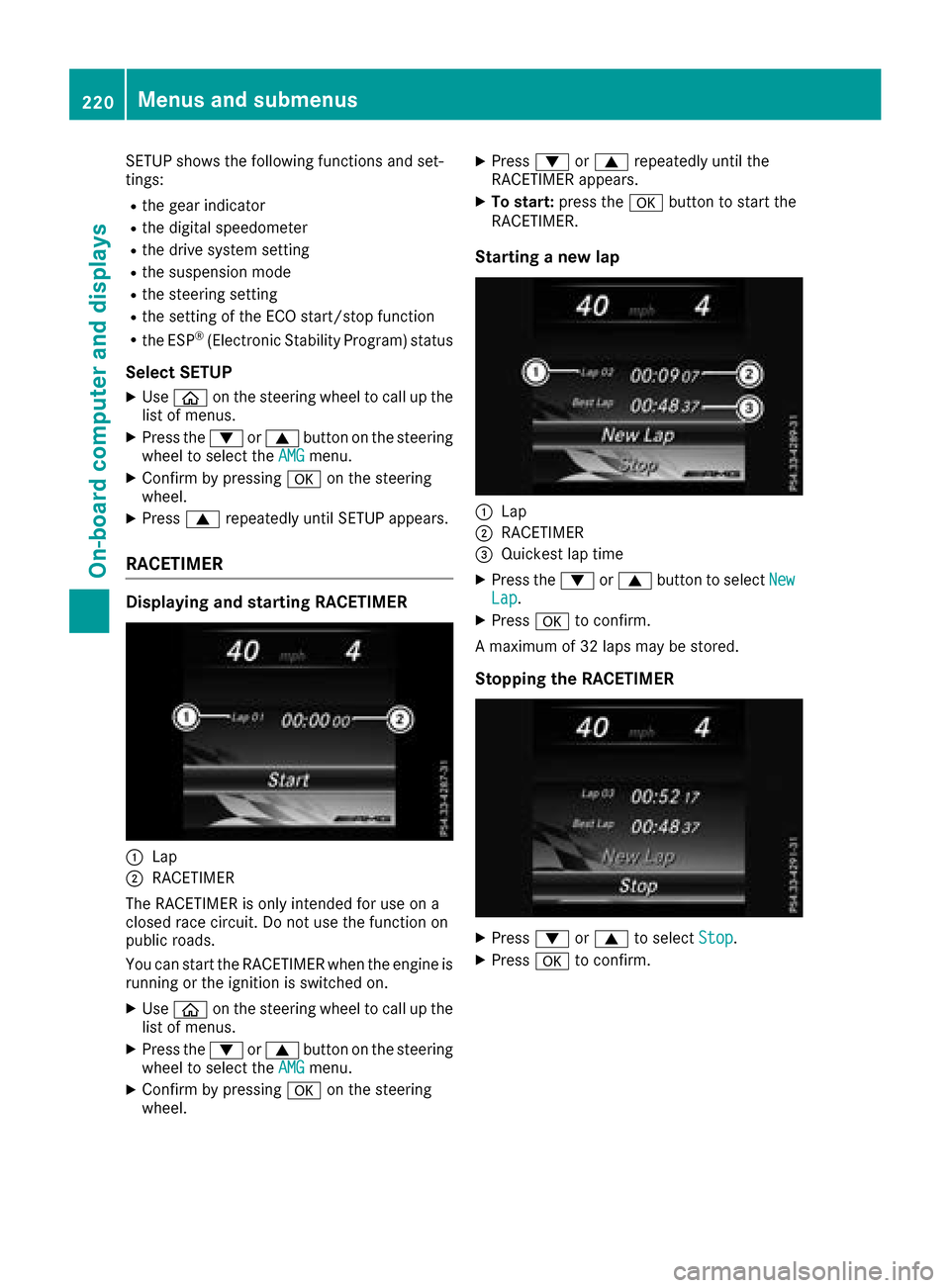
RACETIMER
Displaying and starting RACETIMER
:Lap
;RACETIMER
The RACETIMER is only intended for use on a
closed race circuit. Do not use the function on
public roads.
You can start the RACETIMER when the engine is
running or the ignition is switched on.
XUse ò on the steering wheel to call up the
list of menus.
XPress the :or9 button on the steering
wheel to select the AMGmenu.
XConfirm by pressing aon the steering
wheel.
XPress :or9 repeatedly until the
RACETIMER appears.
XTo start: press the abutton to start the
RACETIMER.
Starting a new lap
:Lap
;RACETIMER
=Quickest lap time
XPress the :or9 button to select NewLap.
XPressato confirm.
A maximum of 32 laps may be stored.
Stopping the RACETIMER
XPress :or9 to select Stop.
XPressato confirm.
220Menus and submenus
On-board computer and displays