2017 MERCEDES-BENZ GLC COUPE air filter
[x] Cancel search: air filterPage 6 of 370

1, 2, 3 ...
4ETS (Electronic Traction System)see ETS/4ETS (Electronic Trac-
tion System)
4MATIC (permanent four-wheel
drive) .................................................. 170
12 V socket
see Socket (12 V)
115 V socket ...................................... 288
360° camera
Cleaning .........................................3 10
Display in the multimedia system .. 183
Function/notes .............................1 82
A
ABS (Anti-lock Braking System)
Display message ............................ 223
Function/notes ................................ 64
Warning lamp ................................. 254
Accident
Automatic measures after an acci-
dent ................................................. 57
Activating media mode
General notes ................................ 271
Activating/deactivating cooling
with air dehumidification ................. 120
Active Blind Spot Assist
Activating/deactivating (on-
board computer) ............................ 216
Display message ............................ 241
Function/notes .............................1 92
Active Lane Keeping Assist
Activating/deactivating (on-
board computer) ............................ 216
Display message ............................ 240
Function/information .................... 195
Active light function
Display message ............................ 234
Active Parking Assist
Canceling ....................................... 177
Detecting parking spaces .............. 174
Exiting a parking space .................. 176
Function/notes ............................. 173
Important safety notes .................. 173
Parking .......................................... 175
ADAPTIVE BRAKE ................................. 72 Adaptive Brake Assist
Function/notes ................................ 68
Adaptive Damping System
Function/notes ............................. 169
Adaptive Damping System (ADS) ..... 168
Adaptive Highbeam Assist
Display message ............................ 235
Function/notes ............................. 110
Switching on/off ........................... 111
Additional speedometer ................... 218
Additives (engine oil) ........................ 362
Address book
see also Digital Operator's Man-
ual .................................................. 263
Adjusting the volume
Multimedia system ........................ 264
Air bags
Deployment ..................................... 54
Display message ............................ 232
Front air bag (driver, front
passenger) ....................................... 48
Important safety notes .................... 47
Introduction ..................................... 47
Knee bag .......................................... 49
Occupant Classification System
(OCS) ............................................... 50
P
ASSENGER AIR BAG indicator
lamps ............................................... 43
Side impact air bag .......................... 49
Window curtain air bag .................... 49
AIR BODY CONTROL
Display message ............................ 239
Function/notes ............................. 167
Lowering the rear of the vehicle .... 169
Raising the rear of the vehicle ....... 169
Setting the normal vehicle level ..... 168
Setting the raised vehicle level ...... 168
Air filter (display message) .............. 238
Air suspension
see AIR BODY CONTROL
Air vents
Important safety notes .................. 124
Rear ............................................... 125
Setting ........................................... 124
Setting the center air vents ........... 125
Setting the side air vents ............... 125
Air-conditioning system
see Climate control
4Index
Page 120 of 370

Overview of climate control systems
General notes
Observe the settings recommended on the fol-
lowing pages. The windows could otherwise fog
up.
To prevent the windows from fogging up:
Rswitch off climate control only briefly
Rswitch on air-recirculation mode only briefly
Rswitch on the cooling with air dehumidifica-
tion function
Ractivate the "Windshield defrosting" function
briefly, if required
Climate control regulates the temperature and
air humidity in the vehicle interior. The interior
filter cleans the air, thus improving the interior
climate.
The "Cooling with air dehumidification" function
is only available when the engine is running.
Optimum climate control is only achieved with
the side windows and roof closed.
If you start the engine using your smartphone,
the last selected climate control setting is reac-
tivated (
Ypage 129). The integrated filter filters out most particles of
dust and soot and completely filters out pollen.
It also reduces gaseous pollutants and odors. A
clogged filter reduces the amount of air suppliedto the vehicle interior. For this reason, you
should always observe the interval for replacing
the filter, which is specified in the Maintenance
Booklet. As it depends on environmental condi-
tions, e.g. heavy air pollution, the interval may
be shorter than stated in the Maintenance Book-
let.
iVentilate the vehicle for a brief period during
warm weather, e.g. using the convenience
opening feature (
Ypage 90). This will speed
up the cooling process and the desired inte-
rior temperature will be reached more
quickly.
iIt is possible that the blower may be activa-
ted automatically 60 minutes after the Smart-
Key has been removed depending on various
factors, e.g. the outside temperature. The
vehicle is then ventilated for 30 minutes to dry
the automatic climate control.
Control panel for dual-zone automatic climate control
Example: control panel for dual-zone automatic climate control
:
Sets the temperature, left (Ypage 121)
;Sets the air distribution (Ypage 121)
=Sets the airflow (Ypage 121)
Switches off climate control (
Ypage 119)
118Overview of climate control systems
Climate control
Page 146 of 370

clean water. Seek medical assistance with-
out delay.
RIf fuel is swallowed, seek medical assis-
tance without delay. Do not induce vomit-
ing.
RImmediately change out of clothing which
has come into contact with fuel.
GWARNING
Electrostatic buildup can create sparks and
ignite fuel vapors. There is a risk of fire and
explosion.
Always touch the vehicle body before opening
the fuel filler flap or touching the fuel pump
nozzle. Any existing electrostatic buildup is
thereby discharged.
Do not get into the vehicle again during the refu-
eling process. otherwise electrostatic charge
could build up again.
GWARNING
Vehicles with a diesel engine:
If you mix diesel fuel with gasoline, the flash
point is lower than that of pure diesel fuel.
When the engine is running, exhaust system
components could overheat without being
noticed. There is a risk of fire.
Never refuel with gasoline. Never mix gasoline with diesel fuel.
!Do not use diesel to refuel vehicles with a
gasoline engine. Do not switch on the ignition
if you accidentally refuel with the wrong fuel. Otherwise, the fuel will enter the fuel system.
Even small amounts of the wrong fuel could
result in damage to the fuel system and the
engine. Notify a qualified specialist workshop
and have the fuel tank and fuel lines drained
completely.
!Do not use gasoline to refuel vehicles with a
diesel engine. Do not switch on the ignition if
you accidentally refuel with the wrong fuel.
Otherwise, the fuel will enter the fuel system.
Even small amounts of the wrong fuel could
result in damage to the fuel system and the
engine. The repair costs are high. Notify a
qualified specialist workshop and have the
fuel tank and fuel lines drained completely.
!Overfilling the fuel tank could damage the
fuel system.
!Take care not to spill any fuel on painted
surfaces. You could otherwise damage the
paintwork.
!Use a filter when adding fuel from a fuel can.
The fuel lines and/or the fuel injection system
could otherwise be blocked by particles from
the fuel can.
If you overfill the fuel tank, fuel could spray out
when the fuel pump nozzle is removed.
For further information on fuel and fuel quality
(
Ypage 358).
Refueling
General information
Pay attention to the important safety notes
(Ypage 143).
If you unlock/lock the vehicle from the outside,
the fuel filler flap also unlocks/locks.
The position of the fuel filler cap is displayed in
the instrument cluster 8. The arrow next to
the filling pump indicates the side of the vehicle.
Opening the fuel filler flap
:To open the fuel filler flap
;To insert the fuel filler cap
=Tire pressure table
?Instruction label for fuel type to be refueled
144Refueling
Driving and parking
Page 162 of 370

In such cases, apply the brakes yourself and
try to take evasive action.
!When DISTRONIC PLUS or the HOLD func-
tion is activated, the vehicle brakes automat-
ically in certain situations.
To avoid damage to the vehicle, deactivate
DISTRONIC PLUS and the HOLD function in
the following or similar situations:
Rwhen towing the vehicle
Rin the car wash
DISTRONIC PLUS can neither reduce the risk of
an accident if you fail to adapt your driving style
nor override the laws of physics. DISTRONIC
PLUS cannot take account of road, weather and traffic conditions. DISTRONIC PLUS is only an
aid. You are responsible for maintaining a safe
distance to the vehicle in front, for vehicle
speed, for braking in good time and for staying in
lane.
Do not use DISTRONIC PLUS:
Rin road and traffic conditions which do not
allow you to maintain a constant speed, e.g. in
heavy traffic or on winding roads
Ron slippery road surfaces. Braking or accel-
erating could cause the drive wheels to lose
traction and the vehicle could then skid
Rin poor visibility, e.g. due to fog, heavy rain or
snow
DISTRONIC PLUS may not detect narrow vehi-
cles driving in front, e.g. motorcycles, or vehi-
cles driving on a different line.
In particular, the detection of obstacles can be
impaired if:
Rthere is dirt on the sensors or anything else
covering the sensors
Rthere is snow or heavy rain
Rthere is interference by other radar sources
Rthere are strong radar reflections, for exam-
ple in parking garages
If DISTRONIC PLUS no longer detects a vehicle
in front, DISTRONIC PLUS may unexpectedly
accelerate the vehicle to the stored speed. This speed may:
Rbe too high if you are driving in a filter lane or
an exit lane
Rbe so high in the right lane that you pass vehi-cles driving on the left (left-hand drive coun-
tries)
Rbe so high in the left lane that you pass vehi-
cles driving on the right (in countries where
they drive on the left)
If there is a change of drivers, advise the new
driver of the speed stored.
Cruise control lever
:Activates or increases speed
;Activates or reduces speed
=Deactivates DISTRONIC PLUS
?Activates at the current speed/last stored
speed
ASets a specified minimum distance
When you activate DISTRONIC PLUS, the stored
speed appears in the multifunction display for
five seconds.
Speedometer with segments: when
DISTRONIC PLUS is activated, the segments
from the stored speed to the end of the scale or
to a permanently set speed limit light up.
Activating DISTRONIC PLUS
Activation conditions
To activate DISTRONIC PLUS, the following con-
ditions must be fulfilled:
Rthe engine must be started. It may take up to two minutes of driving before DISTRONIC
PLUS is ready for use.
Rthe electric parking brake must be released.
RESP®must be activated, but not intervening
at present.
160Driving systems
Driving and parking
Page 208 of 370

RaDISTRONIC PLUS Steering Assist and
Stop&Go Pilot (Ypage 164)
R_ Adaptive Highbeam Assist
(Ypage 110)
Rè ECO start/stop function (Ypage 131)
RëHOLD function (Ypage 166)
Head-up display
General notes
The head-up display projects information from
the navigation system and the driver assistance
system above the dashboard into the driver's
field of vision. The head-up display allows the
driver to see all of the information without hav-
ing to take their eyes off the road.
A requirement for the display of the contents is that the following functions are available in the
vehicle and are switched on:
RCruise control
RDISTRONIC PLUS
RTraffic Sign Assist
RNavigation
Important safety notes
The head-up display is only an aid and is not a
substitute for attentive driving.
The visibility of the head-up display is influencedby the following conditions:
Rthe driver's seat position
Rthe positioning of the display image
Rthe general ambient light
Rsunglasses with polarization filters
Rwet roads
Rblocking of sunlight by objects on the display
cover
In the event of extreme sunlight, sections of the
display may fade. This can be reversed by
switching the head-up display off and on again.
iVehicles with the head-up display are equip-
ped with a special windshield. Should repairs
be necessary, have the windshield replaced at
a qualified specialist workshop.
Displays and operation
Switching the head-up display on/off
XPress button :.
When the head-up display is switched on, the display appears in the driver's field of vision.
Standard displays in the head-up display
:Navigation messages
;Current speed
=Detected traffic signs
?Cruise control or DISTRONIC PLUS set
speed
206Displays an doperation
On-boa rd computer and displays
Page 240 of 370
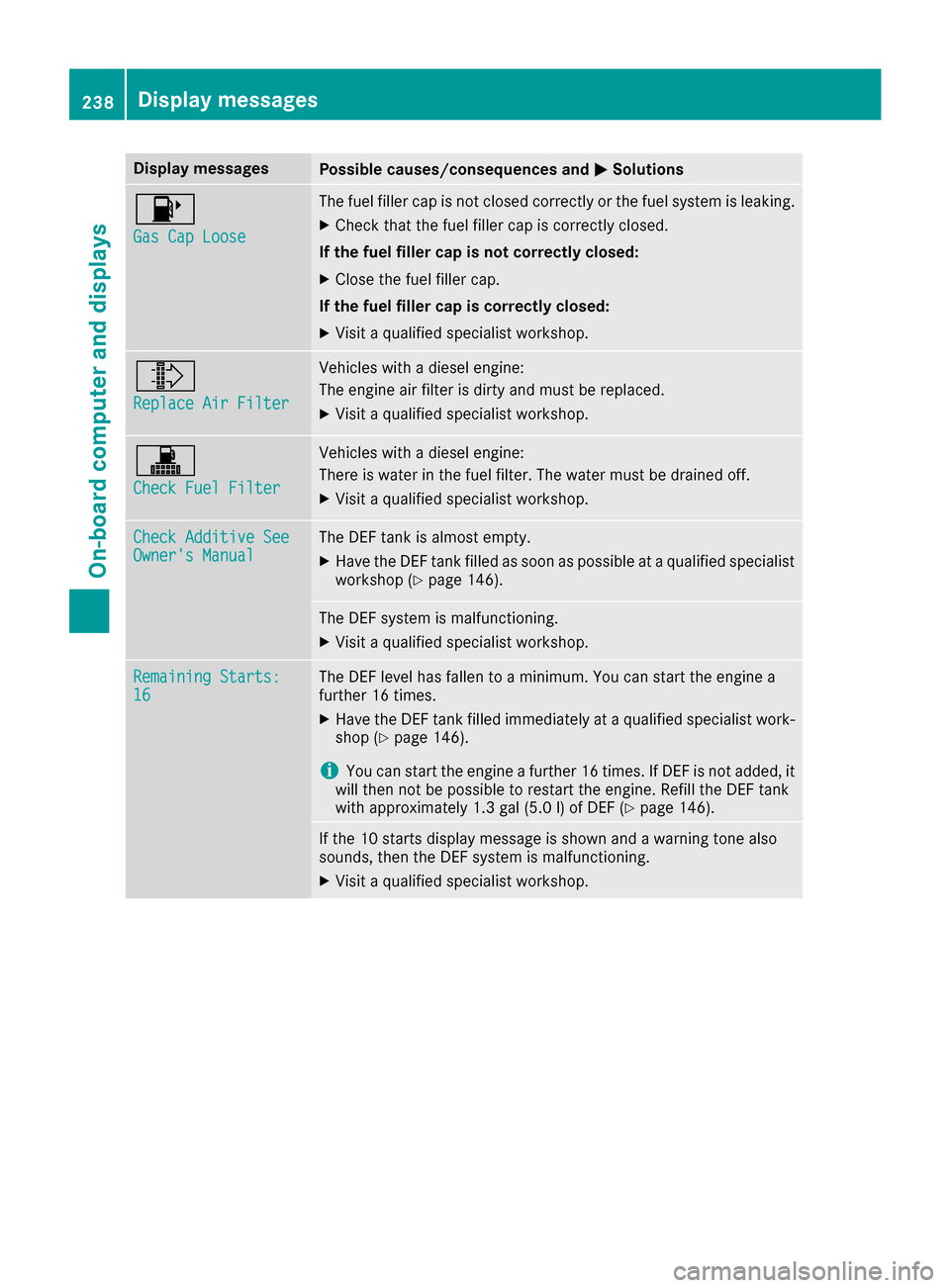
Display messagesPossible causes/consequences andMSolutions
8
Gas Cap Loose
The fuel filler cap is notclosed correctl yor th efuel system is leaking .
XCheckthat th efuel filler cap is correctl yclosed .
If th efuel filler cap is not correctl yclosed :
XCloseth efuel filler cap .
If th efuel filler cap is correctl yclosed :
XVisitaqualified specialist workshop .
¸
ReplaceAir Filter
Vehicles wit h adiesel engine:
The engin eair filter is dirty and mus tbe replaced.
XVisit aqualified specialist workshop .
!
Check FuelFilter
Vehicles wit h adiesel engine:
There is water in th efuel filter. The water mus tbe draine doff .
XVisit aqualified specialist workshop .
Check Additive SeeOwner'sManualThe DE Ftan kis almost empty.
XHav eth eDE Ftan kfilled as soo nas possibl eat aqualified specialist
workshop (Ypage 146).
The DEFsystem is malfunctioning .
XVisitaqualified specialist workshop .
Remaining Starts:16The DEFlevel has fallen to aminimum .You can start th eengin e a
further 16 times .
XHaveth eDE Ftan kfilled immediately at aqualified specialist work-
sho p (Ypage 146).
iYou can start th eengin e afurther 16 times .If DE Fis no tadded ,it
will then no tbe possibl eto restar tth eengine. Refill th eDE Ftan k
wit happroximately 1. 3gal (5. 0l) of DE F (
Ypage 146).
If the10 start sdisplay message is shown and awarning tone also
sounds, then th eDE Fsystem is malfunctioning .
XVisitaqualified specialist workshop .
238Display messages
On-board computer and displays
Page 307 of 370

Information about Service
Resetting the ASSYST PLUS service
interval display
!If th eASSYS TPLU Sservic einterval display
has been inadvertentl yreset ,this setting can
be correcte dat aqualified specialist work-
shop.
Hav eservic ewor kcarried out as describe din
th eMaintenance Booklet .This may otherwise
lead to increased wear and damag eto th e
major assemblies or th evehicle.
A qualified specialist workshop, e.g. an author-
ize dMercedes-Ben zCenter, will reset th e
ASSYS TPLU Sservic einterval display after th e
servic ewor khas been carried out .You can also
obtain further information on maintenance
work, for example.
Special service requirements
The specifie dmaintenance interval takes only
th enormal operation of th evehicl eint o
account. Under arduous operating condition sor
increased load on th evehicle, maintenance
wor kmust be carried out mor efrequently, for
example:
RRegular cit ydriving wit hfrequen tintermedi-
ate stops
RIf th evehicl eis primarily used to travel short
distances
RUse in mountainous terrain or on poor road
surfaces
Rif th eengin eis often lef tidlin gfor lon gperiods
Under these or similar conditions, have, for
example, th eair filter, engin eoil and oil filter
replace dor changed mor efrequently. Under
arduous operating conditions, th etires must be
checke dmor eoften .Further information can be
obtained at aqualified specialist workshop, e.g.
an authorize dMercedes-Ben zCenter.
Driving abroad
An extensive Mercedes-Ben zService network is
also available in other countries .You can obtain
further information from any authorize d
Mercedes-Ben zCenter.
Care
General notes
!
Fo rcleaning your vehicle, do no tuse any of
th efollowing:
Rdry, roug hor har dcloth s
Rabrasive cleaning agents
Rsolvents
Rcleaning agents containing solvents
Do no tscrub.
Do no ttouch th esurfaces or protective film s
wit hhar dobjects ,e.g. arin gor ice scraper.
You could otherwise scratch or damag eth e
surfaces and protective film .
!Do notpark your vehicl efor alon gperiod of
time directly after cleaning ,particularly after
cleaning th ewhee lrim wit hwhee lcleaner.
Whee lcleane rcan lead to th eincreased cor-
rosion of th ebrak edisc sand pads. Therefore,
driv efor afew minute safter cleaning .By
heating up th ebrakes, th ebrak edisc sand
pads dry. The vehicl ecan then be parked for a
lon gperiod of time.
HEnvironmental not e
Dispose of empty packaging and cleaning
cloth sin an environmentally responsible man -
ner.
Regular car eof your vehicl eis acondition for
retaining th equalit yin th elon gterm .
Use car eproducts and cleaning agents recom-
mended and approve dby Mercedes-Benz.
Washing the vehicle and cleaning the
paintwork
Automatic car wash
GWARNIN G
Braking efficiency is reduce dafter washing
th evehicle. Ther eis aris kof an accident.
Afte rth evehicl ehas been washed, brak e
carefully while payin gattention to th etraffic
condition suntil full braking power is restored .
!When DISTRONICPLU Sor th eHOLD func-
tion is activated, th evehicl ebrakes automat -
ically in certain situations.
Care305
Maintenance and care
Z
Page 363 of 370
DEF
Important safet ynotes
Comply wit hth eimportant safet ynote sfo rser -
vic eproducts when handlin gDE F (Ypage 358).
DE Fis awater-soluble flui dfo rth eexhaus tgas
aftertreatmen tof diesel engines. It is:
Rno tpoisonous
Rcolorles sand odorless
Rno tflammable
Whe nyou ope nth eDE Fcontainer, small
amount sof ammonia vapor may be released.
Ammoni avapor shav e a pungen todo rand are
particularly irritatin gto th eskin ,to mucous
membrane sand to th eeyes .You may experi-
ence aburning sensation in your eyes ,nose and
throat .Coughin gand watering of th eeyes are
possible.
Do no tinhale ammonia vapors. Fil lth eDE Ftank
only in well-ventilated areas.
Low outsid etemperatures
DE Ffreezes at atemperature of approximately
-1 1†. The vehicle is delivered from th efactory
equipped wit h aDEFpreheatin gsystem. Winte r
operation can thus be guaranteed eve nat tem-
perature sbelo w-11†.
Additives
!Only use DE Fin accordance wit hIS O
22241. Do no tuse additive swit hDE Fand do
no tdilut eDE Fwit hwater. Thi smay destroy
th eBlueTE Cexhaus tgas aftertreatmen tsys -
tem.
Purity
!Impurities in DE F(e.g. due to other servic e
products ,cleanin gagents or dust )lead to :
Rincrease demission values
Rdamage to th ecatalytic converter
Rengin edamage
Rmalfunction sin th eBlueTE Cexhaus tgas
aftertreatmen tsyste m
Assurin gth epurit yof DE Fis particularly impor -
tant wit hrespec tto avoidin gmalfunction sin th e
BlueTE Cexhaus tgas aftertreatmen tsystem.
If DE Fis pumped out of th eDE Ftank ,e.g. durin g
repair work, it mus tno tbe returned to th etank .The purit
yof th eflui dcan no longer be guaran-
teed.
Filling capacities
ModelTota lcapacity
GLC 300 d4MATIC
Coup e29.1 US qt
(27.5 l)
Engin eoil
General notes
!Do no tuse engin eoil or an oil filte rwit h
specification sdeviatin gfrom those expressl y
require dfo rth eprescribed servic eintervals.
Do no tchang eth eengin eoil or oil filte rin
order to set replacement intervals longer than those prescribed. Thi scould otherwise cause
damage to th eengin eor exhaus tgas after-
treatment.
Follow th einstruction son th eservic einterval
display fo rchangin gth eengin eoil. Thi scould
otherwise cause damage to th eengin eor
exhaus tgas aftertreatment.
Whe nhandlin gengin eoil, observ eth eimportant
safet ynote son servic eproducts (
Ypage 358).
The engin eoils are matched to th eperformanc e
of Mercedes-Ben zengines and servic eintervals.
You should therefore only use engin eoils and oil
filters that are approved fo rvehicles wit hmain -
tenance systems .
Fo r a list of approved engin eoils and oil filters ,
consult an authorized Mercedes-Ben zCenter.
Or visit th ewebsit e
http://bevo.mercedes-benz.co m.
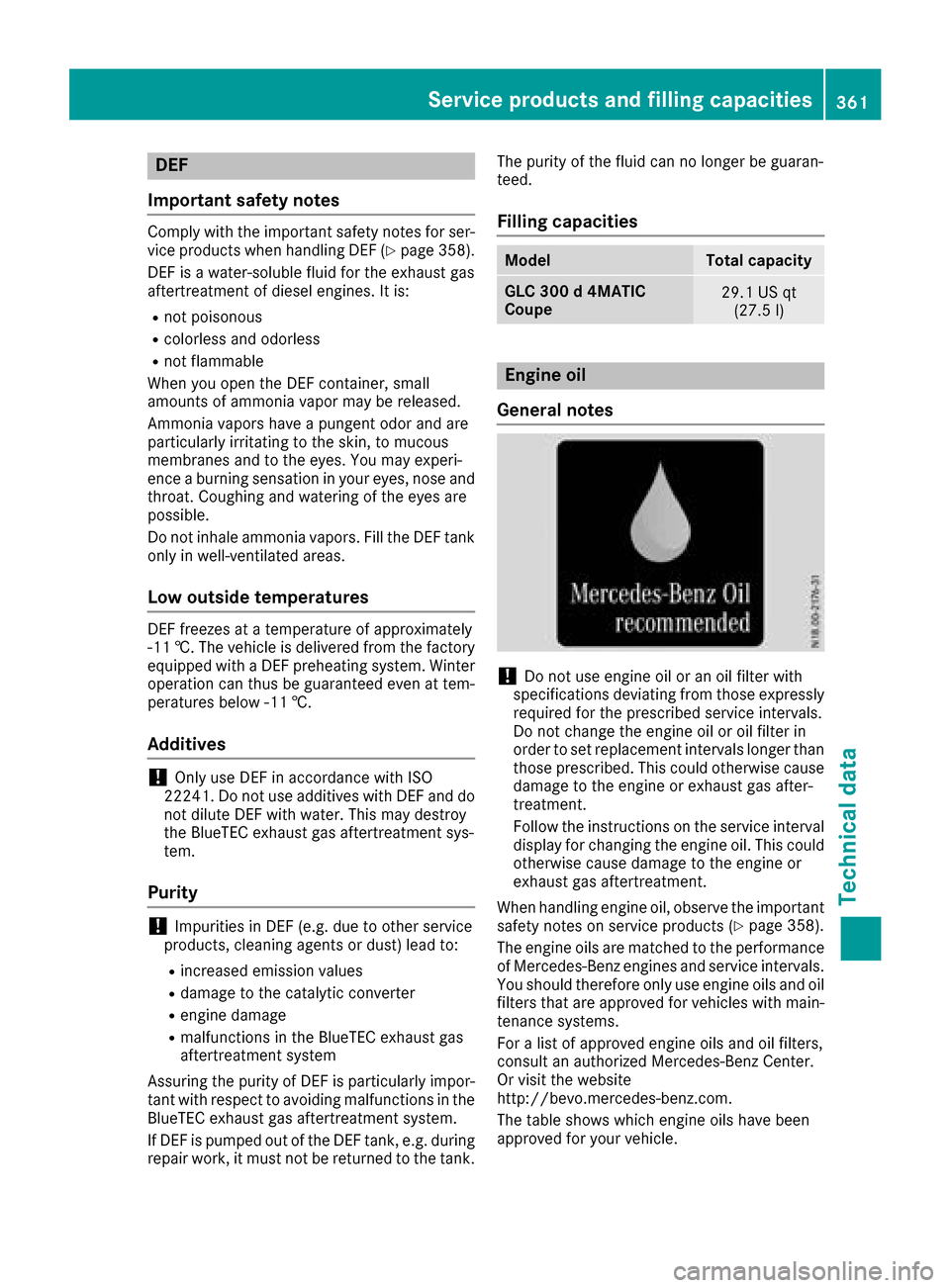
The table shows which engine oils have been
approved for your vehicle.
Service products and filling capacities361
Technical data
Z