2017 MERCEDES-BENZ GLA SUV cooling
[x] Cancel search: coolingPage 7 of 369
1, 2, 3 ...
4ETS (Electronic Traction System) see ETS/4ETS (Electronic Trac-
tion System)
4MATIC
Display message ............................ 261
4MATIC (permanent four-wheel
drive) .................................................. 190
12 V socket
see Sockets
360° camera
Function/notes .............................2 04A
ABS (Anti-lock Braking System) Display message ............................ 235
Function/notes ................................ 68
Important safety notes .................... 68
Warning lamp ................................. 267
Acceleration
see Kickdown
Accident
Automatic measures after an acci-
dent ................................................. 56
Activating media mode
General notes ................................ 286
Activating/deactivating air-recir-
culation mode ................................... .135
Activating/deactivating cooling
with air dehumidification ................. 132
Active Brake Assist
Activating or deactivating .............. 227
Display message ............................ 241
Function/notes ................................ 69
ADAPTIVE BRAKE ................................. 75
Adaptive brake lights .......................... 71
Adaptive Damping System
Function/notes ............................ .191
Adaptive Highbeam Assist
Display message ............................ 248
Function/notes ............................ .118
Switching on/off ........................... 119
Additional speedometer ................... 228
Additives (engine oil) ........................ 356
Address book
See also Digital Owner's Manual ... 277 Adjusting the headlamp range
......... 117
Adjusting the volume
Multimedia system ........................ 278
Air conditioning
General notes ................................ 128
Air filter (white display message) .... 251
Air pressure
see Tyre pressure
Air vents
Important safety notes .................. 141
Rear ............................................... 142
Setting the centre air vents ........... 142
Setting the side air vents .............. .142
Air-conditioning system
see Climate control
Airbag
Automatic front-passenger front
airbag deactivatio n.......................... 49
Introduction ..................................... 46
PASSENGER AIR BAG indicator
lamps ............................................... 42
Airbags
Display message ............................ 244
Front airbag (driver, front
passenger) ....................................... 47
Important safety guidelines ............. 46
Kneebag ........................................... 48
Sidebag ............................................ 48
Triggering ......................................... 53
Windowba g...................................... 49
Alarm
ATA (Anti-Theft Alarm system )......... 76
Switching off (ATA) .......................... 76
Switching the function on/off
(ATA) ................................................ 76
Alarm system
see ATA (Anti-Theft Alarm system)
AMG
Performance Seat .......................... 110
RIDE CONTROL sports suspen-
sion ................................................ 189
AMG menu (on-board computer) ..... 231
AMG Performance exhaust sys-
tem ..................................................... 150
AMG RIDE CONTROL
General Information ....................... 189
Anti-glare film .................................... 3014
Index
Page 10 of 369
Display message ............................ 247
Brakes
ABS .................................................. 68
BAS .................................................. 69
Brake fluid (notes) ........................ .356
Braking assistance appropriate to
the situation ..................................... 71
Display message ............................ 235
Driving tips ................................... .170
Hill start assist ............................... 147
HOLD function ............................... 186
Important safety notes .................. 170
Parking brake ................................ 167
Warning lamp ................................. 266
Braking assistance appropriate to
the situation
Function/notes ................................ 71
Breakdown
Where will I find...? ........................ 315
see Flat tyre
see Tow-starting
see Towing away
Buttons on the steering column ...... 218C
Calling up a fault see Display messages
Car
see Vehicle
Car wash (care) ................................. 308
Care
Automatic car wash ....................... 308
Carpets .......................................... 314
Display .......................................... .312
Exhaust pipe .................................. 312
Exterior lighting ............................ .311
Gear or selector lever .................... 313
High-pressure cleaner .................... 309
Interior .......................................... .312
Matt paintwork .............................. 309
Notes ............................................. 308
Paint .............................................. 309
Plastic trim ................................... .312
Reversing camera .......................... 311
Roof lining ...................................... 314
Seat belt ........................................ 313
Seat cover ..................................... 313 Sensors ......................................... 311
Steering wheel ............................... 313
Trim pieces ................................... .313
Washing by hand ........................... 308
Wheels .......................................... .310
Windows ........................................ 310
Wiper blades .................................. 310
Wooden trim .................................. 313
CD
See also Digital Owner's Manual ... 277
CD player (on-board computer) ........224
Central locking
Automatic locking (on-board com-
puter) ............................................. 229
Locking/unlocking (key ).................. 79
Centre console
Lower section .................................. 37
Upper section .................................. 36
Changing a wheel
Wheels and tyres ........................... 343
Child
Restraint system .............................. 57
Child seat
Forward-facing restraint system ...... 61
i-Size ................................................ 57
ISOFIX .............................................. 57
On the front-passenger sea t............ 60
Rearward-facing restraint system .... 61
Recommendations ........................... 65
Suitable positions ............................ 61
Top Tether ....................................... 59
Child-proof locks
Important safety notes .................... 66
Rear doors ....................................... 67
Children in the vehicle
Important safety notes .................... 56
Cigarette lighter ................................ 298
Cleaning
Mirror turn signal ........................... 311
Trailer tow hitch ............................. 312
Climate control
Air conditioning ............................. 129
Auxiliary heating/ventilation .......... 137
Controlling automaticall y............... 132
Convenience opening/closing
(air-recirculation mode) ................. 136
Cooling with air dehumidification .. 132
Demisting the windows .................. 135 Index
7
Page 11 of 369
Demisting the windscreen ............
.134
Indicator lamp ................................ 132
Information on using
THERMOTRONIC automatic cli-
mate control .................................. 131
Notes on using the air-condition-
ing system ..................................... 129
Overview of systems ..................... .128
Problem with the rear window
heating .......................................... 135
Problems with cooling with air
dehumidification ............................ 132
Setting the air distribution ............. 133
Setting the air vents ..................... .141
Setting the airflow ......................... 134
Setting the temperature ................ 133
Switching air-recirculation mode
on/off ............................................ 135
Switching on/off ........................... 131
Switching residual heat on/off ...... 137
Switching the rear window heat-
ing on/off ...................................... 135
Switching the ZONE function
on/off ............................................ 134
THERMOTRONIC (2-zone) auto-
matic climate control ..................... 130
Cockpit
Overview .......................................... 32
Collision warning
see Active Brake Assist
COMAND display
Cleaning ......................................... 312
COMAND Online
Driving dynamics displa y............... 192
Combination switch .......................... 118
Connecting a USB device
See also Digital Owner's Manua l... 277
Consumption statistics (on-board
computer) .......................................... 221
Controller ........................................... 278
Convenience closing feature .............. 99
Convenience opening feature ............ 98
Convenience opening/closing (air-
recirculation mode) ........................... 136
Coolant (engine)
Checking the level ......................... 305
Display message ............................ 249 Important safety notes .................. 356
Temperature (on-board computer,
Mercedes-AMG vehicles) ............... 231
Temperature gaug e........................ 218
Warning lamp ................................. 273
Cooling
see Climate control
Copyright ............................................. 31
Cornering light function
Display message ............................ 246
Cover
see Roller sunblind
Cruise control
Activation conditions ..................... 177
Cruise control lever ....................... 176
Deactivating ................................... 178
Display message ............................ 255
Driving system ............................... 176
Important safety notes .................. 176
LIM indicator lamp ......................... 176
Selecting ........................................ 177
Setting a speed .............................. 177
Storing and maintaining current
speed ............................................. 177
Cup holder
Centre console .............................. 297
Important safety notes .................. 296
Rear compartment ......................... 297 D
Dashboard see Cockpit
Dashboard lighting
see Instrument cluster lighting
Data
see Technical data
Data modem mode
Telephone module with Blue-
tooth ®
(SAP profile) ....................... 285
Daytime driving lights
Display message ............................ 248
Function/note s............................. 116
Switching on/off (on-board com-
puter) ............................................. 229
Dealership
see Qualified specialist workshop
Declarations of conformity ................. 278
Index
Page 131 of 369
Overview of climate control systems
General notes
Observe the settings recommended on the fol-
lowing pages. Otherwise, the windows could
mist up.
To prevent the windows from misting up:
R switch off climate control only briefly
R activate air-recirculation mode only briefly
R activate the "Cooling with air dehumidifica-
tion" function
R activate the "Windscreen demisting" function
briefly, if required
The air-conditioning system or THERMOTRONIC automatic climate control regulates the temper-ature and the humidity of the vehicle interior andfilters undesirable substances from the air.
The air-conditioning system or THERMOTRONIC automatic climate control can only be operatedwhen the engine is running. Optimum operation
is only achieved with the side windows and pan- orama sliding sunroof closed.
The "Residual heat" function can only be
switched on or off if the ignition is switched off
(Y page 137).
Always keep the ventilation flaps behind the
side panelling clear (Y page 122). Otherwise the
vehicle will not be ventilated correctly.
i Ventilate the vehicle for a brief period during
warm weather, e.g. using the convenience
opening feature (Y page 98). This will speed up the cooling process and the desired inte-
rior temperature will be reached more
quickly.
i The integrated filter filters out most parti-
cles of dust and soot and completely filters
out pollen. With THERMOTRONIC automatic
climate control, gaseous pollutants and
odours will also be reduced. A clogged filter
reduces the amount of air supplied to the
vehicle interior. For this reason, you should
always observe the interval for replacing the
filter, which is specified in the Service Book-
let. As this depends on environmental condi-
tions, e.g. heavy air pollution, the interval may be shorter than stated in the Service Booklet.
i Vehicles with auxiliary heating:
Under
certain environmental conditions, the resid-
ual heat function may be activated automati-
cally an hour after the ignition key has been
removed in order to dry the automatic climate control. The blue LED on the rocker switch in
the centre console lights up when the active
function to dry the automatic climate control is on. The vehicle is then ventilated for
30 minutes.
Vehicles without auxiliary heating: Under
certain environmental conditions, the resid-
ual heat function may be activated automati-
cally an hour after the ignition key has been
removed in order to dry the automatic climate control. The vehicle is then ventilated for
30 minutes. 128
Overview of climate control systemsClimate control
Page 132 of 369

Control panel for air-conditioning system
:
To set the temperature (Y page 133)
; To demist the windscreen (Y page 134)
= To set the air distribution (Y page 133)
? To activate/deactivate air-recirculation mode (Y page 135)
A To set the airflow (Y page 134)
B To activate/deactivate cooling with air dehumidification (Y page 132)
C To switch the rear window heating on/off (Y page 135)Notes on using the air-conditioning
system
Air-conditioning system Below, you can find a number of tips and rec-
ommendations for optimum use of the air-con-
ditioning system.
R Switch on the air-conditioning system by turn-
ing control knob Aclockwise to the desired
position (except position 0).
R Set the temperature to 22 †.
R Recommendation for avoiding misted
windows at low exterior temperatures or
in rain: switch on the ¿cooling with dehu-
midification function (Y page 132).
Set air distribution to ¯and if possible
switch off PandO( Ypage 133).
Deactivate air-recirculation mode e
(Y page 135).
Set airflow control Ato a setting between 3
and 6(Y page 134). R
Recommendation for rapid cooling or
heating of the vehicle interior: briefly set
airflow control Ato a setting between 3and
6 (Y page 134).
R Recommendation for a constant vehicle
interior temperature: set airflow controlA
to a setting between 1and 3(Y page 134).
R Recommendation for air distribution in
winter: select the Oand¯ settings
(Y page 133).
Recommendation for air distribution in
summer: select the PorP and¯
settings (Y page 133).
R Use the "Windscreen demisting" function only
briefly until the windscreen is clear again.
R Use the "Air-recirculation mode" function only
briefly, e.g. if there are unpleasant outside
odours or when in a tunnel. The windows
could otherwise mist up as no fresh air is
drawn into the vehicle in air-recirculation
mode.
R If you change the settings of the climate con-
trol system, the climate status display Overview of climate control systems
129Climate control
Page 133 of 369
appears for approximately three seconds at
the bottom of the screen in the multimedia
system display; see separate operating
instructions. You will see the current settings
of the various climate control functions.
DYNAMIC SELECT button (except
Mercedes-AMG vehicles) You can choose between various drive programs
with the DYNAMIC SELECT button
(Y page 151).
If you have selected drive program E:
R when heating, the electrical heater booster is
deactivated and in the warming-up phase
heat output is reduced
R the rear window heating running time is
reduced Depending on the configuration, the climate set-
tings can also be influenced in drive program I.
If you have selected drive program Cor S, the
climate settings are not affected.
ECO start/stop function During automatic engine stop, the climate con-
trol operates only at a reduced capacity. If you
require the full climate control output, you can
switch off the ECO start/stop function by press-
ing the ECO button (Y page 149).Control panel for THERMOTRONIC automatic climate control (2-zone)
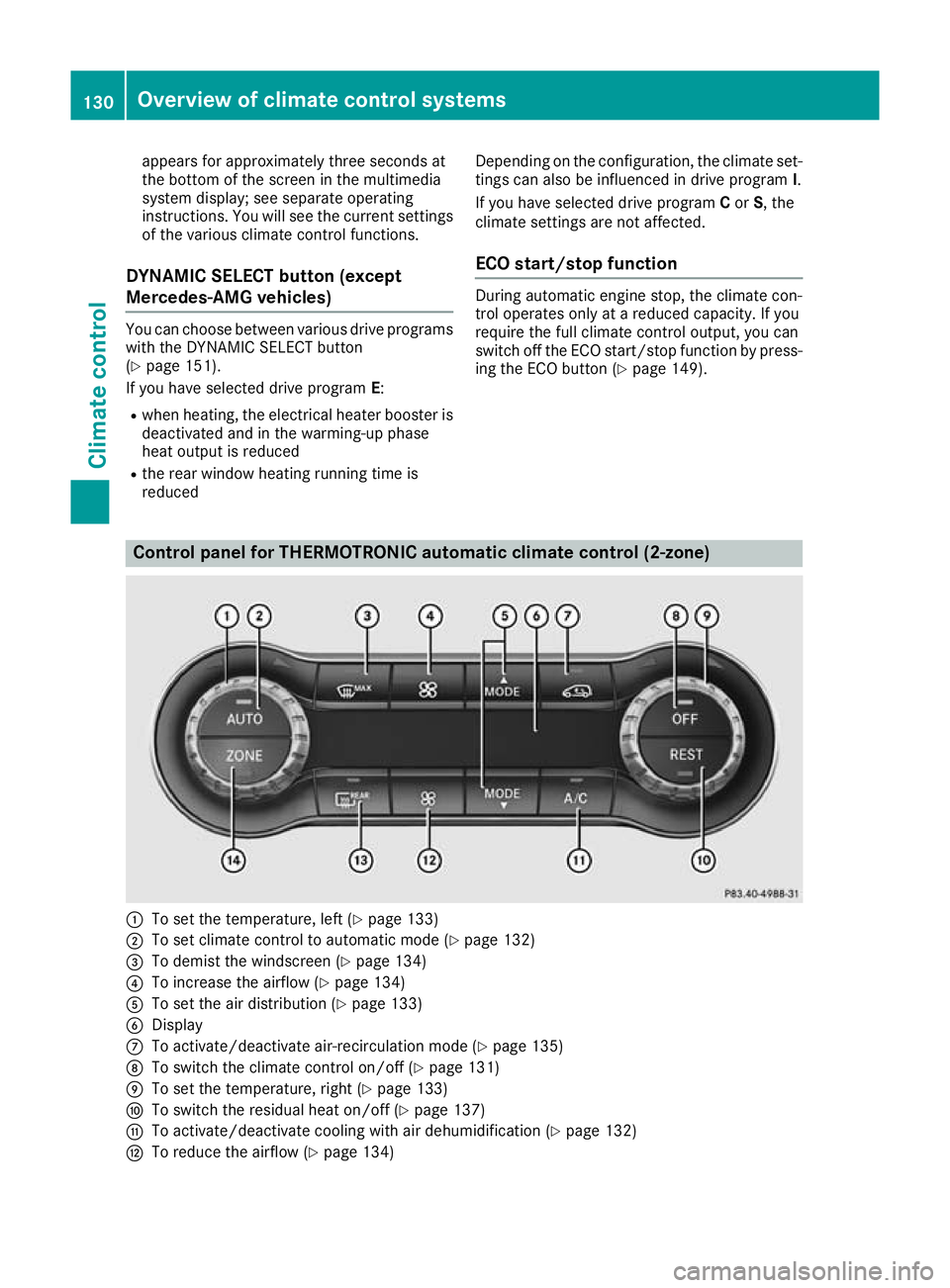
:
To set the temperature, left (Y page 133)
; To set climate control to automatic mode (Y page 132)
= To demist the windscreen (Y page 134)
? To increase the airflow (Y page 134)
A To set the air distribution (Y page 133)
B Display
C To activate/deactivate air-recirculation mode (Y page 135)
D To switch the climate control on/off (Y page 131)
E To set the temperature, right (Y page 133)
F To switch the residual heat on/off (Y page 137)
G To activate/deactivate cooling with air dehumidification (Y page 132)
H To reduce the airflow (Y page 134)130
Overview of climate control systemsClimate control
Page 135 of 369
THERMOTRONIC automatic climate
control X
Turn the key to position 2in the ignition lock
(Y page 144).
X To activate: press theÃbutton.
The indicator lamp in the Ãbutton lights
up. Airflow and air distribution are set to auto- matic mode.
or
X Press the ^button.
The indicator lamp in the ^button goes
out. The previous settings are reactivated.
X To deactivate: press the^button.
The indicator lamp in the ^button lights
up.
i THERMOTRONIC automatic climate control:
switch on climate control primarily using the
à button. Activating/deactivating cooling with
air dehumidification
General notes If you deactivate the "Cooling with air dehumid-
ification" function, the air inside the vehicle will not be cooled during warm weather. The air
inside the vehicle will also not be dehumidified.
The windows can mist up more quickly. There-
fore, only deactivate the "Cooling with air dehu- midification" function briefly.
The "Cooling with air dehumidification" function
is available only when the engine is running. The air inside the vehicle is cooled and dehumidified
according to the temperature selected.
Condensation may drip from the underside of
the vehicle when cooling mode is active. This is
normal and not a sign that there is a malfunc-
tion.
Activating/deactivating X
Press the ¿button.
The indicator lamp in the ¿button lights
up or goes out.
The indicator lamp in the button indicates that the respective function is activated. The cool-ing with air dehumidification function has a
delayed switch-off feature.
Problems with the "Cooling with air dehumidification" function Problem
Possible causes/consequences and
M MSolutions The indicator lamp in the
¿ button flashes
three times or remains
off. The cooling with air
dehumidification func-
tion cannot be activated. The cooling with air dehumidification function has been deactivated
due to a malfunction.
X Consult a qualified specialist workshop. Setting climate control to automatic
mode
General notes Only THERMOTRONIC automatic climate con-
trol features the "Control climate control auto-
matically" function.
In automatic mode, the set temperature is main-
tained automatically at a constant level. The
system automatically regulates the temperature of the dispensed air, the airflow and the air dis-
tribution.
The "Cooling with air dehumidification" function
is activated automatically in automatic mode. 132
Operating the climate control systemsClimate control
Page 138 of 369
or
X Air-conditioning system: turn temperature
control :anti-clockwise or clockwise
(Y page 129).
THERMOTRONIC automatic climate control:
turn temperature control :orE anti-clock-
wise or clockwise (Y page 130). Demisting the windows
Windows misted up on the inside Air-conditioning system
X Activate the ¿"Cooling with air dehumid-
ification" function.
X If the windows continue to mist up, activate
the ¬ "Windscreen demisting" function.
i You should only select this setting until the
windscreen is clear again.
THERMOTRONIC automatic climate con-
trol
X Activate the ¿"Cooling with air dehumid-
ification" function.
X Activate automatic mode Ã.
X If the windows continue to mist up, activate
the ¬ "Windscreen demisting" function.
i You should only select this setting until the
windscreen is clear again. Windows misted up on the outside X
Activate the windscreen wipers.
X Set the air distribution to PorO.
i You should only select this setting until the
windscreen is clear again. Rear window heating
General notes The rear window heating has a high current
draw. You should therefore switch it off as soon
as the window is clear. The rear window heating otherwise switches off automatically after sev-
eral minutes.
If the battery voltage is too low, the rear window
heating may switch off.
Switching on/off X
Turn the key to position 2in the ignition lock
(Y page 144).
X Press the ¤button.
The indicator lamp in the ¤button lights
up or goes out.
Problems with the rear window heating Problem
Possible causes/consequences and
M MSolutions The rear window heating
has switched off prema-
turely or cannot be
switched on. The battery has not been sufficiently charged.
X Switch off any consumers that are not required, e.g. reading lamps,
interior lighting or the seat heating.
When the battery is sufficiently charged, the rear window heating
can be switched on again. Activating/deactivating air-recircula-
tion mode
General notes You can deactivate the flow of fresh air tempo-
rarily if unpleasant odours are entering the vehi-
cle from outside. The air already inside the vehi- cle will then be recirculated. If you activate air-recirculation mode, the win-
dows can mist up more quickly, particularly at
low temperatures. Activate air-recirculation
mode only briefly to prevent the windows from
misting up.
The operation of air-recirculation mode is the
same for all control panels. Operating the climate control systems
135Climate control