2017 MERCEDES-BENZ G-Class alarm
[x] Cancel search: alarmPage 6 of 286
1, 2,3...
4ETS (Electronic Traction System)
see ETS/4ETS (Electronic Trac-
tion System)
12 Vsocket
see Socket (12 V)
115 Vsocket ...................................... 213
A
ABS (Anti-lock Braking System)
Display message ............................ 171
Function/notes ................................ 57
Warnin glamp ........................ 190,1 91
Accident
Automatic measures after an acci-
dent .................................................4 9
Activatin gmedia mode
General note s............................... .203
ADAPTIVE BRAKE ................................ .61
Additives (engineo il)........................ 279
Addres sbook
see also Dig ital Operator's Man-
ual .................................................. 198
Adjustabl edampi ng.......................... 109
Adjusting th evolume
COMAND ...................................... .199
Ai rb ags
Deployment ..................................... 46
Display message ............................ 175
Front ai rbag (driver, front
passenger). ...................................... 45
Important safety notes .................... 43
Introduction ..................................... 43
PASSENGER AIR BAG OFF indica-
tor lamp ...........................................3 9
Pelvis air bag ................................... 45
Side impact air bag .......................... 45
Window curtain air bag .................... 46
Air vents
Important safety notes .................. 101
Rear .................. ............................. 102
Set
ting ...........................................1 01
Setting the center ai rvents ........... 102
Setting the sidea irvents ...............1 02
Air-conditionings ystem
see Climate control Alarm
ATA (Anti-Theft Alarm system) ......... 61
Switching off (ATA) .......................... 61
Switching the function on/off
(ATA) ................................................ 61
Alarm system
see ATA (Anti-Theft Alarm system)
All-whee ldrive
Transfe rcase ................................. 145
AMG menu (on-board computer) ..... 167
Anti-theft alarm system
see ATA (Anti-Theft Alarm system)
Approach/departure angle .............. 130
Ashtray ............................................... 211
Assistanced isplay (on-board com-
puter) ..................................................1 64
Assistancem enu (on-board com-
puter) ..................................................1 64
ASSYST service interval display
Service messages .......................... 230
ATA (Anti-Theft Alarm system)
Activating/deactivating ................... 61
Function ...........................................6 1
Switching off the alarm .................... 61
Authorized Mercedes-Benz Center
see Qualifie dspecialist workshop
AUTO lights
Displa ymessage ............................ 176
see Lights
Automatic car was h(care) ............... 231
Automatic engine start (ECO start/
stopf unction) .................................... 107
Automatic engine switch-of f(EC O
start/stopf unction).......................... 106
Automatic headlamp mode ................ 86
Automatic transmission
Displa ymessage ............................ 186
Drive position (ECOs tart/stop
function) ........................................ 111
Drive program. ............................... 114
Driving tip s.................................... 112
Emergency running mode. ............. 117
Engaging drive position .................. 111
Engaging neutral ............................ 111
Engaging reverse gea r................... 110
Engaging the park p
osition ............ 110
Important safety notes .................. 109
4Index
Page 14 of 286
Hazard warning lamps ..................... 87
High beamflasher ............................ 87
High-beamh eadlamps ..................... 87
Light switch .....................................8 5
Low-beamh eadlamps...................... 85
Parking lamps .................................. 86
Rear fog lamp .................................. 86
Standing lamps ................................ 86
Switching the daytime running
lamps on/off( on-board com-
puter) ............................................. 165
Switching the daytime running
lamps on/off( switch) ...................... 85
Switching the exterio rlighting
delaye dswitch-off on/off( on-
board computer) ............................ 165
Switching the surround lighting
on/off( on-board computer) .......... 165
Turn signal s..................................... 87
see Interior lighting
see Replacing bulbs
Load anchorage ................................. 208
Loadin gguidelines ............................ 204
Locking
see Central locking
Locking (doors)
Automati c........................................ 67
Emergency locking ........................... 68
From inside (central locking but-
ton) .................................................. 67
Locking centrally
see Central locking
Locking verification signal (on-
board computer) ............................... 166
LO WR ANGE off-road gear ................ 146
Low-beam headlamps
Displa ymessage ............................ 176
Switching on/off. ............................. 85
Lumbar support
Adjusting the 4-wa ylum bars up-
por t.................................................. 78
Luxury hea drestraints ....................... 76
M
M+S tires ............................................ 253
Malfunctio nmessage
see Displa ymessages Matte finis
h(clea ning instruc-
tions) .................................................. 233
mbrace
Call priority .................................... 218
Displa ymessage ............................ 173
Downloading destinations
(COMAND) ..................................... 218
Downloading routes ....................... 221
Emergency cal l.............................. 215
Generaln otes ................................ 214
Ge ofencing ................................... 221
Info cal lbutton .............................. 217
Locating astolen vehicl e............... 220
Remote fault diagnosis. ................. 220
Remote vehicl eloc king .................. 219
Roadside assistance button ........... 216
Search &Send ............................... 218
Self-test ......................................... 215
Speed alert .................................... 221
System .......................................... 215
Triggering the vehicl ealarm ........... 221
Vehicl eremote unlocking .............. 219
Mechanical key
Function/note s................................ 64
Genera lnotes .................................. 64
Inserting .......................................... 64
Locking vehicl e................................ 68
Removing ......................................... 64
Unlocking the driver'sd oor.............. 68
Memory card (audio) ......................... 162
Memory function ................................. 83
Mercedes-Benz Intelligent Drive
DISTRONIC PLUS. .......................... 132
Messagem emory (on-board com-
puter) .................................................. 170
Messages
see Displa ymessages
Mirro rturn signal
Cleaning ......................................... 234
Mirrors
Sun visor ........................................ 211
see Exterior mirrors
see Rear-vie wmirror
Mobil ephone
Connecting (Bluetooth®inter-
face ).............................................. 201
12Index
Page 16 of 286

Service menu ................................. 164
Settingsmenu ............................... 164
Standard display ............................ 160
Telephone menu ............................ 163
Tripm enu ...................................... 160
TV operation .................................. 163
Vehicl esubmenu ........................... 166
Video DVD operation ..................... 162
Operatin gsafety
Declaration of conformity ................ 26
Important safety notes .................... 26
Operatin gsystem
see On-board computer
Operation
Digital Operator's Manua l................ 22
Operator's Manual
Vehicl eequipment ........................... 24
Outside temperature display ........... 157
Overhead controlp anel...................... 36
Override feature
Rear sid ewindow s........................... 56
P
Paint code number ............................ 275
Paintwork (cleaning instructions) ... 233
Parking
Engaging park position .................. 110
Important safety notes .................. 120
Parking brake ................................ 121
Position of exterio rmirror, front-
passenger sid e................................. 83
Rear vie wcamera .......................... 143
Switching off the engine ................ 121
see PARKTRONIC
Parking aid
see Exterior mirrors
see PARKTRONIC
see Rear vie wcamera
Parking brake
Applying ......................................... 121
Displa ymessage ............................ 172
Emergency braking ........................ 121
Warning lamp ................................. 193
Parking lamps
Switching on/off. ............................. 86
PARKTRONIC
Deactivating/activating ................. 142 Driving system ............................... 140
Function/note
s............................. 140
Important safety notes .................. 140
Problem (malfunction) ................... 142
Range of the sensors ..................... 140
Trailer towing ................................. 142
Warning display ............................. 141
PASSENGER AI RBAG OFF
Indicato rlam p.................................. 39
Problems (malfunctions ).................. 55
Permanent all-whee ldrive
Off-road system ............................. 139
Pets in the vehicle ............................... 57
Phone book
see also Digital Operator's Man-
ual.................................................. 198
Plastict rim (cleaning instruc-
tions) .................................................. 236
Powe rsuppl y(trailer) ....................... 156
Powe rwashers .................................. 232
Program selecto rbutton .................. 113
Protectio nagainst theft
ATA (Anti-Theft Alarm system). ........ 61
Immobilizer ...................................... 61
Protectio nofthe environment
Generaln otes .................................. 23
Pulling away
Automati ctransmission ................. 105
Generaln otes ................................ 105
Trailer ............................................ 105
Q
QR code
Mercedes-Benz Guid eApp ................. 1
Rescuec ard ..................................... 28
Qualified specialist workshop ........... 27
R
RACETIME R(on-board computer,
Mercedes-AMG vehicles) .................. 168
RACETIMER
Deleting al llap s............................. 169
Displaying and starting .................. 168
Displaying the intermediate time ... 168
Resetting the current la p............... 169
Starting anew la p.......................... 168
14Index
Page 63 of 286
EBD (electronic brakeforce distribu-
tion)
General information
EB Dm onitors and controls th ebrak epressure
on th erear wheels to improve driving stability
while braking.
Important safety notes
iObserv ethe "Important safety notes" sec-
tio n(Ypage 57).
GWARNING
If EB Dism alfunctioning, th erear wheels can
lock, e.g .unde rfull braking .This increases the
risk of skiddinga nd an accident.
You should therefore adapt your driving style
to th edifferenth andlingcharacteristics .Have
th eb rak esystem checked at aqualified spe-
cialist workshop.
Observ einformatio nregardin gindicator and
warning lamps (
Ypage 190) as well as display
messages (Ypage 172).
ADAPTIV EBRAKE
ADAPTIVEB RAKE provide sincreased braking
safety. In addition to th ebraking function,
ADAPTIVEB RAKE also has th eHOLDf unction
(
Ypage 139) and hill start assist(Ypage 127).
Protection against theft
Immobilizer
The immobilizer prevent syour vehicle from
beings tarted without th ecorrec tSma rtKey.
XTo activate: remove theSmartKey from the
ignition lock.
XTo deactivate: switch on theignition.
When leavin gthe vehicle ,always tak ethe
SmartKey with you and lockt hevehicle .The
engine can be started by anyon ewithavalid
SmartKey that is left inside th evehicle.
iThe immobilizer is always deactivate dwhen
you start th eengine. In th
eeven ttha tthe engine canno tbestarted
(yet th evehicle's battery is charged), th esys-
te misn otoperational. Contac tanauthorized
Mercedes-Ben zCenter or call
1-800-FOR-MERCedes (in th eUSA)or
1-800-387-0100 (in Canada).
ATA (anti-thef talarm system)
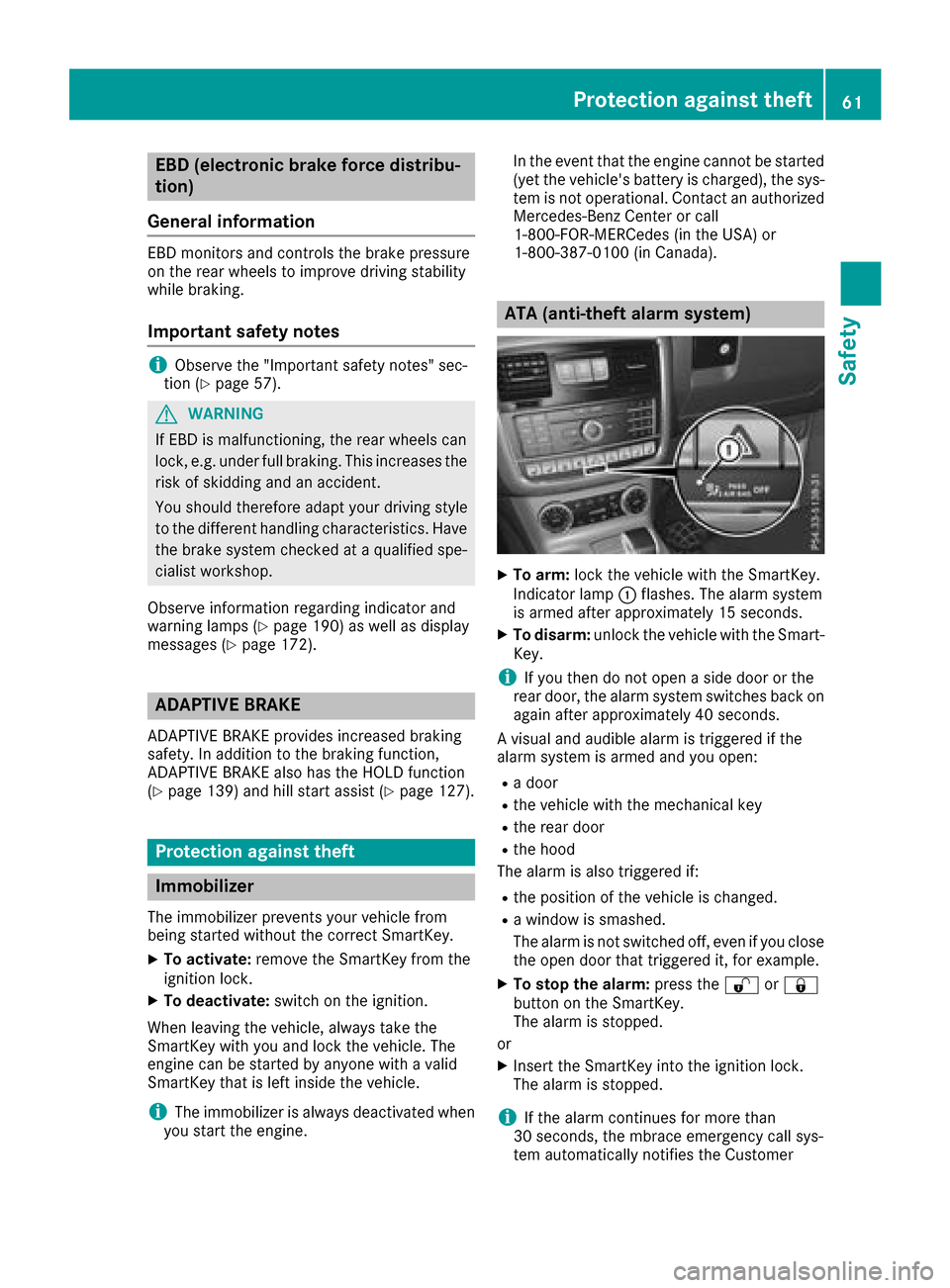
XTo arm: lockthevehicle with th eSmartKey.
Indicato rlamp :flashes. The alarm system
is armed after approximately 15 seconds.
XTo disarm: unlock thevehicle with th eSma rt-
Key.
iIf you then do no topen aside door or the
rear door,t healarm system switches back on
again after approximately 40 seconds.
Av isual and audible alarm is triggered if the
alarm system is armed and you open:
Rad oor
Rthev ehicle with th emechanical key
Rther ear door
Rtheh ood
The alarm is also triggered if:
Rth ep osition of th evehicle is changed.
Raw indow is smashed.
The alarm is no tswitched off ,even if you close
th eo pen door that triggered it, for example.
XTo stop th ealarm: pressthe % or&
butto nont heSmartKey.
The alarm is stopped.
or
XInsertt heSmartKey int othe ignition lock.
The alarm is stopped.
iIf th ealarm continues for mor ethan
30 seconds, th embrace emergency call sys-
te ma utomaticall ynotifies th eCustomer
Protection against theft61
Safety
Z
Page 66 of 286
Changing thesettings of th elocking
system
You can chang ethe settings of th elockin gsys-
tem. This mean sthato nlyt he driver'sd oor and
th ef uel fille rflap are unlocked when th evehicle
is unlocked. This is useful if you frequently travel
alone.
XTo change th esetting: pressand hold down
the % and& buttons simultaneously
for approximately six seconds until th ebat-
tery check lamp (
Ypage 65 )flashes twice.
If th esettin goft helockin gsystem is changed
within th esignal range of th evehicle ,pressing
the & or% button:
Rlocks or
Runlock sthe vehicle
The SmartKey no wfunctionsasf ollows:
XTo unlock th edriver's door and fuel filler
flap: pressthe % buttononce.
XTo unlock centrally: pressthe % button
twice.
XTo lock centrally: pressthe & button.
XTo restor ethe factor ysettings: pressand
hold the %and& buttons simultane-
ously for approximately six seconds until the
battery check lamp (
Ypage 65) flashes
twice.
Mechanica lkey
General notes
If th evehicle can no longer be unlocked witht he
SmartKey, use th emechanical key.
If you use th emechanical ke ytou nlock and
open th edriver'sd oor,theanti-thefta larm sys-
te mw ill be triggered. Switch off th ealarm
(
Ypage 61).
If you unlock th evehicle usingt hemechanical
key, th efuel fille rflap will no tbeunlocked auto-
matically.
XTo unlock th efuelfille rflap: insert the
SmartKey int othe ignition lock.
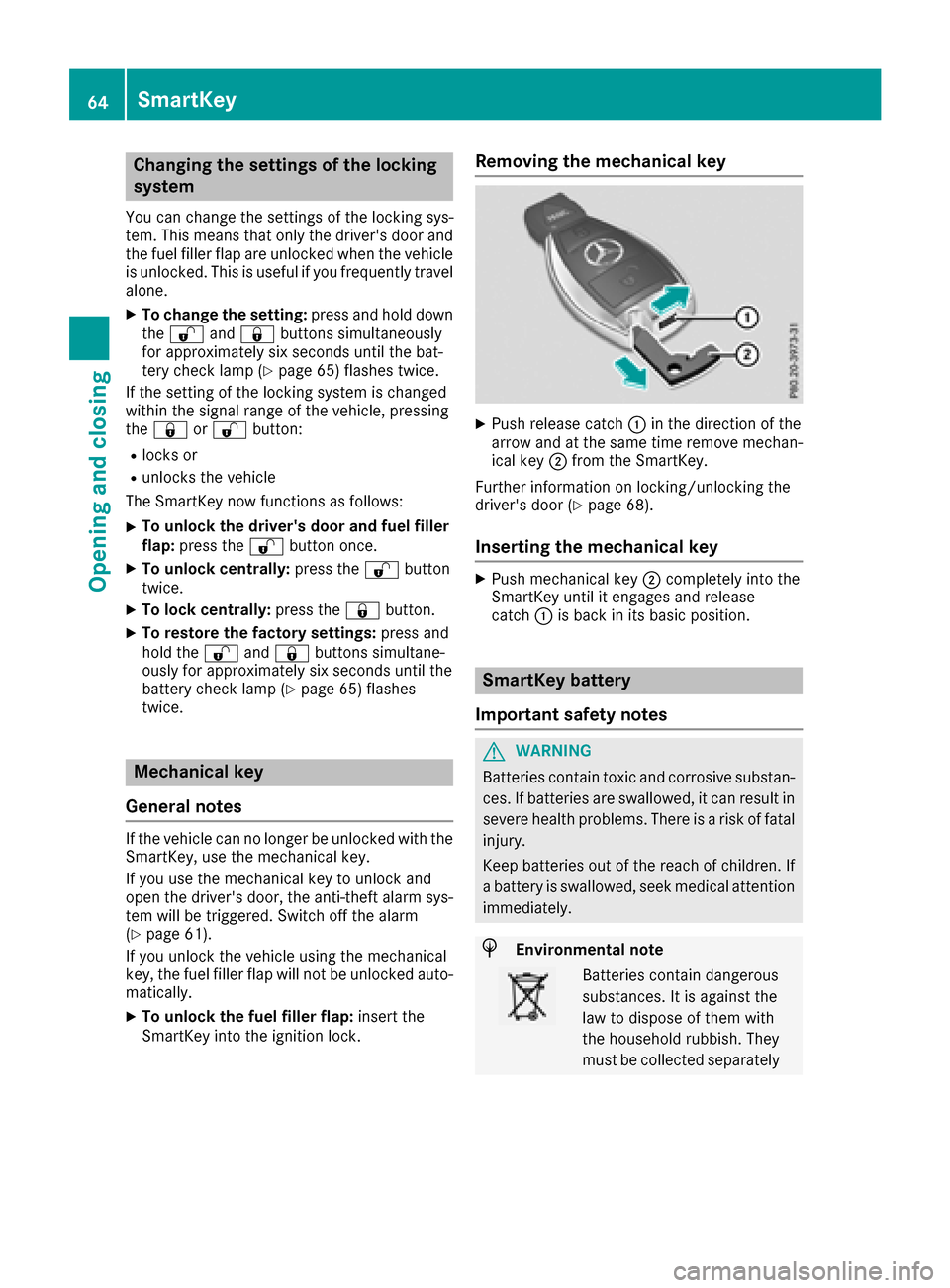
Removing th emechanica lkey
XPush release catch :in th edirection of the
arrow and at th esame tim eremove mechan-
ical key ;from th eSmartKey.
Further informatio nonlocking/unlockin gthe
driver'sd oor (
Ypage 68).
Insertingthe mechanica lkey
XPush mechanical key ;completely int othe
SmartKey until it engages and release
catch :is back in its basic position.
SmartKey battery
Important safety notes
GWARNING
Batteries contain toxic and corrosive substan- ces .Ifb atteries are swallowed, it can result in
severe healthp roblems. Thereisar iskoff atal
injury.
Keep batteries out of th ereac hofc hildren. If
ab attery is swallowed, seek medical attention
immediately.
HEnvironmental note
Batteries contain dangerous
substances. It is against the
law to dispose of them with
th eh ouseholdr ubbish. They
must be collecte dseparately
64SmartKey
Opening and closing
Page 69 of 286
Unlocking and opening doors from
the inside
You can openadoor from inside the vehicle
even if it has been locked. You can only open the
rear doors from inside the vehicle if they are not secured by the child-proof lock s(
Ypage 56). If
the vehicle has previously been locked with the
SmartKey, openin gadoor from the inside will
trigger the anti-theft alarm system .Switc hoff
the alarm (
Ypage 61).
Only open the door when the traffic situation
permits.
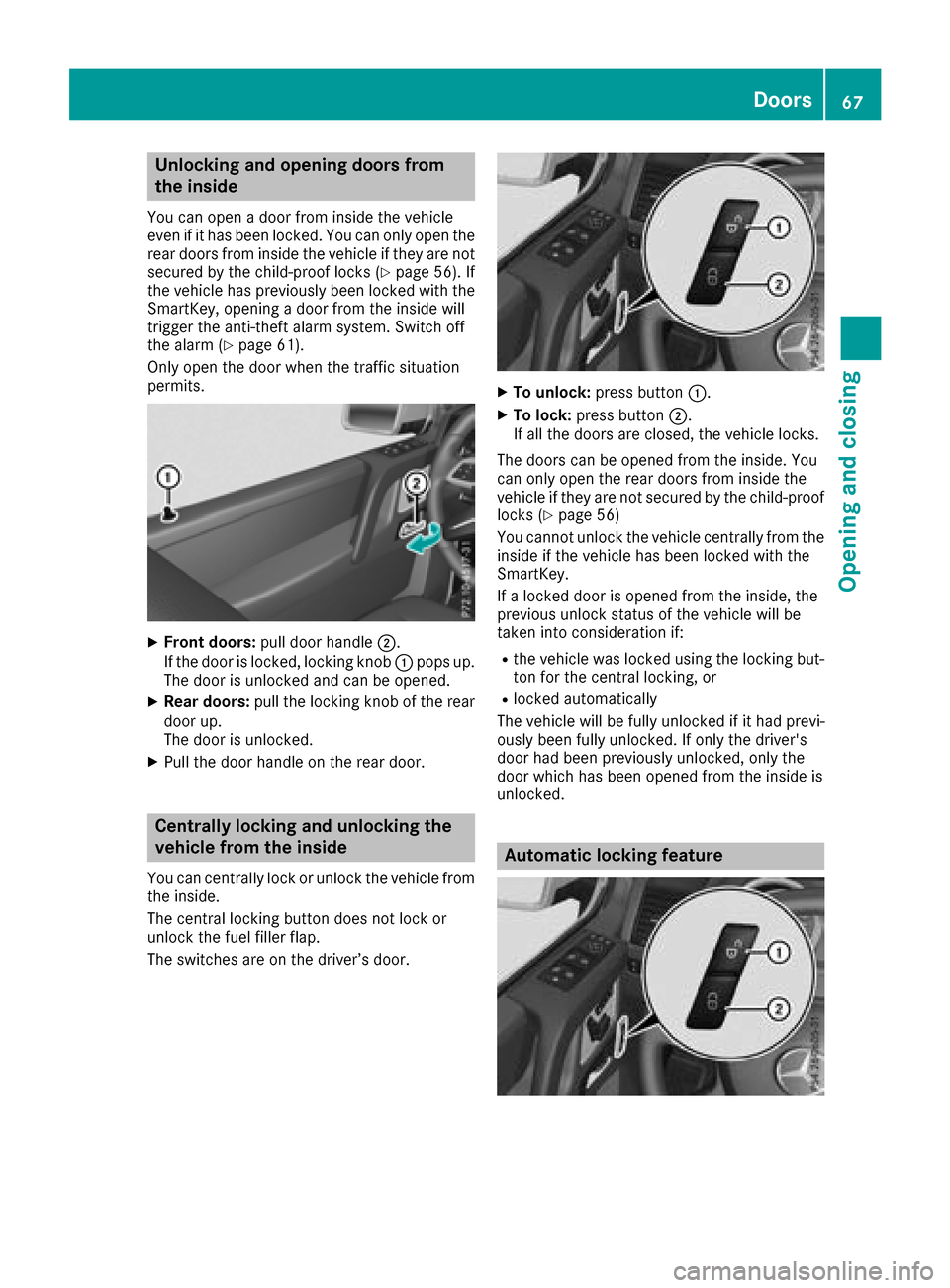
XFront doors: pull door handle ;.
If the door is locked, locking knob :pops up.
The door is unlocked and can be opened.
XRear doors: pull the locking knob of the rear
door up.
The door is unlocked.
XPull the door handle on the rear door.
Centrally locking and unlocking the
vehicle from the inside
You can centrally lock or unlock the vehicle from
the inside.
The central locking button does not lock or
unlock the fuel filler flap.
The switches are on the driver’s door.
XTo unlock: press button :.
XTo lock:press button ;.
If all the doors are closed, the vehicle locks.
The doors can be opened from the inside. You
can only open the rear doors from inside the
vehicle if they are not secured by the child-proof
lock s(
Ypage 56)
You cannot unlock the vehicle centrally from the
inside if the vehicle has been locked with the
SmartKey.
If al ocked door is opened from the inside, the
previous unlock status of the vehicle will be
taken int oconsideratio nif:
Rthe vehicle was locked using the locking but-
ton for the central locking, or
Rlocked automatically
The vehicle will be fully unlocked if it had previ-
ously been fully unlocked. If only the driver's
door had been previously unlocked, only the
door which has been opened from the inside is
unlocked.
Automatic locking feature
Doors67
Opening and closing
Z
Page 70 of 286
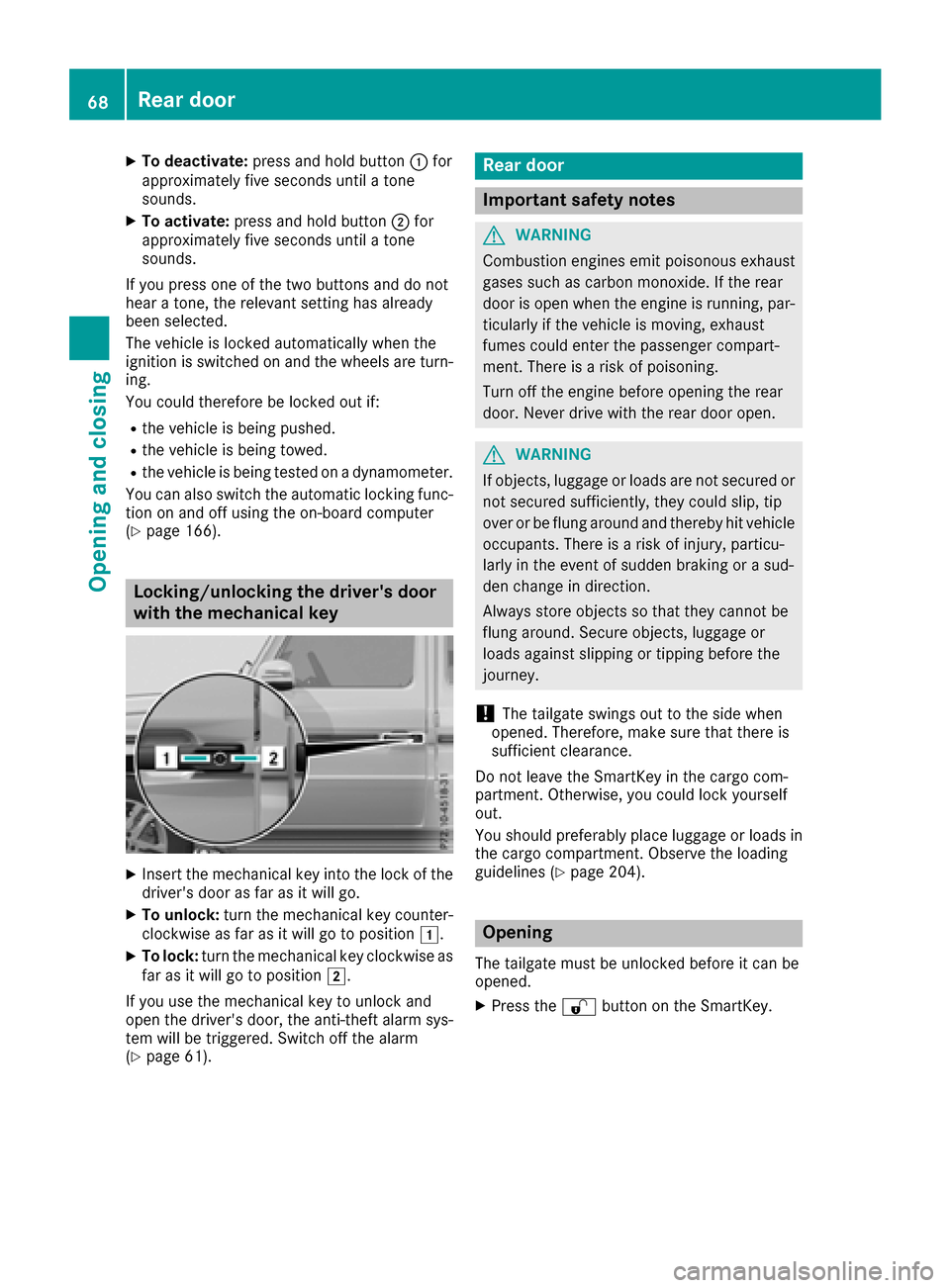
XTo deactivate:press and holdbutton :for
approximatelyf ives econds unti latone
sounds.
XTo activate: press and hol dbutton ;for
approximatelyf ives econds unti latone
sounds.
If yo upress one of the two buttons and do not
hea rat one, the relevant setting hasa lready
been selected.
The vehicl eislocked automaticall ywhent he
ignition is switched on and the wheels are turn-
ing.
Yo uc ould therefore be locked outi f:
Rthe vehicleisbeing pushed.
Rthe vehicl eisbeing towed.
Rthe vehicl eisbeing teste donadynamometer.
Yo uc an also switch the automatic locking func-
tio nona nd off using the on-board computer
(
Ypage 166).
Locking/unlockin gthe driver's door
with the mechanical key
XInsert the mechanical key into the lock of the driver's door as far as it will go.
XTo unlock: turn the mechanical key counter-
clockwise as far as it will go to position 1.
XTo lock:turn the mechanical key clockwise as
far as it will go to position 2.
If yo uusethe mechanical key to unlock and
open the driver's door, the anti-thef talarm sys-
tem will be triggered .Switch off the alarm
(
Ypage 61).
Rear door
Important safety notes
GWARNING
Combustio nengines emi tpoison ouse xhaust
gases such as carbo nmonoxide. If the rear
door is open when the engine is running ,par-
ticularly if the vehicl eismoving, exhaust
fumes could enter the passenger compart-
ment. There is ariskofp oisoning .
Turn off the engine before opening the rear
door. Never drive with the reard ooro pen.
GWARNING
If objects, luggage or load sare not secured or
not secured sufficiently ,they could slip ,tip
overorbef lung around and thereb yhitvehicle
occupants. There is ariskofi njury,p articu-
larly in the event of sudden braking or asud-
de nc hange in direction.
Alway sstoreo bjects so thatt hey cannotbe
flung around .Secure objects, luggage or
load sagain st slipping or tipping before the
journey.
!The tailgate swing soutto the side when
opened. Therefore, make sure thatt hereis
sufficient clearance.
Do not leave the SmartKey in the cargo com-
partment. Otherwise, yo ucould lock yourself
out.
Yo us houl dpreferabl yplace luggage or load sin
the cargo compartment. Observe the loading
guideline s(
Ypage 204).
Opening
The tailgate must be unlockedb efore it can be
opened.
XPress the %button on the SmartKey.
68Rear door
Opening and closing
Page 222 of 286
Mercedes-BenzCustomer Assistanc eCenter
at 1-800-FOR-MERCedes (1-800-367-6372)
or 1-866-990-9007
You will be asked for your password.
The next time you are inside the vehicle and you
switch on the ignition, the Doors Locked
Remotelymessage appears in the multifunction
display.
Alternatively, the vehicle can be locked via:
Rthe Internet, under the "Owners Online" sec-
tion
Rtelephone applications (e.g. for iPhone®,
Android™)
To do this, you will need your identification num-
ber and password.
Stolen vehicle recovery service
If your vehicle has been stolen:
XNotify the police.
The police will issue anumbered incident
report.
XThis number will be forwarded to the
Mercedes-BenzC ustomer Assistanc eCenter
together with your PIN.
The Mercedes-BenzC ustomer Assistance
Center then tries to locate the system. The
Mercedes-BenzC ustomer Assistanc eCenter
contacts you and the local law enforcement
agency if the vehicle is located.
However, only the law enforcement agency is
informed of the location of the vehicle.
If the anti-theft alarm system is activated for
longer than 30 seconds, the Mercedes-Benz
Customer Assistanc eCenter is automatically
notified.
Vehicle Health Check
With the Vehicle Health Check, the Customer
Assistanc eCenter can provide improved sup-
port for problems with your vehicle. During an
existing call, vehicle data is transferred to the
Customer Assistanc eCenter.
The customer service representative can use
the received data to decide what kind of assis-
tance is required. You are then, for example,
guided to the nearest Mercedes-BenzS ervice
Center or arecovery vehicle is called.
If vehicle data need to be transferred during an
Info call or aRoadside Assistanc ecall, this is
initiated by the Customer Assistanc eCenter. You will see the
Roadside Assistance Con‐
nectedmessage in the display.Ift he Vehicle
Health Check can be started, the RequestforVehicle Diagnostics Received Startvehicle diagnostics?message appears in
the display.
XPress the Yesbutton to confirm the message.
XWhen the Vehicle Diagnostics PleaseStart Ignitionmessage appears: turn the
SmartKey to position 2in the ignition lock
(
Ypage 104).
XIf the Please follow the instructionsreceivedbyphoneandmoveyourvehi‐cle to asafe position.message
appears: please follow the instructions
received by phone and move your vehicle to a
safe position.
The message in the display disappears.
The vehicle operating state check begins. You
will see the Vehicle Diagnostics Active
message.
If you select Cancel
,the Vehicle Health
Check is canceled completely.
When the check is complete, the Sending
vehicle diagnostics data. (Voice con‐nection may be interrupted duringdatatransfer)message appears. The vehicle
data can now be sent.
XPress the OKbutton to confirm the message.
The voice connection with the Customer
Assistanc eCenter is terminated.
You will see the Vehicle diagnosis:
Transferring data...message.
The vehicle data is sent to the Customer
Assistanc eCenter.
Depending on what the customer service rep-
resentative agreed with you, the voice connec-
tion is re-established after the transfer is com-
plete. If necessary, you will be contacted at a
later time by another means, e.g. by e-mail or
phone.
Another function of the Vehicle Health Check is
the transfer of service data to the Customer
Assistanc eCenter. If aservice is due, the display
shows amessage to this effect together with
information about any special offers at your
workshop.
This information can also be called up under
"Owners Online" at http://www.mbusa.com.
Information on the data stored in the vehicle
(
Ypage 28).
220Features
Stowage and features