Page 109 of 482
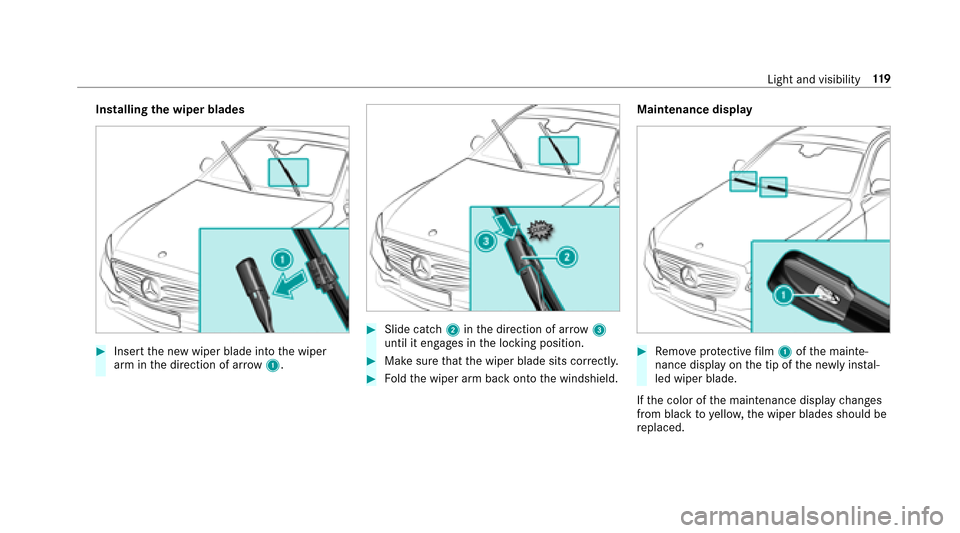
#Press in cigarette lighter 1.
The cigar ette lighter will pop out automati‐
cally when the heating element is red-hot.
Soc kets
Using the 12V sock etinthe front center
console
Re quirementsROnly connect devices up toa maximum of
18 0Wa tt (15 A)
RIfyo u ha veconnected a device tothe12 V
soc ket, le ave the co ver of thestow age com‐
partment open
#Lift up co ver1 ofthe soc ket and insert the
plug of the device.
Using the12 V sock etinthere ar passenger
co mp artment
Requirement
Only connect devices up toa maximum of 180
wa tt (15 A)
#Brie fly press the trim of co ver2.
#Lift out co ver1 ofthe soc ket and insert the
plug of the device.
Using the11 5 V soc ket in the rear passen ger
compa rtment
&
DANG ER Risk of fata l injury due todam‐
aged connecting cables or soc kets
If a suitable device is connected, the11 5 V
soc ket will be car rying a high voltage. If the
connecting cable or the11 5 V soc ket is
pulled out of the trim or is damaged or wet,
yo u could receive an electric shoc k.
Seats andstowing 10
7
Page 110 of 482
#Only use dry and damage-free connect‐
ing cables.
#Whenthe ignition is switched off,
ensure that the11 5 V soc ket is dr y.
#Ifth e11 5 V soc ket is damage d orgets
pulled out of the paneling, immediately
ha ve the soc ketch ecked or replaced at
a qu alified specialized workshop.
#Ne ver plug the connecting cable into a
11 5 V soc ketth at is damaged or has
been pulled out of the trim.
&
DANG ER Risk of fata l injury due toincor‐
re ct handling of the soc ket
Yo u could receive an electric shock:
Rifyo ure ach into the soc ket.
Rifyo u insert unsuit able devices or objects
into the soc ket.
#Only connect suitable devices tothe
soc ket.
Re quirementsROnly connect devices with a suitable plug
which con form sto thest andards specific to
th e count ryyou are in.
ROnly connect device s uptoa maximum of
15 0wa tts.
RDo not use multiple soc ket outlets.
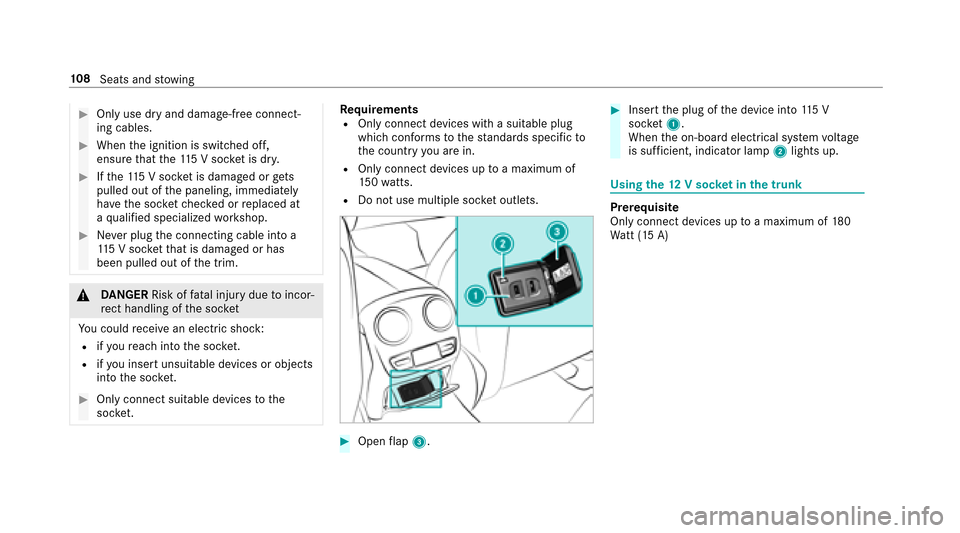
#Open flap 3.
#Insert the plug of the device into 115 V
soc ket1.
When the on-board electrical sy stem voltage
is suf ficient, indicator la mp2lights up.
Using the12 V sock etinthe trunk
Prerequisite
Only connect devices up toa maximum of 180
Wa tt (15 A)
108
Seats and stowing
Page 112 of 482
*NO
TEDama getoobjects caused by
placing them in the mobile phone stow‐
age compartment
If yo uplac e objects inthe mobile phone
stow age compartment, these may be dam‐
aged byelectromagnetic fields.
#Do not place credit cards, storage
media or other objects sensitive to
electromagnetic fields in the mobile
phone stowage compartment.
* NO
TEDama getothe mobile phone
stow age compartment caused byliquids
If liquid is spilled in the mobile phone stow‐
age compartment, the mobile phone stowage
compartment may be damaged.
#Do not spill liquids into the mobile
phone stowage compartment.
RDepending on theve hicle equipment, the
mobile phone is connected totheve hicle's
ex terior antenna via thech arging module.
RThe charging function and wireless connec‐
tion of the mobile phone totheve hicle's
ex terior antenna are only available when the
ignition is switched on.
RSmall mobile phones may not be able tobe
ch arge d in every position of the mobile
phone stowage compartment.
RLargemobile phones which do not fit into the
mobile phone stowage compartment may not
be able tobe charge d or connec ted with the
ex terior antenna.
RThe mobile phone may heat up during the
ch arging process. The mobile phone can be
cooled in the mobile phone stowage com‐
partment when the air conditioning sy stem is
switched on. The cooling output in the
mobile phone stowage compartment is high‐
est when the controller in theglove box is
closed.
Wire lesscharging of the mobile phone
Requ irementsRYour mobile phone must be suit ablefor wire‐
less charging (Qi-compatible mobile phone). Yo
u can find a li stof Qi-compatible mobile
phones online at:
http://www.mercedes-benz.com/connect
RTo ensure more ef ficient charging and con‐
nection with theve hicle's exterior antenna,
re mo vethe pr otective co ver from the mobile
phone.
RIf possible, use the mat when charging.
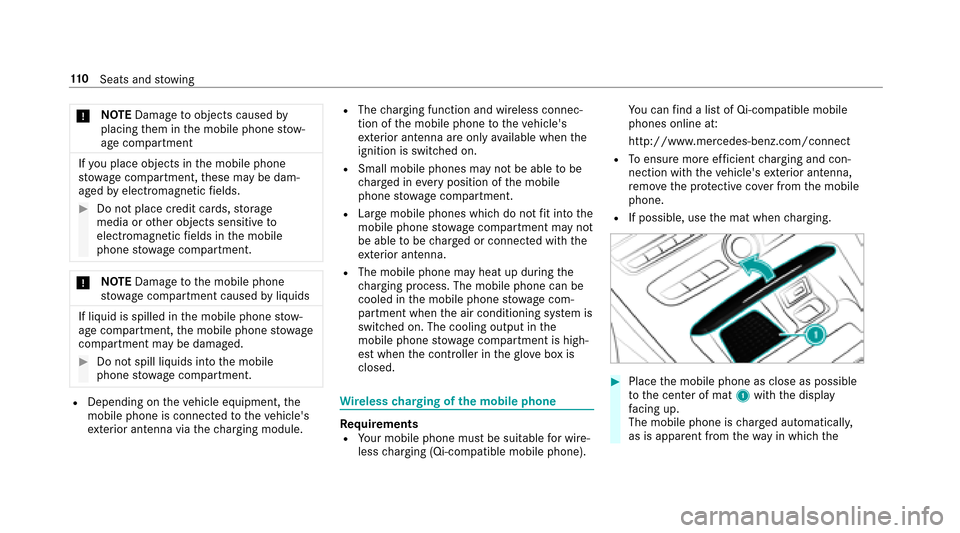
#Place the mobile phone as close as possible
to the center of mat 1with the display
fa cing up.
The mobile phone is charge d automatically,
as is apparent from thewa yin whic hth e
11 0
Seats and stowing
Page 121 of 482
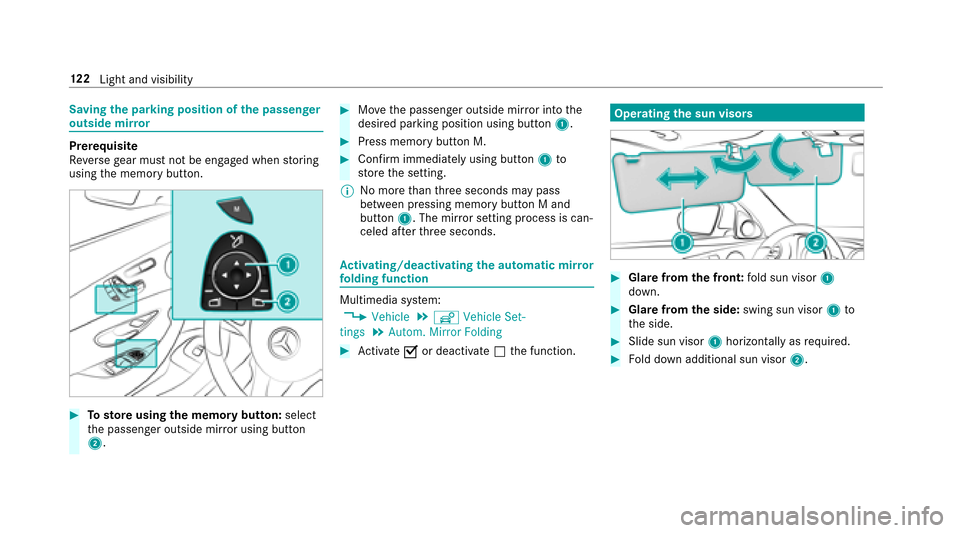
Installingthe wiper blades
#Insert the new wiper blade into the wiper
arm in the direction of ar row1.
#Slide catch 2inthe direction of ar row 3
until it engages in the locking position.
#Make sure that the wiper blade sits cor rectly.
#Fo ldthe wiper arm back onto the windshield. Maintenance display
#Re
mo veprotective film 1 ofthe mainte‐
nance display on the tip of the newly ins tal‐
led wiper blade.
If th e color of the maintenance display changes
from black to yellow, the wiper blades should be
re placed.
Light and visibility 11
9
Page 124 of 482
Savingthe pa rking position of the passenger
outside mir ror
Prerequisite
Re versege ar must not be engaged when storing
using the memory button.
#To sto reusing the memory butto n:select
th e passenger outside mir ror using button
2.
#Mo vethe passenger outside mir ror into the
desired parking position using button 1.
#Press memory button M.
#Confirm immediately using button1to
st ore the setting.
% No more than thre e seconds may pass
between pressing memory button M and
button 1. The mir ror setting process is can‐
celed af terth re e seconds.
Ac tivating/deactivating the automatic mir ror
fo lding function
Multimedia sy stem:
,9HKLFOH.î 9HKLFOH 6HW�
WLQJV.$XWRP� 0LUURU )ROGLQJ
#Ac tivate Oor deacti vate ª the function.
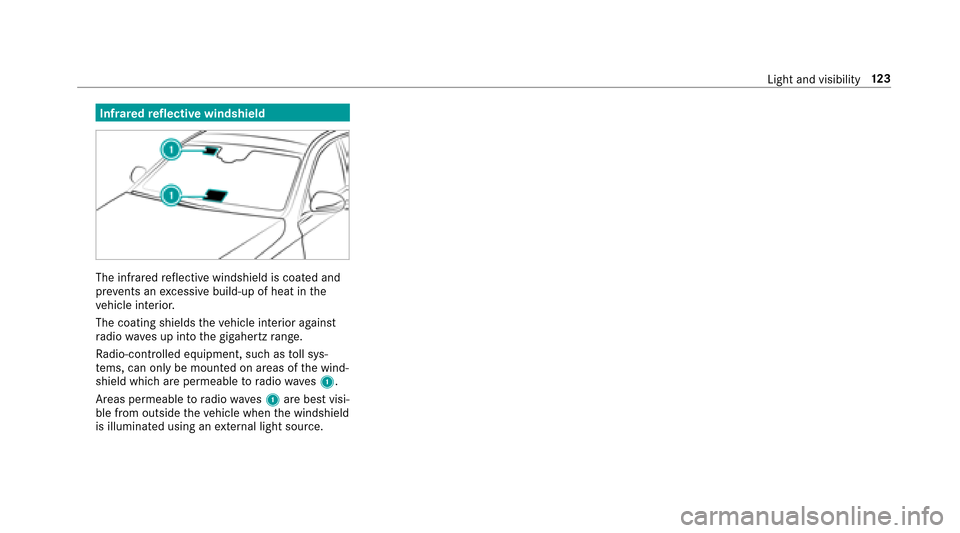
Operating the sun visors
#Glare fromthe front: fold sun visor 1
down.
#Glare from the side: swing sun visor 1to
th e side.
#Slide sun visor 1horizon tally as required.
#Fold down additional sun visor 2.
122
Light and visibility
Page 125 of 482
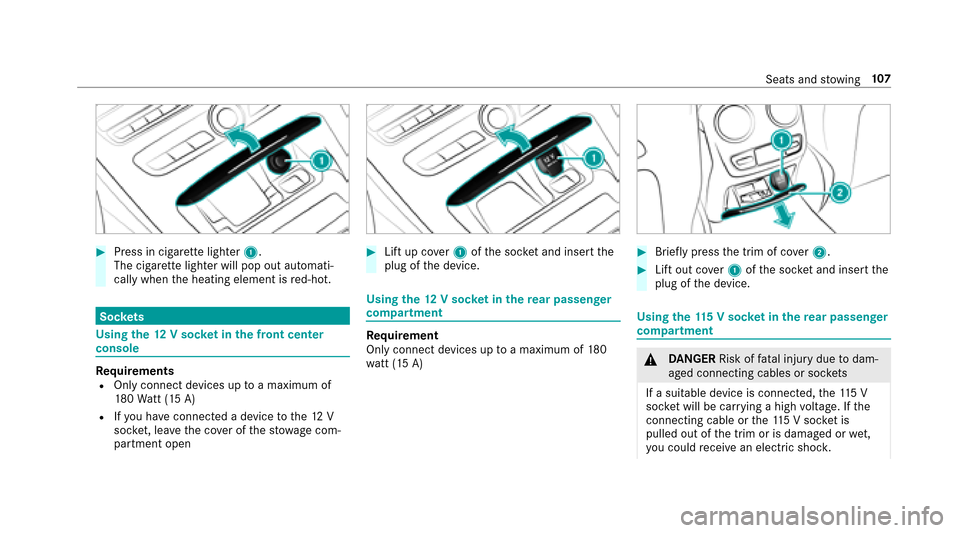
Infraredreflective windshield
The inf rare dre flective windshield is coated and
pr eve nts an excessive build-up of heat in the
ve hicle interior.
The coating shields theve hicle interior against
ra dio waves up into the gigahertz range.
Ra dio-cont rolled equipment, such as toll sys‐
te ms, can only be mounted on areas of the wind‐
shield which are permeable toradio wav es1.
Areas permeable toradio wav es1 are best visi‐
ble from outside theve hicle when the windshield
is illuminated using an extern al light source.
Light and visibility 12
3
Page 126 of 482
Overview of climate control systems
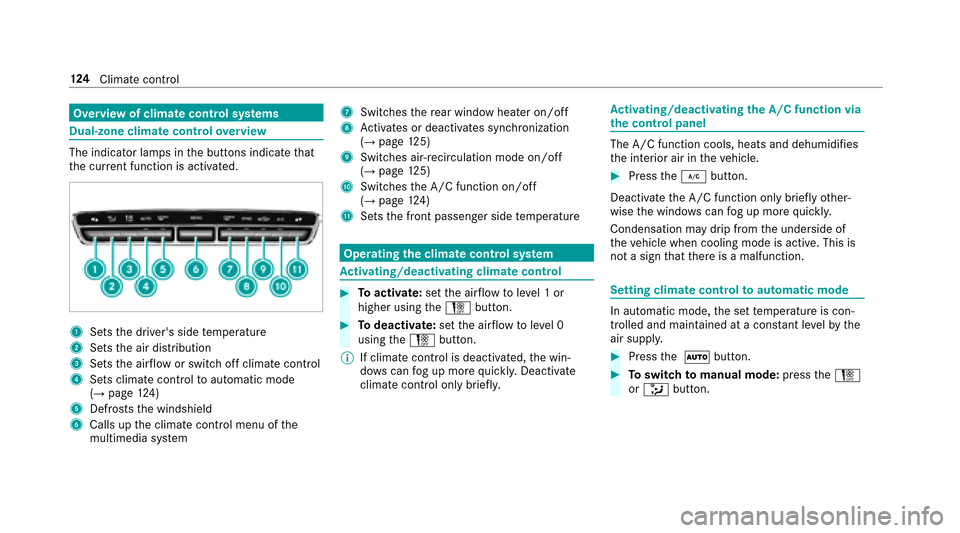
Dual-zone clima tecontro love rview
The indicator lamps in the buttons indicate that
th e cur rent function is acti vated.
1Sets the driver's side temp erature
2Sets the air distribution
3Sets the air flow or switch off climate contro l
4Sets climate controltoautomatic mode
(→page 124)
5Defrosts the windshield
6Calls up the climate control menu of the
multimedia sy stem
7Switches there ar wind owheater on/off
8Activates or deacti vates synchronization
(→page 125)
9Switches ai r-re circulation mode on/off
(→page 125)
ASwitches the A/C function on/off
(→page 124)
BSets the front passenger side temp erature
Operating the clima tecontro l system
Ac tivating/deactivating climate control
#To activate: setthe air flow toleve l 1 or
higher using theH button.
#Todeactivate: setthe air flow toleve l 0
using theH button.
% If climate control is deactivated, the win‐
do ws can fog up more quickl y.Deactivate
climate control only brie fly.
Ac tivating/deactivating the A/C function via
the control panel
The A/C function cools, heats and dehumidifies
th e interior air in theve hicle.
#Press the¿ button.
Deactivate the A/C function only briefly other‐
wise the windo wscan fog up more quickl y.
Condensation may drip from the underside of
th eve hicle when cooling mode is active. This is
not a sign that there is a malfunction.
Setting climate control toautomatic mode
In au tomatic mode, the set temp erature is con‐
trolled and maintained at a const ant levelby the
air suppl y.
#Pressthe à button.
#Toswitch tomanual mode: presstheH
or _ button.
124
Climat e control
Page 132 of 482
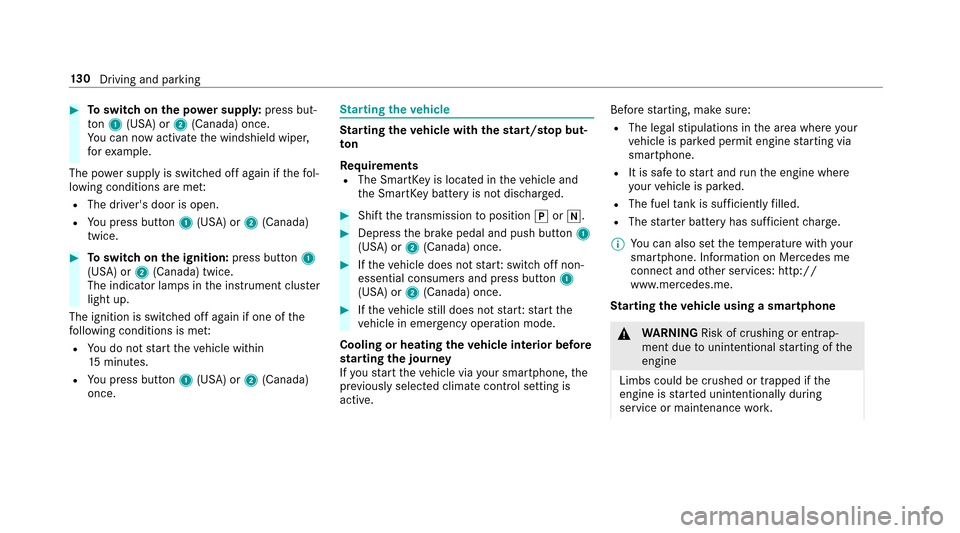
#Toswitch on the po wer supp ly:press but‐
to n1 (USA) or 2(Canada) once.
Yo u can now act ivate the windshield wiper,
fo rex ample.
The po wer supp lyis switched off again if thefo l‐
lowing conditions are me t:
RThe driver's door is open.
RYoupr ess butto n1 (USA) or 2(Canada)
twice.
#To switch on the ignition: press button 1
(USA) or 2(Canada) twice.
The indicator lamps in the instrument clus ter
light up.
The ignition is switched off again if one of the
fo llowing conditions is me t:
RYoudo not start theve hicle within
15 minutes.
RYoupr ess butto n1 (USA) or 2(Canada)
once.
St arting theve hicle
Starting theve hicle with thest art/s top but‐
to n
Requ irements
RThe SmartK eyis located in theve hicle and
th e SmartK eybattery is not dischar ged.
#Shift the transmission toposition jori.
#Depress the brake pedal and push button 1
(USA) or 2(Canada) once.
#Ifth eve hicle does not star t:switch off non-
essential consumers and press button 1
(USA) or 2(Canada) once.
#Ifth eve hicle still does not star t:start the
ve hicle in emer gency operation mode.
Cooling or heating the vehicle interior before
st arting the jou rney
If yo ustart theve hicle via your smartphone, the
pr ev iously selecte d climate control setting is
active. Before
starting, make sure:
RThe legal stipulations in the area where your
ve hicle is par ked permit engine starting via
smartphone.
RIt is safe tostart and runth e engine where
yo ur vehicle is par ked.
RThe fuel tank is suff icientlyfilled.
RThe star ter battery has suf ficient charge .
% You can also set thete mp erature with your
smartphone. Info rm ation on Mercedes me
connect and other services: http://
www.mercedes.me.
St arting theve hicle using a smartphone
&
WARNING Risk of crushing or entrap‐
ment due tounin tentional starting of the
engine
Limbs could be crushed or trapped if the
engine is star ted unintentionally during
service or maintenance work.
13 0
Driving and pa rking