2017 MERCEDES-BENZ E43AMG charging
[x] Cancel search: chargingPage 329 of 482

#When givingstarting assis tance, al ways
make sure that you only connect bat‐
te ry term inals with identical polarity.
#During starting assis tance, you must
observ eth e described order for con‐
necting and disconnecting the jumper
cables.
#Do not connect or disconnect the bat‐
te ry cla mp s while the engine is running.
&
WARNING Risk ofexplosion during
ch arging process and starting assis tance
During thech arging process and starting
assis tance, the battery may release an explo‐
sive gas mixture.
#Av oid fire , open flames, creating spar ks
and smoking.
#Make sure that there is suf ficient venti‐
lation du ring thech arging process and
during starting assis tance.
#Do not lean over a batter y.
Ifth e indicator/warning lamps in the instrument
clus ter do not light up at low temp eratures, it is
ve ry likely that the dischar ged battery has fro‐
zen.
& WARNING Risk ofexplosion from a fro‐
zen battery
A dischar ged battery may freeze at temp era‐
tures slightly abo veor below freezing point.
During starting assis tance or battery charg‐
ing, batte rygas may be released.
#Alw aysth aw a frozen batte ryout firs t
before charging it or per form ing start‐
ing assis tance.
* NO
TEShor tening the service life of the
battery bycharging the battery at low
te mp eratures
Charging the battery at very low temp era‐
tures may shor tenth e service life of the bat‐
te ry and ha vea negative ef fect on starting.
#Do not charge the battery at very low
te mp eratures.
The service life of a battery that has been
th awe d may be dramatically shor tened.
It is recommended that you ha veathaw ed bat‐
te ry checked at a qualified specialist workshop.
All vehicles
* NO
TEDama gecaused bynumerous or
ex tended attem ptsto start the engine
Nume rous or extended attem ptsto start the
engine may damage the catalytic con verter
due tonon-combu sted fuel.
#Av oid numerous and extended attem pts
to start the engine.
Obser vethefo llowing points during starting
assis tance and when charging the battery:
ROnly use undamaged jumper cables/charg‐
ing cables with a suf ficient cross-section and
insula tedte rm inal clamps.
RNon- insulated parts of thete rm inal clamps
must not come into con tact wi thother me tal
parts while the jumper cable/charging cable
is connected tothe battery/jump-s tart con‐
nection point.
Breakdown assis tance 327
Page 330 of 482
RThe jumper cable/charging cable must not
come into contact with any parts which may
movewhen the engine is running.
RAlw ays make sure that nei ther you nor the
battery is elect rostatically charge d.
RKe ep away from fire and open flames.
RDo not lean overth e batter y.
RWhencharging: only use battery charge rs
te sted and appr oved byMercedes-Benz and
re ad the battery charge r's operating instruc‐
tions before charging the batter y.
Obser vethe additional following points during
st arting assis tance:
RSt arting assis tance may only be pr ovided
using batteries with a nominal voltage of 12
V.
RThe vehicles must not touch.
RGa soline engine: Onlyaccept starting assis‐
ta nce if the engine is cold and theex haust
sy stem has cooled down.
#Secure theve hicle byapplying the electric
parking brake.
#Au tomatic transmission: Shiftthe trans‐
mission toposition j.
#Make sure that the ignition and all electrical
consumers are switched off.
#Open the hood.
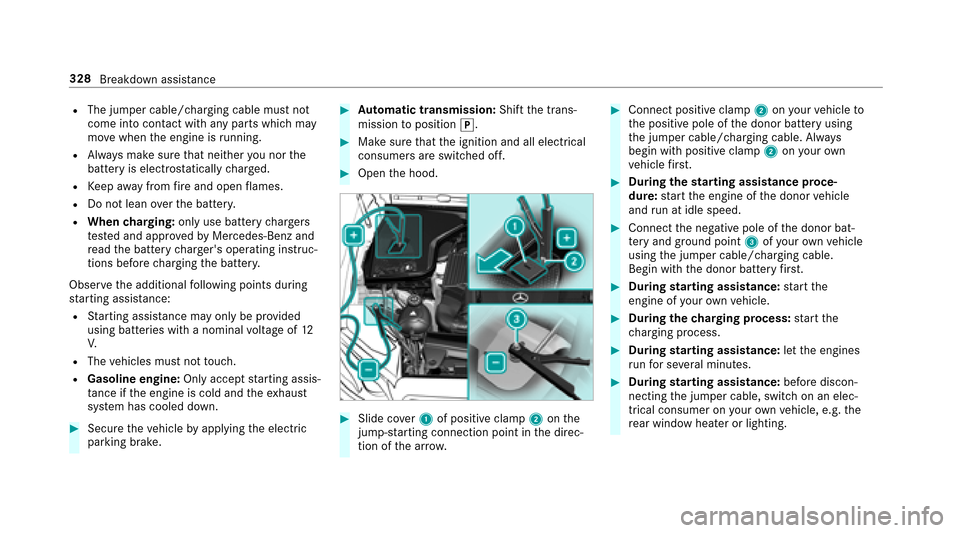
#Slide co ver1 of positive clamp 2onthe
jump-s tarting connection point in the direc‐
tion of the ar row.
#Connect positive clamp 2onyour vehicle to
th e positive pole of the donor battery using
th e jumper cable/charging cable. Alw ays
begin with positive clamp 2onyour ow n
ve hicle firs t.
#Du ring thest arting assist ance proce‐
dure: start the engine of the donor vehicle
and run at idle speed.
#Connect the negative pole of the donor bat‐
te ry and ground po int3 ofyour ow nve hicle
using the jumper cable/charging cable.
Begin with the donor battery firs t.
#Du ring starting assist ance:start the
engine of your ow nve hicle.
#During thech arging process: start the
ch arging process.
#During starting assist ance:letthe engines
ru nfo r se veral minutes.
#During starting assist ance:before discon‐
necting the jumper cable, switch on an elec‐
trical consumer on your ow nve hicle, e.g. the
re ar wind owheater or lighting.
328
Breakdown assis tance
Page 331 of 482
Whenthest arting assis tance/charging process
is compl ete:
#Fir st,re mo vethe jumper cable/charging
cable from ground point 3and the negative
pole of the donor batter y,then from positive
clamp 2and the positive pole of the donor
batter y.Begin each time with the conta cts
on your ow nve hicle firs t.
#Af terre moving the jumper cable/charging
cable, close co ver1 of positive clamp 2.Yo
u can obtain fur ther information on starting
assis tance at any qualified specialist workshop.
To w starting or towing away
Perm itted towing me thods
Mercedes-Benz recommends transporting your
ve hicle in the case of a breakdown, rath er than
to wing it away. *
NO
TEDama getotheve hicle due to tow‐
ing away incor rectly
#Obser vethe instructions and no tes on
to wing away.
Breakdown assis tance 329
Page 447 of 482
Automatic transmission
see Selector le ver
B
BA S (Brake Assist Sy stem) .................... .151
Battery Key........................................................ 57
Battery (vehicle) Charging .............................................. 326
Jump -star ting ...................................... 326
No tes ................................................... 324
Battery (vehicle) see Vehicle battery
Belt .............................................................3 3
Belt air bag Activation .............................................. 31
Fu nction/no tes .....................................3 5
Blind Spot Assist ..................................... 193
Ac tivating/deactivating .......................1 95
Fu nction/no tes ................................... 193
Sy stem limits ....................................... 193
Blind Spot Assist see Active Blind Spot Assi st Blo
wer
see Climate control
Blue tooth®
Ac tivating/deactivating .......................2 33
Setting up an Internet connection ....... 275
Settings ............................................... 232
Switching profile (DUN/PAN) .............. 276
Blue tooth
®Au dio
Ac tivating ............................................ 293
De-authorizing (de-regis tering) the
device .................................................. 293
Information .......................................... 290
Overview ............................ .....
............. 291
Sear ching for and au thorizing the
device .................................................. 292
Switching device via NFC .................... 293
Brake Assist Sy stem
see BAS (Brake Assist System)
Brake fluid
No tes ................................................... 375
Brake forc e distribution
EBD (Elect ronic Brake forc e Distribu‐
tion) ..................................................... 155 Brakes
ABS (Anti-lock Braking Sy stem) ........... 151
BA S (Brake Assist System) .................. .151
Driving tips .......................................... 132
EBD (Electronic Brake forc e Distribu‐
tion) ..................................................... 155
HOLD function .....................................1 71
Limited braking ef fect (salt-treate d
ro ads) .................................................. 132
New/replaced brake linings/brake
discs .................................................... 132
No tes on breaking-in a new vehicle ..... 132
Brakes see Active Brake Assi st
Braking assistance see BAS (Brake Assist System)
Breakdown ............................................... 318
Changing a wheel ................ ...
............. 362
Overview of the help functions .............. 16
Ro adside Assis tance .............................. 21
To w starting ........................................ 334
To wing away ........................................ 330
Tr ansporting theve hicle ......................3 32
Index44
5
Page 449 of 482
Mounting a new wheel ........................ 365
Preparation ......................................... 362
Raising theve hicle .............................. 363
Re moving a wheel ...............................3 65
Re moving/mounting hub caps ............ 362
Changing hub caps ................................. 362
Character entry Function/no tes ................................... 229
Using the controller ............................. 230
Charging Battery (vehicle) ................................. .326
Child saf ety lock
Re ar door .............................................. 52
Re ar side wind ows................................. 54
Child seat .................................................. .45
Fr ont passenger seat (no tes) ................. 51
Fr ont passenger seat (rear ward-
fa cing/for ward-facing) .......................... 52
LA TC H-type (ISOFIX) (ins talling) ............ 49
LA TC H-type (ISOFIX) (no tes) .................. 48
No tes ..................................................... 45
To pTe ther ............................................. .50
Child seat saf etyfe ature .......................... 47Child
ren
Child seat saf etyfe ature ........................ 47
Re stra int sy stems ................................. .45
Chock Storage location ................................... 36 1
Chock see Wheel chock
Cigar ette lighter .
..................................... 106
Cleaning see Care
Climate control ........................................ 124
Ac tivating/deactivating .......................1 24
Ac tivating/deactivating the A/C
function (cont rol panel) ...................... .124
Ac tivating/deactivating the synchro‐
nization function (cont rol panel) .......... 125
Ad justing air vents ............................... 127
Air di stribution settings .......................1 25
Air-recirculation mode ......................... 125
Au tomatic control ................................ 124
Defrosting the windo ws....................... 125
Defrosts the windshield ....................... 124
Dual-zone au tomatic climate control
panel .................................................... 124 Filling capacity
forPA G oil .................. .378
Glo vebox air vent ................................ 128
Inserting/removing theflacon (fra‐
gr ance sy stem) .................................... 126
Ionization ............................................. 125
Re ar air vents ...................................... 128
Re frigerant ...........................................3 77
Re frigerant filling capacity .................. .378
Sets the air flow .................................... 124
Setting the air distribution .................. .124
Setting the fragrance sy stem ............... 125
Se tting
thete mp erat
ure ....................... 124
Switching there ar wind owheater
on/off .................................................. 124
Wi ndshield hea ter ................................ 127
Cockpit ........................................................ .6
Overview .................................................6
COMAND see Multimedia sy stem
COMAND Touch ....................................... 236
Au thorizing a device ............................2 35
Child saf etyloc k.................................. 23 6
COMAND Touch App
see COMAND Touch
Index 44
7
Page 472 of 482
Switch-off delay timeInterior .................................................1 17
Switching the sur round sound on/off
Burmes ter
®sur round sound sy stem ... .301
Synchronization function Activating/deactivating (control
panel) .................................................. 125
Sy stem settings
Language ............................................ .236
No tes on language selection ............... 236
Re set function (multimedia sy stem) ... .239
Setting the dis tance unit ..................... 236
Software upda te.................................. 238
Sy stem settings
see Multimedia sy stem
T
Ta ilgate
see Trunk lid
Ta ilpipes (Care) ........................................ 313
Ta nk capacity
Fu el ...................................................... 374
Re ser ve(fuel) ...................................... .374 Te
ch nical data
Information .......................................... 368
Ti re pressure monitoring sy stem ......... 345
Ve hicle identification plate .................. 370
Te lephone ................................................ .260
Ac tivating functions du ring a call ........ 264
Call and ringtone volume .................... .263
Calls with se veral participants ............ .264
Commands (Voice Control Sy stem) ..... 218
Connecting a mobile phone (Near
Field Communication (NFC)) .......... .....2 62
Connecting a mobile phone (Pass‐
ke y) ...................................................... 26 1
Connectin g amobile phone (Secur e
Simple Pairing) .................................... .261
Disconnecting the mobile phone ......... 262
Incoming call during an existing call .... 264
Menu (on-board computer) .................. 208
Mobile phone voice recognition .......... 263
No tes ...... ............................................ 260
R
e ception and transmission volume .... 263
Swit ching mobile phones .................... 262
Swit ching mobile phones (Near Field
Communication (NFC)) ........................ 262
Te lephone menu overview .................. .260 Te
lephone operation ............................ 263
Using Near Field Communication
(NFC) .................................................. .262
Wi reless charging (mobile phone) ........ 110
Te lephone
see Mobile phone
Te lephone number
Dialing (on-board computer) ................ 208
Te mp erature ............................................ .124
Te mp erature grade .................................. 350
Te xt messages ......................................... 267
Calling a sender ..................................2 68
Commands (Voice Control Sy stem) ..... 220
Composing .......................................... 268
Configuring thete xt message s dis‐
pla yed .................................................. 267
Deleting ...............................................2 69
No tes ................................................... 267
Re ad-aloud function .... ........................ 268
Re ading .............................................. .268
Re plying .............................................. 268
Sending ...............................................2 68
Through-loading feature
see Seat
47 0
Index
Page 479 of 482
Windshield
Defrosting ............................................ 124
Infrared reflective ................................ 123
Re placing the wiper blades .................. 118
Wi ndshield heater ................................... 127
Wi ndshield heating
see Windshield hea ter
Wi ndshield washer fluid .........................3 76
No tes ................................................... 376
Wi ndshield washer sy stem
Re filling .............................................. .309
Wi ndshield wipers
Ac tivating/deactivating ........................ 117
Re placing the wiper blades .................. 118
Wi nter operation
Snow chains ........................................ 339
Wi nter tires
Setting the permanent speed limit ...... .161
Wi per blades
Ca re ..................................................... 313
Changing .............................................. 118
Wire lesscharging
Fu nction/no tes ................................... 109 Mobile phone .......................................
110
Wire lessvehicle co mponents
Declaration of Conformity .................... .23
Wo rkout prog ram
Overview ............................................... 89
Wo rkshop
see Qualified specialist workshop
Index 47
7