2017 MERCEDES-BENZ E-CLASS SALOON ECU
[x] Cancel search: ECUPage 249 of 497
#
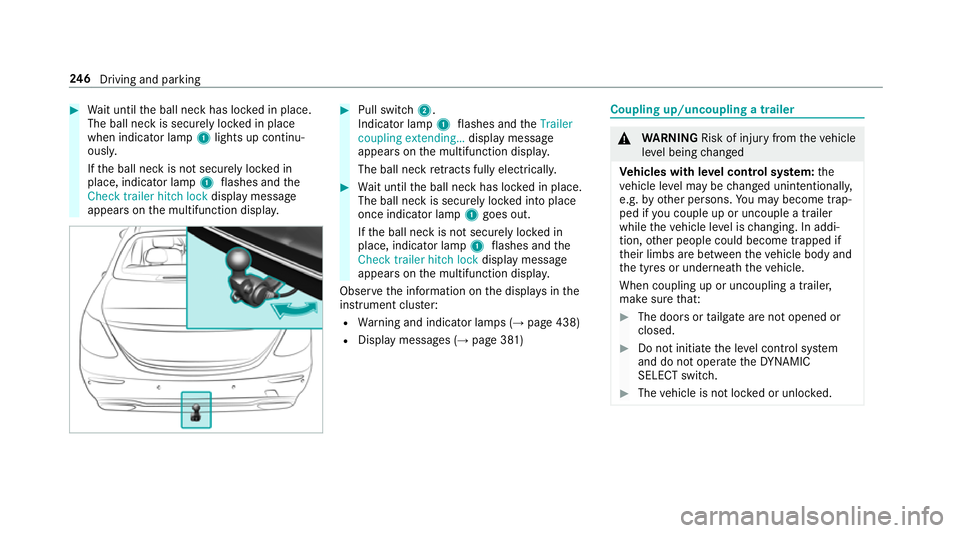
Wait until the ball neck has loc ked in place.
The ball neck is securely loc ked in place
when indicator lamp 1lights up continu‐
ousl y.
If th e ball neck is not securely loc ked in
place, indicator lamp 1flashes and the
Check trailer hitch lock displaymessa ge
appears on the multifunction displa y. #
Pull switch 2.
Indicator lamp 1flashes and theTrailer
coupling extending… display message
appears on the multifunction displa y.
The ball neck retracts fully electrically. #
Wait until the ball neck has loc ked in place.
The ball neck is securely loc ked into place
once indicator lamp 1goes out.
If th e ball neck is not securely loc ked in
place, indicator lamp 1flashes and the
Check trailer hitch lock displaymessa ge
appears on the multifunction displa y.
Obser vethe information on the displa ysinthe
instrument clus ter:
R Warning and indicator lamps (→ page 438)
R Display messages (→ page 381) Coupling up/uncoupling a trailer
&
WARNING Risk of inju ryfrom theve hicle
le ve l being changed
Ve hicles with le vel control sy stem: the
ve hicle le vel may be changed unin tentional ly,
e.g. by ot her persons. You may become trap‐
ped if you couple up or uncouple a trailer
while theve hicle le vel is changing. In addi‐
tion, other people could become trapped if
th eir limbs are between theve hicle body and
th e tyres or underneath theve hicle.
When coupling up or uncoupling a trailer,
make sure that: #
The doors or tailgate are not opened or
closed. #
Do not initiate the le vel control sy stem
and do not operate theDY NA MIC
SELECT switch. #
The vehicle is not loc ked or unloc ked. 246
Driving and pa rking
Page 250 of 497
Re
quirements:
R the ball neck must be extended fully electri‐
cal lyand engaged in the securely loc ked
position.
Tr ailers with a 7-pin plug can be connec tedto
th eve hicle with thefo llowing adap ters:
R adap ter plug
R adapte r cable
The trailer will be cor rectly de tected bytheve hi‐
cle only if thefo llowing conditions are me t:
R the trailer is connected cor rectly
R the trailer lighting sy stem is in working order
The operation of thefo llowing sy stems depends
on the trailer being connected cor rectly:
R Active Lane Keeping Assist
R ESP ®
R Parking Assist PARKTRONIC
R Active Parking Assist
R Blind Spot Assist or Active Blind Spot Assi stCoupling up a trailer
* NO
TEDama getothe battery due tofull
discharge Charging
the trailer battery using the po wer
supply of the trailer can damage the batter y. #
Do not use the po wer supp lyto charge
th e trailer batter y. #
Remo vethe co ver from the ball head and
st ore it in a safe place (→ page107). #
Position the trailer on a le vel sur face behind
th eve hicle and couple it up totheve hicle. #
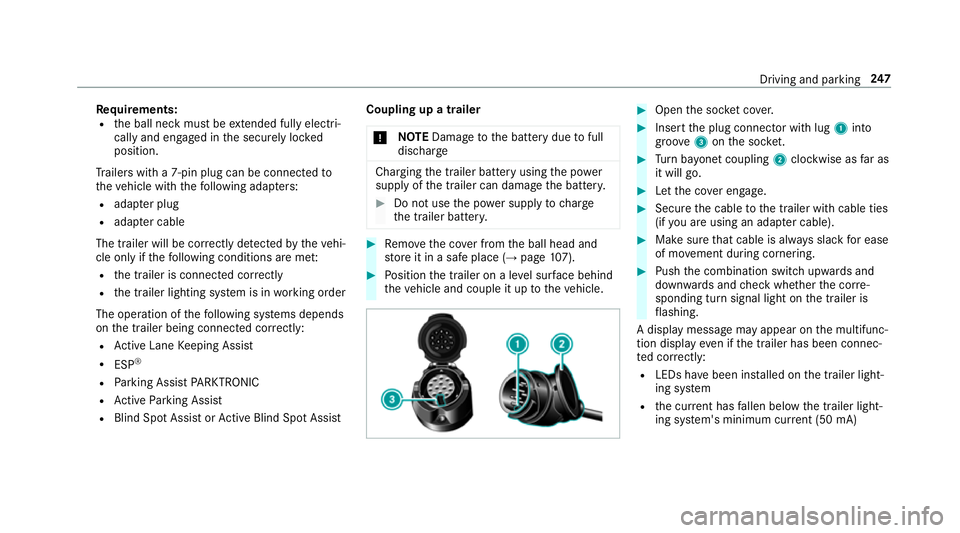
Open the soc ket co ver. #
Insert the plug connector with lug 1into
groo ve3 onthe soc ket. #
Turn bayonet coupling 2clockwise as far as
it will go. #
Let the co ver engage. #
Secure the cable tothe trailer with cable ties
(if you are using an adap ter cable). #
Make sure that cable is alw ays slack for ease
of mo vement during cornering. #
Push the combination switch upwards and
down wards and check whe ther the cor re‐
sponding turn signal light on the trailer is
fl ashing.
A display message may appear on the multifunc‐
tion display even if the trailer has been connec‐
te d cor rectly:
R LEDs ha vebeen ins talled on the trailer light‐
ing sy stem
R the cur rent has fallen below the trailer light‐
ing sy stem's minimum cur rent (50 mA) Driving and pa
rking 247
Page 251 of 497
%
Accessories can be connected tothe perma‐
nent po wer supp lyup to180W, and tothe
po we r supp lythat is swit ched on via the igni‐
tion loc k.
Un coupling a trailer &
WARNING Risk of being crushed and
becoming trapped when uncoupling a
trailer
When uncoupling a trailer wi than engaged
ine rtia-activated brake, your hand may
become trapped between theve hicle and the
trailer dr awbar. #
Do not uncouple trailers with an
engaged overrun brake. &
WARNING Risk of becoming trapped
when disconnecting the trailer cable
Ve hicles with le vel control sy stem: the
ve hicle lo werswhen the trailer cable is dis‐
connected. This could
result in you or other people
becoming trapped if your or their limbs are
between theve hicle body and the tyres or
underneath theve hicle. #
Make sure nobody is underneath the
ve hicle or in the immediate vicinity of
th e wheel ar ches when you disconnect
th e trailer cable. *
NO
TEDama getothere ar bumper from
ins talling adap ter cables or adapte r plugs The
following parts could be damaged when
re tracting the ball neck fully electrically:
R bumper
R adap ter cable
R adapte r plug #
Alw aysre mo vethe adap ter cable or
adapte r plug before retracting the ball
neck fully electrically. #
Safeguard the trailer against rolling away. #
Disconnect the electrical connection
between theve hicle and the trailer. #
Uncouple the trailer. #
Place the co ver on the ball head. Bicycle
rack &
WARNING Risk of an accident when
using the bicycle rack incor rectly
The bicycle rack may become de tach ed from
th eve hicle in thefo llowing cases:
R the permissible load capacity of the
trailer hitch is exceeded.
R the bicycle rack is used incor rectl y.
R the bicycle rack is secured tothe ball
neck beneath the ball head.
Obser vethefo llowing foryo ur ow n sa fety
and that of other road users:
R always adhere tothe permissible load
capacity of the trailer hitch. 248
Driving and pa rking
Page 253 of 497
Note
s on loads
The larger the dis tance between the load's
cent reof gr avity and the ball head, the greater
th e load on the trailer hitch.
Obser vethefo llowing no tes:
R mount heavy bicycles as close totheve hicle
as possible.
R always distribute the load on the bicycle rack
as eve nly as possible across theve hicle's
longitudinal axis.
Mercedes-Benz recommends removing all
de tach able parts from the bicycles, e.g. bask ets,
ch ild seats or rech arge able bat teries, before
loading them onto the bicycle rack . This
impr ovesth e wind resis tance and centre of gr av‐
ity of the bicycle rack.
Alw ays secure the bicycles toprev ent them from
moving around and check they are secured at
re gular inter vals.
Do not use tarp aulins or other co vers. The han‐
dling characteristics and rear view may be impaired. In addition,
the wind resis tance and
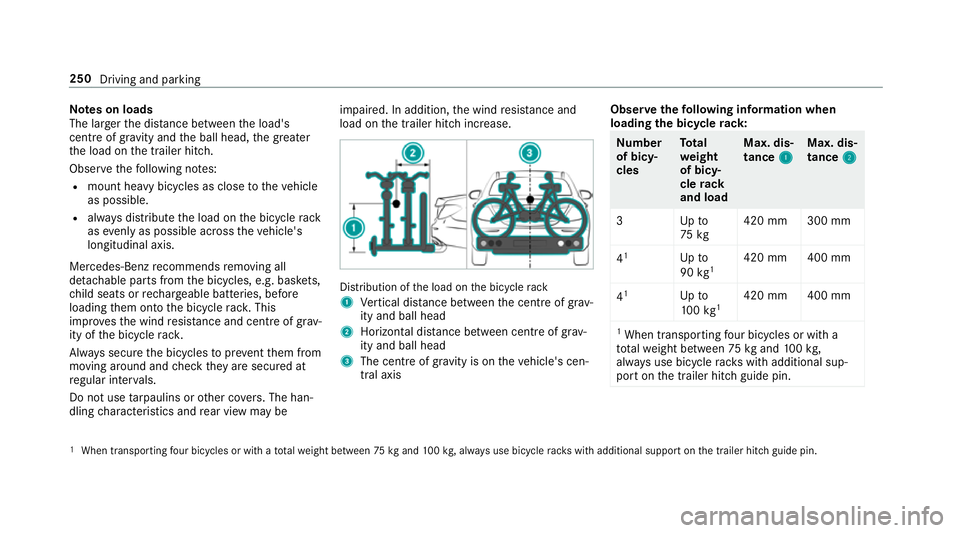
load on the trailer hitch increase. Distribution of
the load on the bicycle rack
1 Vertical dis tance between the cent reof gr av‐
ity and ball head
2 Horizon tal dis tance between centre of gr av‐
ity and ball head
3 The centre of gr avity is on theve hicle's cen‐
tral axis Obser
vethefo llowing information when
loading the bicycle rack: Nu
mber
of bicy‐
cles To
tal
we ight
of bicy‐
cle rack
and load Max. dis‐
tance
1 1Max. dis‐
tance
2 2
3U pto
75 kg 420 mm 300 mm
4 1
Upto
90 kg1 420 mm 400 mm
4 1
Upto
10 0kg 1 420 mm 400 mm
1 When transpo rting four bic ycles or with a
tot alwe ight between 75kgand 100kg,
alw ays use bicycle rack s with additional sup‐
port on the trailer hitch guide pin. 1
When transporting four bicycles or with a totalwe ight between 75kgand 100kg , alw ays use bicycle rack s with additional support on the trailer hitch guide pin. 250
Driving and parking
Page 255 of 497

R
Limiter (→ page 202)
R Active Dis tance Assi stDISTRONIC
(→ page 205)
* NO
TEEngine dama gedue toexc essively
high engine speeds The engine will be damaged if
you drive with
th e engine in theov errevving range. #
Do not drive wi th the engine in theove r‐
re vving range. The fuel supply is inter
rupted toprotect the
engine when there d band in rev counter 3
(o ve rrev ving range) is reached.
During no rmal operating conditions, coolant
te mp erature display 4may rise to120 °C. &
WARNING Danger of bu rns when open‐
ing the bonn et
If yo u open the engine bonn etwhen the
engine has overheated or during a fire inthe
engine compartment, you could come into
contact with hot gases or other escaping
operating fluids. #
Before opening the bonn et, allow the
engine tocool down. #
Intheeve nt of a fire inthe engine com‐
partment, keep the engine bonn et
closed and call thefire service. Ve
hicles with a 48 V on-board electrical sys‐
te m (EQ Boo sttech nology): R
E-POWER 1shows th e electrical drive sup‐
port as a percentage.
R CHARGE 2showsthe electric mo tor's recu‐
peration per form ance as a percen tage. õ
showsthe drive sy stem's operational read‐
iness . Overview of
the but tons on thest eering
wheel 1
Button group:
¤ Main menu and ba ckbutton (on-board
computer)
8 Switches sound off/on
W Increases thevo lume
X Decreases thevo lume
2 Touch Control (on-board co mputer)
3 Touch Control (multimedia sy stem) 252
Instrument Display and on-board computer
Page 260 of 497
R
Grey radar waves next tovehicle: Blind Spot
Assist activated
R Green radar waves next tovehicle: Blind Spot
Assist active
R Active Dis tance Assi stDISTRONIC displa ys
( → page 205) Calling up displa
ysintheTr ip menu On-board computer:
, Trip
% Ve
hicles with an instrument display in
th e widescreen cockpit: whenyou ha ve
th e design set toProgressive ,yo u can view
information on the journey in the left-hand
area of the instrument displa y.#
Toselect a displa y:swipe upwards or down‐
wa rds on the left-hand Touch Control.
Displa ysintheTripmenu:
R standard display
R range and cur rent fuel consu mption When
gliding mode is active (→ page175),
Gliding mode is displayed ins tead of the cur‐
re nt fuel consu mption.
A recuperation displ ayis also available for
cer tain engines. If there is only a small
amount of fuel left in the fuel tank, the dis‐
play sho wsave hicle being refuelled ins tead
of thera nge.
R ECO displ ay (→page 168)
R Trip computer From startandFrom reset
R Digital speedom eter
% Ve
hicles with an Instrument Display in
th eWi descreen Co ckpit: the digital speed‐
ome ter only appears in theClassic andSport
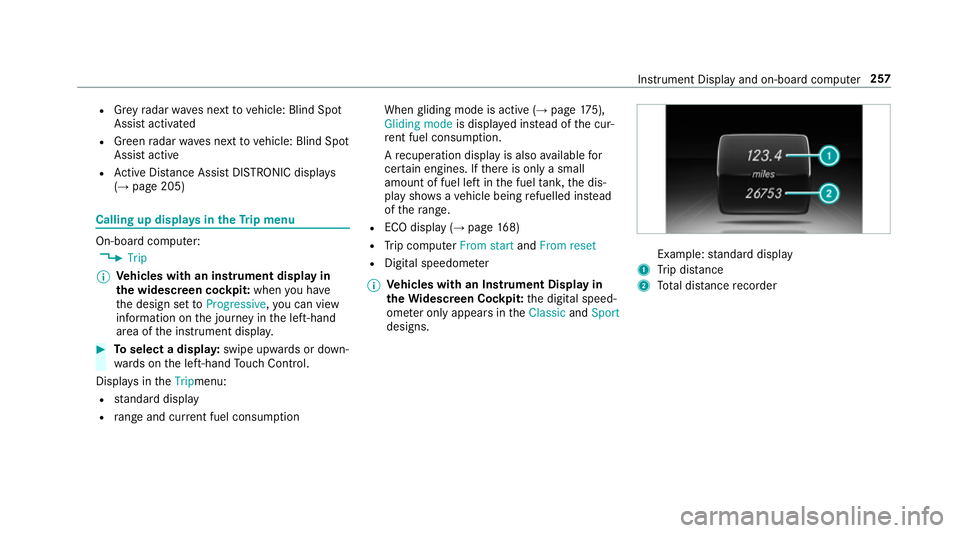
designs. Example:
standard display
1 Trip dis tance
2 Total dis tance recorder Instrument Display and on-board compu
ter257
Page 283 of 497
Connecting a mobile phone (au
thorisation
using Secure Simple Pairing) #
Select a mobile phone.
A code is displa yed in the multimedia sy stem
and on the mobile phone. #
Ifth e codes match: selectYesonthe multi‐
media sy stem.
R Confirm the code on the mobile phone. #
Ifth e codes are dif fere nt: select Noonthe
multimedia sy stem.
The process is cancelled.
Connecting a mobile phone (authorisation by
entering a passk ey)#
Select the Blue tooth®
name of the mobile
phone. #
Choose a one tosixteen-digit number combi‐
nation as a passk ey.#
Multimedia sy stem: enter the passk eyand
select a. #
Mobile phone: enterthe passk eyagain and
con firm. #
Depending on the mobile phone used, you
may ha vetoconfirm the connection tothe multimedia sy
stem and forth e PBAP and
MAP Blue tooth®
profiles.
Switching mobile phones
Requ irements:
R The mobile phones are authorised
(→ page 279).
Mul timedia sy stem:
, Tel/ ®.
Telephone .
Connect
device #
Select the mobile phone from the device list.
% Only one mobile phone can be connected at
any one time. The mobile phone that is cur‐
re ntly connected is indica ted with a dot #.
Disconnecting a mobile phone (deauthoris‐
ing)
Multimedia sy stem:
, Tel/ ®.
Telephone .
Connect
device #
Highlight the mobile phone in the device list. #
Select G. #
Select De-authorise. #
Select Yes.
Setting there ception and transmission vol‐
ume
Re quirements:
R A mobile phone is connec ted (authorised)
(→ page 279).
Mul timedia sy stem:
, Tel/ ®.
Telephone .
Connect
device
This function ensures optimal language qualit y. #
Highlight the mobile phone in the device list. #
Select G. #
Select Reception volume orTransmission
volume . #
Set thevo lume.
Fu rther information on there commended recep‐
tion and transmission volume: http://
www.me rcedes-benz.com/connect 280
Multimedia sy stem
Page 302 of 497
Switching
toMedia Inter face
Multimedia sy stem:
, Media .
Media .
Media Interface 1 #
Connect the data storage medium with the
USB port (→ page 297).
Pla yable music files are pla yed bac k.
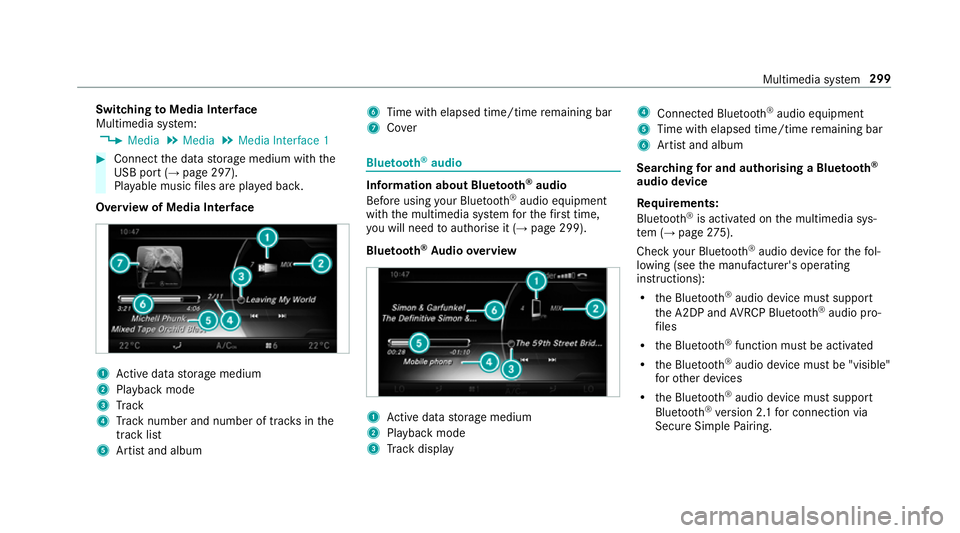
Overview of Media Inter face 1
Active da tastorage medium
2 Playback mode
3 Track
4 Track number and number of trac ksinthe
track li st
5 Artist and album 6
Time with elapsed time/time remaining bar
7 Cover Blue
tooth ®
audio Information about Blue
tooth ®
audio
Before using your Blue tooth®
audio equipment
with the multimedia sy stem forth efirs t time,
yo u will need toauthorise it (→ page 299).
Blu etoo th®
Au dio overview 1
Active da tastorage medium
2 Playback mode
3 Track display 4
Connec ted Blue tooth®
audio equipment
5 Time with elapsed time/time remaining bar
6 Artist and album
Sear ching for and authorising a Blue tooth ®
audio device
Requ irements:
Blue tooth ®
is activated on the multimedia sys‐
te m (→ page275).
Che ckyour Blue tooth®
audio device forth efo l‐
lowing (see the manufacturer's operating
instructions):
R the Blue tooth®
audio device must suppo rt
th e A2DP and AVRC P Blue tooth®
audio pro‐
fi les
R the Blue tooth®
function must be activated
R the Blue tooth®
audio device must be "visible"
fo rot her devices
R the Blue tooth®
audio device must suppo rt
Blu etoo th®
ve rsion 2.1 for connection via
Secure Simple Pairing. Multimedia sy
stem 299