2017 MERCEDES-BENZ E-CLASS ESTATE lock
[x] Cancel search: lockPage 258 of 585
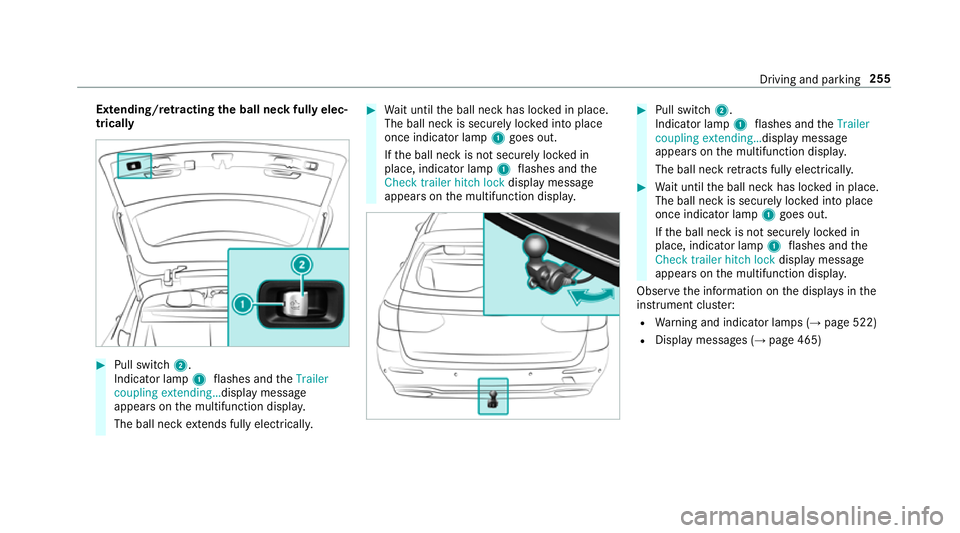
Extending/r
etra ctin gthe bal lneckf ullye lec‐
trically #
Pull swit ch2.
Indicator lamp 1flashes and theTrailer
coupling extending… displaymessage
appear sonthe multifunction displa y.
The ball nec kextends fully electrically. #
Wait until theb all nec khas loc kedinp lace.
The ball nec kissecurel yloc kedi ntop lace
onc eindicator lamp 1goes out.
If th eb all nec kisnotsecurel yloc kedin
place, indicator lamp 1flashes and the
Chec ktrailer hitch lock displaymessa ge
appear sonthe multifunction displa y. #
Pull switch 2.
Indicator lamp 1flashes and theTrailer
coupling extending… displaymessage
appear sonthe multifunction displa y.
The ball nec kretra cts fully electrically. #
Wait until theb all nec khas loc kedinp lace.
The ball nec kissecurel yloc kedi ntop lace
onc eindicator lamp 1goes out.
If th eb all nec kisnotsecurel yloc kedin
place, indicator lamp 1flashes and the
Chec ktrailer hitch lock displaymessa ge
appear sonthe multifunction displa y.
Obser vethei nformation on thed ispla ysinthe
instrumen tclus ter:
R Warning and indicator lamps (→ page522)
R Displa ymessages (→ page465) Drivin
gand parking 255
Page 259 of 585
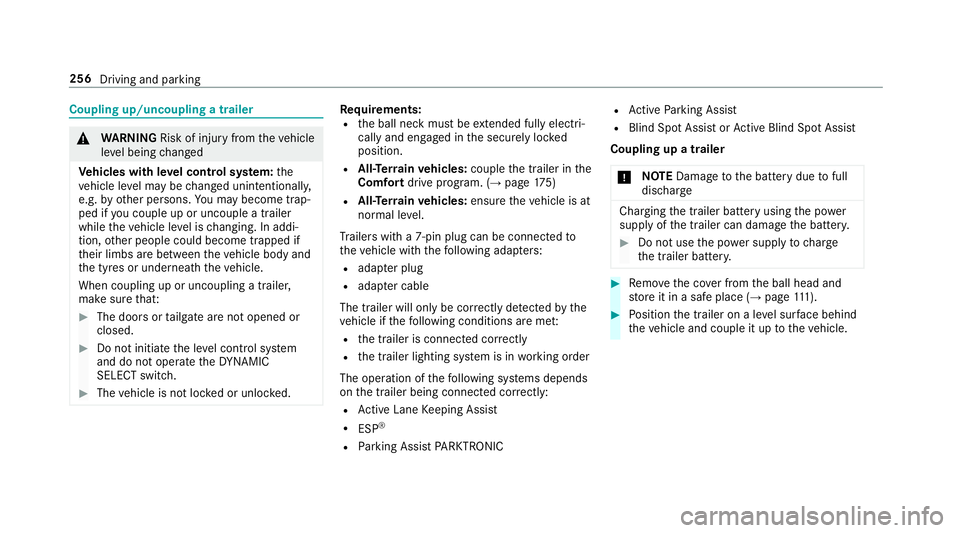
Coupling up/uncouplin
gatrailer &
WARNING Risk of inju ryfrom thev ehicle
le ve lb eing changed
Ve hicles with le velc ontrol sy stem: the
ve hicle le velm aybe changed unin tentional ly,
e.g. by ot her persons. Youm aybecome trap‐
ped if youc ouple up or uncouple atrailer
while thev ehicle le velisc hanging. In addi‐
tion, other people could become trapped if
th eir limbs ar ebetwe en thev ehicle body and
th et yres or underneat hthe vehicle.
When coupling up or uncoupling atrailer,
mak esuret hat: #
The door sortailgat earenoto pened or
closed. #
Do no tinitiat ethe le velc ontrol sy stem
and do no toperat ethe DYNA MIC
SELECT switch. #
The vehicle is no tloc kedoru nlocked. Re
quirements:
R theb all nec kmustbee xtende dfully electri‐
cal lyand engaged in thes ecurel yloc ked
position.
R All-Terrain vehicles: couplethe trailer in the
Comfort driveprogram. (→ page175)
R All-Ter rain vehicles: ensurethe vehicle is at
normal le vel.
Tr ailer switha7 -pin plug can be connec tedto
th ev ehicle wit hthe following adap ters:
R adap terp lug
R adapte rcable
The trailer willo nly be correctly de tected bythe
ve hicle if thef ollowing condition sareme t:
R thet railer is connected cor rectly
R thet railer lighting sy stem is in working order
The operation of thef ollowing sy stems depends
on thet railer being connected cor rectly:
R ActiveL aneK eeping Assist
R ESP ®
R Parking Assis tPARKTRONIC R
ActiveP arking Assist
R Blin dSpotA ssis torA ctiveBlind Spo tAssist
Coupling up atrailer
* NO
TEDama getotheb atter ydue tofull
discharge Charging
thet railer batter yusing thep ower
supply of thet railer can damag ethe batter y. #
Do no tuse thep owe rsupp lyto charge
th et railer batter y. #
Remo vethec ove rfromt he ball head and
st or eitinas afep lace (→ page111). #
Position thet railer on alevel sur face behind
th ev ehicle and couple it up tothev ehicle. 256
Driving and parking
Page 260 of 585
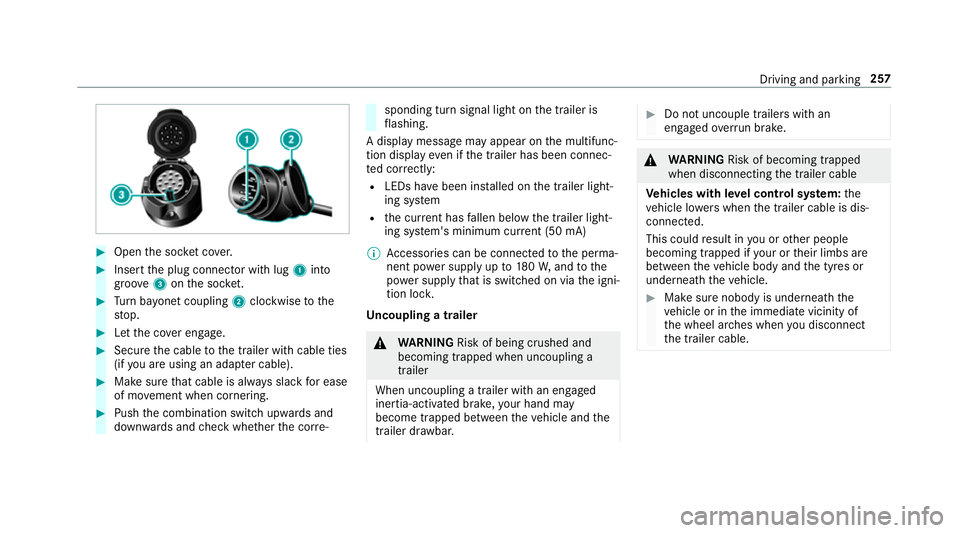
#
Open thes ocketc ove r. #
Inser tthe plug connector wit hlug 1 into
groo ve3 onthes ocket. #
Turn bayone tc oupling 2clockwise tothe
st op. #
Letthe co vere ngage. #
Secur ethe cable tothet railer wit hcable ties
(if youa reusin gana dapterc able). #
Mak esuret hat cabl eisalway ss lac kfor ease
of mo vement when cornering. #
Push thec ombination switc hupwards and
down wardsa nd checkw hether thec orre‐ sponding tur
nsignal light on thet railer is
fl ashing.
Ad ispla ymessag emayappear on them ultifunc‐
tion displa yevenift he trailer has been connec‐
te dc orrectly:
R LEDs ha vebeen ins talled on thet railer light‐
ing sy stem
R thec urrent ha sfallen belo wthe trailer light‐
ing sy stem's minimum cur rent (50 mA)
% Accessorie scan be connected tothep erma‐
nentp owersupp lyup to180W,a ndtothe
po we rsupp lythat is swit ched on via thei gni‐
tion loc k.
Un coupling atrailer &
WARNING Risk of being crushed and
becoming trapped whe nuncoupling a
trailer
Whe nuncoupling atrailer with an engaged
ine rtia-activated brake, your han dmay
become trapped between thev ehicle and the
traile rdrawbar. #
Do no tuncouple trailer swithan
engaged overrunb rake. &
WARNING Risk of becoming trapped
whe ndisconnecting thet railer cable
Ve hicles with le velc ontrol sy stem: the
ve hicle lo werswhen thet railer cable is dis‐
connected.
This could result in youoro ther people
becoming trapped if your or their limbs are
between thev ehicle body and thet yres or
underneat hthe vehicle. #
Mak esuren obody is underneat hthe
ve hicle or in thei mmediat evicinity of
th ew heel ar ches when youd isconnect
th et railer cable. Driving and parking
257
Page 304 of 585
#
Accept thec onnection requ estfromt he new
device.
As ecurity keyisd isplayed. #
Ente rthe security keyint he extern al device.
The devic eisauthorised.
Selecting aconnected device #
Select Authorise anew device.
The devices already connec teda redispla yed. #
Select Continue using connected devices.
The Please start COMAND Touch on your
device and follow the instructions. message
appears. #
Select Continue.
Fo llowt he instructions toauthorise the
selected device.
De-authorising thed evice #
Select aconnec tedd evice from thel ist.
The Please start COMAND Touch on your
device and follow the instructions. message
appears. #
Select Continue.
Ap romp twill appear asking whe ther you
wo uld lik etodeauthorise thes elected
device. #
Select Yes.
The device is deauthorised. Ac
tivating/deactivatin gparenta lcon trol Multimedia sy
stem:
, System .
Parental control
Locking an extern al device #
Select an extern al device. #
Select Lock.
The devic econnec tedv iatheC OMAND
To uc hA ppis loc kedOor unloc kedª. Sy
stem language Note
sont he system language
This function allo wsyoutod etermine thel an‐
guag efor them enu displa ysand then avigation
announcements. The selected languag eaffects
th ec haracter savailable fore ntr y.The navigation announcement
sarenota vailable in all lan‐
guages. If alanguag eisnotavailable, then aviga‐
tion announcements will be in Engl ish.
Setting thes ysteml anguage
Multimedia sy stem:
, System .
Language #
Setthe language.
% Ifyo ua reusin gArabic map data, thet ext
information can also be shown in Arabic on
th en avigation map. Todo so, select ةيبرعلاas
th el anguag efromt he languag elist. Naviga‐
tion announcements ar ethen also made in
Arabic. Setting
thed istance unit Multimedia sy
stem:
, System .
% Units #
Select kmormi. #
Inthem ultifunction displa yofthe instrument
displa y,switc hthe Additional speedometer
displa yonO. Multimedia sy
stem 301
Page 306 of 585
Ac
tivatin gPINprotection ford atae xport #
Select Change settings .
Confir mwitht he PIN. #
Select Protect data export.
Ac tivate Oor deacti vate ª thef unction.
Ac tivatin gPINprotection foro ffline mode #
Select Changesettings .
Confir mwitht he PIN. #
Select Protect deactivation of offline mode.
Ac tivate Oor deacti vate ª thef unction.
Un blocking theP IN
Re quirements:
R Ther eisanI nternetconnection.
R AM ercedes me account exists at http://
www.me rcedes.me.
R The Personalisation (→pag e303)service is
activated.
If th eP IN has been entered incor rectly three
times ,the PIN will be bloc ked. Youc an ha ve a
single-use passwor dsent to yo uviathe Mercedes me connect online por
taltor esetthe
PIN pr otection. #
Select Unbloc kPIN. #
Ente rthe single-use password.
PIN pr otection is reset, and youc an se ta
ne wP IN.
% Alternativel y,yo uc an ha vePIN pr otection
re se tata Mercedes-Benz Service Centre. User profile
Setting
auser profile
Multimedia sy stem:
, System .
g Personalisation
Displaying auser profile when starting
If th is function is active, apromp tappear swhen
st artin gthe sy stem asking whic huser profile to
use. #
Select Display profile list after start . #
Activate Oor deacti vate ª thef unction.
Selecting auser profile #
Select Guestor individual profile #.%
Some settings from theu ser profile ar eonly
loaded when thev ehicle is stationar yor
when thei gnition is switched on.
Au tomatic syn chronisation
Eac htime thei gnition is switched of foron,the
individual user profiles ar esynchronised on the
multimedia sy stem and on thes erve r.This
ensures that thel ates tuser profiles ar ealways
av ailable. #
Select Automatic synchronisation. #
Activate Oor deacti vate ª thef unction.
% Form orei nformation about importing/
ex portin guser profiles (→ page304).
Creating auser profile
Multimedia sy stem:
, System .
g Personalisation .
Cre-
ate profile #
Ente ran ame. #
Select a.
Individuals ettings ar esave dint he user profile,
e.g.:
R System settings Multimedia sy
stem 303
Page 333 of 585
Multimedia sy
stem:
, Navigation #
Tozoo min:swipe down on theT ouc hCon‐
trol.
or #
Turn thec ontroller anti-clockwise.
or #
Movetwof inger saparton thet ouchpad. #
Tozoo mo ut:swipe up on theT ouc hControl.
or #
Turn thec ontroller clockwise.
or #
Movetwof inger stogether on thet ouchpad.
% Youc an se tthe unit of measurement of the
map scale (→ page301). Moving
them ap
Multimedia sy stem:
, Navigation .
Z Options .
Map
menu #
Alternatively: if them ap is displa yedinf ull
screen mode, press theT ouc hControl, the
controller or thet ouchpad.
The map menu appears. #
Select "mo vemap" in map menu 2
(→ pag e329). #
Swipe in an ydirection on theT ouc hControl
or touchpad.
or #
Slid ethe controller in an ydirection.
The map mo vesint he cor responding direc‐
tion under thec rosshair .The fur ther you
mo veyour finger away from thes tarti ngposi‐
tio nont hetouchpad, thef astert he map
mo ves. Selecting
them aporientation
Multimedia sy stem:
, Navigation .
Z Options .
Map
menu #
Alternatively: if them ap is displa yedinf ull
screen mode, press theT ouc hControl or the
to uchpad.
The map men uappears. #
In map menu 3,select N,2D or
3D( →pag e329).
R N:t he 2D map vie wisdisplayedsot hat
nor this alw aysatt hetop.
R 2D:t he 2D map vie wisaligned tothe
direction of tra vel.
R 3D:t he 3D map vie wisaligned tothe
direction of tra vel.
Selecting POI symbols
Multimedia sy stem:
, Navigation .
Z Options .
Map con-
tent
POIs include filling stations and ho tels whic hcan
be displa yedass ymbols on them ap,fore xam‐
ple. Notall POI sareavailable everywhere. 330
Multimedia sy stem
Page 342 of 585
#
Select Yes, SIM card and
and ,ifn ecessa ry,e nter theS IM car dPIN.
Ac cess tothem obile phone dat aisavailable.
Incoming and outgoin gcalls ar eavailable
usin gthe SIM card. Overvie
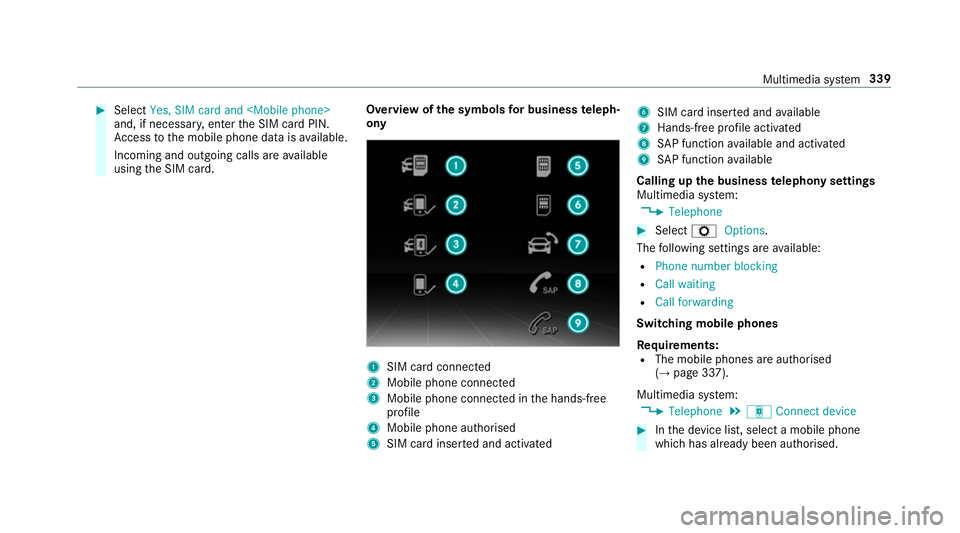
wofthe symbols forb usines steleph‐
ony 1
SIM car dconnec ted
2 Mobile phone connected
3 Mobile phone connected in theh ands-free
profile
4 Mobile phone authorised
5 SIM car dinser teda nd activated 6
SIM car dinser teda nd available
7 Hands-free profile activated
8 SAPfunction available and activated
9 SAPfunction available
Calling up theb usiness telephon ysettings
Multimedia sy stem:
, Telephone #
Select ZOptions.
The following settings ar eavailable:
R Phon enumber blocking
R Call waiting
R Call forwarding
Swit ching mobile phones
Requ irements:
R The mobile phones ar eauthorised
(→ pag e337).
Multimedia sy stem:
, Telephone .
á Connec tdevice #
Inthed evice list, select amobile phone
whic hhas already been authorised. Multimedia sy
stem 339
Page 354 of 585
Sy
stem information:
R Softwar erelease of them ultimedia sy stem
R System ID (anonymised)
The transfer of this dat aisusedtooptimise
communication between thev ehicle and the
mobil ephone.
To do this, and toassig nseve ralv ehicles tothe
mobil ephone, avehicle identifier is randomly
ge nerated.
Thi sh asno connectio ntothevehicle identifica‐
tion number (VIN) and is dele tedw hen them ulti‐
media sy stem is rese t(→pag e306).
Driving status data:
R Transmission position engaged
R Distinction between par ked, standstill, rolling
and driving
R Day/night mode of thei nstrument clus ter
The transfer of this dat aisusedtoalter how
con tent is displ ayed tocor respond tothed riving
situation. Po
sition data:
R Coordinates
R Speed
R Compass direction
R Acceleration di rection
Thi sd ata is on lytransfer redw hile then avigation
sy stem is activ einorder toimpr oveit (e.g. so it
can continue functioning when in atunnel). Mercedes me connect
Information on Mercedes me connect
Mercedes me connec
tprovide sthe following
services:
R Breakdown management
R Appointmen trequests or similar
R Mercedes-Benz emer gency cal lsyst em
R Accident mana gement
The Mercedes-Benz Cust omer Centreand the
Mercedes-Benze mergency cal lcentr eareavaila‐
ble fory ou around thec lock. The Inf
ocall button, theb reakdown assis tance
cal lbuttona nd thee mer gency cal lbuttonc an be
fo und on theo verhead control panel of thev ehi‐
cle (→ page352).
Yo uc an also call theM ercedes-Benz Cus tomer
Centr eusing them ultimedia sy stem
(→ pag e351).
Please no tethat Mercedes me connec tisa
Mercedes-Ben zservice. In emer gencies, al ways
cal lthe national emer gency service sfirst using
th es tandar dnational emer gency service phone
numbe rs.Ine mergencies, youc an also use the
Mercedes-Benze mergency cal lsyst em
(→ pag e354).
Fu rther information on Mercedes me connect,
th ep rovide dservice scope and operation:
http://manuals.daimler.com/baix/cars/
connectme/de_DE/index.html
Calling theM ercedes-Benz Cus tomer Centre
using the multimedi asystem
Requ irements:
R Youh ave access toaG SM networ k. Multimedia sy
stem 351