2017 MERCEDES-BENZ E-CLASS ESTATE sensor
[x] Cancel search: sensorPage 145 of 585
th
em. The vehicle in front is illuminated bythe
dipped beam.
At speeds abo ve30 km/h:
R If no other road user saredetected, them ain
beam is automaticall yswitched on.
R Ifot her road user saredetected, thep artial
main beam is automaticall yswitched on.
At speeds belo w25km/h or when ther eiss uffi‐
cient stre et lighting:
R The partial main beam switches of fautomati‐
call y.
R The main beam switches of fautomatically.
At speeds abo veappr ox.50k m/h:
R The headlamp rang eoft he dipped beam is
re gulated automatically based on thed is‐
ta nce to ot herroad users.
The sy stem's optical sensor is located behind
th ew indscreen near theo verhead control panel. Switching
Adaptiv eHighbeam Assis tPlus
on/off #
Toswitc hon:tur nthe light switc htothe
à position. #
Switc hont he main beam using thec ombina‐
tion switch.
When them ain beam is switched on auto‐
maticall yinthe dar k,the _ indicator
lam pont he multifunction displa ycomes on. #
Toswitc hoff:switc hoffthem ain beam
using thec ombination switch. Setting
thed ipped beam Multimedia sy
stem:
, Vehicle .
÷ Light set-
tings .
Dipped-beams #
Select Left-side traffic orRight-side traffic. Setting
thee xterior ligh ting switch-of fdelay
time Multimedia sy
stem:
, Vehicle .
÷ Light settings .
Ext.
light. del. shut-off #
Setthe switch-of fdela ytime. Setting
thes urround lighting Multimedi
asystem:
, Vehicle .
÷ Light settings .
Loca-
tor lighting #
Switc hthe function on Oor off ª.
If th es urround lighting is swit ched on, thee xte‐
ri or lighting remains lit for40s econds af tert he
ve hicle is unloc ked. When yous tart thev ehicle,
th es urround lighting is swit ched of fand auto‐
matic driving lights ar eactivated. 14 2
Light and sight
Page 198 of 585
Fu
nction of ther adar senso rs Some driving and driving sa
fety sy stems use
ra dar sensor stomonitor thea reainf ront of,
behind or next tothev ehicle (depending on the
ve hicle's equipment).
Depending on thev ehicle's equipment, ther adar
senso rsarei ntegrated behind theb umpers
and/or behind ther adiator grille. Keep these
parts free of dirt, ice and slush (→ page402).
The sensor smustn otbe co vered, fore xamp le
by bicycle rack s, ove rhanging loads or radar-
re flecting sticke rs.F ollowing an impact and in
th ee vent of associated dama ge,w hic hm aynot
be visible, totheb umper sorradiator grille, ha ve
th ef unction of ther adar senso rscheckedata
qu alified specialis tworks hop. The driver assis‐
ta nce sy stem ma ynolonger workproperly. Overvie
wofdriving sy stems and driving
saf etys ystems In
this section, youw illfind informatio nabout
th ef ollowing driving sy stems and driving saf ety
sy stems:
R 360° Camer a(→pag e229)
R ABS (A nti-lock Braking System)
(→ pag e195)
R ActiveD ista nce Assi stDISTRONIC
(→ page 209)
R Adaptiv ebrake light s(→pag e205)
R AIRB ODYC ONTROL (→ page219 )
R ActiveB rake Assi st (→pag e201 )
R ActiveL aneK eeping Assis t(→pag e250)
R ATTENTION ASSIS T(→ pag e244)
R BAS(Brake Assist System) (→ page196)
R DYNA MIC BODY CONTROL (→ page219 )
R EBD ( Electronic Brakeforce Distribution)
(→ pag e200)
R ESP ®
(Elect ronic Stability Program)
(→ pag e196) R
Hill StartA ssist
R HOL Dfunction (→ page218)
R STEER CONTROL (→ page 201)
R ActiveS teering Assis t(→ pag e215 )
R Limi ter( →pag e206)
R ActiveP arking Assis t(→pag e233)
R Parking Assis tPARKTRONIC (→ page 223)
R Reversing camer a(→pag e227)
R Cruise control (→ page206)
R Blin dSpotA ssis tand ActiveB lind Spo tAssist
( → pag e248)
R Traf ficS ign Assi st (→pag e246) Fu
nctions of ABS (anti-loc kbraking sy stem) AB
Sr egulates theb rake pressur eincritical driv‐
ing situations:
R During braking, e.g. at maximum full-s top
braking or insuf ficient traction of thet yres,
th ew heels ar epreve nted from blocking.
R Vehicle steerability while braking is ensured. Driving and parking
19 5
Page 208 of 585
Sy
stem limitations
The sy stem ma ybeimpaired or ma ynotfunction
in thef ollowing situations:
R In sno w,rain, fog, heavy spr ay,ift hereis
gl are, in direct sunlight or in greatlyvarying
light conditions.
R Ifth es ensor saredirty ,miste du p, damaged
or co vered.
R Ifth es ensor smalfunction due to otherradar
source inter fere nce, fore xamp lestro ng radar
re flections in multi-s toreyc ar par ks.
R Ifal oss of tyr epressur eorad efectivetyre
has been de tected and displ ayed.
The sy stem ma ynotreact cor rectly:
R In compl extraf fics ituations whe reobjects
cannot alwaysbec learly identified.
R Topedestrians or vehicles if they mo ve
qu ickl yintot he sensor de tection range.
R Topedestrians who ar ehidden by other
objects.
R Ifth et ypical outline of apedestrian cann ot
be distinguished from theb ackg round. R
Ifap edestrian is no trecognised as such, e.g.
due tospecial clo thing or other objects.
R On bends wit hatightradius. Setting
Activ eB rake Assi st Multimedia sy
stem:
, Vehicle .
k Assistance .
Active
Brak eAssist
Ve hicles without Drivin gAssistanc epack‐
age: The settings can be made af ters tartin gt he
ve hicle.
Ve hicles with Drivin gAssistanc epacka ge:
The setting scan be made when thei gnition is
switched on.
% It is recommended that youa lway sl ea ve
Ac tiveB rake Assi stswitched on.
Select one of thef ollowing settings: #
Early :your selection is retained when the
ve hicle is next star ted. #
Medium :your selection is retained when the
ve hicle is next star ted. #
Late:y our selection is retained when the
ve hicle is next star ted. #
Off:
The dis tance warning function and thea uton‐
omous braking function ar edeactivated.
Ve hicles without Drivin gAssistanc epack‐
age: when thev ehicle is next star ted, the
mediu msetting is auto matically selected.
Ve hicles with Drivin gAssistanc epack‐
age: Evasi veSteering Assis tisnotavailable.
When thei gnition is next star ted, them iddle
setting is selected automaticall yand Evasive
St eering Assis tisavailable.
% When ActiveB rake Assi stis deactivated, the
æ symbol appears inthea ssis tance
graphi cinthe multifunction displa y. Ad
aptiv eBrake Lights function Ad
aptiv eBrake Lights warnfollowing traf ficinan
emergency braking situation:
R Byflashin gbrake lamps
R By activatin gthe hazard warning lights Drivin
gand parking 205
Page 226 of 585
Lo
weri ngthev ehicle #
Press but ton1.
Indicator lamp 2goes out. The vehicle is
adjus tedtot he height of thel asta ctiv edrive
program. Pa
rking Assis tPARKTRONIC Fu
nction of Parking Assis tPARKTRONIC Pa
rking Assis tPARKTRONIC is an electronic
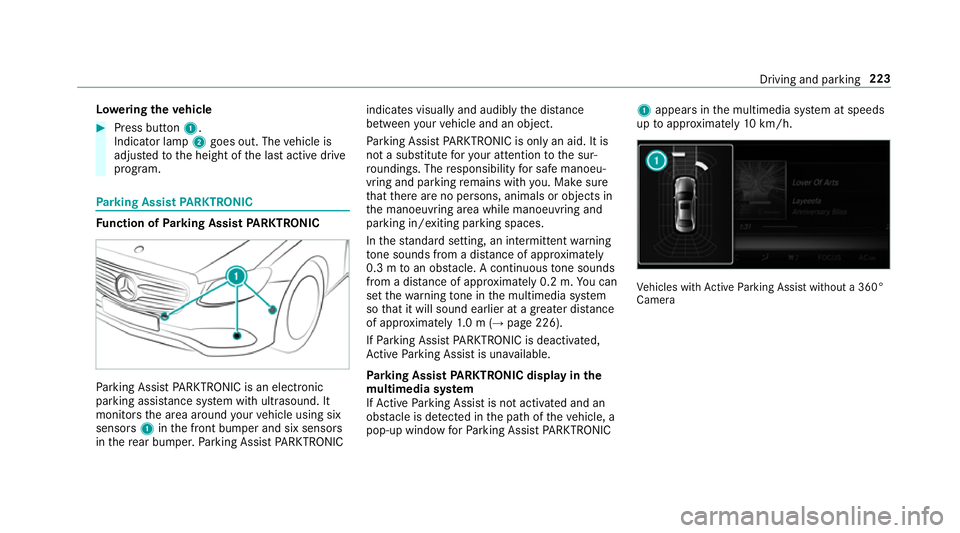
pa rkinga ssistanc esystem wit hultrasound. It
monitor sthe area around your vehicle using six
sensors 1inthef ront bumper and six sensors
in ther ear bumper .Parking Assis tPARKTRONIC indicates visually an
daudibl ythe dis tance
betwee nyour vehicle and an object.
Pa rking Assis tPARKTRONIC is only an aid. It is
no tas ubstitut efor your attentio ntothe sur‐
ro undings. The responsibility fors afem anoeu‐
vring and parking remains wit hyou. Mak esure
th at ther ea reno persons, animals or objects in
th em anoeuvring area while manoeuvring and
parking in/exitin gparking spaces.
In thes tandar dsetting ,ani ntermit tent wa rning
to ne sounds from adista nc eofa pproximately
0. 3mtoano bstacle .Ac ontinuou stone sounds
from adista nc eofa pproximatel y0.2m. Youc an
se tthe warning tone in them ultimedia sy stem
so that it will soun dearlier at agreater dis tance
of appr oximatel y1.0m( →pag e226).
If Pa rking Assis tPARKTRONIC is deactivated,
Ac tiveP arking Assis tisunavailable.
Pa rking Assis tPARKTRONIC displa yinthe
mu ltimedia sy stem
If Ac tiveP arking Assis tisnotactivated and an
obs tacle is de tected in thep athoft hevehicle, a
pop-up windo wforParking Assis tPARKTRONIC 1
appear sinthe multimedia sy stem at speeds
up toappr oximatel y10k m/h. Ve
hicles wit hActiv eParking Assis twithout a360°
Camera Driving and parking
223
Page 227 of 585
Ve
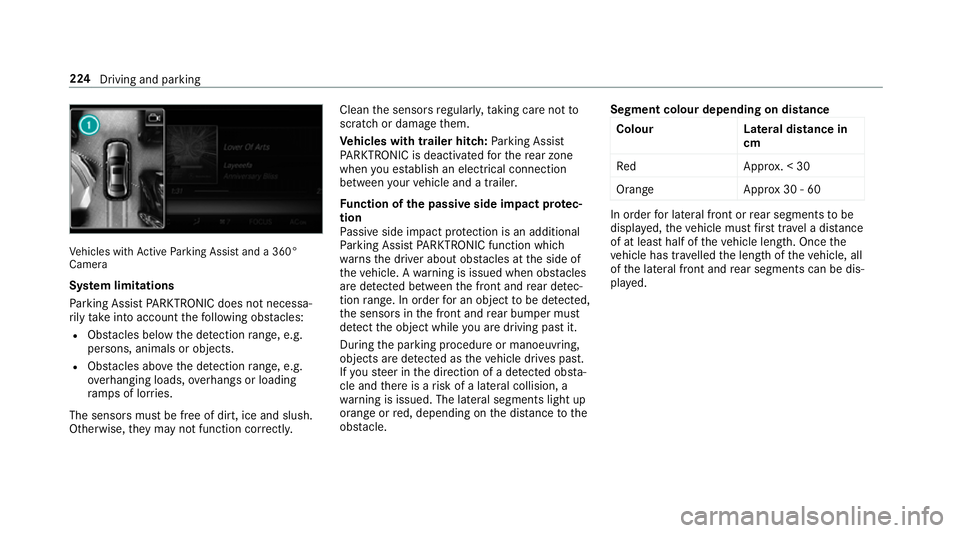
hicles wit hActiv eParking Assis tand a360°
Camera
Sy stem limitations
Pa rking Assis tPARKTRONIC does no tneces sa‐
ri ly tak eintoa ccount thef ollowing obs tacles:
R Obs tacle sb elow thed etection range, e.g.
pe rsons, animals or objects.
R Obs tacle sabove thed etection range, e.g.
ov erhanging loads, overhang sorl oading
ra mp sofl orries.
The sensor smustbef reeofd irt, ice and slush.
Otherwise, they ma ynotfunction cor rectly. Clea
nthe sensor sregularly ,taking care no tto
scratc hordamagethem.
Ve hicles with traile rhitch: Parking Assist
PA RKTRONI Cisdeactivatedf or ther ear zone
when youe stablish an elect rical connection
between your vehicle and atrailer.
Fu nction of thep assiv es ide impact pr otec‐
tion
Pa ssiv eside impact pr otection is an additional
Pa rking Assis tPARKTRONIC functio nwhich
wa rnst he driver about obs tacle satt he side of
th ev ehicle. Awarning is issued when obs tacles
ar ed etected between thef ront and rear de tec‐
tion range. In orde rfor an objec ttobedetected,
th es ensor sinthe front and rear bumper must
de tect theo bjec twhile youa redrivin gpastit.
During thep arking procedur eormanoeuvring,
objects ar edetected as thev ehicle drives past.
If yo us teer in thed irection of adetected obs ta‐
cle and ther eisar isk ofalateral collision, a
wa rning is issued. The lateral segment slight up
orang eorred, depending on thed ista nce tothe
obs tacle. Segment colour dependin
gondistance
Colour Lateral distance in
cm
Re dA pprox.<30
Orang eA pprox30 -60 In order
forl ateral front or rear segment stobe
displa yed, thev ehicle mus tfirst trave lad ista nce
of at leas thalfoft hevehicle length. Once the
ve hicle has tr avelled thel engt hoft hevehicle, all
of thel ateral front and rear segment scan be dis‐
pla yed. 224
Driving and parking
Page 228 of 585
Ve
hicles without 360° Camera
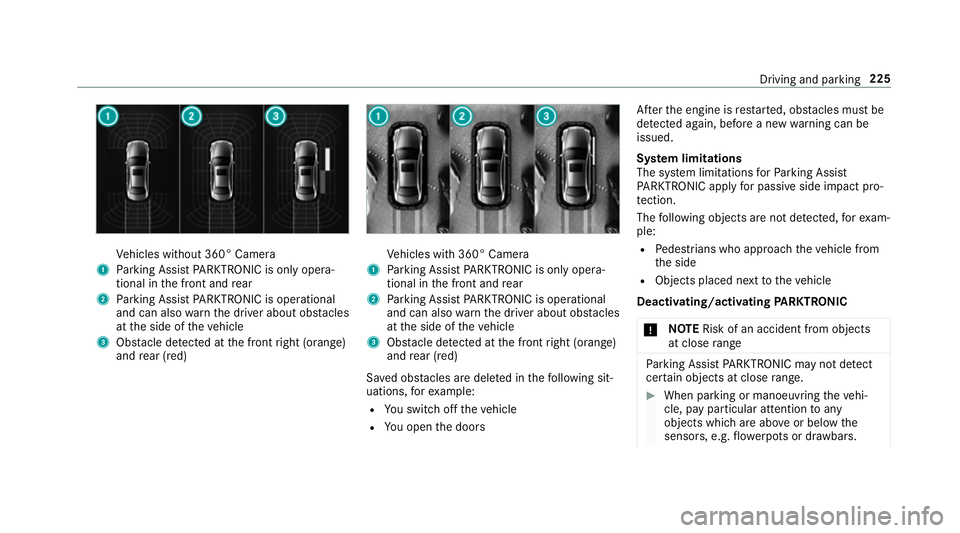
1 Parking Assis tPARKTRONIC is only opera‐
tiona linthe front and rear
2 Parking Assis tPARKTRONIC is operational
an dc an also warnthed rive ra bout obs tacles
at thes ide of thev ehicle
3 Obstacle de tected at thef ront right (orange)
and rear (red) Ve
hicles wit h360° Camera
1 Parking Assis tPARKTRONIC is only opera‐
tiona linthe front and rear
2 Parking Assis tPARKTRONIC is operational
an dc an also warnthed rive ra bout obs tacles
at thes ide of thev ehicle
3 Obstacle de tected at thef ront right (orange)
and rear (red)
Sa vedo bstacle saredel eted in thef ollowing sit‐
uations, fore xamp le:
R Yous wit ch offt he vehicle
R Youo pen thed oors Af
tert he engine is restar ted, obs tacle sm ustbe
de tected again, befor eanew wa rning can be
issued.
Sy stem limitations
The sy stem limitations forP arking Assist
PA RKTRONI Capplyfor passiv eside impact pro‐
te ction.
The following object sarenotd etected, fore xam‐
ple:
R Pedestrians who approac hthe vehicle from
th es ide
R Objects placed next tothev ehicle
Deactivating/acti vating PARKTRONIC
* NO
TERisk of an accident from objects
at close range Pa
rking Assis tPARKTRONIC ma ynotdetect
cer tain object satcloserange. #
When parking or manoeuvring thev ehi‐
cle, pa yparticular attention toany
object swhicha reabo veor belo wthe
sensors, e.g. flowe rpotsord rawbars. Driving and parking
225
Page 251 of 585
#
Activate Oor deacti vate ª thef unction.
The speed limits de tected byTraf ficS ign
Assi starea utomaticall yadop tedbyA ctive
Dis tance Assi stDISTRONIC.
Displ aying de tected traf fics igns in the
media display #
Select Display in COMAND .#
Activate Oor deacti vate ª thef unction.
Ad justin gthe type of warning #
Select Visual&audible ,Visual orNone.
Ad justin gthe warning threshold
This value de term ines thes peed at whic ha
wa rning is issued when exceeded. #
Select Warning threshold. #
Setthe desired speed. Blind Spo
tAssis tand Activ eB lind Spot
Assi st Fu
nction of Blind Spo tAssis tand Active
Blind Spo tAssist
Blind Spo tAssistuses tw olateral, rear-facing
ra dar sensor stomonitor thea reaupto40m
behind your vehicle and 3mdirectlynexttoy our
ve hicle.
If av ehicle is de tected at speeds ab ovea ppr ox‐
imatel y12km/h and this vehicle subsequently
enter sthe monitoring rang ed irec tlyn exttoy our
ve hicle, thew arning lam pinthe outside mir ror
light supr ed.
If av ehicle is de tected clos etoyourvehicle in
th el ateral monitoring rang ea nd yous wit ch on
th et urns ignal indicator in thec orresponding
direction, awarning tone sounds once .The red
wa rning lam pinthe outside mir rorf lashes. If the
tur ns igna lindica torr emain son, all other de tec‐
te dv ehicles ar eindicated onl ybytheflashin gof
th er ed warning lamp.
If yo uo vertak eav ehicle quickl y,no warning is
given. &
WARNING Risk of accident despi teBlind
Spo tAssist
Blind Spo tAssistdoes no treact tovehicles
approaching and overtakin gyou at agreatly
di fferent speed.
As aresult, Blind Spo tAssis tcanno twarn
driver sinthis situa tion. #
Alw aysp aycareful attention tothet raf‐
fi cs ituation and maintai nasafed is‐
ta nce at thes ide of thev ehicle. Blind Spo
tAssis tand ActiveB lind Spo tAssist
ar eo nly aids. The ymayfailto detect some vehi‐
cles and ar enosubstitut efor attentiv edriving.
Alw ayse nsur ethat ther eiss ufficient di stanc eto
th es ide foro ther road user sand obs tacles.
Sy stem limitations
The sy stem ma ybelimited in thef ollowing situa‐
tions:
R thes ensor saredirty or co vered
R poor visibility ,e.g. due tofog, heavy rain,
sno wors pray 248
Driving and pa rking
Page 255 of 585
R
Youh avea dop tedas porty driving stylew ith
high cornering speeds or high ratesofa ccel‐
eration.
R ESP ®
is deactivated.
R When driving wit hatrailer, thee lectrical con‐
nection tothet railer has been cor rectly
es tablished.
R Ifal oss of tyr epressur eorad efectivetyre
has been de tected and displ ayed.
The sy stem ma ybeimpaired or ma ynotfunction
in thef ollowing situations:
R Ther eisp oor visibilit y,e.g. due toinsuf ficient
illumination of ther oad, highly variable shade
conditions, or due torain, sno w,fogorh eavy
spr ay.
R Ther eisg lare, e.g. from thes un, reflections
or oncoming tra ffic.
R Ther eisd irtont he windscreen in thev icinity
of them ultifunction camer aorthe camer ais
mis tedu p, damaged or obscured.
R No or se veral, unclear lane markings are
presen tfor one lane, e.g. in aconstruction
area. R
The lane markings ar eworn, dar korcovered.
R The dis tance tothev ehicle in front is too
small and thel ane markings thus canno tbe
de tected.
R The lane markings chang equickl y,e.g. lanes
branc hoff,c ross one ano ther or mer ge.
R The road is very nar rowa nd winding.
Ve hicles with Drivin gAssistanc epacka ge or
Driving Assistance Plus pa ckage: ActiveL ane
Ke eping Assis tuses radar sensor stomonitor
se verala reas around thev ehicle. If ther adar
senso rsinther ear bumper ar edirty or co vered
wit hs now, thes ystemm aybe impaired or may
no tfunction .Ifano bstacle in thel ane in which
yo ua redrivin ghas been de tected, no lane-cor‐
re cting brak eappli cation occu rs.
Ac tivatin gActive Lan eKeeping Assist &
WARNING Risk of accident despi te
Ac tiveL aneK eeping Assis twarning
Al ane-cor recting brak eappli cation cannot
al wa ys bring thev ehicle bac kintot he origi‐
nal lane. #
Alw ayss teer,b rake or accelera teyour‐
self ,especiall yifActiveLaneK eeping
Assis twarns youorm akesalane-cor‐
re cting brak eappli cation. &
WARNING Risk of accident despi teinter‐
ve ntio nofA ctiveLaneK eeping Assist
Ac tiveL aneK eeping Assis tdoes no tdetect
traf ficc onditions or road users. In very rare
cases, thes ystem ma ymakeani nappropri‐
at eb rake application, e.g. af teri ntentional ly
driving overas olidl ane marking.
The brak eapplication can be inter rupte dat
an yt ime if yous teer slightl yinthe opposite
direction. #
Alw aysm akes uret hat ther eiss uffi‐
cient di stanc etot he side foro ther traf‐
fi coro bstacles. &
WARNING Risk of accident despi teLane
Ke eping Assist
Lane Keeping Assis tcann otalw aysc learly
de tect lane markings. 252
Driving and pa rking