2017 MERCEDES-BENZ CLS-Class Light
[x] Cancel search: LightPage 129 of 334
pedal, the engine starts automatically and the
braking effect of the HOLD function is deac-
tivated.
Automatic engine switch-off can take place a
maximum of four times in a row (initial stop, then
three subsequent stops).
Mercedes-AMG vehicles: the number of con-
secutive automatic engine switch-offs is unlimi- ted.
All other models: automatic engine switch-off
can take place a maximum of four times in a row
(initial switch-off, then three subsequent switch-
offs).
Automatic engine start
The engine starts automatically if:
Ryou switch off the ECO start/stop function by
pressing the ECO button
Rin transmission position Dor Nthe brake
pedal is released and the HOLD function is not
active
Ryou depress the accelerator pedal
Ryou engage reverse gear R
Ryou move the transmission out of position P
Ryou switch to drive programS,S+ orM
(Mercedes-AMG vehicles)
Ryou unfasten your seat belt or open the driv-
er's door
Rthe vehicle starts to roll
Rthe brake system requires this
Rthe temperature in the vehicle interior devi-
ates from the set range
Rthe system detects moisture on the wind-
shield when the air-conditioning system is
switched on
Rthe battery's condition of charge is too low
iShifting the transmission to position Pdoes
not start the engine.
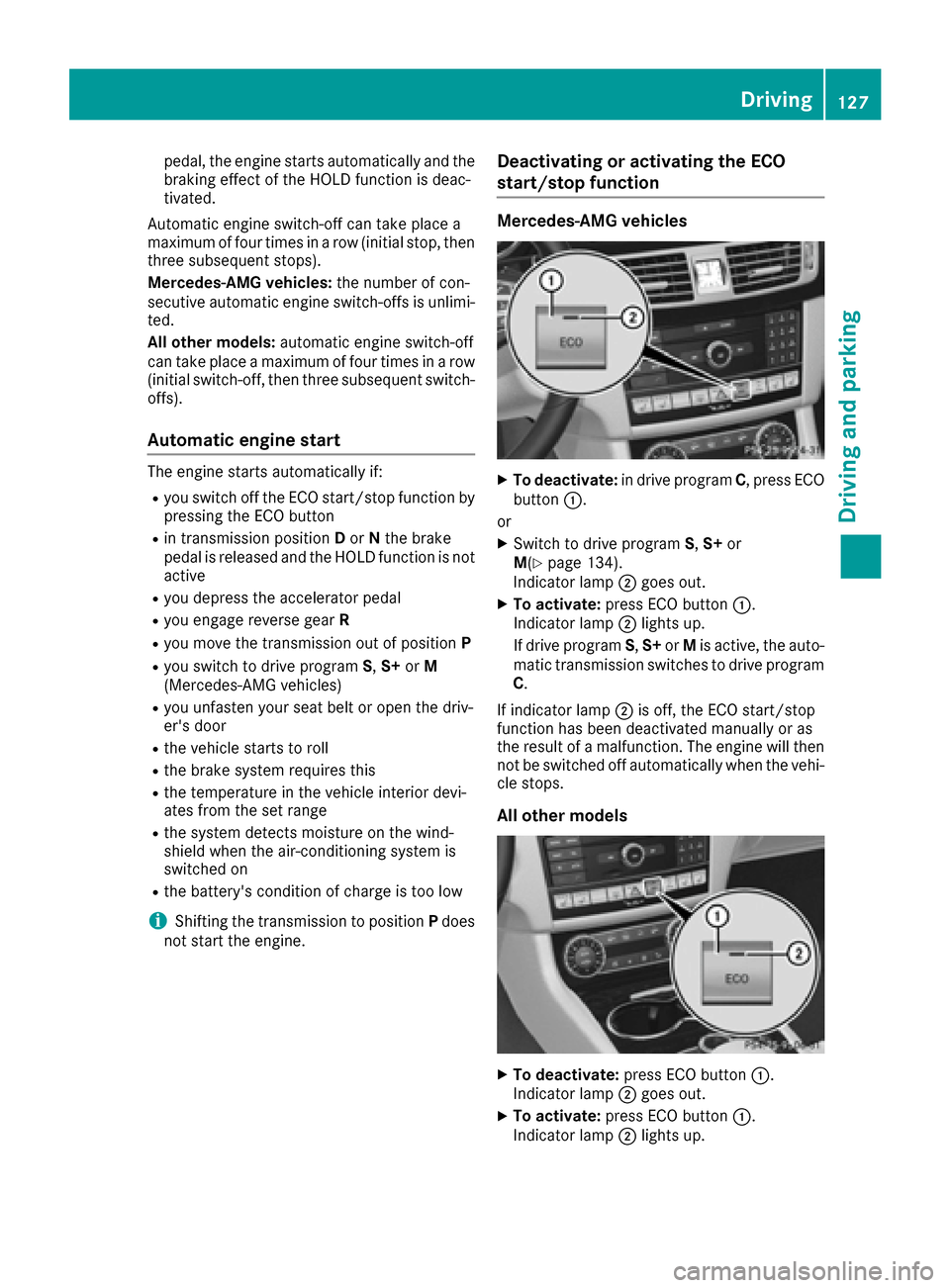
Deactivating or activating the ECO
start/stop function
Mercedes-AMG vehicles
XTo deactivate: in drive program C, press ECO
button :.
or
XSwitch to drive program S,S+ or
M(Ypage 134).
Indicator lamp ;goes out.
XTo activate: press ECO button :.
Indicator lamp ;lights up.
If drive program S,S+ orMis active, the auto-
matic transmission switches to drive program
C.
If indicator lamp ;is off, the ECO start/stop
function has been deactivated manually or as
the result of a malfunction. The engine will then
not be switched off automatically when the vehi- cle stops.
All other models
XTo deactivate: press ECO button :.
Indicator lamp ;goes out.
XTo activate: press ECO button :.
Indicator lamp ;lights up.
Driving127
Driving and parking
Z
Page 131 of 334

ProblemPossible causes/consequences andMSolutions
The engine is not running
smoothly and is misfir-
ing.There is a malfunction in the engine electronics or in a mechanical
component of the engine management system.
XOnly depress the accelerator pedal slightly.
Otherwise, non-combusted fuel may get into the catalytic converter
and damage it.
XHave the cause rectified immediately at a qualified specialist work-
shop.
The coolant temperature
gauge shows a value
above 248 ‡ (120 †).The coolant level is too low. The coolant is too hot and the engine is no
longer being cooled sufficiently.
XStop as soon as possible and allow the engine and the coolant to
cool down.
XCheck the coolant level (Ypage 268). Observe the warning notes
as you do so and add coolant if necessary.
Automatic transmission
Important safety notes
GWARNING
If the engine speed is above the idling speed
and you engage transmission position Dor R,
the vehicle could pull away suddenly. There is
a risk of an accident.
When engaging transmission position Dor R,
always firmly depress the brake pedal and do not simultaneously accelerate.
GWARNING
The automatic transmission switches to neu-
tral position Nwhen you switch off the engine.
The vehicle may roll away. There is a risk of an
accident.
After switching off the engine, always switch
to parking position P. Prevent the parked vehi-
cle from rolling away by applying the parking
brake.
Selector lever (Mercedes-AMG vehi-
cles)
Overview of transmission positions
jPark position with parking lock
kReverse gear
iNeutral
hDrive
Transmission position and drive pro-
gram display
The current transmission position and drive pro-
gram appear in the multifunction display.
Automatic transmission129
Driving and parking
Z
Page 132 of 334

:Transmission position display
;Drive program display
Additionally, displays next to the selector lever
mark the current transmission position.
The indicators light up when the Smartkey is
inserted into the ignition lock. The indicators go
out when the Smartkey is removed from the
ignition lock.
If the transmission position display in the mul-
tifunction display is not working, you should pull
away carefully to check whether the desired
transmission position is engaged. Ideally, you
should select transmission position Dand drive
program Cor S.
Engaging park position P
XWhen the vehicle is stationary, press but-
ton :.
DIRECT SELECT lever
Overview of transmission positions
jPark position with parking lock
kReverse gear
iNeutral
hDrive
The DIRECT SELECT lever is on the right of the
steering column.
The DIRECT SELECT lever always returns to its
original position. The current transmission posi-
tion P,R, Nor Dappears in the transmission
position display in the multifunction display
(
Ypage 130).
Transmission position and drive pro-
gram display
The current transmission position and drive pro-
gram appear in the multifunction display.
:Transmission position display
;Drive program display
The arrows in the transmission position display
show how and into which transmission positions
you can shift using the DIRECT SELECT lever.
If the transmission position display in the mul-
tifunction display is not working, you should pull
away carefully to check whether the desired
transmission position is engaged. Ideally, you
should select transmission position Dand drive
program Eor S.
130Automatic transmission
Driving and parking
Page 136 of 334

Vehicles with the AMG Sports package
XPress program selector button:repeatedly
until the letter for the desired drive program
appears in the multifunction display.
The program selector button allows you to
choose between different driving characteris-
tics.
iFurther information about permanent drive
program M(Ypage 136).
As well as this permanent drive program M,
you can also activate temporary drive pro-
gram M(
Ypage 135).
EEconomyComfortable, economical
driving
S SportSporty driving style
M ManualManual gear shifting
iFor further information on the automatic
drive program, see (Ypage 135).
iThe automatic transmission shifts to auto-
matic drive program Eeach time the engine is
started.
Mercedes-AMG vehicles
Drive program selector with manual drive program
XTurn drive program selector :until the
desired drive program appears in the multi-
function display in the speedometer.
The drive program indicator on drive program
selector :lights up in red.
iFurther information about permanent drive
program M(Ypage 136).
As well as this permanent drive program M,
you can also activate temporary drive pro-
gram M(
Ypage 135).
CControlled
EfficiencyComfortable, economical
driving
S SportSporty driving style
S+ SportPlusParticularly sporty driving
style
MManualManual gear shifting
RS RACE
STARTOptimal vehicle accelera-
tion from a standstill
iFor further information on the automatic
drive program, see (Ypage 135).
iThe automatic transmission shifts to auto-
matic drive program Ceach time the engine is
started.
iRS cannot be selected during normal driv-
ing. For further information on RACE START,
see (
Ypage 158).
134Automatic transmission
Driving and parking
Page 138 of 334

sion automatically shifts up in order to pre-
vent engine damage.
XTo shift down:pull on the left-hand steering
wheel paddle shifter (Ypage 135).
The automatic transmission shifts down to
the next gear.
If the engine exceeds the maximum engine
speed when shifting down, the automatic
transmission protects against engine damage
by not shifting down.
iAutomatic down shifting occurs when
coasting.
Shift recommendation
The gearshift recommendations assist you in
adopting an economical driving style. The mul-
tifunction display shows you the recommended
gear.
XShift to recommended gear ;according to
gearshift recommendation :when shown in
the multifunction display.
Deactivating
If you have activated manual drive program M, it
will remain active for a certain amount of time.
Under certain conditions the minimum amount
of time is extended, e.g. in the case of lateral
acceleration, during an overrun phase or when
driving on steep terrain.
If manual drive program Mhas been deactiva-
ted, the automatic transmission shifts into the
automatic drive program that was last selected,
i.e. E,Cor S.
You can also deactivate manual drive program
M yourself:
XPull on the right-hand steering wheel paddle
shifter and hold it in place (Ypage 135).
or
XSwitch the transmission position.
RAll vehicles except Mercedes-AMG vehi-
cles: use the DIRECT SELECT lever
(
Ypage 130)
RMercedes-AMG vehicles: use the lever
(Ypage 129)
or
XChange the drive program.
RAll vehicles except Mercedes-AMG vehi-
cles: use the drive program selector button
(
Ypage 133)
RMercedes-AMG vehicles: use the drive
program selector (Ypage 134)
Manual drive program (Mercedes-
AMG vehicles and vehicles with the
AMG sports package)
General notes
In this drive program, you can permanently
change gear yourself by using the steering
wheel paddle shifters. The transmission must be
in position D.
As well as this permanent drive program M, you
can also activate temporary drive program M
(
Ypage 135).
Switching on the manual drive program
XAll vehicles except Mercedes-AMG vehi-
cles: press the program selector button
repeatedly until drive program Mappears in
the multifunction display (
Ypage 133).
XMercedes-AMG vehicles: turn the drive pro-
gram selector until drive program Mappears
in the multifunction display (
Ypage 134).
The indicator Mon the drive program selector
lights up in red.
Manual drive program Mis different from drive
programs Sand S+with regard to spontaneity,
responsiveness and smoothness of gear
changes.
In manual drive program M, you can change gear
using the steering wheel paddle shifters if the
transmission is in position D. The multifunction
display shows the selected and engaged gear.
136Automatic transmission
Driving and parking
Page 141 of 334

You must make sure that fuel does not comeinto contact with your skin, eyes or clothing
and that it is not swallowed. Do not inhale fuel
vapors. Keep fuel away from children.
If you or others come into contact with fuel,
observe the following:
RWash away fuel from skin immediately
using soap and water.
RIf fuel comes into contact with your eyes,
immediately rinse them thoroughly with
clean water. Seek medical assistance with-
out delay.
RIf fuel is swallowed, seek medical assis-
tance without delay. Do not induce vomit-
ing.
RImmediately change out of clothing which
has come into contact with fuel.
GWARNING
Electrostatic buildup can create sparks and
ignite fuel vapors. There is a risk of fire and
explosion.
Always touch the vehicle body before opening
the fuel filler flap or touching the fuel pump
nozzle. Any existing electrostatic buildup is
thereby discharged.
!Do not use diesel to refuel vehicles with a
gasoline engine. Do not switch on the ignition
if you accidentally refuel with the wrong fuel.
Otherwise, the fuel will enter the fuel system. Even small amounts of the wrong fuel could
result in damage to the fuel system and the
engine. Notify a qualified specialist workshop
and have the fuel tank and fuel lines drained
completely.
!Overfilling the fuel tank could damage the
fuel system.
!Take care not to spill any fuel on painted
surfaces. You could otherwise damage the
paintwork.
!Use a filter when adding fuel from a fuel can.
The fuel lines and/or the fuel injection system
could otherwise be blocked by particles from
the fuel can. Do not get into the vehicle again during the refu-
eling process. Otherwise, electrostatic charge
could build up again.
If you overfill the fuel tank, fuel could spray out
when the fuel pump nozzle is removed.
For further information on fuel and fuel quality
(
Ypage 324).
Refueling
General information
Pay attention to the important safety notes
(Ypage 138).
The fuel filler flap is unlocked or locked auto-
matically when you unlock or lock the vehicle
with the SmartKey or using KEYLESS-GO.
The position of the fuel filler cap is displayed in
the instrument cluster 8. The arrow next to
the filling pump indicates the side of the vehicle.
Opening the fuel filler flap
:To open the fuel filler flap
;To insert the fuel filler cap
=Tire pressure table
?Instruction label for fuel type to be refueled
XSwitch off the engine.
XRemove the SmartKey from the ignition lock.
or, on vehicles with KEYLESS‑ GO:
XOpen the driver's door.
The vehicle electronics now have status 0.
This is the same as the SmartKey having been
removed.
XRemove the Start/Stop button from the igni-
tion lock (Ypage 123).
XPress the fuel filler flap in the direction of
arrow :.
The fuel filler flap opens slightly.
Refueling139
Driving and parking
Z
Page 144 of 334

XMercedes-AMG vehicles:when the vehicle
is stationary, press button :.
XWith the Smartkey:turn the Smartkey to
position 0in the ignition lock and remove it.
The immobilizer is activated.
XWith KEYLESS-GO: press the KEYLESS-GO
Start/Stop button (Ypage 123).
The engine stops and all the indicator lamps in
the instrument cluster go out.
When the driver's door is closed, this corre-
sponds to Smartkey position 1. When the
driver's door is open, this corresponds to
Smartkey position 0: "Smartkey removed".
If you switch the engine off with the transmis-
sion in position Ror D, the automatic transmis-
sion shifts to Nautomatically.
With the Smartkey: if you then open the driv-
er's door or the front-passenger door or remove the Smartkey from the ignition, the automatic
transmission shifts to Pautomatically.
With KEYLESS-GO: if you then open the driver's
or front-passenger door, the automatic trans-
mission shifts to P.
If you want the automatic transmission to
remain in neutral N, e.g. when having the vehicle
cleaned in an automatic car wash with a towing
system:
XVehicles with KEYLESS-GO: remove the
Start/Stop button from the ignition lock.
XInsert the Smartkey into the ignition lock.
XAll vehicles: switch the ignition on.
XDepress the brake pedal and keep it
depressed.
XShift to neutral N.
XRelease the brake pedal.
XRelease the parking brake.
XSwitch off the ignition and leave the Smartkey
in the ignition lock. The engine can be switched off while the vehicle
is in motion by pressing and holding the Start/
Stop button for about three seconds. This func-
tion operates independently of the ECO start/
stop automatic engine switch-off function.
Parking brake
GWARNING
If you must brake the vehicle with the parking brake, the braking distance is considerably
longer and the wheels could lock. There is an
increased danger of skidding and accidents.
Only use the parking brake to brake the vehi-
cle when the service brake is faulty. Do not
apply the parking brake too firmly. If the
wheels lock, release the parking brake until
the wheels begin turning again.
GWARNING
If you leave children unsupervised in the vehi-
cle, they could set it in motion by, for example:
Rrelease the parking brake.
Rshift the automatic transmission out of the
parking position P.
Rstart the engine.
In addition, they may operate vehicle equip-
ment and become trapped. There is a risk of
an accident and injury.
When leaving the vehicle, always take the
SmartKey with you and lock the vehicle. Never
leave children unsupervised in the vehicle.
If you brake the vehicle with the parking brake,
the brake lamps will not light up.
142Parking
Driving and parking
Page 145 of 334

XTo apply:depress parking brake ;firmly.
When the engine is running, the $(USA
only) or J(Canada only) indicator lamp
lights up in the instrument cluster.
XTo release: depress the brake pedal and keep
it depressed.
XPull release handle :.
When the ignition is switched on or the engine
is running, the $(USA only) or J(Can-
ada only) indicator lamp goes out in the instru-
ment cluster.
Parking the vehicle for a long period
If you leave the vehicle parked for longer than
four weeks, the battery may be damaged by
exhaustive discharging.
If you leave the vehicle parked for longer than six
weeks, the vehicle may suffer damage as a
result of lack of use.
XVisit a qualified specialist workshop and seek
advice.
iYou can obtain information about trickle
chargers from a qualified specialist work-
shop.
Driving tips
General notes
Important safety notes
GWARNING
If you switch off the ignition while driving,
safety-relevant functions are only available
with limitations, or not at all. This could affect, for example, the power steering and the brake
boosting effect. You will require considerably
more effort to steer and brake. There is a risk
of an accident.
Do not switch off the ignition while driving.
GWARNING
If you operate mobile communication equip-
ment while driving, you will be distracted from traffic conditions. You could also lose control
of the vehicle. There is a risk of an accident.
Only operate this equipment when the vehicle
is stationary.
Observe the legal requirements for the country
in which you are driving. Some jurisdictions pro-
hibit the driver from using a mobile phone while
driving a vehicle.
If you make a call while driving, always use
hands-free mode. Only operate the telephone
when the traffic situation permits. If you are
unsure, pull over to a safe location and stop
before operating the telephone.
Bear in mind that at a speed of only 30 mph
(approximately 50 km/h), the vehicle covers a
distance of 44 ft (approximately 14 m)per sec-
ond.
Drive sensibly – save fuel
Observe the following tips to save fuel:
XThe tires should always be inflated to the rec-
ommended tire pressure.
XRemove unnecessary loads.
XRemove roof racks when they are not needed.
XWarm up the engine at low engine speeds.
XAvoid frequent acceleration or braking.
XHave all maintenance work carried out as
indicated by the service intervals in the Main-
tenance Booklet or by the service interval dis-
play.
Fuel consumption also increases when driving in cold weather, in stop-start traffic and in hilly ter-
rain.
Drinking and driving
GWARNING
Drinking and driving and/or taking drugs and driving are very dangerous combinations.
Even a small amount of alcohol or drugs can
affect your reflexes, perceptions and judg-
ment.
The possibility of a serious or even fatal acci-
dent is greatly increased when you drink or
take drugs and drive.
Do not drink or take drugs and drive or allow
anyone to drive who has been drinking or tak-
ing drugs.
Driving tips143
Driving and parking
Z