2017 MERCEDES-BENZ CLS-Class height
[x] Cancel search: heightPage 161 of 334

Activating RACE START
XDepress thebrak epedal wit hyour lef tfoo t
and keep it depressed.
XTurn th edrive program selector clockwise
(Ypage 134) until th eRS lamp lights up.
The RACESTART Confirm: Paddle UP
Cancel :Paddle DOW Nmessage appear sin
th emultifunction display.
iIf th eactivation condition sare no longer ful-
filled, RACE START is canceled. The RACE
START Canceledmessage appear sin th e
multifunction display.
XTo cancel: pull th elef tsteering whee lpaddl e
shifte r (Ypage 135).
or
XTo confirm :pull th eright steering whee lpad-
dle shifte r (Ypage 135).
The RACESTART available Depres s
acceleratormessage appearsin th emulti-
function display.
iIf you do no tdepress th eaccelerato rpedal
fully within two seconds, RACE START is can -
celed. The RACE
STARTNotPossibleSeeOperator' sManualmessage appear sin th e
multifunction display.
XFull ydepress th eaccelerato rpedal .
The engin espee drises to approximately
3,500 rpm.
The RACE
STARTReleas ebraketostartmessage appear sin th emultifunction display.
iIf you do no trelease th ebrak epedal within
fiv eseconds, RACE START is canceled. The
RAC ESTART Canceled
message appear sin
th emultifunction display.
XTak eyour foo toff th ebrake, but keep th e
accelerato rpedal depressed.
The vehicl epulls away at maximum acceler -
ation .
The RACE
STARTactivemessage appear sin
th emultifunction display.
RACE START is deactivated when th evehicl e
reaches aspee dof approximately 30 mph (Can -
ada: 50 km/h). Drive program S+is activated.
SPORT handlin gmod eremain sswitched on .
RACE START is deactivated immediately if you
release th eaccelerato rpedal during RACE
START or if any of th eactivation condition sare
no longer fulfilled .The RACESTART Not Pos ‐
sible See Operator' sManualmessage
appear sin th emultifunction display.
iIf RACE START is used repeatedly within a
short period of time, it is only available again
after th evehicl ehas been driven acertain
distance.
AIRMATIC
Vehicle level
Important safety notes
GWARNIN G
When th evehicl eis bein glowered, people
could become trapped if their limb sare
between th evehicl ebody and th ewheels or
underneat hth evehicle. There is aris kof
injury.
Mak esur eno on eis underneat hth evehicl eor
in th eimmediat evicinity of th ewhee larches
when th evehicl eis bein glowered.
Your vehicl eregulates it sheight automatically.
All-roun dlevel control ensures th ebest possibl e
suspension and constan tground clearance ,
eve nwit h a laden vehicle. When you drive fast,
th evehicl eis lowered automatically to improve
drivin gsafet yand to reduce fuel consumption .
The followin gvehicl elevels are possible:
RNormal
RRaised :th evehicl eis raised by approximately
0.80 in (20 mm ) when compared with the nor-
mal level
RLowered: the vehicle is raised by approx-
imately 0.40 in (10 mm) when compared with
the normal level
iThese changes in level are so slight that you
are hardly aware of them.
The "Normal" and "Raised" vehicle levels can be
set manually.
The "Lowered” vehicle level is set automatically:
Rat speeds above 70 mph (113 km/h)
Rif you have selected "Sports tuning"
(Ypage 160)
Setting the vehicle level
Select the "Normal" setting for normal road sur-
faces and "Raised" for driving with snow chains or on particularly poor road surfaces. Your
Driving systems159
Driving and parking
Z
Page 162 of 334
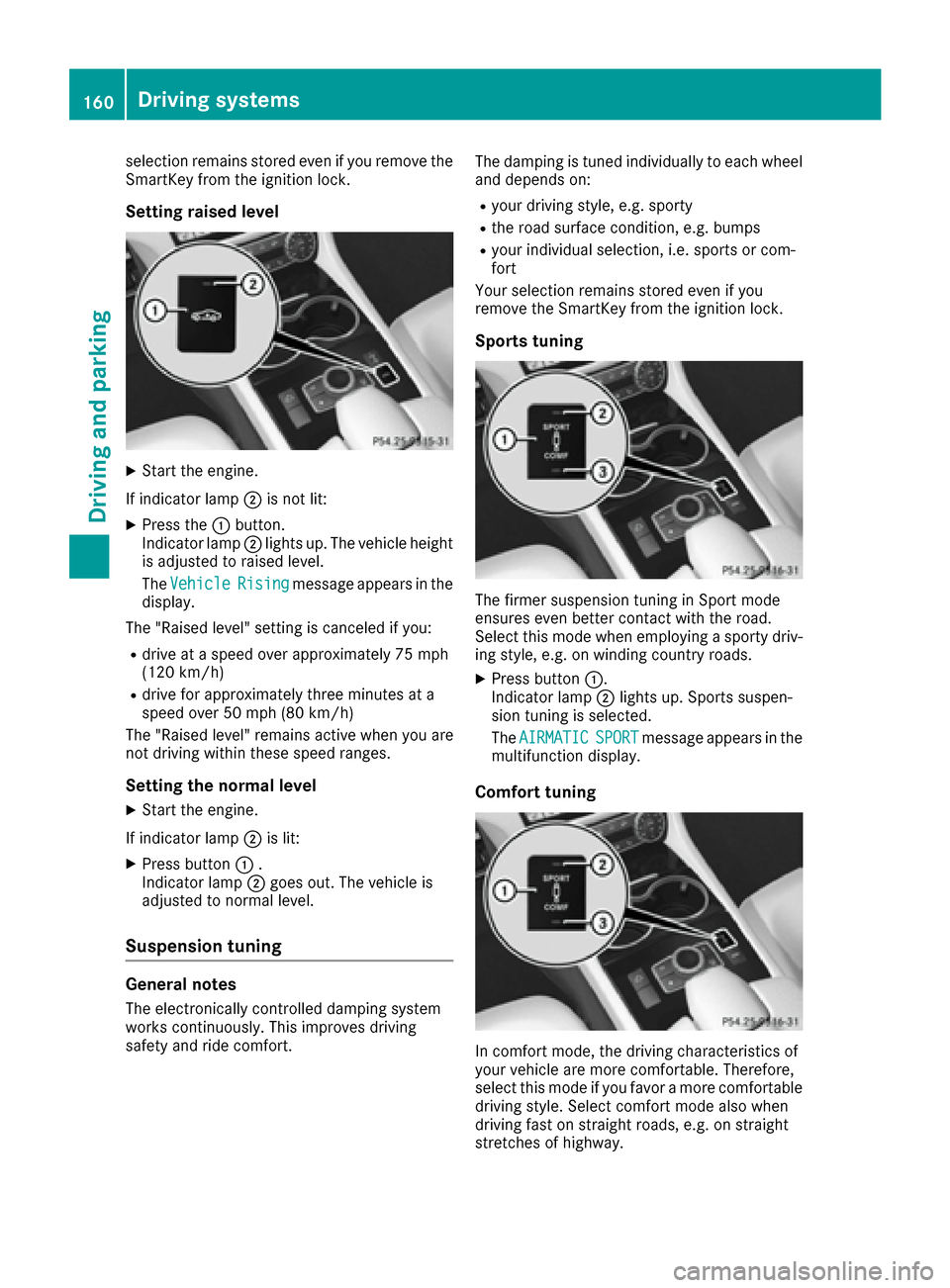
selection remains stored even if you remove the
SmartKey from the ignition lock.
Setting raised level
XStart the engine.
If indicator lamp ;is not lit:
XPress the :button.
Indicator lamp ;lights up. The vehicle height
is adjusted to raised level.
The Vehicle
Risingmessage appears in the
display.
The "Raised level" setting is canceled if you:
Rdrive at a speed over approximately 75 mph
(120 km/h)
Rdrive for approximately three minutes at a
speed over 50 mph (80 km/h)
The "Raised level" remains active when you are
not driving within these speed ranges.
Setting the normal level
XStart the engine.
If indicator lamp ;is lit:
XPress button :.
Indicator lamp ;goes out. The vehicle is
adjusted to normal level.
Suspension tuning
General notes
The electronically controlled damping system
works continuously. This improves driving
safety and ride comfort. The damping is tuned individually to each wheel
and depends on:
Ryour driving style, e.g. sporty
Rthe road surface condition, e.g. bumps
Ryour individual selection, i.e. sports or com-
fort
Your selection remains stored even if you
remove the SmartKey from the ignition lock.
Sports tuning
The firmer suspension tuning in Sport mode
ensures even better contact with the road.
Select this mode when employing a sporty driv-
ing style, e.g. on winding country roads.
XPress button :.
Indicator lamp ;lights up. Sports suspen-
sion tuning is selected.
The AIRMATIC
SPORTmessage appears in the
multifunction display.
Comfort tuning
In comfort mode, the driving characteristics of
your vehicle are more comfortable. Therefore,
select this mode if you favor a more comfortable
driving style. Select comfort mode also when
driving fast on straight roads, e.g. on straight
stretches of highway.
160Driving systems
Driving and parking
Page 164 of 334

TheAMG Ride Control SPORT +message
appears in the multifunction display.
If indicator lamp ?lights up:
XPress button :once.
Second indicator lamp =lights up. You have
selected Sport + mode.
The AMG
SuspensionSystemSPORT +mes-
sage appears in the multifunction display.
Comfort mode
When comfort mode is selected, the driving
characteristics of your vehicle are more com-
fortable. Select this mode if you favor a comfort-
oriented driving style. Select comfort mode also
when driving fast on straight roads, e.g. on
straight stretches of highway.
XPress button :repeatedly until indicator
lamps =and ?go out.
You have selected Comfort mode.
The AMG
SuspensionSystemCOMFORTmes-
sage appears in the multifunction display.
Storing and calling up settings
Once the suspension setting and drive program
have been selected, you can store and call up
your settings using AMG button ;.
XTo store:press and hold AMG button ;until
you hear a tone.
XTo call up: press AMG button ;.
The stored suspension setting and drive pro-
gram are selected.
XTo display: briefly press AMG button ;.
Your selection appears in the multifunction
display.
Vehicle level
Important safety notes
GWARNING
When the vehicle is being lowered, people
could become trapped if their limbs are
between the vehicle body and the wheels or
underneath the vehicle. There is a risk of
injury.
Make sure no one is underneath the vehicle or
in the immediate vicinity of the wheel arches
when the vehicle is being lowered. The vehicle may be lowered if you press the sus-
pension setting selector button or the AMG but-
ton. The vehicle also lowers if it is stationary.
!If Sport or Sport + suspension tuning has
been selected, the vehicle's ground clearance
decreases. Make sure that no objects
become trapped or that the vehicle does not
become damaged, for example, on the curb.
iThe vehicle level may change visibly at the
rear axle if you park the vehicle and the out-
side temperature changes. If the temperature
drops, the vehicle level lowers; with an
increase in temperature, the vehicle level
rises.
Changing the rear axle ride height
This function is only available on the Mercedes-
AMG CLS 63 4MATIC.
The vehicle level at the rear axle depends on the
selected suspension mode and the vehicle
speed.
The vehicle level at the rear axle changes while
driving depending on which suspension mode is
selected:
RComfort: +0.4 in (+10 mm)
RSport + and Sport: -0.6 in (-15 mm)
When changing from Comfort to Sport or Sport
+, the rear axle is lowered by approximately
1.0 in (25 mm). When changing from Sport or
Sport + to Comfort, the rear axle is raised by
approximately 1.0 in (25 mm). This level change
also takes place when the vehicle is stationary.
If you drive faster than 105 mph (170 km/h) , the
rear axle level is set to a middle level. This
increases driving safety and reduces air resist-
ance. If you then drive slower than 93 mph
(150 km/h), the level of the rear axle is again
adjusted to correspond to the selected suspen-
sion mode.
Load compensation
The vehicle can compensate differences in the
vehicle level by raising or lowering the rear axle.
This is the case, for example, if people get out or
if luggage is being loaded.
Load c
ompensation takes place if:
Ra door or the trunk lid is opened
Rthe parked vehicle is unlocked
For larger level changes, the engine must be
running.
162Driving systems
Driving and parking
Page 168 of 334

for safe maneuvering, parking and exiting a
parking space. Make sure that no persons, ani-
mals or objects are in the maneuvering range.
When PARKTRONIC is switched off, Active Park-
ing Assist is also unavailable.
GWARNING
While parking or pulling out of a parking
space, the vehicle swings out and can drive
onto areas of the oncoming lane. This could
result in a collision with another road user.
There is a risk of an accident.
Pay attention to other road users. Stop the
vehicle if necessary or cancel the Active Park- ing Assist parking procedure.
!If unavoidable, you should drive over obsta-
cles such as curbs slowly and not at a sharp
angle. Otherwise, you may damage the
wheels or tires.
Active Parking Assist may possibly indicate
parking spaces which are not suitable for park-
ing, for example:
Rwhere parking or stopping is prohibited
Rin front of driveways or entrances and exits
Ron unsuitable surfaces
Parking tips:
ROn narrow roads, drive as close to the parking
space as possible.
RParking spaces that are littered or overgrown
might be identified or measured incorrectly.
RParking spaces that are partially occupied by
trailer drawbars might not be identified as
such or be measured incorrectly.
RSnowfall or heavy rain may lead to a parking
space being measured inaccurately.
RPay attention to the PARKTRONIC
(Ypage 164) warning messages during the
parking procedure.
RYou can intervene in the steering procedure
to correct it at any time. Active Parking Assist
will then be canceled.
RWhen transporting a load which protrudes
from your vehicle, you should not use Active
Parking Assist.
RNever use Active Parking Assist when snow
chains are installed.
RMake sure that the tires are inflated to the
specified tire pressure. This has a direct influ- ence on the parking characteristics of the
vehicle.
Use Active Parking Assist for parking spaces:
Rparallel or at right angles to the direction of
travel
Ron the same level as the road, e.g. not on the
pavement
Ron straight roads, not bends
Detecting parking spaces
Objects located above the height range of Active Parking Assist will not be detected when the
parking space is measured. These are not taken
into account when the parking procedure is cal-
culated, e.g. overhanging loads, truck over-
hangs or loading ramps.
GWARNING
If there are objects above the detection range:
RActive Park Assist may steer too early
Rthe vehicle may not stop in front of these
objects
You may cause a collision as a result. There is
a risk of an accident.
If objects are located above the detection
range, stop and deactivate Active Parking
Assist.
For further information on the detection range
(
Ypage 163).
Active Parking Assist does not assist you park-
ing in spaces at right angles to the direction of
travel if:
Rtwo parking spaces are located directly next
to one another
Rthe parking space is directly next to a low
obstacle such as a low curb
Ryou park forwards
Active Parking Assist does not assist you park-
ing in spaces that are parallel or at right angles
to the direction of travel if:
Rthe parking space is on a curb
Rthe system reads the parking space as being
blocked, for example by foliage or grass pav-
ing blocks
166Driving systems
Driving and parking
Page 172 of 334

iThe text shown in the multimedia system
depends on the language setting. The follow-
ing are examples of rear view camera displays
in the multimedia system.
Important safety notes
The rear view camera is only an aid. It is not a
replacement for your attention to your immedi-
ate surroundings. You are always responsible
for safe maneuvering and parking. When maneu-
vering or parking, make sure that there are no
persons, animals or objects in the area in which you are maneuvering.
Under the following circumstances, the rear
view camera will not function, or will function in
a limited manner:
Rif the trunk lid is open
Rin heavy rain, snow or fog
Rat night or in very dark places
Rif the camera is exposed to very bright light
Rif the area is lit by fluorescent bulbs or LED
lighting (the display may flicker)
Rif there is a sudden change in temperature,
e.g. when driving into a heated garage in win- ter
Rif the camera lens is dirty or obstructed
Observe the notes on cleaning
(
Ypage 274)
Rif the rear of your vehicle is damaged. In this
event, have the camera position and setting
checked at a qualified specialist workshop
The field of vision and other functions of the rear
view camera may be restricted due to additional
accessories on the rear of the vehicle (e.g.
license plate holder, bicycle rack).
On vehicles with height-adjustable chassis,
leaving the standard height can result in inac-
curacies in the guide lines, depending on tech-
nical conditions.
iThe rear view camera is protected from rain-
drops and dust by means of a flap. When the
rear view camera is activated, this flap opens.
The flap closes again when:
Ryou have finished the maneuvering process
Ryou switch off the engine
Ryou open the trunk
Observe the notes on cleaning (
Ypage 274).
For technical reasons, the flap may remain
open briefly after the rear view camera has
been deactivated.
Switching the rear view camera on/off
XTo switch on: make sure that the Activa‐
tion by R gearfunction is selected in the
multimedia system (see Digital Operator's
Manual).
XEngage reverse gear.
The rear view camera flap opens. The multi-
media system shows the area behind the vehi-
cle with guide lines.
The image from the rear view camera is avail-
able throughout the maneuvering process.
XTo switch off: shift the transmission to posi-
tion P.
or
XDrive forwards a short distance.
Displays in the multimedia system
The rear view camera may show a distorted view
of obstacles, show them incorrectly or not at all.
The rear view camera does not show objects in
the following positions:
Rvery close to the rear bumper
Runder the rear bumper
Rin the area immediately above the tailgate
handle
!Objects not at ground level may appear to
be further away than they actually are, e.g.:
Rthe bumper of a parked vehicle
Rthe drawbar of a trailer
Rthe ball coupling of a trailer tow hitch
Rthe rear section of an HGV
Ra slanted post
Use the guidelines only for orientation.
Approach objects no further than the bottom-
most guideline.
170Driving systems
Driving and parking
Page 176 of 334

Ryellowbrackets wit hthin lines: PARKTRONI C
is active
Ryello wbrackets wit hnormal lines: an objec tis
presen tin close range of th evehicl e
Rred line: an objec tis presen tin th eimmediat e
close range of th evehicl e
Impor tant safety notes
The 360°camera is only an aid and may sho w a
distorted vie wof obstacles, sho wthem incor-
rectl yor no tat all. The 360°camera is no t a
substitut efor attentive driving.
You are always responsibl efor saf emaneuver-
in gand parking. Whe nmaneuverin gor parking,
mak esur ethat there are no persons, animals or
objects in th earea in whic hyou are maneuver-
ing.
You are always responsibl efor safety, and mus t
always pay attention to your surroundings when
parkin gand maneuvering. This applies to th e
area sbehind ,in fron tof and beside th evehicle.
You could otherwise endanger yourself and oth-
ers .
The 360° camera will no tfunction or will func-
tion in alimite dmanner:
Rif th edoors are open
Rif th eexterio rmirror sare folded in
Rif th etrunk lid is open
Rin heav yrain ,snow or fog
Rat night or in ver ydark places
Rif th ecameras are exposed to ver ybright ligh t
Rif thearea is lit by fluorescent bulbs or LE D
lighting (the display may flicker)
Rif there is asudden chang ein temperature,
e.g. when drivin ginto aheated garage in win -
te r
Rif th ecamera lenses are dirty or covered
Rif th evehicl ecomponent sin whic hth ecam -
eras are installed are damaged. In this eve nt,
h
av eth ecamera position and setting checke d
at aqualified specialist workshop
Do no tuse th e360° camera in this case. You
can otherwise injur eother sor caus edamage to
objects or th evehicle.
Guide lines are always shown at roa dlevel.
The field of vision and other function sof th e
camera system may be restricted due to addi-
tional attachments (e.g. license plat eholder,
rear bicycle carrier). On vehicles wit
hheight-adjustable chassis,
dependin gon technical conditions, leavin gth e
standard height can result in :
Rinaccuracies in theguide lines
Rinaccuracies in th edisplay of generated
images (top view)
Activati onconditions
The imag efrom th e360° camera appears if:
Rth emultimedia system is switched on
Rth e360 °Camerafunction is switched on
Switching onthe 360° camera
XPress th eØ buttonin th ecenter console
for longer than tw oseconds.
Dependin gon whether position Dor Ris
engaged, th efollowin gis shown:
Raspli tscree nwit hto pvie wand th eimag e
from th efron tcamera or
Ra spli tscree nwit hto pvie wand th eimag e
from th erear vie wcamera
or
XBriefly press th eØ buttonin th ecenter
console.
The vehicl emen uis displayed.
XSelec t360 °Cameraand press 7to confirm .
Dependin gon whether position Dor Ris
engaged, th efollowin gis shown:
Raspli tscree nwit hto pvie wand th eimag e
from th efron tcamera or
Ra spli tscree nwit hto pvie wand th eimag e
from th erear vie wcamera
Activating the 360°camera using
re verse gear
The 360° camera images can be automatically
displayed by engagin grevers egear .
XMakesur ethat th eActivatio nby Rgea rfunction is selected in th emultimedia system
(see Digital Operator' sManual).
XTo sho wthe360° camera image :engage
revers egear .
The multimedia system shows th earea
behind th evehicl ein split-scree nmode. You
see th eto pvie wof th evehicl eand th eimag e
from th erear vie wcamera.
174Driving systems
Driving and parking
Page 249 of 334

and secure heavy objects in the trunk outside
the EASY-PACK trunk box.
The maximum permitted load of the EASY-PACK
trunk box is 22 lbs (10 kg). With a load of above
approximately 11 lbs (5 kg), the bottom of the
box moves downward until it rests on the mat of
the trunk floor. Thus, overloading of the box is
avoided.
Adjusting the height to any position
XPull the box out by the handle :in the direc-
tion of the arrow as far as it will go.
XLowering the load surface : push the center
of load surface ;down by hand in the direc-
tion of the arrow until load surface ;has
reached the desired position and the box is
the desired size.
XTo raise the load surface: press switch=.
Load surface ;of the box moves up auto-
matically.
XTo stow the box: push the box in by the han-
dle :as far as it will go.
Removing and installing
XTo install: insert retainer ;of box :into
slots =
XRaise box :and press hooks Ainto anchor-
age ?as far as they will go.
XTurn left-hand rotating catch Bclockwise
and right-hand rotating catch Bcounter-
clockwise by 90°.
XTo remove: turn left-hand rotating catch B
counter-clockwise and right-hand rotating
catch Bclockwise by 90°.
XMove box :downwards and pull it out from
anchorages ?.
iStore the EASY-PACK trunk box on a flat
surface after removal, e.g. on a suitable shelf.
Stowage well under the trunk floor
!
Unhook the handle before again before clos-
ing the trunk lid and clip it in securely to pre-
vent the handle flap from protruding. Other-
wise, you could damage the handle.
The TIREFIT kit, the vehicle tool kit, etc. are
located in the stowage compartment.
XTo open: pull handle :up.
Stowage areas247
Stowage and features
Z
Page 268 of 334

XMake sure that the windshield wipers are
turned off.
XPull release lever:on the hood.
The hood is released.
XReach into the gap, pull hood catch handle ;
up and lift the hood.
If you lift the hood by approximately 15 in
(40 cm), the hood is opened and held open
automatically by the gas-filled strut.
Closing the hood
XLower the hood and let it fall from a height of
approximately 8 in (20 cm).
XCheck that the hood has engaged properly.
If the hood can be raised slightly, it is not
properly engaged. Open it again and close it
with a little more force.
Radiator
Do not cover up the radiator, such as with a
thermal mat or insect protection cover. The
readings of the on-board-diagnostic system may
otherwise be inaccurate. Some of these read-
ings are required by law and must be accurate at
all times.
Engine oil
Important safety notes
GWARNING
Certain components in the engine compart-
ment, such as the engine, radiator and parts
of the exhaust system, can become very hot.
Working in the engine compartment poses a
risk of injury.
Where possible, let the engine cool down and touch only the components described in the
following.
GWARNING
The engine compartment contains moving
components. Certain components, such as
the radiator fan, may continue to run or start
again suddenly when the ignition is off. There is a risk of injury.
If you need to do any work inside the engine
compartment:
Rswitch off the ignition
Rnever reach into the area where there is a
risk of danger from moving components,
such as the fan rotation area
Rremove jewelry and watches
Rkeep items of clothing and hair, for exam-
ple, away from moving parts
GWARNING
If engine oil comes into contact with hot com- ponents in the engine compartment, it may
ignite. There is a risk of fire and injury.
Make sure that engine oil is not spilled next to
the filler neck. Let the engine cool down and
thoroughly clean the engine oil off the com-
ponents before starting the engine.
GWARNING
Opening the hood when the engine is over-
heated or when there is a fire in the engine
compartment could expose you to hot gases
or other service products. There is a risk of
injury.
266Engine compartment
Maintenance and care