2017 MERCEDES-BENZ CLS-Class ACC
[x] Cancel search: ACCPage 190 of 334

Important safety notes
GWARNING
If you operate information systems and com-
munication equipmen tintegrate din th evehi-
cle while driving ,you will be distracte dfrom
traffic conditions. You could also lose control
of th evehicle. Ther eis aris kof an accident.
Only operate th eequipmen twhen th etraffic
situation permits. If you are no tsur ethat this
is possible ,park th evehicl epayin gattention
to traffic condition sand operate th eequip-
men twhen th evehicl eis stationary.
You must observ eth elegal requirements for th e
country in whic hyou are currentl ydriving when
operating th eon-board computer.
GWARNIN G
If th einstrumen tcluste rhas faile dor mal-
functioned, you may no trecognize function
restriction sin systems relevan tto safety. The
operating safet yof your vehicl emay be
impaired .Ther eis aris kof an accident.
Drive on carefully. Hav eth evehicl echecke d
at aqualified specialist workshop immedi-
ately.
The on-board computer only shows message sor
warning sfrom certain systems in th emultifunc-
tion display. You should therefor emak esur e
your vehicl eis operating safely at all times .
If th eoperating safet yof your vehicl eis
impaired ,pull ove ras soo nas it is saf eto do so.
Contac t aqualified specialist workshop.
Fo ran overview, see th einstrumen tpanel illus-
tration (
Ypage 34).
Displays and operation
Speedometer with segments
The segments in th espeedometer indicat e
whic hspee drange is available.
RCruis econtrol activated (Ypage 148):
The segments ligh tup from th estore dspee d
to th een dof th escale.
RDISTRONI CPLU Sactivated (Ypage 149): On
eor two segments in th eset spee drange
ligh tup.
RDISTRONI CPLU Sdetects avehicl ein fron t
moving mor eslowly than th estore dspeed:
The segments between th espee dof th evehi-
cle in fron tand th estore dspee dligh tup.
Tachometer
!
Do no tdriv ein th eoverrevving range, as this
could damag eth eengine.
The red ban din th etachometer indicates th e
engine's overrevving range.
The fuel suppl yis interrupted to protect th e
engin ewhen th ered ban dis reached.
Outside temperature display
You should pay special attention to road condi-
tion swhen temperatures are aroun dfreezing
point.
Bea rin min dthat th eoutside temperature dis-
play indicates th etemperature measured and
does no trecord th eroad temperature.
The outside temperature display is in th emulti-
function display (
Ypage 190).
The multifunction display shows changes in th e
outside temperature wit h adelay.
Coolant temperature gauge
GWARNIN G
Opening th ehoo dwhen th eengin eis over-
heated or when there is afir ein th eengin e
compartmen tcould expos eyou to hot gase s
or other servic eproducts .Ther eis aris kof
injury.
Let an overheate dengin ecool down before
opening th ehood. If there is afir ein th e
engin ecompartment, keep th ehoo dclosed
and contact th efir edepartment.
!A display message is shown if th ecoolan t
temperature is to ohigh .
If th ecoolan ttemperature is ove r24 8 ‡
(12 0†), do no tcontinue driving .The engin e
will otherwise be damaged.
188Displays and operation
On-board computer and displays
Page 192 of 334

Right control panel
~RRejects or ends a call
RExits the telephone book/redial
memory
6RMakes or accepts a call
RSwitches to the redial memory
W
XRAdjusts the volume
8RMute
?RSwitches on voice-operated navi-
gation or the Voice Control System
Multifunction display
:Text field
;Menu bar
=Drive program
?Transmission position
APermanent display: outside temperature or
speed
XTo display menu bar;: press the=
or ; button on the steering wheel.
Text field :shows the selected menu or sub-
menu as well as display messages.
If you do not press the buttons any longer,
menu bar ;is faded out after a few seconds.
Possible displays in the multifunction dis-
play:
RZ Gearshift recommendation, when shifting
manually (Ypage 135)
Rj Active Parking Assist (Ypage 165)
RCRUISECruise control (Ypage 148)
R_ Adaptive Highbeam Assist
(Ypage 108)
R¤ ECO start/stop function (Ypage 126)
RëHOLD function (Ypage 157)
Menus and submenus
Menu overview
Press the =or; button on the steering
wheel to call up the menu bar and select a menu.
Operating the on-board computer (
Ypage 189).
Depending on the equipment installed in the
vehicle, you can call up the following menus:
RTripmenu (Ypage 190)
RNavimenu (navigation instructions)
(Ypage 192)
RAudiomenu (Ypage 193)
RTelmenu (telephone) (Ypage 194)
RDriveAssistmenu (assistance)
(Ypage 195)
RServ.menu (Ypage 197)
RSett.menu (settings) (Ypage 197)
RAMGmenu (Mercedes-AMG vehicles)
(Ypage 201)
The display messages dependent on the multi-
media system. This is why the displays for the
Audio
, Naviand Telmenus may differ slightly
to those in your vehicle.
Trip menu
Standard display
XPress and hold the %button on the steer-
ing wheel until the Tripmenu with trip odom-
eter :and odometer ;appears.
190Menus and submenus
On-board computer and displays
Page 196 of 334

Only for vehicles with a COMAND multimedia
system: you can use theAudiomenu to play
video DVDs.
XSwitch on the multimedia system and select
video DVD.
XPress the =or; button on the steering
wheel to select the Audiomenu.
XTo select the next or previous scene:
briefly press the9or: button.
XTo select a scene from the scene list
(rapid scrolling): press and hold the 9
or : button until desired scene :
appears.
Telephone menu
Introduction
GWARNING
If you operate information systems and com-
munication equipment integrated in the vehi-
cle while driving, you will be distracted from
traffic conditions. You could also lose control
of the vehicle. There is a risk of an accident.
Only operate the equipment when the traffic
situation permits. If you are not sure that this
is possible, park the vehicle paying attention
to traffic conditions and operate the equip-
ment when the vehicle is stationary.
When telephoning, you must observe the legal
requirements for the country in which you are
currently driving.
XSwitch on the mobile phone (see the manu-
facturer’s operating instructions).
XSwitch on the multimedia system.
XEstablish a Bluetooth®connection to the mul-
timedia system (see Digital Operator's Man-
ual).
XPress the =or; button on the steering
wheel to select the Telmenu.
You will see one of the following display mes-
sages in the multifunction display:
RPhone READYor the name of the network
provider: the mobile phone has found a net-
work and is ready to receive.
RPhone No Service: there is no network
available or the mobile phone is searching for
a network.
Accepting a call
If someone calls you when you are in the Telmenu, a display message appears in the multi-
function display.
You can accept a call at any time regardless of
the menu selected.
XPress the6button on the steering wheel
to accept an incoming call.
Rejecting or ending a call
XPress the ~button on the steering wheel
to reject or end a call.
Selecting an entry in the phone book
XPress the =or; button on the steering
wheel to select the Telmenu.
XPress the9,:ora button to
switch to the phone book.
XAuthorize access to the phone book on the
phone.
XPress the 9or: button to select the
desired name.
or
XTo start rapid scrolling: press and hold:
or 9 for longer than one second.
The names in the phone book are displayed
quickly one after the other.
Rapid scrolling stops when you release the
button or reach the end of the list.
XIf only one telephone number is stored for
a name: press the 6ora button to
start dialing.
or
XIf there is more than one number for a
particular name: press the6ora
button to display the numbers.
XPress the 9or: button to select the
number you want to dial.
XPress the 6ora button to start dialing.
or
XTo exit the telephone book: press the~
or % button.
194Menus and submenus
On-board computer and displays
Page 197 of 334

Redialing
The on-board computer saves the last names or
numbers dialed in the redial memory.
XPress the=or; button on the steering
wheel to select the Telmenu.
XPress the6button to switch to the redial
memory.
XPress the 9or: button to select the
desired name or number.
XPress the 6ora button to start dialing.
or
XTo exit the redial memory: press the~
or % button.
Assistance menu
Introduction
Depending on the equipment installed in the
vehicle, you have the following options in the
DriveAssist
menu:
RDisplaying the assistance graphic
(Ypage 195)
RDeactivating/activating ESP®(except
Mercedes‑AMG vehicles) (Ypage 195)
RActivating/deactivating Steering Assist and
Stop&Go Pilot of DISTRONIC PLUS
(
Ypage 196)
RActivating/deactivating PRE-SAFE®Brake
(Ypage 196)
RActivating/deactivating COLLISION PREVEN-
TION ASSIST PLUS (Ypage 196)
RActivating/deactivating ATTENTION ASSIST
(Ypage 196)
RActivating/deactivating Blind Spot Assist or
Active Blind Spot Assist (Ypage 196)
RActivating/deactivating Lane Keeping Assist
or Active Lane Keeping Assist (Ypage 197)
Displaying the assistance graphic
XPress the =or; button on the steering
wheel to select the DriveAssistmenu.
XPress9or: to select Assist.Graphic.
XPressato confirm.
The multifunction display shows the
DISTRONIC PLUS distance display in the
assistance graphic.
The assistance graphic shows you the status
and further information on the following driv-
ing systems or driving safety systems:
RTraffic Sign Assist (Ypage 178)
RDISTRONIC PLUS (Ypage 149)
RPRE-SAFE®Brake (Ypage 72)
RCOLLISION PREVENTION ASSIST PLUS
(Ypage 67)
RATTENTION ASSIST (Ypage 177)
RLane Keeping Assist (Ypage 181)
RActive Lane Keeping Assist (Ypage 184)
XPress :to display the ATTENTION ASSIST
assessment.
Deactivating/activating ESP®
iObserve the important safety notes on ESP®
(Ypage 69).
GWARNING
If you deactivate ESP
®, ESP®no longer sta-
bilizes the vehicle. There is an increased risk
of skidding and an accident.
Only deactivate ESP
®in the situations descri-
bed in the following.
It may be best to deactivate ESP
®in the follow-
ing situations:
Rwhen using snow chains
Rin deep snow
Ron sand or gravel
Deactivating/activating ESP®on Mercedes-
AMG vehicles (Ypage 71).
For further information about ESP®, see
(Ypage 69).
XStart the engine.
XPress the =or; button on the steering
wheel to select the DriveAssistmenu.
XPress9or: to select ESP.
Menus and submenus195
On-board computer and displays
Z
Page 205 of 334

XPress=or; on the steering wheel to
select the AMGmenu.
XPress9repeatedly until the lap evaluation
appears.
Each lap is shown in a separate submenu. The
fastest lap is indicated by flashing symbol :.
XPress the9or: button to select a dif-
ferent lap evaluation.
Display messages
Introduction
General notes
Display messages appear in the multifunction display.
Display messages with graphic displays may be shown in simplified form in the Operator's Manual
and may differ from the messages shown in the multifunction display.
Please respond in accordance with the display messages and follow the additional notes in this
Operator's Manual.
Certain display messages are accompanied by an audible warning tone or a continuous tone.
When the ignition is switched off, all display messages are deleted, apart from some high-priority
display messages. Once the causes of the high-priority display messages have been rectified, the
corresponding display messages are also deleted.
When you stop and park the vehicle, please observe the notes on:
RHOLD function (Ypage 157)
RParking (Ypage 141)
Hiding display messages
XPress the aor% button on the steering wheel.
The multifunction display hides the display message.
The multifunction display shows high-priority display messages in red. Some high-priority display
messages cannot be hidden.
The multifunction display shows these messages continuously until the causes for the messages
have been remedied.
Message memory
The on-board computer saves certain display messages in the message memory. You can call up
the display messages:
XPress the =or; button on the steering wheel to select the Serv.menu.
If there are display messages, the multifunction display shows 2 Messages, for example.
XPress the9or: button to select the entry, e.g. 2 Messages.
XPressato confirm.
XPress the 9or: button to scroll through the display messages.
Display messages203
On-board computer and displays
Z
Page 206 of 334
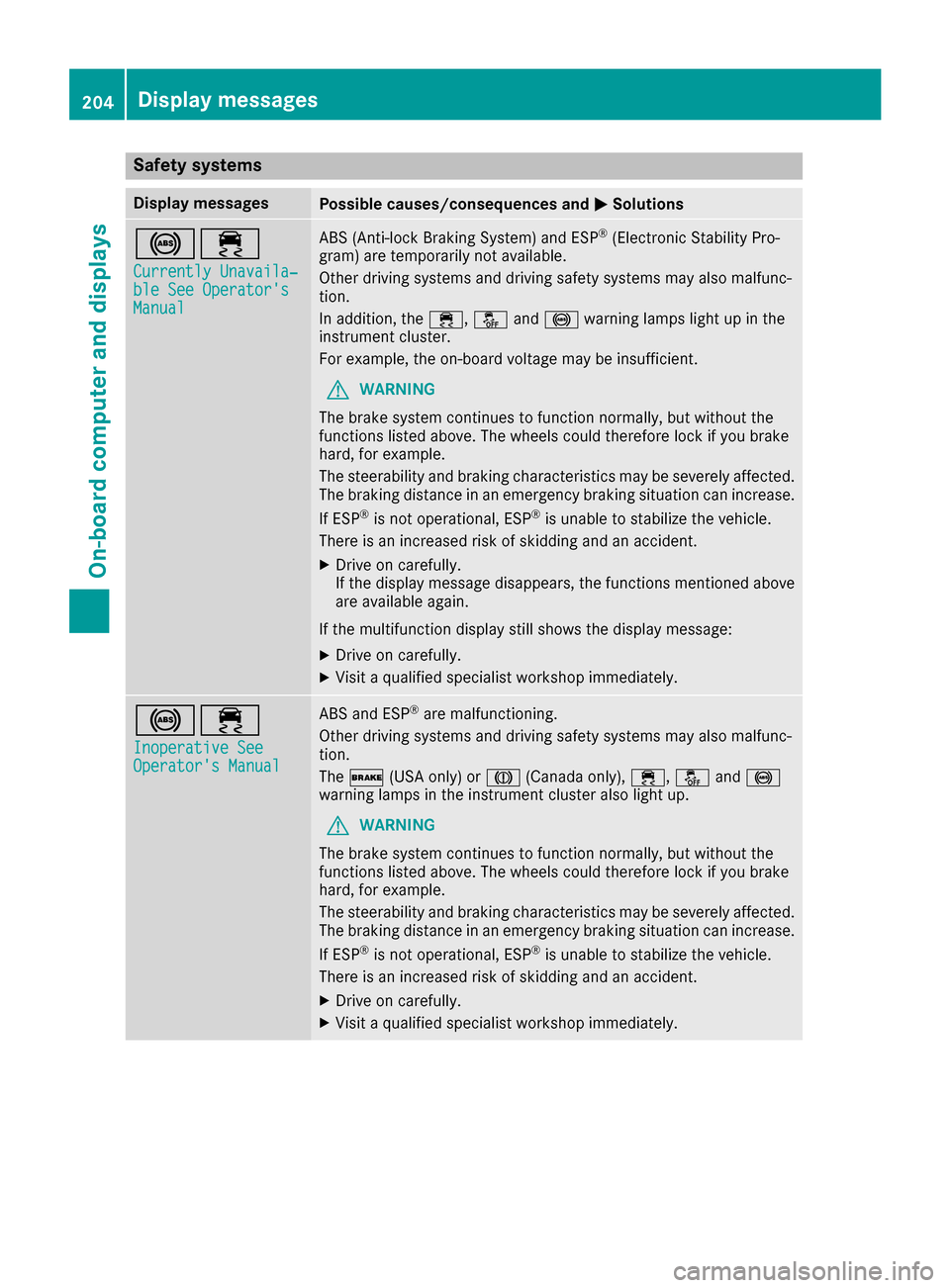
Safety systems
Display messagesPossible causes/consequences andMSolutions
!÷
Currently Unavaila‐ble See Operator'sManual
ABS (Anti-lock Braking System) and ESP®(Electronic Stability Pro-
gram) are temporarily not available.
Other driving systems and driving safety systems may also malfunc-
tion.
In addition, the ÷,åand! warning lamps light up in the
instrument cluster.
For example, the on-board voltage may be insufficient.
GWARNING
The brake system continues to function normally, but without the
functions listed above. The wheels could therefore lock if you brake
hard, for example.
The steerability and braking characteristics may be severely affected.
The braking distance in an emergency braking situation can increase.
If ESP
®is not operational, ESP®is unable to stabilize the vehicle.
There is an increased risk of skidding and an accident.
XDrive on carefully.
If the display message disappears, the functions mentioned above are available again.
If the multifunction display still shows the display message:
XDrive on carefully.
XVisit a qualified specialist workshop immediately.
!÷
Inoperative SeeOperator's Manual
ABS and ESP®are malfunctioning.
Other driving systems and driving safety systems may also malfunc-
tion.
The $ (USA only) or J(Canada only), ÷,åand!
warning lamps in the instrument cluster also light up.
GWARNING
The brake system continues to function normally, but without the
functions listed above. The wheels could therefore lock if you brake
hard, for example.
The steerability and braking characteristics may be severely affected.
The braking distance in an emergency braking situation can increase.
If ESP
®is not operational, ESP®is unable to stabilize the vehicle.
There is an increased risk of skidding and an accident.
XDrive on carefully.
XVisit a qualified specialist workshop immediately.
204Display messages
On-board computer and displays
Page 207 of 334

Display messagesPossible causes/consequences andMSolutions
÷
Inoperative SeeOperator'sManual
ES P®is malfunctioning .
Other drivin gsystems and drivin gsafet ysystems may also malfunc -
tion .
In addition ,th e÷ andå warning lamp sligh tup in th einstru-
men tcluster.
The self-diagnosis function might no tbe complete, for example.
GWARNIN G
The brak esystem continues to function normally, but without th e
function slisted above.
The braking distanc ein an emergenc ybraking situation can thus
increase.
If ES P
®is no toperational, ES P®is unable to stabiliz eth evehicle.
There is an increased ris kof skiddin gand an accident.
XDrive on carefully.
XVisit aqualified specialist workshop immediately.
T!
÷
Inoperative SeeOperator' sManual
EB D(electronic brak eforce distribution), AB Sand ES P®are malfunc -
tioning .
Other drivin gsystems and drivin gsafet ysystems may also malfunc -
tion .
In addition ,th e÷, åand! warning lamp sligh tup in th e
instrumen tcluste rand awarning tone sounds.
GWARNIN G
The brak esystem continues to function normally, but without th e
function slisted above. The fron tand rear wheels could therefor eloc k
if you brak ehard, for example.
The steerabilit yand braking characteristics may be severely affected.
The braking distanc ein an emergenc ybraking situation can increase.
If ES P
®is no toperational, ES P®is unable to stabiliz eth evehicle.
There is an increased ris kof skiddin gand an accident.
XDrive on carefully.
XVisit aqualified specialist workshop immediately.
F(USA
only)
J( Canada
only)
Please
Releas ePark‐ing Brake
You are drivin gwit hth eparking brak eapplied. Awarning tone also
sounds.
XReleas eth eparking brake.
Display messages20 5
On-board computer and displays
Z
Page 208 of 334

Display messagesPossible causes/consequences andMSolutions
$(USA
only)
J( Canada
only)
Check Brake Fluid
Level
There is no tenough brak efluid in th ebrak efluid reservoir .
In addition ,th e$ (USAonly) or J(Canada only) warning lamp
lights up in th einstrumen tcluste rand awarning tone sounds.
GWARNIN G
The braking effec tmay be impaired.
There is aris kof an accident.
XPull ove rand stop th evehicl esafely as soo nas possible, payin g
attention to roa dand traffic conditions. Do no tcontinu edrivin g
under any circumstances.
XSecur eth evehicl eagainst rollin gaway (Ypage 141).
XConsult aqualified specialist workshop .
XDo notadd brak efluid .This does no tcorrec tth emalfunction .
#
CheckBrakePadWear
The brak epads/linings hav ereached their wear limit.
XVisit aqualified specialist workshop .
G
mbrace Inoperative
Oneor mor emain features of th embrace system are malfunctioning .
XVisitaqualified specialist workshop .
Collision Preven‐tionAssist Plu sCurrently Unavaila‐ble See Operator' sManual
COLLISION PREVENTION ASSIST PLU Sis temporarily no toperational.
Possibl ecauses are:
Rth eradar sensor system is temporarily inoperative, e.g. due to elec -
tromagneti cradiation emitted by nearby TV or radi ostation sor
other source sof electromagneti cradiation
Rth esystem is outside th eoperating temperature range
Rth eon-boar dvoltag eis to olow.
Whe nth ecauses state dabov eno longer apply, th edisplay message
disappears.
COLLISION PREVENTION ASSIST PLU Sis operational again .
If th edisplay message does no tdisappear :
XPull overand stop th evehicl esafely as soo nas possible, payin g
attention to roa dand traffic conditions.
XSecur eth evehicl eagainst rollin gaway (Ypage 141).
XRestart th eengine.
Collision Preven ‐tionAssist Plu sInoperative
COLLISION PREVENTION ASSIST PLU Sis temporarily inoperative due
to amalfunction .Adaptive Brake Assis tmay also hav efailed.
XVisit aqualified specialist workshop .
PRE-SAFE
Inoperative SeeOperator'sManual
Importan tfunction sof PRE-SAF E®havefailed. Al lother occupant
safet ysystems ,e.g. air bags ,remain available.
XVisit aqualified specialist workshop .
206Display messages
On-board computer and displays