2017 MERCEDES-BENZ CLA start stop button
[x] Cancel search: start stop buttonPage 147 of 318
In addition to driving style, the actual consump-
tion is affected by other factors, such as: R
Load R
Tire pressure R
Cold start R
Choice of route R
Active electrical consumers
These factors are not included in the ECO dis-
play.
An economical driving style specially requires
driving at moderate engine speeds.
Achieving a higher value in the categories
"Acceleration" and "Constant": R
observe the gearshift recommendations. R
drive the vehicle in drive program C or E
(vehicles with a DYNAMIC SELECT button).
On long journeys at a constant speed, e.g. on the
highway, only the outer area for "constant" will
change.
The ECO display summarizes the driving style
from the start of the journey to its completion.
Therefore, there are more marked changes in
the outer areas at the start of a journey. On lon-
ger journeys, there are fewer changes. For more
marked changes, perform a manual rest
( Y
page 178).
For more information on the ECO display, see
( Y
page 177).
Braking
Important safety notes
G WARNING
If you shift down on a slippery road surface in
an attempt to increase the engine's braking
effect, the drive wheels could lose their grip.
There is an increased danger of skidding and
accidents.
Do not shift down for additional engine brak-
ing on a slippery road surface.
Downhill gradients
! On long and steep gradients, you must
reduce the load on the brakes by shifting to a
lower gear in good time. This allows you to
take advantage of engine braking. For this you
must first activate manual gearshifting. This helps you to avoid overheating the brakes and
wearing them out excessively.
When you take advantage of engine braking, it
is possible that a drive wheel will not rotate for
some time, e.g. on a slippery road surface.
This could cause damage to the drive train.
This type of damage is not covered by the
Mercedes-Benz warranty.
Briefly depressing the accelerator pedal on
downhill gradients while the manual drive pro-
gram M is temporarily activated: the automatic
transmission may switch to the last active auto-
matic drive program E or S . The automatic trans-
mission may shift to a higher gear. This can
reduce the engine's braking effect.
Heavy and light loads
G WARNING
If you rest your foot on the brake pedal while
driving, the braking system can overheat. This
increases the stopping distance and can even
cause the braking system to fail. There is a
risk of an accident.
Never use the brake pedal as a footrest. Never
depress the brake pedal and the accelerator
pedal at the same time.
! Depressing the brake pedal constantly
results in excessive and premature wear to
the brake pads.
If the brakes have been subjected to a heavy
load, do not stop the vehicle immediately. Drive
on for a short while. This allows the airflow to
cool the brakes more quickly.
Wet roads If you have driven for a long time in heavy rain
without braking, there may be a delayed reac-
tion from the brakes when braking for the first
time. This may also occur after the vehicle has
been washed or driven through deep water.
You have to depress the brake pedal more
firmly. Maintain a greater distance from the
vehicle in front.
After driving on a wet road or having the vehicle
washed, brake firmly while paying attention to
the traffic conditions. This will warm up the
brake discs, thereby drying them more quickly
and protecting them against corrosion. Driving tips 145
Driving and parking Z
Page 159 of 318
i After a time, the electric parking brake
secures the vehicle and relieves the service
brake.
When the HOLD function is activated, the trans-
mission is shifted automatically to position P if:R
the driver's seat belt is not fastened and the
driver's door is open. R
the engine is switched off, unless it is auto-
matically switched off by the ECO start/stop
function.
The electric parking brake secures the vehicle
automatically if the HOLD function is activated
when the vehicle is stationary and: R
a system malfunction occurs. R
the power supply is insufficient.
Start-off assist (except Mercedes-
AMG vehicles)
Important safety notes
G WARNING
If you use start-off assist, individual wheels
may start to spin and the vehicle may skid. If
ESP ®
is deactivated, there is a greater danger
of skidding and having an accident. Make sure
that no persons or obstacles are in the vicinity
of the vehicle.
Start-off assist enables optimum acceleration
from a standstill. For this, a suitably high-grip
road surface is required, along with the tires and
vehicle being in proper operating condition.
Do not activate start-off assist on public roads.
Observe the safety notes on driving safety sys-
tems ( Y
page 60).
Be sure to read the safety notes and information
on ESP ®
( Y
page 63).
Activating start-off assist X
Deactivate ESP ®
( Y
page 182).X
Turn the steering wheel to the straight-ahead
position. X
Depress the brake pedal hard with your left
foot and keep it depressed. X
Shift the transmission to position D .X
Use the DYNAMIC SELECT button to select
the S drive program ( Y
page 127). X
Quickly depress the accelerator pedal fully. X
Take your foot off the brake, but keep the
accelerator pedal depressed.
The vehicle pulls away at maximum acceler-
ation.
i Activate ESP ®
as soon as the acceleration
process has ended. ESP ®
will otherwise not
be able to stabilize the vehicle if the vehicle
starts to skid or a wheel starts to spin.
Canceling start-off assist X
Remove your foot from the accelerator pedal. X
Reactivate ESP ®
.
RACE START (Mercedes-AMG vehi-
cles)
Important safety notes
i RACE START must not be used on normal
roads. RACE START must only be activated
and used on dedicated road circuits, outside
of public road use.
i RACE START is only available in
Mercedes ‑ AMG vehicles.
G WARNING
If you use RACE START, individual tires may
start to spin and the vehicle could skid.
Depending on the selected ESP ®
mode, there
is an increased risk of skidding and having an
accident. Make sure that no persons, animals
or obstacles are within range of the vehicle.
RACE START enables optimal acceleration from
a standing start. For this, a suitably high-grip
road surface is required, along with the tires and
vehicle being in proper operating condition.
i Observe the safety notes on driving safety
systems ( Y
page 60).
Be sure to read the safety notes and informa-
tion on ESP ®
( Y
page 63).
Conditions for activation
You can activate RACE START if: R
the doors, hood and the trunk lid are closed. R
the engine is running and the transmission,
all-wheel drive clutch and the engine are at
operating temperature.Driving systems 157
Driving an d parking Z
Page 160 of 318
R
the steering wheel is in the straight-ahead
position. R
the vehicle is stationary and the brake pedal is
depressed (left foot). R
the transmission is in position D .R
one of the drive programs S , S+ or RACE is
selected. ( Y
page 128)
Activating RACE START X
Depress the brake pedal with your left foot
and keep it depressed. X
Pull and hold both steering wheel paddle shift-
ers. X
The RACE START Confirm: Paddle UP
Cancel: Paddle DOWN message appears in
the multifunction display. X
Release both steering wheel paddle shifters.
i If the activation conditions are no longer ful-
filled, RACE START is canceled. The RACE
START Not Possible See Operator's
Manual message appears in the multifunction
display. X
To cancel: pull the left steering wheel paddle
shifter ( Y
page 135).
or X
To confirm: pull the right steering wheel pad-
dle shifter ( Y
page 135).
The RACE START Available Depress gas
pedal message appears in the multifunction
display.
i If you do not depress the accelerator pedal
within a few seconds, RACE START is can-
celed. The multifunction display shows the
RACE START Canceled message.X
Fully depress the accelerator pedal.
The engine speed is increased.
The RACE START Release brake to start
message appears in the multifunction display.
i If you do not release the brake pedal within
a short time, RACE START will be canceled.
The multifunction display shows the RACE
START Canceled message.X
Take your foot off the brake, but keep the
accelerator pedal depressed.
The vehicle pulls away at maximum acceler-
ation.
The RACE START Active message appears in
the multifunction display. RACE START is deactivated when the vehicle
reaches a speed of approximately 50 km/h.
RACE START is deactivated immediately if you
release the accelerator pedal during RACE
START or if any of the activation conditions are
no longer fulfilled. The RACE START Not Pos‐
sible or RACE START Canceled message
appears in the multifunction display.
i If RACE START is used repeatedly within a
short period of time, it is only available again
after the vehicle has been driven a certain
distance.
AMG adaptive sport suspension sys-
tem
General notes The electronically controlled damping system
works continuously. This improves driving
safety and ride comfort.
The damping is tuned individually to each wheel
and depends on: R
your driving style, e.g. sporty R
the road surface condition, e.g. bumps R
your individual selection of "Sport" or "Com-
fort"
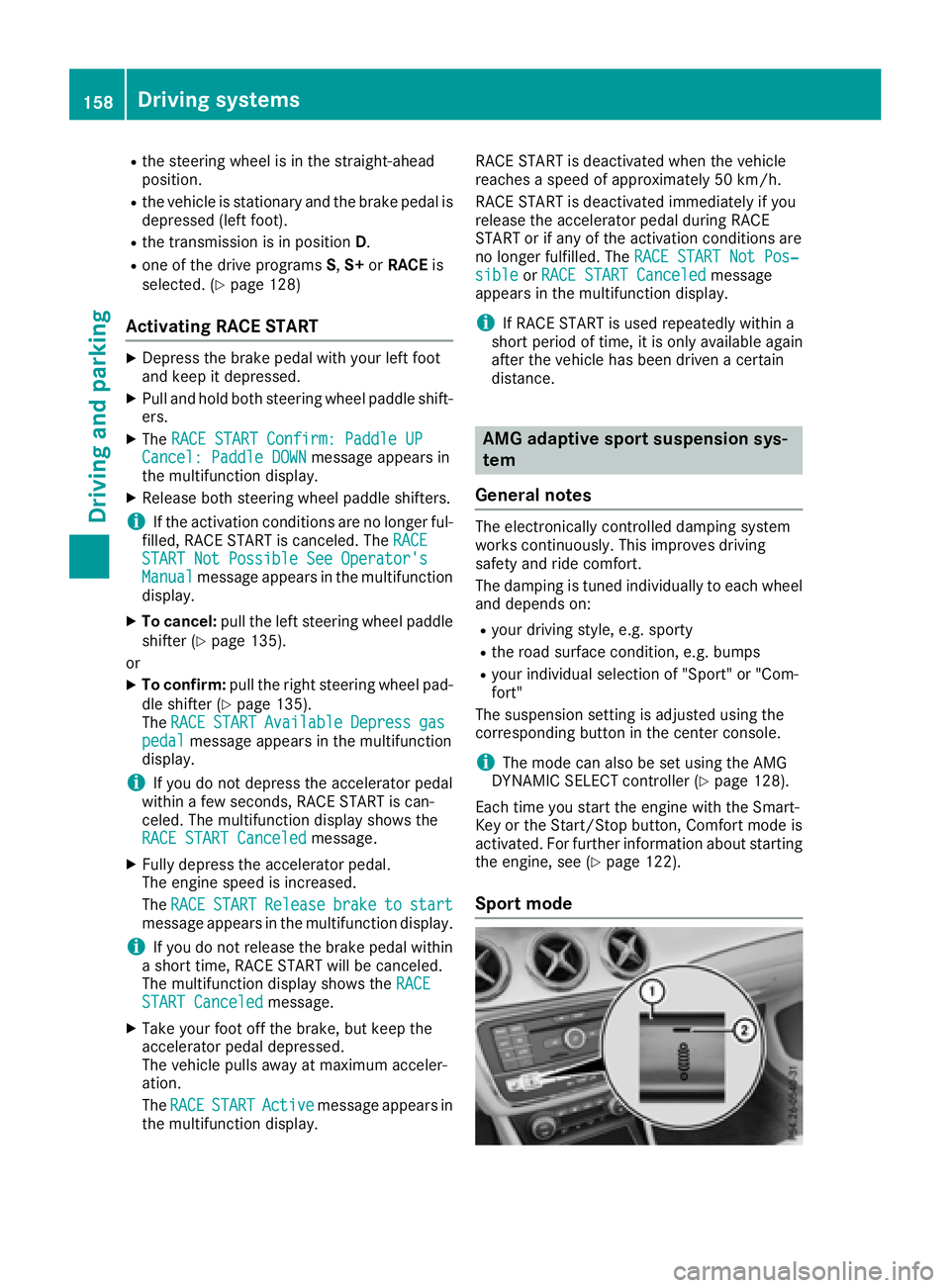
The suspension setting is adjusted using the
corresponding button in the center console.
i The mode can also be set using the AMG
DYNAMIC SELECT controller ( Y
page 128).
Each time you start the engine with the Smart-
Key or the Start/Stop button, Comfort mode is
activated. For further information about starting
the engine, see ( Y
page 122).
Sport mode158
Driving system s
Dr ivi ng an d parking
Page 166 of 318
R
that are parallel to the direction of travel and
at least 39.5 in (1.0 m) longer than your vehi-
cle R
that are at right angles to the direction of
travel and at least 39.5 in (1.0 m) wider than
your vehicle
i Note that Parking Pilot cannot measure the
length of a parking space if it is at right angles
to the direction of travel. You will need to
judge whether your vehicle will fit into the
parking space.
When driving at speeds below 19 mph
(30 km/h), you will see parking symbol D as a
status indicator in the instrument cluster. When
a parking space has been detected, an arrow
towards the right or the left also appears. Park-
ing Pilot only displays parking spaces on the
front-passenger side as standard. Parking
spaces on the driver's side are displayed as
soon as the turn signal on the driver's side is
activated. When parking on the driver's side,
this must remain activated until you confirm the
use of Parking Pilot by pressing the v button
on the multifunction steering wheel. The system
automatically determines whether the parking
space is parallel or at right-angles to the direc-
tion of travel.
A parking space is displayed while you are driv-
ing past it, and until you are approximately 50 ft
(15 m) away from it.
Parking
G WARNING
If you leave the vehicle when it is only being
braked by Parking Pilot, it could roll away if: R
there is a malfunction in the system or in
the voltage supply. R
the electrical system in the engine com-
partment, the battery or the fuses are tam-
pered with. R
the battery is disconnected. R
the vehicle is accelerated, e.g. by a vehicle
occupant.
There is a risk of an accident.
Before leaving the vehicle, always secure it
against rolling away.
i If Parking Assist PARKTRONIC detects
obstacles, Parking Pilot brakes automatically whilst the vehicle is parking. You are respon-
sible for braking in good time. X
Stop the vehicle when the parking space sym-
bol shows the desired parking space in the
instrument cluster. X
Shift the transmission to position R .
The Start Parking Pilot? Yes: OK No:
8 message appears in the multifunction
display. X
To cancel the procedure: press the 8
button on the multifunction steering wheel or
pull away.
or X
To park using Parking Pilot: press the v
button on the multifunction steering wheel.
The Parking Pilot Active Accelerate
and Brake Observe Surroundings mes-
sage appears in the multifunction display. X
Let go of the multifunction steering wheel. X
Back up the vehicle, being ready to brake at all
times. When backing up, drive at a speed
below approximately 6 mph (10 km/h). Oth-
erwise Parking Pilot is canceled.
Parking Pilot brakes the vehicle to a standstill
when the vehicle approaches the rear border
of the parking space.
Maneuvering may be required in tight parking
spaces.
The Parking Pilot Active Select D
Observe Surroundings message appears in
the multifunction display. X
Shift the transmission to position D while the
vehicle is stationary.
Parking Pilot immediately steers in the other
direction.
The Parking Pilot Active Accelerate
and Brake Observe Surroundings mes-
sage appears in the multifunction display.
i You will achieve the best results by waiting
for the steering procedure to complete before
pulling away. X
Drive forwards and be ready to brake at all
times.
Parking Pilot brakes the vehicle to a standstill
when the vehicle approaches the front border
of the parking space.
Maneuvering may be required in tight parking
spaces.
The Parking Pilot Active Select R
Observe Surroundings message appears in
the multifunction display.164
Driving systems
Driving and parking
Page 183 of 318

cle while driving, you will be distracted from
traffic conditions. You could also lose control
of the vehicle. There is a risk of an accident.
Only operate the equipment when the traffic
situation permits. If you are not sure that this
is possible, park the vehicle paying attention
to traffic conditions and operate the equip-
ment when the vehicle is stationary.
When telephoning, you must observe the legal
requirements for the country in which you are
currently driving. X
Switch on the mobile phone (see the manu-
facturer’s operating instructions). X
Switch on the multimedia system (see sepa-
rate operating instructions). X
Establish a Bluetooth ®
connection to the mul-
timedia system; see the separate operating
instructions. X
Press the Y or e button on the steering
wheel to select the Tel menu.
You will see one of the following display mes-
sages in the multifunction display: R
Telephone READY or the name of the net-
work provider: the mobile phone has found a
network and is ready to receive. R
Telephone No service : there is no network
available or the mobile phone is searching for
a network.
Accepting a call If someone calls you when you are in the Tel
menu, a display message appears in the multi-
function display.
You can accept a call at any time, even if you are
not in the Tel menu.X
Press the a button on the steering wheel
to accept an incoming call.
Rejecting or ending a call
You can end or reject a call anytime, even if you
are not in the Tel menu.X
Press the v button on the steering wheel
to reject or end a call. Selecting an entry in the phone book X
Press the Y or e button on the steering
wheel to select the Tel menu.X
Press the c , d or v button to
switch to the phone book. X
Authorize access to the phone book on the
phone. X
Press the c or d button to select the
desired name.
or X
To begin rapid scrolling: press and hold the
c or d button for longer than one sec-
ond.
Rapid scrolling stops when you release the
button or reach the end of the list. X
If only one telephone number is stored for
a name: press the a or v button to
start dialing.
or X
If there is more than one number for a
particular name: press the a or v
button to display the numbers. X
Press the c or d button to select the
number you want to dial. X
Press the a or v button to start dialing.
or X
If you do not want to make a call: press the
v or 8 button.
Redialing The on-board computer saves the last names or
numbers dialed in the redial memory. X
Press the Y or e button on the steering
wheel to select the Tel menu.X
Press the a button to switch to the redial
memory. X
Press the c or d button to select the
desired name or number. X
Press the a or v button to start dialing.
or X
If you do not want to make the call: press
the v or 8 button.Menus and submenus 181
On-board computer and displays Z
Page 189 of 318
X
Press the 8 button on the steering wheel.X
Confirm Yes with v .
The RACETIMER interrupts timing if you stop the
vehicle and turn the SmartKey to position 1 in
the ignition lock. If you turn the key to position 3
and then press v to confirm Start , timing is
continued.
Resetting the current lap X
Stop the RACETIMER. X
Press the Y or e button to select
Reset Lap .X
Press v to reset the lap time to "0".
Deleting all laps
If you switch off the engine, the RACETIMER is
reset to "0" after 30 seconds. All laps are
deleted.
You cannot delete individual stored laps. If you
have stopped 16 laps, the current lap does not
have to be reset. X
Reset the current lap. X
Press v to confirm Reset .
Reset Race-Timer? appears in the multi-
function display. X
Press the d button to select Yes and press
the v button to confirm.
All laps are deleted.
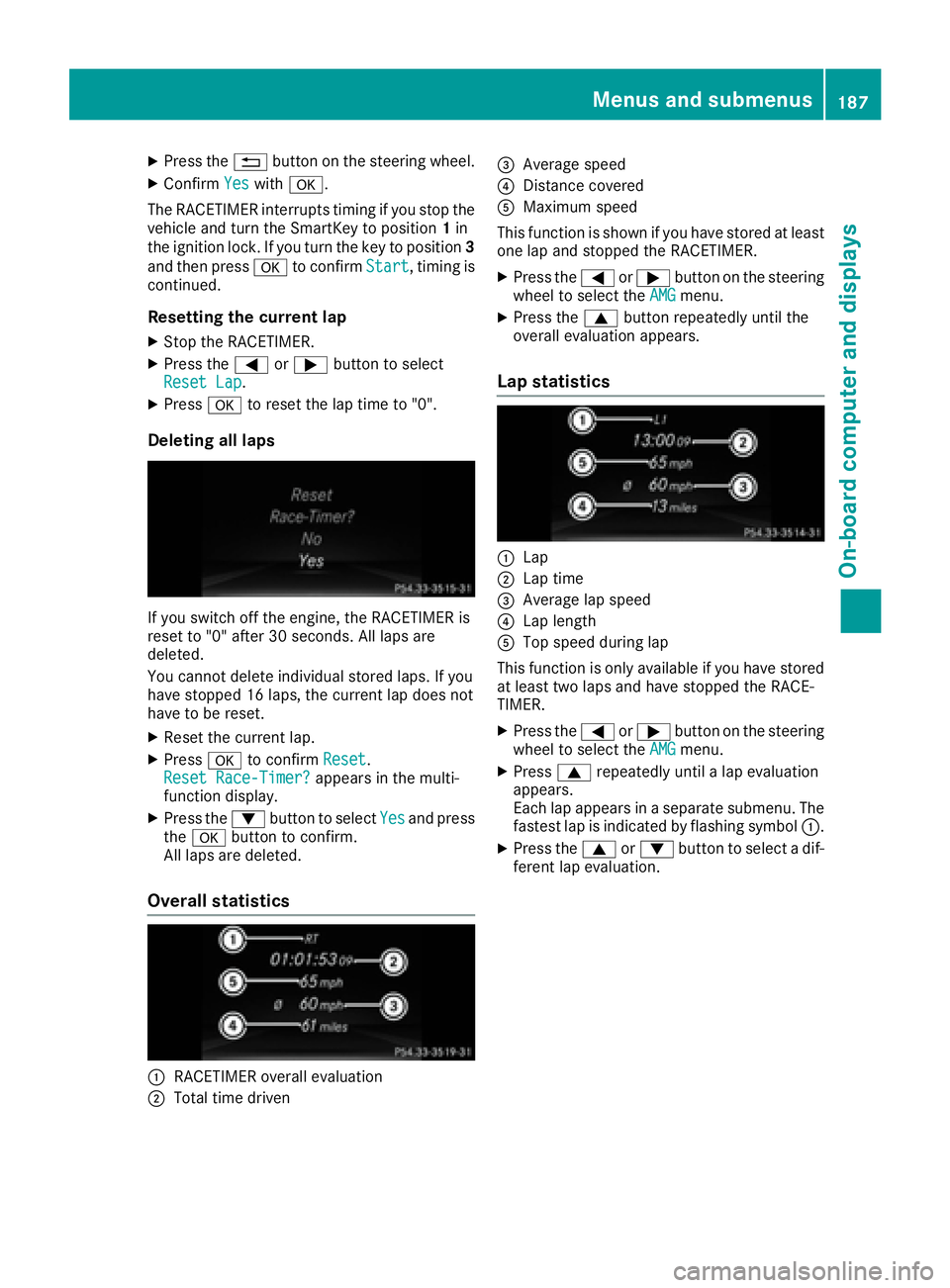
Overall statistics
C
RACETIMER overall evaluation
D
Total time driven
Page 278 of 318
i Jumper cables and further information regarding jump-starting can be obtained at any qualified
specialist workshop.
Towing and tow-starting
Important safety notes
G WARNING
Functions relevant to safety are restricted or
no longer available if: R
the engine is not running. R
the brake system or the power steering is
malfunctioning. R
there is a malfunction in the voltage supply
or the vehicle's electrical system.
If your vehicle is being towed, much more
force may be necessary to steer or brake.
There is a risk of an accident.
In such cases, use a tow bar. Before towing,
make sure that the steering moves freely.
G WARNING
You can no longer steer the vehicle if the
steering wheel lock has been engaged. There
is a risk of an accident.
Always switch off the ignition when towing the
vehicle with a tow cable or a tow bar.
G WARNING
When towing or tow-starting another vehicle
and its weight is greater than the permissible
gross weight of your vehicle, the: R
the towing eye could detach itself R
the vehicle/trailer combination could roll-
over.
There is a risk of an accident.
When towing or tow-starting another vehicle,
its weight should not be greater than the per-
missible gross weight of your vehicle.
Details on the permissible gross vehicle weight
of your vehicle can be found on the vehicle iden-
tification plate ( Y
page 308).
! When Active Brake Assist, Distance Pilot
DISTRONIC or the HOLD function is activated, the vehicle brakes automatically in certain
situations.
To avoid damage to the vehicle, deactivate
these systems in the following or similar sit-
uations: R
when towing the vehicle R
in the car wash
! Make sure that the electric parking brake is
released. If the electric parking brake is faulty,
visit a qualified specialist workshop.
! Only secure the tow rope or tow bar at the
towing eyes. Otherwise, the vehicle could be
damaged.
! Do not use the towing eyes for recovery pur-
poses as this could damage the vehicle. If in
doubt, recover the vehicle with a crane.
! When towing, pull away slowly and
smoothly. If the tractive power is too high, the
vehicles could be damaged.
! The vehicle can be towed a maximum of
30 miles (50km). The towing speed of 30 mph
(50km/h) must not be exceeded.
If the vehicle has to be towed more than
30 miles (50km), the front axle must be raised
or the entire vehicle raised and transported.
! Do not tow with sling-type equipment. This
could damage the vehicle.
! When towing vehicles with KEYLESS-GO,
use the key instead of the Start/Stop button.
Otherwise, the automatic transmission may
shift to position P when the driver's or front-
passenger door are opened, which could lead
to damage to the transmission.
! Vehicles with automatic transmission must
not be started by tow-starting. This could oth-
erwise damage the transmission.
It is better to have the vehicle transported than
to have it towed away.
If the vehicle can no longer be driven because of
an accident or breakdown, you have the follow-
ing options: R
transporting the vehicle276
Towing and tow-starting
Breakdown assistance
Page 279 of 318
As a rule, you should have the vehicle trans-
ported. R
towing the vehicle with a tow rope or tow bar
Only tow the vehicle in exceptional cases.
The battery must be connected and charged.
Otherwise, you: R
cannot turn the SmartKey to position 2 in the
ignition lock R
cannot release the electric parking brake R
cannot move the transmission to position N
The function of the electric parking brake and
the parking lock is dependent on the on-board
voltage.
If the on-board voltage is low or if there is a sys-
tem malfunction: R
the electric parking brake may not be applied
in certain circumstances, or R
the transmission may not be shifted to P
Switch off non-essential consumers, e.g. the
radio.
Disarm the automatic locking feature before the
vehicle is towed ( Y
page 184). You could other-
wise be locked out when pushing or towing the
vehicle.
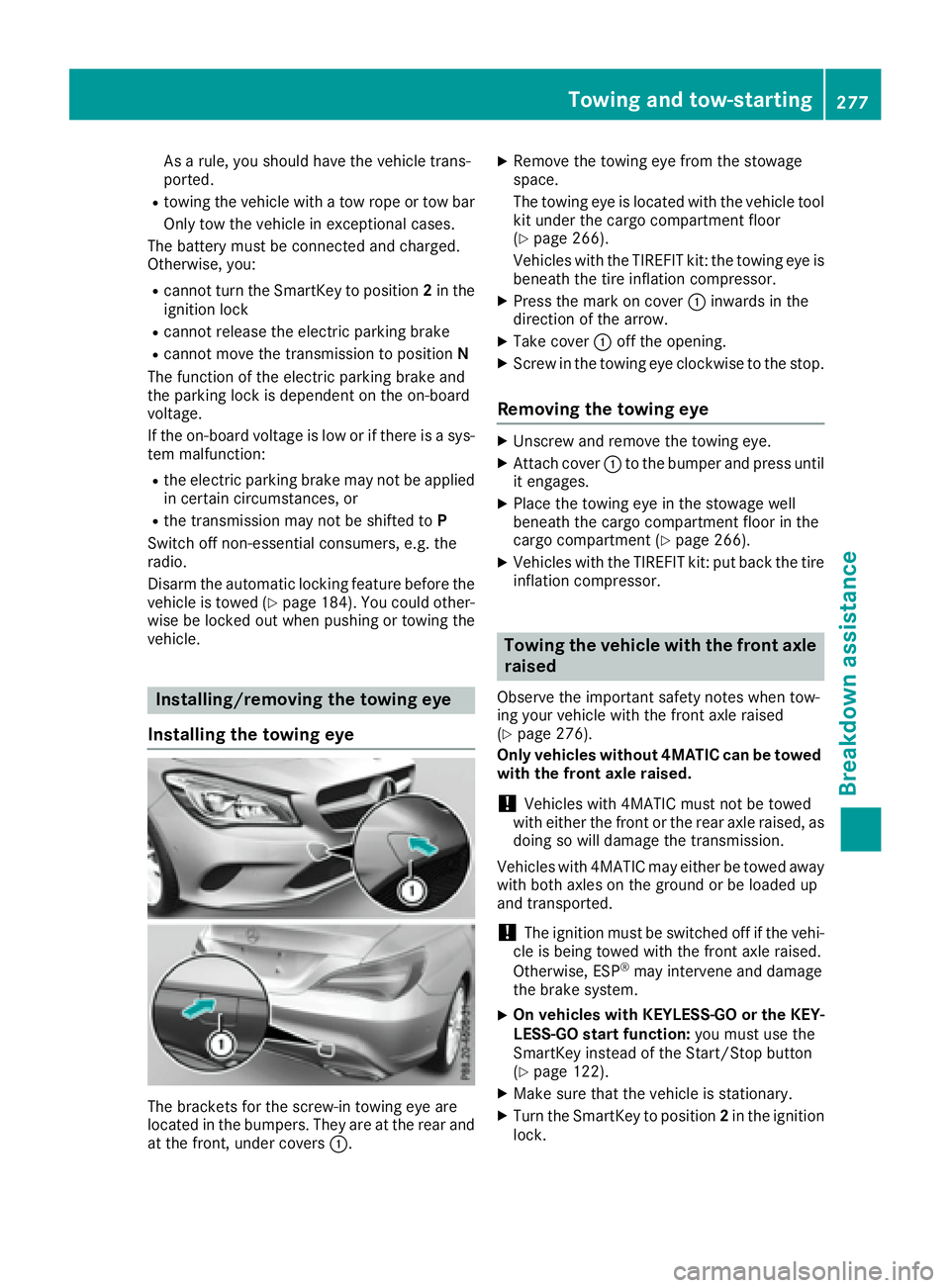
Installing/removing the towing eye
Installing the towing eye
The brackets for the screw-in towing eye are
located in the bumpers. They are at the rear and
at the front, under covers C . X
Remove the towing eye from the stowage
space.
The towing eye is located with the vehicle tool
kit under the cargo compartment floor
( Y
page 266).
Vehicles with the TIREFIT kit: the towing eye is
beneath the tire inflation compressor. X
Press the mark on cover C inwards in the
direction of the arrow. X
Take cover C off the opening. X
Screw in the towing eye clockwise to the stop.
Removing the towing eye X
Unscrew and remove the towing eye. X
Attach cover C to the bumper and press until
it engages. X
Place the towing eye in the stowage well
beneath the cargo compartment floor in the
cargo compartment ( Y
page 266).X
Vehicles with the TIREFIT kit: put back the tire
inflation compressor.
Towing the vehicle with the front axle
raised Observe the important safety notes when tow-
ing your vehicle with the front axle raised
( Y
page 276).
Only vehicles without 4MATIC can be towed
with the front axle raised.
! Vehicles with 4MATIC must not be towed
with either the front or the rear axle raised, as
doing so will damage the transmission.
Vehicles with 4MATIC may either be towed away
with both axles on the ground or be loaded up
and transported.
! The ignition must be switched off if the vehi-
cle is being towed with the front axle raised.
Otherwise, ESP ®
may intervene and damage
the brake system. X
On vehicles with KEYLESS-GO or the KEY-
LESS-GO start function: you must use the
SmartKey instead of the Start/Stop button
( Y
page 122). X
Make sure that the vehicle is stationary. X
Turn the SmartKey to position 2 in the ignition
lock.Towing and tow-starting 277
Breakdo wn assis tance Z