2017 MERCEDES-BENZ CLA-Class trunk
[x] Cancel search: trunkPage 4 of 318

Index....................................................... 4
Digital Operator's Manual..................22
Introduction .......................................... .22
Operation ............................................... 22
Introduction ......................................... 23
Protecting the environment ...................2 3
Genuine Mercedes-Benz parts .............. .23
Operator's Manual ................................. 24
Service and vehicle operation ................2 4
Operating safety .................................... 26
QR codes for the rescue card ................2 8
Data stored in the vehicle ...................... 28
Information on copyright ....................... 30
At a glance ........................................... 31
Cockpit .................................................. 31
Instrument cluster ................................. 32
Multifunction steering wheel ................. 33
Center console ...................................... 34
Door control panel ................................. 37
Overhead control panel .........................3 8
Safety................................................... 39
Panic alarm ............................................ 39
Occupant safety .................................... 39
Children in the vehicle ........................... 53
Pets in the vehicle ................................. 59
Driving safety systems ........................... 60
Protection against theft .........................6 7
Opening and closing...........................69
SmartKey ............................................... 69
Doors ..................................................... 75
Trunk ..................................................... 77
Side windows ......................................... 80
Panorama roof with power tilt/sliding
panel ...................................................... 84
Seats, steering wheel and mirrors ....89
Correct driver's seat position ............... .89
Seats ..................................................... 89
Steering wheel ....................................... 94 Mirrors ................................................... 95
Memory function ................................... 97
Lights and windshield wipers
............99
Exterior lighting ..................................... 99
Interior lighting .................................... 102
Replacing bulbs ................................... 103
Windshield wipers ................................ 106
Climate control ................................. 109
Overview of climate control systems ... 109
Operating the climate control sys-
tems .................................................... 114
Air vents .............................................. 119
Driving and parking ..........................120
Notes on breaking-in a new vehicle ..... 120
Driving ................................................. 120
DYNAMIC SELECT button (all vehicles
except Mercedes-AMG vehicles) ......... 127
DYNAMIC SELECT controller
(Mercedes-AMG vehicles) .................... 128
Automatic transmission ....................... 129
Refueling ............................................. 137
Parking ................................................ 140
Driving tips .......................................... 143
Driving systems ................................... 148
On-board computer and displays ....174
Important safety notes ........................ 174
Displays and operation ........................ 174
Menus and submenus ......................... 177
Display messages ................................ 188
Warning and indicator lamps in the
instrument cluster ............................... 216
Multimedia system ...........................227
General notes ...................................... 227
Important safety notes ........................ 227
Function restrictions ............................ 227
Operating system ................................ 228
Stowage and features ......................233
Loading guidelines ............................... 233
Stowage areas ..................................... 233
2Contents
Page 11 of 318
ESP®(Electronic Stability Pro-
gram) ............................................... 63
Important safety information ........... 60
Overview .......................................... 60
STEER CONTROL ............................. 66
Driving system
Distance Pilot DISTRONIC ............. 150
Parking assist PARKTRONIC .......... 160
Parking Pilot .................................. 162
RACE START (Mercedes-AMG
vehicles) ........................................ 157
Start-off assist ............................... 157
Driving systems
AMG adaptive sport suspension
system ........................................... 158
ATTENTION ASSIST ........................ 169
Blind Spot Assist ............................ 171
Cruise control ................................ 148
Display message ............................ 205
HOLD function ............................... 156
Lane Keeping Assist ...................... 172
Lane Tracking package .................. 171
Rear view camera .......................... 166
Driving tips
Automatic transmission ................. 132
Brakes ........................................... 145
Break-in period .............................. 120
Checking brake lining thickness .... 146
Distance Pilot DISTRONIC ............. 155
Downhill gradient ........................... 145
Drinking and driving ....................... 143
Driving in winter ............................. 147
Driving on flooded roads ................ 147
Driving on wet roads ...................... 147
Exhaust check ............................... 143
Fuel ................................................ 143
General .......................................... 143
Hydroplaning ................................. 147
Icy road surfaces ........................... 147
Limited braking efficiency on sal-
ted roads ....................................... 146
Snow chains .................................. 285
The first 1000 miles (1500 km) ..... 120
Wet road surface ........................... 145
DVD video
Operating (on-board computer) ..... 180
see also Digital Operator's Man-
ual .................................................. 227 DYNAMIC SELECT button
Climate control (3-zone automaticclimate control) ............................. 114
Climate control (air-conditioning
system) .......................................... 111
DYNAMIC SELECT button (al l ve
hi-
cles except Mercedes-AMG vehi-
cles) .................................................... 127
DYNAMIC SELECT controller
(Mercedes-AMG vehicles) ................. 128
E
EBD (electronic brake force distri-
bution)
Display message ............................ 191
Function/notes ................................ 66
ECO display
Function/notes ............................. 144
On-board computer ....................... 177
ECO start/stop function
Automatic engine start .................. 125
Automatic engine switch-off .......... 125
Deactivating/activating ................. 126
General information ....................... 125
Important safety notes .................. 125
Introduction ................................... 124
Electronic Stability Program
see ESP
®(Electronic Stability Program)
Emergency
Automatic measures after an acci-
dent ................................................. 53
Emergency release
Driver's door .................................... 76
Trunk ............................................... 80
Vehicle ............................................. 76
Emergency Tensioning Devices
Activation ......................................... 51
Emissions control
Service and warranty information .... 24
Engine
Check Engine warning lamp ........... 222
Display message ............................ 202
ECO start/stop function ................ 124
Engine number ............................... 309
Irregular running ............................ 126
Jump-starting ................................. 273
Starting problems .......................... 126
Index9
Page 19 of 318

Setting the airflow............................1 16
Setting the date/time format
see also Digital Operator's Man-
ual ..................................................2 27
Setting the language
see also Digital Operator's Man-
ual ..................................................2 27
Setting the time
see also Digital Operator's Man-
ual ..................................................2 27
Settings
Factory (on-board computer) ......... 185
On-board computer ....................... 183
SETUP (on-board computer) ............. 186
Side impact air bag .............................4 5
Side marker lamp (display mes-
sage) ................................................... 201
Side windows
Cleaning ......................................... 261
Convenience closing feature ............ 82
Convenience opening feature ..........8 2
Important safety information ........... 80
Opening/closing .............................. 81
Problem (malfunction) .....................8 3
Resettin g........................................ .83
Reversin gfeature ............................ .81
SIRIUS services
see also Digital Operator's Man-
ual .................................................. 227
Sliding sunroof
see Panorama roof with power
tilt/sliding panel
SmartKey
Changing the battery ....................... 72
Changing the programming .............7 1
Checking the battery ...................... .72
Convenience closing feature ............ 82
Convenience opening feature .......... 82
Dis play message ............................ 214
Door central locking/unlo ckin
g ......
.69
Important safety notes .................... 69
KEYLESS-GO start function .............. 70
Loss .................................................7 3
Mechanical key ................................ 71
Positions (ignition lock) ................. 121
Problem (malfunction) ..................... 73
Starting the engine ........................ 123 SmartKey positions (ignition lock)
.. 121
SMS
see also Digital Operator's Man-
ual .................................................. 227
Snow chains ...................................... 285
Sockets
Center console .............................. 241
General notes ................................ 241
Rear compartment .........................2 42
Trunk ............................................. 242
Sound
Switching on/off ........................... 228
Special seat belt retractor .................. 54
Specialist workshop ............................ 27
Speed, controlling
see Cruise control
Speedometer
Activating/deactivating the addi-
tional speedometer ........................ 184
Digital ............................................ 178
In the Instrument cluster ................. 32
Segments ...................................... 174
Selecting the display unit ...............1 83
SPORT handling mode
Deactivating/activating
(Mercedes-AMG vehicles) ................ 65
Warning lamp ................................. 220
Standing lamps
Display message ............................ 200
Switching on/off ........................... 100
Start-off assist
Activating ....................................... 157
Important safety notes .................. 157
Start/Stop button
Removing ....................................... 122
Starting the engine ........................ 123
Start/stop function
see ECO start/stop function
Starting (engine) ................................ 122
STEER CONTROL .................................. 66
Steering
Display message ............................ 214
Ste
ering assistant STEER CON-
TROL
see STEER CONTROL
Steering wheel
Adjusting (manually) ........................ 94
Index17
Page 20 of 318

Button overview ............................... 33
Buttons (on-board computer) ......... 175
Cleaning .........................................264
Important safety notes .................... 94
Paddle shifters ............................... 135
Steering wheel paddle shifters ........135
Stopwatch (RACETIMER) ................... 186
Stowage compartments
Armrest (front) ............................... 234
Armrest (under) .............................2 35
Center console .............................. 234
Center console (rear) ..................... 235
Cup holders ................................... 238
Eyeglasses compartment ...............2 34
Glove box ....................................... 234
Important safety information ......... 233
Map pockets .................................. 235
Stowage net ................................... 235
Under driver's seat/front-
passenger seat .............................. 235
Stowage net ....................................... 235
Stowage well beneath the trunk
floor .................................................... 237
Summer tires ..................................... 284
Sun visor ............................................ 240
Suspension
Adaptive Damping System ............. 159
Suspension setting
AMG adaptive sport suspension
system ........................................... 158
Switching air-recirculation mode
on/off ................................................. 118
Switching on media mode
Via the device list .......................... 232
T
Tachometer ........................................ 174
Tail lamps
Display message ............................ 200
see Lights
Tank
see Fuel tank
Tank content
Fuel gauge ....................................... 32
Technical data
Capacities ...................................... 309
Information .................................... 307 Tires/wheels ................................. 306
Vehicle data ................................... 314
Telephone
Accepting a call (multifunction
steering wheel) .............................. 181
Authorizing a mobile phone (con-
necting) ......................................... 231
Connecting a mobile phone (gen-
eral information) ............................ 230
Display message ............................ 214
Introduction ................................... 180
Menu (on-board computer) ............ 180
Number from the phone book ........ 181
Redialing ........................................ 181
Rejecting/ending a call ................. 181
see also Digital Operator's Man-
ual .................................................. 227
Switching between mobile
phones ........................................... 232
Temperature
Coolant .......................................... 175
Coolant (on-board computer,
Mercedes-AMG vehicles) ............... 185
Engine oil (on-board computer,
Mercedes-AMG vehicles) ............... 185
Outside temperature ...................... 174
Setting (climate control) ................ 115
Transmission oil (on-board com-
puter, Mercedes-AMG vehicles) ..... 185
Through-loading feature ................... 236
Timing (RACETIMER) ......................... 186
Tire pressure
Calling up (on-board computer) ..... 289
Checking manually ........................ 288
Display message ............................ 209
Maximum ....................................... 288
Not reached (TIREFIT) .................... 269
Notes ............................................. 287
Reached (TIREFIT) .......................... 270
Recommended ............................... 285
Tire pressure loss warning system
General notes ................................ 288
Important safety notes .................. 288
Restarting ...................................... 289
Tire pressure monitor
Checking the tire pressure elec-
tronically ........................................ 291
Function/notes ............................. 289
18Index
Page 22 of 318

Removingth etowin geye .............. .277
Towing a trailer
ESP
®(Electronic Stability Pro-
gram) ............................................... 66
Towing away
Important safety guidelines ........... 276
Installing the towing eye ................ 277
Notes for 4MATIC vehicles ............ 279
Removing the towing eye ...............2 77
Transporting the vehicle ................ 278
With both axles on the ground ....... 278
With front axle raised ..................... 277
Towing eye ......................................... 266
Traffic reports
see also Digital Operator's Man-
ual ..................................................2 27
Transmission
see Automatic transmission
Transmission position display
(DIRECT SELECT lever) ......................129
Transporting the vehicle .................. 278
Trim pieces (cleaning instruc-
tions) ..................................................2 64
Trip computer (on-board com-
puter) ..................................................1 77
Trip odometer
Calling up ....................................... 177
Resetting (on-board computer) ...... 178
Trunk
Emergency release .......................... 80
Emergency release button ...............8 0
Important safety notes .................... 77
Opening (automatically from out-
side) .................................................7 8
Opening (from outside the vehi-
cle, HANDS-FREE ACCESS) .............. 78
Opening automatically from
inside ............................................... 79
Opening/closing (manually from
outside) ............................................ 77
Trunk emergency release button .......80
Trunk lid
Display message ............................ 213
Opening dimensions ...................... 314
Trunk load (maximum) ...................... 314
Turn signals
Display message ............................ 199 Replacing bulbs (front) ................... 105
Swi
tching o
n/off ........................... 100
Two-way radio
Frequencies ................................... 307
Installation ..................................... 307
Transmission output (maximum) .... 307
Type identification plate
see Vehicle identification plate
U
UnlockingEmergency unlocking ....................... 76
From inside the vehicle (central
unlocking button) ............................. 75
Upshift indicator (on-board com-
puter, Mercedes-AMG vehicles) ....... 185
USB devices
Connecting to the Media Inter-
face ............................................... 232
V
Vanity mirror (in the sun visor) ........ 240
Vehicle
Correct use ...................................... 27
Data acquisition ............................... 28
Display message ............................ 211
Equipment ....................................... 24
Individual settings .......................... 183
Limited Warranty ............................. 28
Loading .......................................... 292
Locking (in an emergency) ............... 76
Locking (SmartKey) .......................... 69
Lowering ........................................ 305
Maintenance .................................... 25
Parking for a long period ................ 142
Pulling away ................................... 124
Raising ........................................... 303
Reporting problems .........................2 7
Securing from rolling away ............ 302
Transporting .................................. 278
Unlocking (in an emergency) ........... 76
Unlocking (SmartKey) ...................... 69
Vehicle data ................................... 314
Vehicle data
Roof load (maximum) ..................... 314
Trunk load (maximum) ................... 314
20Index
Page 39 of 318

Door controlpanel
FunctionPage
:Opens th edoo r75
;%&Unlocks/locks
the vehicle75
=r45= Saves
the seat and exterior mirror
settings
97
?Adjusts the seats electrically91
A7 Zö\
Adjusts and folds the exterior
mirrors in/out electrically
95
FunctionPage
BW Opens/closes the side
windows81
Cn Activates/deactivates
the override feature for the
side windows in the rear
compartment
59
Dq Opens the trunk79
Door control panel37
At a glance
Page 69 of 318

This steering assistance is provided in particular
if:
Rboth right wheels or both left wheels are on awet or slippery road surface when you brake
Rthe vehicle begins to skid
Important safety notes
iObserve the "Important safety notes" sec-
tion (Ypage 60).
No steering assistance is provided from STEER
CONTROL, if:
RESP®is malfunctioning
Rthe steering is malfunctioning
If ESP®is malfunctioning, you will be assisted
further by the electrical power steering.
Protection against theft
Immobilizer
The immobilizer prevents your vehicle from
being started without the correct SmartKey.
XTo activate with the SmartKey: remove the
SmartKey from the ignition lock.
XTo activate with KEYLESS-GO start-func-
tion or KEYLESS-GO: switch the ignition off
and open the driver's door.
XTo deactivate: switch on the ignition.
When leaving the vehicle, always take the
SmartKey with you and lock the vehicle. Anyone
can start the engine if a valid SmartKey has been
left inside the vehicle.
iThe immobilizer is always deactivated when
you start the engine.
In the event that the engine cannot be started
(yet the vehicle's battery is charged), the sys-
tem is not operational. Contact an authorized
Mercedes-Benz Center or call
1-800-FOR-MERCedes (in the USA) or
1-800-387-0100 (in Canada).
ATA (anti-theft alarm system)
XTo arm: lock the vehicle with the SmartKey or
KEYLESS-GO.
Indicator lamp :flashes. The alarm system
is armed after approximately 15 seconds.
XTo disarm: unlock the vehicle with the Smart-
Key or KEYLESS-GO.
or
XInsert the SmartKey into the ignition lock.
A visual and audible alarm is triggered if the
alarm system is armed and you open:
Ra door
Rthe vehicle with the mechanical key
Rthe trunk lid
Rthe hood
XTo turn the alarm off with the SmartKey:
press the %or& button on the Smart-
Key.
The alarm is stopped.
or
XVehicles with KEYLESS-GO start-function
or KEYLESS-GO: remove the Start/Stop but-
ton from the ignition lock (
Ypage 121).
XInsert the SmartKey into the ignition lock.
The alarm is stopped.
XTo stop the alarm using KEYLESS-GO:
grasp the outside door handle. The SmartKey
must be outside the vehicle.
The alarm is stopped.
or
XPress the Start/Stop button on the dash-
board. The SmartKey must be inside the vehi-
cle.
The alarm is stopped.
The alarm is not switched off, even if you close
the open door that triggered it, for example.
Protection against theft67
Safety
Z
Page 71 of 318
SmartKey
Important safety notes
GWARNING
If children are left unsupervised in the vehicle,
they could:
Ropen the doors, thus endangering other
people or road users.
Rget out and disrupt traffic.
Roperate the vehicle's equipment.
Additionally, children could set the vehicle in
motion if, for example, they:
Rrelease the parking brake.
Rshifting the automatic transmission out of
park position P
RStart the engine.
There is a risk of an accident and injury.
When leaving the vehicle, always take the
SmartKey with you and lock the vehicle. Never
leave children or animals unattended in the
vehicle. Always keep the SmartKey out of
reach of children.
GWARNING
If you attach heavy or large objects to the
SmartKey, the SmartKey could be uninten-
tionally turned in the ignition lock. This could
cause the engine to be switched off. There is a risk of an accident.
Do not attach any heavy or large objects to the
SmartKey. Remove any bulky key rings before
inserting the SmartKey into the ignition lock.
!Keep the SmartKey away from strong mag-
netic fields. Otherwise, the remote control
function could be affected.
Strong magnetic fields can occur in the vicin-
ity of powerful electrical installations.
Do not keep the SmartKey:
Rwith electronic devices, e.g. a mobile phone
or another SmartKey.
Rwith metallic objects, e.g. coins or metal foil.
Rinside metallic objects, e.g. a metal case
Vehicles with KEYLESS-GO start function: do
not keep the SmartKey in the trunk. Otherwise, the SmartKey may not be detected, e.g. when
starting the engine using the Start/Stop button.
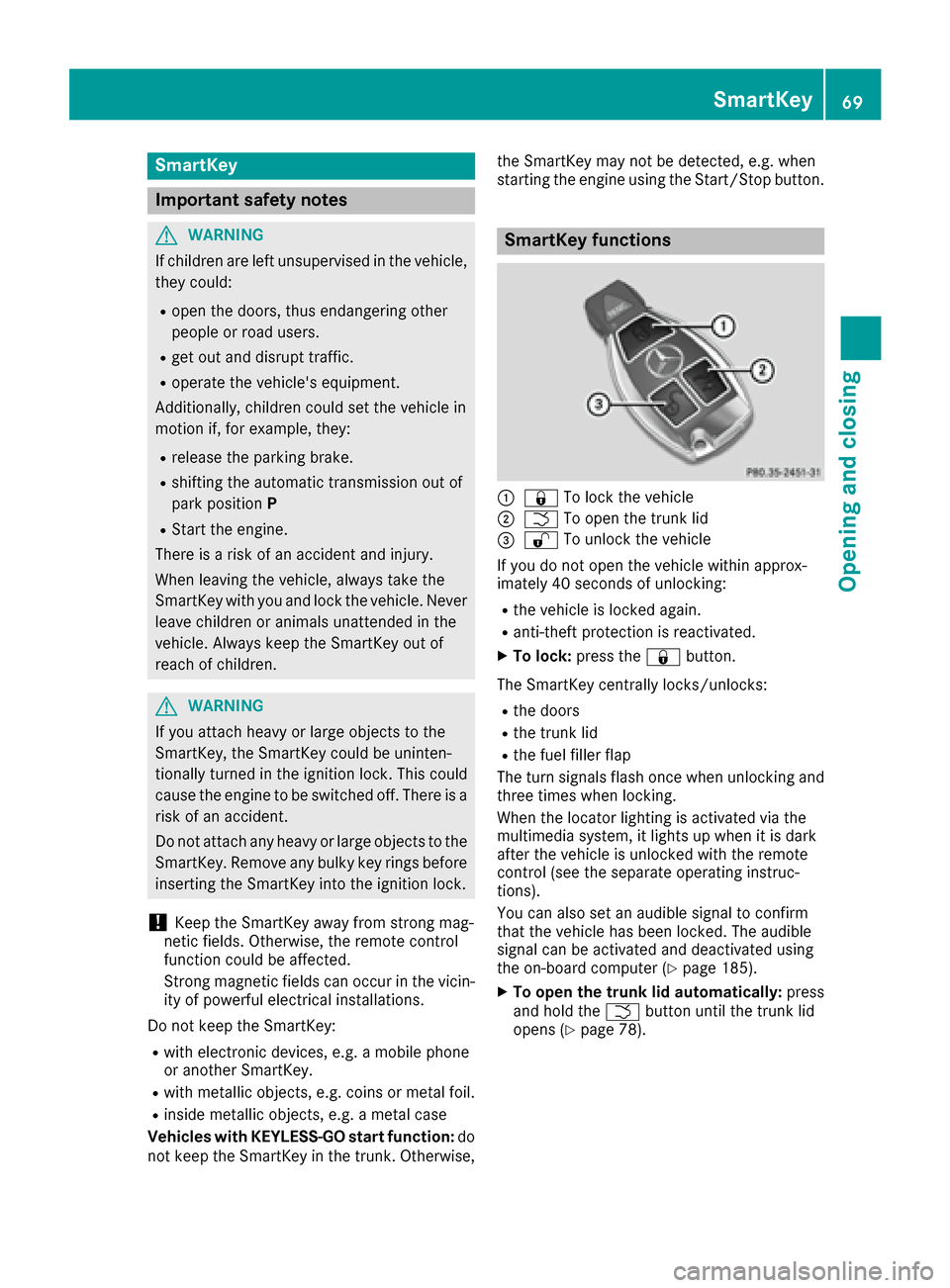
SmartKey functions
:&
To lock the vehicle
;FTo open the trunk lid
=%To unlock the vehicle
If you do not open the vehicle within approx-
imately 40 seconds of unlocking:
Rthe vehicle is locked again.
Ranti-theft protection is reactivated.
XTo lock: press the &button.
The SmartKey centrally locks/unlocks:
Rthe doors
Rthe trunk lid
Rthe fuel filler flap
The turn signals flash once when unlocking and
three times when locking.
When the locator lighting is activated via the
multimedia system, it lights up when it is dark
after the vehicle is unlocked with the remote
control (see the separate operating instruc-
tions).
You can also set an audible signal to confirm
that the vehicle has been locked. The audible
signal can be activated and deactivated using
the on-board computer (
Ypage 185).
XTo open the trunk lid automatically: press
and hold the Fbutton until the trunk lid
opens (
Ypage 78).
SmartKey69
Opening and closing
Z