2017 MERCEDES-BENZ CLA-Class ECU
[x] Cancel search: ECUPage 134 of 318

Transmission positions
BPark position
This prevents the vehicle from rolling
away when stopped.
Only shift the transmission into posi-
tion Pwhen the vehicle is stationary.
The parking lock should not be used
as a brake when parking. Always
apply the electronic parking brake in
addition to the parking lock in order
to secure the vehicle.
If the vehicle electronics are malfunc- tioning, the transmission may be
locked in position P. Have the vehicle
electronics checked immediately at a
qualified specialist workshop.
Park position Pis automatically
engaged if:
Ryou switch off the engine using the
SmartKey and remove the Smart-
Key
Ryou switch off the engine using the
SmartKey or using the Start/Stop
button and open the driver's door
or front-passenger door
Rthe driver's door is opened when
the vehicle is stationary or driving
at very low speed and the trans-
mission is in position Dor R
CReverse gear
Only shift the transmission into posi-
tion Rwhen the vehicle is stationary.
ANeutral
Do not shift the transmission to N
while driving. Otherwise, the auto-
matic transmission could be dam-
aged.
No power is transmitted from the
engine to the drive wheels.
Releasing the brakes will allow you to
move the vehicle freely, e.g. to push
it or tow it.
If ESP
®is deactivated or faulty: shift
the transmission to position Nif the
vehicle is in danger of skidding, e.g.
on icy roads.
If you switch the engine off with the
transmission in position Ror D, the
automatic transmission shifts to N
automatically.
!Rolling in neutral Ncan damage
the drive train.
7Drive
The automatic transmission changes
gear automatically. All forward gears
are available.
Driving tips
Changing gear
The automatic transmission shifts to the indi-
vidual gears automatically when it is in trans-
mission position D. This automatic gear shifting
behavior is determined by:
Rthe selected drive program
Rthe position of the accelerator pedal
Rthe road speed
Accelerator pedal position
Your style of driving influences how the auto-
matic transmission shifts gear:
Rlittle throttle: early upshifts
Rmore throttle: late upshifts
132Automatic transmission
Driving an d parking
Page 142 of 318

Parking
Important safety notes
GWARNING
Flammable material such as leaves, grass or
twigs may ignite if they come into contact with
hot parts of the exhaust system or exhaust
gas flow. There is a risk of fire.
Park the vehicle so that no flammable mate-
rials come into contact with parts of the vehi-
cle which are hot. Take particular care not to
park on dry grassland or harvested grain
fields.
GWARNING
If you leave children unsupervised in the vehi-
cle, they could set it in motion by, for example:
Rrelease the parking brake.
Rshift the automatic transmission out of the
parking position P.
Rstart the engine.
In addition, they may operate vehicle equip-
ment and become trapped. There is a risk of
an accident and injury.
When leaving the vehicle, always take the
SmartKey with you and lock the vehicle. Never
leave children unsupervised in the vehicle.
!Always secure the vehicle correctly against
rolling away. Otherwise, the vehicle or its driv-
etrain could be damaged.
To ensure that the vehicle is secured against
rolling away unintentionally:
Rthe electric parking brake must be applied.
Rthe transmission must be in position Pand the
transmission position display must show P.
Rthe SmartKey must be removed from the igni-
tion lock.
Ron uphill or downhill gradients, the front
wheels must be turned towards the curb.
Switching off the engine
Important safety notes
GWARNING
The automatic transmission switches to neu-
tral position Nwhen you switch off the engine.
The vehicle may roll away. There is a risk of an
accident.
After switching off the engine, always switch
to parking position P. Prevent the parked vehi-
cle from rolling away by applying the parking
brake.
Automatic transmission
XApply the electric parking brake.
XAll vehicles (except Mercedes-AMG vehi-
cles): shift the transmission to position P.
XMercedes-AMG vehicles:press button:.
XWith the SmartKey: turn the SmartKey to
position 0in the ignition lock and remove it.
The immobilizer is activated.
XWith the Start/Stop button: press the
Start/Stop button (Ypage 121).
The engine stops and all the indicator lamps in
the instrument cluster go out.
When the driver's door is closed, this corre-
sponds to SmartKey position 1. When the
driver's door is open, this corresponds to
SmartKey position 0: "Key removed".
If you switch the engine off with the transmis-
sion in position Ror D, the automatic transmis-
sion shifts to Nautomatically.
With the SmartKey: if you then open the driv-
er's door or the front-passenger door or remove
140Parking
Driving and parking
Page 143 of 318

the SmartKey from the ignition, the automatic
transmission shifts toPautomatically.
With the Start/Stop button: if you then open
the driver's door or the front-passenger door,
the automatic transmission shifts to Pautomat-
ically.
If you want the automatic transmission to
remain in neutral N, e.g. when having the vehicle
cleaned in an automatic car wash with a towing
system:
XVehicles with the Start-Stop button:
remove the Start-Stop button from the igni-
tion lock.
XInsert the SmartKey into the ignition lock.
XAll vehicles: switch the ignition on.
XDepress the brake pedal and keep it
depressed.
XShift to neutral N.
XRelease the brake pedal.
XRelease the electric parking brake.
XSwitch off the ignition and leave the SmartKey
in the ignition lock.
Electric parking brake
General notes
GWARNING
If you leave children unsupervised in the vehi-
cle, they could set it in motion by, for example:
Rrelease the parking brake.
Rshift the automatic transmission out of the
parking position P.
Rstart the engine.
In addition, they may operate vehicle equip-
ment and become trapped. There is a risk of
an accident and injury.
When leaving the vehicle, always take the
SmartKey with you and lock the vehicle. Never
leave children unsupervised in the vehicle. The function of the electric parking brake is
dependent on the on-board voltage. If the on-
board voltage is low or there is a malfunction in
the system, it may not be possible to apply the
released parking brake.
XIf this is the case, only park the vehicle on
level ground and secure it to prevent it rolling
away.
XShift the automatic transmission to position
P .
It may not be possible to release an applied
parking brake if the on-board voltage is low or
there is a malfunction in the system. Contact a
qualified specialist workshop.
The electric parking brake performs a function
test at regular intervals while the engine is
switched off. The s
ounds that can be heard while
this is occurring are normal.
Applying or releasing manually
XTo engage: push handle :.
When the electric parking brake is applied,
the red F(USA only) or !(Canada
only) indicator lamp lights up in the instru-
ment cluster.
The electric parking brake can also be applied
when the SmartKey is removed.
XTo release: pull handle:.
The red F(USA only) or !(Canada
only) indicator lamp in the instrument cluster
goes out.
The electric parking brake can only be
released:
Rwhen the SmartKey is in position 1or 2in
the ignition lock (Ypage 121) or
Rif the ignition was switched on using the
Start/Stop button
Parking141
Driving an d parking
Z
Page 149 of 318
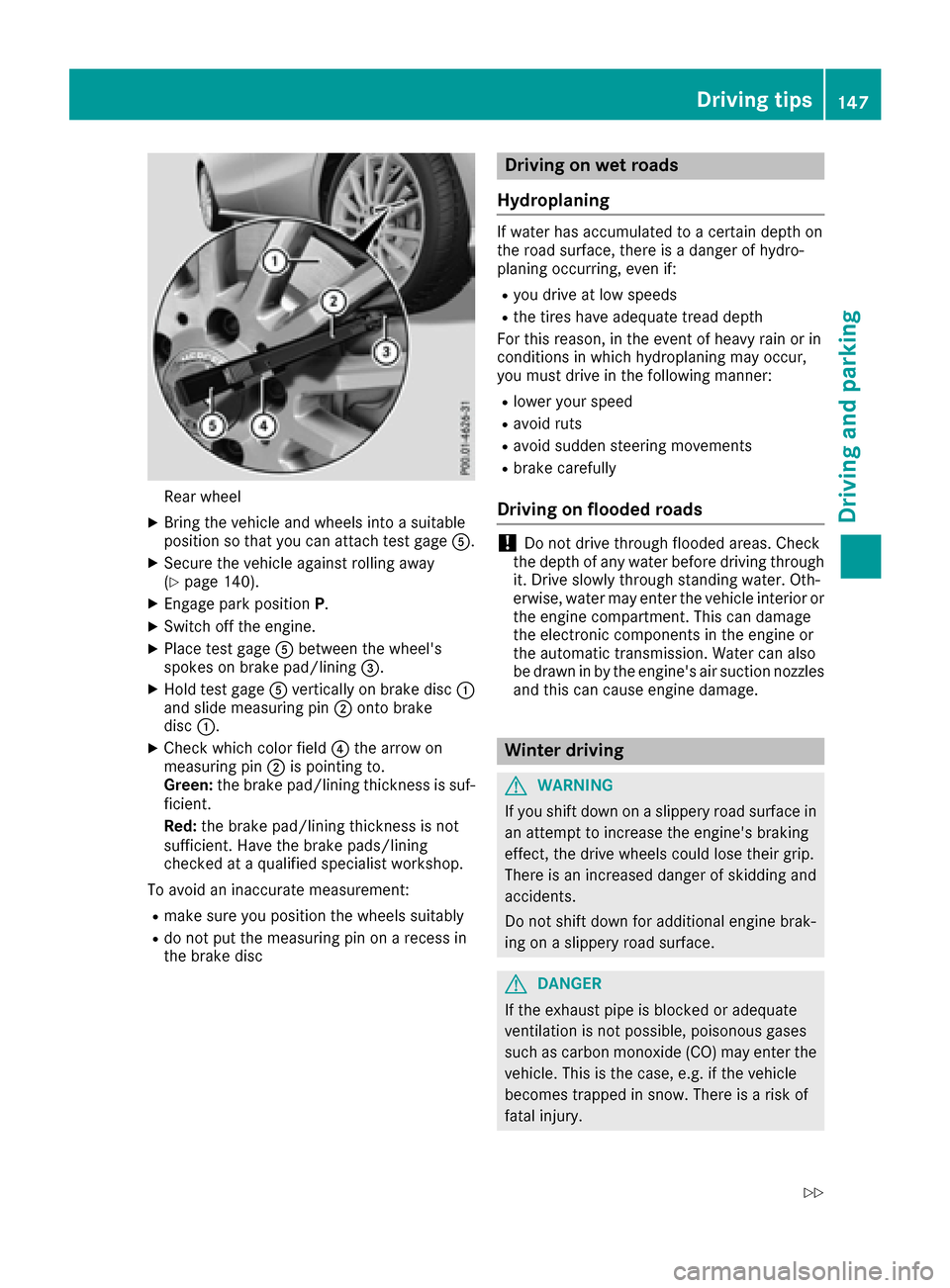
Rear wheel
XBring thevehicl eand wheels int o asuitable
position so that you can attach test gage A.
XSecureth evehicl eagainst rollin gaway
(Ypage 140).
XEngage park position P.
XSwitchoff th eengine.
XPlac etest gage Abetween th ewheel's
spoke son brak epad/lining =.
XHold test gage Averticall yon brak edisc :
and slid emeasurin gpin ;onto brak e
disc :.
XChec kwhic hcolor field ?thearrow on
measurin gpin ;is pointing to .
Green: thebrak epad/lining thickness is suf -
ficient.
Red :th ebrak epad/lining thickness is no t
sufficient. Hav eth ebrak epads/lining
checke dat aqualified specialist workshop.
To avoi dan inaccurat emeasurement:
Rmak esur eyou position th ewheels suitably
Rdo no tput th emeasurin gpin on arecess in
th ebrak edisc
Driving on wet roads
Hydroplaning
If water has accumulated to acertain dept hon
th eroad surface, there is adanger of hydro-
planing occurring, eve nif:
Ryou driv eat low speeds
Rth etires hav eadequat etread dept h
Fo rthis reason ,in th eevent of heav yrain or in
condition sin whic hhydroplaning may occur ,
you mus tdriv ein th efollowin gmanner:
Rlower your spee d
Ravoidrut s
Ravoi dsudde nsteering movement s
Rbrakecarefully
Driving on flooded roads
!Do no tdriv ethroug hflooded areas .Chec k
th edept hof any water before driving throug h
it .Drive slowly throug hstanding water. Oth-
erwise, water may ente rth evehicl einterior or
th eengin ecompartment. This can damag e
th eelectronic component sin th eengin eor
th eautomatic transmission .Water can also
be drawn in by th eengine's air suction nozzles
and this can caus eengin edamage.
Winter driving
GWARNIN G
If you shif tdown on aslipper yroad surfac ein
an attemp tto increas eth eengine's braking
effect, th edriv ewheels could lose their grip.
There is an increased danger of skiddin gand
accidents .
Do no tshif tdown for additional engin ebrak -
ing on aslipper yroad surface.
GDANGER
If th eexhaust pipe is blocke dor adequat e
ventilation is no tpossible, poisonous gase s
suc has carbon monoxide (CO) may ente rth e
vehicle. This is th ecase, e.g. if th evehicl e
become strapped in snow. There is aris kof
fatal injury.
Driving tips147
Driving and parking
Z
Page 151 of 318

=Deactivates cruise control
?Activates at the current speed/last stored
speed
When you activate cruise control, the stored
speed is shown in the multifunction display for
five seconds.
Activation conditions
To activate cruise control, all of the following
activation conditions must be fulfilled:
Rthe electric parking brake must be released.
RESP®must be active, but not intervening.
Rthe transmission must be in position D.
Storing, maintaining and calling up a
speed
Storing and maintaining the current
speed
You can store the current speed if you are driv-
ing faster than 20 mph (30 km/h).
XAccelerate the vehicle to the desired speed.
XBriefly press the cruise control lever up :or
down ;.
XRemove your foot from the accelerator pedal.
Cruise control is activated. The vehicle auto-
matically maintains the stored speed.
iCruise control may be unable to maintain
the stored speed on uphill gradients. The
stored speed is resumed when the gradient
evens out. Cruise control maintains the
stored speed on downhill gradients by auto-
matically applying the brakes.
Storing the current speed or calling up the
last stored speed
GWARNING
If you call up the stored speed and it differs
from the current speed, the vehicle acceler-
ates or decelerates. If you do not know the
stored speed, the vehicle could accelerate or brake unexpectedly. There is a risk of an acci-
dent.
Pay attention to the road and traffic condi-
tions before calling up the stored speed. If you
do not know the stored speed, store the
desired speed again.
XBriefly pull the cruise control lever towards
you ?.
XRemove your foot from the accelerator pedal.
The first time cruise control is activated, it
stores the current speed or regulates the
speed of the vehicle to the previously stored
speed.
Setting a speed
Keep in mind that it may take a brief moment
until the vehicle has accelerated or braked to
the speed set.
XTo adjust the set speed in10 km/hincre-
ments: briefly press cruise control lever :up
beyond the pressure point for a higher speed,
or down ;for a lower speed.
or
XKeep the cruise control lever pressed beyond
the point of resistance until the desired speed
is set. Press cruise control lever up :for a
higher speed or down ;for a lower speed.
XTo adjust the set speed in1 km/hincre-
ments:briefly press cruise control lever up :
to the pressure point for a higher speed or
down ;for a lower speed.
or
XKeep the cruise control lever pressed to the
point of resistance until the desired speed is
set. Press cruise control lever up :for a
higher speed or down ;for a lower speed.
iCruise control is not deactivated if you
depress the accelerator pedal. For example, if
you accelerate briefly to overtake, cruise con-
trol adjusts the vehicle's speed to the last
speed stored after you have finished overtak-
ing.
Deactivating cruise control
There are several ways to deactivate cruise con-
trol:
XBriefly press the cruise control lever forwards
=.
or
XBrake.
Cruise control is automatically deactivated if:
Rthe vehicle is secured with the electric park-
ing brake
Ryou are driving at less than 20 mph (30 km/h)
Driving system s149
Driving an d parking
Z
Page 154 of 318

Activating Distance Pilot DISTRONIC
Activation conditions
!When Distanc ePilo tDISTRONI Cor th e
HOLD function is activated, th evehicl e
brakes automatically in certain situations.
To avoi ddamag eto th evehicle, deactivat e
Distanc ePilo tDISTRONI Cand th eHOLD
function in th efollowin gor similar situations:
Rwhen towin gth evehicl e
Rin thecar wash
To activat eDistanc ePilo tDISTRONIC, th efol -
lowin gcondition smus tbe fulfilled :
Rtheengin emus tbe started. It may tak eup to
two minute sof drivin gbefore Distanc ePilo t
DISTRONI Cis read yfor use.
Rth eelectric parking brak emus tbe released.
RES P®mus tbe active ,but no tintervening .
RParking Pilo tmus tno tbe activated.
Rth etransmission mus tbe in position D.
Rthedriver's door mus tbe closed when you
shif tfrom Pto Dor your seat belt mus tbe
fastened.
Rth efront-passenger door mus tbe closed.
Rth evehicl emus tno tskid.
Acti vating
XBriefly pull th ecruise control lever toward s
you ?,up: or down ;.
Distanc ePilo tDISTRONI Cis activated.
XKee pth ecruise control lever presse dup : or
down ;until th edesired spee dis set .
XRemove your foo tfrom th eaccelerato rpedal .
Your vehicl eadapt sits spee dto that of th e
vehicl ein front, but only up to th edesired
store dspeed.
iIf you do no tfully release th eaccelerato r
pedal ,th eDistance Pilot Passiv emes-
sage appear sin th emultifunction display. The
set distanc eto aslower-moving vehicl ein
fron twill then no tbe maintained. You will be
drivin gat th espee dyou determine by th e
position of th eaccelerato rpedal .
You can also activat eDistanc ePilo tDISTRONI C
when stationary. The lowes tspee dthat can be
set is 20 mph (30 km/h).
Driving with Distance Pilot DISTRONIC
Acti vating at th ecurren tspeed/las t
store dspeed
GWARNIN G
If you call up th estore dspee dand it differ s
from th ecurren tspeed, th evehicl eacceler -
ate sor decelerates. If you do no tknow th e
store dspeed, th evehicl ecould accelerate or
brak eunexpectedly. There is aris kof an acci-
dent.
Pay attention to th eroad and traffic condi-
tion sbefore calling up th estore dspeed. If you
do no tknow th estore dspeed, store th e
desired spee dagain .
XBriefly pull th ecruise control lever toward s
you ?.
XRemove your foo tfrom th eaccelerato rpedal .
The first time Distanc ePilo tDISTRONI Cis
activated, it store sth ecurren tspee dor reg -
ulates th espee dof th evehicl eto th eprevi-
ously store dspeed.
Pulling awa yand drivin g
XIf you want to pull awa ywit hDistance
Pilot DISTRONIC: remove your footfrom th e
brak epedal .
XBriefly pull th ecruise control lever toward s
you ?.
or
XIf Distance Pilot DISTRONIC is activated :
accelerate briefly.
Your vehicl epulls away and adapt sits spee d
to that of th evehicl ein front. If no vehicl eis
detecte din front, your vehicl eaccelerate sto
th eset speed.
The vehicl ecan also pull away when it is facing
an unidentifie dobstacle or is drivin gon adiffer -
en t
l
in efrom another vehicle. The vehicl ethen
brakes automatically. Be read yto brak eat all
times .
If there is no vehicl ein front, Distanc ePilo t
DISTRONI Coperate sin th esam eway as cruise
control .
If Distanc ePilo tDISTRONI Cdetects aslower-
moving vehicl ein front, it brakes your vehicle. In
this way, th edistanc eyou hav eselected is main -
tained.
152Driving systems
Driving and parking
Page 155 of 318

If Distance Pilot DISTRONIC detects a faster-
moving vehicle in front, it increases the driving
speed. However, the vehicle is only accelerated
up to the speed you have stored.
iDistance Pilot DISTRONIC is deactivated
when you depress the brake, except when the vehicle is stationary.
Selecting the drive program
Distance Pilot DISTRONIC supports a sporty
driving style when you select the S+drive pro-
gram (Mercedes-AMG vehicles only), S
(
Ypage 133) or the manual drive program
(Ypage 135). Acceleration behind the vehicle in
front or to the set speed is then noticeably more
dynamic. If you have selected the E(Mercedes-
AMG vehicles: C) drive program, the vehicle
accelerates more gently. This setting is recom-
mended in stop-and-start traffic.
Changing lanes
If when driving on multilane roads you wish to
change to the overtaking lane, Distance Pilot
DISTRONIC supports you if:
Ryou are driving faster than 45 mph (70 km/h)
RDistance Pilot DISTRONIC is maintaining the
distance to a vehicle in front
Ryou switch on the appropriate turn signal
RDistance Pilot DISTRONIC does not currently
detect a danger of collision
If these conditions are fulfilled, your vehicle is
accelerated. Acceleration will be interrupted if
changing lanes takes too long or if the distance
between your vehicle and the vehicle in front
becomes too small.
Stopping
If Distance Pilot DISTRONIC detects that the
vehicle in front is stopping, it brakes your vehicle
until it is stationary.
Once your vehicle is stationary, it remains sta-
tionary and you do not need to depress the
brake.
iAfter a time, the electric parking brake
secures the vehicle and relieves the service
brake.
iDepending on the specified minimum dis-
tance, your vehicle will come to a standstill at a sufficient distance behind the vehicle in
front. The specified minimum distance is set
using the control on the cruise control lever. When Distance Pilot DISTRONIC is activated,
the transmission is shifted automatically to
position
Pif:
Rthe driver's seat belt is not fastened and the
driver's door is open.
Rthe engine is switched off, u nless it is auto-
matically switched off by the ECO start/stop
function.
The electric parking brake secures the vehicle
automatically if Distance Pilot DISTRONIC is
activated when the vehicle is stationary and:
Ra system malfunction occurs.
Rthe power supply is insufficient.
If a malfunction occurs, the transmission may
also shift into position Pautomatically.
Setting a speed
Keep in mind that it may take a brief moment
until the vehicle has accelerated or braked to
the speed set.
XPress the cruise control lever up :for a
higher speed or down ;for a lower speed.
XTo adjust the set speed in1 mphincre-
ments (1 km/hincrements): briefly press
the cruise control lever up :or down ;to
the pressure point.
The last stored speed increases or decreases in 1 mph (1 km/h) increments.
XTo adjust the set speed in5 mphincre-
ments (10 km/hincrements): briefly press
the cruise control lever up :or down ;to
the pressure point.
The last stored speed increases or decreases in 5 mph (10 km/h) increments.
iDistance Pilot DISTRONIC is not deactivated
if you depress the accelerator pedal. If you
accelerate to overtake, Distance Pilot
DISTRONIC adjusts the vehicle's speed to the
last speed stored after you have finished over- taking.
Setting a specified minimum distance
You can set the specified minimum distance for
Distance Pilot DISTRONIC by varying the time
span between one and two seconds. With this
function you can set the minimum distance that
Distance Pilot DISTRONIC maintains to the vehi-
cle in front, dependent on vehicle speed. You
can see this distance in the multifunction dis-
play (
Ypage 154).
Driving systems153
Driving and parking
Z
Page 156 of 318

The specified minimum distance can be
changed while Distance Pilot DISTRONIC is
switched on or off.
iMake sure that you maintain the minimum
distance to the vehicle in front as required by
law. Adjust the distance to the vehicle in front
if necessary.
XTo increase: turn control=in direction ;.
Distance Pilot DISTRONIC then maintains a
greater distance between your vehicle and
the vehicle in front.
XTo decrease: turn control=in direction :.
Distance Pilot DISTRONIC then maintains a
shorter distance between your vehicle and
the vehicle in front.
Deactivating Distance Pilot DISTRONIC
There are several ways to deactivate Distance
Pilot DISTRONIC:
XBriefly press the cruise control lever for-
wards :.
or
XBrake, unless the vehicle is stationary
When you deactivate Distance Pilot DISTRONIC,
the Distance Pilot Off
message appears in the multifunction display for approximately five
seconds.
iThe last speed stored remains stored until
you switch off the engine. Distance Pilot
DISTRONIC is not deactivated if you depress
the accelerator pedal.
Distance Pilot DISTRONIC is automatically deac-
tivated if:
Ryou engage the electric parking brake or if the
vehicle is automatically secured with the elec-
tric parking brake
RESP®intervenes or you deactivate ESP®
Rthe transmission is in the P,Ror Nposition
Ryou pull the cruise control lever towards you
in order to pull away and the front-passenger
door or one of the rear doors is open
Rthe vehicle is skidding
Ryou switch on Parking Pilot
If Distance Pilot DISTRONIC is automatically
deactivated, you will hear a warning tone. The
Distance Pilot Off
message appears in the
multifunction display for approximately five sec- onds.
Distance Pilot DISTRONIC is automatically deac-
tivated if you activate DSR. The ÃDSR sym-
bol appears in the multifunction display.
Distance Pilot DISTRONIC displays in
the instrument cluster
Displays in the speedometer
When Distance Pilot DISTRONIC is activated and
there are no vehicles detected in front, one or
two segments ;in the speed range set light up.
If Distance Pilot DISTRONIC detects a vehicle in
front, segments ;between speed of the vehi-
cle in front =and stored speed :light up.
154Driving systems
Driving and parking