2017 MERCEDES-BENZ CLA-Class ECO mode
[x] Cancel search: ECO modePage 147 of 318
In addition to driving style, the actual consump-
tion is affected by other factors, such as:
RLoad
RTire pressure
RCold start
RChoice of route
RActive electrical consumers
These factors are not included in the ECO dis-
play.
An economical driving style specially requires
driving at moderate engine speeds.
Achieving a higher value in the categories
"Acceleration" and "Constant":
Robserve the gearshift recommendations.
Rdrive the vehicle in drive program Cor E
(vehicles with a DYNAMIC SELECT button).
On long journeys at a constant speed, e.g. on the
highway, only the outer area for "constant" will
change.
The ECO display summarizes the driving style
from the start of the journey to its completion.
Therefore, there are more marked changes in
the outer areas at the start of a journey. On lon- ger journeys, there are fewer changes. For more
marked changes, perform a manual rest
(
Ypage 178).
For more information on the ECO display, see
(
Ypage 177).
Braking
Important safety notes
GWARNING
If you shift down on a slippery road surface in an attempt to increase the engine's braking
effect, the drive wheels could lose their grip.
There is an increased danger of skidding and
accidents.
Do not shift down for additional engine brak-
ing on a slippery road surface.
Downhill gradients
!On long and steep gradients, you must
reduce the load on the brakes by shifting to a
lower gear in good time. This allows you to
take advantage of engine braking. For this you
must first activate manual gearshifting. This helps you to avoid overheating the brakes and
wearing them out excessively.
When you take advantage of engine braking, it
is possible that a drive wheel will not rotate for
some time, e.g. on a slippery road surface.
This could cause damage to the drive train.
This type of damage is not covered by the
Mercedes-Benz warranty.
Briefly depressing the accelerator pedal on
downhill gradients while the manual drive pro-
gram Mis temporarily activated: the automatic
transmission may switch to the last active auto-
matic drive program Eor S. The automatic trans-
mission may shift to a higher gear. This can
reduce the engine's braking effect.
Heavy and light loads
GWARNING
If you rest your foot on the brake pedal while
driving, the braking system can overheat. This increases the stopping distance and can even
cause the braking system to fail. There is a
risk of an accident.
Never use the brake pedal as a footrest. Never
depress the brake pedal and the accelerator
pedal at the same time.
!Depressing the brake pedal constantly
results in excessive and premature wear to
the brake pads.
If the brakes have been subjected to a heavy
load, do not stop the vehicle immediately. Drive
on for a short while. This allows the airflow to
cool the brakes more quickly.
Wet roads
If you have driven for a long time in heavy rain
without braking, there may be a delayed reac-
tion from the brakes when braking for the first
time. This may also occur after the vehicle has
been washed or driven through deep water.
You have to depress the brake pedal more
firmly. Maintain a greater distance from the
vehicle in front.
After driving on a wet road or having the vehicle
washed, brake firmly while paying attention to
the traffic conditions. This will warm up the
brake discs, thereby drying them more quickly
and protecting them against corrosion.
Driving tips145
Driving and parking
Z
Page 148 of 318

Limited braking performance on salt-
treated roads
If you drive on salted roads, a layer of salt resi-
due may form on the brake discs and brake
pads. This can result in a significantly longer
braking distance.
RIn order to prevent any salt build-up, apply the
brakes occasionally while paying attention to the traffic conditions.
RCarefully depress the brake pedal and the
beginning and end of a journey.
RMaintain a greater distance to the vehicle
ahead.
Servicing the brakes
!The brake fluid level may be too low, if:
Rif the red brake warning lamp lights up in
the instrument cluster and
Ryou hear a warning tone while the engine is
running
Observe additional warning messages in the
multifunction display.
The brake fluid level may be too low due to
brake pad wear or leaking brake lines.
Have the brake system checked immediately.
Consult a qualified specialist workshop to
arrange this.
!A function or performance test should only
be carried out on a 2-axle dynamometer. If
you wish to operate the vehicle on such a
dynamometer, please consult a qualified spe- cialist workshop in advance. You could oth-
erwise damage the drive train or the brake
system.
!As the ESP®system operates automatically,
the engine and the ignition must be switched
off (the SmartKey must be in position 0or 1in
the ignition lock) if:
Rthe electric parking brake is tested on a
brake dynamometer (for a maximum of
ten seconds)
Rthe vehicle is towed with the front axle
raised.
Braking triggered automatically by ESP
®may
seriously damage the brake system.
All checks and maintenance work on the brake
system must be carried out at a qualified spe-
cialist workshop. Have brake pads installed and brake fluid
replaced at a qualified specialist workshop.
If the brake system has only been subject to
moderate loads, you should test the functional-
ity
of your brakes at regular in
tervals.
You can find a description of Brake Assist (BAS)
on (
Ypage 60).
Mercedes-Benz recommends that you only have
brake pads/linings installed on your vehicle
which have been approved for Mercedes-Benz
vehicles or which correspond to an equivalent
quality standard. Brake pads/linings which have
not been approved for Mercedes-Benz vehicles
or which are not of an equivalent quality could
affect your vehicle's operating safety.
Mercedes-Benz recommends that you only use
brake fluid that has been specially approved for
your vehicle by Mercedes-Benz, or which corre-
sponds to an equivalent quality standard. Brake
fluid which has not been approved for
Mercedes-Benz vehicles or which is not of an
equivalent quality could affect your vehicle's
operating safety.
Checking brake lining thickness
You can measure the break pad/lining thick-
ness using a test gage. Color-coding (green or
red) on the test gage allows you to determine
whether the brake pad/lining thickness is still
sufficient. The test gage is in the vehicle docu-
ment wallet in the glove box.
Front wheel
146Driving tips
Driving and parking
Page 159 of 318

iAfter a time, the electric parking brake
secures the vehicle and relieves the service
brake.
When the HOLD function is activated, the trans-
mission is shifted automatically to position Pif:
Rthe driver's seat belt is not fastened and the
driver's door is open.
Rthe engine is switched off, unless it is auto-
matically switched off by the ECO start/stop
function.
The electric parking brake secures the vehicle
automatically if the HOLD function is activated
when the vehicle is stationary and:
Ra system malfunction occurs.
Rthe power supply is insufficient.
Start-off assist (except Mercedes-
AMG vehicles)
Important safety notes
GWARNING
If you use start-off assist, individual wheels
may start to spin and the vehicle may skid. If
ESP
®is deactivated, there is a greater danger
of skidding and having an accident. Make sure
that no persons or obstacles are in the vicinity
of the vehicle.
Start-off assist enables optimum acceleration
from a standstill. For this, a suitably high-grip
road surface is required, along with the tires and vehicle being in proper operating condition.
Do not activate start-off assist on public roads.
Observe the safety notes on driving safety sys-
tems (
Ypage 60).
Be sure to read the safety notes and information
on ESP
®(Ypage 63).
Activating start-off assist
XDeactivate ESP®(Ypage 182).
XTurn the steering wheel to the straight-ahead
position.
XDepress the brake pedal hard with your left
foot and keep it depressed.
XShift the transmission to position D.
XUse the DYNAMIC SELECT button to select
the Sdrive program (Ypage 127).
XQuickly depress the accelerator pedal fully.
XTake your foot off the brake, but keep the
accelerator pedal depressed.
The vehicle pulls away at maximum acceler-
ation.
iActivate ESP®as soon as the acceleration
process has ended. ESP®will otherwise not
be able to stabilize the vehicle if the vehicle
starts to skid or a wheel starts to spin.
Canceling start-off assist
XRemove your foot from the accelerator pedal.
XReactivate ESP®.
RACE START (Mercedes-AMG vehi-
cles)
Important safety notes
iRACE START must not be used on normal
roads. RACE START must only be activated
and used on dedicated road circuits, outside
of public road use.
iRACE START is only available in
Mercedes‑AMG vehicles.
GWARNING
If you use RACE START, individual tires may
start to spin and the vehicle could skid.
Depending on the selected ESP
®mode, there
is an increased risk of skidding and having an accident. Make sure that no persons, animals
or obstacles are within range of the vehicle.
RACE START enables optimal acceleration from
a standing start. For this, a suitably high-grip
road surface is required, along with the tires and
vehicle being in proper operating condition.
iObserve the safety notes on driving safety
systems (Ypage 60).
Be sure to read the safety notes and informa- tion on ESP
®(Ypage 63).
Conditions for activation
You can activate RACE START if:
Rthe doors, hood and the trunk lid are closed.
Rthe engine is running and the transmission,
all-wheel drive clutch and the engine are at
operating temperature.
Driving systems157
Driving an d parking
Z
Page 160 of 318

Rthe steering wheel is in the straight-ahead
position.
Rthe vehicle is stationary and the brake pedal is
depressed (left foot).
Rthe transmission is in positionD.
Rone of the drive programs S,S+ orRACE is
selected. (Ypage 128)
Activating RACE START
XDepress the brake pedal with your left foot
and keep it depressed.
XPull and hold both steering wheel paddle shift-
ers.
XThe RACE START Confirm: Paddle UPCancel: Paddle DOWNmessage appears in
the multifunction display.
XRelease both steering wheel paddle shifters.
iIf the activation conditions are no longer ful-
filled, RACE START is canceled. The RACE
START Not Possible See Operator'sManualmessage appears in the multifunction
display.
XTo cancel: pull the left steering wheel paddle
shifter (Ypage 135).
or
XTo confirm: pull the right steering wheel pad-
dle shifter (Ypage 135).
The RACESTARTAvailableDepressgaspedalmessage appears in the multifunction
display.
iIf you do not depress the accelerator pedal
within a few seconds, RACE START is can-
celed. The multifunction display shows the
RACE START Canceled
message.
XFully depress the accelerator pedal.
The engine speed is increased.
The RACE
STARTReleasebraketostartmessage appears in the multifunction display.
iIf you do not release the brake pedal within
a short time, RACE START will be canceled.
The multifunction display shows the RACE
START Canceledmessage.
XTake your foot off the brake, but keep the
accelerator pedal depressed.
The vehicle pulls away at maximum acceler-
ation.
TheRACE
STARTActivemessage appears in
the multifunction display. RACE START is deactivated when the vehicle
reaches a speed of approximately 50 km/h.
RACE START is deactivated immediately if you
release the accelerator pedal during RACE
START or if any of the activation conditions are
no longer fulfilled. The
RACE START Not Pos‐
sibleorRACE START Canceledmessage
appears in the multifunction display.
iIf RACE START is used repeatedly within a
short period of time, it is only available again
after the vehicle has been driven a certain
distance.
AMG adaptive sport suspension sys-
tem
General notes
The electronically controlled damping system
works continuously. This improves driving
safety and ride comfort.
The damping is tuned individually to each wheel
and depends on:
Ryour driving style, e.g. sporty
Rthe road surface condition, e.g. bumps
Ryour individual selection of "Sport" or "Com-
fort"
The suspension setting is adjusted using the
corresponding button in the center console.
iThe mode can also be set using the AMG
DYNAMIC SELECT controller (Ypage 128).
Each time you start the engine with the Smart-
Key or the Start/Stop button, Comfort mode is
activated. For further information about starting
the engine, see (
Ypage 122).
Sport mode
158Driving system s
Driving an d parking
Page 180 of 318

Displaying therange an dcurrent fuel
consumption
Mercedes-AMG vehicles :th emen uonly shows
range :.
XPress th e= or; buttonon th esteerin g
whee lto selec tth eTri pmenu.
XPress 9or: to selec tth edisplay wit h
approximat erange :and curren tfue lcon-
sumption ;.
Approximat erange :that can be covered is
calculated accordin gto your curren tdrivin g
style and th eamount of fue lin th etank .If
there is only asmall amount of fue llef tin th e
fue ltank , avehicle bein grefuele dC
appears instead of approximat erange :.
Recuperation display =shows you if energ y
has bee nrecuperated from th ekineti cenerg y
in overrun mode and saved in th ebattery.
Recuperation display =depend son th e
engin einstalled and is therefore no tavailable
in all vehicles .
Digital speedometer
XPress the= or; buttonon th esteerin g
whee lto selec tth eTri pmenu.
XPress th e9 or: buttonto selec tth e
digita lspeedometer ;.
A gear shift recommendation :Zcan also
follow .
Observ eth einformation on gearshift recom -
mendation :when shiftin gmanually
(
Ypage 135).
Mercedes-AMG vehicles : agearshift recom -
mendation is shown in th estatus bar of th emultifunction display and no
tin th edigita l
speedometer display.
Resetting value s
XPress the= or; buttonon th esteerin g
whee lto selec tth eTri pmenu.
XPress th e9 or: buttonto selec tth e
function that you wish to reset .
XPressato confirm .
XPress:to selec tYesand press ato
confirm .
You can reset th evalues of th efollowin gfunc-
tions:
RTrip odometer
R"From Start "trip compute r
R"From Reset" trip compute r
RECOdisplay
If you reset th evalues in th eEC Odisplay, th e
values in th e"From Start "trip compute rare also
reset .If you reset th evalues in th e"From Start "
trip computer, th evalues in th eEC Odisplay are
also reset .
Navigation syste mmenu
Displaying navigation instructions
In th eNav imenu, th emultifunction display
shows navigation instructions.
You can fin dfurther information on navigation in
th eseparat emultimedia system operatin g
instructions.
XSwitc hon th emultimedia system (se esepa-
rat eoperatin ginstructions).
XPress th e= or; buttonon th esteerin g
whee lto selec tth eNav imenu.
Route guidance not active
:Direction of trave l
;Currentroad
178Menus and submenus
On-board computer and displays
Page 188 of 318

temperature. Avoid driving at full engine out-
put during this time.
SETUP
:DriveComfort/Sport/Sport +
;Chassis Comfort/Sport/Sport +
=Transmission D/M
?ESP®On/Offor SPORT handling mode
Sport
SETUP displays the following information and
functions:
Rthe digital speedometer
Rthe gear indicator
Rthe drive system setting
Rthe suspension mode
Rthe transmission position
Rthe ESP®(Electronic Stability Program) status
XPress =or; on the steering wheel to
select the AMGmenu.
XPress9repeatedly until SETUP appears.
RACETIMER
Displaying and starting RACETIMER
:Lap
;RACETIMER
The RACETIMER is only intended for use on a
closed race circuit. Do not use the function on
public roads. You can start the RACETIMER when the engine is
running or if the SmartKey is in position
2in the
ignition lock.
XPress =or; on the steering wheel to
select the AMGmenu.
XPress the9button repeatedly until the
RACETIMER appears.
XTo start: press the abutton to start the
RACETIMER.
Displaying the intermediate time
XPress the =or; button to select
Interm. Time.
XPress ato confirm.
The intermediate time appears for five sec-
onds.
Starting a new lap
:RACETIMER
;Fastest lap time (best lap)
=Lap
XPress ato confirm New Lap.
iIt is possible to store a maximum of sixteen
laps. The 16th lap can only be completed with
Finish Lap
.
Stopping the RACETIMER
186Menus and submenus
On-board computer and displays
Page 217 of 318
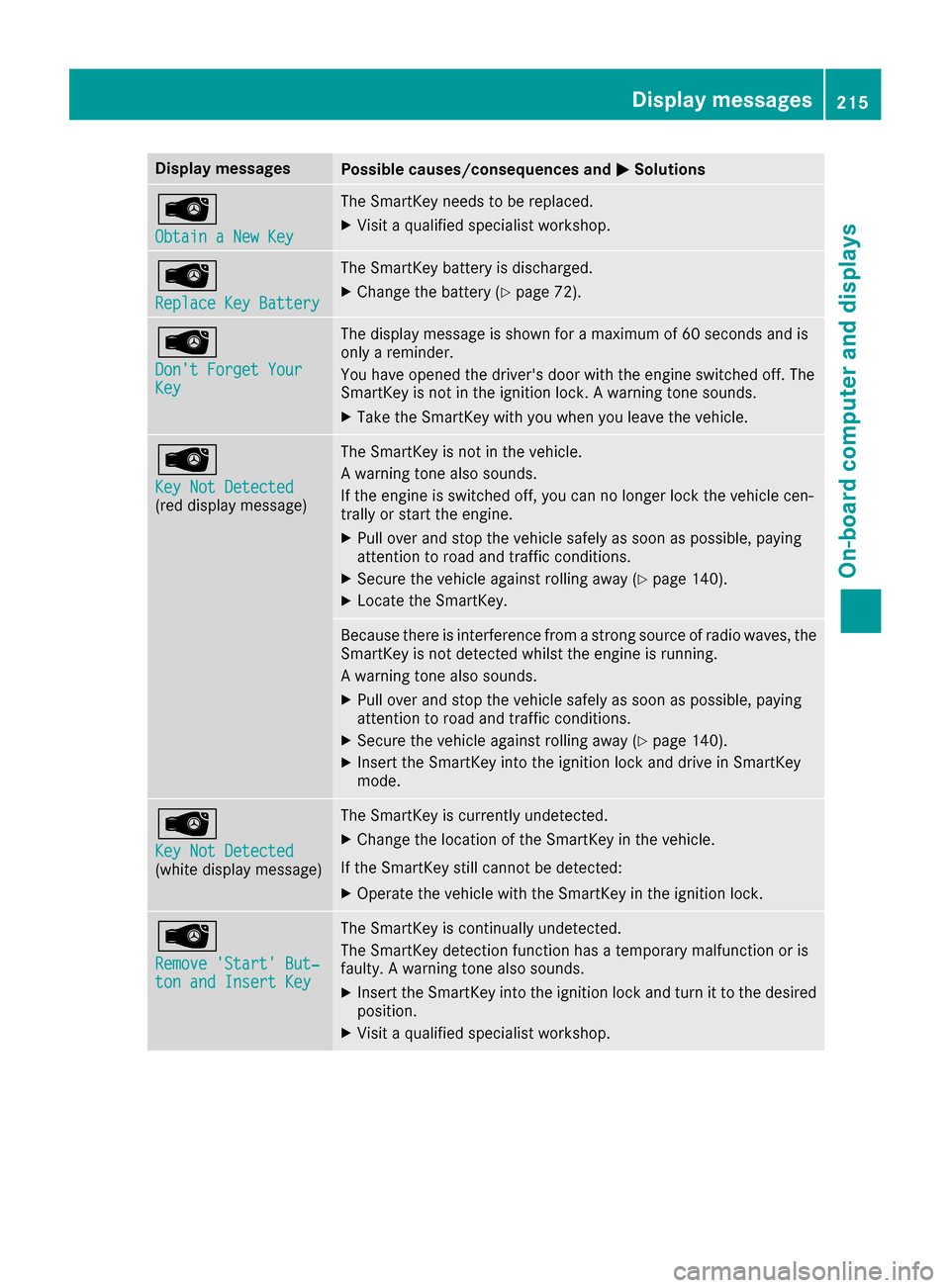
Display messagesPossible causes/consequences andMSolutions
Â
ObtainaNew Key
The SmartKey needs to be replaced.
XVisit aqualified specialist workshop .
Â
ReplaceKey Batter y
The SmartKey battery is discharged.
XChange thebattery (Ypage 72) .
Â
Don't Forget You rKey
The display message is shown for amaximum of 60 seconds and is
only areminder.
You hav eopened th edriver's door wit hth eengin eswitched off .The
SmartKey is no tin th eignition lock. Awarning tone sounds.
XTak eth eSmartKey wit hyou when you leav eth evehicle.
Â
Key Not Detected(re ddisplay message )
The SmartKey is no tin th evehicle.
A warning tone also sounds.
If th eengin eis switched off ,you can no longer loc kth evehicl ecen-
trally or start th eengine.
XPull ove rand stop th evehicl esafely as soo nas possible, payin g
attention to roa dand traffic conditions.
XSecur eth evehicl eagainst rollin gaway (Ypage 140).
XLocate th eSmartKey.
Becaus ethere is interferenc efrom astron gsource of radi owaves, th e
SmartKey is no tdetecte dwhils tth eengin eis running.
A warning tone also sounds.
XPull ove rand stop th evehicl esafely as soo nas possible, payin g
attention to roa dand traffic conditions.
XSecur eth evehicl eagainst rollin gaway (Ypage 140).
XInsertth eSmartKey int oth eignition loc kand drive in SmartKey
mode.
Â
Key Not Detected(whit edisplay message )
The SmartKey is currentl yundetected.
XChange th elocation of th eSmartKey in th evehicle.
If th eSmartKey still canno tbe detected:
XOperat eth evehicl ewit hth eSmartKey in th eignition lock.
Â
Remove 'Start 'But ‐ton and Insert Key
The SmartKey is continually undetected.
The SmartKey detection function has atemporar ymalfunction or is
faulty. Awarning tone also sounds.
XInser tth eSmartKey int oth eignition loc kand tur nit to th edesire d
position .
XVisitaqualified specialist workshop .
Display messages215
On-board computer and displays
Z
Page 230 of 318

Operating system
Overview
General notes
!Do not use the space in front of the display
for storage. Objects placed here could dam-
age the display or impair its function. Avoid
any direct contact with the display surface.
Pressure on the display surface may result in
impairments to the display, which could be
irreversible.
Wearing polarized sunglasses may impair your
ability to read the display.
The display has an automatic temperature-con-
trolled switch-off feature. The brightness is
automatically reduced if the temperature is too
high. The display may temporarily switch off
completely.
Cleaning instructions
!Do not touch the display. The display has a
very sensitive high-gloss surface; there is a
risk of scratching. If you have to clean the
screen, however, use a mild cleaning agent
and a soft, lint-free cloth.
The display must be switched off and have
cooled down before you start cleaning. Do not
apply pressure to the display surface when
cleaning it, as this could cause irreversible dam-
age to the display.
Switching the multimedia system
on/off
XPress the qcontrol knob.
Adjusting the volume
XTurn the qcontrol knob.
The volume is adjusted:
Rfor the currently selected media source
Rduring traffic or navigation announcements
Rin hands-free mode during a phone call
Switching the sound on or off
XPress the 8button on the control panel.
If the audio output is switched off, the status
line will show the 8symbol. If you switch the media source or set the volume, the sound
is automatically switched on.
iNavigation announcements will be heard
even if the sound is muted.
Functions
The multimedia system has the following func-
tions:
RRadio mode
RMedia mode with media search
RSound systems
RNavigation system
COMAND: navigation via the hard drive
Audio 20: navigation via SD card
RCommunication functions
RSIRIUS Weather (COMAND)
RVehicle functions with system settings
RFavorites functions
Controller
The controller in the center console lets you:
Rselect menu items on the display
Renter characters
Rselect a destination on the map
Rsave entries
The controller can be:
Rturned 3
Rslid left or right 1
Rslid forwards or back 4
Rslid diagonally2
Rpressed briefly or pressed and held 7
Back button
You can use the%button to exit a menu or to
call up the basic display of the current operating
mode.
XTo exit the menu: briefly press the%
button.
The multimedia system changes to the next
higher menu level in the current operating
mode.
XTo call up the basic display: press the%
button for longer than two seconds.
The multimedia system changes to the basic
display of the current operating mode.
228Operating system
Multimedia system