2017 MERCEDES-BENZ CLA-Class Digital
[x] Cancel search: DigitalPage 22 of 318

Removingth etowin geye .............. .277
Towing a trailer
ESP
®(Electronic Stability Pro-
gram) ............................................... 66
Towing away
Important safety guidelines ........... 276
Installing the towing eye ................ 277
Notes for 4MATIC vehicles ............ 279
Removing the towing eye ...............2 77
Transporting the vehicle ................ 278
With both axles on the ground ....... 278
With front axle raised ..................... 277
Towing eye ......................................... 266
Traffic reports
see also Digital Operator's Man-
ual ..................................................2 27
Transmission
see Automatic transmission
Transmission position display
(DIRECT SELECT lever) ......................129
Transporting the vehicle .................. 278
Trim pieces (cleaning instruc-
tions) ..................................................2 64
Trip computer (on-board com-
puter) ..................................................1 77
Trip odometer
Calling up ....................................... 177
Resetting (on-board computer) ...... 178
Trunk
Emergency release .......................... 80
Emergency release button ...............8 0
Important safety notes .................... 77
Opening (automatically from out-
side) .................................................7 8
Opening (from outside the vehi-
cle, HANDS-FREE ACCESS) .............. 78
Opening automatically from
inside ............................................... 79
Opening/closing (manually from
outside) ............................................ 77
Trunk emergency release button .......80
Trunk lid
Display message ............................ 213
Opening dimensions ...................... 314
Trunk load (maximum) ...................... 314
Turn signals
Display message ............................ 199 Replacing bulbs (front) ................... 105
Swi
tching o
n/off ........................... 100
Two-way radio
Frequencies ................................... 307
Installation ..................................... 307
Transmission output (maximum) .... 307
Type identification plate
see Vehicle identification plate
U
UnlockingEmergency unlocking ....................... 76
From inside the vehicle (central
unlocking button) ............................. 75
Upshift indicator (on-board com-
puter, Mercedes-AMG vehicles) ....... 185
USB devices
Connecting to the Media Inter-
face ............................................... 232
V
Vanity mirror (in the sun visor) ........ 240
Vehicle
Correct use ...................................... 27
Data acquisition ............................... 28
Display message ............................ 211
Equipment ....................................... 24
Individual settings .......................... 183
Limited Warranty ............................. 28
Loading .......................................... 292
Locking (in an emergency) ............... 76
Locking (SmartKey) .......................... 69
Lowering ........................................ 305
Maintenance .................................... 25
Parking for a long period ................ 142
Pulling away ................................... 124
Raising ........................................... 303
Reporting problems .........................2 7
Securing from rolling away ............ 302
Transporting .................................. 278
Unlocking (in an emergency) ........... 76
Unlocking (SmartKey) ...................... 69
Vehicle data ................................... 314
Vehicle data
Roof load (maximum) ..................... 314
Trunk load (maximum) ................... 314
20Index
Page 23 of 318

Vehicle dimensions........................... 314
Vehicle emergency locking ................ 76
Vehicle identification number
see VIN
Vehicle identification plate .............. 308
Vehicle tool kit .................................. 266
Ventilation
Setting the vents ........................... 119
Video
Operating the DVD ......................... 180
see also Digital Operator's Man-
ual .................................................. 227
VIN
Seat ............................................... 309
Type plate ...................................... 308
W
Warning and indicator lampsABS ................................................ 218
Active Brake Assist ........................ 225
Brakes ........................................... 217
Check Engine ................................. 222
Coolant .......................................... 223
Distance warning ........................... 225
ESP
®.............................................. 219
ESP®OFF ....................................... 220
Fuel tank ........................................ 222
Overview .......................................... 32
PASSENGER AIR BAG ...................... 40
Reserve fuel ................................... 222
Restraint system ............................ 222
Seat belt ........................................ 216
SPORT handling mode ................... 220
Tire pressure monitor .................... 226
Warranty .............................................. 24
Washer fluid
Display message ............................ 214
Weather display (COMAND)
see also Digital Operator's Man-
ual .................................................. 227
Wheel and tire combinations
Tires ............................................... 306
Wheel bolt tightening torque ........... 305
Wheel chock ...................................... 302
Wheels
Changing a wheel .......................... 301
Checking ........................................ 282 Cleaning ......................................... 261
Important safety notes .................. 282
Information on driving .................... 282
Interchanging/changing ................ 301
Mounting a new wheel ................... 304
Removing a wheel .......................... 304
Storing ........................................... 302
Tightening torque ........................... 305
Wheel size/tire size ....................... 306
Window curtain air bag
Display message ............................ 196
Operation ......................................... 46
Windows
see Side windows
Windshield
Defrosting ...................................... 116
Windshield washer system
Adding washer fluid ....................... 257
Important safety notes .................. 313
Windshield wipers
Display message ............................ 214
Problem (malfunction) ................... 108
Replacing the wiper blades ............ 107
Switching on/off ........................... 106
Winter driving
Slippery road surfaces ................... 147
Snow chains .................................. 285
Winter operation
General notes ................................ 284
Winter tires
M+S tires ....................................... 284
Wiper blades
Cleaning ......................................... 262
Imp
ortant safety notes .................. 107
Wooden trim (cleaning instruc-
tions) .................................................. 264
Workshop
see Qualified specialist workshop
Z
ZONE functionSwitching on/off ........................... 116
Index21
Page 24 of 318

Introduction
The printedOperator's Manual provide sinfor-
mation about th esaf eoperation of your vehicle.
The Digital Operator's Manual provide scompre-
hensiv eand specifically adapted information on
your vehicle's equipmen tand multimedia sys-
tem. You can call up th eDigital Operator's Man -
ual via th emultimedia system.
iYou will no tincur any cost swhen calling up
th eDigital Operator's Manual. The Digital
Operator's Manual works without connecting
to th eInternet .
Ther eare three ways to access th etopic sof th e
Digital Operator's Manual:
RVisua lsearch
The visual search allows you to explor eyour
vehicl e"virtually". Starting from either th e
vehicl eexterio rvie wor interio rview, you can
access man yof th edifferen ttopic scovered
by th eDigital Operator's Manual. To access
th evehicl einterio rsection ,select th e"Vehi-
cle interior" view.
RKeywor dsearch
The keyword search allows you to search for a
keyword by enterin gcharacters.
RContent s
You can select individual section sin th econ-
tents.
iThe Digital Operator's Manual is deactiva-
te dfor safet yreason swhile driving .
Operation
Calling up the Digital Operator's Man-
ual
XPress theØ buttonin th ecenter console.
The overview relating to th evehicl eappears.
XSelec tth e"Operator's Manual" men uitem by
turnin g3 or pressin g7 thecontroller.
XConfir m7 themessage about th ewarning
and safet ynotes.
The basic men ufor th eDigital Operator's
Manual appears.
Operating the Digital Operator's Man-
ual
General notes
Pleas eobserv eth einformation about th eoper -
ation of th econtroller (Ypage 228).
Content pages
The conten tpages can be accessed by mean sof
a visual search , akeyword search or usin gth e
contents .
XTo scroll forwards/backwards: turn3
th econtroller .
XTo displayin full-screen or animation: slide
8 thecontroller to th elef t:.
XTo select information texts or sav ebook -
marks: slide9 thecontroller to th e
right ;.
XTo select alink :slide 6thecontroller
downwards =.
XTo exitacontent page: select%sym-
bol ?.
XTo call up th ebasic men uof th eDigital
Operator's Manual: selectÞsymbol A.
XTo switch functions to th emultimedi a
system using th ebutton son th ecenter
console: press the$, %,ÕorØ
button.
The selected men uappears. The Digital Oper -
ator's Manual remain sopen in th eback-
ground .
22Digital Operator's Manual
Page 31 of 318

After a malfunction has been rectified, the infor-
mation is deleted from the malfunction memory
or is continually overwritten.
When operating the vehicle, situations are con-
ceivable in which this technical data, in connec-
tion with other information (if necessary, under
consultation with an authorized expert), could
be traced to a person.
Examples include:
Raccident reports
Rdamage to the vehicle
Rwitness statements
Further additional functions that have been con- tractually agreed upon with the customer allow
certain vehicle data to be conveyed by the vehi-
cle as well. The additional functions include, for
example, vehicle location in case of an emer-
gency.
COMAND/mbrace
If the vehicle is equipped with COMAND or
mbrace, additional data about the vehicle's
operation, the use of the vehicle in certain sit-
uations, and the location of the vehicle may be
compiled through COMAND or the mbrace sys-
tem.
For additional information please refer to the
COMAND User Manual or the Digital Operator's
Manual and/or the mbrace Terms and Condi-
tions.
Event data recorders
This vehicle is equipped with an event data
recorder (EDR). This vehicle is equipped with an
event data recorder (EDR). The main purpose of
an EDR is to record, in certain crash or near
crash-like situations, such as an air bag deploy-
ment or hitting a road obstacle, data that will
assist in understanding how a vehicle's systems
performed. The EDR is designed to record data
related to vehicle dynamics and safety systems for a short period of time, typically 30 seconds
or less.
The EDR in this vehicle is designed to record
such data as:
RHow various systems in your vehicle were
operating
RWhether or not the driver and passenger
safety belts were buckled/fastened
RHow far (if at all) the driver was depressing theaccelerator and/or brake pedal and
RHow fast the vehicle was traveling.
These data can help provide a better under-
standing of the circumstances in which crashes and injuries occur. NOTE: EDR data are recorded
by your vehicle only if a non-trivial crash situa-
tion occurs; no data are recorded by the EDR
under normal driving conditions and no personal
data (e.g. name, gender, age and crash location)
are recorde d. Ho
wever, other parties, such as
law enforcement could combine the EDR data
with the type of personally identifying data rou-
tinely acquired during a crash investigation.
Access to the vehicle and/or the EDR is needed
to read data that is recorded by an EDR, and
special equipment is required. In addition to the
vehicle manufacturer, other parties that have
the special equipment, such as law enforce-
ment, can read the information by accessing the
vehicle or the EDR.
EDR data may be used in civil and criminal mat- ters as a tool in accident reconstruction, acci-
dent claims and vehicle safety. Since the Crash
Data Retrieval CDR tool that is used to extract
data from the EDR is commercially available,
Mercedes-Benz USA, LLC ("MBUSA") expressly
disclaims any and all liability arising from the
extraction of this information by unauthorized
Mercedes-Benz personnel.
MBUSA will not share EDR data with others
without the consent of the vehicle owners or, if
the vehicle is leased, without the consent of the
lessee. Exceptions to this representation
include responses to subpoenas by law enforce- ment; by federal, state or local government; in
connection with or arising out of litigation involv-
ing MBUSA or its subsid
iaries and affiliates; or,
as required by law.
Warning: The EDR is a component of the
Restraint System Module. Tampering with, alter-
ing, modifying or removing the EDR component
may result in a malfunction of the Restraint Sys-
tem Module and other systems.
State laws or regulations regarding EDRs that
conflict with federal regulation are pre-empted.
This means that in the event of such conflict, the
federal regulation governs. As of February 2013, 13 states have enacted laws relating to EDRs.
Data stored in the vehicle29
Introduction
Z
Page 32 of 318

Information on copyright
General information
Information on license for free and open-source
software used in your vehicl eand it selectronic
component sis available on th efollowin gweb-
site:
http://www.mercedes-benz.com/opensource
Registered trademarks
RBluetoot h®isaregistere dtrademark of Blue -
toot hSI G Inc.
RDTS™ is aregistere dtrademark of DTS, Inc.
RDolby®and MLP ™are registere dtrademark s
of DOLB YLaboratories.
RBabySmart™, ES P®and PRE-SAFE®are reg-
istere dtrademark sof Daimler AG.
RHomeLink®is aregistere dtrademark of John -
son Controls.
RiPod®and iTunes®are registere dtrademark s
of Apple Inc.
RLogic7®is aregistere dtrademark of Harman
International Industries .
RMicrosoft®and Windows media®are regis-
tered trademark sof Microsoft Corporation .
RSIRIUS®isaregistere dtrademark of Sirius
XM Radio Inc.
RHD Radio™ is aregistere dtrademark of iBiq-
uit yDigital Corporation .
RGracenote®isaregistere dtrademark of
Gracenote, Inc.
RZAGA TSurvey®and relate dbrands are regis-
tered trademark sof Zagat Survey, LLC.
30Information on copyright
Introduction
Page 35 of 318
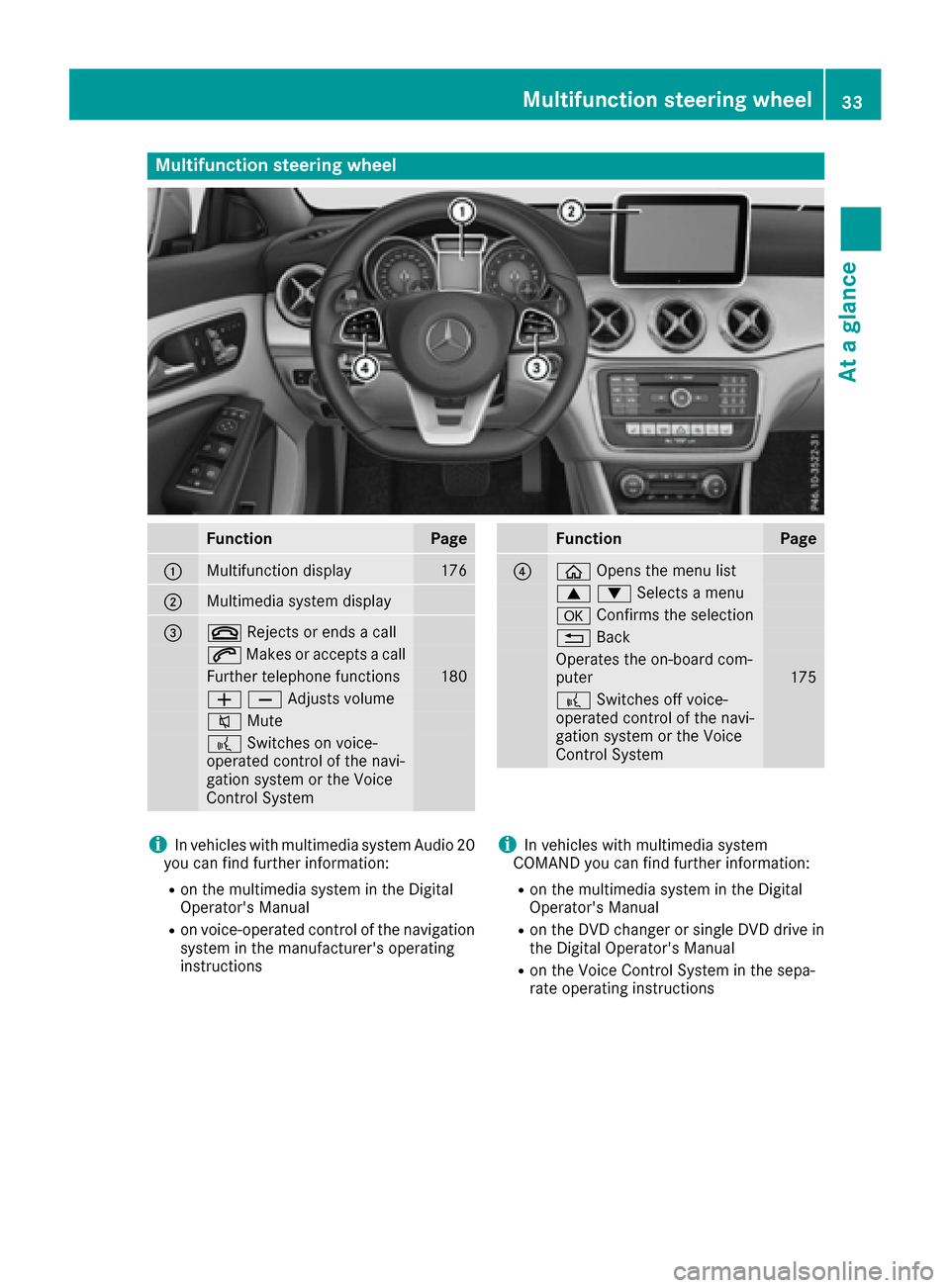
Multifunction steering wheel
FunctionPage
:Multifunction display176
;Multimedia system display
=~Rejects or ends a call
6Makes or accepts a call
Further telephone functions180
WXAdjusts volume
8 Mute
?Switches on voice-
operated control of the navi-
gation system or the Voice
Control System
FunctionPage
?ò Opens the menu list
9:Selects a menu
aConfirms the selection
%Back
Operates the on-board com-
puter175
?Switches off voice-
operated control of the navi-
gation system or the Voice
Control System
iIn vehicles with multimedia system Audio 20
you can find further information:
Ron the multimedia system in the Digital
Operator's Manual
Ron voice-operated control of the navigation
system in the manufacturer's operating
instructions
iIn vehicles with multimedia system
COMAND you can find further information:
Ron the multimedia system in the Digital
Operator's Manual
Ron the DVD changer or single DVD drive in
the Digital Operator's Manual
Ron the Voice Control System in the sepa-
rate operating instructions
Multifunction steering wheel33
At a glance
Page 136 of 318
Drive programI(Individual)
In drive progra mIth efollowing properties of th e
drive progra mcan be selected:
Rthedrive (engin eand transmissio nmanage-
ment)
Rth esuspensio n(vehicles wit hdampin gsys-
te m or AM Gadaptive sport suspensio nsys-
tem)
Rth esteerin g
Rtheavailabilit yof th eECO start/sto pfunction
Rth eclimat econtrol
Information about configurin gdrive progra mI
wit hth emultimedia system can be found in th e
Digital Operator' sManual.
iTo permanentl yselect th egear sin drive
progra mIusin gth esteerin gwhee lpaddl e
shifters ,select th eM (manual) setting fo rth e
drive.
Drive program E(Economy)
Drive progra mEis characterized by th efollow-
ing:
Rcomfort-oriented engin esettings.
Roptimal fue lconsumption resultin gfrom th e
automati ctransmissio nshiftin gup sooner.
Rth evehicl epulls away mor egentl yin forwar d
and revers egears, unless th eaccelerato r
peda lis depressed fully.
Rth evehicl ehas improved drivin gstability, fo r
exampl eon slipper yroa dsurfaces.
Rth eautomati ctransmissio nshiftin gup
sooner. This result sin th evehicl ebein gdriven
at lowe ren gin
es
peeds and th ewheels bein g
less likely to spin .
Rglidingmod eis activated automatically when
engine-internal condition sare fulfilled and
th eaccelerato ris no tdepressed. At th esam e
time th etransmission’s clutc hopens and th e
vehicl erolls freely usin gits kineti cenergy. As
a result great distances can be completed
without th eengin ebrak eand fue lconsump-
tion reduced.
iThe availabilit yof glidin gmod edepend son
various factors ,includin gth efollowing :
Rtheengin eand transmissio ntemperature
Rth edownhill gradien t
Rthevehicl espeed
Rperformin gregular adaptation function sWhe
nyou depress th ebrak epedal, glidin g
mod eis deactivated, dependin gon peda l
pressure.
Whe nyou activat ecruise control or Distanc e
Pilo tDISTRONIC, glidin gmod eis no tavaila-
ble.
Mercedes-AMG vehicles
Drive program I(Individual)
In drive progra mIth efollowing properties of th e
drive progra mcan be selected:
Rthedrive (engin emanagement)
Rth etransmissio nmanagemen t
Rthesuspensio n(vehicles wit hAM Gadaptive
sport suspensio nsystem)
RES P®
Information about configurin gdrive progra mI
wit hth emultimedia system can be found in th e
Digital Operator' sManual.
Drive program C(Comfort)
Drive progra mCis characterized by th efollow-
ing:
Rth evehicl edeliver scomfortable, economical
handlin gcharacteristics .
Rthevehicl epulls away mor egentl yin forwar d
and revers egears, unless th eaccelerato r
peda lis depressed fully.
Rth evehicl ehas improved drivin gstability, fo r
exampl eon slipper yroa dsurfaces.
Roptimal fue lconsumption resultin gfrom th e
automati ctransmissio nshiftin gup sooner.
The vehicl eis driven in th elow engin espeed
range and th ewheels are less likely to spin .
Rglidingmod eis available.
Rth eECO start/sto pfunction is available.
Drive program S(Sport)
Drive progra mSis characterized by th efollow-
ing:
Rth evehicl eexhibits sport ydrivin gcharacter-
istics .
Rtheautomati ctransmissio nshift sup later.
The fue lconsumption possibl ybein ghigher
as aresult of th elater automati ctransmissio n
shift points .
Rthesuspensio nexhibits stiff springin gand
dampin gsetting s(vehicles wit hAI R adaptive
sport suspensio nsystem) .
134Automatic transmission
Driving and parking
Page 169 of 318
Rif the camera lens is dirty or obstructed
Observe the notes on cleaning
(
Ypage 262)
Rif the rear of your vehicle is damaged. In this
case, have the camera position and setting
checked at a qualified specialist workshop
The field of vision and other functions of the rear
view camera may be restricted due to additional
accessories on the rear of the vehicle (e.g.
license plate holder, bicycle rack).
Activating/deactivating the rear view
camera
XTo activate: make sure that the SmartKey is
in position 2in the ignition lock.
XMake sure that the Activation by R gearfunction is selected in the multimedia system;
see the Digital Operator's Manual.
XEngage reverse gear.
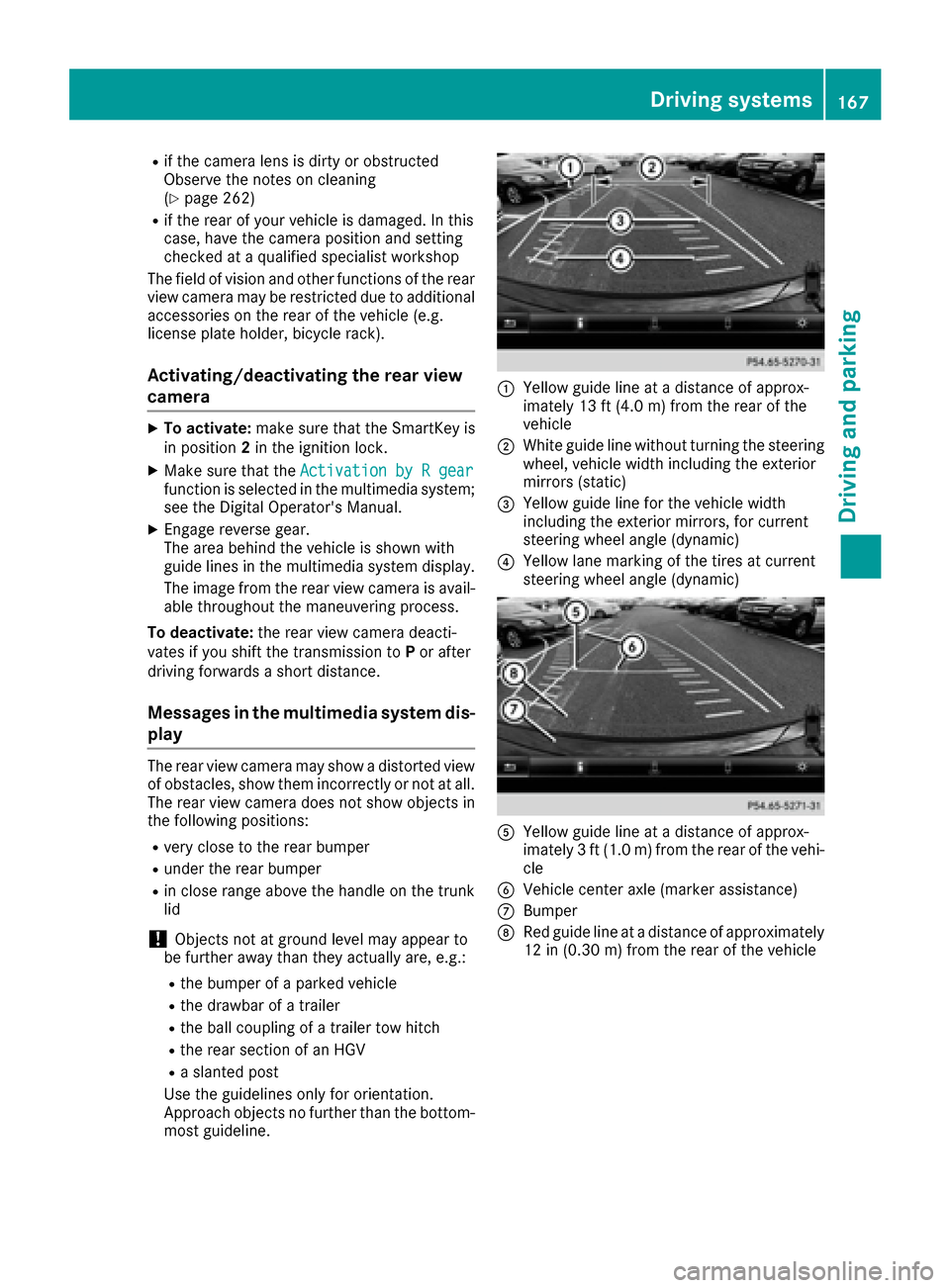
The area behind the vehicle is shown with
guide lines in the multimedia system display.
The image from the rear view camera is avail-
able throughout the maneuvering process.
To deactivate: the rear view camera deacti-
vates if you shift the transmission to Por after
driving forwards a short distance.
Messages in the multimedia system dis- play
The rear view camera may show a distorted view
of obstacles, show them incorrectly or not at all.
The rear view camera does not show objects in
the following positions:
Rvery close to the rear bumper
Runder the rear bumper
Rin close range above the handle on the trunk
lid
!Objects not at ground level may appear to
be further away than they actually are, e.g.:
Rthe bumper of a parked vehicle
Rthe drawbar of a trailer
Rthe ball coupling of a trailer tow hitch
Rthe rear section of an HGV
Ra slanted post
Use the guidelines only for orientation.
Approach objects no further than the bottom-
most guideline.
:Yellow guide line at a distance of approx-
imately 13 ft (4.0 m) from the rear of the
vehicle
;White guide line without turning the steering
wheel, vehicle width including the exterior
mirrors (static)
=Yellow guide line for the vehicle width
including the exterior mirrors, for current
steering wheel angle (dynamic)
?Yellow lane marking of the tires at current
steering wheel angle (dynamic)
AYellow guide line at a distance of approx-
imately 3 ft (1.0 m) from the rear of the vehi-
cle
BVehicle center axle (marker assistance)
CBumper
DRed guide line at a distance of approximately
12 in (0.30 m) from the rear of the vehicle
Driving systems167
Driving and parking
Z