X
To select Connect Device
Connect Device: turn and press
the controller.
The device list is displayed.
X To select the desired mobile phone: turn and
press the controller.
The selected mobile phone is searched for
and connected if it is within Bluetooth ®
range
and if Bluetooth ®
is activated.
Only one mobile phone can be connected at any one time. The currently connected mobile
phone is indicated by the 003Bdot in the device list.
i You can only switch to another authorized
mobile phone if you are not currently making
a call. De-authorizing (disconnecting) a
mobile phone
Mercedes-Benz USA, LLC recommends de-
authorization in the multimedia system as well
as on the mobile phone. Subsequent authoriza-
tion may otherwise fail.
X To call up the telephone menu: press the
002B button.
X To show the menu bar: slide 6the control-
ler.
X To select Connect Device
Connect Device: turn and press
the controller.
X To highlight the desired mobile phone in the
device list: turn the controller.
X To select G: slide 9the controller.
X To select Deauthorize
Deauthorize : turn and press the
controller.
A prompt appears, asking whether you really
wish to de-authorize this device.
X To select Yes
Yes: turn and press the controller.
The mobile phone is de-authorized.
i Before re-authorizing the mobile phone, you
should also delete the device name MB
MB Blue‐ Blue‐
tooth
tooth from your mobile phone's Bluetooth ®
list. Displaying connection details
X To call up the telephone menu: press the
002B button.
X To switch to the menu bar in the telephone
menu: slide 6the controller. X
To select Connect Device Connect Device: turn and press
the controller.
X To highlight the desired mobile phone in the
device list: turn the controller.
X To select G: slide 9the controller.
X To select Details
Details: turn and press the con-
troller.
The following information concerning the
selected mobile phone is shown:
R Bluetooth ®
device name
R Bluetooth ®
address
R Availability status (shown after a new
search)
R Authorization status
X To close the detailed display: slide8 the
controller. Reception and transmission volume
Once the mobile phone has been authorized,
you can optimize the transmission and recep-
tion volume settings. To find out about the best
possible settings for your mobile phone, visit
http://www.mercedes-benz.com/connect .
Or call the Mercedes-Benz Customer Assistance Center at 1-800-FOR-MERCedes
(1-800-367-6372)( USA) or Customer Relations
at 1-800-387-0100 (Canada). X
To call up the telephone menu: press the
002B button.
X To switch to the menu bar: slide 6the con-
troller.
X To select Connect Device Connect Device: turn and press
the controller.
The device list appears.
X To highlight the desired mobile phone in the
device list: turn the controller.
X To select G: slide 9the controller. 96
Reception and transmission volumeTelephone
i
A2DP (A
dvanced AudioDistribution Profile):
Bluetooth ®
audio profile for audio data trans-
mission
AVRCP (Audio VideoRemote ControlProfile):
Bluetooth ®
audio profile for audio data play-
back
i The Bluetooth ®
device must be visible to the
multimedia system for authorization. After
authorization, the multimedia system even
finds the Bluetooth ®
device when it is not
visible. General notes
Before using your Bluetooth ®
audio device with
the multimedia system for the first time, you will need to authorize it.
When you authorize a new Bluetooth ®
audio
device, it is connected automatically. Connec-
tion involves first searching for a Bluetooth ®
audio device and then authorizing it.
You can authorize up to 15 Bluetooth ®
devices.
i If you authorize a mobile phone that sup-
ports Bluetooth ®
audio, the A2DP and AVRCP
Bluetooth ®
audio profiles are connected
automatically.
The mobile phone is then entered:
R in the Bluetooth ®
telephone list
(Y page 93)
R in the Bluetooth ®
device list
(Y page 154)
Mercedes-Benz recommends authorizing a
mobile phone in Bluetooth ®
telephony
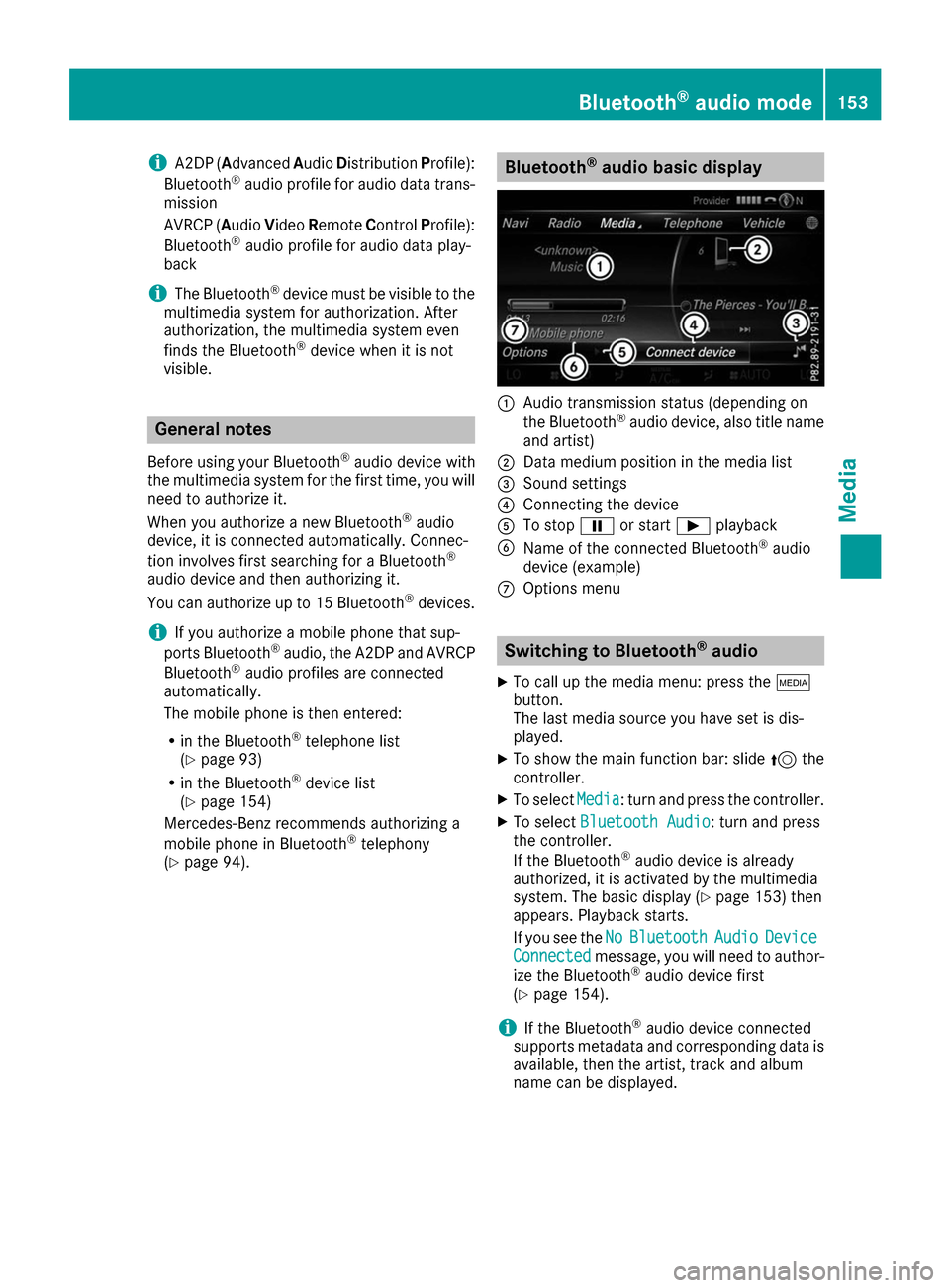
(Y page 94). Bluetooth
®
audio basic display 0043
Audio transmission status (depending on
the Bluetooth ®
audio device, also title name
and artist)
0044 Data medium position in the media list
0087 Sound settings
0085 Connecting the device
0083 To stop 00CFor start 00D0playback
0084 Name of the connected Bluetooth ®
audio
device (example)
006B Options menu Switching to Bluetooth
®
audio
X To call up the media menu: press the 00FD
button.
The last media source you have set is dis-
played.
X To show the main function bar: slide 5the
controller.
X To select Media
Media: turn and press the controller.
X To select Bluetooth Audio Bluetooth Audio: turn and press
the controller.
If the Bluetooth ®
audio device is already
authorized, it is activated by the multimedia
system. The basic display (Y page 153) then
appears. Playback starts.
If you see the No NoBluetooth
Bluetooth Audio
AudioDevice
Device
Connected
Connected message, you will need to author-
ize the Bluetooth ®
audio device first
(Y page 154).
i If the Bluetooth ®
audio device connected
supports metadata and corresponding data is
available, then the artist, track and album
name can be displayed. Bluetooth
®
audio mode 153Media Z