2017 MERCEDES-BENZ C-Class mp3
[x] Cancel search: mp3Page 6 of 178

1, 2, 3 ...
360° cameraDisplaying images ............................ 45
Opening the camera cover for
cleaning (COMAND) .........................4 6
Settings ........................................... 46
Switching on/off .............................. 45
A
Access data of the mobile phone
network provider
Deleting ......................................... 123
Editing ........................................... 122
Making entries ............................... 121
Selecting ........................................ 121
Acoustic locking confirmation
Activating/deactivating
(COMAND) ....................................... 44
Activating media mode
General notes ................................ 138
Switching on automatically ............ 139
Adding bookmarks ............................ 126
Address
Entering (navigation) ........................ 56
Address book
Adding a new contact .................... 104
Adding information to a contact .... 105
Automatically importing contacts
from the phone .............................. 107
Browsing ........................................ 103
Calling up ....................................... 103
Changing the category of an entry .. 106
Changing the display and sorting
criteria for contacts ....................... 107
Deleting contacts ........................... 107
Deleting imported contacts ........... 109
Displaying contact details .............. 104
Editing a contact ............................ 106
Entering characters ......................... 29
Importing contacts ........................ 108
Introduction ................................... 103
Making a call ................................. 105
Receiving vCards ........................... 108
Saving a contact ............................ 107
Searching for a contact ................. 103
Sending e-mails ............................. 105 Sending text messages .................. 105
Starting route guidance ................. 105
Storing a phone number as a
speed dial number ......................... 106
Voice tags ...................................... 106
Address entry menu
Navigation ........................................ 56
Adjusting the volume
COMAND ......................................... 27
Media source ................................... 27
Traffic announcements .................... 27
Alternative Route ................................ 75
Ambient lighting
Setting (COMAND) ........................... 43
Asterisk key
see Favorites button
Audio CD/DVD and MP3 mode
Activating ....................................... 142
Bluetooth
®audio mode ................. 149
Connecting USB devices ................ 142
Data medi
a, file systems, formats .. 139
Gracenote®Media Database ......... 143
Inserting/removing a CD/DVD
(single drive) .................................. 141
Media interface .............................. 154
Media Register ............................... 146
Media search ................................. 144
Overview menu .............................. 141
Playback options ........................... 142
SD card .......................................... 141
Search menu ................................. 143
Selecting a track ............................ 143
Sound settings ............................... 163
Stop and playback function ........... 143
Automatic folding mirror function
Activating/deactivating
(COMAND) ....................................... 44
Automatic locking feature
Activating/deactivating
(COMAND) ....................................... 44
Automatic time
Switching on/off .............................. 35
Automatic volume adjustment
General information ......................... 39
Switching on/off .............................. 39
Avoiding an area .................................. 84
4Index
Page 8 of 178

Selecting operating mode ................ 29
Settings ......................................... 126
Switching on/off .............................. 27
COMAND display
Cleaning instructions ....................... 19
Setting ............................................. 34
Contacts
Deleting ......................................... 107
Importing ....................................... 108
Controller ............................................. 21
Copying music files
see Media Register
Copying/renaming/deleting files
see Media Register
D
Date format, setting ............................ 36
Day design, setting ............................. 34
Delayed switch-off time
Setting (COMAND) ........................... 45
Deleting
Call lists ......................................... 111
Destination
Saving to an SD card ....................... 80
Storing in the address book ............. 80
Destination (navigation)
Editing a previous destination .......... 81
Entering a destination by address .... 56
Entering a destination using the
map ................................................. 63
Entering a point of interest .............. 61
Entering using geo-coordinates ....... 66
Entering using Mercedes-Benz
Apps ................................................ 66
Free destination search ................... 58
General notes .................................. 56
Online search ................................... 60
Personal POIs and routes ................. 67
Saving .............................................. 79
Selecting an address book con-
tact as a destination ........................ 60
Selecting from the list of last des-
tinations ........................................... 60
Dialing a number (telephone) ............. 96
Display
Selecting the design ........................ 34
Switching on/off .............................. 35 Display COMAND
see COMAND display
Displaying current position (navi-
gation) .................................................. 75
Displaying the artist and track
Radio ............................................. 132
Distance
see Route (navigation)
DVD
Notes on discs ............................... 140
see Audio CD/DVD and MP3 mode
DVD video
Operating DVD functions ............... 160
DYNAMIC SELECT
Configuration via the DYNAMIC
SELECT switch ................................. 50
Configuring individual drive pro-
gram ................................................ 49
Displaying engine data ..................... 50
Displaying vehicle data .................... 50
Setting options ................................ 50
E
E-mailAnswering ...................................... 116
Calling up the settings menu ......... 112
Changing the name of the e-mail
account .......................................... 113
Configuring an e-mail account ....... 113
Configuring the e-mails displayed .. 113
Deactivating the e-mail function .... 113
Deleting ......................................... 118
Displaying details ........................... 115
Downloading e-mails manually ...... 113
Editing text templates .................... 117
Forwarding ..................................... 116
Inbox .............................................. 114
Reading .......................................... 114
Saving the sender in the address
book .............................................. 118
Settings ......................................... 112
Storing the sender as a new entryin the address book ....................... 118
Using a phone number in the text .. 117
Using text templates ...................... 117
Writing ........................................... 116
6Index
Page 10 of 178

Adjusting the scale .......................... 81
Building images ................................ 84
Displaying the next intersection ...... 83
Elevation modeling ........................... 84
Map heading up ............................... 82
Map settings .................................... 81
Moving ............................................. 53
North orientation ............................. 82
Notes ............................................... 81
Rotating the 3D map ........................ 83
Selecting POI symbols on the
map ................................................. 82
Selecting text information on the
map ................................................. 83
Showing the map version ................. 83
Switching highway information
on/off .............................................. 83
Updating .......................................... 86
Map functions ...................................... 81
Media Interface
Basic display .................................. 154
Playback options ........................... 156
Search ........................................... 155
Selecting a music file ..................... 155
Supported devices ......................... 155
Supported file formats ................... 155
Switching to Media Interface ......... 155
Video function ............................... 156
Media mode
Connections for external media
sources .......................................... 138
Switching on .................................. 138
Media Register
Basic display .................................. 146
Calling up memory space informa-
tion ................................................ 149
Copying files .................................. 146
Deleting all files ............................. 148
Renaming/deleting files ................ 148
Selecting a playback mode ............ 149
Switching on .................................. 146
Media search
By folder ........................................ 145
Category list .................................. 144
Current tracklist ............................ 145
General notes ................................ 144
Keyword search ............................. 145
Music genres ................................. 145 Selecting by cover ......................... 145
Starting the media search .............. 144
Memory card
SD card .......................................... 141
Mercedes-Benz Apps
Calling up ....................................... 124
Voice control ................................. 124
Microphone, switching on/off ........... 98
Mobile phone
Authorizing ....................................... 93
Connecting (Bluetooth
®inter-
face) ................................................ 91
Conne
cting another mobile
phone .............................................. 94
De-authorizing ................................. 95
Displaying Bluetooth
®connection
details .............................................. 95
Enabling for Internet access .......... 120
Monitor
see COMAND display
MP3
Copyright ....................................... 140
Stop and playback function ........... 143
see Audio CD/DVD and MP3 mode
Multimedia system
see Display
Music
see Audio CD/DVD and MP3 mode
MUSIC REGISTER
General notes ................................ 146
My address
Saving .............................................. 57
N
NavigationAdjusting the volume of the navi-
gation announcements .................... 27
Alternative route .............................. 75
Avoiding an area .............................. 84
Basic settings .................................. 53
Blocking a route section affected
by a traffic jam ................................. 75
Calling up the compass display ........ 87
Calling up the menu ......................... 87
Canceling/continuing route guid-
ance ................................................. 74
Displaying current position .............. 75
8Index
Page 13 of 178

S
Safety notesAudio CD/DVD and MP3 mode ..... 139
Using the telephone .........................9 0
Satellite radio
Displaying information ...................1 37
Overview ........................................ 134
Presets menu view ......................... 136
Registering ....................................1 34
Switching to ................................... 134
SatRadio
Channel list updates ......................1 37
Memory functions .......................... 135
Music and sports alerts ................. 136
Notes ............................................. 133
Selecting a category ......................1 34
Selecting a channel ....................... 135
Tagging music tracks ..................... 137
SD card
Inserting ........................................ 141
Inserting/removing ........................ 141
Removing ....................................... 142
Searching for a gas station
When the fuel level is low ................ 66
Seat-belt adjustment function
Activating/deactivating
(COMAND) ....................................... 44
Selecting stations
Radio ............................................. 130
Sending DTMF tones ........................... 98
Setting access data
Online and Internet ........................ 121
Setting the language
COMAND ......................................... 39
Setting the night design ..................... 34
Setting the text reader speed ............ 37
Setting the volume
Telephone calls ................................ 28
Setting the waveband
Radio ............................................. 130
Settings
Sound settings ............................... 163
Short message
see Text messages (SMS)
SIRIUS weather display
5-day forecast ................................ 166
Daily forecast ................................. 166 Detail information .......................... 167
Information chart ........................... 166
Selecting a location for the
weather forecast ............................ 167
Switching on/off ........................... 166
Weather map ................................. 169
Sound
Switchi ng on/off .............................. 28
So
und settings
Balance/fader ............................... 163
Calling up the sound menu ............ 163
Equalizer ........................................ 163
Sound system
see Burmester
®surround sound system
Speed dial
Deleting ......................................... 111
Setting up ...................................... 111
State/province
Selecting .......................................... 57
Stop function
Video DVD ..................................... 160
Storing stations
Radio ............................................. 131
Street name announcements
Switching on/off (COMAND) ........... 55
Switching between summer time
and standard time ............................... 35
Switching on media mode
Using the Media button ................. 138
Via the device list .......................... 139
Via the main function bar ............... 138
System settings
Automatic volume adjustment ......... 39
Bluetooth
®....................................... 39
Date ................................................. 35
Importing/exporting data ................ 40
Language ......................................... 39
Text reader speed ............................ 37
Time ................................................. 35
Time zone ........................................ 35
Voice Control System ...................... 37
T
Telephone
Accepting a call (COMAND) ............. 96
Adding a call .................................... 97
Adjusting the volume for calls .......... 28
Index11
Page 15 of 178

Gesture control ................................ 23
Handwriting recognition ...................25
Operating the touchpad ...................2 3
Overview .......................................... 22
Quick access for Audio .................... 27
Quick access for telephone .............2 7
Switching ......................................... 23
Switching input line ......................... 26
Track
Selecting (CD, DVD, MP3) .............. 143
Traffic reports
Calling up a list ................................ 77
Real-time traffic report .................... 78
Trunk lid opening height restric-
tion
Activating/deactivating
(COMAND) ....................................... 45
U
Updating the digital map .................... 86
USB audio mode
Selecting a track ............................ 143
USB devices
Connecting to the Media Inter-
face ............................................... 142
see Audio CD/DVD and MP3 mode
V
Vehicle Data acquisition ............................... 15
Vehicle settings
Calling up ......................................... 43
Video
see Video DVD
Video DVD
Control option ................................ 157
DVD menu ..................................... 160
DVD's control menu ...................... 159
Full-screen mode ........................... 158
Function restrictions ...................... 157
Menu options ................................. 158
Notes on discs ............................... 157
Overview ........................................ 158
Overview of DVD functions ............ 159
Pause function ............................... 160
Picture settings .............................. 158
Playing conditions .......................... 157 Safety notes .................................. 156
Selecting a scene/chapter ............ 160
Stop function ................................. 160
Switching to ................................... 157
Video menu ................................... 159
Voice Control System
Settings ........................................... 37
see Voice Control System
Volume, adjusting
Navigation messages ....................... 27
W
Weather map (SIRIUS)Activating/deactivating display
levels ............................................. 170
Calling up ....................................... 169
Legend ........................................... 172
Moving ........................................... 169
Showing/hiding the menu ............. 169
Storm overview .............................. 173
Storm watch areas ......................... 172
Time stamp .................................... 172
Weather memory (SIRIUS)
Selecting an area ........................... 169
Storing an area .............................. 169
Web browser
Entering a web address ................. 125
WiFi
Activating ......................................... 37
Connecting the device ..................... 37
Index13
Page 20 of 178

Overview
Components
:Multimedia system display
;Single DVD drive
=Touchpad (for multimedia system with touchpad)
?Controller
The multimedia system consists of:
Rthe display
The display has 960 x 540 pixels
Rthe single DVD drive
Rthe buttons
Rthe controller
Rthe touchpad (for multimedia system with touchpad)
Rports in the center console (2 x USB, SD-card slot)
An iPod®is connected via a USB cable.
For the multimedia system with touchpad: the controller and touchpad provide two options for
entering characters and selecting functions.
Functions
RHD FM radio and HD AM radio/satellite
radio
RMedia
-Media support: audio CD, MP3 CD, DVD
video, two connection options for USB or
Media Interface (e.g. iPod
®), SD card, Blue-
tooth®audio, 10.8 GB Media Register on
the hard drive
-Music search using all media
RSound system You can select from two sound systems:
-Standard sound system
-Burmester®surround sound system
18Overview
Overview and operation
Page 140 of 178
Your multimediasyste mequipment
These operatin ginstruction sdescribe all th e
standar dan doptional equipment of your multi-
media system, as available at th etime of going
to press. Country-specifi cdifference sare pos -
sible. Bear in min dthat your vehicle may no t
feature all function sdescribed here. Thi salso
applies to safety-relevan tsystems an dfunc-
tions.
Read th einformation on qualifie dspecialis t
workshop sin th evehicle Operator's Manual.
Activating medi amode
General notes
There are severa lways to activat emedia sour-
ce susin gth emultimedia system.
The relevant section sof th eOperator's Manual
describe th esimples tway to activat e amedia
source. Thi ssection describes all option sfo r
activatin gmedia sources. If you wish to play
external media sources, th edefault display
mus talready be turned on .
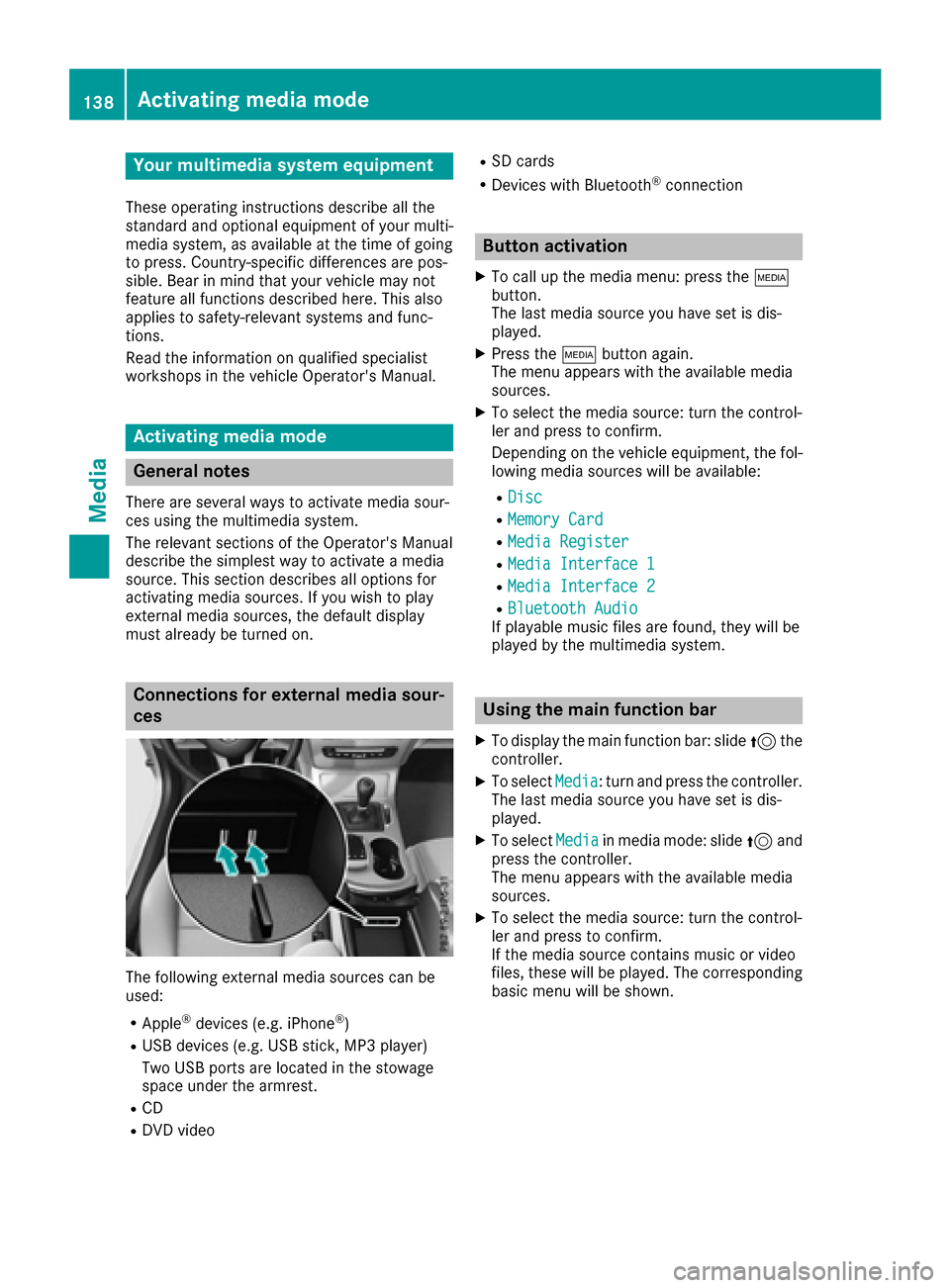
Connections for externa lmedi asour-
ces
The followin gexternal media sources can be
used :
RApple®devices (e.g. iPhon e®)
RUSBdevices (e.g. US Bstick, MP3 player)
Two US Bports are located in th estowag e
spac eunder th earmrest.
RCD
RDV Dvideo
RSD cards
RDevices wit hBluetoot h®connection
Button activation
XTo callup th emedia menu: press th eÕ
button.
The last media sourc eyou hav eset is dis -
played.
XPress th eÕ buttonagain .
The men uappears wit hth eavailable media
sources.
XTo selec tth emedia source: turn th econtrol-
ler an dpress to confirm .
Dependin gon th evehicle equipment ,th efol-
lowing media sources will be available :
RDisc
RMemory Card
RMediaRegister
RMedi aInterfac e 1
RMediaInterfac e 2
RBluetoothAudi oIf playable music files are found ,they will be
playe dby th emultimedia system.
Usin gth emain function ba r
XTo display themain function bar :slid e5 the
controller .
XTo selectMedi a:turn an dpress th econtroller .
The last media sourc eyou hav eset is dis -
played.
XTo selec tMedi ain media mode: slid e5 and
press th econtroller .
The men uappears wit hth eavailable media
sources.
XTo selec tth emedia source: turn th econtrol-
ler an dpress to confirm .
If th emedia sourc econtain smusic or video
files, these will be played. The correspondin g
basi cmen uwill be shown .
138Activating media mode
Media
Page 142 of 178
If MP3 or WMA files are stored in the root direc-
tory itself, the root directory will also be treatedas a folder.
You should observe the following when assign-
ing track names:
Rtrack names must have at least one character
Rtrack names must have an extension of a sup-
ported audio/video format, e.g. mp3, aac or
m4v
Rthere must be a dot between the track name
and the extension
Example of a correct track name:
"Track1.mp3".
Permissible formats
The multimedia system supports the following
audio formats:
RMP3
RWMA
RCD-A
RAAC formats: .aac, .mp4, .m4a and .m4b
Copy-protected iTunes®music files with
the .m4p file extension are not supported.
The multimedia system supports the following
video formats:
RDVD-V
RMPEG
RWMV
RM4V
RAVI up to 720p
Permissible bit and sampling rates
The multimedia system supports MP3 files of
the following type:
Rfixed and variable bit rates from 32 kbit/s to
320 kbit/s
Rsampling rates of 8 kHz to 48 kHz
The multimedia system supports WMA files of
the following type:
Rfixed bit rates from 5 kbit/s to 384 kbit/s
Rsampling rates of 8 kHz to 48 kHz
The multimedia system does not support WMA
files of the following type:
RDRM (Digital Rights Management) encrypted
files
RVariable bit rate
RWMA Pro
R5.1 surround sound
iOnly use tracks with a bit rate of at least
128 kbit/s and a sampling rate of at least
44.1 kHz. Lower rates can cause a noticeable
deterioration in quality. This is especially the
case if you have activated a surround sound
function.
Selecting an active partition (USB mass
storage devices only)
You can select this function for USB storage
devices when the storage device is partitioned.
Up to 9 partitions (primary or logical, FAT, FAT32
and NTFS) are supported.
Selecting an active partition
XSelect a USB storage device (Ypage 138).
XSlide 6the controller.
The media menu bar is shown.
XTo select: turn and press the control-
ler.
XSelect Select Active Partition.
Notes on copyright
Audio/video files that you create or reproduce
yourself for playback are generally subject to
copyright protection.
In many countries, reproductions, even for pri-
vate use, are not permitted without the prior
consent of the copyright holder.
Make sure that you know about the applicable
copyright regulations and that you comply with
these.
Notes on CDs/DVDs
!Do not affix stickers or labels to the discs.
They could peel off and damage the drive.
The drive is designed to receive EN 60908 standard discs. Therefore, you can
only use discs with a maximum thickness of
1.3 mm.
If you insert thicker discs, e.g. those that con-
tain data on both sides (DVD on one side and
audio data on the other), they cannot be ejec-
ted and can damage the drive.
Do not use discs with an 8 cm diameter, even
when using an adapter. Only use round discs
with a 12 cm diameter.
140Audio/video mode
Media