2017 MERCEDES-BENZ B-Class charging
[x] Cancel search: chargingPage 125 of 290

Controls on the charging cable
0043
A/C status indicator
0044 Control system and electrical fuses indica-
tor
0087 Charge current indicator
0085 Charge current setting button
When displays 0043and 0044on the charging cable
light up, this means the following: Display
0043 0043 Lights up green The external power
supply connection is
working properly. The
high-voltage battery
can be charged. Flashes red A malfunction has
been detected in the
external power sup-
ply. The high-voltage
battery is recharged
as soon as the elec-
tricity signal registers
normal values. Lights up red There is a malfunc-
tion. The charging
cable must be
removed from the
electrical outlet and
then re-inserted. Display
0044
0044 Lights up green There are no malfunc-
tions. The high-volt-
age battery can be
charged. Lights up red There is a malfunc-
tion. The high-voltage
battery cannot be
charged. For information on problems relating to the
charging process, see (Y
page 126).
Setting the maximum charge current G
WARNING
If the charge current draw via a mains socket is too high during the charging process, the
external electrical system may overheat.
There is a risk of fire.
Before beginning the charging process, check the maximum permissible charge current
locally. Consult a qualified expert to do so
where necessary.
If necessary, adjust your vehicle's settings.
! An excessive charge current can blow a fuse
or lead to overheating of the external power
supply. Check whether the external power
supply is compatible with the set charge cur-
rent. If necessary, lower the set charge cur-
rent or use another power socket.
You can set a limit for the values of the charge
current used in charging the high-voltage bat-
tery. This acts as a means of preventing the
power supply from overloading. You can set this limit by using the controls on the charging cable
or in the on-board computer's menu. Only set
the maximum charge current in the on-board
computer menu if there are no charge current
settings on the charging cable.
The default standard value is the minimum
charge current setting. This corresponds to the
minimum available charge current from the
power supply.
i The value of the maximum setting and the
relevant adjustment values may vary depend-
ing on the country.
Before charging the high-voltage battery, have
the maximum permissible charge current for the High-voltage battery
123Driving and parking Z
Page 126 of 290

relevant power socket checked by an electri-
cian.
X To adjust the setting: press button0085
repeatedly until the desired setting is selec-
ted in display 0087.
R Two LEDs are flashing: minimum setting
R All LEDs are flashing: maximum setting
Information about the charging time
(Y page 286)
If, after the charging process, the charging cable
is:
R left connected to the mains socket, the set
value will be used for the next charging proc-
ess.
R removed from the power socket, the values
will be reset to the minimum setting for the
next charging process. You may then need to
reset the values of the maximum charge cur-
rent.
If the charge current values that have been set
on the charging cable and the on-board com-
puter are different, the high-voltage battery is
charged using the lower value.
If the vehicle requires more time than usual to
charge the high-voltage battery, check:
R the settings of the maximum charge current
on the controls of the charging cable
R the settings of the maximum charge current in
the menu of the on-board computer Connecting the charging cable 0043
To open the charge socket flap
0044 Tire pressure table
0087 Socket cap
0085 Fastener
0083 Reference sticker (voltage range)
0084 Vehicle socket
006B Warning sticker (charging cable)
X Shift the DIRECT SELECT lever to position P.
X Switch the ignition off.
X Press the charge socket flap in the direction
of arrow 0043.
The charge socket flap swings up.
X Slide fastener 0085to the right.
Socket cap 0087is open.
X Insert the power supply plug into the electri-
cal outlet to the stop.
X Insert the charging cable connector into vehi-
cle socket 0084to the stop.
The high-voltage battery is being charged.
The vehicle must not be moved while the charg-
ing cable is connected or during charging.
i Depending on the temperature, the engine
cooling system and battery cooling system
may audibly switch on when the charging 124
High-voltage batteryDriving and parking
Page 127 of 290

cable is connected or during the charging
process.
Removing the charging cable !
Before driving away, you must ensure that,
for your own safety and to avoid damage, the charging cable has been removed from the
vehicle socket. Otherwise, you cannot shift
the transmission out of position P.
When the charge level display reaches 100%,
the battery is fully charged (Y page 153).When the battery is charged:
X Press and hold button 006Con the charging
cable connector and remove the charging
cable from vehicle socket 0084.
X Close socket cap 0087.
X Close the charge socket flap.
X Remove the charging cable from the electrical
outlet.
X Stow the charging cable safely in the vehicle
(Y page 122). Charging high-voltage battery at a
charging station/wallbox
General notes Only use charging cables that have been tested
and approved by the manufacturer for charging
the high-voltage battery in an electric vehicle.
Pay attention to the "Important safety notes"
(Y page 117).
Charging communication at a charging
station The charging station first has to be activated
before you can charge at a charging station. You can activate the charging station by using an
RFID card or via telephone activation. Observe
the on-site operator instructions for the charg-
ing station.
When the vehicle is connected to the charging
station, information and details on technical
parameters are exchanged. It can thus take up
to 30 seconds for the charging process to begin.
Connecting the charging cable 0043
To open the charge socket flap
0044 Tire pressure table
0087 Socket cap
0085 Fastener
0083 Reference sticker (voltage range)
0084 Vehicle socket
006B Warning sticker (charging cable)
X Shift the DIRECT SELECT lever to position P.
X Switch the ignition off.
X Press the charge socket flap in the direction
of arrow 0043.
The charge socket flap swings up.
X Slide fastener 0085to the right.
Socket cap 0087is open.
X Insert the charging cable connector into vehi-
cle socket 0084to the stop.
The high-voltage battery is being charged. High-voltage battery
125Driving and parking Z
Page 128 of 290
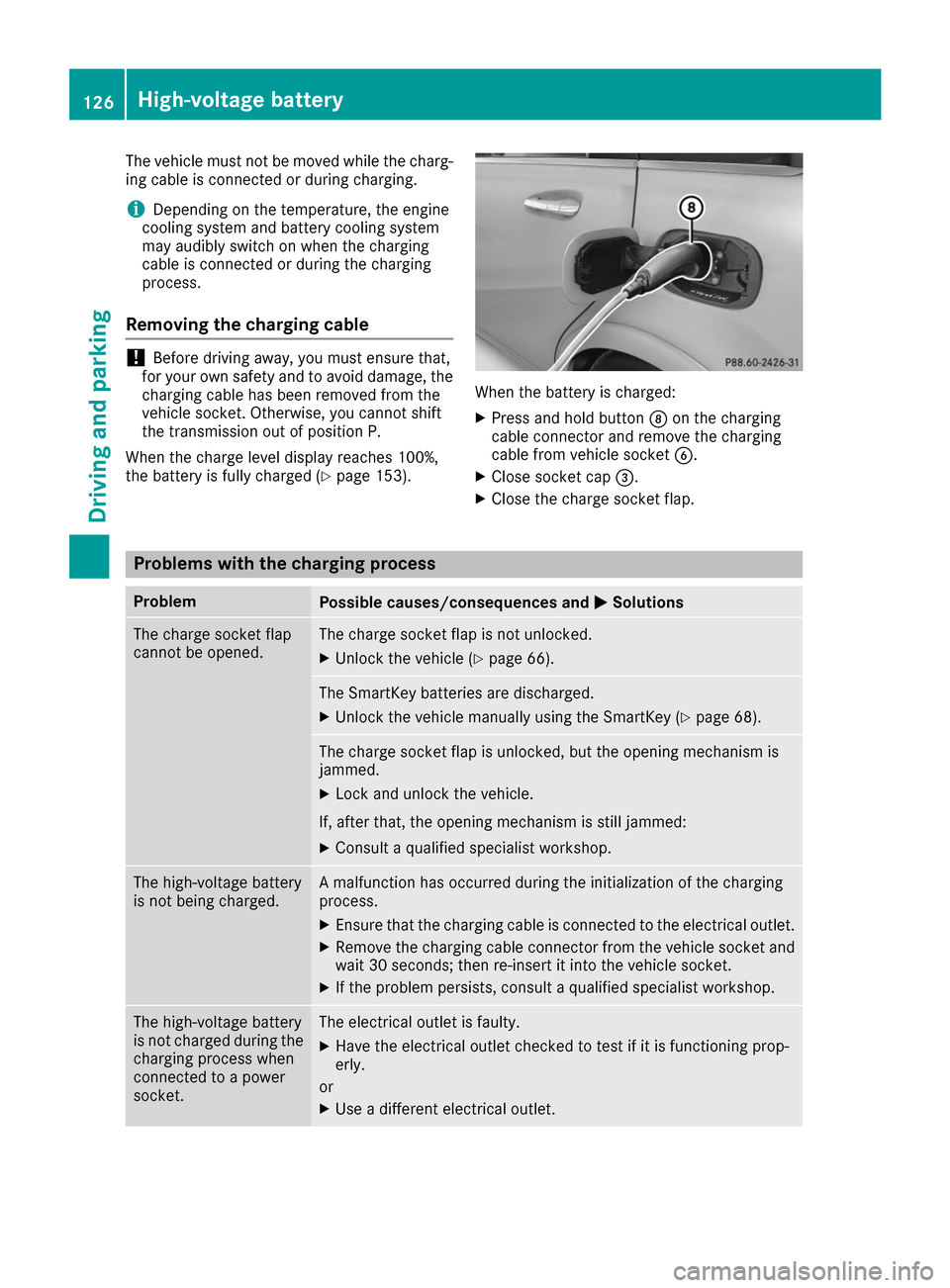
The vehicle must not be moved while the charg-
ing cable is connected or during charging.
i Depending on the temperature, the engine
cooling system and battery cooling system
may audibly switch on when the charging
cable is connected or during the charging
process.
Removing the charging cable !
Before driving away, you must ensure that,
for your own safety and to avoid damage, the
charging cable has been removed from the
vehicle socket. Otherwise, you cannot shift
the transmission out of position P.
When the charge level display reaches 100%,
the battery is fully charged (Y page 153). When the battery is charged:
X Press and hold button 006Con the charging
cable connector and remove the charging
cable from vehicle socket 0084.
X Close socket cap 0087.
X Close the charge socket flap. Problems with the charging process
Problem
Possible causes/consequences and
0050 0050Solutions The charge socket flap
cannot be opened. The charge socket flap is not unlocked.
X Unlock the vehicle (Y page 66). The SmartKey batteries are discharged.
X Unlock the vehicle manually using the SmartKey (Y page 68).The charge socket flap is unlocked, but the opening mechanism is
jammed.
X Lock and unlock the vehicle.
If, after that, the opening mechanism is still jammed:
X Consult a qualified specialist workshop. The high-voltage battery
is not being charged. A malfunction has occurred during the initialization of the charging
process.
X Ensure that the charging cable is connected to the electrical outlet.
X Remove the charging cable connector from the vehicle socket and
wait 30 seconds; then re-insert it into the vehicle socket.
X If the problem persists, consult a qualified specialist workshop. The high-voltage battery
is not charged during the
charging process when
connected to a power
socket. The electrical outlet is faulty.
X Have the electrical outlet checked to test if it is functioning prop-
erly.
or X Use a different electrical outlet. 126
High-voltage batteryDriving and parking
Page 129 of 290

Problem
Possible causes/consequences and
0050
0050Solutions The charging cable con-
nector cannot be
removed from the vehi-
cle socket. The snap fastener on the charging cable connector is locked.
X Press and hold the button on the charging cable connector. The
snap fastener on the vehicle socket is unlocked.
X Remove the charging cable connector from the vehicle socket. The snap fastener on the charging cable connector is blocked.
X Press and hold the button on the charging cable connector.
X Try to remove the blockage. Online access to the vehicle
General notes G
WARNING
If you operate information systems and com-
munication equipment integrated in the vehi- cle while driving, you will be distracted from
traffic conditions. You could also lose control of the vehicle. There is a risk of an accident.
Only operate the equipment when the traffic
situation permits. If you are not sure that this
is possible, park the vehicle paying attention
to traffic conditions and operate the equip-
ment when the vehicle is stationary.
You must observe the legal requirements for the country in which you are currently driving whenoperating integrated information systems and
communications equipment.
Only use information systems and communica-
tions devices if this is permitted while driving
and if the traffic situation permits. You may oth-
erwise be distracted from the traffic conditions,
cause an accident and injure yourself and oth-
ers.
From the "My Mercedes Electric - Vehicle Home-
page", you can call up remote query and remote
configuration functions for your vehicle. This is
possible from an Internet-enabled computer, as well as many modern smartphones.
You can access the "Vehicle Homepage" via
your web browser.
Please call the Mercedes-Benz Customer Assis-
tance Center (USA) at the hotline number
1-800-FOR-MERCedes (1-800-367-6372) to
obtain the relevant Internet address. In order to use the "Vehicle Homepage", you
must agree to the applicable terms of use.
The contractual periods of mbrace apply to the
"Vehicle Homepage". To use the "Vehicle Home-
page", you require an activated mbrace access
and a separate activation or registration for the "Vehicle Homepage".
Further information about the supported end
devices, available languages and contractual
periods is available at an authorized Mercedes-
Benz Center.
In order to call up the "Vehicle Homepage", the
vehicle must be connected to the Internet.
This is possible via the radio module
(Y page 128).
Notes on data protection Bear in mind that the "Vehicle Homepage" offers
access to your data. Therefore, look after the
vehicle verification code (VVC) and your user
details carefully.
The vehicle verification code (VVC) is required
when you register for the first time on the "Vehi- cle Homepage". Using this code, the vehicle andthe user access are linked to each other on the
"Vehicle Homepage", enabling the intended
usage. You can obtain further information from
an authorized Mercedes-Benz Center.
Prevent unauthorized persons from access- ing this data.
Every person who has access to the informationstated can use the functions on the "Vehicle
Homepage".
R If you sell your vehicle, you are obliged to
delete the vehicle from your personal area on
the "Vehicle Homepage". Additionally, you High-voltage battery
127Driving and parking Z
Page 130 of 290

must destroy documents containing the vehi-
cle verification code (VVC).
R If you have bought a used vehicle, it is possi-
ble that the previous owner still has access to
the "Vehicle Homepage". If in doubt, have a
new vehicle verification code (VVC) issued by
the Mercedes-Benz Center after purchase.
With the code you can set up access to your
vehicle, as described in the section "Setting
up a personal area" on the Vehicle Home-
page". There, you may also deactivate the
existing access of the previous owner.
Calling up functions in the "My
Mercedes Electric - Vehicle Homepage" The "My Mercedes Electric - Vehicle Homepage"
allows you access to information about your
vehicle and its functions using remote query and
remote configuration. For example, climate con- trol can be activated using remote configuration
which means that it need not be set in the vehi- cle. Power for the climate control is primarily
supplied via the charging cable connected to the mains supply. In most cases, this does not
reduce the range. If climate control is activated,the condition of charge and thus the range may
be reduced. The "Vehicle Homepage" provides
you with information all about how to use your
vehicle.
If the vehicle is entered in your personal area of
the "Vehicle Homepage", you can also access
the following functions:
R request the current condition of charge of the
high-voltage battery
R program the departure time (Y page 163)
R order and activate the "Pre-entry climate con-
trol at departure time" function
If the vehicle is charging, the predicted charging
time and the predicted range will also be shown.
This data is estimated and may be influenced by
the following factors:
R outside temperature
R switched on consumers, e.g. climate control
and seat heating
R personal driving style
R road and traffic conditions
R route characteristics
Therefore, allow for a sufficient reserve. i
Information on additional functions and
operating instructions can be found on the
"Vehicle Homepage".
Connecting the vehicle to the Internet Via a radio module
This function is not available in all countries and requires an activated mbrace access.
You can use the "Vehicle Homepage" if the vehi-
cle has a connection to the Internet via a mobile phone. The radio module uses a mobile phone
connection and transmits the necessary data by
radio. The vehicle automatically recognizes
whether a connection to the Internet via the
radio module is possible or not. No presets are
necessary.
To enable the transfer of data via the mobile
communications module, you do not need a SIM
card.
i Restrictions in reception are possible if the
vehicle is in an underground car park, for
example. Restrictions may also occur in areas with poor mobile network coverage. Parking
Important safety notes
G
WARNING
If you release the parking brake on uphill or
downhill gradients, the vehicle can begin to
move when in park position P. There is a risk
of an accident.
To avoid hazardous situations:
R prevent the parked vehicle from rolling on
uphill or downhill gradients by always
applying the parking brake.
R do not park the vehicle on uphill or downhill
gradients if the parking brake is malfunc-
tioning. 128
ParkingDriving and parking
Page 133 of 290

Releasing automatically
Your vehicle's electric parking brake is auto-
matically released if all of the following condi-
tions are met:
R the vehicle has been started.
R the transmission is in position Dor R.
R the seat belt has been fastened.
R you depress the accelerator pedal.
If the transmission is in position R, the tailgate
must be closed.
If your seat belt is not fastened, the following
conditions must be fulfilled to automatically
release the electric parking brake:
R the driver's door is closed.
R you have shifted out of transmission position
P or you have previously driven faster than
2 mph (3 km/h).
Ensure that you do not depress the accelerator
pedal unintentionally. Otherwise the parking
brake will be released and the vehicle will start
to move.
Emergency braking The vehicle can also be braked during an emer-
gency by using the electric parking brake.
X While driving, push handle 0043of the electric
parking brake (Y page 130).
The vehicle is braked as long as you keep
handle 0043of the electric parking brake
pressed. The longer the electric parking brake
handle 0043is depressed, the greater the brak-
ing force.
During braking: R a warning tone sounds
R the Release parking brake
Release parking brake message
appears
R the red 0049(USA only) or 0024(Canada
only) indicator lamp in the instrument cluster
flashes
When the vehicle has been braked to a stand-
still, the electric parking brake is applied. Parking the vehicle for a long period
If you leave the vehicle parked for longer than
four weeks, the battery may be damaged by
exhaustive discharging. If you leave the vehicle parked for longer than six
weeks, the vehicle may suffer damage as a
result of lack of use.
X Visit a qualified specialist workshop and seek
advice.
i You can obtain information about trickle
chargers from a qualified specialist work-
shop. Driving tips
General notes
Important safety notes G
WARNING
If you switch off the ignition while driving,
safety-relevant functions are only available
with limitations, or not at all. This could affect, for example, the power steering and the brake
boosting effect. You will require considerably
more effort to steer and brake. There is a risk of an accident.
Do not switch off the ignition while driving. G
WARNING
If you operate mobile communication equip-
ment while driving, you will be distracted from traffic conditions. You could also lose controlof the vehicle. There is a risk of an accident.
Only operate this equipment when the vehicleis stationary.
Observe the legal requirements for the country
in which you are driving. Some jurisdictions pro- hibit the driver from using a mobile phone while
driving a vehicle.
If you make a call while driving, always use
hands-free mode. Only operate the telephone
when the traffic situation permits. If you are
unsure, pull over to a safe location and stop
before operating the telephone.
Bear in mind that at a speed of only 30 mph
(approximately 50 km/h), the vehicle covers a
distance of 44 ft (approximately 14 m)per sec-
ond. Driving tips
131Driving and parking Z
Page 155 of 290

X
Start the drive system (Y page 111).
E-CELL display 0043shows the available power
of the drive system.
Under normal operating conditions, E-CELL dis-
play 0043is in the maximum range.
The power output available may deviate from
the maximum range in the event of:
R very high or low outside temperatures
R very high performance requirements for a lon-
ger period of time
R very low condition of charge of the high-volt-
age battery
R a malfunction in the drive system
The reduced power output can be improved by
charging the high-voltage battery (Y page 117).Power display
Power display
0043contains two areas:
R Area above 0
Here, the current amount of power that the
drive system is feeding to the wheels is dis-
played.
R Area below 0
Here, the vehicle's recuperative power in
overrun mode is displayed. If the needle for the power display is in the
OFF
position, the vehicle is not ready to drive
because:
R the drive system has not yet started
R the charging cable is still connected to the
vehicle socket
R there is insufficient power available from the
high-voltage battery
R the vehicle's high-voltage electrical system is
malfunctioning
When the drive system is started, the needle in
the power display moves to position 0. The dis-
play Ready Ready appears in the lower multifunction
display. The vehicle is ready to drive.
The boost area for maximum acceleration can
be reached using kickdown (Y page 114).
The braking performance of the electric motor
using recuperative braking is, in some operating
modes, either reduced or not effective:
R when the condition of charge of the high-volt-
age battery increases
R if the high-voltage battery is not yet at a nor-
mal operating temperature
R when driving close to the maximum speed
R when the vehicle is almost stationary
R in transmission position N
R during and after ESP stability control
If necessary, counteract the reduced regenera-
tive braking effect by applying the brake your-
self. Condition of charge display
Condition of charge display
0043shows the con-
dition of charge of the high-voltage battery.
The charge value is shown as a percentage in the
Energy Flow Energy Flow menu in the instrument cluster
(Y page 157). Displays and operation
153On-board computer and displays Z