2017 MERCEDES-BENZ B-Class Wiper switch
[x] Cancel search: Wiper switchPage 96 of 290

X
Reach under the right-hand side of trim 0084
and lightly tug along the entire length of the
trim in order to unclip 0083it.
X Pull out connector 006Bof the surround lighting
by releasing the latches.
X Place paneling 0084to one side. X
On the side where the bulb is to be replaced,
unclip the remaining part of trim 006Cfrom the
assembly with a strong tug, until the bulb
holder is accessible. X
Remove bulb holder 006Dusing both sides of
lever 006E. Bulb holder X
Backup lamp 006F: pull the bulb out of bulb
holder 006D.
X Insert the new bulb into the bulb holder.
X Rear fog lamp 0070: press the bulb gently into
bulb holder 006D, turn it counter-clockwise and
remove it from the bulb holder.
X Insert the new bulb into the bulb holder and
turn it clockwise.
X Reinsert the bulb holder until you hear it
engage audibly.
X Position paneling 006Cand engage it in place by
tapping it with your hand.
X Before continuing with the installation, check
that all the metal clips are inserted in the parts placed to one side: 2 clips 0044in the upper part
of handle 0087and 5 clips 0083in paneling 0084.
X If not, remove the missing metal clips from
the metal openings in the tailgate and insert
them in the appropriate places.
X Take paneling 0084and connect plug connector
006B to the surround lighting.
i The surround lighting only illuminates when
the tailgate has been shut and reopened.
X Position paneling 0084and engage it in place by
tapping it with your hand, starting from the
outside.
X Clip in the lower section of handle 0043at posi-
tion 0044again.
X Insert the upper section of handle 0087into
lower section 0043and engage with recess 0085
again.
License plate lamp X
Switch off the lights.
X Open the tailgate.
X Apply a screwdriver to lamp lens 0043from the
outside. 94
Replacing bulbsLights and windshield wipers
Page 97 of 290

X
Lever out lamp lens 0043and remove it.
X Replace the bulb.
X Insert lamp lens 0043into the license plate lamp
and press it in until it engages. Windshield wipers
Switching the windshield wipers
on/off
! Do not operate the windshield wipers when
the windshield is dry, as this could damage
the wiper blades. Moreover, dust that has col-
lected on the windshield can scratch the glass
if wiping takes place when the windshield is
dry.
If it is necessary to switch on the windshield
wipers in dry weather conditions, always use
washer fluid when operating the windshield
wipers.
! If the windshield wipers leave smears on the
windshield after the vehicle has been washed
in an automatic car wash, wax or other resi-
dues may be the reason for this. Clean the
windshield using washer fluid after washing
the vehicle in an automatic car wash. Combination switch
0047
003F Windshield wiper off
0048 0062 Intermittent wipe, low (rain sensor set
to low sensitivity)
0049 0063 Intermittent wipe, high (rain sensor
set to high sensitivity)
004A 00AA Continuous wipe, slow
004B 00A9 Continuous wipe, fast
0084 00D3 Single wipe/00D4 Wipes the wind-
shield using washer fluid X
Switch on the ignition.
X Turn the combination switch to the corre-
sponding position.
! Vehicles with a rain sensor: if the windshield
becomes dirty in dry weather conditions, the
windshield wipers may be activated inadver-
tently. This could then damage the windshield
wiper blades or scratch the windshield.
For this reason, you should always switch off
the windshield wipers in dry weather.
Vehicles with a rain sensor: in the 0062or0063
position, the appropriate wiping frequency is
automatically set according to the intensity of
the rain. In the 0063position, the rain sensor is
more sensitive than in the 0062position, caus-
ing the windshield wiper to wipe more fre-
quently.
If the wiper blades are worn, the windshield will no longer be wiped properly. This could prevent
you from observing the traffic conditions. Switching the rear window wiper on/
off Combination switch
0043
00C5 Switch
0048 00E2 Wipes with washer fluid
0049 ISwitches on intermittent wiping
004A 0Switches off intermittent wiping
004B 00E2 Wipes with washer fluid
X Switch on the ignition.
X Slide switch 0043on the combination switch to
the corresponding position.
When the rear window wiper is switched on,
the 00C5 symbol appears in the assistance
graphic in the instrument cluster. Further
information on the assistance graphic
(Y page 162). Windshield wipers
95Lights and windshield wipers Z
Page 98 of 290

Replacing the wiper blades
Important safety notes G
WARNING
If the windshield wipers begin to move while
you are changing the wiper blades, you could be trapped by the wiper arm. There is a risk of
injury.
Always switch off the windshield wipers and
ignition before changing the wiper blades.
! To avoid damaging the wiper blades, make
sure that you touch only the wiper arm of the
wiper.
! Never open the hood/tailgate if a wiper arm
has been folded away from the windshield/
rear window.
Never fold a windshield wiper arm without a
wiper blade back onto the windshield/rear
window.
Hold the windshield wiper arm firmly when
you change the wiper blade. If you release the
wiper arm without a wiper blade and it falls
onto the windshield/rear window, the wind-
shield/rear window may be damaged by the
force of the impact.
Mercedes-Benz recommends that you have
the wiper blades changed at a qualified spe-
cialist workshop.
Changing the windshield wiper blades Removing the wiper blades
X Vehicles without KEYLESS-GO: remove the
SmartKey from the ignition lock.
X Vehicles with KEYLESS-GO: switch off the
engine.
X Fold the wiper arm away from the windshield. X
Hold on to the wiper arm with one hand. With
the other hand, turn wiper blade in direction
of arrow 0043away from the wiper arm as far as
it will go.
X Slide catch 0044in the direction of arrow 0087
until it engages in the removal position with a noticeable click. X
Remove the wiper blade in the direction of
arrow 0085away from the wiper arm.
Installing the wiper blades X
Insert the new wiper blade into the wiper arm
in the direction of arrow 0043.96
Windshield wipersLights and windshield wipers
Page 99 of 290

X
Slide catch 0044in the direction of arrow 0087
until it engages in the locking position with a
noticeable click.
X Make sure that the wiper blade is seated cor-
rectly.
X Fold the wiper arm back onto the windshield. X
Remove protective film 0043of the service indi-
cator on the tip of the wiper blade.
If the color of the service indicator changes from black to yellow, the wiper blades should be
replaced.
i The duration of the color change varies
depending on the usage conditions. Replacing the rear window wiper blade Removing a wiper blade
X
Vehicles without KEYLESS-GO: remove the
SmartKey from the ignition lock.
X Vehicles with KEYLESS-GO: switch off the
engine.
X Fold wiper arm 0043away from the rear window
until you feel it engage.
X Position wiper blade 0044at a right angle to
wiper arm 0043.
X Hold wiper arm 0043and press wiper blade 0044
in the direction of the arrow until it releases.
X Remove wiper blade 0044.
Installing a wiper blade
X Place new wiper blade 0044onto wiper arm 0043.
X Hold wiper arm 0043and press wiper blade 0044
in the opposite direction to the arrow until it
engages.
X Make sure that wiper blade 0044is seated cor-
rectly.
X Position wiper blade 0044parallel to wiper
arm 0043.
X Fold wiper arm 0043back onto the rear window. Windshield wipers
97Lights and windshield wipers Z
Page 100 of 290

Problems with the windshield wipers
Problem
Possible causes/consequences and
0050
0050Solutions The windshield wipers
are jammed. Leaves or snow, for example, may be obstructing the windshield wiper
movement. The wiper motor has been deactivated.
X For safety reasons, you should remove the SmartKey from the igni-
tion lock.
X Remove the cause of the obstruction.
X Switch the windshield wipers back on. The windshield wipers
fail completely. The windshield wiper drive is malfunctioning.
X Select another wiper speed on the combination switch.
X Have the windshield wipers checked at a qualified specialist work-
shop. The windshield washer
fluid from the spray noz-
zles no longer hits the
center of the windshield. The spray nozzles are misaligned.
X Have the spray nozzles adjusted at a qualified specialist workshop. 98
Windshield wipersLights and windshield wipers
Page 105 of 290

or
X Turn temperature control 0043or006D counter-
clockwise or clockwise (Y page 99).MAX COOL maximum cooling
The MAX COOL function is only available in vehi-
cles for the USA.
The MAX COOL function only works when the
vehicle is ready to drive.
X To activate: press the00C9button.
The indicator lamp in the button lights up.
X To deactivate: press the00C9button.
The indicator lamp goes out. The previously
selected settings are restored.
When you activate MAX COOL, climate control
switches to the following functions:
R maximum cooling
R maximum airflow
R air-recirculation mode on Defrosting the windows
Windows fogged up on the inside X
Activate the 005A"Cooling with air dehumid-
ification" function.
X Activate automatic mode 0058.
X If the windows continue to fog up, activate the
0064 "Windshield defrosting" function. i
You should only select this setting until the
windshield is clear again.
Windows fogged up on the outside X
Activate the windshield wipers.
X Set the air distribution to 009Cor009B.
i You should only select this setting until the
windshield is clear again. Rear window defroster
General notes The rear window defroster has a high current
draw. You should therefore switch it off as soon
as the rear window is clear. Otherwise, the rear window defroster switches off automatically
after several minutes.
If the battery voltage is too low, the rear window
defroster may switch off.
Activating/deactivating X
Turn the SmartKey to position 2in the ignition
lock (Y page 109).
X Press the 006Cbutton.
The indicator lamp in the 006Cbutton lights
up or goes out.
Problems with the rear window defroster Problem
Possible causes/consequences and
0050 0050Solutions The rear window
defroster has deactiva-
ted prematurely or can-
not be activated. The battery has not been sufficiently charged.
X Switch off any consumers that are not required, e.g. reading lamps,
interior lighting or the seat heating.
When the battery is sufficiently charged, the rear window defroster can be activated again. Operating the climate control systems
103Climate control
Page 111 of 290
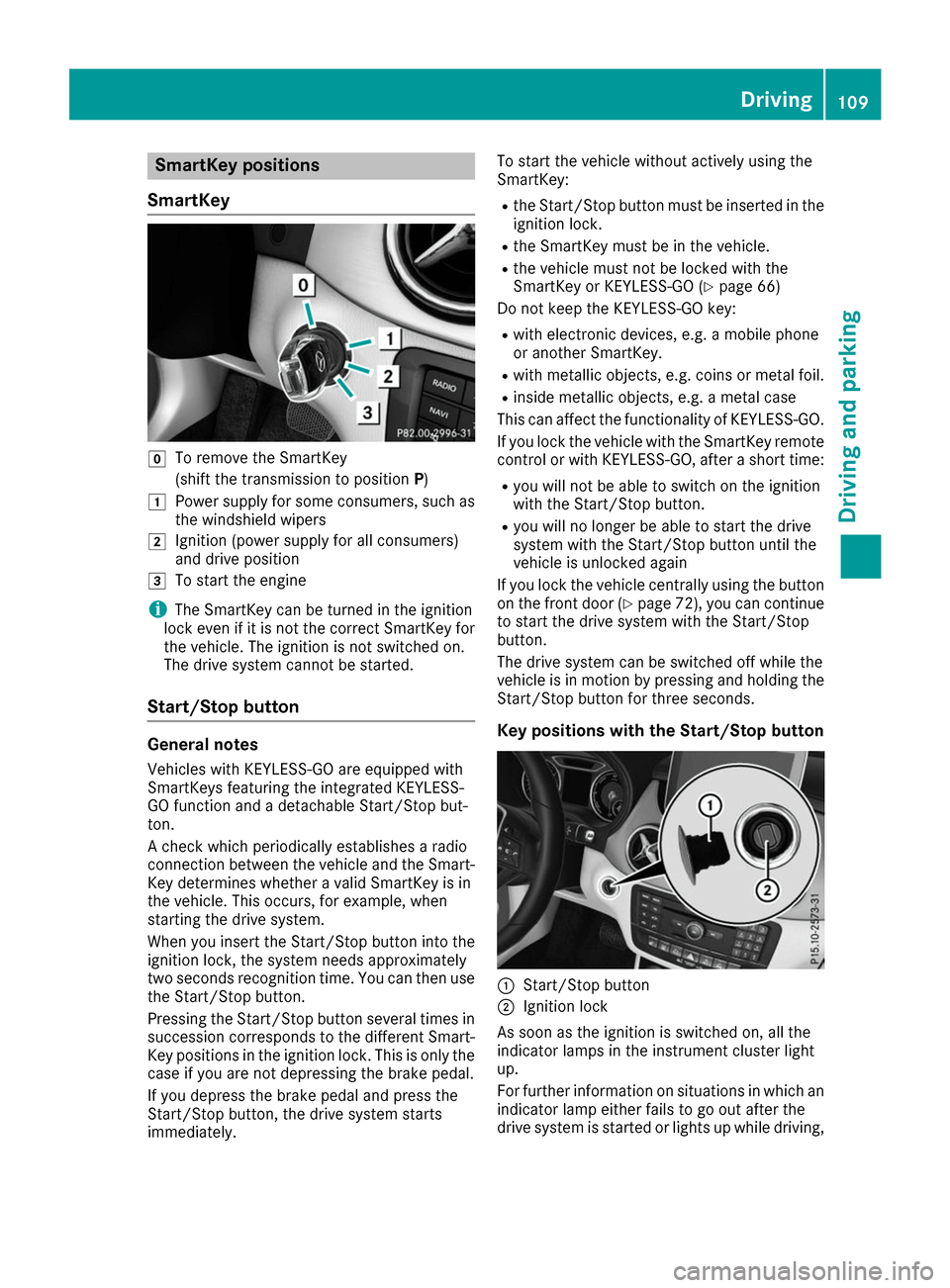
SmartKey positions
SmartKey 005A
To remove the SmartKey
(shift the transmission to position P)
0047 Power supply for some consumers, such as
the windshield wipers
0048 Ignition (power supply for all consumers)
and drive position
0049 To start the engine
i The SmartKey can be turned in the ignition
lock even if it is not the correct SmartKey for
the vehicle. The ignition is not switched on.
The drive system cannot be started.
Start/Stop button General notes
Vehicles with KEYLESS-GO are equipped with
SmartKeys featuring the integrated KEYLESS-
GO function and a detachable Start/Stop but-
ton.
A check which periodically establishes a radio
connection between the vehicle and the Smart-
Key determines whether a valid SmartKey is in
the vehicle. This occurs, for example, when
starting the drive system.
When you insert the Start/Stop button into the
ignition lock, the system needs approximately
two seconds recognition time. You can then use the Start/Stop button.
Pressing the Start/Stop button several times in
succession corresponds to the different Smart- Key positions in the ignition lock. This is only the
case if you are not depressing the brake pedal.
If you depress the brake pedal and press the
Start/Stop button, the drive system starts
immediately. To start the vehicle without actively using the
SmartKey:
R
the Start/Stop button must be inserted in the
ignition lock.
R the SmartKey must be in the vehicle.
R the vehicle must not be locked with the
SmartKey or KEYLESS-GO (Y page 66)
Do not keep the KEYLESS-GO key:
R with electronic devices, e.g. a mobile phone
or another SmartKey.
R with metallic objects, e.g. coins or metal foil.
R inside metallic objects, e.g. a metal case
This can affect the functionality of KEYLESS-GO.
If you lock the vehicle with the SmartKey remote
control or with KEYLESS-GO, after a short time:
R you will not be able to switch on the ignition
with the Start/Stop button.
R you will no longer be able to start the drive
system with the Start/Stop button until the
vehicle is unlocked again
If you lock the vehicle centrally using the button
on the front door (Y page 72), you can continue
to start the drive system with the Start/Stop
button.
The drive system can be switched off while the
vehicle is in motion by pressing and holding the Start/Stop button for three seconds.
Key positions with the Start/Stop button 0043
Start/Stop button
0044 Ignition lock
As soon as the ignition is switched on, all the
indicator lamps in the instrument cluster light
up.
For further information on situations in which an indicator lamp either fails to go out after the
drive system is started or lights up while driving, Driving
109Driving and parking Z
Page 112 of 290

please refer to "Warning and indicator lamps in
the instrument cluster" (Y page 192).
If Start/Stop button 0043has not yet been
pressed, this corresponds to the SmartKey
being removed from the ignition.
X To switch on the power supply: press
Start/Stop button 0043once.
The power supply is switched on. You can now
activate the windshield wipers, for example.
The power supply is switched off again if:
R the driver's door is opened and
R you press Start/Stop button 0043twice when in
this position
X To switch on the ignition: press Start/Stop
button 0043twice.
The ignition is switched on.
If you press Start/Stop button 0043once when
in this position, the ignition is switched off
again.
Removing the Start/Stop button
You can remove the Start/Stop button from the
ignition lock and start the vehicle as normal
using the SmartKey.
You can only switch between Start/Stop button
mode and SmartKey operation when the vehicle is stationary.
You must also engage park position P.
X Remove Start/Stop button 0043from ignition
lock 0044.
You do not have to remove the Start/Stop but-
ton from the ignition lock when you leave the
vehicle. You should, however, always take the
SmartKey with you when leaving the vehicle. As
long as the SmartKey is in the vehicle:
R the vehicle can be started using the Start/
Stop button
R the electrically powered equipment can be
operated Starting the engine
Important safety notes G
WARNING
If children are left unsupervised in the vehicle, they could:
R open the doors, thus endangering other
people or road users.
R get out and disrupt traffic.
R operate the vehicle's equipment.
Additionally, children could set the vehicle in
motion if, for example, they:
R release the parking brake.
R shift the transmission out of park position P
R start the vehicle's drive system.
There is a risk of an accident and injury.
When leaving the vehicle, always take the
SmartKey with you and lock the vehicle. Never leave children or animals unattended in the
vehicle. Always keep the SmartKey out of
reach of children.
Vehicles with an electric motor generate much
less driving noise than vehicles with internal
combustion engines. As a result, your vehicle
may not be heard by other road users in certain
situations. This can happen, for example, when
you are parking and your vehicle is not seen by
other road users. This requires you to adopt a
particularly anticipatory driving style, as it is
necessary to allow for the possibility that other
road users may behave erratically.
The vehicle is equipped with a sound generator.
The sound generator is activated so that other
road users can hear your vehicle better. The
sound generator is activated at speeds of under
20 mph (30 km/h) and switches off automati-
cally at higher speeds.
Starting procedure with the Start/Stop
button The Start/Stop button can be used to start the
vehicle manually without inserting the SmartKey
into the ignition lock. The Start/Stop button
must be inserted in the ignition lock and the
SmartKey must be in the vehicle. 110
DrivingDriving and parking