2017 LINCOLN NAVIGATOR change wheel
[x] Cancel search: change wheelPage 325 of 532

Tire Change Procedure
WARNINGS
When one of the front wheels is off the
ground, the transmission alone will not
prevent the vehicle from moving or slipping
off the jack. To help prevent the vehicle from
moving when you change a tire, be
sure to place the transmission in park (P), set
the parking brake and block (in both
directions) the wheel that is diagonally
opposite (other side and end of the vehicle)
to the tire being changed. Never get underneath a vehicle that is
supported only by a jack. If the vehicle
slips off the jack, you or someone else could
be seriously injured. Do not attempt to change a tire on the
side of the vehicle close to moving
traffic. Pull far enough off the road to avoid
the danger of being hit when operating the
jack or changing the wheel. WARNINGS
Always use the jack provided as
original equipment with your vehicle.
If using a jack other than the one provided
as original equipment with your vehicle,
make sure the jack capacity is adequate for
the vehicle weight, including any vehicle
cargo or modifications. Disable the power running boards
before jacking, lifting, or placing any
object under the vehicle. Never place your
hand between the power running board and
the vehicle as extended power running
boards will retract when the doors are
closed. Failure to follow these instructions
may result in personal injury. Failure to follow these instructions
when using the spare tire carrier could
cause loss of the wheel and tire and lead to
personal injury: Only use the spare tire carrier
to stow the tire and wheel combination
specified on the Tire Label or Safety
Compliance Certification Label on the B-Pillar
or the edge of the driver door. Other tire and
wheel combinations could cause the carrier
to fail if it does not fit securely or is too
heavy. Do not use impact tools or power WARNINGS
tools operating over 200 RPM, which may
cause winch malfunction and prevent a
secure fit. Override the winch at least three
times (there will be an audible click each
time) to ensure a tight secure fit of the wheel
and tire. Note:
Passengers should not remain in the
vehicle when the vehicle is being jacked.
Park on a level surface, activate the hazard
flashers and set the parking brake. Then,
place the transmission in park (P) and turn
the engine off.
Removing the Jack and Tools
Note: Pay close attention to the orientation
of the bag, because it will have to be
reinstalled after changing the tire.
1. Open the liftgate, then locate the access
panel on the floor behind the third row
seat. Unlatch and remove the panel.
322
Navigator (TB5) Canada/United States of America, enUSA, First Printing Wheels and Tires
Page 327 of 532
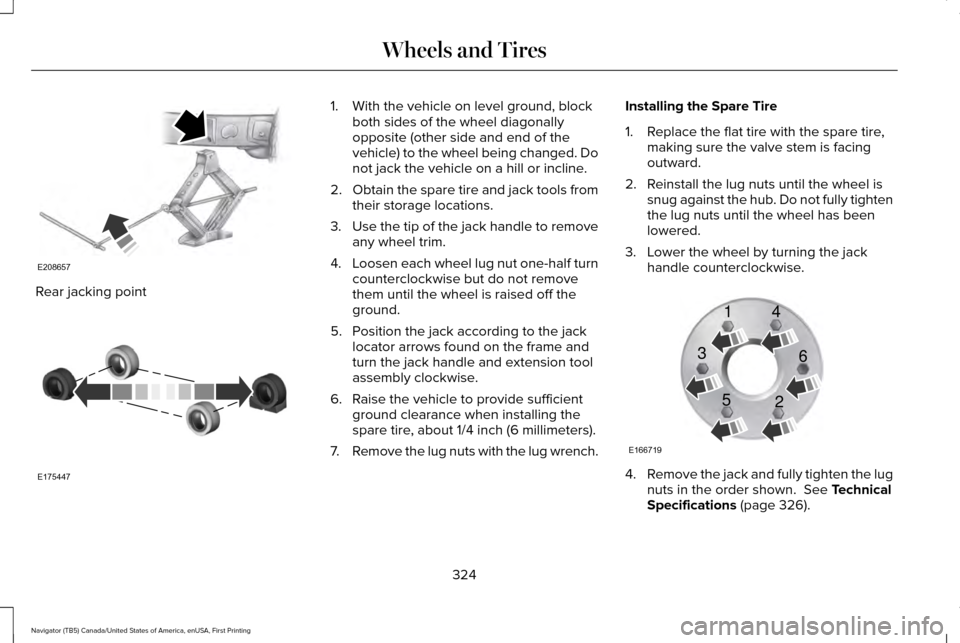
Rear jacking point 1. With the vehicle on level ground, block
both sides of the wheel diagonally
opposite (other side and end of the
vehicle) to the wheel being changed. Do
not jack the vehicle on a hill or incline.
2. Obtain the spare tire and jack tools from
their storage locations.
3. Use the tip of the jack handle to remove
any wheel trim.
4. Loosen each wheel lug nut one-half turn
counterclockwise but do not remove
them until the wheel is raised off the
ground.
5. Position the jack according to the jack locator arrows found on the frame and
turn the jack handle and extension tool
assembly clockwise.
6. Raise the vehicle to provide sufficient ground clearance when installing the
spare tire, about 1/4 inch (6 millimeters).
7. Remove the lug nuts with the lug wrench. Installing the Spare Tire
1. Replace the flat tire with the spare tire,
making sure the valve stem is facing
outward.
2. Reinstall the lug nuts until the wheel is snug against the hub. Do not fully tighten
the lug nuts until the wheel has been
lowered.
3. Lower the wheel by turning the jack handle counterclockwise. 4.
Remove the jack and fully tighten the lug
nuts in the order shown. See Technical
Specifications (page 326).
324
Navigator (TB5) Canada/United States of America, enUSA, First Printing Wheels and TiresE208657 E175447 E166719
1
3
5 4
6
2
Page 465 of 532

Normal Maintenance Intervals
At every oil change interval as indicated by the information display
*
Change engine oil and filter. **
Rotate tires, inspect tire wear and measure tread depth.
Perform a multi-point inspection (recommended).
Inspect the automatic transmission fluid level (if equipped with dipsti\
ck). Consult your dealer for requirements.
Inspect the brake pads, rotors, hoses and parking brake.
Inspect the engine cooling system strength and hoses.
Inspect the exhaust system and heat shields.
Inspect front axle and U-joints.
Inspect the half-shaft boots.
Inspect the steering linkage, ball joints, suspension, tire-rod ends, driveshaft and U-joints.
Inspect the wheels and related components for abnormal noise, wear, looseness or drag.
* Do not exceed one year or 10000 miles (16000 kilometers) between service interv\
als.
** Reset the Intelligent Oil-Life Monitor after engine oil and filter change\
s.
462
Navigator (TB5) Canada/United States of America, enUSA, First Printing Scheduled Maintenance
Page 466 of 532

Other maintenance items
1
Replace engine air filter.
Every 30000 miles (48000
km)
Change engine coolant. 2
At 100000 miles (160000
km)
Replace spark plugs.
Every 100000 miles
(160000 km)
Inspect accessory drive belt(s). 3
Change automatic transmission fluid.
Every 150000 miles
(240000 km) Change front axle fluid (Four-wheel drive vehicles).
Change rear axle fluid.
Change transfer case fluid (Four-wheel drive vehicles).
Replace accessory drive belt(s).
1 Perform these maintenance items within 3000 miles (4800 kilometers) of \
the last engine oil and filter change. Do not exceed the designated
distance for the interval.
2 Initial replacement at six years or 100000 miles (160000 kilometers),\
then every three years or 50000 miles (80000 kilometers).
3 After initial inspection, inspect every other oil change until replaced\
.
463
Navigator (TB5) Canada/United States of America, enUSA, First Printing Scheduled Maintenance
Page 467 of 532

SPECIAL OPERATING CONDITIONS
SCHEDULED MAINTENANCE
If you operate your vehicle primarily in any
of the following conditions, you need to
perform extra maintenance, as indicated. If
you operate your vehicle occasionally under
any of these conditions, it is not necessary
to perform the extra maintenance. For specific recommendations, see your
dealership service advisor or technician.
Perform the services shown in the following
tables when specified or within 3,000 mi
(4,800 km) of the message appearing in the
information display prompting you to change
your oil. •
Example 1
: The message comes on at
28,751 mi (46,270 km). Perform the
30,000 mi (48,000 km) automatic
transmission fluid replacement.
• Example 2
: The message has not come
on, but the odometer reads 30,000 mi
(48,000 km) (for example, the Intelligent
Oil-Life Monitor was reset at 25,000 mi
(40,000 km)). Perform the engine air filter
replacement. Towing a trailer or using a car-top carrier
Change engine oil and filter as indicated by the information display and\
perform services listed in the Normal
Scheduled Maintenance chart.
As required
Inspect and lubricate U-joints (if equipped with grease fittings).
Inspect frequently, service
as required
See axle maintenance items under
Exceptions.
Change transfer case fluid (Four-wheel drive vehicles).
Every
60,000 mi
(96,000 km) Replace spark plugs.
464
Navigator (TB5) Canada/United States of America, enUSA, First Printing Scheduled Maintenance
Page 468 of 532

Extensive idling or low-speed driving for long distances, as in heavy co\
mmercial use
Change engine oil and filter as indicated by the information display and\
perform services listed in the Normal
Scheduled Maintenance chart.
As required
Replace engine air filter.
Inspect frequently, service
as required
Change transfer case fluid (Four-wheel drive vehicles).
Every 60,000 mi
(96,000 km) Replace spark plugs. Operating in dusty or sandy conditions (such as unpaved or dusty roads)\
Replace engine air filter.
Inspect frequently, service
as required
Inspect the wheels and related components for abnormal noise, wear, looseness or drag.
Every
5,000 mi (8,000 km)
Rotate tires, inspect tires for wear and measure tread depth.
Change engine oil and filter. *
Every
5,000 mi (8,000 km)
or six months
Change transfer case fluid (Four-wheel drive vehicles).
Every
60,000 mi
(96,000 km)
* Reset your Intelligent Oil-Life Monitor after each engine oil and filter \
change.
465
Navigator (TB5) Canada/United States of America, enUSA, First Printing Scheduled Maintenance
Page 469 of 532

Off-road operation
Inspect steering linkage, ball joints and U-joints. Lubricate if equipped with grease fittings.
Inspect frequently, service
as required
Replace engine air filter.
Change engine oil and filter.*
Every 5,000 mi (8,000 km)
or six months
Inspect the wheels and related components for abnormal noise, wear, looseness or drag.
Rotate tires, inspect tires for wear and measure tread depth.
Replace front wheel bearing grease and grease seals if non-sealed bearing\
s are used (Two-wheel drive
vehicles).
Every
30,000 mi
(48,000 km)
Change transfer case fluid (Four-wheel drive vehicles).
Every
60,000 mi
(96,000 km)
* Reset your Intelligent Oil-Life Monitor after each engine oil and filter \
change.
Exceptions
There are several exceptions to the Normal
Schedule. Axle and Transfer Case Maintenance
Axle(s) and transfer case (four-wheel drive
vehicles) fluid changes or level checks are
not required unless a leak is suspected or
the assembly has been submerged in water.
During long periods of trailer towing with
outside temperatures above 70°F (21°C) or
at wide-open throttle for long periods above45 mph (72 km/h), change the rear axle fluid
every 30,000 mi (48,000 km) or three
months, whichever comes first, if the rear
axle is filled with non-synthetic fluid. This
interval can be waived and the 150,000 mi
(240,000km) service interval can continue if
466
Navigator (TB5) Canada/United States of America, enUSA, First Printing Scheduled Maintenance
Page 523 of 532

B
Battery
See: Changing the 12V Battery.......................275
Blind Spot Information System..................201
False Alerts..........................................................206
Switching the System Off and On.................206
System Errors......................................................206
System Limitations.............................................205
Using the System................................................201
Bonnet Lock See: Opening and Closing the Hood............262
Booster Seats
..................................................26
Types of Booster Seats.......................................26
Brake Fluid Check
........................................273
Brakes..............................................................182 General Information............................................182
Breaking-In.....................................................228
Bulb Specification Chart
..............................281
C
California Proposition 65................................11
Capacities and Specifications...................332 Specifications......................................................334
Car Wash See: Cleaning the Exterior...............................286
Center Console
.............................................152 Changing a Bulb
...........................................279
Central High-mounted Brake Lamp..............280
HID Headlamp Bulbs.........................................279
LED Lamps...........................................................280
License Plate Lamp Bulbs................................280
Changing a Fuse..........................................259 Fuses.....................................................................259
Changing a Road Wheel.............................319 Dissimilar Spare Wheel and Tire Assembly
Information......................................................320
Location of the Spare Tire and Tools.............321
Tire Change Procedure....................................
322
Changing the 12V Battery
..........................275
Battery Management System..........................276
Changing the Engine Air Filter.................283
Changing the Wiper Blades.......................277
Checking MyKey System Status.................58
Checking the Wiper Blades
.......................277
Childminder Mirror.........................................92
Child Restraint and Seatbelt Maintenance..................................................39
Child Restraint Positioning
...........................29
Child Safety.......................................................16
General Information..............................................16
Child Safety Locks..........................................30
Cleaning Leather Seats...............................291
Cleaning Products
.......................................285
Cleaning the Alloy Wheels........................292 Cleaning the Engine....................................288
Cleaning the Exterior..................................286
Exterior Chrome Parts.......................................287
Exterior Plastic Parts..........................................287
Stripes or Graphics.............................................287
Underbody...........................................................287
Under Hood.........................................................288
Cleaning the Instrument Panel and Instrument Cluster Lens............................291
Cleaning the Interior...................................289 Cleaning Black Label or Presidential
Interior..............................................................290
Cleaning the Windows and Wiper Blades...........................................................289
Clearing All MyKeys.......................................56
Climate.............................................................391
Climate Control..............................................122
Climate Controlled Seats
............................142
Cooled Seats........................................................143
Coolant Check See: Engine Coolant Check............................268
Crash Sensors and Airbag Indicator..........47
Creating a MyKey...........................................55 Programming/Changing Configurable
Settings...............................................................55
Cruise Control
..................................................79
Principle of Operation........................................199
520
Navigator (TB5) Canada/United States of America, enUSA, First Printing Index