Page 328 of 532

Stowing the Flat or Spare Tire
1.
Lay the tire on the ground, near the rear
of the vehicle, with the valve stem side
facing up.
2. Slide the wheel partially under the vehicle and install the retainer through
the wheel center. If equipped, you may
have to remove the wheel center cap
prior to pushing the retainer through the
center of the wheel. To remove the
center cap, press it off with the jack tool
from the inner side of the wheel. Pull on
the cable to align the components at the
end of the cable. 3. Assemble the jack handle and winch
extension, then insert the winch
extension through the access hole
behind the third row seat and engage
the winch.
4. Turn the jack handle clockwise until the tire is raised to its stowed position
underneath the vehicle. The wrench will
become harder to turn and the spare tire
winch will rachet or slip when the tire is
raised to maximum tightness. A clicking
sound will be heard from the winch
indicating that the tire is properly stowed. 5. Disassembly the jack tool and winch
extension and snap them back into the
tool tray.
6. Reinstall the jack bag properly around the jack and tool assembly tray, making
sure the strap is fastened.
7. Close the access hole with the rubber plug.
8. Reinstall the tray into the vehicle and secure it with the wing nut.
325
Navigator (TB5) Canada/United States of America, enUSA, First Printing Wheels and Tires
Page 332 of 532
MOTORCRAFT PARTS
Part Number
Component
FA-1883
Air filter element.
FL-500-S
Oil filter.
BXT-65-750
Battery.
SP-534
Spark plugs.
FT-188
Transmission filter.
WW-2234
Windshield wiper blade.
WW-1612
Rear window wiper blade.
We recommend Motorcraft replacement parts available at your Ford dealer o\
r at fordparts.com for scheduled maintenance. These parts meet
or exceed Ford Motor Company’ s specifications and are engineered for your vehicle. Use of other parts may impact vehicle performance,
emissions and durability. Your warranty may be void for any damage related to use of other parts.
If a Motorcraft oil filter is not available, use an oil filter that meets industry performance specification SAE/USCAR-36.
For spark plug replacement, contact an authorized dealer. Replace the spark plugs at the appropriate intervals. See Scheduled Maintenance
(page 456).
329
Navigator (TB5) Canada/United States of America, enUSA, First Printing Capacities and Specifications
Page 335 of 532

CAPACITIES AND SPECIFICATIONS
Capacities
WARNING
The air conditioning refrigerant system contains refrigerant under high \
pressure. Only qualified personnel should service the air
conditioning refrigerant system. Opening the air conditioning refrigeran\
t system can cause personal injury.
Capacity
Item
6.0 qt (5.7 L)
Engine oil (with oil filter).
18.5 qt (17.5 L)
Engine coolant (Base radiator with auxiliary rear heat).
18.0 qt (17 L)
Engine coolant (Heavy duty trailer towing with auxiliary rear heat).
Between MIN and MAX on brake fluid reservoir
Brake fluid.
3.5 pt (1.7 L)
Front axle .
4.5 pt (2.1 L)*
Rear axle.
13.1 qt (12.4 L)**
Automatic transmission fluid.
1.6 qt (1.5 L) - 1.8 qt (1.7 L)
Transfer case fluid (Four Wheel Drive with Electronic Shift On the Fly)\
.
1.5 qt (1.4 L)
Transfer case fluid (Four Wheel Drive with Torque On Demand).
Fill as required
Windshield washer fluid.
332
Navigator (TB5) Canada/United States of America, enUSA, First Printing Capacities and Specifications
Page 336 of 532
Capacity
Item
28.0 gal (106 L)
Fuel tank.
33.5 gal (126.8 L)
Fuel tank (Navigator L).
44 oz (1.25 kg)
A/C refrigerant.
40 oz (1.13 kg)
A/C refrigerant (Navigator L).
7.1 fl oz (210 ml)
A/C refrigerant compressor oil.
* The rear axle is filled with synthetic rear axle lubricant, and it is co\
nsidered lubricated for life. Do not check or change the lubricant unless
you suspect a leak or submerge the axle in water. Contact an authorized dealer.
** Approximate dry fill capacity. Actual amount may vary during fluid changes.
333
Navigator (TB5) Canada/United States of America, enUSA, First Printing Capacities and Specifications
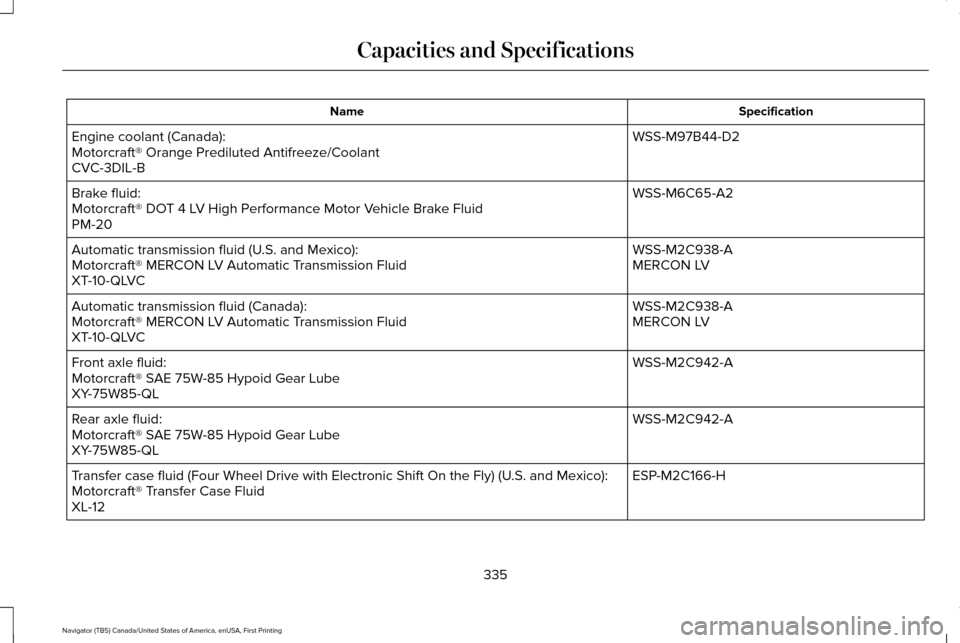
Page 338 of 532
Specification
Name
WSS-M97B44-D2
Engine coolant (Canada):
Motorcraft® Orange Prediluted Antifreeze/Coolant
CVC-3DIL-B
WSS-M6C65-A2
Brake fluid:
Motorcraft® DOT 4 LV High Performance Motor Vehicle Brake Fluid
PM-20
WSS-M2C938-A
Automatic transmission fluid (U.S. and Mexico):
MERCON LV
Motorcraft® MERCON LV Automatic Transmission Fluid
XT-10-QLVC
WSS-M2C938-A
Automatic transmission fluid (Canada):
MERCON LV
Motorcraft® MERCON LV Automatic Transmission Fluid
XT-10-QLVC
WSS-M2C942-A
Front axle fluid:
Motorcraft® SAE 75W-85 Hypoid Gear Lube
XY-75W85-QL
WSS-M2C942-A
Rear axle fluid:
Motorcraft® SAE 75W-85 Hypoid Gear Lube
XY-75W85-QL
ESP-M2C166-H
Transfer case fluid (Four Wheel Drive with Electronic Shift On the Fly)\
(U.S. and Mexico):
Motorcraft® Transfer Case Fluid
XL-12
335
Navigator (TB5) Canada/United States of America, enUSA, First Printing Capacities and Specifications
Page 345 of 532
CD slot: Insert a CD.
A
Eject:
Press the control to eject a CD.
B
TUNE:
Turn the control to search manually through the radio frequency band. The\
system stops at the first station it finds in that
direction. In SIRIUS mode, the system selects the previous or next channel. If you select a speci\
fic category (Jazz, Rock, News, etc.),
turn the TUNE control to find the previous or next channel in the select\
ed category.
C
Seek/Fast Forward/Reverse:
Press the control to go to the previous or next track or available radi\
o station. Press and hold to either
reverse or fast forward through the current track or to quickly reverse \
or advance through the radio bands in individual increments.
D
Volume:
Turn the control to adjust the volume level on your system.
E
Power:
Press the control to switch the audio system on and off.
F
Rear Seat Audio Controls 342
Navigator (TB5) Canada/United States of America, enUSA, First Printing Audio SystemE182082
Page 346 of 532

VOL: Adjust radio volume.
A
MEDIA:
Scroll through available audio system modes.
B
Rear audio display:
See displayed time, radio frequency, Sirius radio channel or CD track.
C
CLOCK:
Press to display the current time in 12-hour format. The time displays \
for a few seconds or you can press the CLOCK button
again to switch immediately back to the last media state.
D
SEEK:
Select the next or previous stored radio frequency station, Sirius radi\
o channel or CD track.
E
SATELLITE RADIO
(If Equipped)
SIRIUS® broadcasts a variety of music, news,
sports, weather, traffic and entertainment
satellite radio channels. For more information
and a complete list of SIRIUS satellite radio
channels, visit www.siriusxm.com in the
United States, www.siriusxm.ca in Canada,
or call SIRIUS at 1-888-539-7474. Note:
This receiver includes the eCos
real-time operating system. eCos is
published under the eCos License.
343
Navigator (TB5) Canada/United States of America, enUSA, First Printing Audio System
Page 347 of 532

Satellite Radio Reception Factors
Potential satellite radio reception issues
For optimal reception performance, keep the antenna clear of snow and ice build-up and keep luggage and
other material as far away from the antenna as possible.
Antenna obstructions
Hills, mountains, tall buildings, bridges, tunnels, freeway overpasses, \
parking garages, dense tree foliage and
thunderstorms can interfere with your reception.
Terrain
When you pass a ground-based broadcast-repeating tower, a stronger signal may overtake a weaker one and
the audio system may mute.
Station overload
Your display may show ACQUIRING . . . to indicate the interference and th\
e audio system may mute.
Satellite radio signal interfer-
ence
SIRIUS® Satellite Radio Service
Note: SIRIUS reserves the unrestricted right
to change, rearrange, add or delete
programming including canceling, moving
or adding particular channels, and its prices,
at any time, with or without notice to you.
Ford Motor Company shall not be
responsible for any such programming
changes. SIRIUS satellite radio is a subscription-based
satellite radio service that broadcasts a
variety of music, sports, news, weather, traffic
and entertainment programming. Your
factory-installed SIRIUS satellite radio system
includes hardware and a limited subscription
term, which begins on the date of sale or
lease of your vehicle. See an authorized
dealer for availability.
344
Navigator (TB5) Canada/United States of America, enUSA, First Printing Audio SystemE208625