2017 LINCOLN MKZ vent
[x] Cancel search: ventPage 90 of 564

Press repeatedly or press and hold
to dim.
A
Press repeatedly or press and hold
to brighten.
B HEADLAMP EXIT DELAY
After you switch the ignition off, you can
switch the headlamps on by pulling the
direction indicator lever toward you. You will
hear a short tone. The headlamps will switch
off automatically after three minutes with any
door open or 30 seconds after the last door
has been closed. You can cancel this feature
by pulling the direction indicator toward you
again or switching the ignition on.
DAYTIME RUNNING LAMPS WARNING
The daytime running lamps system
does not activate the rear lamps and
may not provide adequate lighting during
low visibility driving conditions. Also, the
autolamps switch position may not activate
the headlamps in all low visibility conditions,
such as daytime fog. Make sure the
headlamps are switched to auto or on, as
appropriate, during all low visibility
conditions. Failure to do so may result in a
crash. Type 1 - Conventional (Non-
Configurable)
The daytime running lamps turn on when:
1. The ignition is switched to the on
position.
2. The transmission is not in park (P) for vehicles with automatic transmissions or
the parking brake is released for vehicles
with manual transmissions.
3. The lighting control is in the off, parking lamp or autolamps positions.
4. The headlamps are off.
Type 2 - Configurable
Switch the daytime running lamps on or off
using the information display controls. See
Information Displays (page 108).
The daytime running lamps turn on when:
1. They are switched on in the information display. See Information Displays (page
108
).
2. The ignition is switched to the on position.
87
MKZ (CC9) Canada/United States of America, enUSA, First Printing LightingE165337AB
Page 97 of 564

Window Lock
Press the control to lock or unlock the rear
window controls. It will illuminate when you
lock the rear window controls.
Accessory Delay
You can use the window switches for several
minutes after you switch the ignition off or
until you open either front door.
GLOBAL OPENING AND CLOSING
You can use the remote control to operate
the windows with the ignition off. Note:
You can enable or disable this feature
in the information display or see an
authorized dealer. See General Information
(page 108).
Note: To operate this feature, accessory
delay must not be active.
Opening the Windows
You can only open the windows for a short
time after you unlock your vehicle with the
remote control. After you unlock your vehicle,
press and hold the remote control unlock
button to open the windows and vent the
moonroof. Release the button once
movement starts. Press the lock or unlock
button to stop movement.
Closing the Windows WARNING
When closing the windows and
moonroof, you should verify they are
free of obstructions and make sure that
children and pets are not in the proximity of
the window openings. To close the windows and moonroof, press
and hold the remote control lock button.
Release the button once movement starts.
Press the lock or unlock button to stop
movement.
EXTERIOR MIRRORS
Power Exterior Mirrors
WARNING
Do not adjust the mirrors when your
vehicle is moving.
94
MKZ (CC9) Canada/United States of America, enUSA, First Printing Windows and MirrorsE144072
Page 102 of 564

WARNINGS
When closing the moonroof, you
should verify that it is free of
obstructions and make sure that children and
pets are not in the proximity of the roof
opening. The moonroof controls are located on the
overhead console and have a one-touch
open and close feature. To stop its
movement during one-touch operation, press
the control a second time.
Opening and Closing the Moonroof Moonroof open. Press and release
to open the moonroof. The
moonroof stops short of the fully
opened position. Press and release
the control again to open the
moonroof fully.
A
Moonroof vent. Press and release
to vent the moonroof.
B Sunshade open. Press and release
to open the sunshade. The
sunshade opens automatically with
the moonroof. You can also open
the sunshade with the moonroof
closed. Note: The sunshade stops
short of its fully opened position
for the comfort of rear passengers.
To open the sunshade fully, press
the control again.
C
Sunshade close. Press and release
to close the sunshade. If fully open,
the sunshade stops after covering
the rear glass panel. Press and
release again to fully close the
sunshade.
D
Moonroof close. Press and release
to close the moonroof from either
the open or vent positions.
E
Bounce-Back
The moonroof automatically reverses some
distance if an obstacle is detected while
closing.
99
MKZ (CC9) Canada/United States of America, enUSA, First Printing Windows and MirrorsE191272
Page 118 of 564
.
Adaptive Cruise Malfunction
Displayed wh")
Adaptive Cruise Control
Action
Message
Displayed when a radar malfunction is preventing the ACC from engaging. \
See Using Adaptive Cruise Control (page 216).
Adaptive Cruise Malfunction
Displayed when conditions exist such that the adaptive cruise cannot fun\
ction properly.
See
Using Adaptive Cruise Control (page 216).
Adaptive Cruise Not Available
Displayed when the radar is blocked because of poor radar visibility due to bad weather or ice/
mud/water in front of radar. Driver can typically clean the sensor to resolve. See Using AdaptiveCruise Control
(page 216).
Adaptive Cruise Not Available Sensor
Blocked See Manual
Displayed when the automatic braking has been disabled.
Normal Cruise Active Automatic Braking
Turned Off
Displayed when a radar malfunction is preventing the ACC from engaging.
Front Sensor Not Aligned
Displayed when the adaptive cruise has reinstated controls to the driver\
.
Adaptive Cruise - Driver Resume Control
Displays when the vehicle speed is too slow to activate the adaptive cru\
ise.
Adaptive Cruise Speed Too Low to
Activate
Displays when the adaptive cruise is automatically adjusting the gap dis\
tance and the driverneeds to shift the transmission into a lower gear.
Adaptive Cruise Shift Down
115
MKZ (CC9) Canada/United States of America, enUSA, First Printing Information Displays
Page 138 of 564

Power: Press to switch the system on and off. When the system is off, it prevents outside air from entering the vehicle.
A
Driver temperature control:
Adjust the temperature setting on the driver side.
B
MAX defrost:
Press to switch on defrost. Outside air flows through the windshield ve\
nts, air conditioning automatically turns on,
and fan automatically adjusts to the highest speed. You can also use this setting to defrost and clear the windshield of a th\
in covering
of ice. The heated rear window also automatically turns on when you select max\
imum defrost.
C
Air distribution control: Press to switch airflow from the windshield, instrument panel, or footw\
ell vents on or off. You can distribute
air through any combination of these vents.
D
MAX A/C:
Press to maximize cooling. Recirculated air flows through the instrument panel vents, air conditioni\
ng automatically turns
on, and the fan automatically adjusts to the highest speed.
E
Passenger temperature control:
Adjust the temperature setting on the passenger side.
F
Recirculated air: Press to switch between outside air and recirculated air. The air currently in the passenger compartment recirculates.
This can reduce the time needed to cool the interior and reduce unwanted\
odors from entering your vehicle.
G
Note:
Recirculated air may also turn on and off automatically in instrument pan\
el or instrument panel and floor airflow modes during
hot weather to improve cooling efficiency.
A/C:
Press to switch the air conditioning on or off. Air conditioning cools your vehicle using outside air. To improve the time to reach
a comfortable temperature in hot weather, drive with the windows open until you feel cold air through the air ve\
nts.
H
AUTO:
Press to switch on automatic operation. Adjust to select the desired te\
mperature. Fan speed, air distribution, air conditioning
operation, and outside or recirculated air are automatically adjusted to\
heat or cool the vehicle to maintain the desired temperature .
You can also switch off dual zone mode by pressing and holding for more t\
han two seconds.
I
Heated seats:
Press to switch the heated seats on and off. See Climate Controlled Seats (page 148).
J
Climate controlled seats:
Press to switch the cooled seats on and off. See Climate Controlled Seats (page 148).
K
Heated steering wheel:
Press to switch the heated steering wheel on and off.
L
135
MKZ (CC9) Canada/United States of America, enUSA, First Printing Climate Control
Page 139 of 564

DUAL: Press to switch on temperature control for the passenger side of the ve\
hicle. When dual zone is off, passenger temperature
settings remain the same as the driver settings.
M
Heated rear window:
Press to switch the heated rear window on and off. See Heated Windows and Mirrors (page 137).
N
Automatic Fan Settings
The AUTO button illuminates for the
following fan settings:
• When three indicators are on, the fan
automatically adjusts to the highest
speed to reach the selected temperature
as quickly as possible.
• When two indicators are on, the fan
automatically adjusts to a medium speed
to reach the selected temperature with
a reduced amount of cabin noise.
• When one indicator is on, the fan
automatically adjusts to the lowest speed
to reach the selected temperature with
the least amount of cabin noise.
Note: The system starts at the previously
selected fan setting when AUTO is switched
on. HINTS ON CONTROLLING THE
INTERIOR CLIMATE
General Hints
Note:
Prolonged use of recirculated air may
cause the windows to fog up.
Note: You may feel a small amount of air
from the footwell air vents regardless of the
air distribution setting.
Note: To reduce humidity build-up inside
your vehicle, do not drive with the system
switched off or with recirculated air always
switched on.
Note: Do not place objects under the front
seats as this may interfere with the airflow
to the rear seats.
Note: Remove any snow, ice or leaves from
the air intake area at the base of the
windshield. Note:
To improve the time to reach a
comfortable temperature in hot weather,
drive with the windows open until you feel
cold air through the air vents.
Automatic Climate Control
Note: Adjusting the settings when your
vehicle interior is extremely hot or cold is not
necessary. The system automatically adjusts
to heat or cool the cabin to your selected
temperature as quickly as possible. For the
system to function efficiently, the instrument
panel and side air vents should be fully
open.
Note: If you select
AUTO during cold outside
temperatures, the system directs airflow to
the windshield and side window vents. In
addition, the fan may run at a slower speed
until the engine warms up.
136
MKZ (CC9) Canada/United States of America, enUSA, First Printing Climate Control
Page 141 of 564

Heated Wiper Park (If Equipped)
When you switch the heated rear window
on, the heated wiper park automatically turns
on.
CABIN AIR FILTER
Your vehicle is equipped with a cabin air
filter, which gives you and your passengers
the following benefits:
• It improves your driving comfort by
reducing particle concentration.
• It improves the interior compartment
cleanliness.
• It protects the climate control
components from particle deposits.
You can locate the cabin air filter behind the
glove box.
Note: Make sure you have a cabin air filter
installed at all times. This prevents foreign
objects from entering the system. Running
the system without a filter in place could
result in degradation or damage to the
system. Replace the filter at regular intervals. See
Scheduled Maintenance (page 495).
For additional cabin air filter information, or
to replace the filter, see an authorized dealer.
REMOTE START
The remote start feature allows you to
pre-condition the interior of your vehicle. The
climate control system works to achieve
comfort according to your pre-selected
settings.
Note: You cannot adjust the system during
remote start operation. You cannot switch
on the displays or indicators during remote
start.
Switch the ignition on to return the system
to its previous settings. The following
features remain on if they automatically
turned on during remote start, or remain off
if they did not turn on during remote start.
• Heated seats.
• Cooled seats.
• Heated steering wheel. •
Heated mirrors.
• Heated rear window.
Note: Passenger heated and cooled seats
only remain on during remote start if they
were on when you switched the vehicle off.
You can adjust the default remote start
settings using the information display
controls.
See Information Displays (page
108).
Automatic Settings
In hot weather, the system is set to 72°F
(22°C). The cooled seats are set to high (if
available, and selected to AUTO in the
information display).
In moderate weather, the system either heats
or cools (based on pre-selected settings).
The rear defroster, heated mirrors and
heated seats do not automatically switch on.
In cold weather, the system is set to 72°F
(22°C). The heated and cooled seats and
heated steering wheel are set to high (if
available, and selected to AUTO in the
information display). The rear defroster and
heated mirrors automatically switch on.
138
MKZ (CC9) Canada/United States of America, enUSA, First Printing Climate Control
Page 142 of 564
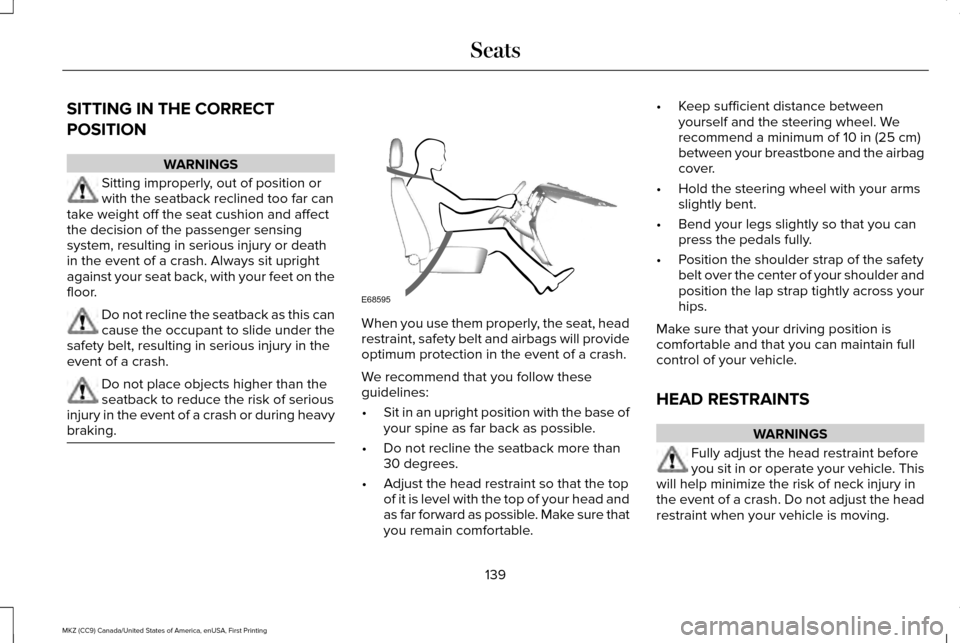
SITTING IN THE CORRECT
POSITION
WARNINGS
Sitting improperly, out of position or
with the seatback reclined too far can
take weight off the seat cushion and affect
the decision of the passenger sensing
system, resulting in serious injury or death
in the event of a crash. Always sit upright
against your seat back, with your feet on the
floor. Do not recline the seatback as this can
cause the occupant to slide under the
safety belt, resulting in serious injury in the
event of a crash. Do not place objects higher than the
seatback to reduce the risk of serious
injury in the event of a crash or during heavy
braking. When you use them properly, the seat, head
restraint, safety belt and airbags will provide
optimum protection in the event of a crash.
We recommend that you follow these
guidelines:
•
Sit in an upright position with the base of
your spine as far back as possible.
• Do not recline the seatback more than
30 degrees.
• Adjust the head restraint so that the top
of it is level with the top of your head and
as far forward as possible. Make sure that
you remain comfortable. •
Keep sufficient distance between
yourself and the steering wheel. We
recommend a minimum of 10 in (25 cm)
between your breastbone and the airbag
cover.
• Hold the steering wheel with your arms
slightly bent.
• Bend your legs slightly so that you can
press the pedals fully.
• Position the shoulder strap of the safety
belt over the center of your shoulder and
position the lap strap tightly across your
hips.
Make sure that your driving position is
comfortable and that you can maintain full
control of your vehicle.
HEAD RESTRAINTS WARNINGS
Fully adjust the head restraint before
you sit in or operate your vehicle. This
will help minimize the risk of neck injury in
the event of a crash. Do not adjust the head
restraint when your vehicle is moving.
139
MKZ (CC9) Canada/United States of America, enUSA, First Printing SeatsE68595