2017 LINCOLN MKZ ignition
[x] Cancel search: ignitionPage 370 of 564

ENGINE SPECIFICATIONS - 2.0L
2.0L engine
Engine
122
Cubic inches
1-3-4-2
Firing order
Coil on plug
Ignition system
9.3:1
Compression ratio
0.027-0.031 in. (0.70-0.80 mm)
Spark plug gap
367
MKZ (CC9) Canada/United States of America, enUSA, First Printing Capacities and Specifications
Page 371 of 564

Drivebelt Routing
Long drivebelt is on first pulley
groove closest to engine
A
Short drivebelt is on second pulley
groove farthest from engine
B
ENGINE SPECIFICATIONS - 3.0L 3.0L V6 Engine
Engine
180
Cubic inches
1-4-2-5-3-6
Firing order
Coil in plug
Ignition system
9.5:1
Compression ratio
0.028–0.031 in (0.7–0.8 mm)
Spark plug gap
368
MKZ (CC9) Canada/United States of America, enUSA, First Printing Capacities and SpecificationsA
BE142480
Page 395 of 564

Action and Description
Menu Item
Item
This bar displays icons and messages pertaining to current system activi\
ties including climate
settings, voice commands and phone functions such as text messages.
Status Bar
A
This button is available on the main screens. Pressing it takes you to the home screen view.
Home
B
This shows the current time. You can set the clock manually or have it controlled by the vehicle's
GPS location. See Settings (page 457).
Clock
C
This displays the current outside temperature.
Outside Temperature
D
You can touch any of the buttons on this bar to select a feature.
Feature Bar
E
The touchscreen allows you quick access to
all of your comfort, navigation,
communication and entertainment options.
Using the status and feature bar you can
quickly select the feature you want to use. Note:
Your system is equipped with a feature
that allows you to access and control audio
features for 10 minutes after you switch the
ignition off (and no doors open). The Status Bar
Additional icons also display in the status bar
depending on market, vehicle options and
current operation. If a feature is not active,
the icon does not display. Certain icons may
move to the left or right depending on what
options are active.
392
MKZ (CC9) Canada/United States of America, enUSA, First Printing SYNC™ 3
Page 409 of 564

download continues where it left off at the
next Wi-Fi connected opportunity. Upon
activation of an update, a banner displays
on the touchscreen indicating the system
update. Select the icon to see more detail.
This icon displays for two ignition cycles.
To switch this feature off:
Menu Item
Settings
General In this menu selection, you
can change the selection for
automatic updates to OFF.
Automatic
System
Updates
Support
The SYNC support team is available to help
you with any questions you are not able to
answer on your own.
Monday-Saturday, 8:30am-8:00pm EST. United States: 1-800-521-4140.
Canada: 1-800-387-9333.
Times are subject to change due to holidays.
Privacy Information
When you connect a cellular phone to SYNC
3, the system creates a profile within your
vehicle that links to that cellular phone. This
profile helps in offering you more cellular
features and operating more efficiently.
Among other things, this profile may contain
data about your cellular phone book, text
messages (read and unread), and call history,
including history of calls when your cell
phone was not connected to the system. In
addition, if you connect a media device, the
system creates and retains an index of
supported media content. The system also
records a short diagnostic log of
approximately 10 minutes of all recent system
activity. The log profile and other system data
may be used to improve the system and help
diagnose any problems that may occur.The cellular profile, media device index, and
diagnostic log remain in your vehicle unless
you delete them and are generally accessible
only in your vehicle when the cellular phone
or media player is connected.
If you no longer plan to use the system or
your vehicle, we recommend you perform a
Master Reset to erase all stored information.
You can find more information about the
Master Reset in General Settings. See
Settings (page 457). System data cannot be
accessed without special equipment and
access to your vehicle's SYNC 3 module. The
Lincoln Motor Company does not access the
system data for any purpose other than as
described absent consent, a court order, or
where required by law enforcement, other
government authorities, or other third parties
acting with lawful authority. Other parties
may seek to access the information
independently of The Lincoln Motor
Company.
406
MKZ (CC9) Canada/United States of America, enUSA, First Printing SYNC™ 3
Page 427 of 564

SIRIUS Satellite Radio Reception Factors and Troubleshooting
Potential reception issues
For optimal reception performance, keep the antenna clear of snow and ice build-up and keep
luggage and other materials as far away from the antenna as possible.
Antenna obstructions
Hills, mountains, tall buildings, bridges, tunnels, freeway overpasses, \
parking garages, dense tree
foliage and thunderstorms can interfere with your reception.
Terrain
When you pass a ground-based broadcast-repeating tower, a stronger signal may overtake a
weaker one and the audio system may mute.
Station overload
Your display may show ACQUIRING... to indicate the interference and the a\
udio system may mute.
Satellite radio signal interference Troubleshooting tips
Action
Cause
Message
No action required. This message should disap-
pear shortly.
Radio requires more than two seconds to produce
audio for the selected channel.
Acquiring Signal
If this message does not clear shortly, or with an
ignition key cycle, your receiver may have a fault.
See an authorized dealer for service.
There is an internal module or system failure
present.
Satellite antenna fault
SIRIUS system failure
Tune to another channel or choose another preset.
The channel is no longer available.
Invalid Channel
424
MKZ (CC9) Canada/United States of America, enUSA, First Printing SYNC™ 3
Page 486 of 564
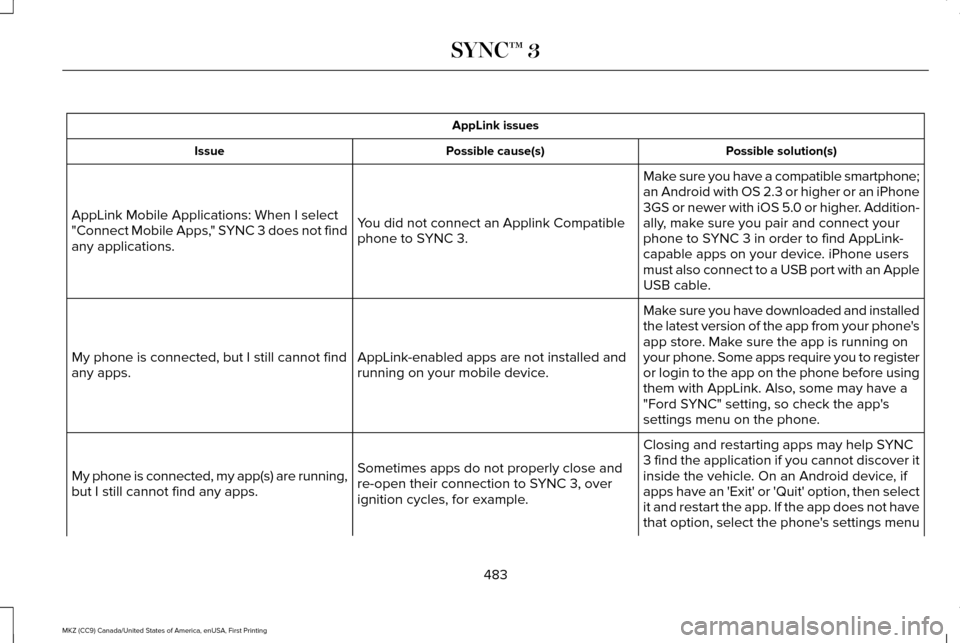
AppLink issues
Possible solution(s)
Possible cause(s)
Issue
Make sure you have a compatible smartphone;
an Android with OS 2.3 or higher or an iPhone
3GS or newer with iOS 5.0 or higher. Addition-
ally, make sure you pair and connect your
phone to SYNC 3 in order to find AppLink-
capable apps on your device. iPhone users
must also connect to a USB port with an Apple
USB cable.
You did not connect an Applink Compatible
phone to SYNC 3.
AppLink Mobile Applications: When I select
"Connect Mobile Apps," SYNC 3 does not find
any applications.
Make sure you have downloaded and installed
the latest version of the app from your phone's
app store. Make sure the app is running on
your phone. Some apps require you to register
or login to the app on the phone before using
them with AppLink. Also, some may have a
"Ford SYNC" setting, so check the app's
settings menu on the phone.
AppLink-enabled apps are not installed and
running on your mobile device.
My phone is connected, but I still cannot find
any apps.
Closing and restarting apps may help SYNC
3 find the application if you cannot discover it
inside the vehicle. On an Android device, if
apps have an 'Exit' or 'Quit' option, then select
it and restart the app. If the app does not have
that option, select the phone's settings menu
Sometimes apps do not properly close and
re-open their connection to SYNC 3, over
ignition cycles, for example.
My phone is connected, my app(s) are running,
but I still cannot find any apps.
483
MKZ (CC9) Canada/United States of America, enUSA, First Printing SYNC™ 3
Page 554 of 564

A
A/C
See: Climate Control...........................................134
About This Manual............................................7
ABS See: Brakes...........................................................188
ABS driving hints See: Hints on Driving With Anti-Lock
Brakes................................................................188
Accessories....................................................491 Exterior Style........................................................491
Interior Style..........................................................491
Lifestyle..................................................................491
Peace of Mind......................................................491
Accessories See: Replacement Parts Recommendation.....13
ACC See: Using Adaptive Cruise Control..............216
Active Park Assist.........................................203 Deactivating the Active Park Assist
Feature.............................................................209
Parallel Parking, Perpendicular Parking, Parallel Park Out Assist................................203
Troubleshooting the System...........................209
Adaptive Headlamps.....................................89
Adjusting the Headlamps............................315 Horizontal Aim Adjustment...............................316 Vertical Aim Adjustment....................................315
Adjusting the Steering Wheel......................78 Power Tilt and Telescope Steering
Column................................................................78
AFS See: Adaptive Headlamps..................................89
Airbag Disposal
...............................................53
Air Conditioning See: Climate Control...........................................134
Air Filter See: Changing the Engine Air Filter...............319
Alarm See: Anti-Theft Alarm...........................................76
All-Wheel Drive
..............................................179
Ambient Lighting............................................92
Anti-Theft Alarm..............................................76
Arming the Alarm..................................................77
Disarming the Alarm.............................................77
Appendices....................................................527
Apps
.................................................................454
........................................................................\
.........454
SiriusXM Traffic and Travel Link.....................456
Audible Warnings and Indicators..............107 Headlamps On Warning Chime.......................
107
Key in Ignition Warning Chime.........................107
Keyless Warning Alert........................................107
Parking Brake On Warning Chime
..................107 Audio Control
...................................................79
Seek, Next or Previous........................................79
Audio System
................................................386
General Information...........................................386
Audio Unit - Vehicles With: Premium AM/ FM/CD...........................................................387
Auto Hold.........................................................191 Using Auto Hold..................................................193
Autolamps.........................................................85 Windshield Wiper Activated Headlamps........86
Automatic Climate Control..........................134 Automatic Fan Settings......................................136
Automatic High Beam Control
....................88
Activating the System..........................................89
Manually Overriding the System......................89
Automatic Transmission...............................173 Automatic Transmission Adaptive
Learning.............................................................177
Brake-Shift Interlock Override.........................176
If Your Vehicle Gets Stuck In Mud or Snow...................................................................177
Push Button Shift Transmission........................173
SelectShift Automatic ™ Transmission.............175
Automatic Transmission Fluid Check............................................................307
6F35/HF35 transmission..................................307
6F50/6F55 Transmission.................................308
Autowipers.......................................................82
551
MKZ (CC9) Canada/United States of America, enUSA, First Printing Index
Page 559 of 564

Traction Control...................................................130
Transmission..........................................................131
Installing Child Restraints..............................19
Child Seats..............................................................19
Using Lap and Shoulder Belts............................19
Using Lower Anchors and Tethers for
CHildren (LATCH).............................................25
Using Tether Straps..............................................27
Instrument Cluster.........................................101
Instrument Lighting Dimmer........................86
Interior Lamps
...................................................91
Front Interior Lamp................................................91
Rear Interior Lamp................................................92
Interior Luggage Compartment Release...........................................................73
Interior Mirror
...................................................97
Auto-Dimming Mirror............................................97
Introduction
.........................................................7
J
Jump Starting the Vehicle...........................261 Connecting the Jumper Cables.....................
262
Jump Starting......................................................263
Preparing Your Vehicle......................................261
Removing the Jumper Cables.........................263 K
Keyless Entry.....................................................71
SECURICODE™ KEYLESS ENTRY
KEYPAD................................................................71
Keyless Starting.............................................159 Ignition Modes.....................................................159
Keys and Remote Controls
...........................54
L
Lane Keeping System
.................................226
Switching the System On and Off..................227
Lighting Control
..............................................85
Headlamp Flasher................................................85
Headlamp High Beam.........................................85
Lighting..............................................................85
Lincoln Automotive Financial Services......12
Lincoln Protect
..............................................493
EXTENDED SERVICE PLANS (CANADA
ONLY)................................................................494
Lincoln Protect (U.S. Only)................................493
Load Carrying
................................................244
Load Limit.......................................................244
Special Loading Instructions for Owners of
Pick-up Trucks and Utility-type
Vehicles............................................................248 Vehicle Loading - with and without a
Trailer................................................................244
Locking and Unlocking
.................................65
Activating Intelligent Access.............................66
Autolock..................................................................68
Battery Saver.........................................................69
Illuminated Entry...................................................68
Illuminated Exit......................................................68
Locking and Unlocking the Doors with the
Key Blade............................................................67
Luggage Compartment.......................................69
Power Decklid.......................................................69
Power Door Locks................................................65
Remote Control.....................................................65
Smart Unlocks for Intelligent Access Keys......................................................................67
Locks..................................................................65
Lug Nuts See: Changing a Road Wheel.........................357
M
Maintenance..................................................295 General Information...........................................295
Media Hub......................................................389
Memory Function..........................................145 Easy Entry and Exit Feature..............................146
556
MKZ (CC9) Canada/United States of America, enUSA, First Printing Index