Page 495 of 587

Cell phone issues
Possible solution
Possible cause
Issue
Text messages from WhatsApp and Facebook Messenger are not
supported.
Your cell phone must support downloading text messages through
Bluetooth to receive incoming text messages.
This is a cell phone-dependent feature.
Audible text messages do
not work on my cell phone. Because each cell phone is different, refer to your device's manual
for the specific cell phone you are pairing. In fact, there can be
differences between cell phones due to brand, model, service provider
and software version.
This is a cell phone limitation. USB and Bluetooth Stereo issues
Possible solution
Possible cause
Issue
Disconnect the device from SYNC 3. Try switching your device off,
resetting it or removing the battery, then reconnect it to SYNC 3.
Possible device malfunction.
I am having trouble
connecting my device. Make sure you are using the manufacturer's cable.
Make sure to correctly insert the USB cable into the device and your
vehicle's USB port.
Make sure that the device does not have an auto-install program or
active security settings.
492
MKX (CD9) Canada/United States of America, enUSA, First Printing SYNC™ 3
Page 496 of 587

USB and Bluetooth Stereo issues
Possible solution
Possible cause
Issue
Make sure your device is unlocked before connecting it to SYNC 3.
The device has a lock screen enabled.
Make sure you are not leaving the device in your vehicle during very
hot or cold temperatures.
This is a device limitation.
SYNC 3 does not recog-
nize my device when I start
my vehicle.
Make sure you connect the device to SYNC 3 and that you have
started the media player on your device.
This is a device-dependent feature.
Bluetooth audio does not
stream. The device is not connected.
Make sure that all song details are populated.
Your music files may not contain the
correct artist, song title, album or genre
information.
SYNC 3 does not recog-
nize music that is on my
device. Try replacing the corrupt file with a new version.
The file may be corrupted.
Some devices require you to change the USB settings from mass
storage to media transfer protocol class.
The song may have copyright protection
that does not allow it to play.
Convert the file to a supported format. See Entertainment (page 433).
The file format is not supported by SYNC
3.
Update media index. See Settings (page 472).
The device needs to be re-indexed.
Make sure your device is unlocked before connecting it to SYNC 3.
The device has a lock screen enabled.
493
MKX (CD9) Canada/United States of America, enUSA, First Printing SYNC™ 3
Page 497 of 587
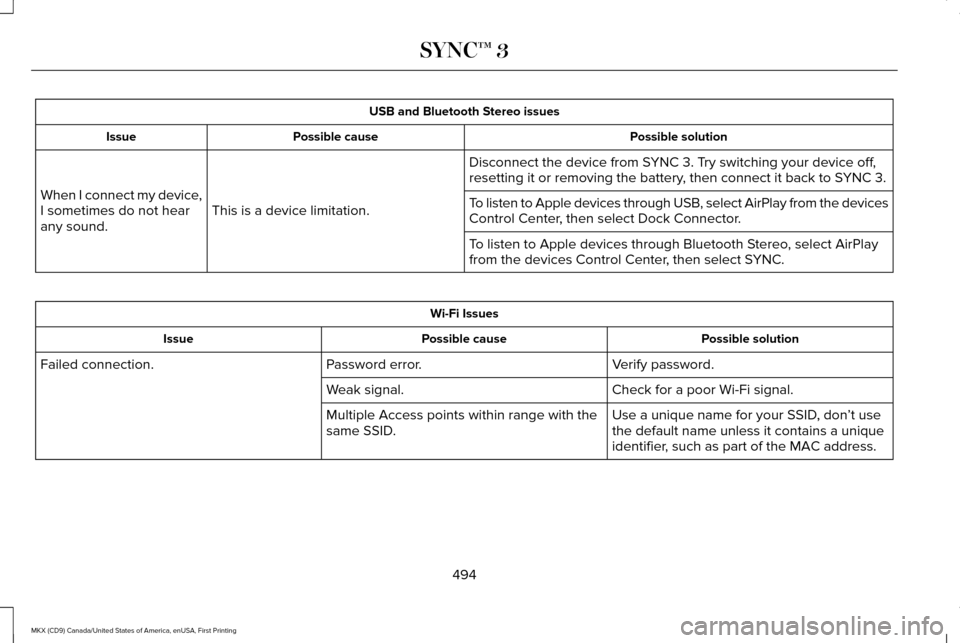
USB and Bluetooth Stereo issues
Possible solution
Possible cause
Issue
Disconnect the device from SYNC 3. Try switching your device off,
resetting it or removing the battery, then connect it back to SYNC 3.
This is a device limitation.
When I connect my device,
I sometimes do not hear
any sound. To listen to Apple devices through USB, select AirPlay from the devices
Control Center, then select Dock Connector.
To listen to Apple devices through Bluetooth Stereo, select AirPlay
from the devices Control Center, then select SYNC.Wi-Fi Issues
Possible solution
Possible cause
Issue
Verify password.
Password error.
Failed connection.
Check for a poor Wi-Fi signal.
Weak signal.
Use a unique name for your SSID, don’t use
the default name unless it contains a unique
identifier, such as part of the MAC address.
Multiple Access points within range with the
same SSID.
494
MKX (CD9) Canada/United States of America, enUSA, First Printing SYNC™ 3
Page 504 of 587

Voice command issues
Possible solution
Possible cause
Issue
Make sure that you are saying the name exactly as it appears on your
phone. For example, if your contact is "Joe Wilson", say "Call Joe
Wilson". If your contact name is "Mom", say "Call Mom".
You may not be saying the name exactly
as it appears on your phonebook.
SYNC 3 does not under-
stand or is calling the
wrong contact when I want
to make a call.
Make sure that your contact names do not have any special characters
like *, - or +.
The contact name may contain special
characters.
SYNC 3 applies the phonetic pronunciation rules of the selected
language to the contact names stored on your cell phone.
You may not be saying the name exactly
as it appears on your phonebook.
The SYNC 3 voice control
system is having trouble
recognizing foreign names
stored on my cell phone.
Helpful Hint: You can select your contact manually. Press PHONE.
Select the option for phonebook and then contact name. Press the
soft-key option to hear it. SYNC 3 will read the contact name to you,
giving you some idea of the pronunciation it is expecting.
501
MKX (CD9) Canada/United States of America, enUSA, First Printing SYNC™ 3
Page 505 of 587

Voice command issues
Possible solution
Possible cause
Issue
SYNC 3 applies the phonetic pronunciation rules of the selected
language to the names stored on your media player or USB flash
drive. It is able to make some exceptions for very popular artist names
(for example, U2) such that you can always use the English pronunci-
ation for these artists.
You may be saying the foreign names
using the currently selected language for
SYNC 3.
The SYNC 3 voice control
system is having trouble
recognizing foreign tracks,
artists, albums, genres and
playlist names from my
media player or USB flash
drive.
SYNC 3 uses a synthetically generated voice rather than pre-recorded
human voice.
SYNC 3 uses text-to-speech voice prompt
technology.
The system generates
voice prompts and the
pronunciation of some
words may not be accurate
for my language. SYNC 3 offers several new voice control features for a wide range of
languages. Dialing a contact name directly from the phonebook
without pre-recording (for example, “call John Smith
”) or selecting a
track, artist, album, genre or playlist directly from your media player
(for example, "play artist Madonna").
502
MKX (CD9) Canada/United States of America, enUSA, First Printing SYNC™ 3
Page 511 of 587

Less Cost to Properly Maintain Your Vehicle
Lincoln Protect also offers a Premium
Maintenance Plan that covers all scheduled
maintenance, and selected wear items. The
coverage is prepaid, so you never have to
worry about the cost of your vehicle
’s
maintenance.
Covered maintenance includes:
• Windshield wiper blades.
• Spark plugs.
• The clutch disc.
• Brake pads and linings.
• Shock absorbers and struts.
• Engine cooling hoses, clamps and
o-rings.
• Engine belts.
• Diesel exhaust fluid replenishment. Interest Free Finance Options
Just a 10% down payment will provide you
with an affordable, no interest, no fee
payment program allowing you all the
security and benefits Lincoln Protect
Extended Service Plan has to offer while
paying over time. You are pre-approved with
no credit check or hassles. To learn more,
call our Lincoln Protect Extended Service
Plan specialists at 800-367-3377.
Complete the information below and mail to:
Lincoln Protect Extended Service Plan
P.O. Box 321067
Detroit, MI 48232
Lincoln Protect (CANADA ONLY)
You can get more protection for your vehicle
by purchasing a Lincoln Protect Extended
Service Plan. Lincoln Protect Extended
Service Plan is the only service contract
backed by Lincoln Motor Company of
Canada, Limited. Depending on the plan you
purchase, Lincoln Extended Service Plan
provides benefits such as: •
Rental reimbursement.
• Coverage for certain maintenance and
wear items.
• Protection against repair costs after your
New Vehicle Limited Warranty Coverage
expires.
• Roadside Assistance benefits.
There are several Lincoln Protect Extended
Service Plans available in various time,
distance and deductible combinations. Each
plan is tailored to fit your own driving needs,
including reimbursement for towing and
rental. When you purchase Lincoln Protect
Extended Service Plan, you receive added
peace-of-mind protection throughout
Canada, the United States and Mexico,
provided by a network of participating
authorized Lincoln Motor Company dealers.
Note: Repairs performed outside of Canada,
the United States and Mexico are not eligible
for Lincoln Protect Extended Service Plan
coverage.
508
MKX (CD9) Canada/United States of America, enUSA, First Printing Lincoln Protect
Page 516 of 587
Check every six months
Safety belts and seat latches for wear and function.
Safety warning lamps (brake, ABS, airbag and safety belt) for operation.
Washer spray and wiper operation. Clean or replace blades as necessary.
Multi-Point Inspection
In order to keep your vehicle running right,
it is important to have the systems on your
vehicle checked regularly. This can help
identify potential issues and prevent major
problems. We recommend having the
following multi-point inspection performed
at every scheduled maintenance interval to
help make sure your vehicle keeps running
great. Multi-Point inspection
Hazard warning system operation
Accessory drive belt(s)
Horn operation
Battery performance
Radiator, cooler, heater and air conditioning hoses
Engine air filter
Suspension components for leaks or damage
Exhaust system
513
MKX (CD9) Canada/United States of America, enUSA, First Printing Scheduled Maintenance
Page 518 of 587
When to expect the message prompting you to change your oil
Vehicle use and example
Interval
Normal
7500-10000 miles (12000-16000 km) Normal commuting with highway driving
No, or moderate, load or towing
Flat to moderately hilly roads
No extended idling
Severe
5000-7499 miles (8000-11999 km) Moderate to heavy load or towing
Mountainous or off-road conditions
Extended idling
Extended hot or cold operation
Extreme
3000-4999 miles
(4800-7999 km) Maximum load or towing
Extreme hot or cold operation
515
MKX (CD9) Canada/United States of America, enUSA, First Printing Scheduled Maintenance