2017 LINCOLN MKT warning
[x] Cancel search: warningPage 179 of 558

5.
Insert a fuel pump nozzle or the fuel filler
funnel provided with your vehicle in to
the fuel tank filler pipe opening. This
action should dislodge any debris that
may be preventing the fuel filler inlet from
fully closing.
Note: If this action corrects the problem the
message may not reset immediately. If the
message remains and the service engine
soon warning lamp appears in the
information display, have your vehicle
checked as soon as possible.
FUEL CONSUMPTION
The advertised capacity is the maximum
amount of fuel that you can add to the fuel
tank after running out of fuel. Included in the
advertised capacity is an empty reserve. The
empty reserve is an unspecified amount of
fuel that remains in the fuel tank when the
fuel gauge indicates empty.
Note: The amount of fuel in the empty
reserve varies and should not be relied upon
to increase driving range. Filling the Fuel Tank
For consistent results when refueling:
•
Turn the ignition off before fueling; an
inaccurate reading results if the engine
is left running.
• Use the same fill rate (low-medium-high)
each time the tank is filled.
• Allow no more than one automatic
shut-off when refueling.
Results are most accurate when the filling
method is consistent.
Calculating Fuel Economy
Do not measure fuel economy during the
first 1,000 mi (1,600 km) of driving (this is your
engine ’s break-in period). A more accurate
measurement is obtained after 2,000 mi
(3,200 km) to 3,000 mi (4,800 km). Also, fuel
expense, frequency of fill ups or fuel gauge
readings are not accurate ways to measure
fuel economy.
1. Fill the fuel tank completely and record the initial odometer reading. 2.
Each time you fill the fuel tank, record the
amount of fuel added.
3. After at least three fill ups, fill the fuel tank and record the current odometer
reading.
4. Subtract your initial odometer reading from the current odometer reading.
To calculate L/100 km (liters per 100
kilometers) fuel consumption, multiply the
liters used by 100, then divide by kilometers
traveled. To calculate MPG (miles per gallon)
fuel consumption, divide miles traveled by
gallons used.
Keep a record for at least one month and
record the type of driving (city or highway).
This provides an accurate estimate of your
vehicle's fuel economy under current driving
conditions. Keeping records during summer
and winter will show how temperature
impacts fuel economy.
176
MKT (TP4) , enUSA, First Printing Fuel and Refueling
Page 180 of 558

Conditions
•
Heavily loading your vehicle reduces fuel
economy.
• Carrying unnecessary weight in your
vehicle may reduce fuel economy.
• Adding certain accessories to your
vehicle such as bug deflectors, rollbars
or light bars, running boards and ski
racks may reduce fuel economy.
• Using fuel blended with alcohol may
lower fuel economy.
• Fuel economy may decrease with lower
temperatures.
• Fuel economy may decrease when
driving short distances.
• You will get better fuel economy when
driving on flat terrain than when driving
on hilly terrain. EMISSION CONTROL SYSTEM WARNINGS
Do not park, idle, or drive your vehicle
in dry grass or other dry ground cover.
The emission system heats up the engine
compartment and exhaust system, which can
start a fire. Exhaust leaks may result in entry of
harmful and potentially lethal fumes
into the passenger compartment. If you smell
exhaust fumes inside your vehicle, have your
dealer inspect your vehicle immediately. Do
not drive if you smell exhaust fumes. Your vehicle is equipped with various
emission control components and a catalytic
converter that will enable your vehicle to
comply with applicable exhaust emission
standards.
To make sure that the catalytic converter and
other emission control components continue
to work properly:
•
Use only the specified fuel listed.
• Avoid running out of fuel. •
Do not turn off the ignition while your
vehicle is moving, especially at high
speeds.
• Have the items listed in scheduled
maintenance information performed
according to the specified schedule.
The scheduled maintenance items listed in
scheduled maintenance information are
essential to the life and performance of your
vehicle and to its emissions system.
If you use anything other than Ford,
Motorcraft or Ford-authorized parts for
maintenance replacements or for service of
components affecting emission control, such
non-Ford parts should be equivalent to
genuine Ford Motor Company parts in
performance and durability.
Illumination of the service engine soon
indicator, charging system warning light or
the temperature warning light, fluid leaks,
strange odors, smoke or loss of engine
power could indicate that the emission
control system is not working properly.
177
MKT (TP4) , enUSA, First Printing Fuel and Refueling
Page 183 of 558

AUTOMATIC TRANSMISSION
WARNINGS
Always apply the parking brake fully
and make sure you shift into park (P).
Switch the ignition off and remove the key
whenever you leave your vehicle. Do not apply the brake pedal and
accelerator pedal simultaneously.
Applying both pedals simultaneously for
more than a few seconds will limit engine
performance, which may result in difficulty
maintaining speed in traffic and could lead
to serious injury. Understanding the Positions of Your
Automatic Transmission
Putting your vehicle in gear:
1. Fully press down the brake pedal.
2.
Move the gearshift lever into the desired
gear.
3. Come to a complete stop.
4. Move the gearshift lever and securely latch it in park (P). Park (P)
With the transmission in park (P), your vehicle
locks the transmission and prevents the
wheels from turning. Always come to a
complete stop before putting your vehicle
into and out of park (P).
Reverse (R)
With the selector in reverse (R), your vehicle
moves backward. Always come to a
complete stop before shifting into and out
of reverse (R).Neutral (N)
With the selector in neutral (N), your vehicle
can be started and is free to roll. Hold the
brake pedal down while in this position.
Drive (D)
Drive (D) is the normal driving position for
the best fuel economy. The overdrive
function allows automatic upshifts and
downshifts through all gears.
Sport (S)
Putting the vehicle in sport (S):
•
Provides additional engine braking and
extends lower gear operation to enhance
performance for uphill climbs, hilly terrain
or mountainous areas. This will increase
engine RPM during engine braking.
• Provides additional lower gear operation
through the automatic transmission shift
strategy.
• Provides gear selection more quickly and
at higher engine speeds.
180
MKT (TP4) , enUSA, First Printing TransmissionPRNDS
E142628
Page 185 of 558
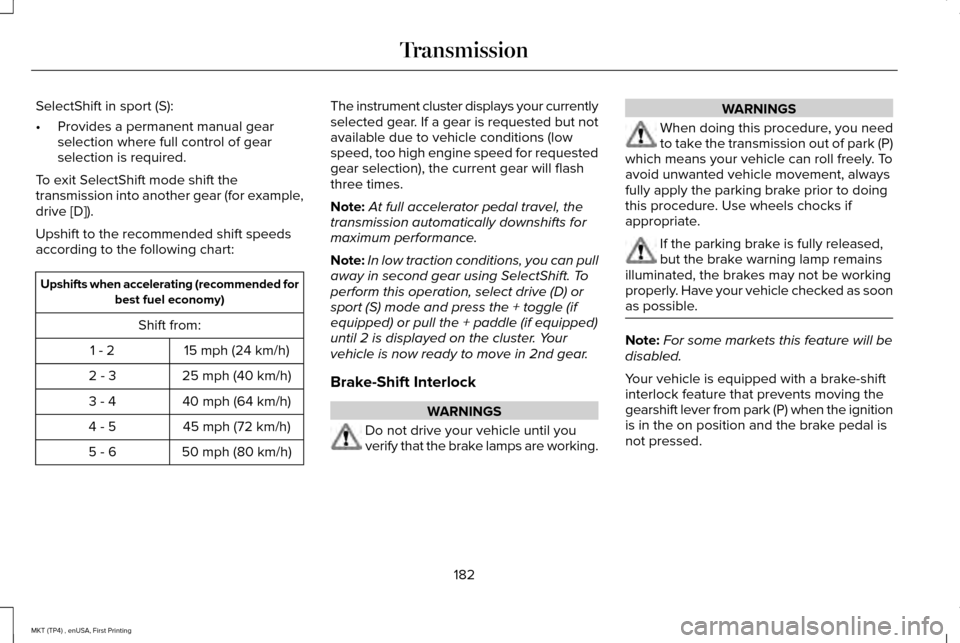
SelectShift in sport (S):
•
Provides a permanent manual gear
selection where full control of gear
selection is required.
To exit SelectShift mode shift the
transmission into another gear (for example,
drive [D]).
Upshift to the recommended shift speeds
according to the following chart: Upshifts when accelerating (recommended for
best fuel economy)
Shift from: 15 mph (24 km/h)
1 - 2
25 mph (40 km/h)
2 - 3
40 mph (64 km/h)
3 - 4
45 mph (72 km/h)
4 - 5
50 mph (80 km/h)
5 - 6 The instrument cluster displays your currently
selected gear. If a gear is requested but not
available due to vehicle conditions (low
speed, too high engine speed for requested
gear selection), the current gear will flash
three times.
Note:
At full accelerator pedal travel, the
transmission automatically downshifts for
maximum performance.
Note: In low traction conditions, you can pull
away in second gear using SelectShift. To
perform this operation, select drive (D) or
sport (S) mode and press the + toggle (if
equipped) or pull the + paddle (if equipped)
until 2 is displayed on the cluster. Your
vehicle is now ready to move in 2nd gear.
Brake-Shift Interlock WARNINGS
Do not drive your vehicle until you
verify that the brake lamps are working. WARNINGS
When doing this procedure, you need
to take the transmission out of park (P)
which means your vehicle can roll freely. To
avoid unwanted vehicle movement, always
fully apply the parking brake prior to doing
this procedure. Use wheels chocks if
appropriate. If the parking brake is fully released,
but the brake warning lamp remains
illuminated, the brakes may not be working
properly. Have your vehicle checked as soon
as possible. Note:
For some markets this feature will be
disabled.
Your vehicle is equipped with a brake-shift
interlock feature that prevents moving the
gearshift lever from park (P) when the ignition
is in the on position and the brake pedal is
not pressed.
182
MKT (TP4) , enUSA, First Printing Transmission
Page 187 of 558

USING ALL-WHEEL DRIVE
All-wheel drive uses all four wheels to power
the vehicle. This increases traction, enabling
you to drive over terrain and road conditions
that a conventional two-wheel drive vehicle
cannot. The AWD system is active all the time
and requires no input from the operator.
Note:
Your AWD vehicle is not intended for
off-road use. The AWD feature gives your
vehicle some limited off-road capabilities in
which driving surfaces are relatively level,
obstruction-free and otherwise similar to
normal on-road driving conditions. Operating
your vehicle under other than those
conditions could subject the vehicle to
excessive stress which might result in
damage which is not covered under your
warranty.
Note: When an AWD system fault is present,
the warning Check AWD displays in the
information display. The AWD system is not
functioning correctly and defaults to
front-wheel drive. When this warning
displays, have your vehicle serviced at an
authorized dealer. Note:
The AWD OFF message may also
appear in the information display if the AWD
system overheats and defaults to front-wheel
drive. This may occur if the vehicle is
operated in extreme conditions with
excessive wheel slip, such as deep sand.
To resume normal AWD function as soon as
possible, stop the vehicle in a safe location
and stop the engine for at least 10 minutes.
After the engine has been restarted and the
AWD system has adequately cooled, the
AWD OFF
message will turn off and normal
AWD function returns. If the engine is not
stopped, the
AWD OFF message turns off
when the system cools and normal AWD
function returns.
184
MKT (TP4) , enUSA, First Printing All-Wheel Drive
(If Equipped)
Page 188 of 558

All-Wheel Drive Messages
Action / Description
AWD Messages
Displays if the AWD system disables to protect itself. This may occur
if you operate the vehicle after installing the compact spare tire, if the
system is overheating or if there is an issue with another vehicle
system that prevents the AWD system from operating. The AWD
system resumes normal operation and clears this message after you
install the road tire and you switch the ignition on and off, or after you
allow the system to cool. If this message remains on, have a qualified
technician service your vehicle to repair other vehicle systems.
AWD OFF
Displayed in conjunction with the powertrain malfunction/reduced
power light when the system is not operating properly. If the warning
stays on or continues to come on, contact your authorized dealer as
soon as possible.
Check AWD
Operating AWD Vehicles With Spare
Tires
A spare tire of a different size other than the
tire provided should never be used. The
AWD system may disable automatically and
enter front-wheel drive only mode to protect
driveline components if a non-full sized tire
is installed. This condition may display an AWD OFF message in the information
display. If there is an AWD OFF message in
the information display from using a non-full
sized spare tire, this indicator should turn off
after reinstalling the repaired or replaced
normal road tire and cycling the ignition off
and on. It is recommended to reinstall the
repaired or replaced road tire as soon as
possible. Major dissimilar tire sizes between the front and rear axles (for example, 17 inch
low profile tires on the front axle and 22 inch
high profile tires on the rear axle) could
cause the AWD system to stop functioning
and default to front-wheel drive or damage
the AWD system.
185
MKT (TP4) , enUSA, First Printing All-Wheel Drive
(If Equipped)
Page 189 of 558

Operating AWD Vehicles With
Mismatched Tires
WARNINGS
Only use replacement tires and wheels
that are the same size, load index,
speed rating and type (such as P-metric
versus LT-metric or all-season versus
all-terrain) as those originally provided by
Ford. The recommended tire and wheel size
may be found on either the Safety
Compliance Certification Label (affixed to
either the door hinge pillar, door-latch post,
or the door edge that meets the door-latch
post, next to the driver's seating position), or
the Tire Label which is located on the B-Pillar
or edge of the driver's door. If this
information is not found on these labels, then
you should contact your authorized dealer
as soon as possible. Use of any tire or wheel
not recommended by Ford can affect the
safety and performance of your vehicle,
which could result in an increased risk of loss
of vehicle control, vehicle rollover, personal
injury and death. WARNINGS
The use of non-recommended tires and
wheels could cause steering,
suspension, axle, transfer case or power
transfer unit failure. If you have questions
regarding tire replacement, contact your
authorized dealer as soon as possible. Major dissimilar tire sizes between the front
and rear axles (for example, 17 inch low
profile tires on the front axle and 22 inch high
profile tires on the rear axle) could cause the
AWD system to stop functioning and default
to front-wheel drive or damage the AWD
system. However, the AWD system is
capable of tolerating any combination of new
and worn tires of the same original tire size.
For example, using 3 worn tread tires and 1
new tread tire all of the same original tire
size, can be tolerated by the AWD system.
Driving In Special Conditions With All-
Wheel Drive (AWD)
AWD vehicles are equipped for driving on
sand, snow, mud and rough roads and have
operating characteristics that are somewhat
different from conventional vehicles, both on
and off the highway.
When driving at slow speeds in deep sand
under high outside temperatures, use a low
gear when possible. Lower gear operation
will maximize the engine and transmission
cooling capability.
Under severe operating conditions, the A/C
may cycle on and off to protect overheating
of the engine.
Basic operating principles in special
conditions
•
Drive slower in strong crosswinds which
can affect the normal steering
characteristics of your vehicle.
• Be extremely careful when driving on
pavement made slippery by loose sand,
water, gravel, snow or ice.
186
MKT (TP4) , enUSA, First Printing All-Wheel Drive (If Equipped)
Page 190 of 558

If Your Vehicle Goes Off the Edge of the
Pavement
•
If your vehicle goes off the edge of the
pavement, slow down, but avoid severe
brake application, ease the vehicle back
onto the pavement only after reducing
your speed. Do not turn the steering
wheel too sharply while returning to the
road surface.
• It may be safer to stay on the apron or
shoulder of the road and slow down
gradually before returning to the
pavement. You may lose control if you
do not slow down or if you turn the
steering wheel too sharply or abruptly.
• It often may be less risky to strike small
objects, such as highway reflectors, with
minor damage to your vehicle rather than
attempt a sudden return to the pavement
which could cause the vehicle to slide
sideways out of control or rollover.
Remember, your safety and the safety of
others should be your primary concern. If Your Vehicle Gets Stuck WARNINGS
Always fully apply the parking brake
and make sure you shift into park (P).
Switch the ignition off and remove the key
whenever you leave your vehicle. If the parking brake is fully released,
but the brake warning lamp remains
illuminated, the brakes may not be working
properly. Have your vehicle checked as soon
as possible. Do not spin the wheels at over 34 mph
(55 km/h). The tires may fail and injure
a passenger or bystander. Note:
Do not rock the vehicle if the engine
is not at normal operating temperature or
damage to the transmission may occur.
Note: Do not rock the vehicle for more than
a few minutes or damage to the transmission
and tires may occur or the engine may
overheat. If your vehicle gets stuck in mud or snow it
may be rocked out by shifting between
forward and reverse gears, stopping
between shifts, in a steady pattern. Press
lightly on the accelerator in each gear.
If your vehicle is equipped with
AdvanceTrac® with Roll Stability Control™, it
may be beneficial to disengage the
AdvanceTrac® with Roll Stability Control™
system while attempting to rock the vehicle.
Emergency Maneuvers
•
In an unavoidable emergency situation
where a sudden sharp turn must be
made, remember to avoid "over-driving"
your vehicle (that is, turn the steering
wheel only as rapidly and as far as
required to avoid the emergency).
Excessive steering will result in less
vehicle control, not more. Additionally,
smooth variations of the accelerator
and/or brake pedal pressure should be
utilized if changes in vehicle speed are
called for. Avoid abrupt steering,
187
MKT (TP4) , enUSA, First Printing All-Wheel Drive
(If Equipped)