2017 LINCOLN CONTINENTAL steering
[x] Cancel search: steeringPage 146 of 584

Note: Recirculated air may also turn on and off automatically in instrument pan\
el or instrument panel and floor airflow modes during
hot weather to improve cooling efficiency.
Climate controlled seats:
Press to switch the cooled seats on and off. See Seats (page 148).
K
Fan speed control:
Adjusts the volume of air circulated in the vehicle.
L
Heated rear window:
Press to switch the heated rear window on and off. See Heated Windows and Mirrors (page 146).
M
Heated steering wheel:
Press to switch the heated steering wheel on and off.
N
Automatic Fan Settings
The AUTO button illuminates for the
following fan settings:
• When three indicators are on, the fan
automatically adjusts to the highest
speed to reach the selected temperature
as quickly as possible.
• When two indicators are on, the fan
automatically adjusts to a medium speed
to reach the selected temperature with
a reduced amount of cabin noise.
• When one indicator is on, the fan
automatically adjusts to the lowest speed
to reach the selected temperature with
the least amount of cabin noise. Note:
The system starts at the previously
selected fan setting when AUTO is switched
on.
HINTS ON CONTROLLING THE
INTERIOR CLIMATE
General Hints
Note: Prolonged use of recirculated air may
cause the windows to fog up.
Note: You may feel a small amount of air
from the footwell air vents regardless of the
air distribution setting. Note:
To reduce humidity build-up inside
your vehicle, do not drive with the system
switched off or with recirculated air always
switched on.
Note: Do not place objects under the front
seats as this may interfere with the airflow
to the rear seats.
Note: Remove any snow, ice or leaves from
the air intake area at the base of the
windshield.
Note: To improve the time to reach a
comfortable temperature in hot weather,
drive with the windows open until you feel
cold air through the air vents.
143
Continental (CPL) Canada/United States of America, enUSA, First Printing Climate Control
Page 150 of 584

Heated Wiper Park (If Equipped)
When you switch the heated rear window
on, the heated wiper park automatically turns
on.
CABIN AIR FILTER
Your vehicle is equipped with a cabin air
filter, which gives you and your passengers
the following benefits:
• It improves your driving comfort by
reducing particle concentration and
odors.
• It improves the interior compartment
cleanliness.
• It protects the climate control
components from particle deposits.
You can locate the cabin air filter behind the
glove box.
Note: Make sure you have a cabin air filter
installed at all times. This prevents foreign
objects from entering the system. Running
the system without a filter in place could
result in degradation or damage to the
system. Replace the filter at regular intervals. See
Scheduled Maintenance (page 508).
For additional cabin air filter information, or
to replace the filter, see an authorized dealer.
REMOTE START
The system adjusts the interior temperature
depending on your chosen settings during
remote start.
You cannot adjust the climate control setting
during remote start operation. When you
switch the ignition on, the climate control
system will return to the previous settings.
You can now make adjustments.
You need to switch on certain
vehicle-dependent features, such as:
• Heated seats.
• Cooled seats.
• Heated steering wheel.
• Heated mirrors.
• Heated rear window. Note:
Passenger heated and cooled seats
only remain on during remote start if they
were on when you switched the vehicle off
(if equipped).
You can adjust the default remote start
settings using the information display
controls.
See Information Displays (page
110).
Automatic Settings
In hot weather, the system is set to 72°F
(22°C). The cooled seats are set to high (if
available, and selected to AUTO in the
information display).
In moderate weather, the system either heats
or cools (based on pre-selected settings).
The rear defroster, heated mirrors and
heated or cooled seats do not automatically
switch on.
In cold weather, the system is set to 72°F
(22°C). The heated seats and heated steering
wheel are set to high (if available, and
selected to AUTO in the information display).
The rear defroster and heated mirrors
automatically switch on.
147
Continental (CPL) Canada/United States of America, enUSA, First Printing Climate Control
Page 151 of 584
SITTING IN THE CORRECT
POSITION
WARNINGS
Sitting improperly, out of position or
with the seatback reclined too far can
take weight off the seat cushion and affect
the decision of the passenger sensing
system, resulting in serious injury or death
in the event of a crash. Always sit upright
against your seat back, with your feet on the
floor. Do not recline the seatback as this can
cause the occupant to slide under the
safety belt, resulting in serious injury in the
event of a crash. Do not place objects higher than the
seatback to reduce the risk of serious
injury in the event of a crash or during heavy
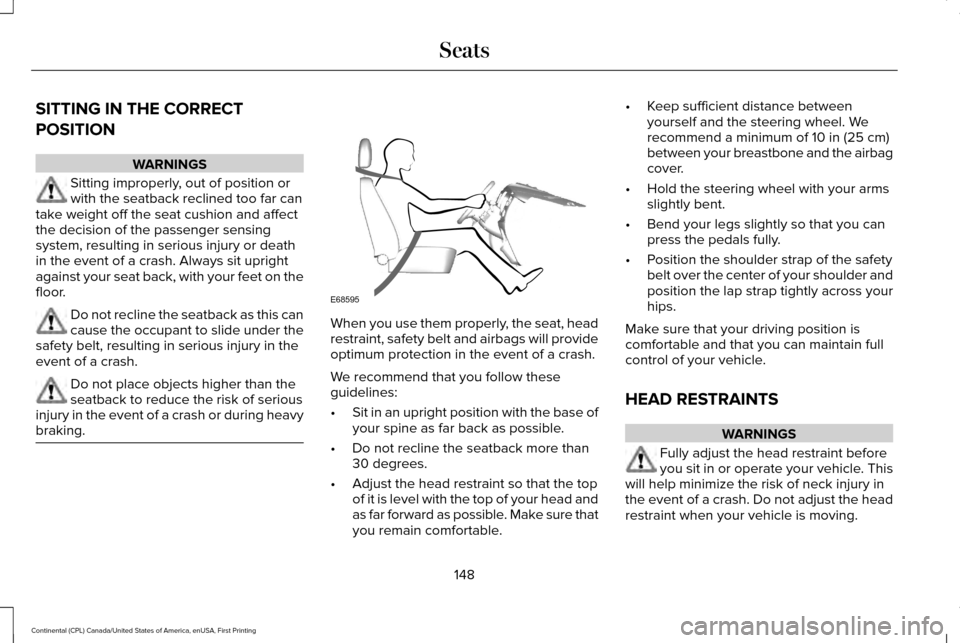
braking. When you use them properly, the seat, head
restraint, safety belt and airbags will provide
optimum protection in the event of a crash.
We recommend that you follow these
guidelines:
•
Sit in an upright position with the base of
your spine as far back as possible.
• Do not recline the seatback more than
30 degrees.
• Adjust the head restraint so that the top
of it is level with the top of your head and
as far forward as possible. Make sure that
you remain comfortable. •
Keep sufficient distance between
yourself and the steering wheel. We
recommend a minimum of 10 in (25 cm)
between your breastbone and the airbag
cover.
• Hold the steering wheel with your arms
slightly bent.
• Bend your legs slightly so that you can
press the pedals fully.
• Position the shoulder strap of the safety
belt over the center of your shoulder and
position the lap strap tightly across your
hips.
Make sure that your driving position is
comfortable and that you can maintain full
control of your vehicle.
HEAD RESTRAINTS WARNINGS
Fully adjust the head restraint before
you sit in or operate your vehicle. This
will help minimize the risk of neck injury in
the event of a crash. Do not adjust the head
restraint when your vehicle is moving.
148
Continental (CPL) Canada/United States of America, enUSA, First Printing SeatsE68595
Page 159 of 584
You can also adjust this feature through the
touchscreen.
Press the Menu Settings icon, then
Vehicle. Choose Multi-Contour
Seats.
When switched on, the system displays
directions for you to adjust the lumbar
settings in your seat or to set the massage
function.
To access and make adjustments to the
lumbar setting:
1. Choose the desired seat to adjust.
2. Press the + or - to adjust the lumbar intensity.
To access and make adjustments to the
massage setting:
1. Press the Menu Settings icon, then Vehicle. Choose Multi-Contour Seats.
2. Choose the desired seat to adjust.
3. Press OFF, Low or High. MEMORY FUNCTION (If Equipped) WARNINGS
Before activating the memory seat,
make sure that the area immediately
surrounding the seat is clear of obstructions
and that all occupants are clear of moving
parts. Do not use the memory function when
your vehicle is moving.
This feature automatically recalls the position
of the following:
•
Driver seat.
• Power mirrors.
• Power steering column.
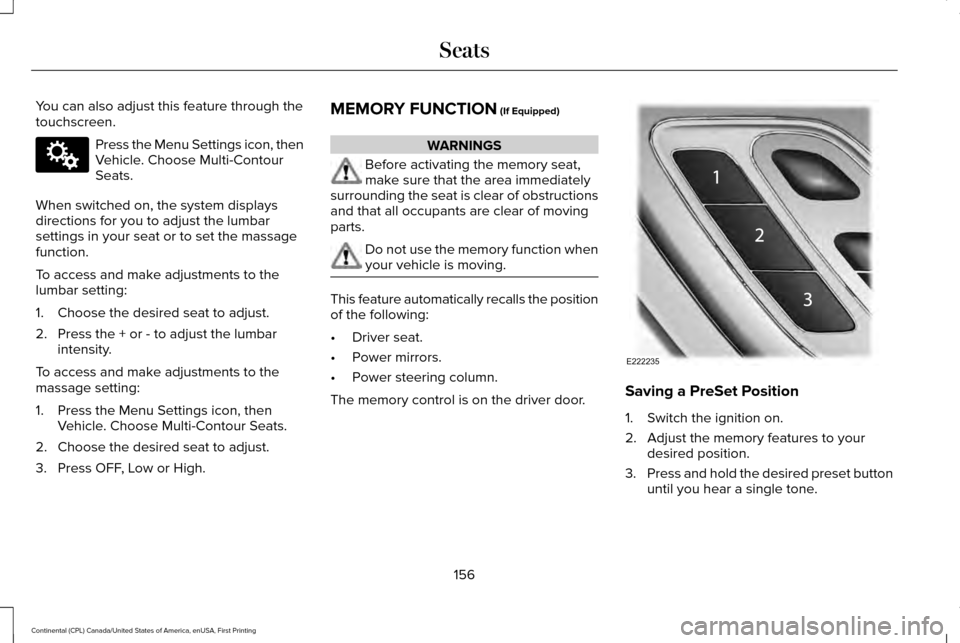
The memory control is on the driver door. Saving a PreSet Position
1. Switch the ignition on.
2. Adjust the memory features to your
desired position.
3. Press and hold the desired preset button
until you hear a single tone.
156
Continental (CPL) Canada/United States of America, enUSA, First Printing SeatsE142607 E222235
Page 177 of 584
Automatic Engine Shutdown Override
Note:
You cannot permanently switch off
the automatic shutdown. When you switch
it off temporarily, it turns on at the next
ignition cycle.
You can stop the shutdown, or reset the
timer, at any point before the 30-second
countdown has expired by doing any of the
following:
• Interacting with your vehicle, for example
pressing the brake or accelerator pedal.
• Disabling the shutdown using the
information display. See Information
Displays (page 110).
• Pressing the OK or RESET button during
the 30-second countdown.
Stopping the Engine When Your
Vehicle is Stationary
Note: The ignition, all electrical circuits and
all warning lamps and indicators will be
turned off.
Note: If the engine is idling for 30 minutes,
the ignition and engine automatically shuts
down. 1. Apply the parking brake.
2. Shift into park (P).
3. Briefly press the push button ignition
switch.
Stopping the Engine When Your
Vehicle is Moving WARNING
Switching off the engine when the
vehicle is still moving will result in a
loss of brake and steering assistance. The
steering will not lock, but higher effort will
be required. When the ignition is switched
off, some electrical circuits, including air
bags, warning lamps and indicators may also
be off. If the ignition was turned off
accidentally, you can shift into neutral (N) and
re-start the engine. 1. Shift into neutral and use the brakes to
bring your vehicle to a safe stop.
2. When your vehicle has stopped, shift into
park (P).
3. Apply the parking brake. 4. Press and hold the push button ignition
switch until the engine stops, or press it
three times within two seconds.
Guarding Against Exhaust Fumes WARNING
Exhaust leaks may result in entry of
harmful and potentially lethal fumes
into the passenger compartment. If you smell
exhaust fumes inside your vehicle, have your
vehicle inspected immediately. Do not drive
if you smell exhaust fumes. Important Ventilating Information
If you stop your vehicle and then leave the
engine idling for long periods, we
recommend that you do one of the following:
•
Open the windows at least
1 in (3 cm).
• Set your climate control to outside air.
174
Continental (CPL) Canada/United States of America, enUSA, First Printing Starting and Stopping the Engine
Page 192 of 584
A message will appear in your information
display screen when your vehicle has
entered Stay in Neutral mode.
Note:
During this mode the N button will
flash continuously and your instrument
cluster will display
N as the selected gear.
Exiting Stay in Neutral mode
To disable Stay in Neutral mode select
another gear. See the
Putting the Vehicle
in Gear for instructions on how to do this.
Entering a Carwash
Note: Always put your vehicle in Stay in
Neutral mode when entering an automatic
car wash. Failure to do this could result in
vehicle damage not covered by warranty.
Drive (D)
The normal driving position for the best fuel
economy.
Sport (S)
Putting the vehicle in sport (S): •
Provides additional engine braking and
extends lower gear operation to enhance
performance for uphill climbs, hilly terrain
or mountainous areas. This will increase
engine RPM during engine braking.
• Provides additional lower gear operation
through the automatic transmission shift
strategy.
• Provides gear selection more quickly and
at higher engine speeds.
SelectShift™ Automatic Transmission
Your vehicle is equipped with a SelectShift
Automatic transmission gearshift lever. The
SelectShift Automatic transmission gives you
the ability to change gears up or down as
desired. In order to prevent the engine from running
at too low an RPM, which may cause it to
stall, SelectShift still automatically makes
some downshifts if it has determined that
you have not downshifted in time. Although
SelectShift makes some downshifts for you,
it still allows you to downshift at any time as
long as the SelectShift determines that
damage will not be caused to the engine
from over-revving.
Note:
Engine damage may occur if you
maintain excessive engine revving without
shifting.
SelectShift does not automatically upshift,
even if the engine is approaching the RPM
limit. It must be shifted manually by pressing
the + button. Notice should be taken of the
shift indicator lamp, which alerts the driver
when to shift to ensure the highest level of
efficiency and fuel economy.
Pull the + paddle on the steering wheel to
activate SelectShift.
• Pull the right paddle (+) to upshift.
• Pull the left paddle (–) to downshift.
189
Continental (CPL) Canada/United States of America, enUSA, First Printing Transmission
Page 193 of 584

SelectShift in drive (D):
•
Provides a temporary manual mode for
performing more demanding maneuvers
where extra control of gear selection is
required (for example, when towing or
overtaking). This mode will hold a
selected gear for a temporary period of
time dependent on driver inputs (for
example, steering or accelerator pedal
input).
SelectShift in sport (S):
• Provides a permanent manual gear
selection where full control of gear
selection is required.
To exit Selectshift mode, shift the
transmission into drive (D). The instrument cluster displays your currently
selected gear. If a gear is requested but not
available due to vehicle conditions (low
speed, too high engine speed for requested
gear selection), the current gear will flash
three times.
Note:
At full accelerator pedal travel the
transmission will auto downshift to ensure
maximum performance.
Brake-Shift Interlock Override WARNINGS
Do not drive your vehicle until you
verify that the brake lamps are working.
When doing this procedure, you need
to take the transmission out of park (P)
which means your vehicle can roll freely. To
avoid unwanted vehicle movement, always
fully set the parking brake prior to doing this
procedure. Use wheels chocks if appropriate. If the parking brake is fully released,
but the brake warning lamp remains
illuminated, the brakes may not be working
properly. Have your vehicle checked as soon
as possible. Note:
See your authorized dealer as soon
as possible if this procedure is used.
Note: For some markets this feature is not
available.
Note: This feature only operates if your
12-volt battery has power. If the vehicle
battery voltage is not sufficient, use an
external 12 volt power source (for example,
jumper cables, a battery charger or jump
pack) to operate interlock override switch.
Use the brake-shift interlock override to
move your transmission from the park
position in the event of an electrical
malfunction. If your vehicle has a dead
battery, you need to use an external power
source.
1. Apply the parking brake and turn your ignition off before performing this
procedure.
190
Continental (CPL) Canada/United States of America, enUSA, First Printing TransmissionE144821
Page 197 of 584
Operating AWD Vehicles With Spare
or Mismatched Tires
WARNING
Only use replacement tires and wheels
that are the same size, load index,
speed rating and type (such as P-metric
versus LT-metric or all-season versus
all-terrain) as those originally provided by
Ford. The recommended tire and wheel size
may be found on either the Safety
Compliance Certification Label (affixed to
either the door hinge pillar, door-latch post,
or the door edge that meets the door-latch
post, next to the driver’ s seating position), or
the Tire Label which is located on the B-Pillar
or edge of the driver’ s door. If this
information is not found on these labels, then
you should contact your authorized dealer
as soon as possible. Use of any tire or wheel
not recommended by Ford can affect the
safety and performance of your vehicle,
which could result in an increased risk of loss
of vehicle control, vehicle rollover, personal
injury and death. A spare tire of a different size other than the
tire provided should never be used. The
AWD system may disable automatically and
enter front-wheel drive only mode to protect
driveline components if a non-full sized tire
is installed. This condition may display an
AWD OFF message in the information
display. If there is an AWD OFF message in
the information display from using a non-full
sized spare tire, this indicator should turn off
after reinstalling the repaired or replaced
normal road tire and cycling the ignition off
and on. It is recommended to reinstall the
repaired or replaced road tire as soon as
possible.
Major dissimilar tire sizes between the front
and rear axles (for example, 17 inch low
profile tires on the front axle and 22 inch high
profile tires on the rear axle) could cause the
AWD system to stop functioning and default
to front-wheel drive or damage the AWD
system. However, the AWD system is
capable of tolerating any combination of new
and worn tires of the same original tire size.
For example, using 3 worn tread tires and 1
new tread tire all of the same original tire
size, can be tolerated by the AWD system. Driving In Special Conditions With All-
Wheel Drive (AWD)
AWD vehicles are equipped for driving on
sand, snow, mud and rough roads and have
operating characteristics that are somewhat
different from conventional vehicles, both on
and off the highway.
When driving at slow speeds in deep sand
under high outside temperatures, use a low
gear when possible. Lower gear operation
will maximize the engine and transmission
cooling capability.
Under severe operating conditions, the A/C
may cycle on and off to protect overheating
of the engine.
Basic operating principles in special
conditions
•
Drive slower in strong crosswinds which
can affect the normal steering
characteristics of your vehicle.
• Be extremely careful when driving on
pavement made slippery by loose sand,
water, gravel, snow or ice.
194
Continental (CPL) Canada/United States of America, enUSA, First Printing All-Wheel Drive
(If Equipped)