2017 LEXUS RX300H brake
[x] Cancel search: brakePage 233 of 640

2334-3. Operating the lights and wipers
4
Driving
RC300h_EE(OM24740E)
This system allows the headlights and front position lights to be turned on for 30
seconds when the power switch is off.
Pull the lever toward you and release it
with the light switch is in after turn-
ing the power switch off.
Pull the lever toward you and release it again to turn off the lights.
■Daytime running light system
●To make your vehicle more visible to other drivers during daytime driving, the daytime
running lights turn on automatically whenever the hybrid system is started and the park- ing brake is released with the headlight switch in the “AUTO” position. (Illuminatebrighter than the front position lights.) Daytime running lights are not designed for use
at night.
●Vehicles with LED front turn signal lights: If a turn signal light is in use, the daytime run- ning light, on the same side, is turned off. For emergency flashers, both are turned off.
■Headlight control sensor
■Automatic light off system
●When the light switch is in or : The headlights turn off automatically if the
power switch is turned to ACCESSORY mode or turned off.
●When the light switch is in : The headlights and all lights turn off automatically if the
power switch is turned to ACCESSORY mode or turned off.
To turn the lights on again, turn the power switch to ON mode, or turn the light switch off
once and then back to or .
Follow me home system
The sensor may not function properly if an
object is placed on the sensor, or anything that blocks the sensor is affixed to the windshield. Doing so interferes with the sensor detecting
the level of ambient light and may cause the automatic headlight system to malfunction.
Page 254 of 640
2544-5. Using the driving support systems
RC300h_EE(OM24740E)
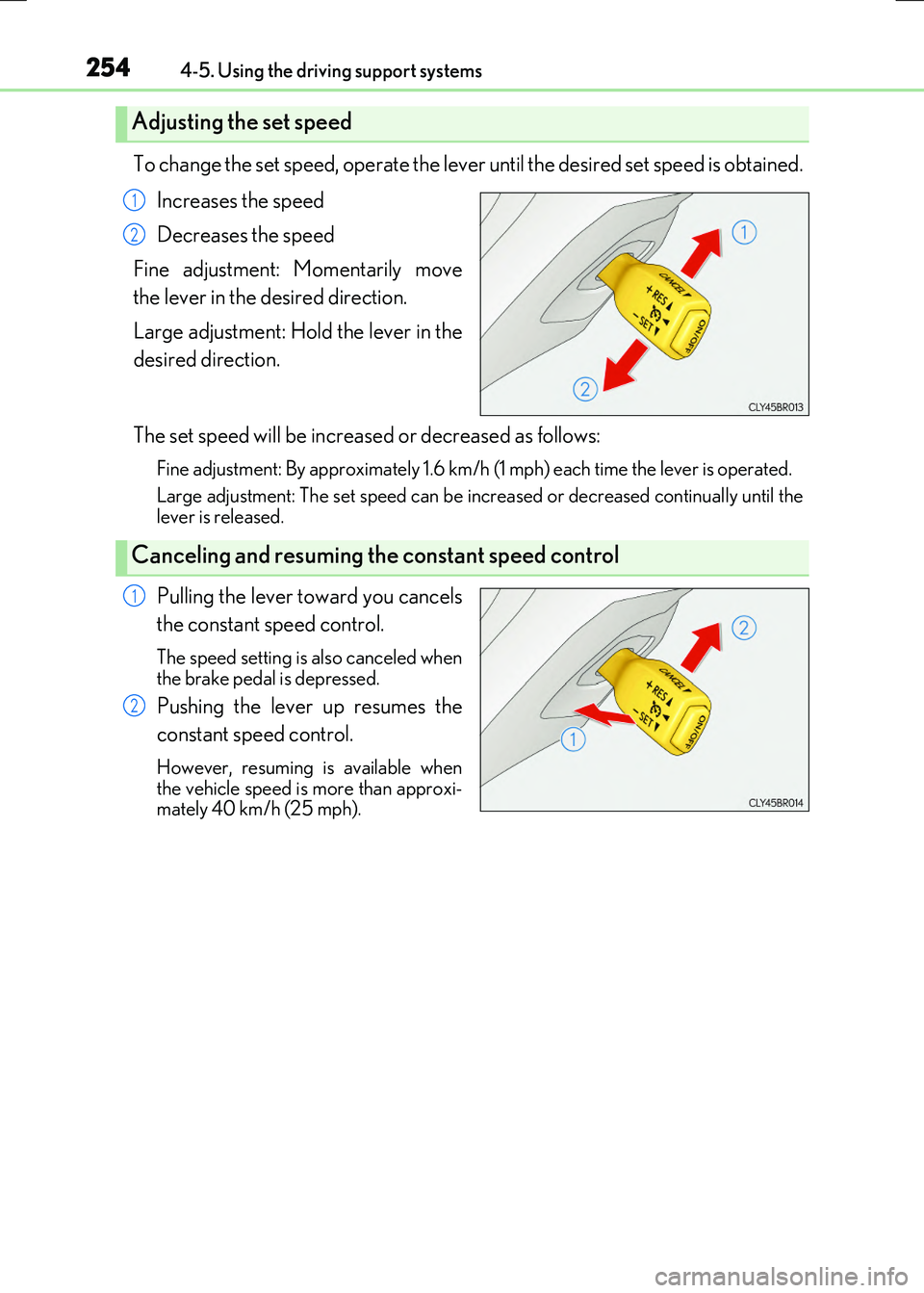
To change the set speed, operate the lever until the desired set speed is obtained.
Increases the speed
Decreases the speed
Fine adjustment: Momentarily move
the lever in the desired direction.
Large adjustment: Hold the lever in the
desired direction.
The set speed will be increased or decreased as follows:
Fine adjustment: By approximately 1.6 km/h (1 mph) each time the lever is operated.
Large adjustment: The set speed can be incr eased or decreased continually until the lever is released.
Pulling the lever toward you cancels
the constant speed control.
The speed setting is also canceled when the brake pedal is depressed.
Pushing the lever up resumes the
constant speed control.
However, resuming is available when the vehicle speed is more than approxi-mately 40 km/h (25 mph).
Adjusting the set speed
1
2
Canceling and resuming the constant speed control
1
2
Page 258 of 640

2584-5. Using the driving support systems
RC300h_EE(OM24740E)
This mode employs a radar sensor to detect the presence of vehicles up to
approximately 120 m (400 ft.) ahead, determines the current vehicle-to-vehicle
following distance, and operates to maintain a suitable following distance from
the vehicle ahead.
Note that vehicle-to-vehicle distance will close in when traveling on long downhill slopes.
Example of constant speed cruising
When there are no vehicles ahead
The vehicle travels at the speed set by the driver. The desired vehicle-to-vehicle dis- tance can also be set by operating the vehicle-to-vehicle distance control.
Example of deceleration cruising
When a preceding vehicle driving slower than the set speed appears
When a vehicle is detected running ahead of you, the system automatically deceler- ates your vehicle. When a greater reductio n in vehicle speed is necessary, the system applies the brakes (the stop lights will come on at this time). A warning tone warns you
when the system cannot decelerate sufficiently to prevent your vehicle from closing in on the vehicle ahead.
Example of follow-up cruising
When following a preceding vehicle driving slower than the set speed
The system continues follow-up cruising wh ile adjusting for changes in the speed of
the vehicle ahead in order to maintain the vehicle-to-vehicle distance set by the driver.
Example of acceleration
When there are no longer any preceding vehicles driving slower than the set
speed
The system accelerates until the set speed is reached. The system then returns to con- stant speed cruising.
Driving in vehicle-to-veh icle distance control mode
1
2
3
4
Page 262 of 640

2624-5. Using the driving support systems
RC300h_EE(OM24740E)
Pulling the lever toward you cancels
the speed control.
The speed setting is also canceled when
the brake pedal is depressed.
Pushing the lever up resumes the
speed control and returns vehicle
speed to the set speed.
Resuming is available when the vehicle speed is more than approximately 40km/h (25 mph).
When your vehicle is too close to a
vehicle ahead, and sufficient automatic
deceleration via the cruise control is
not possible, the display will flash and
the buzzer will sound to alert the driver.
An example of this would be if another
driver cuts in front of you while you are
following a vehicle. Depress the brake
pedal to ensure an appropriate vehicle-
to-vehicle distance.
■Warnings may not occur when
In the following instances, there is a possibility that the warnings will not occur:
●When the speed of the preceding vehicle matches or exceeds your vehicle
speed
●When the preceding vehicle is traveling at an extremely slow speed
●Immediately after the cruise control speed was set
●When depressing the accelerator pedal
Canceling and resuming the speed control
1
2
Approach warning (vehicle-to-vehicle distance control mode)
Page 268 of 640
2684-5. Using the driving support systems
RC300h_EE(OM24740E)
WARNING
■Before using dynamic radar cruise control
Do not overly rely on vehicle-to-vehicle distance control mode. Be aware of the set speed. If automatic deceleration/acceleration is not appropriate,
adjust the vehicle speed, as well as the distance between your vehicle and vehicles ahead by applying the brakes, etc.
■Cautions regarding the driving assist systems
Observe the following precautions. Failure to do so may cause an accident resulting in death or serious injury.
●Assisting the driver to measure following distance
The dynamic radar cruise control is only in tended to help the driver in determining the following distance between the driver’s own vehicle and a designated vehicletraveling ahead. It is not a mechanism that allows careless or inattentive driving, and it
is not a system that can assist the driver in low-visibility conditions. It is still necessary for driver to pay close attention to the vehicle’s surroundings.
●Assisting the driver to judge proper following distance
The dynamic radar cruise control determines whether the following distance between the driver’s own vehicle and a designated vehicle traveling ahead is appro-priate or not. It is not capable of making any other type of judgement. Therefore, it is
absolutely necessary for the driver to remain vigilant and to determine whether or not there is a possibility of danger in any given situation.
●Assisting the driver to operate the vehicle
The dynamic radar cruise control has no ca pability to prevent or avoid a collision with a vehicle traveling ahead. Therefore, if there is ever any danger, the driver must takeimmediate and direct control of the vehicle and act appropriately in order to ensure
the safety of all involved.
■To avoid inadvertent dynamic radar cruise control activation
Switch the dynamic radar cruise control off using the “ON/OFF” button when not in
use.
Page 270 of 640

2704-5. Using the driving support systems
RC300h_EE(OM24740E)
WARNING
■When the sensor may not be correctly detecting the vehicle ahead
In the case of the following and depending on the conditions, operate the brake pedal when deceleration of the system is insufficient or operate the accelerator pedal when
acceleration is required. As the sensor may not be able to correctly detect these types of vehicles, the approachwarning ( P. 262) will not be activated, which may lead to an accident resulting in
death or serious injury.
●Vehicles with small rear ends (trailers with no load on board, etc.)
●Vehicles that cut in suddenly
●Vehicles traveling at low speeds
●Vehicles that are not moving in the same lane
●Motorcycles traveling in the same lane
Page 271 of 640

2714-5. Using the driving support systems
4
Driving
RC300h_EE(OM24740E)
WARNING
■Conditions under which the vehicle-to-vehicle distance control mode may not func- tion correctly
Operate the brake pedal (or accelerator pedal operation depending on the situation)
as necessary in the following conditions as the radar sensor may not be able to cor- rectly detect vehicles ahead, which may lead to an accident resulting in death or seri-ous injury.
●When water or snow thrown up by the surrounding vehicles hinders the detecting ofthe sensor
●When your vehicle is pointing upwards(caused by a heavy load in the trunk, etc.)
●When the road curves or when the lanes arenarrow
●When steering wheel operation or your posi-tion in the lane is unstable
●When the vehicle ahead of you decelerates
suddenly
Accelerate Accelerate Decelerate
Page 284 of 640

2844-5. Using the driving support systems
RC300h_EE(OM24740E)
■If a message is displayed on the multi-information display
P. 545
WARNING
■When using the Lexus parking assist-sensor
Observe the following precautions.
Failing to do so may result in the vehicle be ing unable to be driven safely and possibly cause an accident.
●Do not use the sensor at speeds in excess of 10 km/h (6 mph).
●The sensors’ detection areas and reaction times are limited. When moving forward or reversing, check the areas surrounding the vehicle (especially the sides of the vehi-cle) for safety, and drive slowly, using the brake to control the vehicle’s speed.
●Do not install accessories within the sensors’ detection areas.
■Limitations of the sensors
●The detection areas of the sensors are limited to the areas around the vehicle’s front
and rear bumpers.
●Certain vehicle conditions and surrounding environments, such as the following, may affect the ability of the sensors to correctly detect objects. Pay particular attention in
the following situations. Failure to do so may result in the vehicle being driven unsafely, possibly leading to an accident.
• When there is dirt, snow or ice on a sens or (Cleaning the sensor will resolve this
problem.) • When the sensor is frozen (Thawing the area will resolve this problem.)In especially cold weather, if a sensor is frozen the screen may show an abnormal
display, or objects may not be detected • When a sensor is covered in any way• When the vehicle is leaning considerably to one side
• When driving on an extremely bumpy road, incline, gravel, or grass • When the vicinity of the vehicle is noisy due to vehicle horns, motorcycle engines,air brakes of large vehicles, or other loud noises producing ultrasonic waves
• When there is another vehicle equipped with parking assist sensor in the vicinity • When the sensor is coated with a sheet of spray or heavy rain• When the vehicle is equipped with a fender pole or wireless antenna
• When a towing eyelet is installed • When a bumper or sensor receives a strong impact• When the vehicle is approaching a tall or curved curb
• When driving in harsh sunlight or intense cold weather • When an object is directly under a bumper• When objects become too close to the sensors
• When a non-genuine Lexus suspension (l owered suspension, etc.) is installed In addition to the situations above, there are instances in which, because of theirshape, signs and other objects may be judged by the sensor to be closer than they
are.