Page 555 of 776

5556-3. Using the interior lights
6
Interior features
RX350/RX200t_EE_OM48F32E
●Illuminated entry system: The lights automatically turn on/off according to engine switch mode, the presence of the electronic key, whether the doors are locked/unlocked, and whether the doors are opened/closed.
●If the interior lights remain on when the engine switch is turned off, the lights will go off automatically after 20 minutes.
●In the following cases, the interior lights and front personal lights may not respond as
normal.
• When water, dirt, etc., have adhered to the lens surface • When operated with a wet hand
• When wearing gloves, etc.
●Some functions can be customized. ( P. 740)
NOTICE
●Never remove the lens for the front interior light and front personal lights. Otherwise,
the lights will be damaged. If the lens ne ed to remove, contact any authorized Lexus dealer or repairer, or another duly qualified and equipped professional.
●To prevent battery discharge, do not leave the lights on longer than necessary when
the engine is off.
Page 556 of 776
556
RX350/RX200t_EE_OM48F32E
6-4. Using the storage features
List of storage features
Glove box ( P. 557)
Auxiliary boxes (if equipped)
( P. 561)
Door pockets ( P. 559)
Bottle holders ( P. 560)
Console box ( P. 557)
Cup holders ( P. 558)
Coin box ( P. 560)
WARNING
●Do not leave glasses, lighters or spray cans in the storage spaces, as this may cause
the following when cabin temperature becomes high:
• Glasses may be deformed by heat or cracked if they come into contact with other stored items.
• Lighters or spray cans may explode. If they come into contact with other stored items, the lighter may catch fire or the spray can may release gas, causing a firehazard.
●When driving or when the storage compartmen ts are not in use, keep the lids closed. In the event of sudden braking or sudden swerving, an accident may occur due to an
occupant being struck by an open lid or the items stored inside.
1
2
3
4
5
6
7
Page 564 of 776
5646-4. Using the storage features
RX350/RX200t_EE_OM48F32E
■Removing the luggage cover
Release the cover from the left
and right anchors and allow it to
retract.
Compress the end of the luggage
cover and lift the luggage cover
up.
After removing the luggage cover, place it somewhere other than the
passenger compartment.
1
2
WARNING
●Do not place anything on the luggage cover. In the event of sudden braking or turn- ing, the item may go flying and strike an occupant. This could lead to an unexpectedaccident, resulting in death or serious injury.
●Do not allow children to climb on the luggage cover. Climbing on the luggage covercould result in damage to the luggage cove r, possibly causing death or serious injury to the child.
Page 570 of 776

5706-5. Using the other interior features
RX350/RX200t_EE_OM48F32E
■Operation indicator light status
*: Depending on the portable device, the operation indicator light may stay illuminated
(orange) after charging has completed.
●If the operation indicator light blinks
If an error is detected, the operation indicator light will blink (orange). Take the
appropriate measures according to the table below.
■The wireless charger can be operated when
The engine switch is in ACCESSORY or IGNITION ON mode.
■Portable devices that can be charged
●Portable devices compatible with the Qi wireless charging standard can be charged by the wireless charger. However, compatibility with all devices which meet the Qi wire- less charging standard is not guaranteed.
●The wireless charger is designed to supply low power electricity (5 W or less) to a cel-lular phone, smartphone, or other portable device.
Operation indicator lightState
OffThe Wireless charger is off
Green (illuminated)Standby (charging is possible)
Charging is complete*
Orange (illuminated)
A portable device has been placed on the charging
area (identifying the portable device)
Charging in progress
Operation indicator lightSuspected causesMeasure
Blinks (orange) at a one second interval continu-ously
Vehicle to charger com-
munication failure.
Contact any authorized Lexus dealer or repairer,
or another duly qualified and equipped professional.
Blinks (orange) 3 times
repeatedly
A foreign object exists
between the portable device and charging area. Remove the foreign object.
Portable device is not posi- tioned properly on the
charging area.
Move the portable device toward the center of the
charging area.
Blinks (orange) 4 times
repeatedly
The temperature of the wireless charger is exces-sively high.
Stop charging immediately and continue chargingafter a while.
Page 572 of 776
5726-5. Using the other interior features
RX350/RX200t_EE_OM48F32E
WARNING
■Caution while driving
When charging a portable device while driv ing, for safety reasons, the driver should not operate the portable device.
■Caution regarding interference with electronic devices
People with implantable cardiac pacemakers , cardiac resynchronization therapy pace- makers or implantable cardioverter defibrillato rs, as well as any other electrical medi-
cal device, should consult their physicia n about the usage of the wireless charger.
Operations of the wireless charger may have an affect on medical devices.
■To prevent damage or burns
Observe the following precautions.
Failure to do so may result in the possib ility of fire, equipment failure or damage, or burns due to heat.
●Do not put any metallic objects between th e charging area and the portable device while charging.
●Do not attach metallic objects, such as aluminum stickers, to the charging area.
●Do not cover the wireless charger with a cloth or other object while charging.
●Do not attempt to charge portable devices which are not compatible with the Qi wireless charging standard.
●Do not disassemble, modify or remove the wireless charger.
●Do not apply force or impact to the wireless charger.
Page 573 of 776

5736-5. Using the other interior features
6
Interior features
RX350/RX200t_EE_OM48F32E
NOTICE
■Conditions in which the wireless charger may not operate correctly
In the following situations, the wireless charger may not operate correctly:
●When a portable device is fully charged
●When there is a foreign object between the charging area and portable device
●When a portable device becomes hot while charging
●When a portable device is placed on the wireless area with its charging surface fac-
ing up
●When a portable device is not centered on the charging area
●When the vehicle is near a TV tower, electric power plant, gas station, radio station,
large display, airport or othe r facility that generates strong radio waves or electrical noise
●When the portable device is in contact wi th, or is covered by any of the following
metallic objects
• Cards to which aluminum foil is attached • Cigarette boxes that ha ve aluminum foil inside
• Metallic wallets or bags •Coins• Metal hand warmers
• Media such as CDs and DVDs
●When wireless keys (that emit radio waves) other than those of your vehicle are being
used nearby.
If in situations other than above the wireless charger does not operate properly or the operation indicator light is blinking, the wireless charger may be malfunctioning. Con-
tact any authorized Lexus dealer or repair er, or another duly qualified and equipped professional.
■To prevent failure or damage to data
●Do not bring magnetic cards, such as a credit card, or magnetic recording media,close to the wireless charger while chargi ng. Otherwise, data may be erased due to the influence of magnetism.
Additionally, do not bring precision instruments such as wrist watches, close to the wireless charger, as such objects may malfunction.
●Do not leave portable devices in the cabin. The temperature inside the cabin may
become high when parked in the su n, and cause damage to the device.
■To prevent battery discharge
Do not use the wireless charger for a long period of time with the engine is stopped.
Page 574 of 776
5746-5. Using the other interior features
RX350/RX200t_EE_OM48F32E
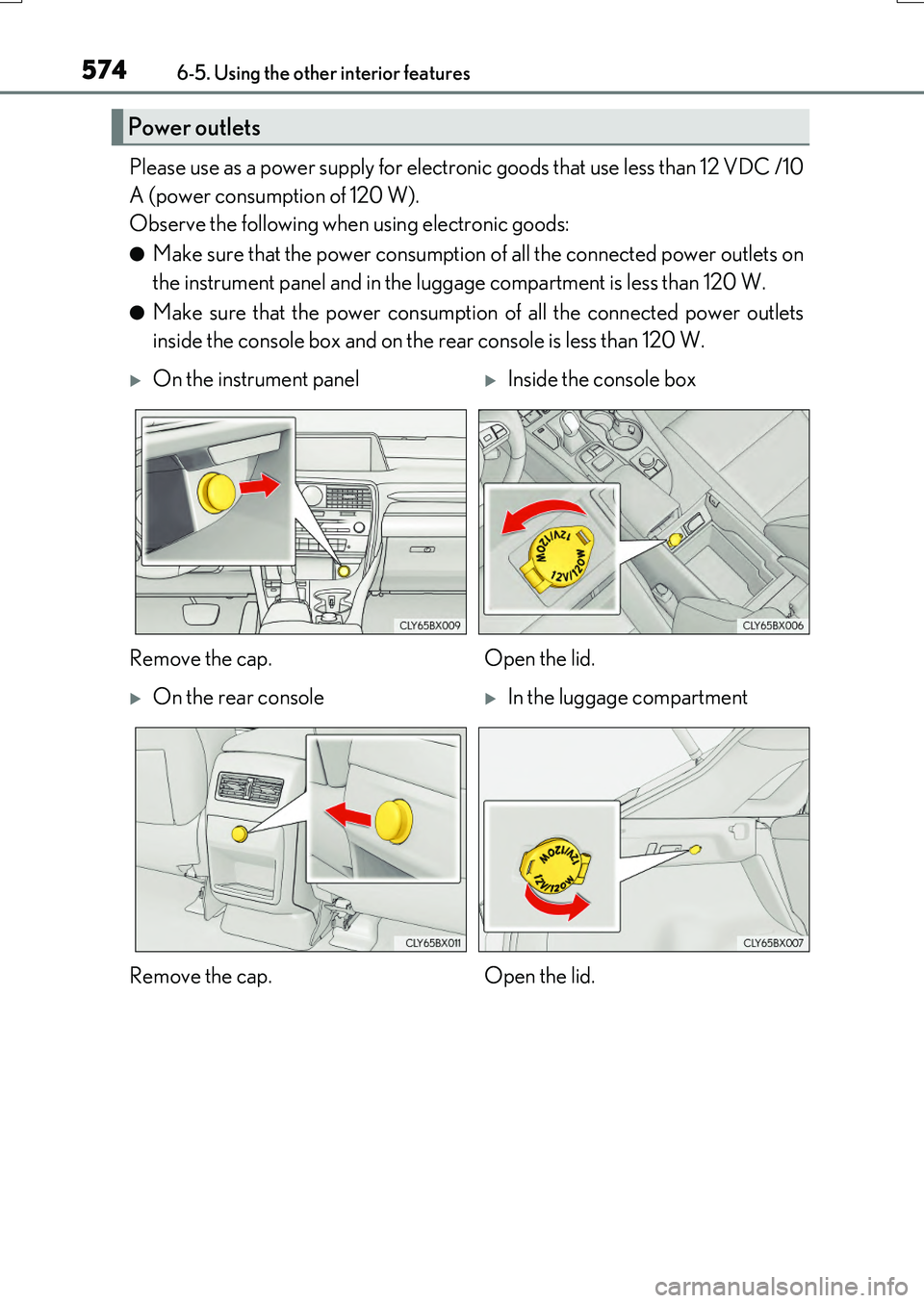
Please use as a power supply for electronic goods that use less than 12 VDC /10
A (power consumption of 120 W).
Observe the following when using electronic goods:
●Make sure that the power consumption of all the connected power outlets on
the instrument panel and in the luggage compartment is less than 120 W.
●Make sure that the power consumption of all the connected power outlets
inside the console box and on the rear console is less than 120 W.
Power outlets
On the instrument panelInside the console box
Remove the cap. Open the lid.
On the rear consoleIn the luggage compartment
Remove the cap. Open the lid.
Page 575 of 776

5756-5. Using the other interior features
6
Interior features
RX350/RX200t_EE_OM48F32E
●The power outlets can be used when the engine switch is in ACCESSORY or IGNI- TION ON mode.
●RX200t: When the engine restarts after having been stopped by the Stop & Start sys-
tem, the power outlets may be temporarily unusable, but this is not a malfunction.
Use the front passenger footwell hooks
to help support and prevent objects
placed on the floor, such as a grocery
bag, from overturning.
●The shape of the console box rim allows power cables to be passed through when the consolebox lid is closed.
NOTICE
●To avoid damaging the power outlets, install the cap or close the lid when the power
outlets is not in use. Foreign objects or liquids that enter th e power outlets may cause a short circuit.
●To prevent battery discharge, do not use the power outlets longer than necessary
when the engine is off.
Front passenger footwell hooks
NOTICE
To prevent the hooks from being damaged, do not hang anything from a hook or apply excessive force to it.