Page 465 of 776

4655-4. Using the radio
5
Lexus Display Audio system
RX350/RX200t_EE_OM48F32E
■Manual tuning (manual screen)
Turn the “TUNE•SCROLL” knob or turn the controller.
■Station list (preset or station list screen)
Select the desired station by pressi ng the “<” or “>” button, turn the
“TUNE•SCROLL” knob, or turning and pressing the controller.
Radio stations can be preset.
Search for desired stations.
Turn the controller to select one of the stations and then press the controller
until you hear a beep while on the preset selection screen.
The broadcast you are currently listening to can be re-listened to at any time.
Move the controller to the right and then select “Time shift”.
Turn the “TUNE•SCROLL” knob to set the desired offset.
An offset playback time can also be set on the menu screen. ( P. 461)
To cancel the time shift operation while in time shift mode, move the controller to the
left and select “Time shift off”. If the time shift display is left showing “-0’ 00”” for 6 seconds without any operation, the time shift operation will be canceled.
■Reception sensitivity
●Maintaining perfect radio recept ion at all times is difficult due to the continually chang- ing position of the antenna, differences in signal strength and surrounding objects, such
as trains, transmitters, etc.
●The radio antenna is mounted inside the rear window. To maintain clear radio reception, do not attach metallic window tinting or other metallic objects to the antenna wire
mounted inside the rear window.
■Traffic announcement operation
When traffic announcement is set to on, “TP” will appear on the screen and the radio will
begin seeking a TP station. If the radio seeks out a TP station, a pop-up massage is dis- played. To listen the program, select “Continue”. When the program ends, the initial
operation will resume.
Setting station presets (preset screen)
Time shift operation (DAB) (if equipped)
1
2
1
2
Page 487 of 776

4875-7. Connecting Bluetooth®
5
Lexus Display Audio system
RX350/RX200t_EE_OM48F32E
When you register a phone, auto connection will be activated. It is recom-
mended to have the system set to this mode and leave the Bluetooth® phone in a
place where a good connection can be established.
When the engine switch is turned to ACCESSORY or IGNITION ON mode,
the system will search for a nearby cellular phone you have registered.
The system automatically connects with the most recent phone that was con-
nected. The connected result is displayed.
When auto connection has failed or “Bluetooth* power” is turned off, you must
connect the Bluetooth® device manually.
Go to “Bluetooth* setup”: “MENU” button “Setup” “Bluetooth*”
Select the device to connect.
Select “Connect all”, “Connect as a telephone” or “Connect as audio player”.
If the desired Bluetooth® device is not displayed, register the device.
( P. 484)
*: Bluetooth is a registered trademark of Bluetooth SIG, Inc.
■Reconnecting a Bluetooth® phone
If the system cannot connect due to poor signal strength with the engine switch in ACCESSORY or IGNITION ON mode, the syst em will automatically attempt to recon-
nect.
■Connecting a phone while Bluetooth® audio is playing
●Bluetooth® audio will stop temporarily.
●It may take time to connect.
Connecting a Bluetooth® phone
There are two connecting methods available: automatic and manual.
Auto connection
Manual connection
1
2
3
Page 618 of 776

6187-3. Do-it-yourself maintenance
RX350/RX200t_EE_OM48F32E
■Situations in which the tire pressure warning system may not operate properly
●In the following cases, the tire pressure warning system may not operate properly.
• If non-genuine Lexus wheels are used.
• A tire has been replaced with a tire that is not an OE (Original Equipment) tire. • A tire has been replaced with a tire that is not of the specified size.• Tire chains, etc., are equipped.
• If a window tint that affects the radio wave signals is installed. • If there is a lot of snow or ice on the vehi cle, particularly around the wheels or wheel housings.
• If the tire inflation pressure is extr emely higher than the specified level. • If wheel without the tire pressure warning valve and transmitter is used.• If the ID code on the tire pressure warning valves and transmitters is not registered
in the tire pressure warning computer.
●Performance may be affected in the following situations.
• Near a TV tower, electric power plant, gas station, radio station, large display, air- port or other facility that generates st rong radio waves or electrical noise. • When carrying a portable radio, cellular phone, cordless phone or other wireless
communication device. If tire position information is not correctly displayed due to the radio wave conditions, the display may be corrected by driving and changing the radio wave conditions.
●When the vehicle is parked, the time taken for the warning to start or go off could beextended.
●When tire inflation pressure declines rapi dly for example when a tire has burst, the
warning may not function.
■The initialization operation
●Make sure to carry out initialization af ter adjusting the tire inflation pressure.
Also, make sure the tires are cold before carry ing out initialization or tire inflation pres- sure adjustment.
●If you have accidentally turned the engine swit ch off during initialization, it is not neces- sary to restart the initialization again as in itialization will restart automatically when the engine switch has been turned to IGNITION ON mode for the next time.
●If you accidentally restart the initialization when initialization is not necessary, adjust the tire inflation pressure to the specified leve l when the tires are cold, and conduct initial- ization again.
●While the position of each tire is being de termined and the inflation pressures are not being displayed on the multi-information display, if the inflation pressure of a tire drops, the tire pressure warning light will come on.
Page 644 of 776
6447-3. Do-it-yourself maintenance
RX350/RX200t_EE_OM48F32E
■Front
Bulb locations
Front turn signal light (vehicles with single-beam headlights)1
Page 645 of 776
6457-3. Do-it-yourself maintenance
7
Maintenance and care
RX350/RX200t_EE_OM48F32E
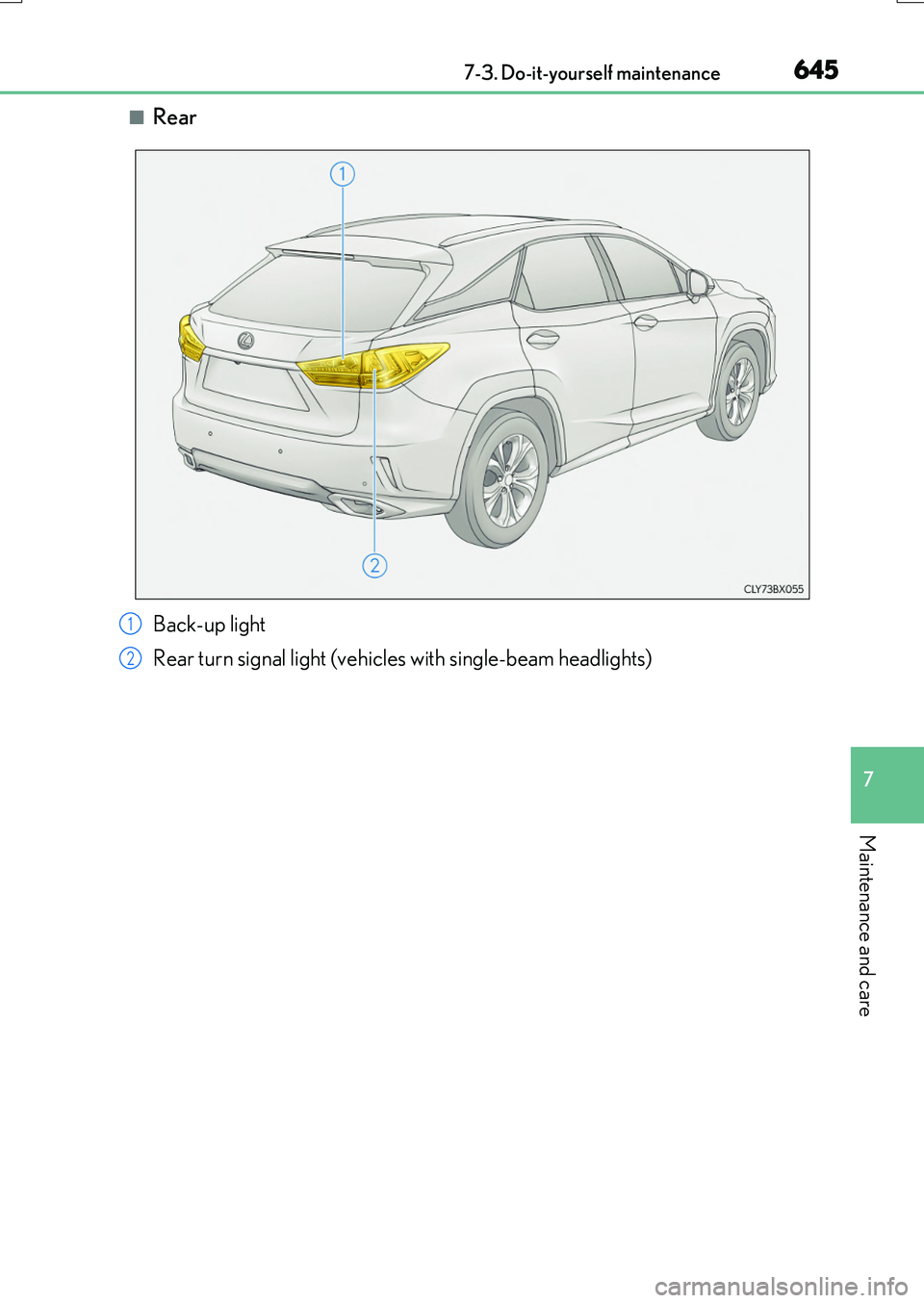
■Rear
Back-up light
Rear turn signal light (vehicles with single-beam headlights)
1
2
Page 646 of 776
6467-3. Do-it-yourself maintenance
RX350/RX200t_EE_OM48F32E
■Front turn signal lights (vehicles with single-beam headlights)
To ensure enough space to per-
form work, turn the steering
wheel to rotate the front wheel
away from the bulb to be
replaced.
Remove the 3 fender liner clips.
Turn the steering wheel to the left when replacing the right side lightbulb, and turn the steering wheel to
the right when replacing the left side light bulb.
When removing a fender liner clip,
use a flathead screwdriver to pry the center portion out and then removethe whole clip.
Pull back the fender liner until the
connector is visible.
Partially remove the fender liner
and turn the bulb base
counterclockwise and remove it.
Replacing light bulbs
1
82
3
Page 647 of 776
6477-3. Do-it-yourself maintenance
7
Maintenance and care
RX350/RX200t_EE_OM48F32E
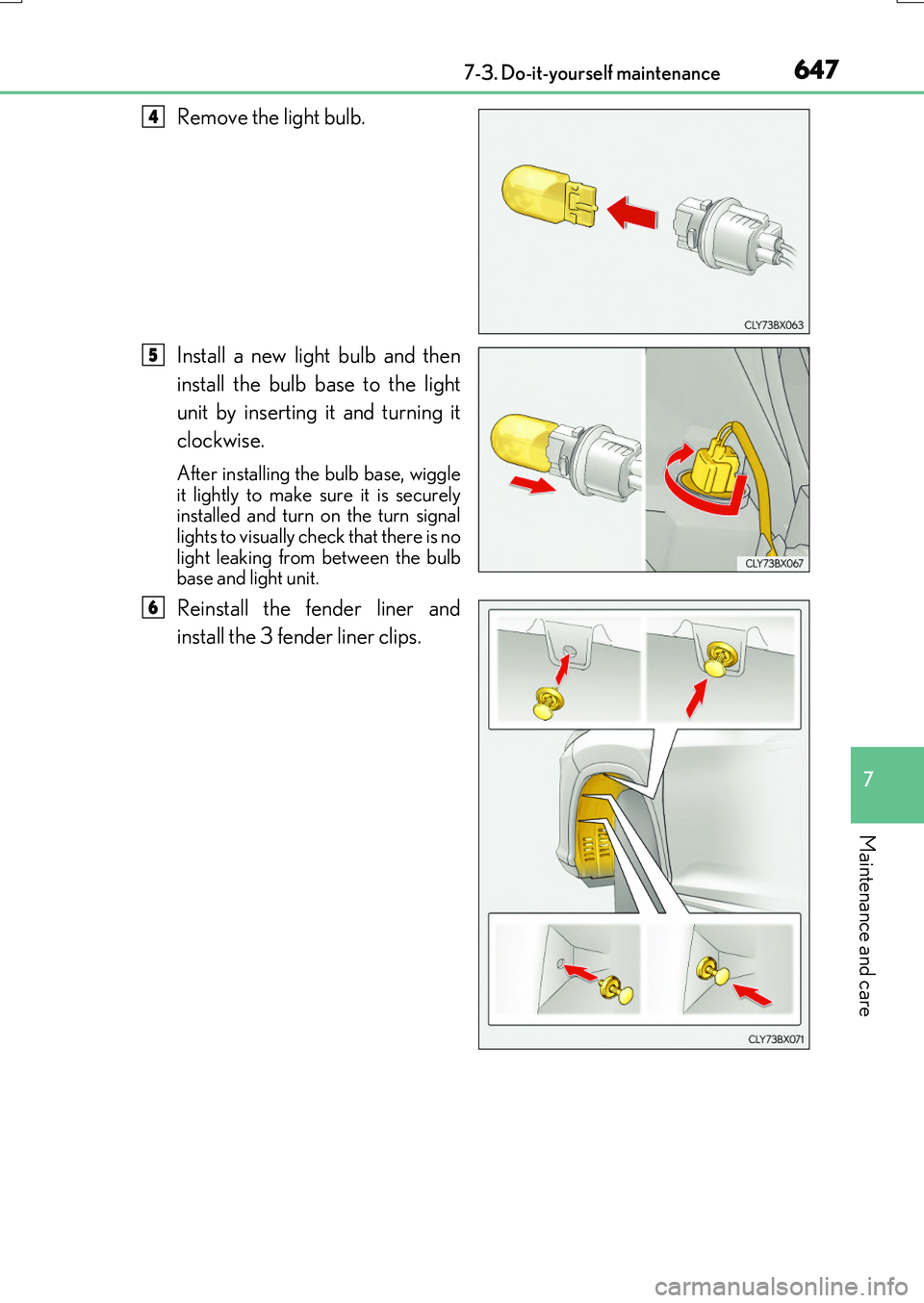
Remove the light bulb.
Install a new light bulb and then
install the bulb base to the light
unit by inserting it and turning it
clockwise.
After installing the bulb base, wiggle it lightly to make sure it is securelyinstalled and turn on the turn signal
lights to visually check that there is no light leaking from between the bulbbase and light unit.
Reinstall the fender liner and
install the 3 fender liner clips.
4
5
6
Page 648 of 776
6487-3. Do-it-yourself maintenance
RX350/RX200t_EE_OM48F32E
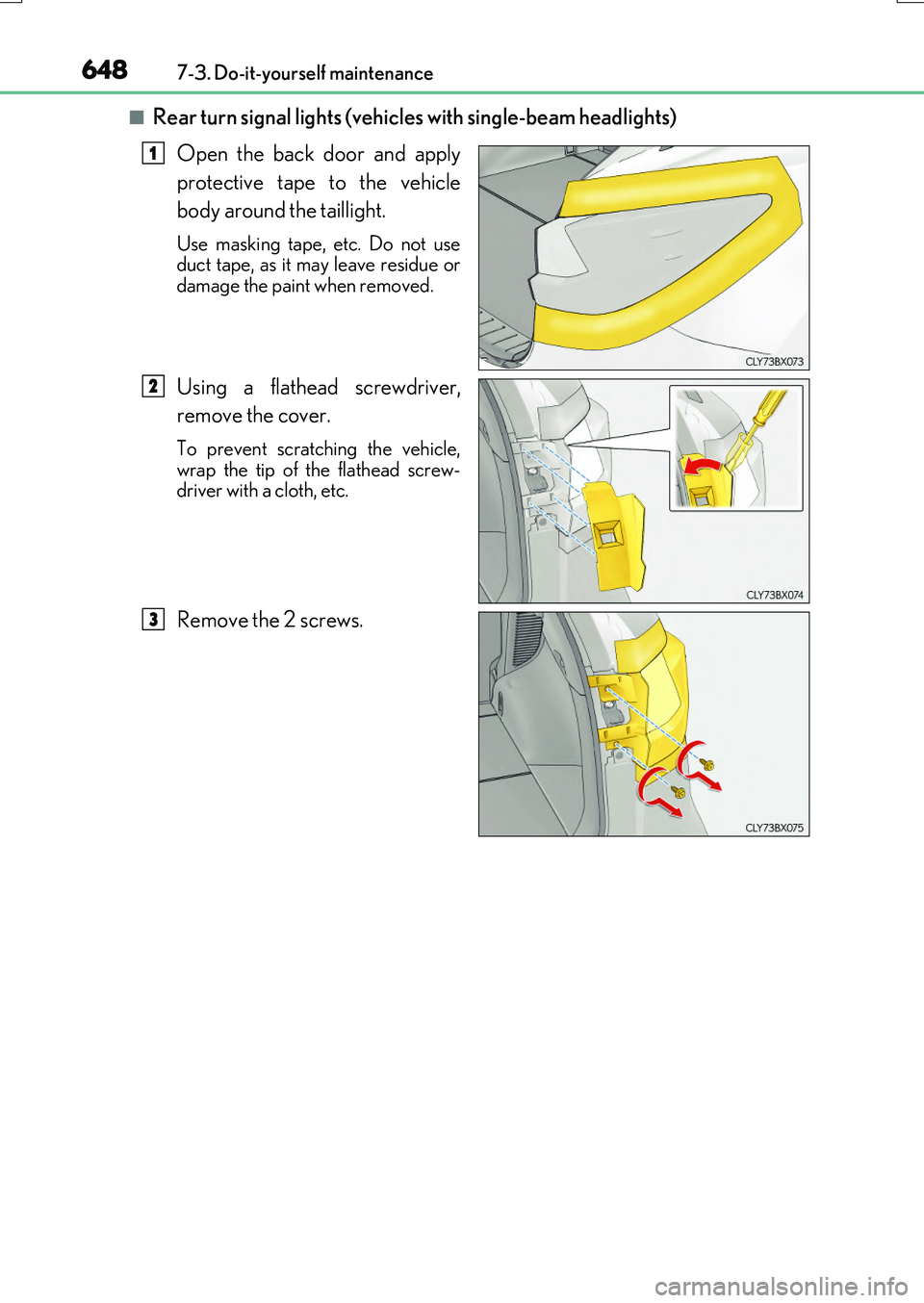
■Rear turn signal lights (vehicles with single-beam headlights)
Open the back door and apply
protective tape to the vehicle
body around the taillight.
Use masking tape, etc. Do not use duct tape, as it may leave residue or
damage the paint when removed.
Using a flathead screwdriver,
remove the cover.
To prevent scratching the vehicle, wrap the tip of the flathead screw-driver with a cloth, etc.
Remove the 2 screws.
1
2
3