2017 LEXUS RX200T cruise control
[x] Cancel search: cruise controlPage 332 of 776

3324-5. Using the driving support systems
RX350/RX200t_EE_OM48F32E
This mode employs a radar sensor to detect the presence of vehicles up to
approximately 100 m (328 ft.) ahead, determines the current vehicle-to-vehicle
following distance, and operates to maintain a suitable following distance from
the vehicle ahead.
Note that vehicle-to-vehicle distance will close in when traveling on long downhill slopes.
Example of constant speed cruising
When there are no vehicles ahead
The vehicle travels at the speed set by the driver. The desired vehicle-to-vehicle dis- tance can also be set by operating the vehicle-to-vehicle distance button.
Example of deceleration cruising and follow-up cruising
When a preceding vehicle driving slower than the set speed appears
When a vehicle is detected running ahead of you, the system automatically deceler- ates your vehicle. When a greater reductio n in vehicle speed is necessary, the system applies the brakes (the stop lights will come on at this time). The system will respond to
changes in the speed of the vehicle ahead in order to maintain the vehicle-to-vehicle distance set by the driver. Approach wa rning warns you when the system cannot decelerate sufficiently to prevent your vehicle from closing in on the vehicle ahead.
When the vehicle ahead of you stops, your ve hicle will also stop (vehicle is stopped by system control). After the vehicle ahead starts off, pushing the cruise control lever upor depressing the accelerator peda l will resume follow-up cruising.
Example of acceleration
When there are no longer any preceding vehicles driving slower than the set
speed
The system accelerates until the set speed is reached. The system then returns to con-
stant speed cruising.
Driving in vehicle-to-veh icle distance control mode
1
2
3
Page 333 of 776
3334-5. Using the driving support systems
4
Driving
RX350/RX200t_EE_OM48F32E
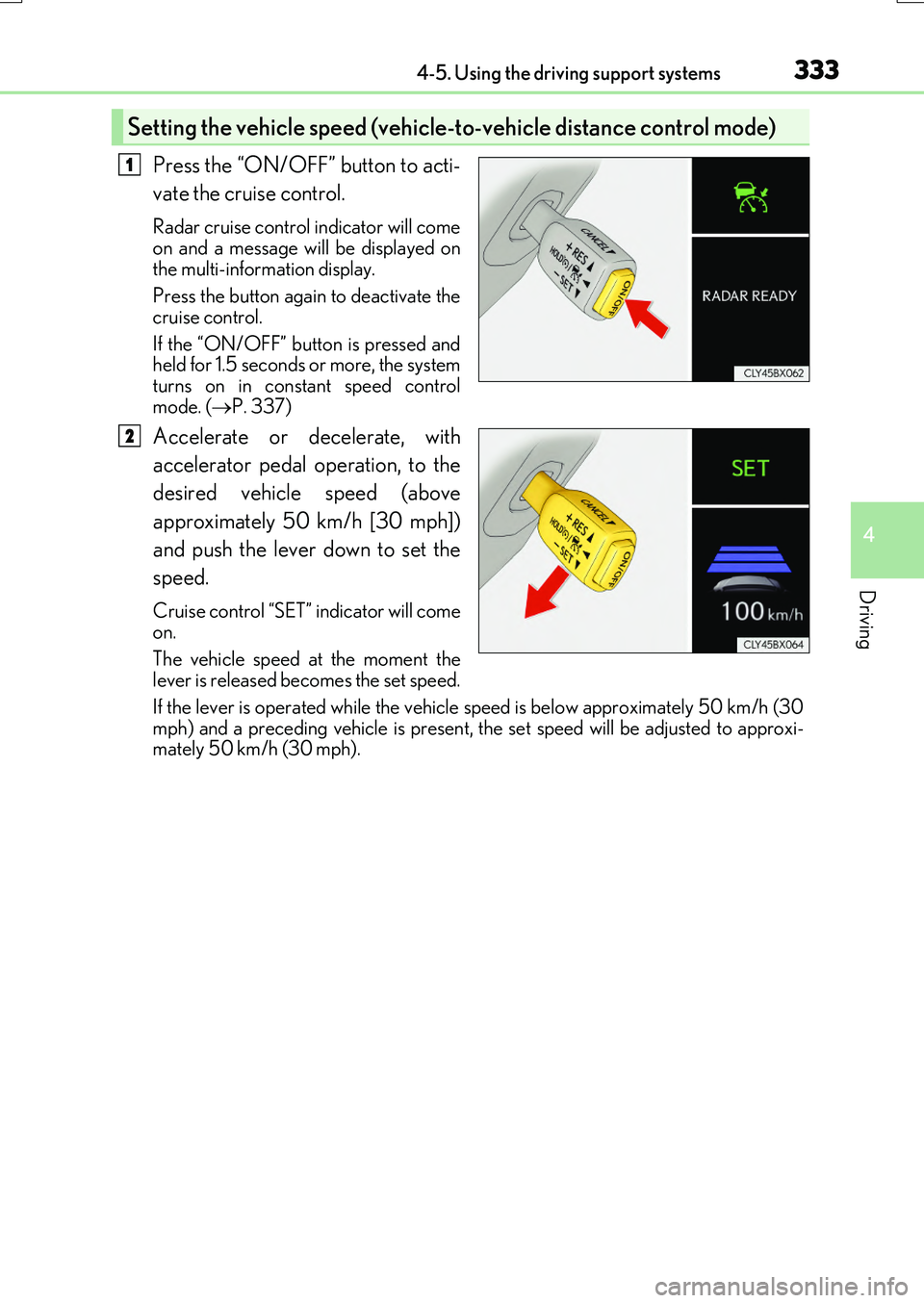
Press the “ON/OFF” button to acti-
vate the cruise control.
Radar cruise control indicator will come
on and a message will be displayed on the multi-information display.
Press the button again to deactivate the
cruise control.
If the “ON/OFF” button is pressed and held for 1.5 seconds or more, the system
turns on in constant speed control mode. ( P. 337)
Accelerate or decelerate, with
accelerator pedal operation, to the
desired vehicle speed (above
approximately 50 km/h [30 mph])
and push the lever down to set the
speed.
Cruise control “SET” indicator will come on.
The vehicle speed at the moment the
lever is released be comes the set speed.
If the lever is operated while the vehicle speed is below approximately 50 km/h (30
mph) and a preceding vehicle is present, the set speed will be adjusted to approxi- mately 50 km/h (30 mph).
Setting the vehicle speed (vehicle -to-vehicle distance control mode)
1
2
Page 336 of 776

3364-5. Using the driving support systems
RX350/RX200t_EE_OM48F32E
Pulling the lever toward you cancels
the speed control.
The speed control is also canceled when
the brake pedal is depressed.
(When the vehicle has been stopped by system control, depressing the brake
pedal does not cancel the setting.)
Pushing the lever up resumes the
cruise control and returns vehicle
speed to the set speed.
However, when a vehicle ahead is not detected, cruise control does not resume when the vehicle speed is approximately 40 km/h (25 mph) or less.
When your vehicle is too close to a
vehicle ahead, and sufficient automatic
deceleration via the cruise control is
not possible, the display will flash and
the buzzer will sound to alert the driver.
An example of this would be if another
driver cuts in front of you while you are
following a vehicle. Depress the brake
pedal to ensure an appropriate vehicle-
to-vehicle distance.
■Warnings may not occur when
In the following instances, warnings may not occur even when the vehicle-to-
vehicle distance is small.
●When the speed of the preceding vehicle matches or exceeds your vehicle
speed
●When the preceding vehicle is traveling at an extremely slow speed
●Immediately after the cruise control speed was set
●When depressing the accelerator pedal
Canceling and resuming the speed control
1
2
Approach warning (vehicle-to-vehicle distance control mode)
Page 337 of 776

3374-5. Using the driving support systems
4
Driving
RX350/RX200t_EE_OM48F32E
When constant speed control mode is selected, your vehicle will maintain a set
speed without controlling the vehicle-to-vehicle distance. Select this mode only
when vehicle-to-vehicle distance control mode does not function correctly due
to a dirty radar sensor, etc.
With the cruise control off, press and
hold the “ON/OFF” button for 1.5
seconds or more.
Immediately after the “ON/OFF” but- ton is pressed, the radar cruise controlindicator will come on. Afterwards, it
switches to the cruise control indicator.
Switching to constant speed control mode is only possible when operating
the lever with the cruise control off.
Accelerate or decelerate, with
accelerator pedal operation, to the
desired vehicle speed (above
approximately 50 km/h [30 mph])
and push the lever down to set the
speed.
Cruise control “SET” indicator will come
on.
The vehicle speed at the moment the lever is released be comes the set speed.
Adjusting the speed setting: P. 334
Canceling and resuming the speed setting: P. 336
Selecting constant speed control mode
1
2
Page 338 of 776

3384-5. Using the driving support systems
RX350/RX200t_EE_OM48F32E
■Dynamic radar cruise control with full-speed range can be set when
●The shift lever is in D.
●Range 4 or higher of D has been selected by using the paddle shift switch. (vehicles with paddle shift switches)
●Vehicle speed is above approximately 50 km/h (30 mph). However, when a precedingvehicle is detected, the dynamic radar cruise control with full-speed range can be seteven if the vehicle speed is at or below approximately 50 km/h (30 mph).
■Accelerating after setting the vehicle speed
The vehicle can accelerate by operating the accelerator pedal. After accelerating, the set speed resumes. However, during vehicle-to-vehicle distance control mode, the vehi-
cle speed may decrease below the set speed in order to maintain the distance to the pre- ceding vehicle.
■Automatic cancelation of vehicle- to-vehicle distance control mode
Vehicle-to-vehicle distance control mode is automatically canceled in the following situ- ations.
●Actual vehicle speed falls below approximat ely 40 km/h (25 mph) when there are no
vehicles ahead.
●The preceding vehicle leaves the lane when your vehicle is following at a vehicle speed below approximately 40 km/h (25 mph). Otherwise, the sensor cannot properly
detect the vehicle.
●VSC is activated.
●TRC is activated for a period of time.
●When the VSC or TRC system is turned off by pressing the VSC OFF switch.
●The sensor cannot detect correctly because it is covered in some way.
●Pre-crash braking is activated.
●The parking brake is operated.
●The vehicle is stopped by syst em control on a steep incline.
●The following are detected when the vehicle has been stopped by system control:
• The driver is not wearing a seat belt. • The driver’s door is opened.• The vehicle has been stopped for about 3 minutes
If vehicle-to-vehicle distance control mode is automatically canceled for any other rea- son, there may be a malfunction in the syst em. Contact any authorized Lexus dealer or repairer, or another duly qua lified and equipped professional.
Page 339 of 776

3394-5. Using the driving support systems
4
Driving
RX350/RX200t_EE_OM48F32E
■Automatic cancelation of constant speed control mode
Constant speed control mode is automatically canceled in the following situations:
●Actual vehicle speed is more than approximately 16 km/h (10 mph) below the set vehi-
cle speed.
●Actual vehicle speed falls below approximately 40 km/h (25 mph).
●VSC is activated.
●TRC is activated for a period of time.
●When the VSC or TRC system is turned off by pressing the VSC OFF switch.
●Pre-crash braking is activated.
If constant speed control mode is automatically canceled for any other reason, there may be a malfunction in the system. Contact any authorized Lexus dealer or repairer, oranother duly qualified and equipped professional.
■Warning messages and buzzers for dynamic radar cruise control with full-speed range
Warning messages and buzzers are used to indicate a system malfunction or to inform the driver of the need for caution while driv ing. If a warning message is shown on the
multi-information display, read the message and follow the instructions.
■When the sensor may not be correctly detecting the vehicle ahead
In the case of the following and depending on the conditions, operate the brake pedal
when deceleration of the system is insufficient or operate the accelerator pedal when acceleration is required.As the sensor may not be able to correctly detect these types of vehicles, the approach
warning ( P. 336) may not be activated.
●Vehicles that cut in suddenly
●Vehicles traveling at low speeds
●Vehicles that are not moving in the same lane
●Vehicles with small rear ends (trailers with no load on board, etc.)
Page 341 of 776

3414-5. Using the driving support systems
4
Driving
RX350/RX200t_EE_OM48F32E
Use the cruise control to maintain a set speed without operating the accelerator
pedal.
Set speed
Indicators
Cruise control switch
Press the “ON/OFF” button to acti-
vate the cruise control.
Cruise control indicator will be dis- played on the multi-information display.
Press the button again to deactivate the cruise control.
Accelerate or decelerate, with
accelerator pedal operation, to the
desired vehicle speed (above
approximately 40 km/h [25 mph])
and push the lever down to set the
speed.
Cruise control “SET” indicator and set speed will be displayed on the multi-
information display.
The vehicle speed at the moment the leve r is released becomes the set speed.
Cruise control
: If equipped
Summary of functions
1
2
3
Setting the vehicle speed
1
2
Page 343 of 776

3434-5. Using the driving support systems
4
Driving
RX350/RX200t_EE_OM48F32E
■Cruise control can be set when
●The shift lever is in D.
●Range 4 or higher of D has been selected by using the paddle shift. (vehicles with paddle shift switches)
●Vehicle speed is above approximately 40 km/h (25 mph).
■Accelerating after setting the vehicle speed
●The vehicle can be accelerated by operating accelerator pedal. After accelerating, the
set speed resumes.
●Even without canceling the cruise control, the set speed can be increased by first accel- erating the vehicle to the desired speed and then pushing the lever down to set the new
speed.
■Automatic cancelation of cruise control
Cruise control is automatically canceled in any of the following situations.
●Actual vehicle speed falls more than approximately 16 km/h (10 mph) below the set speed.
●Actual vehicle speed is below approximately 40 km/h (25 mph).
●VSC is activated.
●TRC is activated for a period of time.
●When the VSC or TRC system is turned off by pressing the VSC OFF switch.
■If “Cruise Control Malfunction Visit Your Dealer” is displayed on the multi-information display
Press the “ON/OFF” button once to deactivate the system, and then press the button
again to reactivate the system. If the cruise control speed cannot be set or if the cruise control cancels immediately afterbeing activated, there may be a malfunction in the cruise control system. Have the vehi-
cle inspected by any authorized Lexus dealer or repairer, or another duly qualified and equipped professional.