Page 567 of 776
567
RX350/RX200t_EE_OM48F32E
6
Interior features
6-5. Using the other interior features
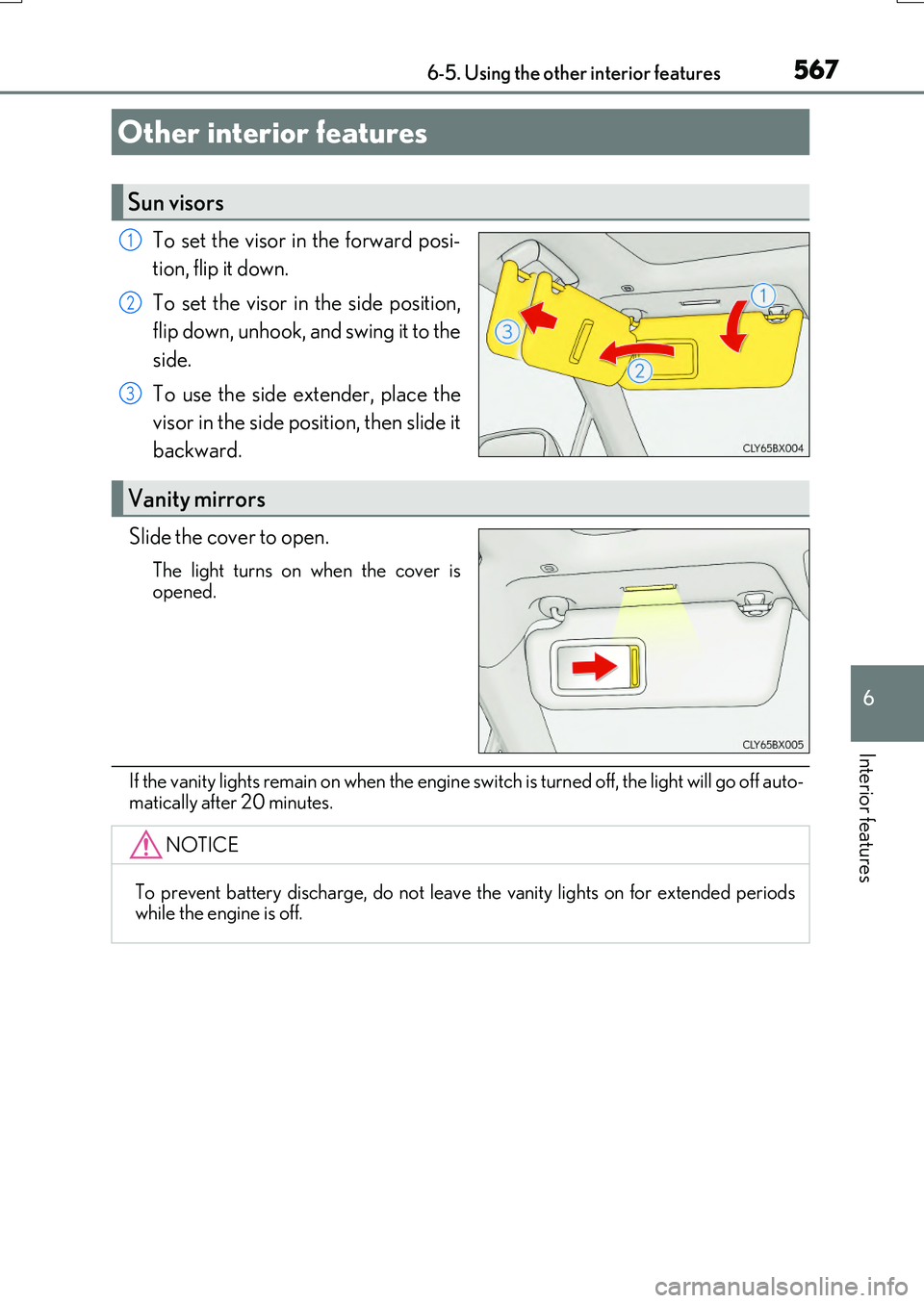
To set the visor in the forward posi-
tion, flip it down.
To set the visor in the side position,
flip down, unhook, and swing it to the
side.
To use the side extender, place the
visor in the side position, then slide it
backward.
Slide the cover to open.
The light turns on when the cover is
opened.
If the vanity lights remain on when the engine sw itch is turned off, the light will go off auto-
matically after 20 minutes.
Other interior features
Sun visors
1
2
3
Vanity mirrors
NOTICE
To prevent battery discharge, do not leave the vanity lights on for extended periods while the engine is off.
Page 569 of 776

5696-5. Using the other interior features
6
Interior features
RX350/RX200t_EE_OM48F32E
■Name for all parts
Power supply switch
Operation indicator light
Charge area
■Using the wireless charger
Press the power supply switch of
the wireless charger.
Pressing the switch again turns the wireless charger off.
When turned on, the operation indi-
cator light (green) comes on.
When the engine switch is turned off, the on/off state of the wireless char-
ger will be memorized.
Place a portable device on the
charging area with its charging
surface facing down.
While charging, the operation indi- cator light (orange) will be illumi-
nated.
If charging does not begin, move the portable device as close to the cen-
ter of the charging area as possible.
When charging is complete, the operatio n indicator light (green) will illuminate.
●Recharging function
• If a certain amount of time has elapsed since charging completed and
the portable device has not been moved, the wireless charger will
restart charging.
• If the portable device is moved within the charging area, charging will
stop temporarily then restart.
1
2
3
1
2
Page 570 of 776

5706-5. Using the other interior features
RX350/RX200t_EE_OM48F32E
■Operation indicator light status
*: Depending on the portable device, the operation indicator light may stay illuminated
(orange) after charging has completed.
●If the operation indicator light blinks
If an error is detected, the operation indicator light will blink (orange). Take the
appropriate measures according to the table below.
■The wireless charger can be operated when
The engine switch is in ACCESSORY or IGNITION ON mode.
■Portable devices that can be charged
●Portable devices compatible with the Qi wireless charging standard can be charged by the wireless charger. However, compatibility with all devices which meet the Qi wire- less charging standard is not guaranteed.
●The wireless charger is designed to supply low power electricity (5 W or less) to a cel-lular phone, smartphone, or other portable device.
Operation indicator lightState
OffThe Wireless charger is off
Green (illuminated)Standby (charging is possible)
Charging is complete*
Orange (illuminated)
A portable device has been placed on the charging
area (identifying the portable device)
Charging in progress
Operation indicator lightSuspected causesMeasure
Blinks (orange) at a one second interval continu-ously
Vehicle to charger com-
munication failure.
Contact any authorized Lexus dealer or repairer,
or another duly qualified and equipped professional.
Blinks (orange) 3 times
repeatedly
A foreign object exists
between the portable device and charging area. Remove the foreign object.
Portable device is not posi- tioned properly on the
charging area.
Move the portable device toward the center of the
charging area.
Blinks (orange) 4 times
repeatedly
The temperature of the wireless charger is exces-sively high.
Stop charging immediately and continue chargingafter a while.
Page 573 of 776

5736-5. Using the other interior features
6
Interior features
RX350/RX200t_EE_OM48F32E
NOTICE
■Conditions in which the wireless charger may not operate correctly
In the following situations, the wireless charger may not operate correctly:
●When a portable device is fully charged
●When there is a foreign object between the charging area and portable device
●When a portable device becomes hot while charging
●When a portable device is placed on the wireless area with its charging surface fac-
ing up
●When a portable device is not centered on the charging area
●When the vehicle is near a TV tower, electric power plant, gas station, radio station,
large display, airport or othe r facility that generates strong radio waves or electrical noise
●When the portable device is in contact wi th, or is covered by any of the following
metallic objects
• Cards to which aluminum foil is attached • Cigarette boxes that ha ve aluminum foil inside
• Metallic wallets or bags •Coins• Metal hand warmers
• Media such as CDs and DVDs
●When wireless keys (that emit radio waves) other than those of your vehicle are being
used nearby.
If in situations other than above the wireless charger does not operate properly or the operation indicator light is blinking, the wireless charger may be malfunctioning. Con-
tact any authorized Lexus dealer or repair er, or another duly qualified and equipped professional.
■To prevent failure or damage to data
●Do not bring magnetic cards, such as a credit card, or magnetic recording media,close to the wireless charger while chargi ng. Otherwise, data may be erased due to the influence of magnetism.
Additionally, do not bring precision instruments such as wrist watches, close to the wireless charger, as such objects may malfunction.
●Do not leave portable devices in the cabin. The temperature inside the cabin may
become high when parked in the su n, and cause damage to the device.
■To prevent battery discharge
Do not use the wireless charger for a long period of time with the engine is stopped.
Page 575 of 776

5756-5. Using the other interior features
6
Interior features
RX350/RX200t_EE_OM48F32E
●The power outlets can be used when the engine switch is in ACCESSORY or IGNI- TION ON mode.
●RX200t: When the engine restarts after having been stopped by the Stop & Start sys-
tem, the power outlets may be temporarily unusable, but this is not a malfunction.
Use the front passenger footwell hooks
to help support and prevent objects
placed on the floor, such as a grocery
bag, from overturning.
●The shape of the console box rim allows power cables to be passed through when the consolebox lid is closed.
NOTICE
●To avoid damaging the power outlets, install the cap or close the lid when the power
outlets is not in use. Foreign objects or liquids that enter th e power outlets may cause a short circuit.
●To prevent battery discharge, do not use the power outlets longer than necessary
when the engine is off.
Front passenger footwell hooks
NOTICE
To prevent the hooks from being damaged, do not hang anything from a hook or apply excessive force to it.
Page 579 of 776

5796-5. Using the other interior features
6
Interior features
RX350/RX200t_EE_OM48F32E
■Automatic Collision Notification
If any airbag deploys, the system is designed to automatically call the Public
Safety Answering Point (PSAP).* The responding agent receives the vehicle’s
location and attempts to speak with the vehicle occupants to assess the level
of emergency. If the occupants are unable to communicate, the agent auto-
matically treats the call as an emer gency, contacts the nearest emergency
services provider to describe the situation, and requests that assistance be
sent to the location.
*: In some cases, the call cannot be made.( P. 580)
■Emergency Assistance Button (“SOS”)
In the event of an emergency, push the “SOS” button to reach the Public
Safety Answering Point (PSAP). The answering agent will determine your
vehicle’s location, assess the emergency, and dispatch the necessary assis-
tance required.
If you accidentally press the “SOS” button, tell the agent that you are not experi-
encing an emergency.
When the engine switch is turned to IGNITION ON mode, the red indicator
light will illuminate for 10 seconds and then the green indicator light will illumi-
nate for 2 seconds, indicating that the syst em is enabled. The indicator lights indi-
cate the following:
●If the green indicator light illuminates and stays on, the system is enabled.
●If the green indicator light flashes, an emergency call is being made (either
automatically or manually).
●If no indicator lights illuminate, the system is not enabled.
●If the red indicator light illuminates any time other than immediately after the
engine switch is turned to IGNITION ON mode, the system may be malfunc-
tioning or the backup battery may be depleted. Contact any authorized Lexus
dealer or repairer, or another duly qualified and equipped professional.
The service life of the backup battery is 3 years or more.
Emergency Notification Services
Indicator lights
Page 583 of 776
583
7Maintenance and care
RX350/RX200t_EE_OM48F32E
7-1. Maintenance and care
Cleaning and protecting
the vehicle exterior ................584
Cleaning and protecting
the vehicle interior..................589
7-2. Maintenance
Maintenance
requirements ............................ 592
7-3. Do-it-yourself
maintenance
Do-it-yourself service
precautions................................595
Hood ............................................... 597
Positioning a floor jack ............598
Engine compartment ............... 599
Tires ...................................................612
Tire inflation pressure .............. 629
Wheels ............................................ 631
Air conditioning filter ............... 633
Windshield wiper inserts ........ 636
Electronic key battery..............638
Checking and
replacing fuses .........................640
Light bulbs..................................... 643
Page 586 of 776

5867-1. Maintenance and care
RX350/RX200t_EE_OM48F32E
WARNING
■When washing the vehicle
Do not apply water to the inside of the engine compartment. Doing so may cause the electrical components, etc. to catch fire.
■When cleaning the windshield (vehicles with rain-sensing windshield wipers)
●When the upper part of the windshield where the raindrop sensor is located is touched by hand
●When a wet rag or similar is held close to the raindrop sensor
●If something bumps against the windshield
●If you directly touch the raindrop sensor body or if something bumps into the raindropsensor
■Precautions regarding the exhaust pipes and rear bumper diffusers
Exhaust gasses cause the exhaust pipes and rear bumper diffusers to become quite hot.
When washing the vehicle, be careful not to touch the pipes and diffusers until they have cooled sufficiently, as touching hot exhaust pipes and rear bumper diffusers cancause burns.
■Precaution regarding the rear bumper with Blind Spot Monitor (if equipped)
If the paint of the rear bumper is chipped or scratched, the system may malfunction. If this occurs, consult any authorized Lexus deal er or repairer, or another duly qualified
and equipped professional.
Set the wiper switch to off.
If the wiper switch is in “AUTO”, the wipers may operate unexpectedly in the following situa-tions, and may result in hands being caught or
other serious injuries and cause damage to the wiper blades.
Off