Page 559 of 776
5596-4. Using the storage features
6
Interior features
RX350/RX200t_EE_OM48F32E
NOTICE
To prevent damage to the rear cup holder, stow the cup holder before stowing the arm- rest.
Door pockets
FrontRear
The door pockets can be opened and
closed.
WARNING
Front door pockets: Keep the door pockets closed while driving. Injuries may result in the event of an accident or sudden braking.
Page 560 of 776
5606-4. Using the storage features
RX350/RX200t_EE_OM48F32E
●When storing a bottle, close the cap.
●The bottle may not be stored depending on its size or shape.
Press in the button.
Bottle holders
NOTICE
Do not place open bottle, glass or paper cups containing liquid in the bottle holders.
Otherwise, contained liquid may be spilled. Gl ass cups may break if used in the bottle
holders.
Coin box
WARNING
Keep the coin box closed while driving.
Injuries may result in the event of an accident or sudden braking.
Page 561 of 776
5616-4. Using the storage features
6
Interior features
RX350/RX200t_EE_OM48F32E
Auxiliary boxes
Type AType B
Press in the lid. Lift the lid.
Type C (if equipped)
Pull up the lever to release the lock, and
lift the lid.
WARNING
Type A: Do not store items heavier than 200 g (0.44 lb.).
Doing so may cause the auxiliary box to open and the items inside may fall out, result-
ing in an accident.
Page 562 of 776
5626-4. Using the storage features
RX350/RX200t_EE_OM48F32E
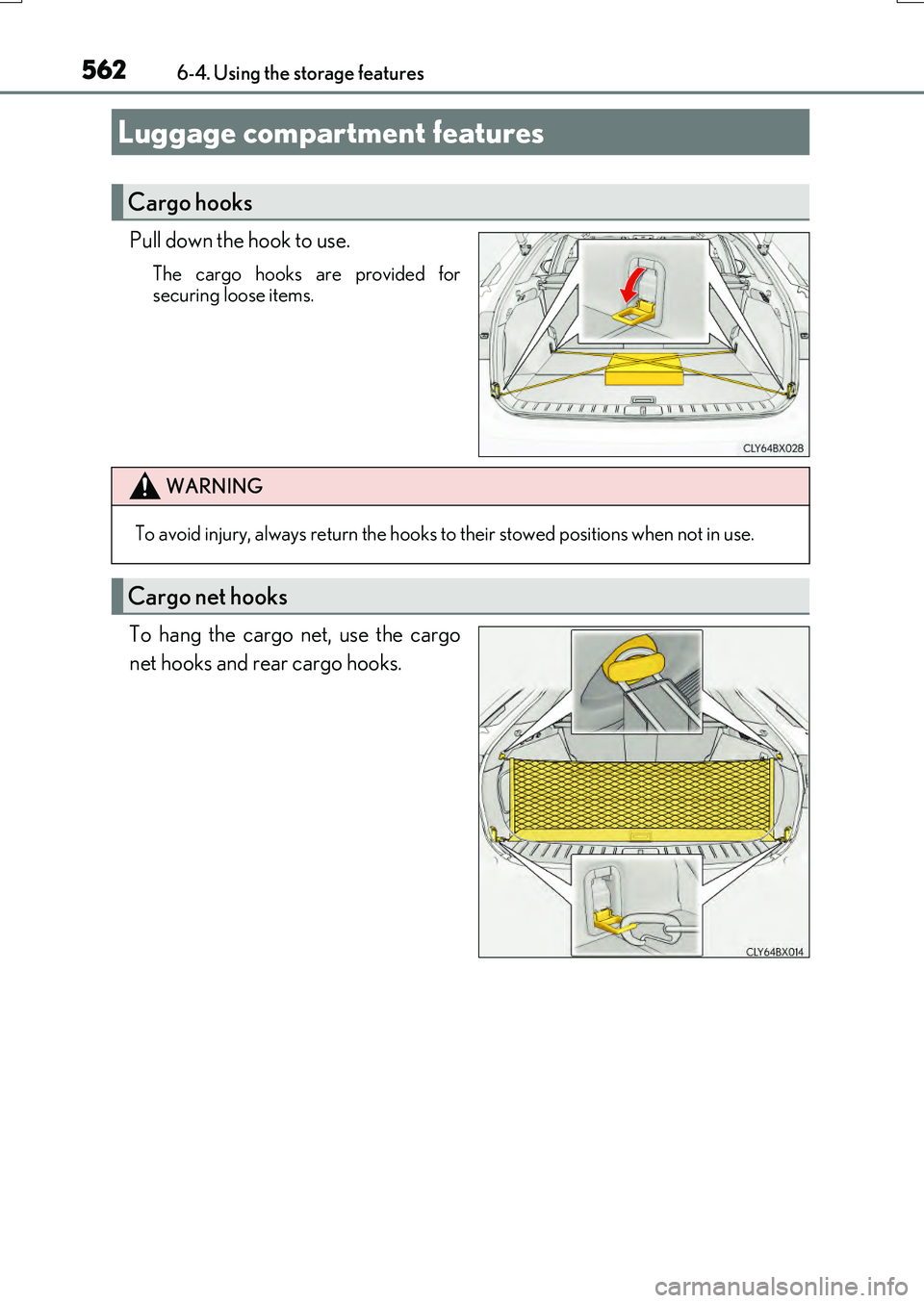
Pull down the hook to use.
The cargo hooks are provided for securing loose items.
To hang the cargo net, use the cargo
net hooks and rear cargo hooks.
Luggage compartment features
Cargo hooks
WARNING
To avoid injury, always return the hooks to their stowed positions when not in use.
Cargo net hooks
Page 564 of 776
5646-4. Using the storage features
RX350/RX200t_EE_OM48F32E
■Removing the luggage cover
Release the cover from the left
and right anchors and allow it to
retract.
Compress the end of the luggage
cover and lift the luggage cover
up.
After removing the luggage cover, place it somewhere other than the
passenger compartment.
1
2
WARNING
●Do not place anything on the luggage cover. In the event of sudden braking or turn- ing, the item may go flying and strike an occupant. This could lead to an unexpectedaccident, resulting in death or serious injury.
●Do not allow children to climb on the luggage cover. Climbing on the luggage covercould result in damage to the luggage cove r, possibly causing death or serious injury to the child.
Page 566 of 776
5666-4. Using the storage features
RX350/RX200t_EE_OM48F32E
■Vehicles with a full-size spare tire
■Vehicles without a spare tire
Deck Floor boxDeck side box
Pull the strap upwards when lifting the
cover up.
Deck Floor boxDeck side box
WARNING
If the deck board is opened or removed, return it to its original position before driving.
In the event of sudden braking, an accident may occur due to an occupant being struck by the deck board or the items stored in the deck under tray.
NOTICE
When closing the back door, do not leave th e deck board hook hooked on the edge of
the back door. The deck board hook may get damaged.
Page 572 of 776
5726-5. Using the other interior features
RX350/RX200t_EE_OM48F32E
WARNING
■Caution while driving
When charging a portable device while driv ing, for safety reasons, the driver should not operate the portable device.
■Caution regarding interference with electronic devices
People with implantable cardiac pacemakers , cardiac resynchronization therapy pace- makers or implantable cardioverter defibrillato rs, as well as any other electrical medi-
cal device, should consult their physicia n about the usage of the wireless charger.
Operations of the wireless charger may have an affect on medical devices.
■To prevent damage or burns
Observe the following precautions.
Failure to do so may result in the possib ility of fire, equipment failure or damage, or burns due to heat.
●Do not put any metallic objects between th e charging area and the portable device while charging.
●Do not attach metallic objects, such as aluminum stickers, to the charging area.
●Do not cover the wireless charger with a cloth or other object while charging.
●Do not attempt to charge portable devices which are not compatible with the Qi wireless charging standard.
●Do not disassemble, modify or remove the wireless charger.
●Do not apply force or impact to the wireless charger.
Page 576 of 776
5766-5. Using the other interior features
RX350/RX200t_EE_OM48F32E
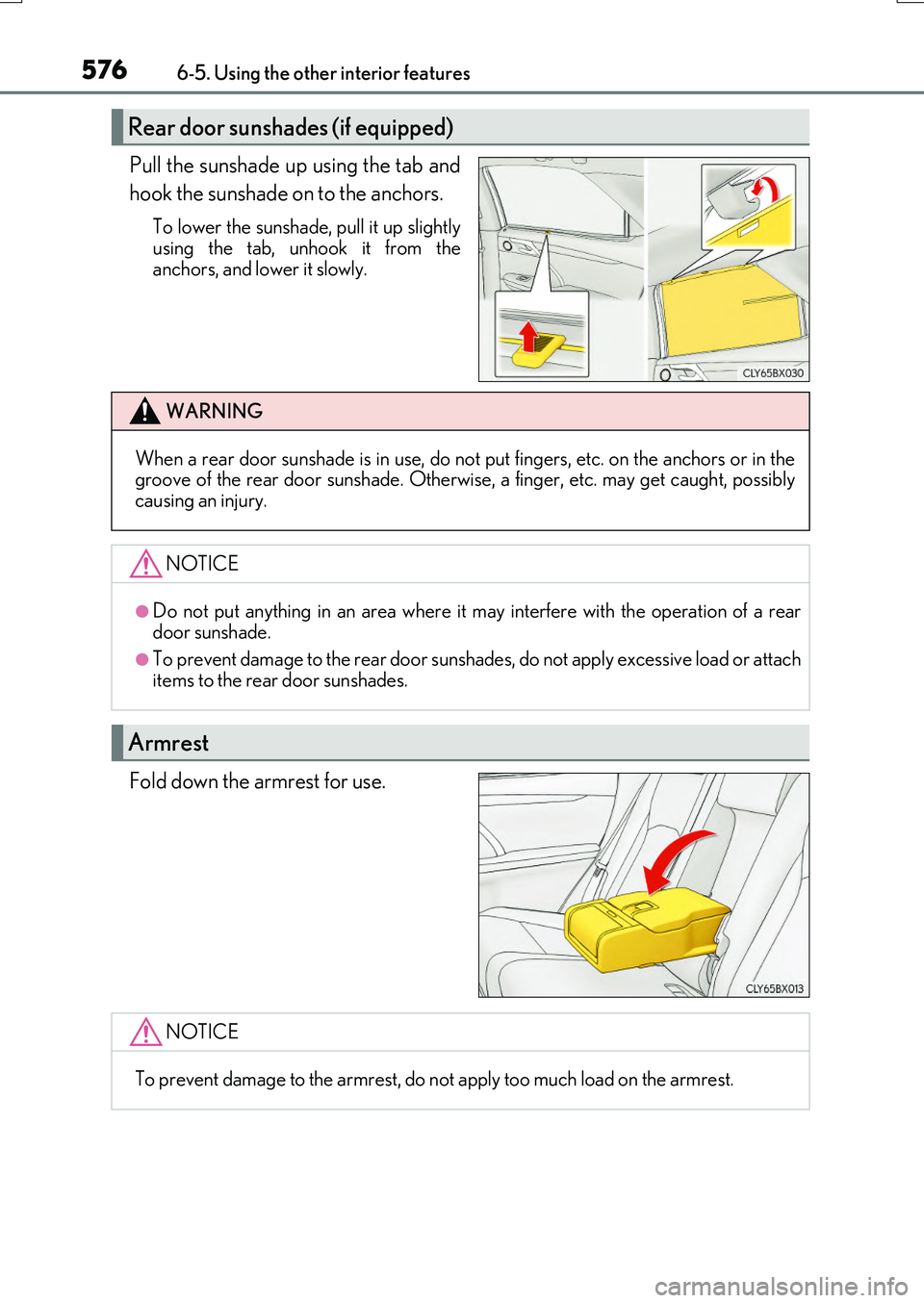
Pull the sunshade up using the tab and
hook the sunshade on to the anchors.
To lower the sunshade, pull it up slightly
using the tab, unhook it from the anchors, and lower it slowly.
Fold down the armrest for use.
Rear door sunshades (if equipped)
WARNING
When a rear door sunshade is in use, do not put fingers, etc. on the anchors or in thegroove of the rear door sunshade. Otherwise, a finger, etc. may get caught, possiblycausing an injury.
NOTICE
●Do not put anything in an area where it may interfere with the operation of a rear
door sunshade.
●To prevent damage to the rear door sunsha des, do not apply excessive load or attach items to the rear door sunshades.
Armrest
NOTICE
To prevent damage to the armrest, do not apply too much load on the armrest.