2017 LEXUS RX200T power steering
[x] Cancel search: power steeringPage 229 of 776

2294-1. Before driving
4
Driving
RX350/RX200t_EE_OM48F32E
WARNING
Observe the following precautions. Failure to do so may result in death or serious injury.
■When starting the vehicle
Always keep your foot on the brake pedal while stopped with the engine running. This prevents the vehicle from creeping.
■When driving the vehicle
●Do not drive if you are unfamiliar with the location of the brake and accelerator ped-als to avoid depressing the wrong pedal.
• Accidentally depressing the accelerator pedal instead of the brake pedal will
result in sudden acceleration that may lead to an accident. • When backing up, you may twist your body around, leading to difficulty in operat- ing the pedals. Make sure to operate the pedals properly.
• Make sure to keep a correct driving posture even when moving the vehicle only slightly. This allows you to depress the brake and accelerator pedals properly.• Depress the brake pedal using your right foot. Depressing the brake pedal using
your left foot may delay response in an emergency, resulting in an accident.
●Do not drive the vehicle over or stop the vehicle near flammable materials.
The exhaust system and exhaust gases can be extremely hot. These hot parts may cause a fire if there is any flammable material nearby.
●During normal driving, do not turn off the engine. Turning the engine off while driving
will not cause loss of steering or braking control, but the power assist to these systems will be lost. This will make it more difficult to steer and brake, so you should pull over and stop the vehicle as soon as it is safe to do so.
However, in the event of an emergency, such as if it becomes impossible to stop the vehicle in the normal way: P. 657
●Use engine braking (downshift) to maintain a safe speed when driving down a steep
hill. Using the brakes continuously may caus e the brakes to overheat and lose effec- tiveness. ( P. 251)
●Do not adjust the positions of the steering wheel, the seat, or the inside or outside rear
view mirrors while driving. Doing so may result in a loss of vehicle control.
●Always check that all passengers’ arms, heads or other parts of their body are not
outside the vehicle.
●AWD models: Do not drive the vehicle off-road. This is not an AWD vehicle designed for o ff-road driving. Proceed with all due cau-
tion if it becomes unavoidable to drive off-road.
●Do not drive across a river or through other bodies of water. This may cause electric/electronic components to short circuit, damage the engine or
cause other serious damage to the vehicle.
Page 234 of 776

2344-1. Before driving
RX350/RX200t_EE_OM48F32E
NOTICE
■When driving the vehicle
●Do not depress the accelerator and brake pedals at the same time during driving, as this may restrain driving torque.
●Do not use the accelerator pedal or depress the accelerator and brake pedals at thesame time to hold the vehicle on a hill.
■When parking the vehicle
Always set the parking brake, and shift the sh ift lever to P. Failure to do so may cause the vehicle to move or the vehicle may accelerate suddenly if the accelerator pedal isaccidentally depressed.
■Avoiding damage to vehicle parts
●Do not turn the steering wheel fully in either direction and hold it there for anextended period of time.
Doing so may damage the power steering motor.
●When driving over bumps in the road, driv e as slowly as possible to avoid damaging the wheels, underside of the vehicle, etc.
●RX200t: Make sure to idle the engine immediately after high speed driving or hillclimbing. Stop the engine only after the turbocharger has cooled down.Failure to do so may cause damage to the turbocharger.
■If you get a flat tire while driving
A flat or damaged tire may cause the following situations. Hold the steering wheel firmly and gradually depress the brake pedal to slow down the vehicle.
●It may be difficult to control your vehicle.
●The vehicle will make abnormal sounds or vibrations.
●The vehicle will lean abnormally.
Information on what to do in case of a flat tire ( P. 679, 693)
■When encountering flooded roads
Do not drive on a road that has flooded after heavy rain, etc. Doing so may cause the
following serious damage to the vehicle:
●Engine stalling
●Short in electrical components
●Engine damage caused by water immersion
In the event that you drive on a flooded road and the vehicle is flooded, be sure to have any authorized Lexus dealer or repairer, or another duly qualified and equipped pro-
fessional check the following:
●Brake function
●Changes in quantity and quality of oil and fluid used for the engine, transaxle, transfer
(AWD models), rear differential (AWD models), etc.
●Lubricant condition for the propeller shaft (AWD models), bearings and suspension joints (where possible), and the func tion of all joints, bearings, etc.
Page 248 of 776
2484-2. Driving procedures
RX350/RX200t_EE_OM48F32E
■Auto power off function
If the vehicle is left in ACCESSORY mode for more than 20 minutes or IGNITION ON mode (the engine is not running) for more than an hour with the shift lever in P, the engineswitch will automatically turn off. However, this function cannot entirely prevent battery
discharge. Do not leave the vehicle with the engine switch in ACCESSORY or IGNI- TION ON mode for long periods of time when the engine is not running.
■Electronic key battery depletion
P. 137
■Conditions affecting operation
P. 170
■Note for the entry function
P. 171
■If the engine does not start
●The engine immobilizer system may not have been deactivated. (P. 77) Contact any authorized Lexus dealer or repairer, or another duly qualified andequipped professional.
●Check that the shift lever is securely set in P. The engine may not start if the shift lever is displaced out of P. “To Start Vehicle, Put Shift Lever into P” will be displayed on themulti-information display.
■Steering lock
After turning the engine switch off and opening and closing the doors, the steering wheel will be locked due to the steering lock functi on. Operating the engine switch again auto-
matically cancels the steering lock.
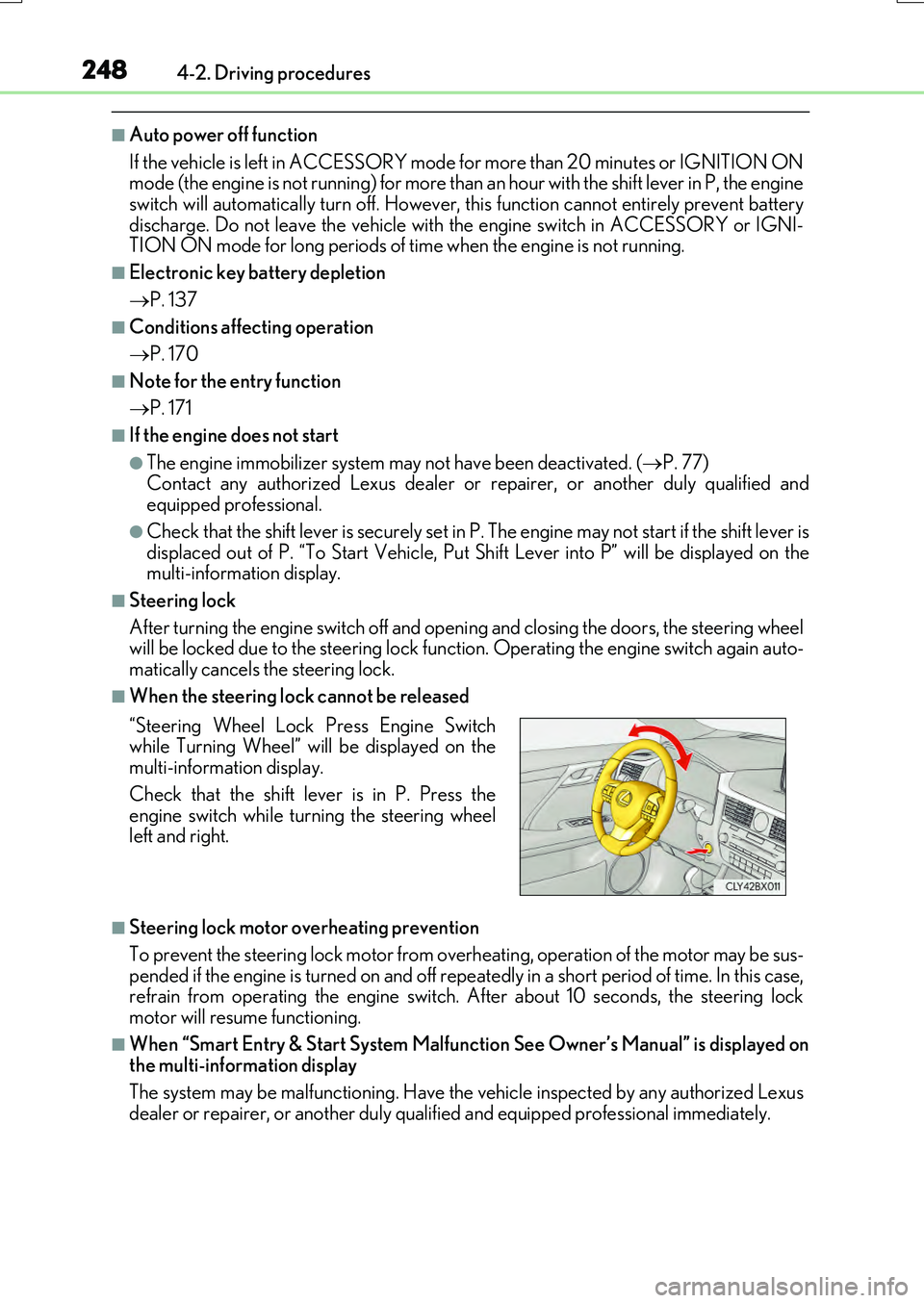
■When the steering lock cannot be released
■Steering lock motor overheating prevention
To prevent the steering lock motor from over heating, operation of the motor may be sus-
pended if the engine is turned on and off repeat edly in a short period of time. In this case, refrain from operating the engine switch. After about 10 seconds, the steering lockmotor will resume functioning.
■When “Smart Entry & Start System Malfunction See Owner’s Manual” is displayed onthe multi-information display
The system may be malfunctioning. Have the vehicle inspected by any authorized Lexus
dealer or repairer, or another duly qua lified and equipped professional immediately.
“Steering Wheel Lock Press Engine Switch while Turning Wheel” will be displayed on themulti-information display.
Check that the shift lever is in P. Press the engine switch while turning the steering wheelleft and right.
Page 249 of 776

2494-2. Driving procedures
4
Driving
RX350/RX200t_EE_OM48F32E
■If the electronic key battery is depleted
P. 638
■Operation of the engine switch
●If the switch is not pressed shortly and firmly, the engine switch mode may not change or the engine may not start.
●If attempting to restart the engine immediately after turning the engine switch off, the
engine may not start in some cases. After turning the engine switch off, please wait a few seconds before restarting the engine.
■If the smart entry & start system has been deactivated by a customized setting
P. 710
WARNING
■When starting the engine
Always start the engine while sitting in the driver’s seat. Do not depress the accelerator pedal while starting the engine under any circumstances.
Doing so may cause an accident resu lting in death or serious injury.
■Caution while driving
If engine failure occurs while the vehicle is moving, do not lock or open the doors until
the vehicle reaches a safe and complete stop. Activation of the steering lock in this cir- cumstance may lead to an accident, resulting in death or serious injury.
■Stopping the engine in an emergency
If you want to stop the engine in an emer gency while driving the vehicle, press and hold the engine switch for more than 2 seconds, or press it briefly 3 times or more in succes- sion. ( P. 657)
However, do not touch the engine switch while driving except in an emergency. Turning the engine off while driving will not cause loss of steering or braking control, but the power assist to these systems will be lost. Th is will make it more difficult to steer and
brake, so you should pull over and stop the vehicle as soon as it is safe to do so.
Page 414 of 776

4144-5. Using the driving support systems
RX350/RX200t_EE_OM48F32E
The estimated course lines move even though the steering wheel is straight
There is a malfunction in the signals being
output by the steering sensor.
Have the vehicle inspected by any autho- rized Lexus dealer or repairer, or anotherduly qualified and equipped professional.
Guide lines are not displayed
The back door is open.
Close the back door.
If this does not resolve the symptom, have the vehicle inspected by any authorizedLexus dealer or repairer, or another duly
qualified and equipped professional.
The estimated course lines are not displayed
• The steering wheel has been moved while the battery was being reinstalled.• Battery power is low.
• The steering sensor has been rein- stalled.• There is a malfunct ion in the signals
being output by the steering sensor.
Stop the vehicle, and turn the steering wheel as far as it will go to the left andright.
If this does not resolve the symptom, have the vehicle inspected by any authorizedLexus dealer or repairer, or another duly
qualified and equipped professional.
Likely causeSolution
Page 417 of 776

4174-5. Using the driving support systems
4
Driving
RX350/RX200t_EE_OM48F32E
Vehicles without Adaptive Variable Suspension System
Normal mode
Provides an optimal balance of fuel ec onomy, quietness, and dynamic perfor-
mance. Suitable for city driving.
Press the switch to change the driving mode to normal mode when Eco drive mode or sport mode is selected.
Eco drive mode
Helps the driver accelerate in an eco-friendly manner and improve fuel econ-
omy through moderate throttle characteristics and by controlling the opera-
tion of the air conditioning system (heating/cooling).
When not in Eco drive mode, if the driving mode select switch is turned to the left, the
Eco drive mode indicator will come on.
Sport mode
Controls the transmission and engine to provide quick, powerful acceleration.
This mode also changes the steering feel, making it suitable for when agile
driving response is desired, such as when driving on roads with many curves.
When not in sport mode, if the driving mode se lect switch is turned to the right, the “SPORT” indicator will comes on.
Driving mode select switch
The driving modes can be selected to suit driving conditions.
1
2
3
Page 419 of 776

4194-5. Using the driving support systems
4
Driving
RX350/RX200t_EE_OM48F32E
Eco drive mode
Helps the driver accelerate in an eco-friendly manner and improve fuel econ-
omy through moderate throttle characteristics and by controlling the opera-
tion of the air conditioning system (heating/cooling).
When not in Eco drive mode, if the driving mode select switch is turned to the left, the
Eco drive mode indicator will come on.
Sport mode
•SPORT S mode
Controls the transmission and engine to provide quick, powerful accelera-
tion. This mode is suitable for when agile driving response is desired, such
as when driving on roads with many curves.
When not in SPORT S mode, if the drivin g mode select switch is turned to the right, the “SPORT S” indicator will come on.
•SPORT S+ mode
Helps to ensure steering performanc e and driving stability by simultane-
ously controlling the steering and susp ension in addition to the transmis-
sion and engine. Suitable for sportier driving.
When in SPORT S mode, if th e driving mode select switch is turned to the right,
the “SPORT S+” indicator will come on.
FunctionSetting
Powertrain
Normal
Power
Eco
ChassisNormal
Sport
Air conditioning systemNormal
Eco
2
3
Page 422 of 776

4224-5. Using the driving support systems
RX350/RX200t_EE_OM48F32E
◆ABS (Anti-lock Brake System)
Helps to prevent wheel lock when the brakes are applied suddenly, or if the
brakes are applied while driving on a slippery road surface
◆Brake assist
Generates an increased level of braking force after the brake pedal is
depressed when the system detects a panic stop situation
◆VSC (Vehicle Stability Control)
Helps the driver to control skidding when swerving suddenly or turning on
slippery road surfaces.
◆VSC + (Vehicle Stability Control +)
Provides cooperative control of the ABS, TRC, VSC and EPS.
Helps to maintain directional stability when swerving on slippery road sur-
faces by controlling steering performance.
◆Trailer Sway Control
Helps the driver to control trailer sway by selectively applying brake pressure
for individual wheels and reducing driving torque when trailer sway is
detected.
◆TRC (Traction Control)
Helps to maintain drive power and prevent the drive wheels from spinning
when starting the vehicle or accelerating on slippery roads
◆Hill-start assist control
Helps to reduce the backward movement of the vehicle when starting on an
uphill
Driving assist systems
To help enhance driving safety and performance, the following systems oper-
ate automatically in response to various driving situations. Be aware, however,
that these systems are suppl ementary and should not be relied upon too heav-
ily when operating the vehicle.