2017 LEXUS RC300H Info system
[x] Cancel search: Info systemPage 148 of 640

1483-2. Opening, closing and locking the doors and trunk
RC300h_EE(OM24740E)
■Side window open/close function linked to door operation
When a door is opened, its window opens slightly. When a door is closed, its window closes completely.
■Switching the door unlock function
It is possible to set which doors the entry function unlocks using the wireless remote con- trol.
Turn the power switch off.
For vehicles with an intrusion sensor: Cancel the intrusion sensor and tilt sensor of the alarm system to prevent unintended trigge ring of the alarm while changing the set- tings. ( P. 105)
When the indicator light on the key su rface is not on, press and hold or
for approximately 5 seconds wh ile pressing and holding .
The setting changes each time an operatio n is performed, as shown below. (When changing the setting continuously, release the buttons, wait for at least 5 seconds, and
repeat step .)
For vehicles with an alarm: To prevent unin tended triggering of the alarm, unlock the doors using the wireless remote control and op en and close a door once after the set-
tings have been changed. (If a door is not opened within 30 seconds after is
pressed, the doors will be locked again and the alarm will automatically be set.)
In a case that the alarm is triggered, immediately stop the alarm. ( P. 103)
1
2
3
3
Multi-information displayUnlocking functionBeep
(Left-hand drive vehi-cles)
(Right-hand drive vehicles)
Holding the driver’s door handleunlocks only the driver’s door.
Exterior: Beeps 3 timesInterior: Pings onceHolding the passenger’s doorhandle unlocks both side doors.
Holding either door handle
unlocks both side doors.
Exterior: Beeps twice
Interior: Pings once
Page 156 of 640

1563-2. Opening, closing and locking the doors and trunk
RC300h_EE(OM24740E)
■Alarms and warning indicators
An alarm sounds and warning messages are di splayed on the multi-information display to protect against unexpected accidents or theft of the vehicle resulting from erroneous
operation. When a warning message is displayed, take appropriate measures based on the displayed message. ( P. 542)
When only an alarm sounds, circumstances and correction procedures are as follows.
■Battery-saving function
The battery-saving function will be activated in order to prevent the electronic key bat-
tery and the 12-volt battery from being discharged while the vehicle is not in operation for a long time.
●In the following situations, the smart entry & start system may take some time to unlock
the doors.
• The electronic key has been left within approximately 2 m (6 ft.) of the outside of the vehicle for 10 minutes or longer.
• The smart entry & start system has no t been used for 5 days or longer.
●If the smart entry & start system has not been used for 14 days or longer, the doors can-
not be unlocked at the passenger door. In this case, hold the driver’s door handle, or use the wireless remote control or mechanical key, to unlock the doors.
AlarmSituationCorrection procedure
Exterior alarm soundsonce for 5 seconds
The trunk was closed while
the electronic key was still inside the trunk and bothside doors were locked.
Retrieve the electronic keyfrom the trunk and close
the trunk lid.
An attempt was made to
lock the vehicle while a door was open.
Close both side doors andlock the doors again.
Interior alarm sounds con-tinuously
The power switch wasturned to ACCESSORY
mode while the driver’s door was open (or thedriver’s door was opened
while the power switch was in ACCESSORY mode).
Turn the power switch off
and close the driver’s door.
The power switch was turned off while the driver’s
door was open.
Close the driver’s door.
Page 158 of 640

1583-2. Opening, closing and locking the doors and trunk
RC300h_EE(OM24740E)
■Note for the entry function
●Even when the electronic key is within the effective range (detection areas), the system may not operate properly in the following cases:
• The electronic key is too close to the window or outside door handle, near the ground, or in a high place when the doors are locked or unlocked.• The electronic key is near the ground or in a high place, or too close to the rear
bumper center when the trunk is opened. • The electronic key is on the instrument pa nel, rear package tray or floor, or in the door pockets or glove box when the hybrid system is started or power switch modes
are changed.
●Do not leave the electronic key on top of th e instrument panel or near the door pockets
when exiting the vehicle. Depending on the radio wave reception conditions, it may be detected by the antenna outside the cabin and the doors will become lockable from the outside, possibly trapping the electronic key inside the vehicle.
●As long as the electronic key is within the effective range, the doors may be locked orunlocked by anyone. However, only the doors detecting the electronic key can be usedto unlock the vehicle.
●Even if the electronic key is not inside the ve hicle, it may be possible to start the hybrid system if the electronic key is near the window.
●The doors may unlock or lock if a large amou nt of water splashes on the door handle,
such as in the rain or in a car wash, when th e electronic key is within the effective range. (The doors will automatically be locked after approximately 30 seconds if the doorsare not opened and closed.)
●If the wireless remote control is used to lock the doors when the electronic key is nearthe vehicle, there is a possibility that the d oor may not be unlocked by the entry func- tion. (Use the wireless remote control to unlock the doors.)
●Touching the door lock or unlock sensor while wearing gloves may prevent lock or unlock operation.
●If the door handle becomes wet while the electronic key is within the effective range,the door may lock and unlock repeatedly. In this case, follow the following correction procedures to wash the vehicle:
• Place the electronic key in a location 2 m (6 ft.) or more away from the vehicle. (Take care to ensure that the key is not stolen.)• Set the electronic key to battery-saving mode to disable the smart entry & start sys-
tem. ( P. 157)
●If the electronic key is inside the vehicle and a door handle becomes wet during a car
wash, a message may be shown on the mult i-information display and a buzzer will sound outside the vehicle. To turn off the alarm, lock both side doors.
●The lock sensor may not work properly if it comes into contact with ice, snow, mud, etc.
Clean the lock sensor and attempt to operate it again.
●A sudden handle operation or a handle oper ation immediately after entering the effec- tive range may prevent the doors from bein g unlocked. Touch the door unlock sensor
and check that the doors are unlocked before pulling the door handle again.
●Unlocking the vehicle may take more time if another electronic key is within the effec- tive range.
Page 177 of 640
1773-2. Opening, closing and locking the doors and trunk
3
Operation of each component
RC300h_EE(OM24740E)
WARNING
■Caution regarding interference with electronic devices
●People with implantable cardiac pacemakers, cardiac resynchronization therapy- pacemakers or implantable cardioverter de fibrillators should maintain a reasonable
distance between themselves and the smart entry & start system antennas. ( P. 155) The radio waves may affect the operation of such devices. If necessary, the entryfunction can be disabled. Ask any authoriz ed Lexus dealer or repairer, or another
duly qualified and equipped professional for details, such as the frequency of radio waves and timing of the emitted radio waves. Then, consult your doctor to see if you should disable the entry function.
●Users of any electrical medical device other than implantable cardiac pacemakers,cardiac resynchronization therapy-pacemakers or implantable cardioverterdefibrillators should consult the manufacturer of the device for information about its
operation under the influence of radio waves. Radio waves could have unexpected effects on the operation of such medicaldevices.
Ask any authorized Lexus dealer or repairer, or another duly qualified and equipped professional for details on disabling the entry function.
Page 207 of 640

2074-1. Before driving
4
Driving
RC300h_EE(OM24740E)
■When starting off on an uphill
The hill-start assist co ntrol will activate. (P. 304)
■For fuel-efficient driving
Keep in mind that hybrid vehicles are similar to conventional vehicles, and it is necessary
to refrain from activities such as sudden acceleration. ( P. 334)
■Driving in the rain
●Drive carefully when it is raining, because visibility will be reduced, the windows may
become fogged-up, and the road will be slippery.
●Drive carefully when it starts to rain, because the road surface will be especially slip- pery.
●Refrain from high speeds when driving on an expressway in the rain, because there maybe a layer of water between the tires and the road surface, preventing the steering andbrakes from operating properly.
■Restraining the hybrid system output (brake override system)
●When the accelerator and brake pedals are de pressed at the same time, the hybrid sys- tem output may be restrained.
●A warning message is displayed on the multi-information display while the system is operating. ( P. 552)
■Breaking in your new Lexus
To extend the life of the vehicle, observing the following precautions is recommended:
●For the first 300 km (186 miles): Avoid sudden stops.
●For the first 1000 km (621 miles):
• Do not drive at extremely high speeds. • Avoid sudden acceleration.
• Do not drive continuously in low gears. • Do not drive at a constant speed for extended periods.
■Drum-in-disc type parking brake system
Your vehicle has a drum-in-disc type parkin g brake system. This type of brake system needs bedding-down of the brake shoes periodically or whenever the parking brakeshoes and/or drum are replaced. Have any authorized Lexus dealer or repairer, or
another duly qualified and equipped professional, perform the bedding down operation.
■Operating your vehicle in a foreign country
Comply with the relevant vehicle registration laws and confirm the availability of the cor-
rect fuel. ( P. 598)
Page 212 of 640

2124-1. Before driving
RC300h_EE(OM24740E)
NOTICE
■When driving the vehicle
●Do not depress the accelerator and brake pedals at the same time while driving, as this may restrain the hybrid system output.
●Do not use the accelerator pedal or depress the accelerator and brake pedals at thesame time to hold the vehicle on a hill.
■When parking the vehicle
Always set the parking brake, and shift the sh ift lever to P. Failure to do so may cause the vehicle to move or the vehicle may accelerate suddenly if the accelerator pedal isaccidentally depressed.
■Avoiding damage to vehicle parts
●Do not turn the steering wheel fully in either direction and hold it there for anextended period of time.
Doing so may damage the power steering motor.
●When driving over bumps in the road, driv e as slowly as possible to avoid damaging the wheels, underside of the vehicle, etc.
■If you get a flat tire while driving
A flat or damaged tire may cause the following situations. Hold the steering wheel firmly and gradually depress the brake pedal to slow down the vehicle.
●It may be difficult to control your vehicle.
●The vehicle will make abnormal sounds or vibrations.
●The vehicle will lean abnormally.
Information on what to do in case of a flat tire ( P. 563)
■When encountering flooded roads
Do not drive on a road that has flooded after heavy rain etc. Doing so may cause the
following serious damage to the vehicle:
●Engine stalling
●Short in electrical components
●Engine damage caused by water immersion
In the event that you drive on a flooded road and the vehicle is flooded, be sure to have any authorized Lexus dealer or repairer, or another duly qualified and equipped pro-
fessional check the following:
●Brake function
●Changes in quantity and quality of oil and fluid used for the engine, hybrid transmis-
sion, differentials, etc.
●Lubricant condition for the propeller shaft, bearings and suspension joints (where possible), and the function of all joints, bearings, etc.
Page 213 of 640

2134-1. Before driving
4
Driving
RC300h_EE(OM24740E)
Cargo and luggage
Take notice of the following information about storage precautions, cargo
capacity and load:
WARNING
■Things that must not be carried in the trunk
The following things may cause a fire if loaded in the trunk:
●Receptacles containing gasoline
●Aerosol cans
■Storage precautions
Observe the following precautions. Failure to do so may prevent the pedals from being depressed properly, may block the driver’s vision, or may result in items hitting the driver or passengers, possibly causing
an accident.
●Stow cargo and luggage in the trunk whenever possible.
●To prevent cargo and luggage from sliding forward during braking, do not stack any-
thing in the enlarged trunk. Keep cargo and luggage low, as close to the floor as pos- sible.
●When you fold down the rear seats, long items should not be placed directly behind
the front seats.
●Never allow anyone to ride in the enlarged trunk. It is not designed for passengers. They should ride in their seats with their seat belts properly fastened.
●Do not place cargo or luggage in or on the following locations.
• At the feet of the driver • On the front passenger or rear seats (when stacking items)
• On the package tray • On the instrument panel• On the dashboard
• In front of the navigation or multimedia system screen (if equipped) or Lexus Dis- play Audio screen (if equipped)
●Secure all items in the occupant compartment.
■Load and distribution
●Do not overload your vehicle.
●Do not apply loads unevenly. Improper loading may cause deterioration of steering or braking control which may cause death or serious injury.
Page 215 of 640
215
4
Driving
RC300h_EE(OM24740E)
4-2. Driving procedures
Check that the parking brake is set.
Check that the shift lever is in P.
Firmly depress the brake pedal.
and a message will be displayed on the multi-information display.
If it is not displayed, the hybrid system cannot be started.
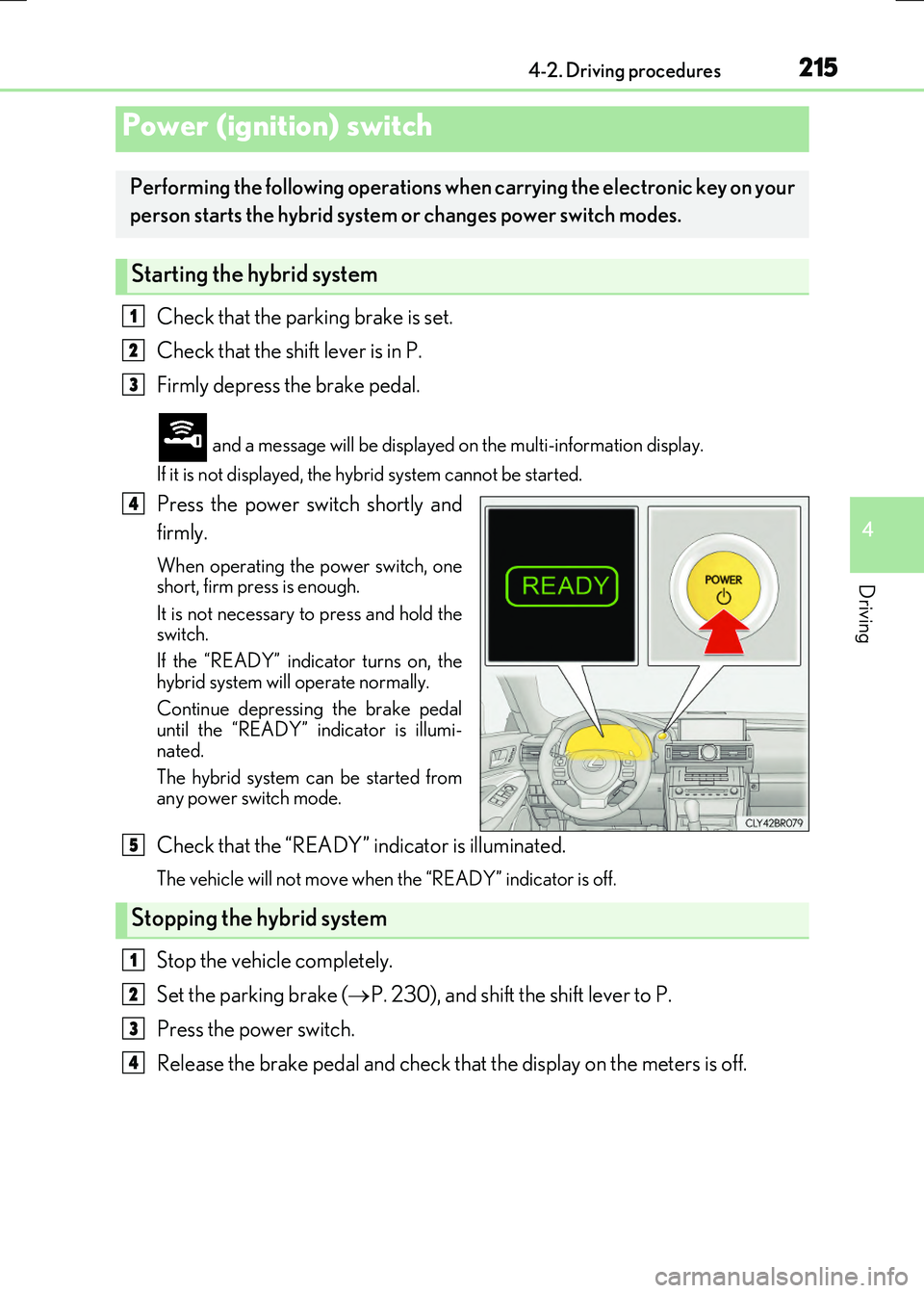
Press the power switch shortly and
firmly.
When operating the power switch, one short, firm press is enough.
It is not necessary to press and hold the switch.
If the “READY” indicator turns on, the
hybrid system will operate normally.
Continue depressing the brake pedal until the “READY” indicator is illumi-
nated.
The hybrid system can be started from any power switch mode.
Check that the “READY” indicator is illuminated.
The vehicle will not move when the “READY” indicator is off.
Stop the vehicle completely.
Set the parking brake ( P. 230), and shift the shift lever to P.
Press the power switch.
Release the brake pedal and check that the display on the meters is off.
Power (ignition) switch
Performing the following operations when carrying the electronic key on your
person starts the hybrid system or changes power switch modes.
Starting the hybrid system
1
2
3
4
Stopping the hybrid system
5
1
2
3
4