Page 426 of 640

4265-12. Other function
RC300h_EE(OM24740E)
To display the left menu screen, turn the
controller to the left while the
MirrorLink screen is being displayed.
Select a device
Change the screen size
Adjust the display settings.
■Selecting a MirrorLink device
If more than one MirrorLink device is available, to select the desired device.
Select “MirrorLink* device select” on the left menu screen.
Select “MirrorLink*1” or “MirrorLink*2”.
*: MirrorLink is a registered trademark of Car Connectivity Consortium, Inc.
■Operational conditions
This function is not available if the smartp hone does not support Car Connectivity Con- sortium .
■About MirrorLink
MirrorLink is a registered trademark of Car Connectivity Consortium, Inc.
Menu screen
1
2
3
WARNING
■While driving
Do not connect smartphone or operate the controls.
NOTICE
■To avoid damaging the smartphone
●Do not leave your smartphone in the vehicle. The temperature inside may rise to a
level that could damage the smartphone.
●Do not push down on or apply unnecessary pressure to the smartphone device while it is connected.
●Do not insert foreign objects into the port.
1
2
Page 435 of 640
4356-1. Using the air conditioning system
6
Interior features
RC300h_EE(OM24740E)
■Other functions
●Switching between outside air and recirculated air modes (P. 438)
●Defogging the windshield (P. 438)
●Defogging the rear window and outside rear view mirrors (P. 438)
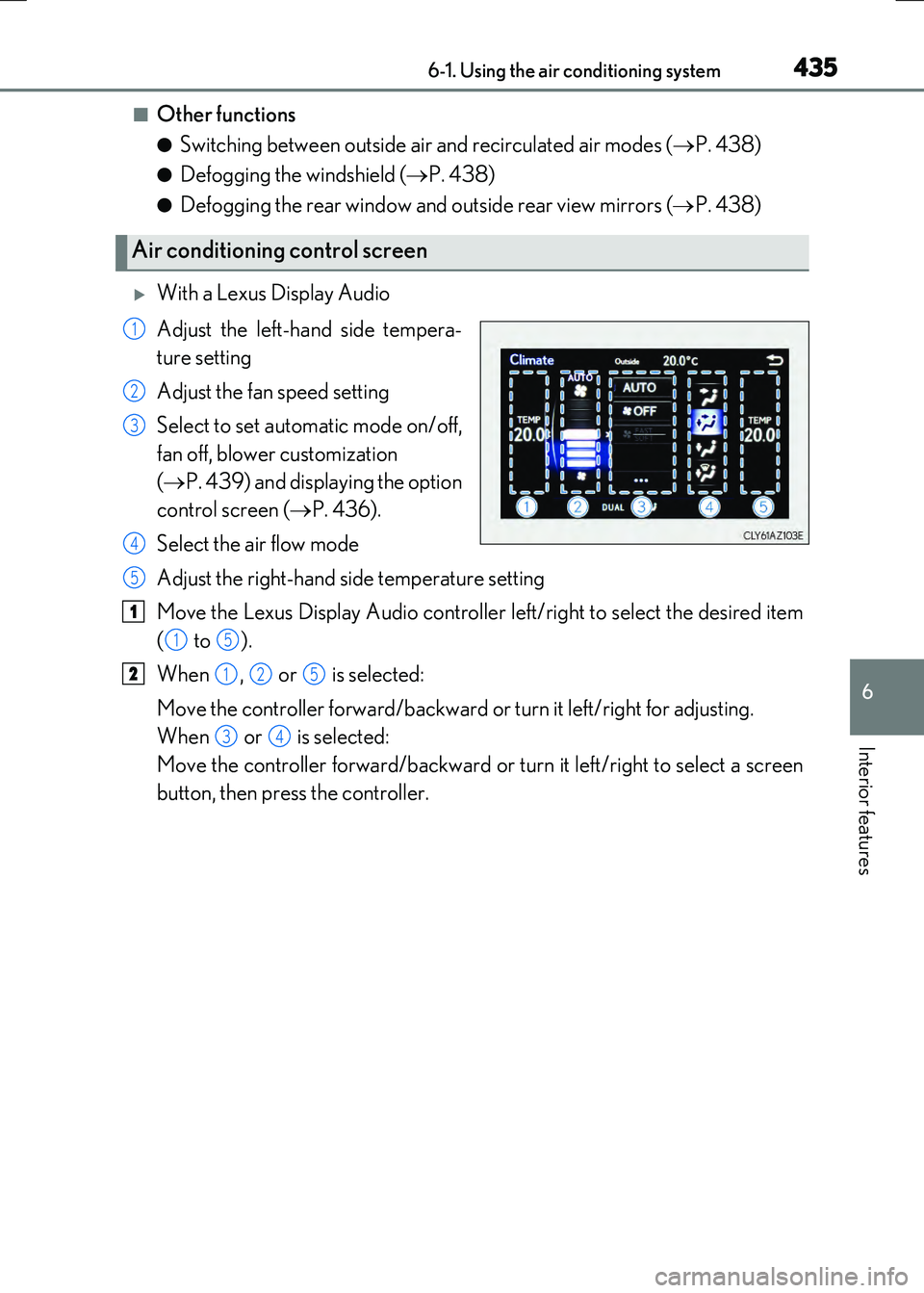
With a Lexus Display Audio
Adjust the left-hand side tempera-
ture setting
Adjust the fan speed setting
Select to set automatic mode on/off,
fan off, blower customization
( P. 439) and displaying the option
control screen ( P. 436).
Select the air flow mode
Adjust the right-hand side temperature setting
Move the Lexus Display Audio controller left/right to select the desired item
( to ).
When , or is selected:
Move the controller forward/backward or turn it left/right for adjusting.
When or is selected:
Move the controller forward/backward or turn it left/right to select a screen
button, then press the controller.
Air conditioning control screen
1
2
3
4
5
1
15
2125
34
Page 436 of 640
4366-1. Using the air conditioning system
RC300h_EE(OM24740E)
With a navigation or multimedia system
Adjust the left-hand side tempera-
ture setting
Adjust the fan speed setting
Changing the fan speed setting
during the automatic mode opera-
tion ( P. 439)
Select the air flow mode
Adjust the right-hand side tempera-
ture setting
Display the option control screen ( P. 436)
Turn the fan off
Select to set automatic mode on/off
Using the Remote Touch, select the button on the screen and activate it by press-
ing on or double tapping the Remote Touch Pad.
■Option control screen
The functions can be switched on and off.
Cooling and dehumidification
function
Adjusting the temperature for
driver and passenger seats sepa-
rately (“DUAL” mode) ( P. 437)
Removing pollen from the air
(Pollen removal mode)
( P. 438)
1
2
3
4
5
6
7
8
1
2
3
Page 437 of 640
4376-1. Using the air conditioning system
6
Interior features
RC300h_EE(OM24740E)
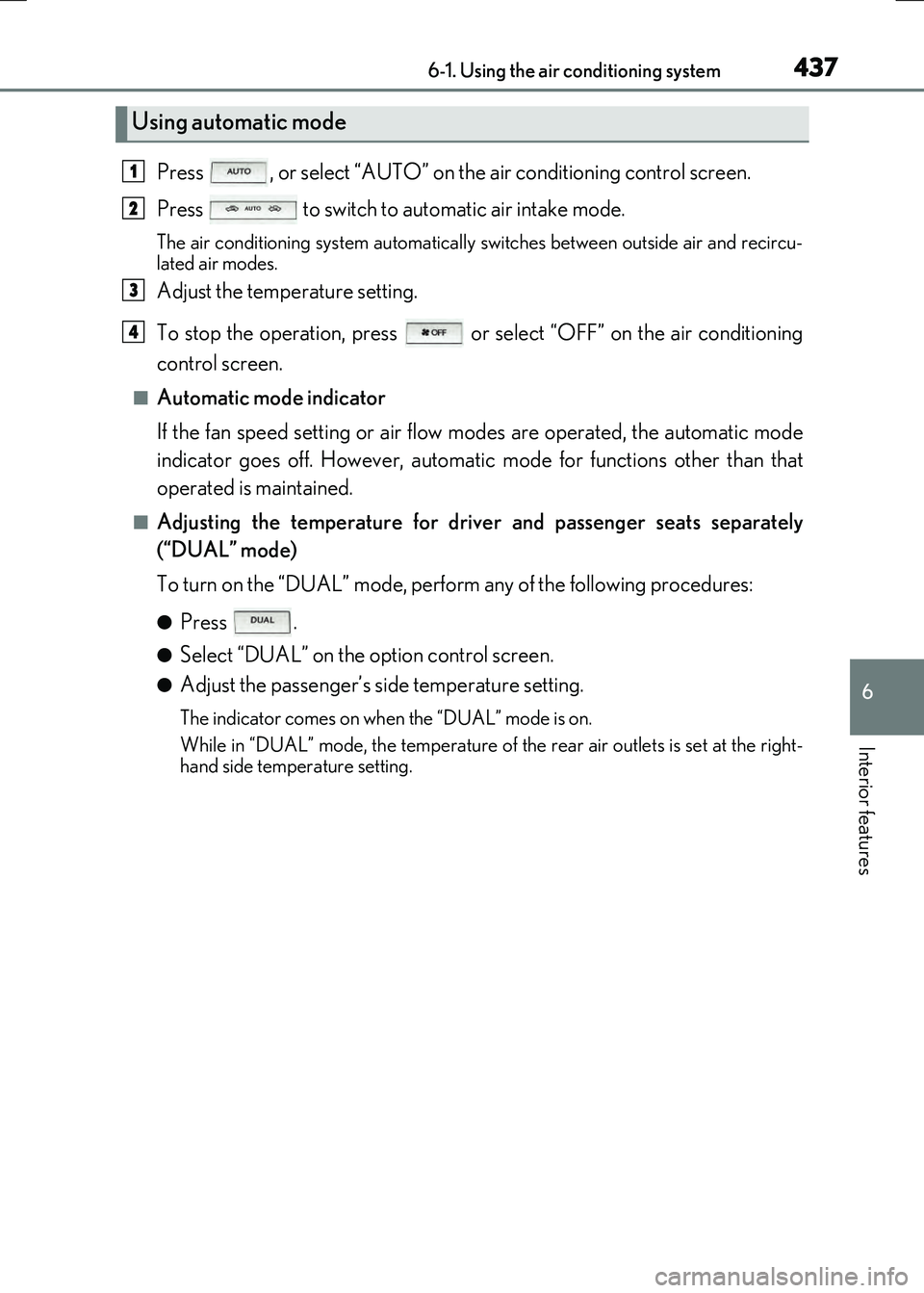
Press , or select “AUTO” on the air conditioning control screen.
Press to switch to automatic air intake mode.
The air conditioning system automatically switches between outside air and recircu-
lated air modes.
Adjust the temperature setting.
To stop the operation, press or select “OFF” on the air conditioning
control screen.
■Automatic mode indicator
If the fan speed setting or air flow modes are operated, the automatic mode
indicator goes off. However, automatic mode for functions other than that
operated is maintained.
■Adjusting the temperature for driv er and passenger seats separately
(“DUAL” mode)
To turn on the “DUAL” mode, perfor m any of the following procedures:
●Press .
●Select “DUAL” on the option control screen.
●Adjust the passenger’s side temperature setting.
The indicator comes on when the “DUAL” mode is on.
While in “DUAL” mode, the temperature of the rear air outlets is set at the right-
hand side temperature setting.
Using automatic mode
1
2
3
4
Page 438 of 640

4386-1. Using the air conditioning system
RC300h_EE(OM24740E)
■Switching between outside air and recirculated air modes
Press .
The mode switches among (recir culated air mode), automatic and
(outside air mode) modes each time the button is pressed.
When the system is switched to automatic mode, the air conditioning system oper-
ates automatically.
The indicator above the selected button comes on.
■Pollen removal mode
Pollen is removed from the air and the ai r flows to the upper part of the body.
Select
on the option control screen.
When pollen removal mode is on, is di splayed on the air conditioning con-
trol screen.
In order to prevent the windshield from fogg ing up when the outside air is cold, the
dehumidification function may operate.
Pollen is filtered even if the pollen removal mode is turned off.
■Defogging the windshield
Defoggers are used to defog the windshield and side windows.
Press .
Set the outside/recirculated air mode button to outside air mode if the recirculated
air mode is used. (It may switch automatically.)
To defog the windshield and the side windows early, turn the air flow and tempera-
ture up.
To return to the previous mode, press again when the windshield is
defogged.
■Defogging the rear window and outside rear view mirrors
Defoggers are used to defog the rear window, and to remove raindrops, dew
and frost from the outside rear view mirrors.
Press .
The defoggers will automatically turn off after a period of time.
Other functions
Page 439 of 640
4396-1. Using the air conditioning system
6
Interior features
RC300h_EE(OM24740E)
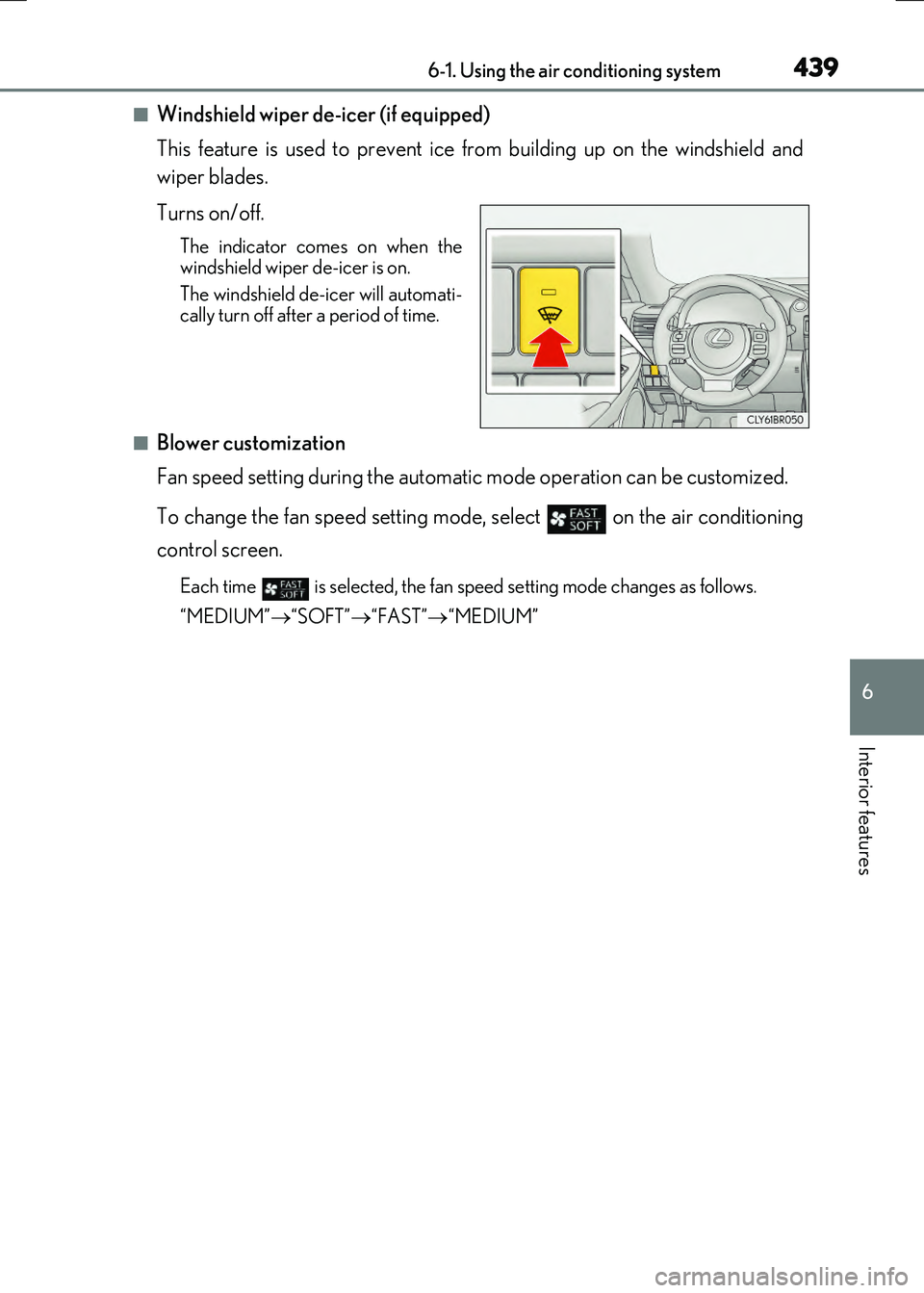
■Windshield wiper de-icer (if equipped)
This feature is used to prevent ice from building up on the windshield and
wiper blades.
Turns on/off.
The indicator come s on when the windshield wiper de-icer is on.
The windshield de-icer will automati- cally turn off after a period of time.
■Blower customization
Fan speed setting during the automatic mode operation can be customized.
To change the fan speed setting mode, select on the air conditioning
control screen.
Each time is selected, the fan speed setting mode changes as follows.
“MEDIUM” “SOFT”“FAST”“MEDIUM”
Page 440 of 640
4406-1. Using the air conditioning system
RC300h_EE(OM24740E)
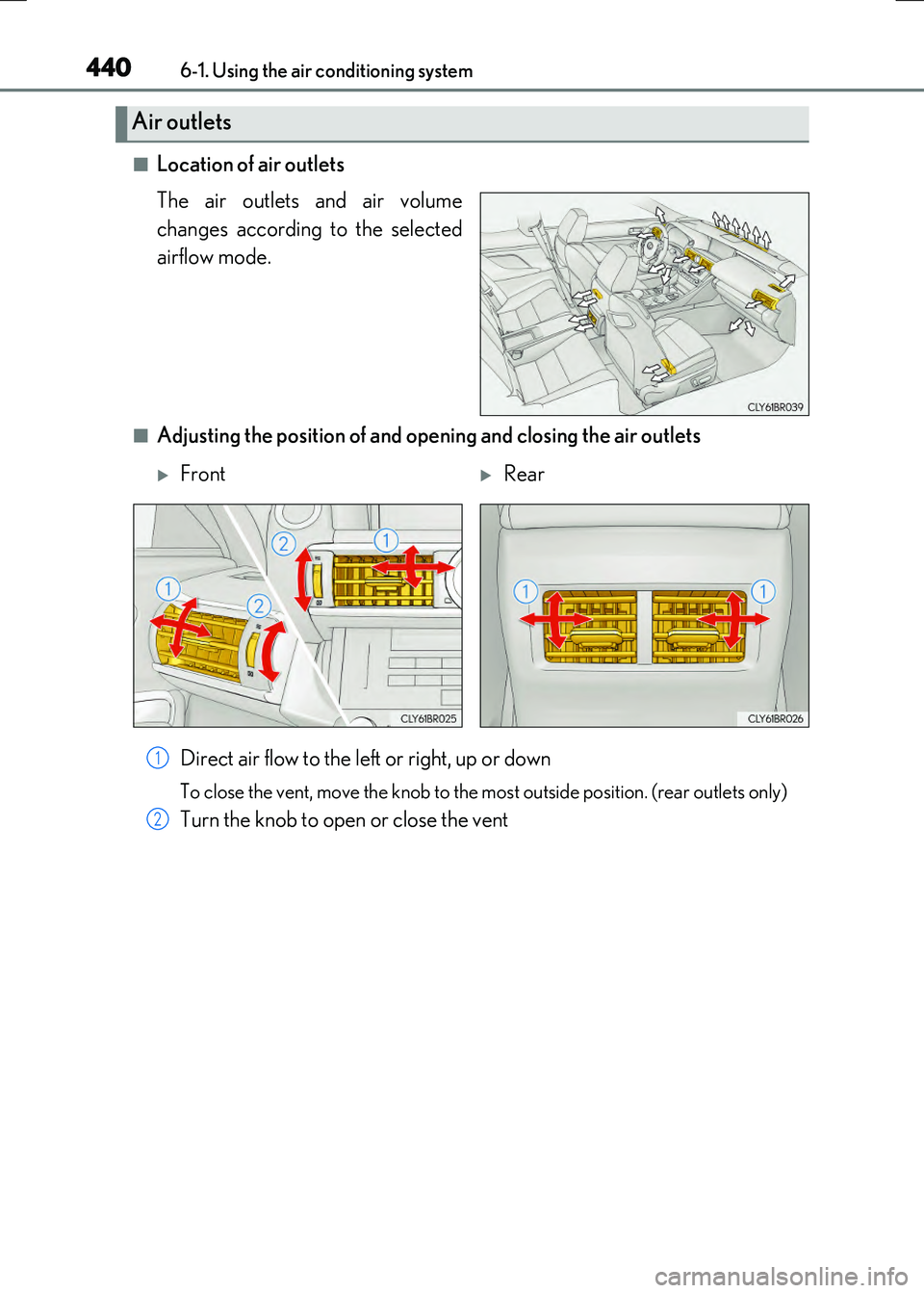
■Location of air outlets
The air outlets and air volume
changes according to the selected
airflow mode.
■Adjusting the position of and opening and closing the air outlets
Direct air flow to the left or right, up or down
To close the vent, move the knob to the most outside position. (rear outlets only)
Turn the knob to open or close the vent
Air outlets
FrontRear
1
2
Page 441 of 640

4416-1. Using the air conditioning system
6
Interior features
RC300h_EE(OM24740E)
■Registering air conditioning settings to electronic keys (vehicles with driving position
memory)
●Unlocking the vehicle using an electronic key and turning the power switch to ON
mode will recall that key's registered air conditioning settings.
●When the power switch is turned off, the cu rrent air conditioning settings will automati-
cally be registered to the electronic key that was used to unlock the vehicle.
●The system may not operate correctly if more than one electronic key is in the vicinity or
if the smart entry & start system is used to unlock a passenger door.
●The doors that can recall the air conditioning setting* when unlocked using the smart
entry & start system can be changed. For details, contact any authorized Lexus dealer
or repairer, or another duly qu alified and equipped professional.
*: The doors that can recall the driving position memory are changed at the same time.
■Using automatic mode
Fan speed is adjusted automatically according to the temperature setting and the ambi-
ent conditions.
Therefore, the fan may stop for a while until wa rm or cool air is ready to flow immediately
after is pressed or “AUTO” is selected.
■Fogging up of the windows
The windows will easily fog up when the hu midity in the vehicle is high. Turning
(“A/C”) on will dehumidify the air from the ou tlets and defog the windshield effectively.
●If you turn (“A/C”) off, the windows may fog up more easily.
●The windows may fog up if the recirculated air mode is used.
■Outside/recirculated air mode
●When driving on dusty roads such as tunnels or in heavy traffic, set the outside/recircu-
lated air mode button to the recirculated air mode. This is effective in preventing out-
side air from entering the vehicle interior . During cooling operation, setting the
recirculated air mode will also cool the vehicle interior effectively.
●Outside/recirculated air mode may automati cally switch depending on the tempera-
ture setting or the inside temperature.
■Automatic mode for air intake control
In automatic mode, the system detects exhaust gas and other pollutants and automati-
cally switches between outside air and recirculated air modes.
When the dehumidification function is off, and the fan is operating, turning automatic
mode on will activate the dehumidification function.
■Operation of the air conditioning system in Eco drive mode
In Eco drive mode, the air conditioning system is controlled as follows to prioritize fuel
efficiency:
●Engine speed and compressor operation controlled to restrict heating/cooling capac-
ity
●Fan speed restricted when automatic mode is selected
To improve air conditioning performanc e, perform the following operations:
●Adjust the fan speed
●Turn off Eco drive mode