2017 LEXUS RC200T steering wheel adjustment
[x] Cancel search: steering wheel adjustmentPage 215 of 724
2153-3. Adjusting the seats
3
Operation of each component
RC200t_RC F_EE(OM24728E)
■To stop the position recall operation part-way through
Perform any of the following:
●Press the “SET” button.
●Press button “1”, “2” or “3”.
●Operate any of the seat adjustment switches (only cancels seat position recall).
●Operate the tilt and telescopic steering control switch (only cancels steering wheel position recall).
■Seat positions that can be memorized ( P. 209)
The adjusted positions other than the position adjusted by lumbar support switch can be recorded.
■Operating the driving position memory after turning the engine switch off
Recorded seat positions can be activated up to 180 seconds after the driver's door is opened and another 60 seconds after it is closed again.
■In order to correctly use the driving position memory function
If a seat position is already in the furthest possible position and the seat is operated in the same direction, the recorded position may be slightly different when it is recalled.
Each electronic key (including a card key) can be registered to recall your pre-
ferred driving position.
■Registering procedure
Record your driving position to button “1”, “2” or “3” before performing the
following:
Carry only the key you want to register, and then close the driver’s door.
If 2 or more keys are in the vehicle, the driving position cannot be recorded
properly.
Check that the shift lever is in P.
Turn the engine switch to IGNITION ON mode.
Recall the driving position that you want to record.
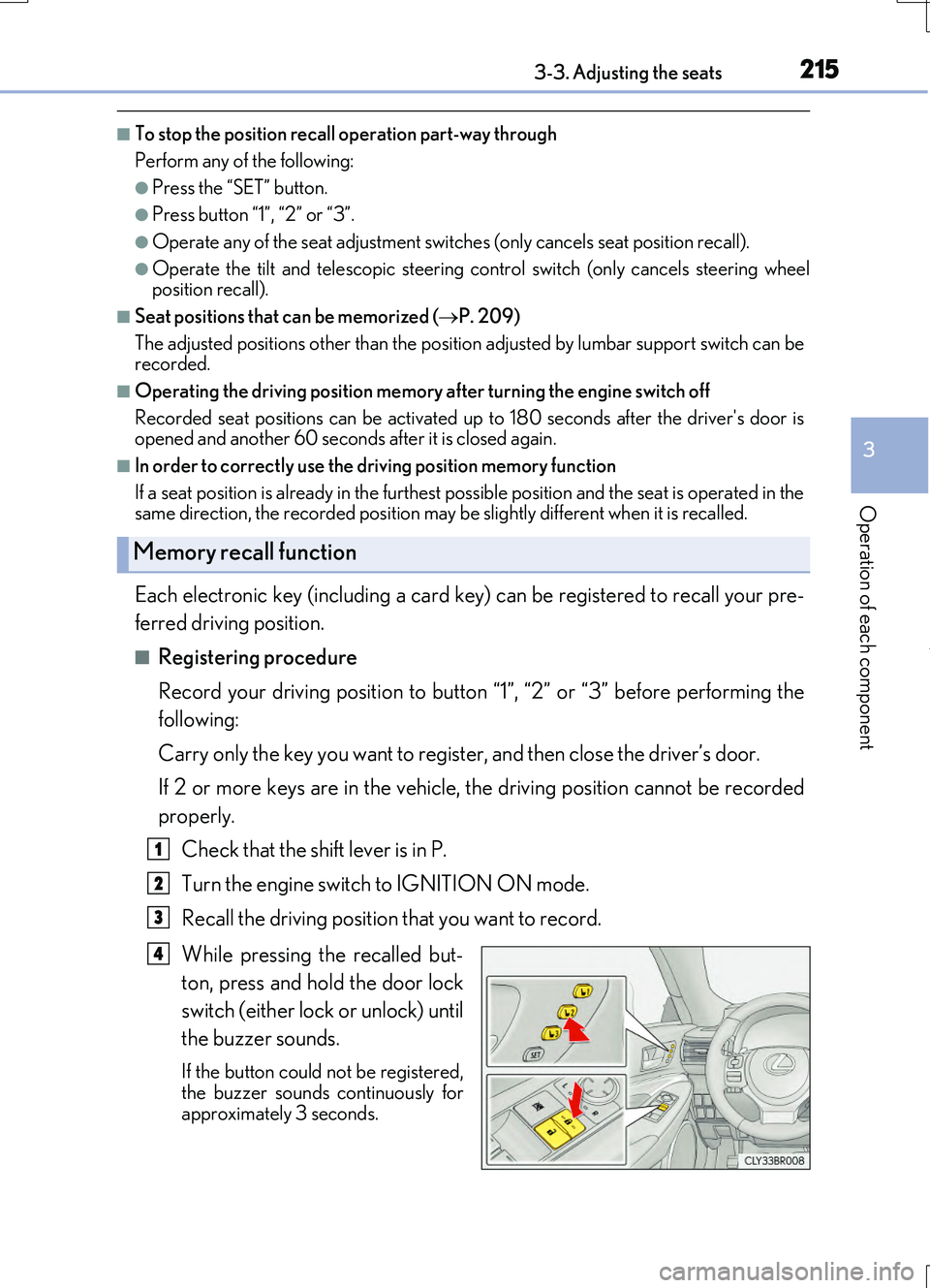
While pressing the recalled but-
ton, press and hold the door lock
switch (either lock or unlock) until
the buzzer sounds.
If the button could not be registered,
the buzzer sounds continuously for approximately 3 seconds.
Memory recall function
1
2
3
4
Page 216 of 724

2163-3. Adjusting the seats
RC200t_RC F_EE(OM24728E)
■Recall procedure
Carry the electronic key that has been registered to the driving position,
and then unlock and open the driver’s door using the smart entry & start
system or wireless remote control.
The driving position will move to the recorded position (not including the steering wheel).
If the driving position is in a position that has already been recorded, the seat and
outside rear view mirrors will not move.
Turn the engine switch to ACCESSORY mode or IGNITION ON mode.
The steering wheel will move to the recorded position.
■Cancelation procedure
Carry only the key you want to cancel and then close the driver’s door.
If 2 or more keys are in the vehicle, the driving position cannot be canceled
properly.
Turn the engine switch to IGNITION ON mode.
While pressing the “SET” button, press and hold the door lock switch
(either lock or unlock) until the buzzer sounds twice.
If the button could not be canceled, the buzzer sounds continuously for approxi-
mately 3 seconds.
■Recalling the driving position us ing the memory recall function
●Different driving positions can be registered for each electronic key. Therefore, the driving position that is recalled may be different depending on the key being carried.
●If a door other than the driver’s door is unlocked with the smart entry & start system, the
driving position cannot be reca lled. In this case, press the driving position button which has been set.
■Customization
The unlock door settings of the memory recall function can be changed. (Customizable features: P. 685)
WARNING
■Seat adjustment caution
Take care during seat adjustment so that the seat does not strike the rear passenger or
squeeze your body against the steering wheel.
1
2
1
2
Page 220 of 724

220
RC200t_RC F_EE(OM24728E)
3-4. Adjusting the steering wheel and mirrors
Manual type
Hold the steering wheel and push
the lever down.
Adjust to the ideal position by mov-
ing the steering wheel horizontally
and vertically.
After adjustment, pull the lever up to secure the steering wheel.
Power type
Operating the switch moves the steering wheel in the following directions:
Up
Down
Toward the driver
Away from the driver
Steering wheel
Adjustment procedure
1
2
1
2
3
4
Page 221 of 724

2213-4. Adjusting the steering wheel and mirrors
3
Operation of each component
RC200t_RC F_EE(OM24728E)
When the engine switch is turned off,
the steering wheel returns to its stowed
position by moving up and away to
enable easier driver entry and exit.
Turning the engine switch to ACCES-
SORY or IGNITION ON mode will return the steering wheel to the originalposition.
To sound the horn, press on or close to
the mark.
■The steering wheel can be adjusted when (power type)
The engine switch is in ACCESSORY or IGNITION ON mode.
■Automatic adjustment of the steering position (if equipped)
A desired steering position can be entered to memory and recalled automatically by the
driving position memory system. ( P. 214)
■Customization
The auto tilt away function can be changed. (Customizable features: P. 685)
Auto tilt away (power type)
Horn
WARNING
■Caution while driving
Do not adjust the steering wheel while driving.
Doing so may cause the driver to mishandle the vehicle and cause an accident, result- ing in death or serious injury.
■After adjusting the steering wheel (manual type)
Make sure that the steering wheel is securely locked. Otherwise, the steering wheel may move suddenly, possibly causing an accident, andresulting in death or serious injury. Also, th e horn may not sound if the steering wheel is
not securely locked.
Page 224 of 724

2243-4. Adjusting the steering wheel and mirrors
RC200t_RC F_EE(OM24728E)
To select a mirror to adjust, press the
switch.
Left
Right
Pressing the same switch again will
put the switch in neutral.
To adjust the mirror, press the switch.
Up
Right
Down
Left
Outside rear view mirrors
Adjustment procedure
1
1
2
2
1
2
3
4
Page 225 of 724

2253-4. Adjusting the steering wheel and mirrors
3
Operation of each component
RC200t_RC F_EE(OM24728E)
■Using the switch
Press the switch to fold the mirrors.
Press it again to extend them to the original position.
■Setting automatic mode (if equipped)
Automatic mode allows the folding or extending of the mirrors to be linked to
locking/unlocking of the doors.
Press the “AUTO” switch to set auto-
matic mode.
The indicator will come on.
Pressing the switch once more will
return to manual mode.
When either “L” or “R” of the mirror select switch is selected, the outside rear
view mirrors will automatically angle downwards when the vehicle is reversing in
order to give a better view of the ground.
To disable this function, select neither “L” nor “R”.
■Adjusting the mirror angle when the vehicle is reversing
With the shift lever in R, adjust the mirror angle at a desired position.
The adjusted angle will be memorized and the mirror will automatically tilt to
the memorized angle whenever the shift lever is shifted to R from next time.
The memorized downward tilt position of the mirror is linked to the normal position
(angle adjusted with the shif t lever in other than R). Therefore, if the normal posi- tion is changed after adjustment, th e tilt position will also change.
When the normal position is changed, readjust the angle in reversing.
Folding and extending the mirrors
Indicator
Linked mirror function when reversing (if equipped)
Page 226 of 724

2263-4. Adjusting the steering wheel and mirrors
RC200t_RC F_EE(OM24728E)
■Mirror angle can be adjusted when
The engine switch is in ACCESSORY or IGNITION ON mode.
■When disconnecting and reconnecting battery terminals (vehicles with an automatic folding/extending mirror function)
The automatic folding/extending mirror function will return to off as default. To turn the function on, press the switch again to select on.
■When the mirrors are fogged up
The outside rear view mirrors can be clea red using the mirror defoggers. Turn on the rear window defogger to turn on the outside rear view mirror defoggers. ( P. 484)
■Automatic adjustment of the mirror angle (if equipped)
A desired mirror face angle can be entered to memory and recalled automatically by the driving position memory. ( P. 214)
■Auto anti-glare function (if equipped)
When the anti-glare inside rear view mirror is set to automatic mode, the outside rear view mirrors will activate in co njunction with the anti-glare inside rear view mirror to reduce reflected light. ( P. 222)
■Using automatic mode in cold weather (if equipped)
When automatic mode is used in cold weat her, the door mirror could freeze up and automatic stowing and return may not be possible. In this case, remove any ice and snow
from the door mirror, then either operate the mirror using manual mode or move the mir- ror by hand.
■Customization
The automatic mirror folding and extending operation can be changed. (Customizable features: P. 685)
WARNING
■Important points while driving
Observe the following precautions while driving.
Failure to do so may result in loss of control of the vehicle and cause an accident, result- ing in death or serious injury.
●Do not adjust the mirrors while driving.
●Do not drive with the mirrors folded.
●Both the driver and passenger side mirrors must be extended and properly adjustedbefore driving.
■When a mirror is moving
To avoid personal injury and mirror malfunction, be careful not to get your hand caught by the moving mirror.
■When the mirror defoggers are operating
Do not touch the rear view mirror surfaces, as they can become very hot and burn you.
Page 718 of 724
718Alphabetical index
RC200t_RC F_EE(OM24728E)
Service reminder indicators................110
S-FLOW mode .................................... 480
Shift lever.................................................. 253
Automatic transmission .................. 253
If the shift lever cannot be
shifted from P ...................................258
Shift lock system ....................................258
Shift position and gear
position ........................................... 118, 124
Side airbags................................................ 49
Side mirrors............................................. 224
Adjusting and folding....................... 224
BSM (Blind spot monitor)............. 364
Linked mirror function when
reversing ............................................. 225
Mirror position memory...................214
Side turn signal lights...........................260
Replacing light bulbs........................ 577
Turn signal lever .................................260
Side windows.......................................... 227
Slip indicator ........................................... 592
Smart entry & start system ................. 175
Antenna location ................................. 175
Entry functions ........................... 164, 170
Starting the engine............................. 247
SMS (Short message service)...........451
Snow mode ............................................. 254
Snow tires ................................................ 387
Spare tire ...................................................619
Inflation pressure ............................... 679
Storage location................................. 620
Spark plug ............................................... 676
Specifications ......................................... 668
Speech command system ................ 475
Speed indicator ............................. 120, 127
Speedometer .................................. 118, 124
Sport mode ............................................. 345
Steering lock .......................................... 250
Column lock release ....................... 250
Steering wheel....................................... 220
Adjustment ........................................... 220
Audio switches ................................... 396
Auto tilt away ......................................... 221
Heated steering wheel ................... 490
Steering wheel position
memory ................................................ 214