Page 385 of 724

3854-6. Driving tips
4
Driving
RC200t_RC F_EE(OM24728E)
Perform the following according to the driving conditions:
●Do not try to forcibly open a window or move a wiper that is frozen. Pour
warm water over the frozen area to melt the ice. Wipe away the water imme-
diately to prevent it from freezing.
●To ensure proper operation of the climate control system fan, remove any
snow that has accumulated on the air inlet vents in front of the windshield.
●Check for and remove any excess ice or snow that may have accumulated on
the exterior lights, vehicle’s roof, chassi s, around the tires or on the brakes.
●Remove any snow or mud from the bottom of your shoes before getting in the
vehicle.
Accelerate the vehicle slowly, keep a safe distance between you and the vehicle
ahead, and drive at a reduced speed suitable to road conditions.
●Park the vehicle and move the shift lever to P without setting the parking
brake. The parking brake may freeze up, preventing it from being released.If
the vehicle is parked without setting the parking brake, make sure to block the
wheels.
Failure to do so may be dangerous because it may cause the vehicle to move
unexpectedly, possibly leading to an accident.
●If the vehicle is parked without setting the parking brake, confirm that the shift
lever cannot be moved out of P*.
*: The shift lever will be locked if it is atte mpted to be shifted from P to any other position
without depressing the brake pedal. If the shift lever can be shifted from P, there may
be a problem with the shift lock system. Ha ve the vehicle inspected by any authorized
Lexus retailer or Lexus authorized re pairer, or any reliable repairer.
Before driving the vehicle
When driving the vehicle
When parking the vehicle
Page 391 of 724
3915-1. Basic Operations
5
Lexus Display Audio system
RC200t_RC F_EE(OM24728E)
■“MENU” screen
To display the “MENU” screen, press the button on the controller unit.
ButtonFunction
“Audio”Display the audio top screen
( P. 415, 417, 423, 427, 432, 441)
“Climate”Automatic air conditioning system (P. 478)
“Telephone”Display the phone top screen (P. 443)
“Car” Consumption information (P. 152)
“Info”Display the “Information” screen (P. 469)
“Setup”Setup menu (P. 399)
“Display”Display settings (P. 404)
Page 395 of 724

3955-1. Basic Operations
5
Lexus Display Audio system
RC200t_RC F_EE(OM24728E)
■When using the screen
●Under extremely cold conditions, the Lexus Display Audio controller may react slowly.
●If the screen is cold, the display may be dark, or the system may seem to be operating slightly slower than normal.
●The screen may seem dark and hard to se e when viewed through sunglasses. Change your angle of viewing, adjust the display on the “Display” screen (P. 404) or remove your sunglasses.
■Using cellular phones
Interference may be heard through the audio system's speakers if a cellular phone is being used inside or close to the vehicle while the audio system is operating.
WARNING
■Using the Lexus Display Audio controller
Be careful when touching the Lexus Display Audio controller in extreme temperatures as it may become very hot or cold due to the temperature inside the vehicle.
■Laser product
This product is a class 1 laser product.
Do not open the cover of the player or attempt to repair the unit yourself. Refer servic- ing to qualified personnel.
NOTICE
■To prevent Lexus Display Audio controller malfunction
●Do not allow the Lexus Display Audio controller to come into contact with food, liq-uid, stickers or lit cigarettes as doing so may cause it to change color, emit a strangeodor or stop functioning.
●Do not subject the Lexus Display Audio controller to excessive pressure or strongimpact as the controller may bend or break off.
■To prevent battery discharge
Do not leave the audio system on longer than necessary when the engine is off.
■To avoid damaging the audio system
Take care not to spill drinks or other fluids on the audio system.
Page 464 of 724

4645-11. Bluetooth®
RC200t_RC F_EE(OM24728E)
■When using the Bluetooth® audio system
●In the following situations, the system may not function.
• If the portable audio player is turned off • If the portable audio player is not connected
• If the portable audio player’s battery is low
●There may be a delay if a cellular phone connection is made during Bluetooth® audio
play.
●Depending on the type of portable audio player that is connected to the system, opera- tion may differ slightly and certain functions may not be available.
■When using the hands-free system
●The audio system is muted when making a call.
●If both parties speak at the same time, it may be difficult to hear.
●If the received call volume is over ly loud, an echo may be heard. If the Bluetooth® phone is too close to the system, quality of the sound may deteriorate and connection status may deteriorate.
●In the following situations, it may be difficult to hear the other party:
• When driving on unpaved roads • When driving at high speeds
•If a window is open • If the air conditioning is blowing directly on the microphone• If there is interference from the network of the cellular phone
●Depending on the type of phone, ce rtain functions may not be available.
■Conditions under which the system will not operate
●If using a cellular phone that does not support Bluetooth®
●If the cellular phone is turned off
●If you are outside of cellular phone service coverage
●If the cellular phone is not connected
●If the cellular phone’s battery is low
●When outgoing calls are controlled, due to heavy traffic on telephone lines, etc.
●When the cellular phone itself cannot be used
●When transferring phonebook data from the cellular phone
Bluetooth®
Page 477 of 724

477
6Interior features
RC200t_RC F_EE(OM24728E)
6-1. Using the air conditioning
system
Automatic air conditioning
system .......................................... 478
Heated steering wheel/
seat heaters/
seat ventilators ........................ 490
6-2. Using the interior lights
Interior lights list ......................... 492
• Interior lights .......................... 493
• Personal lights ....................... 494
6-3. Using the storage features
List of storage features ............ 495
• Glove box ............................... 496
• Console box .......................... 496
• Cup holders ........................... 497
Trunk features .............................498
6-4. Using the other interior
features
Other interior features ........... 500
• Sun visors ............................... 500
• Vanity mirrors ...................... 500
• Clock ......................................... 501
• Power outlet............................ 501
• Armrest....................................502
• Trunk storage
extension .................................503
• Assist grips .............................504
• Coat hooks .............................504
Page 478 of 724
478
RC200t_RC F_EE(OM24728E)
6-1. Using the air conditioning system
Automatic air conditioning system
Air outlets and fan speed are automatically adjusted according to the tem-
perature setting.
Vehicles with a Lexus Display Audio system: Press the “MENU” button on the
Lexus Display Audio controller, then sele ct “Climate” to display the air condi-
tioning operation screen.
For details on the Lexus Display Audio controller, refer to “Lexus Display
Audio controller” on P. 392.
Vehicles with a navigation or multimedia system: Press the “MENU” button on
the Remote Touch, then select “Climate” to display the air conditioning con-
trol screen.
For details on the Remote Touch, refer to the “NAVIGATION AND MULTI-
MEDIA SYSTEM OWNER’S MANUAL”.
The illustrations below are for left-hand drive vehicles.
The button positions and shapes will di ffer for right-hand drive vehicles.
Also, the display and button positions will differ depending on the type of the
system.
Page 479 of 724
4796-1. Using the air conditioning system
6
Interior features
RC200t_RC F_EE(OM24728E)
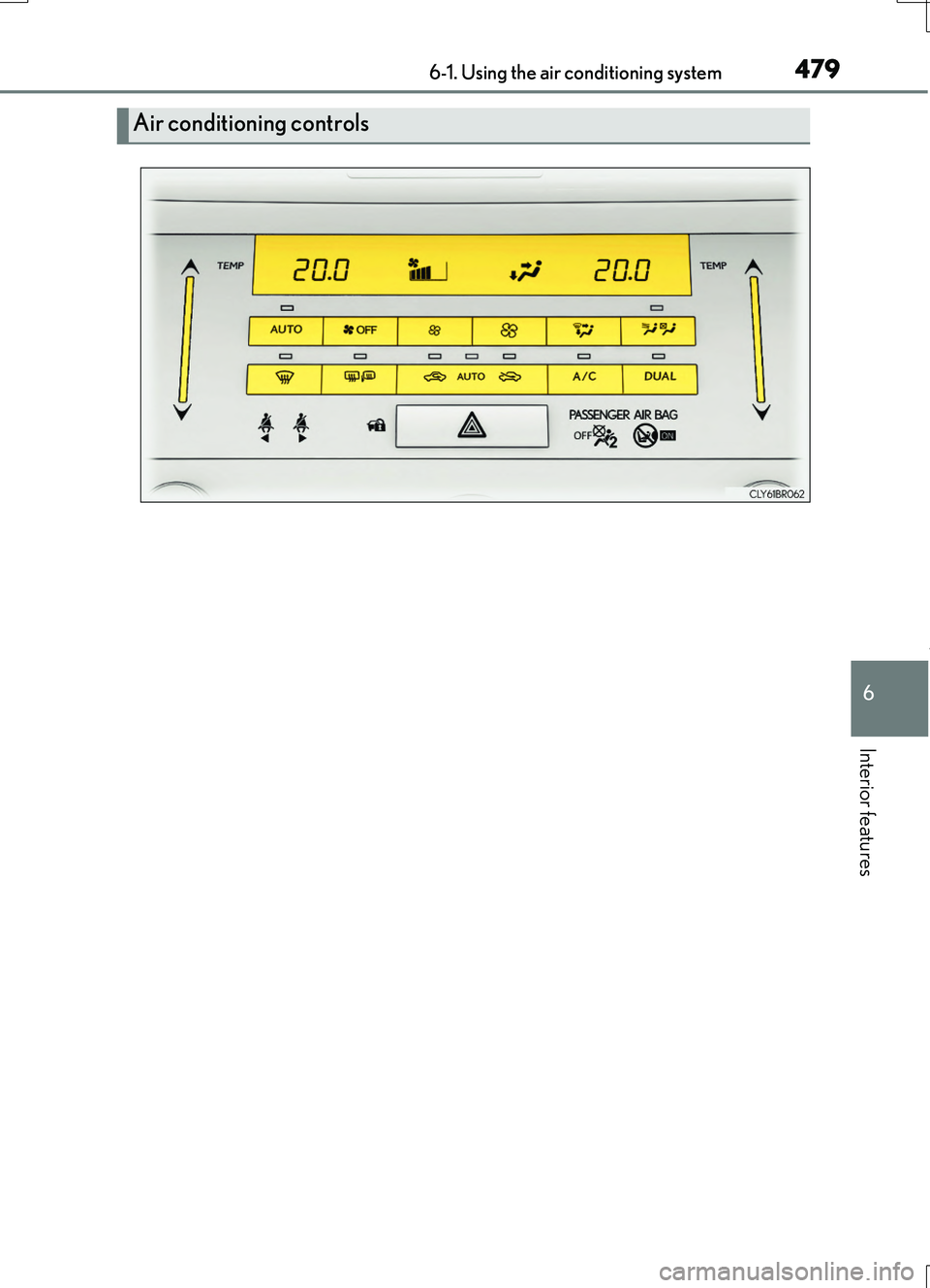
Air conditioning controls
Page 480 of 724

4806-1. Using the air conditioning system
RC200t_RC F_EE(OM24728E)
■Adjusting the temperature setting
To adjust the temperature setting,
touch and slide your finger up or
down on the sensor.
The temperature setting can also be adjusted by touching on the sensor.
When the temperature setting is changed, a buzzer sounds.
■Fan speed setting
Press to increase the fan speed.
Press to decrease the fan speed.
■Change the airflow mode
To change the airflow, press .
The air outlets used are switched
each time the button is pressed.
Air flows to the upper body.
Air flows to the upper body and
feet.
Air flows to the feet.
Air flows to the feet and the wind-
shield defogger operates.
■S-FLOW mode (if equipped)
When there are no passengers in the rear seats, airflow can be directed to the
front seats only to reduce the air conditioning effect on the rear seats.
However, depending on both the temperat ure inside and outside the vehicle, air- flow may be directed to the rear seats even though S-FLOW mode is on to main- tain comfort inside the vehicle.
Press .
The indicator comes on when S-FLOW mode is on.
Press again to resume airflow to the rear seats.
1
2
3
4